Category Archives: Error

[How to Modify] etcd-server-8-12: ERROR (spawn error)

My problem is here

 vi etcd-server-startup.sh

#This is wrong

[program:etcd-server-7-12]
command=/opt/etcd/etcd-server-startup.sh              ; the program (relative uses PATH, can take args)
numprocs=1                                            ; number of processes copies to start (def 1)
directory=/opt/etcd                                   ; directory to cwd to before exec (def no cwd)
autostart=true                                        ; start at supervisord start (default: true)
autorestart=true                                      ; retstart at unexpected quit (default: true)
startsecs=30                                          ; number of secs prog must stay running (def. 1)
startretries=3                                        ; max # of serial start failures (default 3)
exitcodes=0,2                                         ; 'expected' exit codes for process (default 0,2)
stopsignal=QUIT                                       ; signal used to kill process (default TERM)
stopwaitsecs=10                                       ; max num secs to wait b4 SIGKILL (default 10)
user=etcd                                             ; setuid to this UNIX account to run the program
redirect_stderr=true                                  ; redirect proc stderr to stdout (default false)
stdout_logfile=/data/logs/etcd-server/etcd.stdout.log ; stdout log path, NONE for none; default AUTO
stdout_logfile_maxbytes=64MB                          ; max # logfile bytes b4 rotation (default 50MB)
stdout_logfile_backups=5                              ; # of stdout logfile backups (default 10)
stdout_capture_maxbytes=1MB                           ; number of bytes in 'capturemode' (default 0)
stdout_events_enabled=false                           ; emit events on stdout writes (default false)


#Right
```bash
#!/bin/sh
./etcd --name etcd-server-8-12 \
    --data-dir /data/etcd/etcd-server \
    --listen-peer-urls https://192.168.118.12:2380 \
    --listen-client-urls https://192.168.118.12:2379,http://127.0.0.1:2379 \
    --quota-backend-bytes 8000000000 \
    --initial-advertise-peer-urls https://192.168.118.12:2380 \
    --advertise-client-urls https://192.168.118.12:2379,http://127.0.0.1:2379 \
    --initial-cluster  etcd-server-8-12=https://192.168.118.12:2380,etcd-server-8-21=https://192.168.118.21:2380,etcd-server-8-22=https://192.168.22:2380 \
    --ca-file ./certs/ca.pem \
    --cert-file ./certs/etcd-peer.pem \
    --key-file ./certs/etcd-peer-key.pem \
    --client-cert-auth  \
    --trusted-ca-file ./certs/ca.pem \
    --peer-ca-file ./certs/ca.pem \
    --peer-cert-file ./certs/etcd-peer.pem \
    --peer-key-file ./certs/etcd-peer-key.pem \
    --peer-client-cert-auth \
    --peer-trusted-ca-file ./certs/ca.pem \
    --log-output stdout
~                                                                                                                             
~                                                     

Etcd start stop command

 ~]# supervisorctl start etcd-server-7-12
 ~]# supervisorctl stop etcd-server-7-12
 ~]# supervisorctl restart etcd-server-7-12
 ~]# supervisorctl status etcd-server-7-12
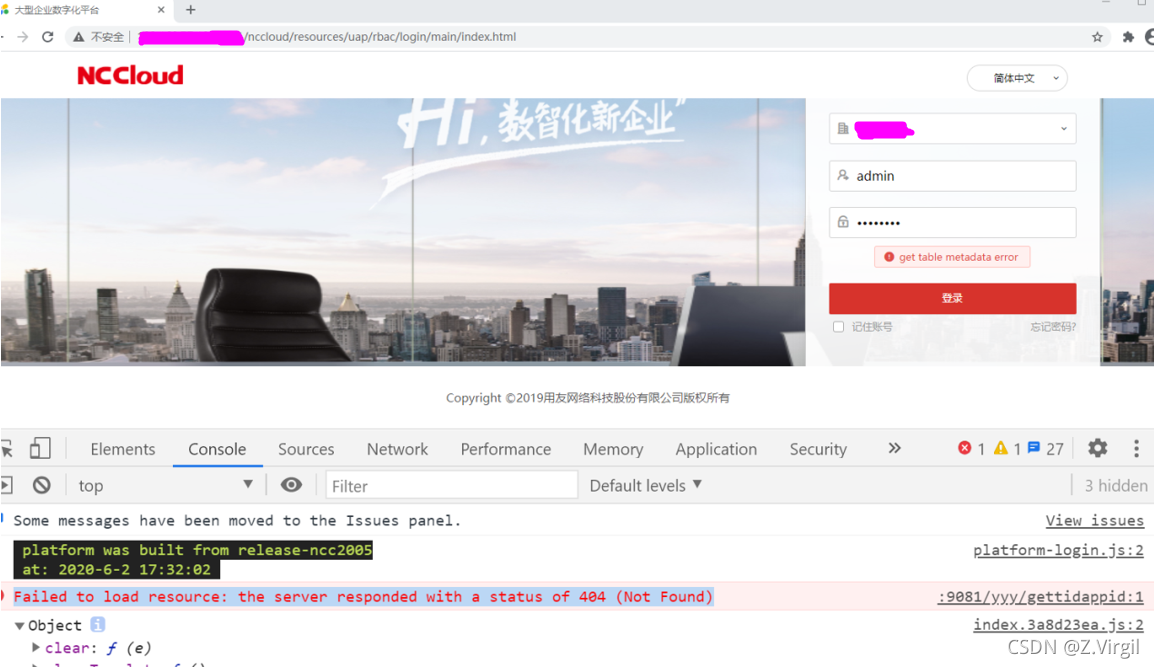
How to Solve Error: libproxychains4.So error

when compiling proxychains ng project, “libproxychains4.So error” is reported
the reason for this is that there is no libproxychains 4.so library file on the current system. You can install a lower version of proxychains ng to solve this problem, such as proxychains ng v4.11. Here, take the example of installing proxychains ng v4.11 on the MAC system.

1 download proxychains ng v4.11

address: https://github.com/rofl0r/proxychains-ng/archive/refs/tags/v4.11.zip

2 disable SIP function

if your system is a MAC system (Apple System), please disable the SIP function. If not, ignore this section
open the black box console and enter the following commands in sequence

2.1 restart the system

sudo reboot

2.2 disable SIP in the system recovery interface

## 1) Boot up and press Option key to enter the system interface
## 2) Press and hold Command + R key to enter the system recovery interface
## 3) In [Tools] â€" [Terminal], enter the command.
csrutil disable
reboot 

2.3 viewing SIP

csrutil status

if “system integrity protection status: disabled.” is printed, it indicates that SIP has been closed.

3 install and configure proxychains

3.1 compiling and installing proxychains

cd proxychains-ng-4.11
./configure --prefix=/usr --sysconfdir=/etc
sudo make && make install
sudo make install-config

3.2 setting proxychains parameters

a) modify proxychains parameter

## Enter the configuration directory
cd /etc

## configuration file
sudo cp proxychains.conf proxychains.conf.bak

## Modify the configuration
sudo vi proxychains.conf

in the [proxylist] field of proxychains.conf file, disable Socks4 and enable Socks5, as follows:
// proxychains.conf

[ProxyList]
# add proxy here ...
# meanwile
# defaults set to "tor"
#socks4 	127.0.0.1 9050 ##Comment out sock4
socks5 127.0.0.1 XXXX ## Fill in this field

b) alias proxychains

sudo vi ~/.zshrc

## Add an alias to ~/.zshrc
alias pc4='proxychains4'

## Enabling configuration
source ~/.zshrc

c) test ProxyChain

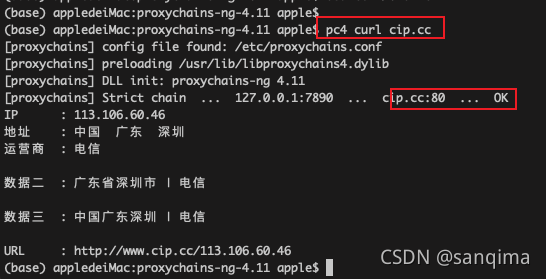
pc4 curl cip.cc

the effect is as follows:

Figure (1) proxychain 4 runs successfully


[Solved] elasticsearch.bat Running Flashback.: Error occurred during initialization of VM, Error occurred during initializatio

Today, when I was learning elasticsearch, I didn’t want to run elasticsearch.bat. As a result, soon after running, there was no black frame, only a flashback. I guess it was too fast. I don’t even have a black box. I can’t see any error information.

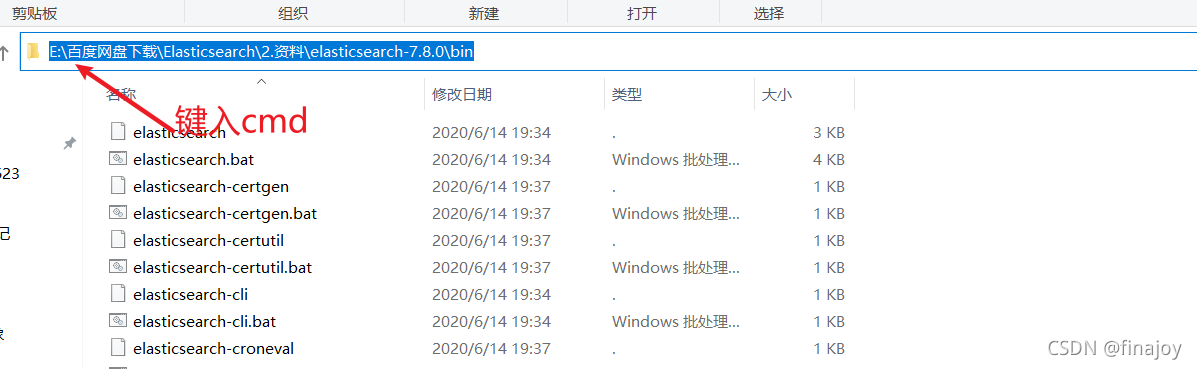
So I used CMD in the bin directory, as shown in the figure

Then execute the elasticsearch.bat file
Then you can see the error message error occurred during initialization of VM, error occurred during initialization.
Solution: I found Java_Home in my environment variable actually disappeared. Although I can still see the information by typing Java in the CMD window, it just disappeared. I guess it may be related to its disappearance, so I re-created Java_Home, locate the current Java directory, and start elasticsearch.bat again. It starts successfully!

Redis Error: (error) NOAUTH Authentication required. [How to Solve]

This error is encountered in the redis interface

127.0.0.1:6379> select 0
(error) NOAUTH Authentication required.

This error is caused by lack of authorization. You can enter a password to solve it at this time.

127.0.0.1:6379> auth "your Password"

Or specify a password when accessing the ‘redis’ client

redis-cli -h 127.0.0.1 -p 6379 -a "your Password"

VSCode Error: collect2.exe:error:1d returned 1 exit status [How to Solve]

Recently, I learned the C + + program video of dark horse. When I realized the employee management system based on polymorphism, I knocked the same code as the video, but I couldn’t compile it successfully by using vscode, and the following errors occurred:

[Employee_Management_System.cpp 2021-10-22 13:58:17.099]
,,C:\Users\AAE3~1\AppData\Local\Temp\cc7ZdaG7.o:Employee_Management_System.cpp:(.text+0x1b): undefined reference to `WorkerManager::WorkerManager()'
C:\Users\AAE3~1\AppData\Local\Temp\cc7ZdaG7.o:Employee_Management_System.cpp:(.text+0x27): undefined reference to `WorkerManager::Show_Menu()'
C:\Users\AAE3~1\AppData\Local\Temp\cc7ZdaG7.o:Employee_Management_System.cpp:(.text+0x44): undefined reference to `WorkerManager::~WorkerManager()'
C:\Users\AAE3~1\AppData\Local\Temp\cc7ZdaG7.o:Employee_Management_System.cpp:(.text+0x57): undefined reference to `WorkerManager::~WorkerManager()'
collect2.exe: error: ld returned 1 exit status

After querying many blogs, it is found that the causes and solutions of errors such as collect.exe: error: 1D returned 1 exit status are as follows
1. The last compiled program is not closed, that is, the black box still exists. Find it and close or restart the IDE
2. The program has no main function or the main function is misspelled
3. Running in vscode will not help you save the code. You need to save the code before running
4. The file name and file path may cause errors in some compilers
5. There is an undefined reference. This is the case for this error. When instantiating the classes of other files in the main function, you need to define the .H file and .Cpp file of other classes to solve the problem.

#include<iostream>
#include"workerManager.h"
#include"workerManager.cpp"

git_error:unable to auto-detect email address [How to Solve]

the reason:
maybe I set the environment variable :home
the variable may impact the .gitconfig
this lead to me set the gitconfig failed(,and I could not do any commit!)
so ,I delete the home environment variable
And,It works.
If you have configured the home environment variable, try removing it and reconfiguring gitconfig

Ise14.7 uses its own XST synthesis Error: error: ngdbuild: 604

“ERROR:NgdBuild:604 – logical block ‘TEMPERAURE_CTRL/AD7893 ’ with type ‘ad7893’ could not be resolved. A pin name misspelling can cause this, a missing edif or ngc file, case mismatch between the block name and the edif or ngc file name, or the misspelling of a type name. Symbol ’ is not supported in target ‘virtex5’.”

Solution:
1. Connect all the ports of the top-level module
2. Connect all the inputs and outputs of the sub-module, and assign values to the outputs

Bin File Programming Failed, could not find core in coresight setup, erase error

Failed to burn bin file, could not find core in coresight setup, erase error

Problem-solving method

Question

Flash is locked and cannot be erased when burning bin. What should I do?

Solution:

Use the j-flash tool to select the corresponding kernel model (I use cortex-m33) for erase chip operation. Note that when erasing, the erasing start address is set to 0x8030000. If the default address is 0x8000000, the PBL and SBL will be erased together, and the PBL and SBL need to be burned again.

[Solved] Error: SRC refspec master doors not match any

Unable to submit successfully when pushing

error: src refspec master does not match any 
error: failed to push some refs to 'https://gitee.com/xxxxxxx/cool-admin-midway.git'

The content of the question is:

Error: SRC refspec master does not match any
error: failed to push some references to ” https://gitee.com/xxxxxxx/cool-admin-midway.git ’

That is, the warehouse is empty
solution:

Use the git add XXX. Py ( git add. add all) instruction to add all files, and then perform git commit – M “init” to commit all files,

git commit -m "init"

Then in execution

$ git remote add origin xxxxxxxx.git

Last use

$ git push -u origin master

In this way, the code can be uploaded successfully. You can see that the code is uploaded successfully in the warehouse

Summary:

In fact, you only need to do the following steps to upload local projects to GitHub

 1. create a local repository (i.e. folder) and turn it into a Git repository by git init.

 2. Copy the project into this folder and add it to the repository via git add . Add the project to the repository.

 3. commit the project to the repository by using git commit -m "comment content".

 4, after setting up the SSH key on Github, create a new remote repository by git remote add origin https://github.com/guyibang/TEST2.git Associate a local repository with a remote repository.

 5. Finally, push the project from the local repository to the remote repository (i.e. Github) via git push -u origin master; (if the README file is automatically created when you create a new remote repository, it will report an error, see above for the solution).

Complete steps for uploading files locally to gitee

Git global settings:

git config --global user.name "namexxxx"
git config --global user.email "emailxxx"

Create a git repository:

mkdir test_code
cd test_code
git init
git add xxxx (to add files, git add . Add all)
git commit -m "first commit"
git remote add origin https://xxxxx.git
git push -u origin master

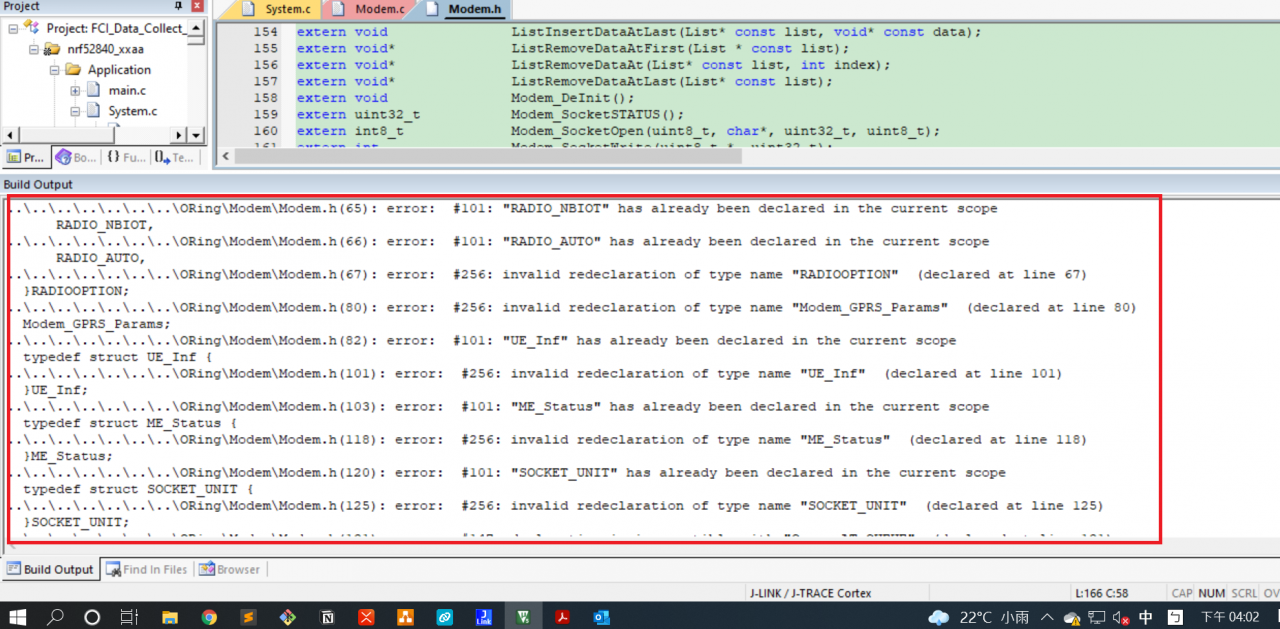
[Solved] Keil error: #101: “name“ has already been declared in the current scope


Keil compilation error


#include <stdio.h>
#include <stdlib.h>
...

#define Result_TIMOUT               3
#define Result_INTIAL               0
#define Result_ERROR                1

... 
typedef enum
{
    MD_INIT,
    HARDWARE_CHECK, 
    FILESYSTEM,     
    BS_SEARCH,      
    BS_REGISTER,    
    BS_REG_CHK,     
    ME_FC_INIT,
		ME_SOCKET,	
    ME_READY
}STATUS_MACHINE_INDEX;

... // struct, enum, union

extern md_Socket_CB 			SocketOpen_CB;
extern md_Socket_CB 			SocketClose_CB;

... 

Solution:

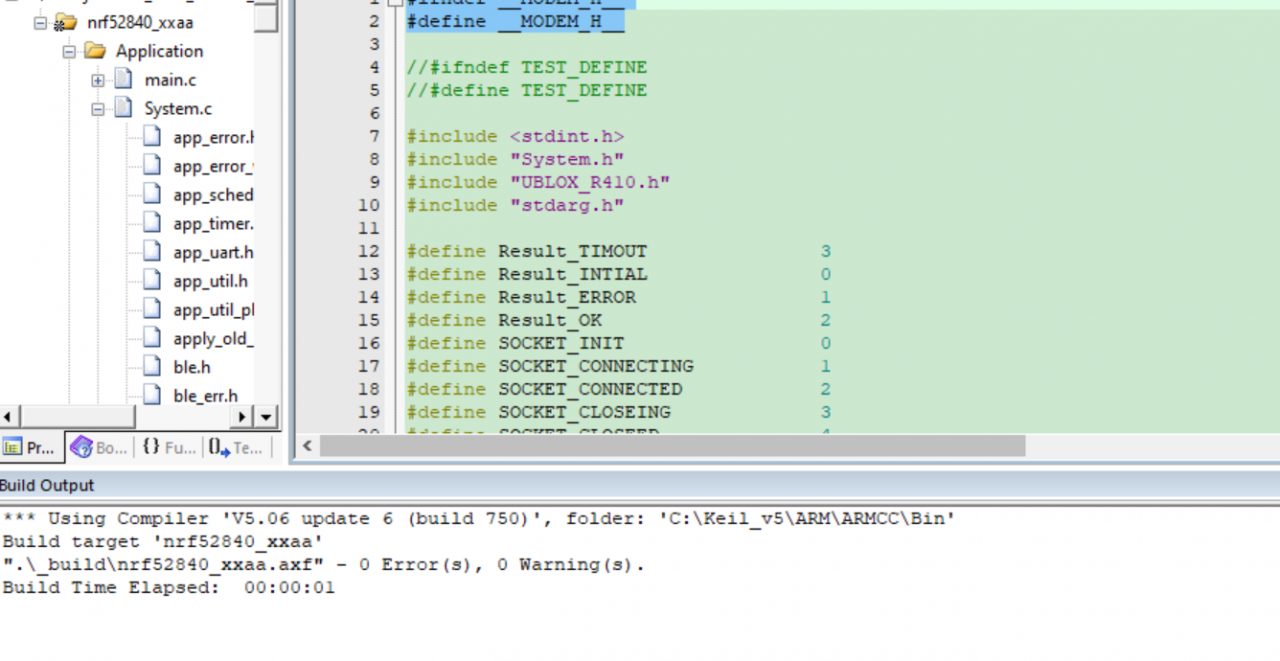
Use conditional compilation to prevent header files from being included repeatedly. Take the above code as an example

#ifndef __MODEM_H__
#define __MODEM_H__

#include <stdio.h>
#include <stdlib.h>
...

#define Result_TIMOUT               3
#define Result_INTIAL               0
#define Result_ERROR                1

... 
typedef enum
{
    MD_INIT,
    HARDWARE_CHECK, 
    FILESYSTEM,     
    BS_SEARCH,      
    BS_REGISTER,    
    BS_REG_CHK,     
    ME_FC_INIT,
		ME_SOCKET,	
    ME_READY
}STATUS_MACHINE_INDEX;

... // struct, enum, union

extern md_Socket_CB 			SocketOpen_CB;
extern md_Socket_CB 			SocketClose_CB;

...

#endif

Keil compiled successfully