Author Archives: Robins

[Solved] Linux virtual machine startup error: operating system not found

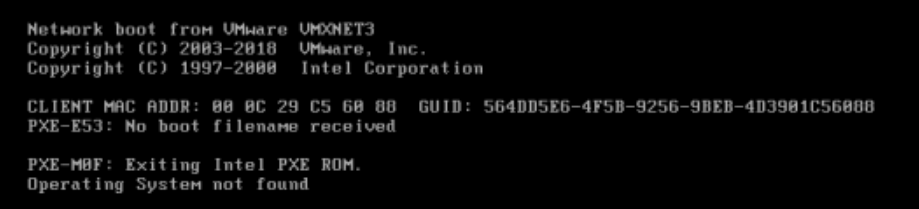
This error indicates that the boot code on the hard disk is missing

Experimental preparation steps

1) Preparation: dd if=/dev/zero of=/dev/nvme0n1 bs=446 count=1

2) Screenshot of system startup error report
The repair steps are as follows

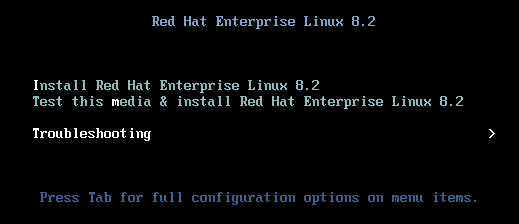
Step 1: select boot from CD to enter rescue mode

Select the third
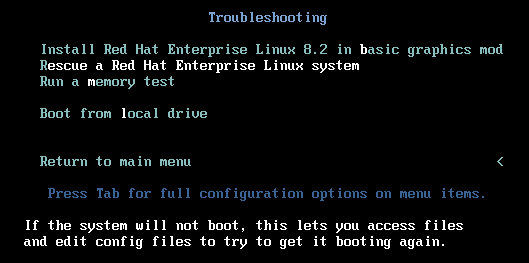
Select the second
Select 1) continue
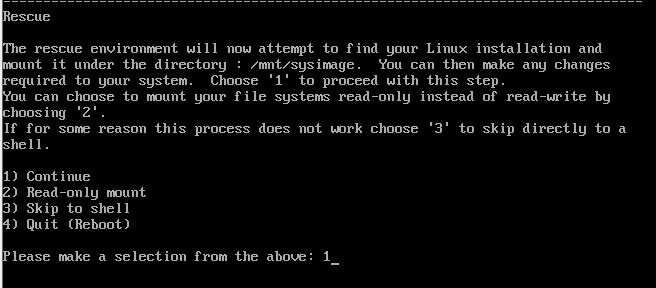
Enter directly

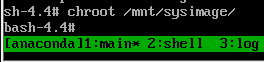
Step 2: switch to the real root file system

chroot /mnt/sysimage
Step 3: repair the boot program

grub2-install /dev/nvme0n1
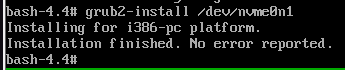
Step 4: exit twice, restart the test, and choose to start from the local disk
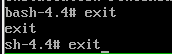
It has been repaired successfully

[Solved] python opencv Error: findContours() Can only use the Grayscale

Original program

import cv2
import numpy as np


def cv_show(name, img):
    cv2.imshow(name, img)
    cv2.waitKey(0)
    cv2.destroyAllWindows()


# Read the image
img = cv2.imread('contours.png')
cv_show('contours', img)

# Grayscale and binarization
gray = cv2.cvtColor(img, cv2.COLOR_BGR2GRAY)
thresh = cv2.threshold(gray, 127, 255, cv2.THRESH_BINARY)[1]
cv_show('thresh', thresh)

# Find the outline
cnt = cv2.findContours(img, cv2.RETR_TREE, cv2.CHAIN_APPROX_NONE)[1]

# Draw the outline
draw = img.copy()
res = cv2.drawContours(draw, cnt, -1, (0, 0, 255), 2)
cv_show('res', res)

report errors

Traceback (most recent call last):
  File "C:/Users/ccccj/PycharmProjects/a_opencv/opencv/opencv_notebook/ppt/ppt_season_2-8/2-7_notebook/image_operation/contours.py", line 21, in <module>
    cnt = cv2.findContours(img, cv2.RETR_TREE, cv2.CHAIN_APPROX_NONE)[1]
cv2.error: OpenCV(3.4.11) C:\Users\appveyor\AppData\Local\Temp\1\pip-req-build-7_3trius\opencv\modules\imgproc\src\contours.cpp:197: error: (-210:Unsupported format or combination of formats) [Start]FindContours supports only CV_8UC1 images when mode != CV_RETR_FLOODFILL otherwise supports CV_32SC1 images only in function 'cvStartFindContours_Impl'

Reason: the SRC of findcontours() function must be a grayscale image. The original program uses img, which is changed to the following:

# Find the outline
# cnt = cv2.findContours(img, cv2.RETR_TREE, cv2.CHAIN_APPROX_NONE)[1]


# Modify to:
cnt = cv2.findContours(thresh, cv2.RETR_TREE, cv2.CHAIN_APPROX_NONE)[1]

[Solved] emcc error: error: LLVM_ROOT is not defined

When using EMCC to compile code, an error is reported:

> emcc hello.c -s WASM=1 -o hello.html
emcc: error: LLVM_ROOT is not defined in /

The reason why I encountered this problem is that I did not execute the activation statement after installing emsdk:

> emsdk activate latest
> source "/root/code/emsdk/emsdk_env.sh"
# After activation, you will be prompted to configure the environment, this step is also very important, otherwise it will be activated for nothing

Also be careful not to forget to activate the other two components:

> emsdk activate binaryen-main-64bit emscripten-main-64bit
> source "/root/code/emsdk/emsdk_env.sh"

After activation, don’t forget to configure environment variables
if you encounter similar problems later, you can first:

  1. Check whether the module in emsdk is activated or not?
  2. Check whether the source environment is variable or not?

If you can’t confirm, you can redo the above two steps to see if the problem is still there.

[Solved] Forbidden (403) CSRF verification failed. Request aborted.

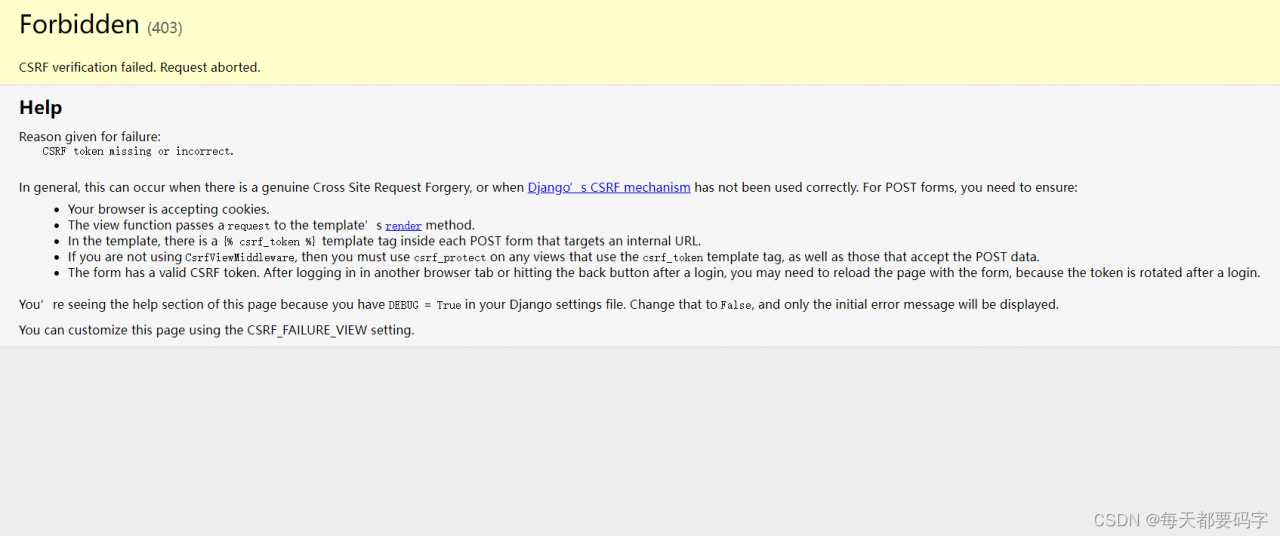
It is a cross site problem and a Django prevention mechanism. The error reports are as follows:

Generally, this can happen when a genuine cross-site request is forged, or when Django’s CSRF mechanism is not being used correctly. For POST forms, you need to make sure that:
Your browser is accepting cookies.
The view function passes a request to the template’s rendering method.
In the template, each POST form has a {% csrf_token %} template token pointing to an internal URL.

If you are not using the CsrfViewMiddleware, then you must use csrf_protect on any view that uses the csrf_token template tag and on those views that accept POST data.

The form has a valid CSRF token. You may need to reload the page with the form after logging in to another browser tab or clicking the back button after logging in, as the token is rotated after logging in.

You will see the help section of this page because there is DEBUG = True in your Django settings file. changing it to False will only show the initial error message.
You can customize this page using the CSRF_FAILURE_VIEW setting.
As the error message suggests, there are two ways we can do this.
1. go to setting and comment out # ‘django.middleware.csrf.CsrfViewMiddleware’
This is the same as removing the middleware from the cross-site prevention mechanism. Then not this error is reported, but if we really encounter cross-domain problems, we may not know it is reported this error, not very recommended.
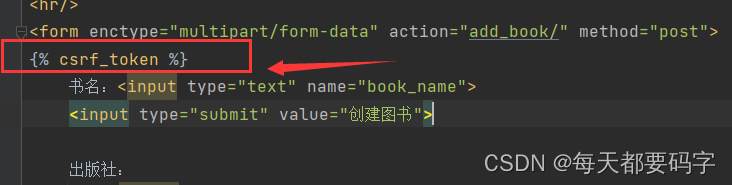
2. Add {% csrf_token %} to the form below

How to Solve JD-GUI Start Error (Mac ARM Version)

Here is a solution to solve JD-GUI Starting Error in Mac ARM Version.


How to solve:

  1. Go to the Application folder, select JD-GUI.app, right click and select “Show Package Contents”.
  2. Edit the package under . /Contents/MacOS/universalJavaApplicationStub.sh file under the package
  3. Find the Github repository URL commented in the script and access it
  4. Download the latest version of the script from Release and replace it with a sh file name extension

How to Solve Error: [Vue warn]: Missing required prop: “value”

I Error reporting scenario

This error occurs when using the El-select component of element-UI in Vue

Operation results: (the following errors will be reported when the interface is initially loaded, and will continue to be reported when clicking El-select and switching El-option)

[Vue warn]: Missing required prop: "value"  

II Error reporting reason

2.1. There is no bidirectional data binding (V-model) in El-select

2.2 El-option does not assign value

You can also try to check errors like these!

[Solved] error converting to execution character set illegal byte sequence

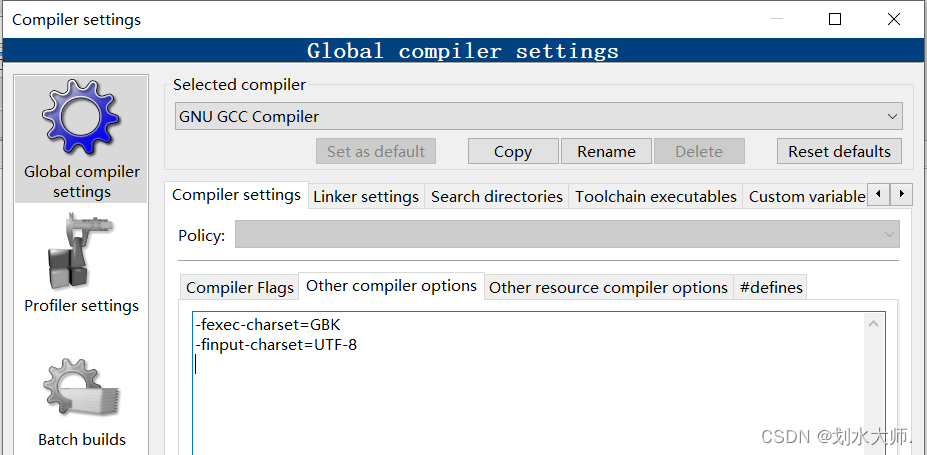
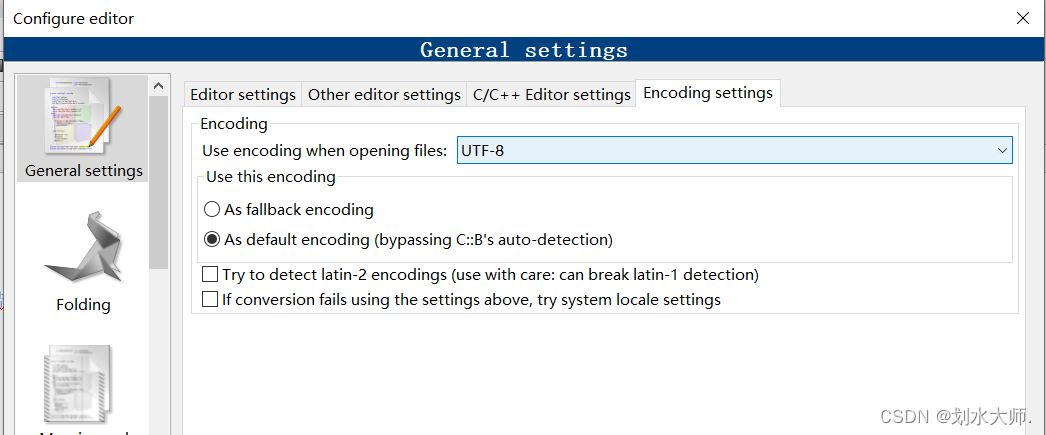
Today, after writing a program, I found that the compiler always reports an error: error converting to execution character set illegal byte sequence. When compiling by default, it is parsed according to UTF-8, and when the character set is not specified, it is always treated as UTF-8. So you have to add the following in settings->compiler->Global compiler settings->Other options:

-fexec-charset=GBK
-finput-charset=UTF-8

The former represents the encoding interpretation format of the input file during compilation, and the latter represents the encoding format used for the display of the generated execution file during execution.

At the same time. In settings -> Editor-> gernal settings-> Other settings, set the file encoding format saved by default to UTF-8, and keep the encoding formats of both sides the same.

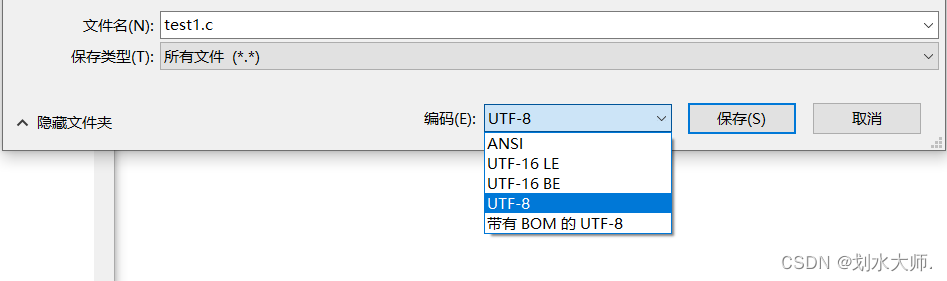
But after I did this, I found it useless… Later, I found that my program didn’t know when it was changed to ANSI format, so it had been either compiled incorrectly or Chinese garbled.

To solve this problem, you can open the code file with notepad and select the file – & gt; How to select the encoding format of UTF-8 to save as.

[Solved] Errors: 1 http://eslint.org/docs/rules/quotes…elementUI Import Error

Introduction of elementui

Add the following in main.js of src:

import Element from 'element-ui'
import "element-ui/lib/theme-chalk/index.css"
Vue.use(Element)

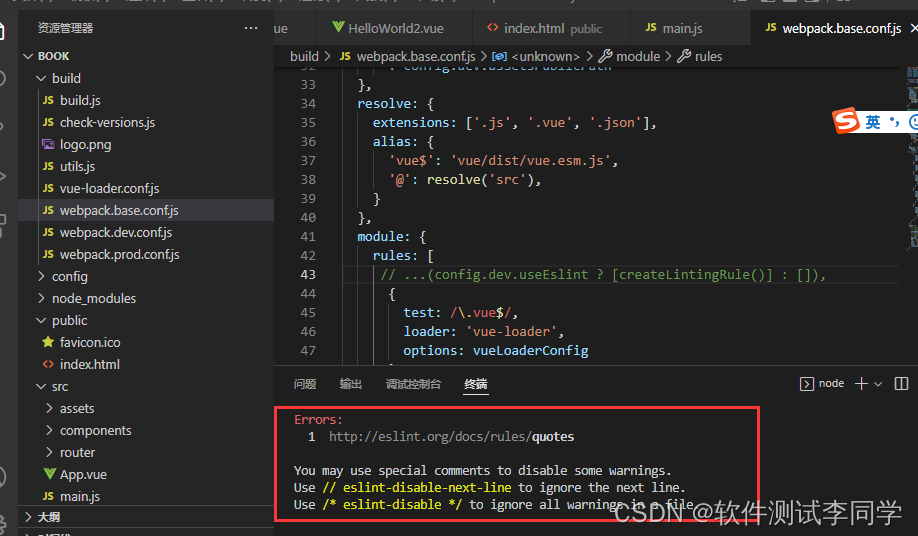
Introduce error reporting

Errors:
  1  http://eslint.org/docs/rules/quotes

You may use special comments to disable some warnings.
Use // eslint-disable-next-line to ignore the next line.
Use /* eslint-disable */ to ignore all warnings in a file.

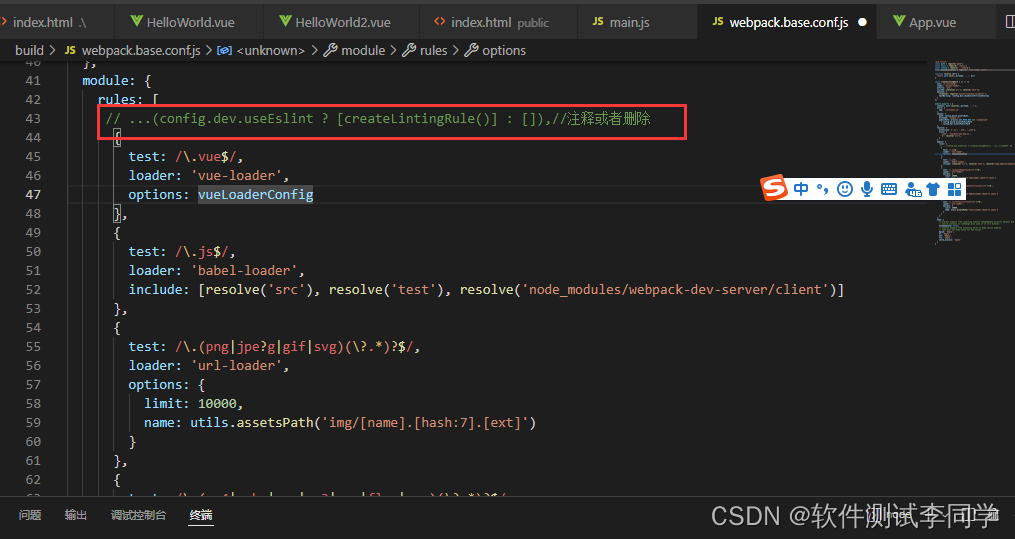
Solution:

In the build/webpack.base.conf.js file, comment out or remove the rule about eslint in: module->rules

Then re-execute the command: npm run dev

It’s normal

[Solved] start value has mixed support, consider using flex-start instead

postcss-loader Error => start value has mixed support, consider using flex-start instead”

Details of error reporting:

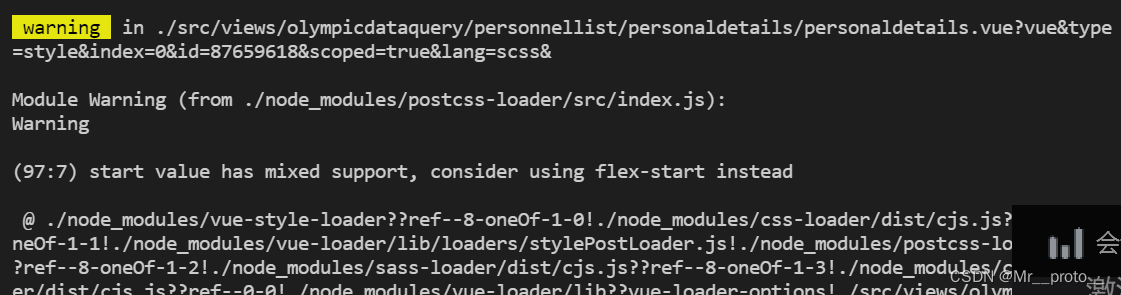
 warning  in ./src/views/olympicdataquery/personnellist/personaldetails/personaldetails.vue?vue&type=style&index=0&id=87659618&scoped=true&lang=scss&

Module Warning (from ./node_modules/postcss-loader/src/index.js):
Warning

(97:7) start value has mixed support, consider using flex-start instead

 @ ./node_modules/vue-style-loader??ref--8-oneOf-1-0!./node_modules/css-loader/dist/cjs.js??ref--8-oneOf-1-1!./node_modules/vue-loader/lib/loaders/stylePostLoader.js!./node_modules/postcss-loader/src??ref--8-oneOf-1-2!./node_modules/sass-loader/dist/cjs.js??ref--8-oneOf-1-3!./node_modules/cache-loader/dist/cjs.js??ref--0-0!./node_modules/vue-loader/lib??vue-loader-options!./src/views/olympicdataquery/personnellist/personaldetails/personaldetails.vue?vue&type=style&index=0&id=87659618&scoped=true&lang=scss& 4:14-524 15:3-20:5 16:22-532
 @ ./src/views/olympicdataquery/personnellist/personaldetails/personaldetails.vue?vue&type=style&index=0&id=87659618&scoped=true&lang=scss&
 @ ./src/views/olympicdataquery/personnellist/personaldetails/personaldetails.vue
 @ ./src/views sync ^\.\/.*$
 @ ./src/store/modules/permission.js
 @ ./src/store/index.js
 @ ./src/main.js
 @ multi (webpack)-dev-server/client?http://192.168.1.78:6206&sockPath=/sockjs-node (webpack)/hot/dev-server.js ./src/main.js

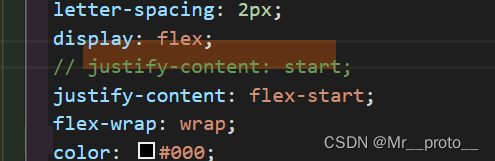
Although just a warning, but certainly what is not standardized, chrome, found to be someone else’s css is not written standard: flex layout of justify-content: start; change to justify-content: flex-start; on it, no more problems

Modify as below:

How to Solve Hadoop Missing Hadoop.dll and winutils.exe file error

The problem encountered today in running mapreduce locally:

Could not locate executable null \bin\winutils.exe in the hadoop binaries
Unable to load native-hadoop library for your platform… using builtin-Java classes where applicable


Reason:

  1. Miss winutils.exe file: Could not locate executable null \bin\winutils.exe in the hadoop binaries
  2. Miss hadoop.dll File: Unable to load native-hadoop library for your platform… using builtin-Java classes where applicable


Solution: Download these two files, download and import these two files into the bin directory under the hadoop directory