Some problems with Android AIDL
(1) Starting Service ** is required after 5.0
An error will be reported if the service is started implicitly (unless Intent. SetPackage (” application package name of the service to be started “) is started implicitly).
Error:(9, 41) No symbol can be found
The reason is that the other class name (Java) file is mixed with aidl’s aidl file in the same directory
Java files have to be placed under the Java file (server package name + Java file).
Error 1
Error: Error converting the bytecode to dex:
Cause: Java. Lang. RuntimeException: Exception parsing classes
Reason package names contain uppercase letters
example:
er.java
p>ge com.example.lqm;
user.java
package com.example.lqm;
public class User implements Parcelable{
private String id;
privte String name;
… .
}
The corresponding aidl file is
user.aidl
package com.example.lqm; // This is user. aidl package
parcelable User;
Author Archives: Robins
Aidl learning
Aidl learning
How is data passed across processes
The two processes cannot directly mmunicate indirectly v> code>,> underlying layer of Android system
AIDL:android interface definition language
Android interface definition language
MOOC video learning address
Data types are supported by default
Basic data types String, CharSequencelist, MAppArcelable
steps
To create a binding service using AIDL, perform the following steps:
Create.aidl file
This file defines the programming interface with method signatures.
package com.example.android;
interface IRemoteService {

int getPid();

void basicTypes(int anInt, long aLong, boolean aBoolean, float aFloat,
        double aDouble, String aString);
}
The Android SDK tool generates an interface using the Java programming language based on your.aidl file. This interface has an internal abstract class called Stub that extends the Binder class and implements methods in the AIDL interface. You must extend the Stub class and implement the method.
private final IRemoteService.Stub mBinder = new IRemoteService.Stub() {
public int getPid(){
    return Process.myPid();
}
public void basicTypes(int anInt, long aLong, boolean aBoolean,
    float aFloat, double aDouble, String aString) {
    // Does nothing
}
};
Expose the interface
implementation Service to the client and override onBind() to return an implementation of the Stub class.
    public class RemoteService extends Service {
@Override
public void onCreate() {
    super.onCreate();
}

@Override
public IBinder onBind(Intent intent) {
    // Return the interface
    return mBinder;
}

private final IRemoteService.Stub mBinder = new IRemoteService.Stub() {
    public int getPid(){
        return Process.myPid();
    }
    public void basicTypes(int anInt, long aLong, boolean aBoolean,
        float aFloat, double aDouble, String aString) {
        // Does nothing
    }
};
}
Call the steps
To invoke the remote interface defined using AIDL, the calling class must perform the following steps:
Add the.aidl file to the project SRC/directory. Declares an instance of the IBinder interface (generated based on AIDL). Realize the ServiceConnection. Call Context.bindService() to pass in your implementation of ServiceConnection. In your onServiceConnected() implementation, you will receive an IBinder instance (named Service). Call YourInterfaceName. Stub. AsInterface ((IBinder) service), to the types of parameters can be converted into YourInterface will return. Invoke the method you defined on the interface. You should always catch DeadObjectExceptions, which are thrown when a connection is broken; This will be the only exception thrown by the remote method. To disconnect, call Context.unbindService() using your instance of the interface.
Steps are not introduced on the official website steps specific jump to the official website
Problems in learning Aidl
Java. Lang. SecurityException: Not allowed to bind to the service of Intent
Cause: The client failed to bind the Service on the server side. The Service on the server side could not be called by the external application
When a server registers a Service in Manifast file, add android:exported=”true” attribute to set the Service to be invoked by external applications
<service android:name=".IRemoteService"
android:exported="true"/>Common problems of Aidl cross process communication
I will summarize the problems I encountered in learning AIDL today.
q.1 in the created entity class Book is in creating the Book. The aidl is wrong “Interface name must be unique”?
the solution: 1.
method to remove entity class, you first create the Book. The aidl file for creating entity class Book. The method of Java
2. When you have created an.aidl file, change the file name to Book
.
solution: this error is. Aidl document compilation errors, entity class must be serialized, implementing an interface Parceable, in a file. An aidl it needs to be referenced in the introduction file package name, even in the same package must also import
3. Run times wrong collapse Java. Lang. SecurityException: Binder invocation to the an incorrect interface?
the solution: storage is due to two projects. Aidl files do not match the package name, need to be unified, entity class must also be unified.
>
>
>
>
>
>
>
Matters needing attention in the process of using Aidl
1. Avoid the client UI thread to access the remote server method, because if the remote server method is a time-consuming operation, it can be operated many times, and the UI thread will report an error.
2. For the robustness of the program, it is necessary to reconnect the client to prevent the server from accidentally hanging down. There are two ways to do it
The first method: Set the DeathRecipient listener to Binder, and when Binder dies, receive the BinderDied method callback and reconnect the server in the method.
The second method: Reconnect the remote service in OnServiceDisconnected.
3. To improve the security of the server.
First: Use Permission in the AndroidMenifest file in the following way
& lt; uses-permission android:name=”xxxxxxxxxx”/>
Second approach: Permission validation is performed in the onTransact method on the server side
2. For the robustness of the program, it is necessary to reconnect the client to prevent the server from accidentally hanging down. There are two ways to do it
The first method: Set the DeathRecipient listener to Binder, and when Binder dies, receive the BinderDied method callback and reconnect the server in the method.
The second method: Reconnect the remote service in OnServiceDisconnected.
3. To improve the security of the server.
First: Use Permission in the AndroidMenifest file in the following way
& lt; uses-permission android:name=”xxxxxxxxxx”/>
Second approach: Permission validation is performed in the onTransact method on the server side
Learning from OpenGL
Pit 001
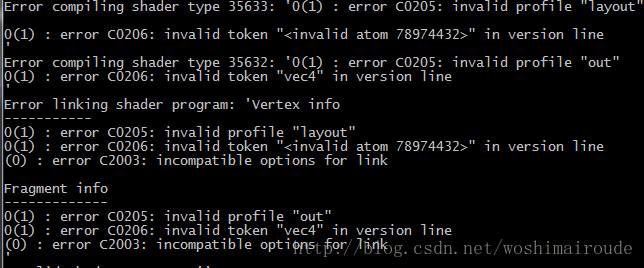
:
:
:
:
:
:
:
:
:
:
:
    std::fstream file(filepath);
    std::string shaderText = "";
    std::string line;
    while (std::getline(file, line))
        shaderText = shaderText + line +"\n" ;
    file.close();
In particular, put a newline character “\n” at the end of each line change after reading it.
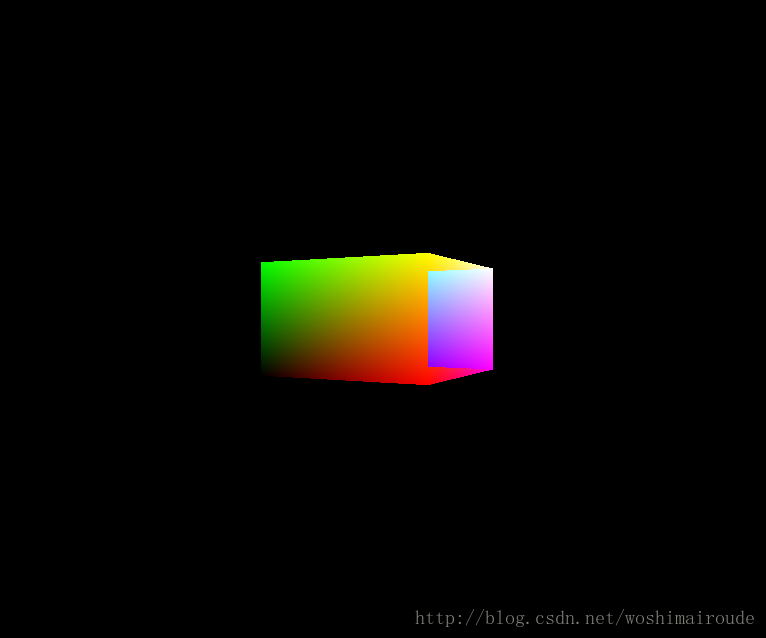
Pit 002
And then at the end of the transformation into the camera space, we have to multiply by the three basis vectors for the camera space.
Pit 003
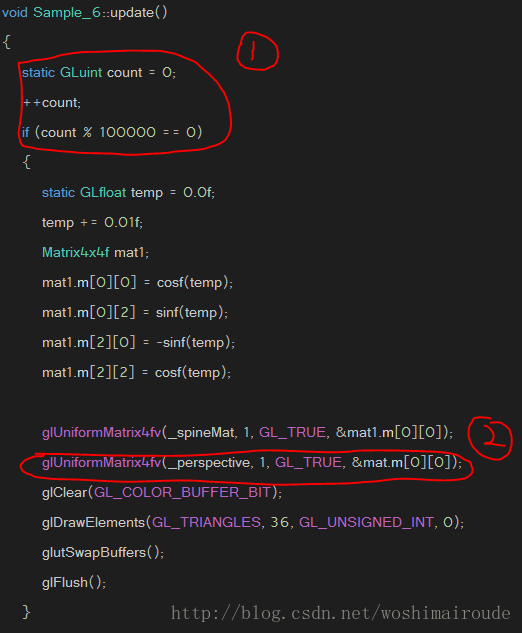
Flag ① : Sometimes the render is too frequent, which causes us to process our input too much, so here we use the code in Flag ① to control the render frequency a bit. Render only if the value of count is an integer multiple of 100,000.
flag ② : The Render Callback needs to constantly refresh the transformation matrix we set, otherwise even if we change the render matrix in the code, it will not work.
Record the problems encountered in OpenGL learning
1. When passing data to a uniform in a shader, the ID of the shader must be bound first, that is, gluseProgram (ID), and the operation must be next to each other. If another shader is bound in the middle, then the data passed will have problems.
2, Normal =mat3(transpose(inverse(model)) *aNormal; 2, Normal =mat3(transpose(inverse))*aNormal;
3. In matrix transformation, generally scale ->; Rotation – & gt; Translation, in turn, transform the modelMat = modelData scale rotate translate * * *, but when using GLM library of built-in method, need to write, in turn, see https://blog.csdn.net/wangdingqiaoit/article/details/51531002 specific reasons, at the same time is highly recommended to see the great god of the tutorial.
Error :gl.h included before glew.h :gl.h included before glew.h: error:gl.h included before glew.h gl/glew.h> Put it on top.
Reproduced in: https://www.cnblogs.com/stigerzergold/p/10965005.html
OpenGL learning notes: Problems and Solutions
This article records the problems and solutions encountered by the author when using OpenGL based on Visual Studio MFC.
directory
Add OpenGL form for dialog-based projects in VC++ MFC
Problem: Unable to open included file: “gl\glaux.h”
The glLodIdentity () function is relevant: OpenGL uses glLodIdentity () multiple times before the graph is displayed
Perspective setting related: GluLookAt and GluPerspective function parsing
Why call glPushMatrix and glPopMatrix
How does OpenGL set the coordinate system
Fatal error C1189: #error: gl.h included before glew.h
Problem: Solve VS “Could not start this program because OpenGL is missing from computer” in OpenGL programming
Rotation calculation of a rigid body in three dimensions
Several ways to draw cubes with OpenGL
How to draw cone/cylinder/sphere/sector/ring with OpenGL
directory
Add OpenGL form for dialog-based projects in VC++ MFC
Problem: Unable to open included file: “gl\glaux.h”
The glLodIdentity () function is relevant: OpenGL uses glLodIdentity () multiple times before the graph is displayed
Perspective setting related: GluLookAt and GluPerspective function parsing
Why call glPushMatrix and glPopMatrix
How does OpenGL set the coordinate system
Fatal error C1189: #error: gl.h included before glew.h
Problem: Solve VS “Could not start this program because OpenGL is missing from computer” in OpenGL programming
Rotation calculation of a rigid body in three dimensions
Several ways to draw cubes with OpenGL
How to draw cone/cylinder/sphere/sector/ring with OpenGL
Add OpenGL form for dialog-based projects in VC++ MFC
Reference Website:
https://www.cnblogs.com/wiener-zyj/p/4159310.html
Note: For actual debugging, “step one” in this URL is replaced by “include” in stdafx.h of the project:
#include< gl\gl.h>// OpenGL basic library
#include< gl\glu.h>// OpenGL utility library
#include< gl\glaux.h>// auxiliary OpenGL library
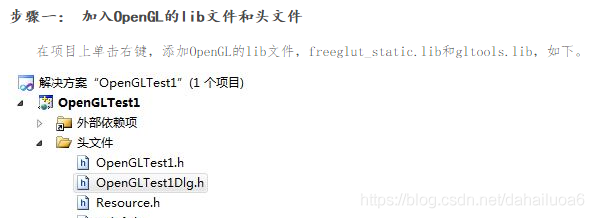
(↑ to replace the “step one”)
Problem: Unable to open included file: “gl\glaux.h”
Please refer to the following websites:
http://blog.csdn.net/mydangdang2/article/details/47361133
and
http://download.csdn.net/download/wyq1153/9646632
↑ (The second site is for downloading files from gl\glaux. H)
The glLodIdentity () function is relevant: OpenGL uses glLodIdentity () multiple times before the graph is displayed
Reference Website:
http://blog.sina.com.cn/s/blog_15bb06c270102ydsl.html
→ Site highlights:
Read a paragraph about glLoadIdentity() introduction, suddenly realize. GlLodIdentity () restores both the model world coordinates and the field of view to (0,0,0), with an orientation of -z and an upward orientation. OK, use glLoIdentity () and add a gluLookAt(), and you’ll be fine.
Perspective setting related: GluLookAt and GluPerspective function parsing
Reference Website:
https://www.2cto.com/kf/201611/565522.html
→ Site highlights:
Before calling the GluLookAt and GluPerspective functions, the glLoadidentity function is usually called (see code 20171117YC below).
// Set view and direction
glMatrixMode (GL_PROJECTION);
glLoadIdentity (); // Initialize the matrix (this line of code is necessary for setting viewpoints and viewing angles).
GluPerspective (60.0, 1, 4, 10.0);//.
glMatrixMode(GL_MODELVIEW);
glLoadIdentity(); // Initialize the matrix (this line of code is necessary for setting viewpoints and viewing angles).
GluLookAt (0.0, 0.0, 5.0, 0.0, 0.0, 0.0, 0.0, 1.0, 0.0);//.
OpenGL — GluLookat function for details:
http://blog.csdn.net/ivan_ljf/article/details/8764737
Why call glPushMatrix and glPopMatrix
Reference Website:
https://zhidao.baidu.com/question/1797166351991328427.html
How does OpenGL set the coordinate system
https://zhidao.baidu.com/question/169062940.html
→ X goes to the right, Y goes up, and Z goes out. This is the coordinate system you see. It does not change, but it can control the translation, rotation, and zoom in and out of the internal coordinate system through transfer, rotate, and scale, which can be understood as the change of coordinate system or the change of lens
GlRotated (90.0, 1.0, 0.0, 0.0); // Rotate 90 about x clockwise, Z vertical
GlRotated (45.0, 0.0, 0.0, 1.0); // The XY plane is 45 clockwise around Z.
GlRotated (45.0, 1.0, 1.0, 0.0); // rotate the Angle bisector 45 counterclockwise to see the effect
Fatal error C1189: #error: gl.h included before glew.h
Solutions:
The “# include< gl\gl.h>// OpenGL basic library “move to” # include “OpenGL_Interact/include/GL/glew. H”// “(to include. H file path) later.
Problem: Solve VS “Could not start this program because OpenGL is missing from computer” in OpenGL programming
This is mainly due to the reference to both the static libraries “Glut.lib” and “Glut32.lib”.
That is, in the project ->; Property – & gt; Configure properties ->; The linker – & gt; Glut.Lib and Glut32.Lib are added to the attached dependencies, and Glut.DLL comes first, glut32.DLL comes second, so the linker first looks for OpenGl32.DLL instead of OpenGL32.DLL.
→ After testing, removing Glut. DLL can solve the problem. 20171121YC
Rotation calculation of a rigid body in three dimensions
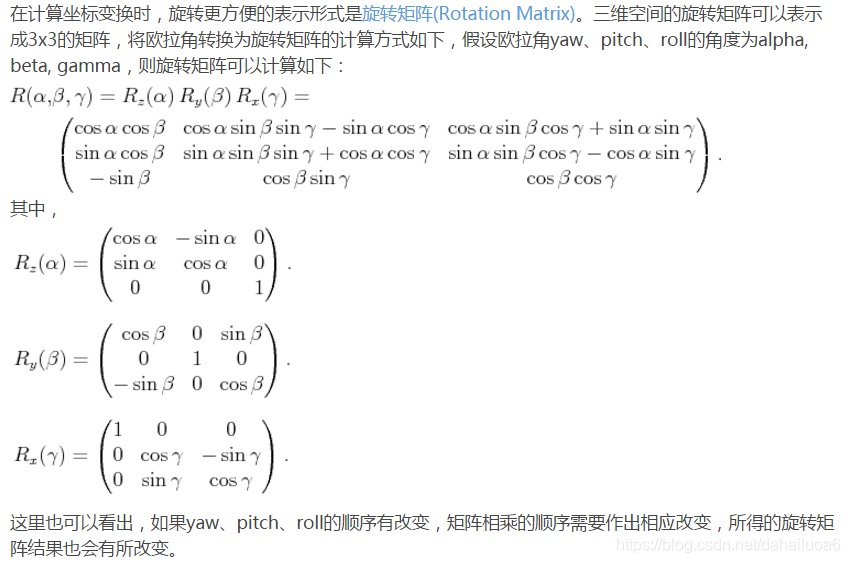
→ The above reference website:
http://blog.csdn.net/mulinb/article/details/51227597
Several ways to draw cubes with OpenGL
Refer to the website: https://www.cnblogs.com/brucemengbm/p/7281301.html
→20200414YC: The cube is drawn by drawing 6 faces.
How to draw cone/cylinder/sphere/sector/ring with OpenGL
Reference site 1:https://blog.csdn.net/biggbang/article/details/20552915
Reference site 2:https://www.cnblogs.com/foundkey/p/6024333.html
Android learning notes 03: some problems and solutions in the learning process
In the process of learning Android development encountered a lot of problems, fortunately, the final search through the Internet have been solved. Now some of the problems I encountered in the process of learning Android development and the solutions are sorted out as follows.
1.R.java cannot be updated in real time
Description of the problem: New variables in the res file are not displayed in real time in R.java.
Solution: Select “Project” from the menu bar and check the “Build Automatically” option.
2.LogCat window is not displayed
Problem description: The LogCat window is not displayed in the lower right corner of Eclipse.
Solution: Select “Windows” from the menu bar, then “Show View”, and finally “LogCat”.
“Android Library Projects Cannot Be Launched
“Android Library Projects Cannot Be Launched” error
Solution: Select “Project” in the menu bar, then “Properties”, select “Android” in the pop-up window, and uncheck the IS Library option.
4. “This text field does not specify an InputType or a hint” error after adding EditText control to XML
Problem description: Add EditText control to XML. Control information is as follows.
& lt; The EditText
android: id = “@ + id/EditText”
android: layout_width = “match_parent”
android: layout_height = “wrap_content” & gt; < /EditText>
Error “This text field does not specify an InputType or a hint” at compile time.
Control lacks android:hint and android:inputType information. The android:hint is used to set the default text prompt displayed when EditText is null. Android: InputType is used to set the text type of EditText, which is used to help the input method display the appropriate keyboard type.
Add android:hint and android:inputType information to the control. Add the control information as follows.
& lt; The EditText
android: id = “@ + id/EditText”
android: hint = “0”
android: inputType = “number”
android: layout_width = “match_parent
” Android: layout_height = “wrap_content” & gt; < /EditText>
5. Warning message “Hardcoded string” XXX “, should use @string resource
Problem description: Add Button control in XML, control information is as follows.
& lt; The Button
android: id = “@ + id/mButton_mc”
android: text = “MC”
android: layout_width = “match_parent
” android: layout_height = “wrap_content” & gt;
& lt; /Button>
At compile time, prompt “Hardcoded string” MC “, should use @string resource warning.
The String MC is used in Android :text. You should define the String in string.xml and then use the String resource by calling the String resource name in string.xml. The advantage of doing this is that it can be a complete change and is useful when supporting multiple languages.
Solution: res–> in the project directory; values–> The following is the information for adding the String MC to string.xml.
< resources>
& lt; string name=”mc”> mc< /string>
< /resources>
Then, in the XML that uses the Button control, you use the string by calling its resource name, as follows.
& lt; The Button
android: id = “@ + id/mButton_mc”
android: text = “@ string/MC”
android: layout_width = “match_parent
” android: layout_height = “wrap_content” & gt;
& lt; /Button>
6. Nested weights are bad for performance
Analysis: When using a nested layout, both parent and child layouts use android:layout_weight, but when it is not required, a warning appears as shown in the title.
Solution: Remove the android:layout_weight that is not required for the sublayout, depending on the situation.
7. The solution to an error message “Please ensure that ADB is correctly located at:XXXXX” when starting the emulator
Executed: When using the correct source code, the following error message “Please ensure that ADB is correctly located at ‘D:\AndroidSDK4.0\ Android-SDK-Windows \ Platform-tools \ Adb.exe ‘and can be executed.”
D:\AndroidSDK4.0\ Android-SDK-Windows-Platform-Tools = D:\AndroidSDK4.0\ Android-SDK-Windows-Platform-Tools = PATH
Waiting for HOME (‘ Android.process.acore ‘) to be launched… Waiting for HOME (‘ Android.process.acore ‘) to be launched… The solution to this problem
Phenomena: When the simulator starts, it cannot start after Waiting for a long time (more than 5 minutes). It keeps saying “Waiting for HOME (‘ Android.process.acore ‘) to be launched…”. Information.
Solution: Delete the current emulator and create a new one.
9.Android emulator landscape screen and portrait screen toggle
After the emulator is started, select the emulator and press Ctrl +F11 to switch between landscape and portrait screen of the Android emulator.
10. The imported Android project @Override returns an error
Phenology: When importing the Android project source code downloaded from the Internet into Eclipse, @Override returns an error.
On the project that reported the error, right-click on Properties–>; Java Compiler–> Select 1.6 in Compiler Compliance Level to refresh the project, and the error will not be reported.
Aidl communication and problems encountered
AIDLDemo realizes the transmission of basic data types, object types, client and server data mutual transmission, and verifies the server to client in a short time to transfer a large amount of data (equivalent to the standard definition real-time video transmission).
Code at https://github.com/jingxiongdi/AIDLDemo to take away is not at all.
Process ‘command ‘C:\Users\ PC-001 \AppData\Local\Android\ SDK \ Build-Tools \26.0.2\aidl.exe “finished with non-zero exit value 1
If you encounter such an error, you can click Run Task to see where the AIDL file is.

Code at https://github.com/jingxiongdi/AIDLDemo to take away is not at all.
Process ‘command ‘C:\Users\ PC-001 \AppData\Local\Android\ SDK \ Build-Tools \26.0.2\aidl.exe “finished with non-zero exit value 1
If you encounter such an error, you can click Run Task to see where the AIDL file is.
OpenGL learning notes and other learning thinking
Recently, I have not written a blog for many days, which is a very bad habit. If you don’t summarize what you learn every day, you basically forget it all. So keep blogging.
Review of C# programming basics
Three key words:
- new: (1) : Create object. To carve out a space in the heap (the object is a reference type, so it carve out space in the heap), to create an object in the carve out space, and to call the class’s no-argument constructor
(2) : completely hide the parent class method of the same name means to inherit the child class and the parent class method of the same name, need to completely hide the parent class method of the use
2. This: (1) : Refers to the object of the current class, especially when used in constructors. That’s what this means
(2) : inherit its own constructor (usually inherit the most complete constructor)
3. Base: (1) : When a constructor from a parent class is used for inheritance
Interface design: (1) : the menu bar has data resources, satellite resources, service resources, plug-in resources, thematic space, global target, resource search
(2) : open, image mode, map mode, chart mode, 3D terrain, place name management, basic data setting, automatic hiding, full screen, help, login, exit
(3) : tool set includes: area measurement tool, text information lead and organization association, manual correction, image data management in application, distance measurement tool, spatial viewable area analysis, global basic image download
(4) : Title bar WPF, global target, display boundary line, landing, meteorological and hydrological data display, new sky empty box.
What is not clear: which space is used for the full screen display (that is, the toolbar is hidden and the top logo bar is removed) and the toolset?Decreases the transparency of the control if the implementation mouse is not over it.
OpenGL: Let’s look at functions first. Learning OpenGL for so long, the feeling is to know the OpenGL rendering process and all kinds of small details, and then is to learn all kinds of functions
1: Readback data from the cache object: GlGetBufferSubData
2. Direct access to data in cache: Glenum Target, Glenum Access
GlumMapBuffer () = glumMapBuffer ()
More accurate access mode: GlmapBufferRange (Glenum Target, GlintPtr Offset, GlSizeiPtr Length, GlBitField Access);
5: abandon part or data in the cache object: glinvalidateBufferData glinvalidateBufferSubData () ()
Style (GLuint index,GLint size,GLenum type, GLboolean normalized, GLsizei stide, const GLvoid*pointer); The initialized property pointer index is passed to this function.
Integer vertex property: glVertexAttribiPointer () does not perform an automatic conversion to a floating point number
Double vertex attribute: glVertexAttriblPointer () whose type must be DOUBLE
9: Compressed format of vertex attributes: ????????
The vertex properties of each property can be set using the GlvertexAttrib *() series of parameters
11: OpenGL drawing command: includes two parts
1: GlDrawElements (GLenum mode,GLsizei count, GLenum type,Const GLvoid* indices) uses count elements to define a set of geometric primitives. The element’s index value is stored in a cache bound up to GL_ELEMENT_ARRAY_BUFFER. Indices defines the offset address in the element array cache. This function reads information about vertices from the currently enabled array of vertex properties and uses them to build the primitive type specified by mode. The index data from the element array cache is used to index each vertex attribute array 2: non-indexed form: basic drawing command: glDraWarRays () directly selects and uses the vertex attributes in their own order in the cached object.
Reproduced in: https://www.cnblogs.com/Audient/p/7643832.html
Common problems and basic concept knowledge of OpenGL
OpenGL FAQ and basic concept knowledge (continuously updated!!)
1. The concept of matrix in OpenGL, what is Model,View,Project?
We know the World in the OpenGL Matrix (World Matrix)/View Matrix (the View Matrix and Projection Matrix (the Projection matirx)
in the Model: the Matrix determine the World coordinates of a unified, mainly aimed at the Model of translation, rotation, scaling, shear, and other functions, is the Model from local space into World space.
Projection matrix is the part of the scene that we can see, with the camera/observer position and so on (set mouse movement, scroll wheel, etc.), and converts all world coordinates to View coordinates.
2. Scheduling between CPU and GPU in OpenGL
OpenGL program involves two types of processing unit CPU and GPU.
engl main program has CPU call to run, image processing part through GLSL to GPU execution.
Data transfer between CPU and GPU is divided into three steps:
1. First use the built-in OpenGL function to generate an ID number
2. According to the need for the ID number of memory types of binding, binding to be used in the receiving system after the completion of the GPU memory of the data in the “identifier” will be ready,
3. This part of memory is initialized. The initialized content is from the system memory, and this part of function is completed by the glBufferData function. After the data is submitted to the GPU dedicated memory, it is necessary to allocate the data according to the application scenarios, such as some data as vertices, some as colors, some for illumination control and so on
In addition, due to the high parallel structure of GPUs, all GPUs have high computational efficiency in processing graphics and complex algorithms. Most of the CPU area is controllers and registers, while GPUs have more ALUs, logical operational units for data processing, rather than data caching and flow control.
The concept of buffers in OpenGL
[1] Frame Buffer: A frame buffer is a combination of the following buffers. Using frame buffers allows you to render your scene into a different frame buffer, which allows you to create mirrors in the scene, or create cool effects that store data for the display.
[2] Color Buffer: Stores the color of all fragments: that is, the effect of visual output.
[3] Depth Buffer: determines which facets are occluded according to the Z value of the buffer. Automatically generated by GLFW.
[4] stencil buffer: Similar to depth testing, the template value is compared to the default value to determine whether to discard the fragment.
Data is processed in OpenGL in the following order: vertex shader – fragment shader – template test – depth test
The concept of depth testing
1. What is depth?
OpenGL will have a special area for storing Z value (the Z value on each pixel), which is the depth cache.
2. Depth Buffer Function?
In general, when we draw a graph, the later drawing overrides the previous graph, and the general drawing order is drawn from the back to the front. So there is a performance problem with the “covered part”, where the first part is covered, and all you see is the top part of the module and the bottom part of the covered part is not meaningful!
depth test appears to solve the covering problem
nction: when the depth test is turned on, the Z value will be checked. The same area close to the observer will be drawn, and other covered areas will not be drawn, regardless of the order of drawing.
3. How to use the deep cache test?
enable (GL_DEPTH_TEST);
glEnable(GL_DEPTH_TEST);
in the above code open depth test by default, the Z value under the condition of small will be overwritten
If the observer is in the positive direction of the Z axis, the Z value is close to the observer 
If the observer is in the negative direction of the z-axis, the smaller z-value is closer to the observer
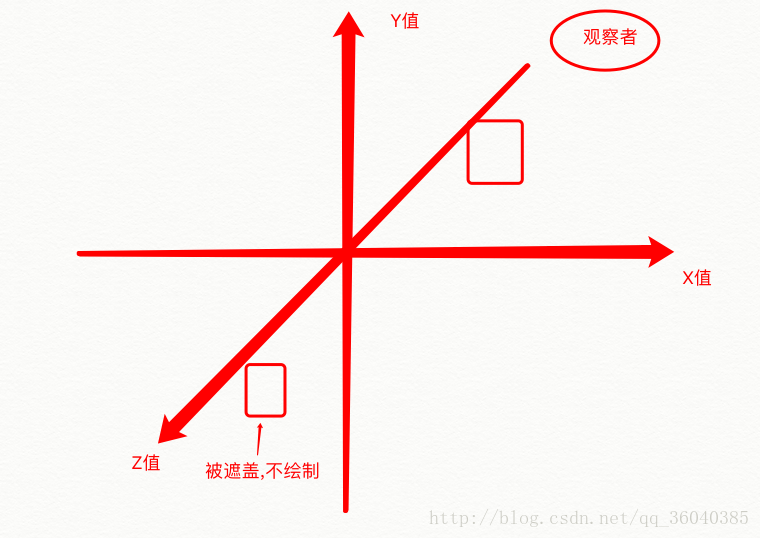
How to solve the conflict problem caused by the same depth value (same Z value)?
The first method: in the second drawing the same Z value, the tiny offset cover problems
note: must be very careful to ensure that the Z value of the gap, or like a refrigerator on the refrigerator as suspended risk
The second method is to sample the GLPolygonOffset function so that the depth value of the fragment can be adjusted so that the depth value is offset without creating a suspended emphasis