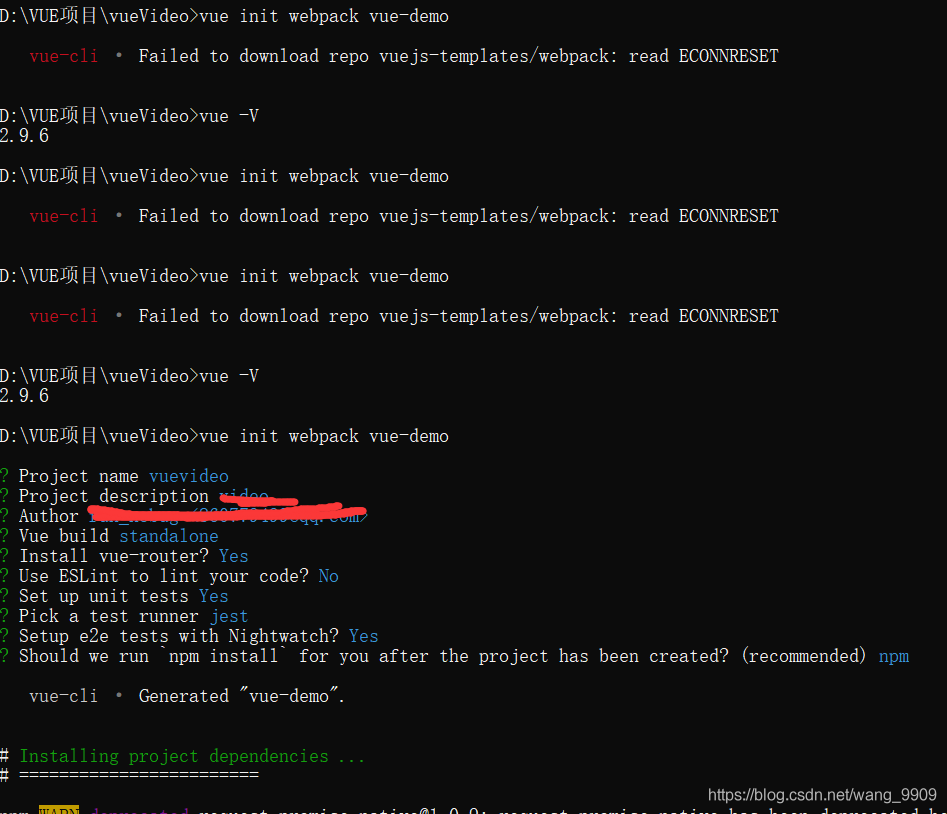
 reported this error today while creating a new VUE project. It has been checked many times online, but there is no effective solution.
Then after many runs, suddenly found that it worked
br>
Python — magic identify file types
introduce
Magic is a python module to identify the file type
the original project address: https://github.com/ahupp/python-magic
the project integration the Windows needed libraries, directly use this one instead:
https://github.com/julian-r/python-magic
The installation
pip install python-magic-bin
Simple to use
Method 1
>>> import magic
>>> magic.from_file("testdata/test.pdf")
'PDF document, version 1.2'
>>> magic.from_buffer(open("testdata/test.pdf").read(1024))
'PDF document, version 1.2'
>>> magic.from_file("testdata/test.pdf", mime=True)
'application/pdf'
Method 2
>>> f = magic.Magic(uncompress=True)
>>> f.from_file('testdata/test.gz')
'ASCII text (gzip compressed data, was "test", last modified: Sat Jun 28 21:32:52 2008, from Unix)'
A small example of solving a real problem
This example combines the use of Zipfile and Magic
# coding:utf8

import os
from zipfile import ZipFile
import magic

m = magic.Magic()

dir_name = '/home/some_zip/'
for root, dir, files in os.walk(dir_name):
    zipnames = files
    break

for a_zip_name in zipnames:
    print '#' * 80
    print a_zip_name
    with ZipFile(dir_name + a_zip_name) as azip:
        filenames = azip.namelist()
        for i in [10, 20, 30]:
            with azip.open(filenames[i], pwd='zippassword') as afile:
                print m.from_buffer(afile.read())
Kill the specified port CMD command line taskkill in window
netstat -aon|findstr “8080”
taskkill /pid 4136-t -f
Execute the procedure under the Windows command line window
1. Check the specified port usage
netstat aon | findstr searches “8080”
Agreement local address external state of PID

The port is occupied by process 4136
2. Directly force kill the specified port
taskkill /pid 4136 -t -f

Ps: You can also close a process by its program name
View the corresponding process PID
tasklist | findstr searches “127704”
Image name PID will words name session # memory use

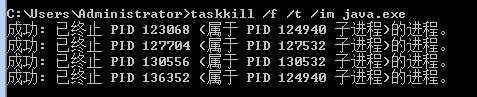
Taskkill /f /t /im java.exe
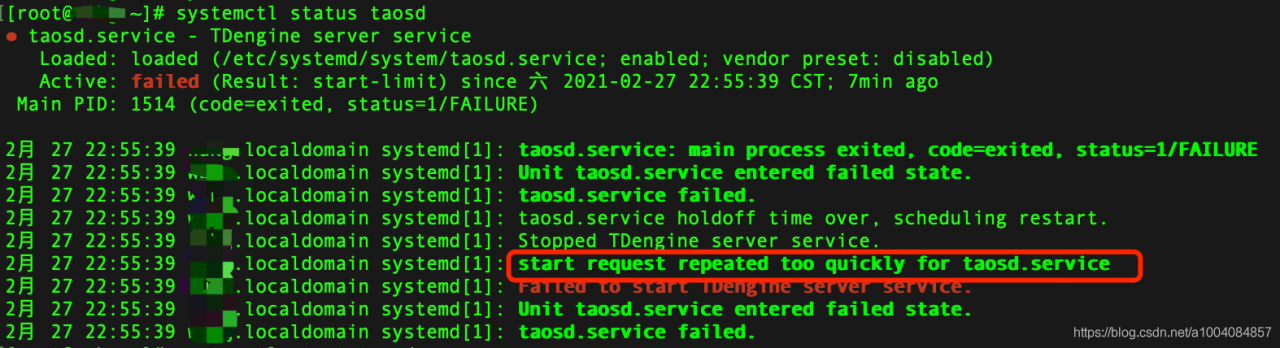
Tdengine failed to start, start request repeated too quickly for taosd.service
The solution
Edit taosd.service and look at the prompts. Line 3 of the image above. Loaded: Loaded follows
vim /etc/systemd/system/taosd.serviceModify StartLimitBurst = 0
[Unit]
Description=TDengine server service
After=network-online.target
Wants=network-online.target

[Service]
Type=simple
ExecStart=/usr/bin/taosd
ExecStartPre=/usr/local/taos/bin/startPre.sh
LimitNOFILE=infinity
LimitNPROC=infinity
LimitCORE=infinity
TimeoutStartSec=0
StandardOutput=null
Restart=always
StartLimitBurst=0
StartLimitInterval=60s

[Install]
WantedBy=multi-user.target
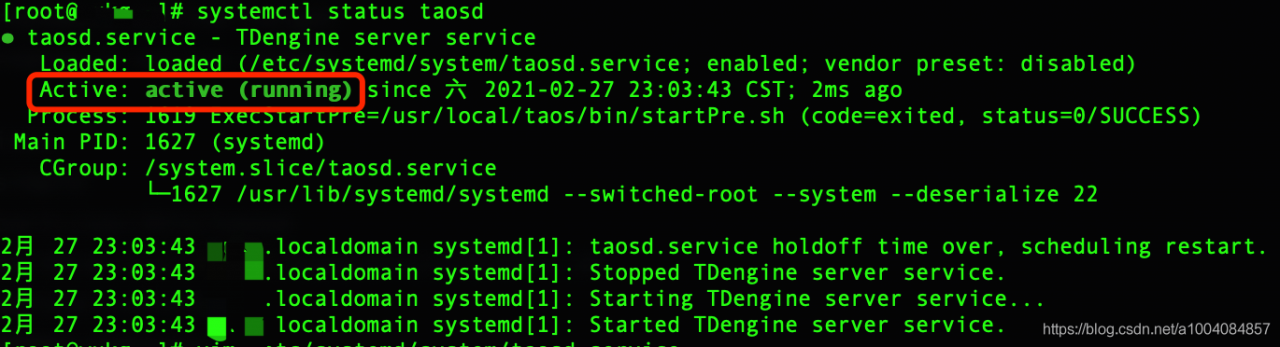
Launch OK again
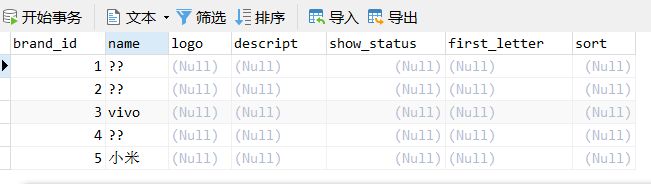
The problem of Chinese garbled data in MySQL
 =
=  =
=
solve com.mysql.jdbc . exceptions.jdbc4 .MySQLSyntaxErrorException:
Solve the com. Mysql. JDBC. Exceptions. Jdbc4. MySQLSyntaxErrorException:
1. Error content
com.mysql.jdbc.exceptions.jdbc4.MySQLSyntaxErrorException: You have an error in your SQL syntax; check the manual that corresponds to your MySQL server version for the right syntax to use near 'where userid='j2ee'' at line 1
	at java.base/jdk.internal.reflect.NativeConstructorAccessorImpl.newInstance0(Native Method)
	at java.base/jdk.internal.reflect.NativeConstructorAccessorImpl.newInstance(NativeConstructorAccessorImpl.java:62)
	at java.base/jdk.internal.reflect.DelegatingConstructorAccessorImpl.newInstance(DelegatingConstructorAccessorImpl.java:45)
	at java.base/java.lang.reflect.Constructor.newInstanceWithCaller(Constructor.java:500)
	at java.base/java.lang.reflect.Constructor.newInstance(Constructor.java:481)
	at [email protected]/com.mysql.jdbc.Util.handleNewInstance(Util.java:425)
	at [email protected]/com.mysql.jdbc.Util.getInstance(Util.java:408)
	at [email protected]/com.mysql.jdbc.SQLError.createSQLException(SQLError.java:943)
	at [email protected]/com.mysql.jdbc.MysqlIO.checkErrorPacket(MysqlIO.java:3973)
	at [email protected]/com.mysql.jdbc.MysqlIO.checkErrorPacket(MysqlIO.java:3909)
	at [email protected]/com.mysql.jdbc.MysqlIO.sendCommand(MysqlIO.java:2527)
	at [email protected]/com.mysql.jdbc.MysqlIO.sqlQueryDirect(MysqlIO.java:2680)
	at [email protected]/com.mysql.jdbc.ConnectionImpl.execSQL(ConnectionImpl.java:2501)
	at [email protected]/com.mysql.jdbc.PreparedStatement.executeInternal(PreparedStatement.java:1858)
	at [email protected]/com.mysql.jdbc.PreparedStatement.executeQuery(PreparedStatement.java:1966)
	at com.a51work6.jpetstore.dao.mysql.AccountDaolmp.findById(AccountDaolmp.java:33)
	at com.a51work6.jpetstore.ui.LoginFrame.lambda$0(LoginFrame.java:65)
	at java.desktop/javax.swing.AbstractButton.fireActionPerformed(AbstractButton.java:1967)
	at java.desktop/javax.swing.AbstractButton$Handler.actionPerformed(AbstractButton.java:2308)
	at java.desktop/javax.swing.DefaultButtonModel.fireActionPerformed(DefaultButtonModel.java:405)
	at java.desktop/javax.swing.DefaultButtonModel.setPressed(DefaultButtonModel.java:262)
	at java.desktop/javax.swing.plaf.basic.BasicButtonListener.mouseReleased(BasicButtonListener.java:279)
	at java.desktop/java.awt.Component.processMouseEvent(Component.java:6632)
	at java.desktop/javax.swing.JComponent.processMouseEvent(JComponent.java:3342)
	at java.desktop/java.awt.Component.processEvent(Component.java:6397)
	at java.desktop/java.awt.Container.processEvent(Container.java:2263)
	at java.desktop/java.awt.Component.dispatchEventImpl(Component.java:5008)
	at java.desktop/java.awt.Container.dispatchEventImpl(Container.java:2321)
	at java.desktop/java.awt.Component.dispatchEvent(Component.java:4840)
	at java.desktop/java.awt.LightweightDispatcher.retargetMouseEvent(Container.java:4918)
	at java.desktop/java.awt.LightweightDispatcher.processMouseEvent(Container.java:4547)
	at java.desktop/java.awt.LightweightDispatcher.dispatchEvent(Container.java:4488)
	at java.desktop/java.awt.Container.dispatchEventImpl(Container.java:2307)
	at java.desktop/java.awt.Window.dispatchEventImpl(Window.java:2762)
	at java.desktop/java.awt.Component.dispatchEvent(Component.java:4840)
	at java.desktop/java.awt.EventQueue.dispatchEventImpl(EventQueue.java:772)
	at java.desktop/java.awt.EventQueue$4.run(EventQueue.java:721)
	at java.desktop/java.awt.EventQueue$4.run(EventQueue.java:715)
	at java.base/java.security.AccessController.doPrivileged(AccessController.java:389)
	at java.base/java.security.ProtectionDomain$JavaSecurityAccessImpl.doIntersectionPrivilege(ProtectionDomain.java:85)
	at java.base/java.security.ProtectionDomain$JavaSecurityAccessImpl.doIntersectionPrivilege(ProtectionDomain.java:95)
	at java.desktop/java.awt.EventQueue$5.run(EventQueue.java:745)
	at java.desktop/java.awt.EventQueue$5.run(EventQueue.java:743)
	at java.base/java.security.AccessController.doPrivileged(AccessController.java:389)
	at java.base/java.security.ProtectionDomain$JavaSecurityAccessImpl.doIntersectionPrivilege(ProtectionDomain.java:85)
	at java.desktop/java.awt.EventQueue.dispatchEvent(EventQueue.java:742)
	at java.desktop/java.awt.EventDispatchThread.pumpOneEventForFilters(EventDispatchThread.java:203)
	at java.desktop/java.awt.EventDispatchThread.pumpEventsForFilter(EventDispatchThread.java:124)
	at java.desktop/java.awt.EventDispatchThread.pumpEventsForHierarchy(EventDispatchThread.java:113)
	at java.desktop/java.awt.EventDispatchThread.pumpEvents(EventDispatchThread.java:109)
	at java.desktop/java.awt.EventDispatchThread.pumpEvents(EventDispatchThread.java:101)
	at java.desktop/java.awt.EventDispatchThread.run(EventDispatchThread.java:90)
2. Problem analysis
This error is usually caused by an error in the SQL statement in my code. My code is as follows:
conn=DBHelper.getConnection();
			String sql="select userid, password,email,name,addr,userid,city,country,phone"     //userid,password,email,name,addr,city,country,phone
					+"from account where userid=?";
			pstmt=conn.prepareStatement(sql);
			pstmt.setString(1, id);
			rs=pstmt.executeQuery();
Where userid=’ J2EE ‘is an error. I thought I had a problem with id, but it turned out to be a space missing when concatenating the SQL string.
3. Summary
looked at other people’s blogs, and he made the wrong conclusion in this type of error check content:
1, check to see if the format of the SQL statement right
2, check the SQL statement whether the use of punctuation in English
3, “mark> connection, special attention to the SQL statement must add Spaces among
Mac command not found solution
MacBook Air command not found. This may have been caused by modifying the Profile when configuring Java Path.
: ls CD, vim, sudo, man command not found
1. First, enter commands so that you can use commands such as Vim temporarily
export PATH=/usr/bin:/usr/sbin:/bin:/sbin:/usr/X11R6/bin
Then open ~/.bash_profile
vim ~/.bash_profile
2. Add PATH
export PATH="/usr/bin:/bin:/usr/sbin:/sbin:/usr/local/bin:${JAVA_HOME}:${JAVA_HOME}/bin"
3. Restart Profile
source ~/.bash_profile
Exit Terminal, open it again, and type Vim to see if it works
MacOS WGet ‘command not found’ solution
input in terminal brew install wget if it is found that the brew didn't hold so first installation brewbrew installation method: ruby - e "$(curl - fsSL https://raw.githubusercontent.com/Homebrew/install/master/install)"
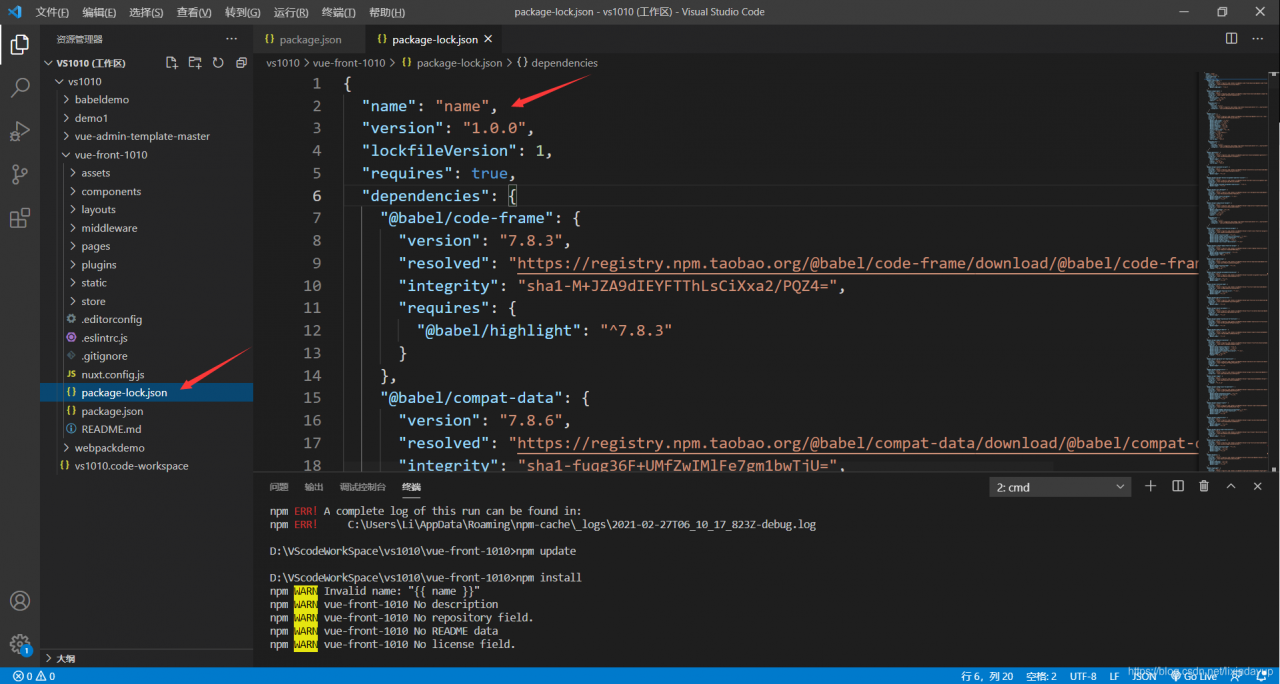
NPM err! Invalid name: “{{name}} in nuxt installation in p166 of Shangsi Valley online education project“
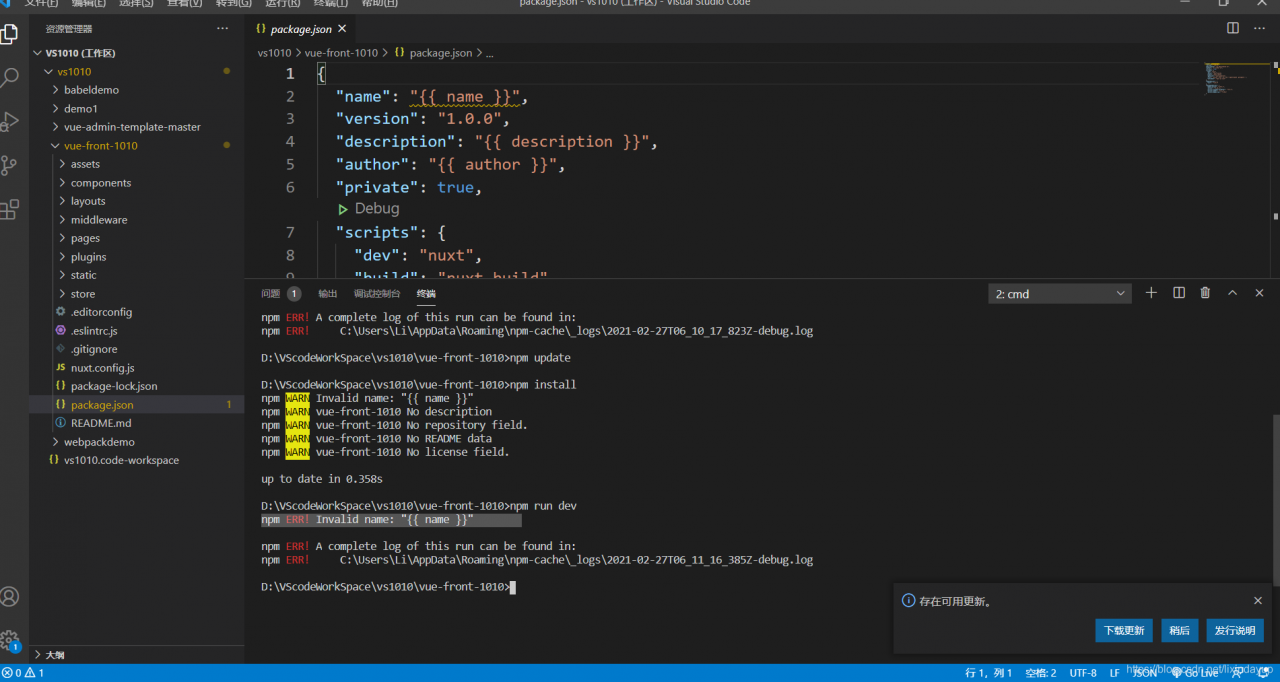
ason:
d>not configure the project name, etc
Solution:
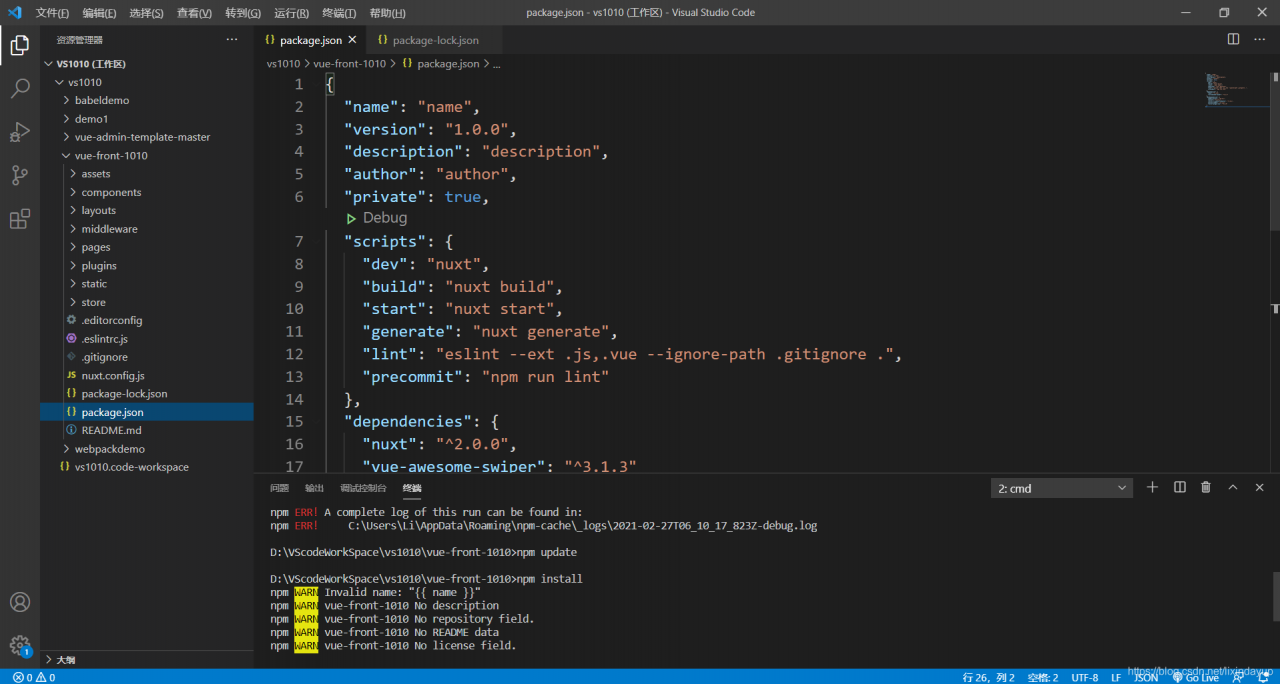
the package. The json file {{name}}, {{description}}, {{an}} respectively for your project name, project description, author, name
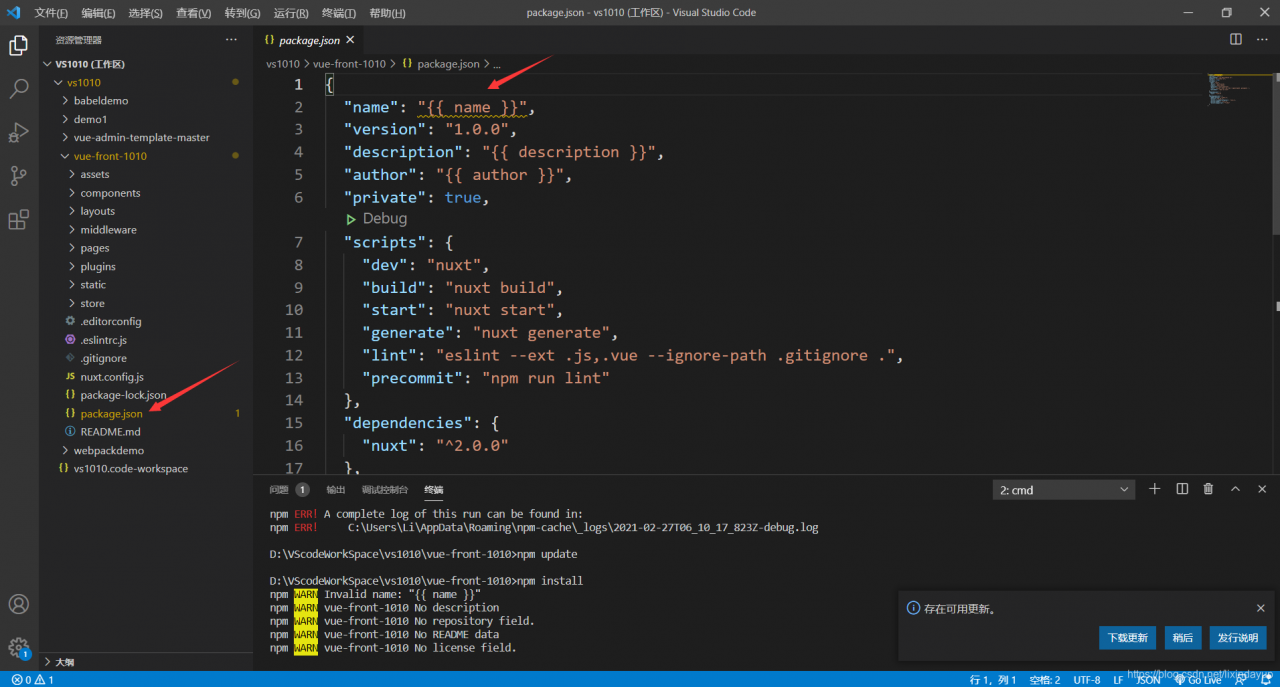 to
to
Centos8 solves the problem of “failed to set locale, defaulting to c.utf-8”
Problem description
>
>
>
>
>
>
>
>
>
systemctl status mysqld.service

journalctl -xe
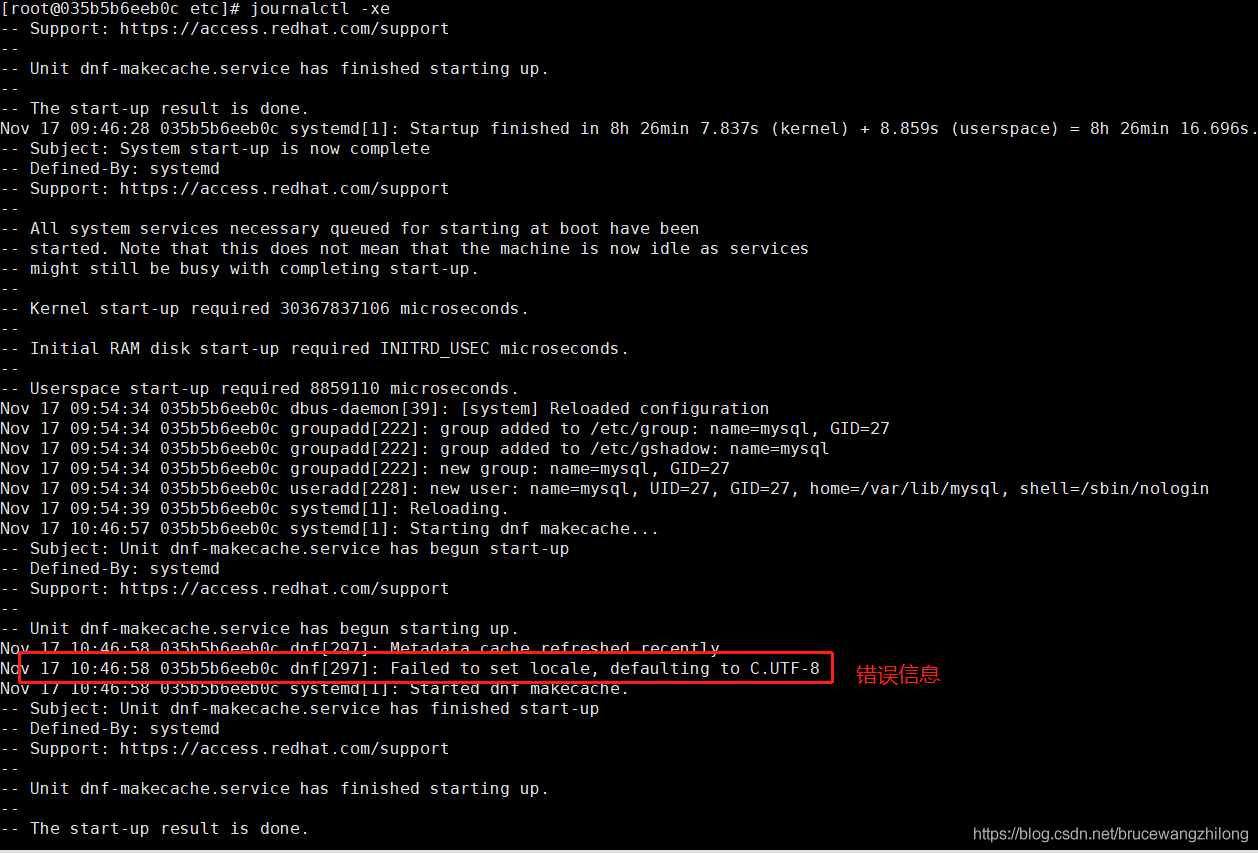
Failed to set locale, defaulting to C.UTF-8
How to solve
To set the system locale, use the localectl command. For example, if you want to use UTF-8 encoded American English (US), run the following command.
download centos docker mirror system default is ISO/IEC 15897 character set
need to utf-8.
to install all of the first character set
dnf install langpacks-en glibc-all-langpacks -y
Set character set
localectl set-locale LANG=en_US.UTF-8
Restart the mysql
bingo!!!!!!
success
How to solve the problem of undefined layer
Uncaught ReferenceError: Layer is not defined?
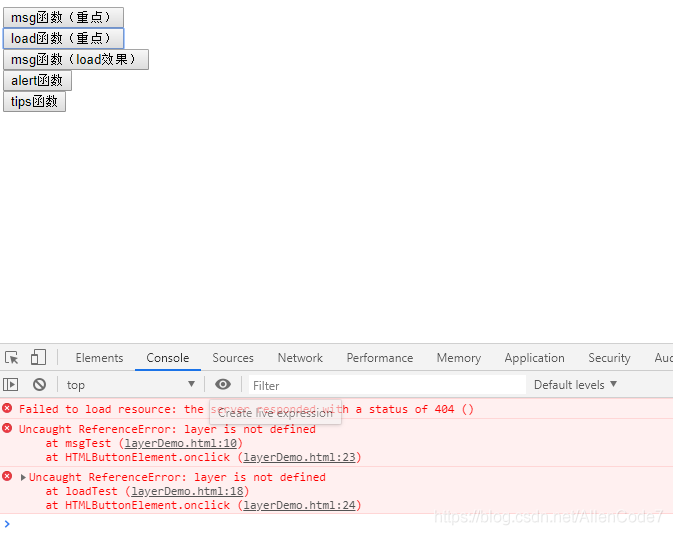
Since I’m using HTML =>; Static resources. So static resources need to be redeployed for the project to take effect
Plug in loaded: fastmirror, langpacks / var / run/ yum.pid Locked, another program with PID 2323 is running
The plugin is loaded: FastestMirror, Langpacks
/var/run/yum.pid is locked and another program with pid 2323 is running.
Another app is currently holding the yum lock; waiting for it to exit…
Another application: PackageKit
Memory: 155 MB RSS (574 MB VSZ)
Started: Mon Mar 23 14:13:26 2020-01:07 before
Status: Running, process ID: 2323
Solution:
[root@chao ~]#
rm -f /var/run/yum.pid