Author Archives: Robins

[Solved] Error while processing statement: FAILED: Execution Error, return code 3 from org.apache.

Error while processing statement: FAILED: Execution Error, return code 3 from org.apache.

This error occurs when executing sql with a collection in the hive on spark engine:
[42000][3] Error while processing statement: FAILED: Execution Error, return code 3 from org.apache.hadoop.hive.ql.exec.spark.SparkTask. Spark job failed during runtime. Please check stacktrace for the root cause.


Solution 1: Switching engine using mr
set hive.execution.engine=mr;

Solution 2:
set mapred.map.tasks.speculative.execution=true
set mapred.reduce.tasks.speculative.execution=true


[Solved] ERROR: Unexpected bus error encountered in worker. This might be caused by insufficient shared memor

ERROR: Unexpected bus error encountered in worker. This might be caused by insufficient shared memor

1. question

Using pytorch dataloader in docker may cause the following errors:

2. solution

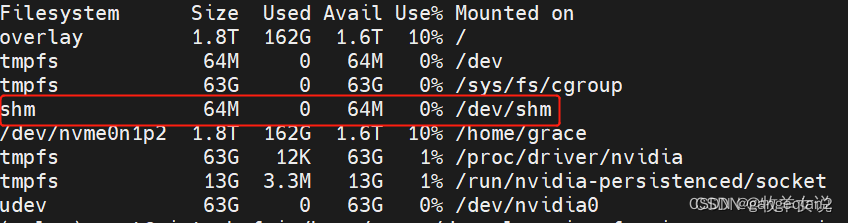
View disk usage through df -h in docker:

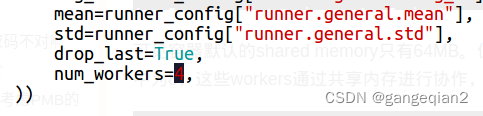
You can see that /dev/shm is only 64M, but the data_loader has more num_works set, and it is collaborating through shared memory, resulting in insufficient memory.

Please note that PyTorch uses shared memory to share data between processes, so if torch multiprocessing is used (e.g. for multithreaded data loaders) the default shared memory segment size that container runs with is not enough, and you should increase shared memory size either with –ipc=host or –shm-size command line options to nvidia-docker run.

Solution:
(1) num_workers=0 (note that setting it to 1 does not work)
(2) docker is easy to share more memory:

--ipc=host  or --shm-size 8G
where -ipc=host will be adjusted according to the current host memory maximum, it is recommended to use this method

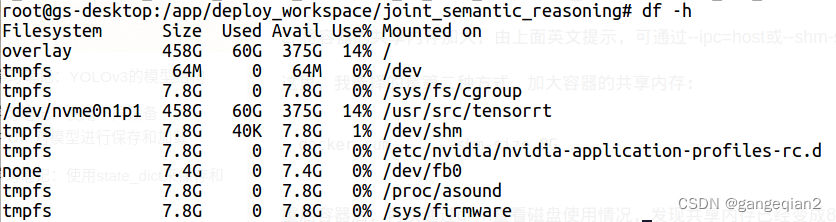
After restart:


[Solved] error: #error “Please include Eigen/Geometry instead of including headers inside the src directory d

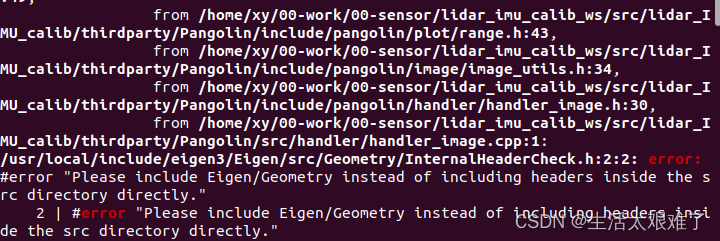
error: #error “Please include Eigen/Geometry instead of including headers inside the src directory d

1-error
2-solution
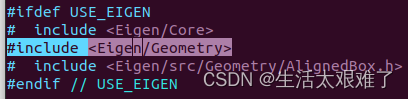
prompt us to \include < Eigen/Geometry>, the header file related to vim should under Panglin/include/pangolin/plot/rang.h
but a new error is reported. There is no such file or directory as eigen/geometry

Solution:

cd /usr/include
sudo ln -sf eigen3/Eigen Eigen
sudo ln -sf eigen3/unsupported unsupported


[Solved] gyp ERR! stack Error: Could not find any Python installation to use

Header error prompt

gyp info it worked if it ends with ok
gyp info using [email protected]
gyp info using [email protected] | win32 | x64
gyp ERR! find Python
gyp ERR! find Python Python is not set from command line or npm configuration
gyp ERR! find Python Python is not set from environment variable PYTHON

Tail error prompt

gyp ERR! find Python **********************************************************
gyp ERR! find Python You need to install the latest version of Python.
gyp ERR! find Python Node-gyp should be able to find and use Python. If not,
gyp ERR! find Python you can try one of the following options:
gyp ERR! find Python - Use the switch --python="C:\Path\To\python.exe"
gyp ERR! find Python   (accepted by both node-gyp and npm)
gyp ERR! find Python - Set the environment variable PYTHON
gyp ERR! find Python - Set the npm configuration variable python:
gyp ERR! find Python   npm config set python "C:\Path\To\python.exe"
gyp ERR! find Python For more information consult the documentation at:
gyp ERR! find Python https://github.com/nodejs/node-gyp#installation
gyp ERR! find Python **********************************************************
gyp ERR! find Python
gyp ERR! configure error
gyp ERR! stack Error: Could not find any Python installation to use
gyp ERR! stack     at PythonFinder.fail (D:\nodejs\node_modules\npm\node_modules\node-gyp\lib\find-python.js:330:47)
gyp ERR! stack     at PythonFinder.runChecks (D:\nodejs\node_modules\npm\node_modules\node-gyp\lib\find-python.js:159:21)
gyp ERR! stack     at PythonFinder.<anonymous> (D:\nodejs\node_modules\npm\node_modules\node-gyp\lib\find-python.js:248:16)
gyp ERR! stack     at PythonFinder.execFileCallback (D:\nodejs\node_modules\npm\node_modules\node-gyp\lib\find-python.js:294:16)
gyp ERR! stack     at exithandler (node:child_process:406:5)
gyp ERR! stack     at ChildProcess.errorhandler (node:child_process:418:5)
gyp ERR! stack     at ChildProcess.emit (node:events:527:28)
gyp ERR! stack     at Process.ChildProcess._handle.onexit (node:internal/child_process:289:12)
gyp ERR! stack     at onErrorNT (node:internal/child_process:478:16)
gyp ERR! stack     at processTicksAndRejections (node:internal/process/task_queues:83:21)
gyp ERR! System Windows_NT 10.0.22000
gyp ERR! command "D:\\nodejs\\node.exe" "D:\\nodejs\\node_modules\\npm\\node_modules\\node-gyp\\bin\\node-gyp.js" "rebuild"
gyp ERR! cwd G:\aidex\font-end\aidex-ui\node_modules\deasync
gyp ERR! node -v v16.15.1
gyp ERR! node-gyp -v v9.0.0
gyp ERR! not ok

Solution:

NPM installation

npm i -g node-gyp

Yarn installation

yarn global add  node-gyp


C++ Compile Error: error: invalid conversion from ‘void*‘ to ‘char*‘ [-fpermissive]

error: invalid conversion from ‘void*‘ to ‘char*‘ [-fpermissive]

#include <stdio.h>
#include<malloc.h>
#define IN
#define OUT

// Get file size
int FileSize(IN char *file)
{
	FILE *fil;
	fil = fopen(file,"rb");
	fseek(fil,0L,SEEK_END);
	int filesize = ftell(fil);
	fseek(fil,0,0);
	return filesize;
}

// read the file
int ReadFileData(IN char *fileName, OUT char *filedata)
{
	FILE *fpIN;
	int fileSizes = FileSize(fileName);
	fpIN = fopen(fileName,"rb");
	fread(filedata,1,fileSizes,fpIN);
	fclose(fpIN);
}

// write the file
int WriteToFile(char *filedata, int size, OUT char *outFileName)
{
	FILE *fpOUT;
	fpOUT = fopen(outFileName,"w+");
	fwrite(filedata,1,size,fpOUT);
	fclose(fpOUT);
}

int main()
{
	char *origin_file = "test.cpp";
	int orgfilesize = FileSize(origin_file);  // Get file size


	char *file_data=  malloc(orgfilesize);      // Allocate file size memory
    if (file_data == NULL)
        return NULL;
	ReadFileData(origin_file, file_data);     // read the file
	char *outFile = "test.txt";
	WriteToFile(file_data,orgfilesize,outFile);  // write the file

	return 0;
}

The following line of code

char *file_data=  malloc(orgfilesize);

Malloc function is used to allocate space in C language. The return type is void*. Void* indicates a pointer of undetermined type. C. C++ specifies that the void* type can cast any other type of pointer.

The malloc() function actually finds a space of a specified size in memory and ranges the first address of that space to a pointer variable.
Here the pointer variable can be a single pointer or the first address of an array.
It depends on the size of the malloc() function.

Use GCC compilation to directly pass and print out the following results

Original String: testing.

When compiling with g++, an error and warning will appear, as follows

error: invalid conversion from ‘void*’ to ‘char*’ [-fpermissive]
warning: deprecated conversion from string constant to ‘char*’ [-Wwrite-strings]

The reason for the error is that c++ is designed to be more secure than C, and it cannot automatically convert void * to other pointer types.

The reason for warning is that the program attempts to convert the string literal (const char [] in c++ and char [] in C language) to char * type,,

char *file_data= (char*) malloc(orgfilesize); 
# The return value of the malloc function is a void*, which is assigned to a variable by adding a forced conversion in front of malloc

Introduction to malloc function
malloc function is often used in C language and c++ to dynamically allocate memory space for variables. Malloc requests the system to allocate memory space of the specified size bytes

function void malloc(int size)

explain:

Malloc requests the system to allocate memory space of the specified size bytes. If the allocation is successful, a pointer to the allocated memory is returned; otherwise, a null pointer is returned
this function is included in the header file: \include < malloc.h> you should import the header file *< malloc.h>  or  < stdlib.h>** when you are using

Note: when the memory is no longer used, the free() function should be used to free the memory block
Common usage

1. When you do not know the definite memory required by a variable

For example, when defining an array, the size of the array is not known until the program is compiled. In this case, you can use the malloc function

int main()
{
	int n;
	scanf("%d",&n);
	int *m=(int *)malloc(sizeof(int)*n);  //Defining a pointer variable that points to n int is equivalent to opening an array of n int elements.
	// If n is very large, more than 1000000, then opening an int array of this size will cause a stack overflow.
	int m[1000000]; //Stack overflow will occur.
	return 0;
}

2. Allocate space for structural variables
define a common variable of structure type. You can dynamically apply for memory without malloc. The CPU will allocate memory for structure variables.

typedef struct
{
    int n;
    char *p;
}node;

int  main()
{
	node a;  //The definition is a structured ordinary variable, you can request memory without using malloc, the CPU will allocate memory for this structured variable
    a.n=4;
    printf("%d",a->n); //can output successfully
    node *b; //defines a structure pointer variable, the CPU will open up memory for this pointer with a size of 4 bytes. But to store the data members of the structure this space is not enough, it will raise a segment error, at this time you must malloc request a structure type size of dynamic memory to store the data members.
    //b=(node *)malloc(sizeof(node));
    printf("%d",sizeof(b)); // use sizeof(b) to see the size of b is 4
    char p[]="abcd";
    printf("%d",b->n);
    (a->p)=p;
    printf("%c",a->p[0]);
    return 0;
}

If malloc is not used to allocate space for structure pointer variable B, warning: ‘B’ is used uninitialized in this function [-wuninitialized]|.

3. When defining a structure, you need to pay attention to allocating space for its members in turn
in normal use, after allocating space for a structure with malloc function, operate on its member variable (pointer type).

For example, when the pointer p=null, it will always report “program received signal SIGSEGV, segmentation fault.”
use malloc function

[Solved] maven Install Error: MavenReportException: Error while generating Javadoc:

【maven】MavenReportException: Error while generating Javadoc:

Environment: jdk1.8
problem cause: Javadoc cannot be generated during maven install
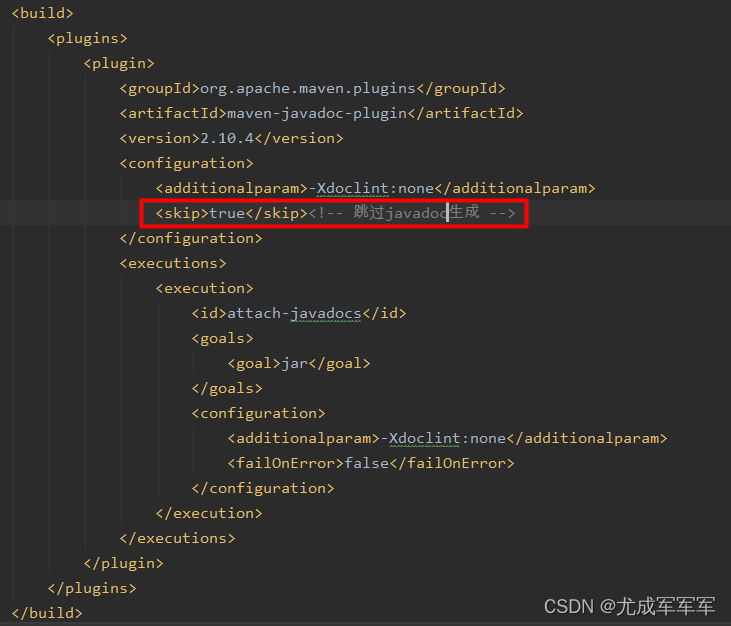
Solution: Add in the configuration <skip>true</skip>, skip the javadoc generation

<build>
		<plugins>
			<plugin>
				<groupId>org.apache.maven.plugins</groupId>
				<artifactId>maven-javadoc-plugin</artifactId>
				<version>2.10.4</version>
				<configuration>
					<additionalparam>-Xdoclint:none</additionalparam>
					<skip>true</skip><!-- skip javadoc -->
				</configuration>
				<executions>
					<execution>
						<id>attach-javadocs</id>
						<goals>
							<goal>jar</goal>
						</goals>
						<configuration>
							<additionalparam>-Xdoclint:none</additionalparam>
							<failOnError>false</failOnError>
						</configuration>
					</execution>
				</executions>
			</plugin>
		</plugins>
	</build>


[Solved] ZYNQ Programs Error: memory write error at 0x100000.APB AP transaction error,DAP status f0000021

Error Messages:

Error “memory write error at 0x100000.apb AP transaction error, DAP status f0000021” occurred during zynq burning

How to Solve:

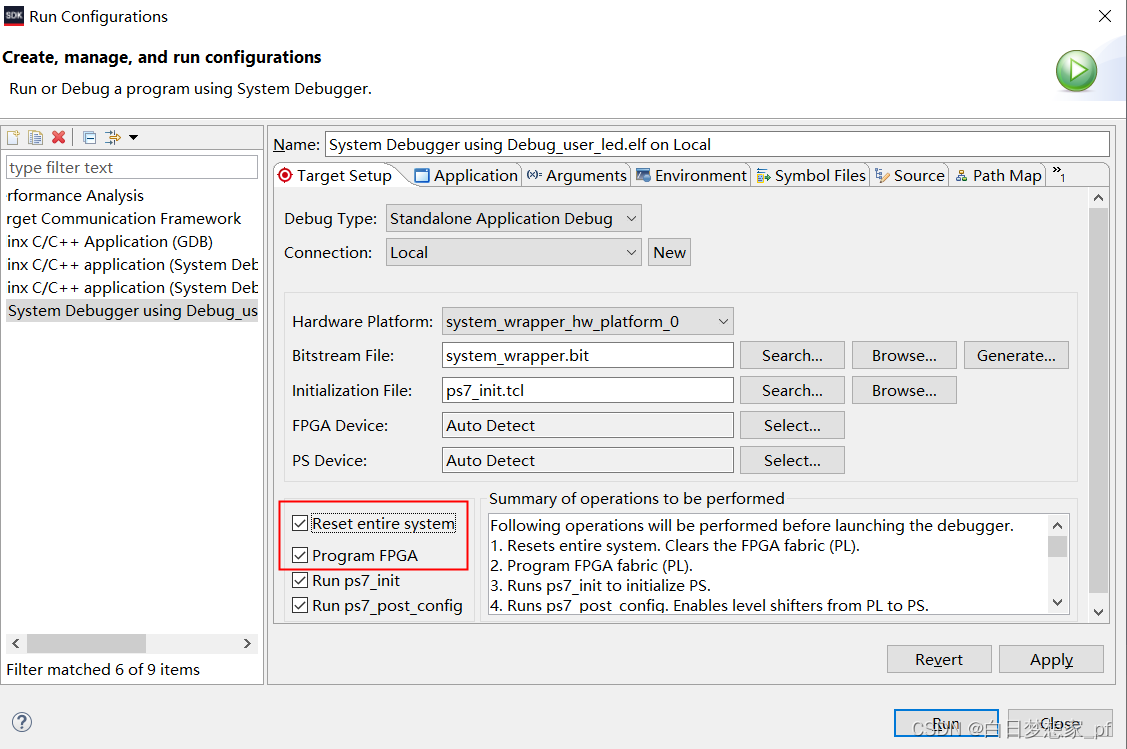
In the first contact with zynq, when using PL side resources with bit stream hardware data, the following configuration was not selected when burning the software, resulting in the error prompt shown in the title.

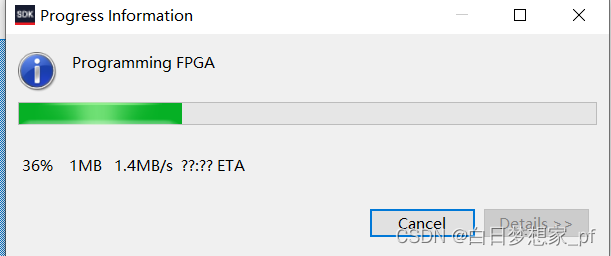
when the option shown in the above figure is checked, the bit stream data will be burned first and the FPGA will be configured, as shown in the following figure. Then it runs normally

[Solved] Vue-cli Error: Module not found: Error: Can‘t resolve ‘vue-router ‘

Error Messages:

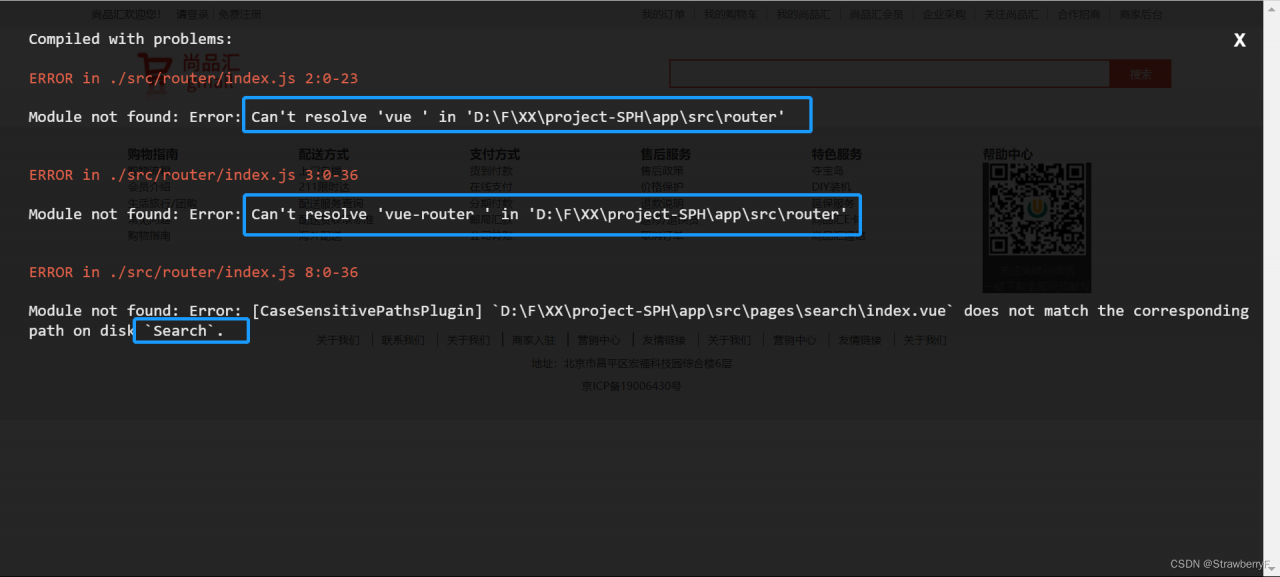
Compiled with problems:X
ERROR in ./src/router/index.js 2:0-23
Module not found: Error: Can’t resolve ‘vue ‘ in ‘D:\F\XX\project-SPH\app\src\router’

ERROR in ./src/router/index.js 3:0-36
Module not found: Error: Can’t resolve ‘vue-router ‘ in ‘D:\F\XX\project-SPH\app\src\router’

ERROR in ./src/router/index.js 8:0-36
Module not found: Error: [CaseSensitivePathsPlugin] `D:\F\XX\project-SPH\app\src\pages\search\index.vue` does not match the corresponding path on disk `Search`.


The incorrect index.js code at this point is as follows:

// Where to configure routing
import Vue from 'vue ';
import VueRouter from 'vue-router ';//Using the plug-in
Vue.use(VueRouter);
//Introduction of routing components
import Home from '@/pages/Home'
import Search from '@/pages/search'
import Login from '@/pages/Login'
import Register from '@/pages/Register'
//configure routing
export default new VueRouter({
//configure routing
    routes:[
    {
        path : "/home",
        component:Home
    },{
        path: " /search",
        component:Search
    },{
        path: " /login",
        component:Login
    },{
        path: " /register",
        component:Register
    }
    ]
})

Process

At first, it was because Vue-router could not be installed. I suspected that Vue-router was not installed properly.

After an afternoon of Googling to find the cause, I decided to look at the code myself to see what the error meant. There are a total of 3 code: all point to the index.js file.

The first place: pointing to Search, I looked at the reference Search place, found written in lower case.

The second place: the reference to vue and vue-router, after careful observation, I found that I wrote an extra space.

After correction, it can be run again without any error.

[Solved] ffmpeg Enable https Error: “ERROR: openssl not found”

ffmpeg can use libssl.so libcrypto.so dynamic library, or libssl.a libcrypto.a static library, the next is to say that obviously the inventory is there, but the compiler still can not find openssl.

Search the ffmpeg source code, and you can find that the prompt is printed in the configure file. The source code is as follows:

enabled openssl           && { use_pkg_config openssl openssl/ssl.h OPENSSL_init_ssl ||
                               check_lib openssl/ssl.h OPENSSL_init_ssl -lssl -lcrypto ||
                               use_pkg_config openssl openssl/ssl.h SSL_library_init ||
                               check_lib openssl/ssl.h SSL_library_init -lssl -lcrypto ||
                               check_lib openssl/ssl.h SSL_library_init -lssl32 -leay32 ||
                               check_lib openssl/ssl.h SSL_library_init -lssl -lcrypto -lws2_32 -lgdi32 ||
                               die "ERROR: openssl not found"; }

You can find that ffmpeg is trying OpenSSL one by one. My config The log shows that the last one has been checked, but OpenSSL is still not found.

The reason is that I am using a newer openssl library, the old openssl library uses ‘SSL_library_init’ to initialize, the newer openssl version uses ‘OPENSSL_init_ssl’ to initialize. The new version of openssl uses ‘OPENSSL_init_ssl’ to initialize, and because it does not pass the check, this error is reported here.

Solution:

Add a line to check ‘check_lib openssl/ssl.h OPENSSL_init_ssl -lssl -lcrypto ‘ and it will pass, above is what I have added.


[Solved] React Startup Error at the First time :SyntaxError: Unexpected token

[react] prompt syntaxerror: unexpected token

1. background

Use react scaffold to build the project

  • Install globally: npm i -g create-react-app
  • create-react-app hello-react
  • Go to the project folder: cd hello-react
  • Start the project: npm start

When executing npm start, an error occurred, please check the node version.


2. problem-solving

  • The investigation found that it was caused by the node version.
  • execute node -v ;

  • react-app requires node version greater than 14
  • execute nvm use 14;

  • Just restart.

XML read process error: javax.xml.stream.XMLStreamException: ParseError at [row,col]:[1,1] Message: Content not allowed in preamble

com. sun. xml. internal. ws. streaming. Xmlstreamreaderexception: XML read process error: javax xml. stream. Xmlstreamexception: parseError at [row, col]: [1,1] message: content is not allowed in the preface

The error contents are as follows

com.sun.xml.internal.ws.streaming.XMLStreamReaderException: XML read process error: javax.xml.stream.XMLStreamException: ParseError at [row,col]:[1,1]
Message: No content is allowed in the preamble.
at com.sun.xml.internal.ws.streaming.XMLStreamReaderUtil.wrapException(XMLStreamReaderUtil.java:311)
at com.sun.xml.internal.ws.streaming.XMLStreamReaderUtil.next(XMLStreamReaderUtil.java:84)
at com.sun.xml.internal.ws.streaming.XMLStreamReaderUtil.nextContent(XMLStreamReaderUtil.java:154)
at com.sun.xml.internal.ws.streaming.XMLStreamReaderUtil.nextElementContent(XMLStreamReaderUtil.java:89)
at com.sun.xml.internal.ws.wsdl.parser.RuntimeWSDLParser.hasWSDLDefinitions(RuntimeWSDLParser.java:310)
at com.sun.xml.internal.ws.wsdl.parser.RuntimeWSDLParser.parse(RuntimeWSDLParser.java:217)
at com.sun.xml.internal.ws.wsdl.parser.RuntimeWSDLParser.parse(RuntimeWSDLParser.java:194)
at com.sun.xml.internal.ws.wsdl.parser.RuntimeWSDLParser.parse(RuntimeWSDLParser.java:163)
at com.sun.xml.internal.ws.client.WSServiceDelegate.parseWSDL(WSServiceDelegate.java:348)
at com.sun.xml.internal.ws.client.WSServiceDelegate.<init>(WSServiceDelegate.java:306)
at com.sun.xml.internal.ws.client.WSServiceDelegate.<init>(WSServiceDelegate.java:215)
at com.sun.xml.internal.ws.client.WSServiceDelegate.<init>(WSServiceDelegate.java:196)
at com.sun.xml.internal.ws.client.WSServiceDelegate.<init>(WSServiceDelegate.java:192)
at com.sun.xml.internal.ws.spi.ProviderImpl.createServiceDelegate(ProviderImpl.java:104)
at javax.xml.ws.Service.<init>(Service.java:77)
at cn.gov.ynhrss.psp.Ynhrsspspservice.<init>(Ynhrsspspservice.java:39)
at com.neusoft.xtpt.web.PspWebService.send(PspWebService.java:38)
at com.neusoft.xtpt.controller.PspCtl.basic(PspCtl.java:25)
at sun.reflect.NativeMethodAccessorImpl.invoke0(Native Method)
at sun.reflect.NativeMethodAccessorImpl.invoke(NativeMethodAccessorImpl.java:62)
at sun.reflect.DelegatingMethodAccessorImpl.invoke(DelegatingMethodAccessorImpl.java:43)
at java.lang.reflect.Method.invoke(Method.java:498)
at org.springframework.web.method.support.InvocableHandlerMethod.doInvoke(InvocableHandlerMethod.java:190)
at org.springframework.web.method.support.InvocableHandlerMethod.invokeForRequest(InvocableHandlerMethod.java:138)
at org.springframework.web.servlet.mvc.method.annotation.ServletInvocableHandlerMethod.invokeAndHandle(ServletInvocableHandlerMethod.java:105)
at org.springframework.web.servlet.mvc.method.annotation.RequestMappingHandlerAdapter.invokeHandlerMethod(RequestMappingHandlerAdapter.java:878)
at org.springframework.web.servlet.mvc.method.annotation.RequestMappingHandlerAdapter.handleInternal(RequestMappingHandlerAdapter.java:792)
at org.springframework.web.servlet.mvc.method.AbstractHandlerMethodAdapter.handle(AbstractHandlerMethodAdapter.java:87)
at org.springframework.web.servlet.DispatcherServlet.doDispatch(DispatcherServlet.java:1040)
at org.springframework.web.servlet.DispatcherServlet.doService(DispatcherServlet.java:943)
at org.springframework.web.servlet.FrameworkServlet.processRequest(FrameworkServlet.java:1006)
at org.springframework.web.servlet.FrameworkServlet.doPost(FrameworkServlet.java:909)
at javax.servlet.http.HttpServlet.service(HttpServlet.java:652)
at org.springframework.web.servlet.FrameworkServlet.service(FrameworkServlet.java:883)
at javax.servlet.http.HttpServlet.service(HttpServlet.java:733)
at org.apache.catalina.core.ApplicationFilterChain.internalDoFilter(ApplicationFilterChain.java:227)
at org.apache.catalina.core.ApplicationFilterChain.doFilter(ApplicationFilterChain.java:162)
at org.apache.tomcat.websocket.server.WsFilter.doFilter(WsFilter.java:53)
at org.apache.catalina.core.ApplicationFilterChain.internalDoFilter(ApplicationFilterChain.java:189)
at org.apache.catalina.core.ApplicationFilterChain.doFilter(ApplicationFilterChain.java:162)
at org.springframework.web.filter.RequestContextFilter.doFilterInternal(RequestContextFilter.java:100)
at org.springframework.web.filter.OncePerRequestFilter.doFilter(OncePerRequestFilter.java:119)
at org.apache.catalina.core.ApplicationFilterChain.internalDoFilter(ApplicationFilterChain.java:189)
at org.apache.catalina.core.ApplicationFilterChain.doFilter(ApplicationFilterChain.java:162)
at org.springframework.web.filter.FormContentFilter.doFilterInternal(FormContentFilter.java:93)
at org.springframework.web.filter.OncePerRequestFilter.doFilter(OncePerRequestFilter.java:119)
at org.apache.catalina.core.ApplicationFilterChain.internalDoFilter(ApplicationFilterChain.java:189)
at org.apache.catalina.core.ApplicationFilterChain.doFilter(ApplicationFilterChain.java:162)
at org.springframework.web.filter.CharacterEncodingFilter.doFilterInternal(CharacterEncodingFilter.java:201)
at org.springframework.web.filter.OncePerRequestFilter.doFilter(OncePerRequestFilter.java:119)
at org.apache.catalina.core.ApplicationFilterChain.internalDoFilter(ApplicationFilterChain.java:189)
at org.apache.catalina.core.ApplicationFilterChain.doFilter(ApplicationFilterChain.java:162)
at org.apache.catalina.core.StandardWrapperValve.invoke(StandardWrapperValve.java:202)
at org.apache.catalina.core.StandardContextValve.invoke(StandardContextValve.java:97)
at org.apache.catalina.authenticator.AuthenticatorBase.invoke(AuthenticatorBase.java:542)
at org.apache.catalina.core.StandardHostValve.invoke(StandardHostValve.java:143)
at org.apache.catalina.valves.ErrorReportValve.invoke(ErrorReportValve.java:92)
at org.apache.catalina.core.StandardEngineValve.invoke(StandardEngineValve.java:78)
at org.apache.catalina.connector.CoyoteAdapter.service(CoyoteAdapter.java:357)
at org.apache.coyote.http11.Http11Processor.service(Http11Processor.java:374)
at org.apache.coyote.AbstractProcessorLight.process(AbstractProcessorLight.java:65)
at org.apache.coyote.AbstractProtocol$ConnectionHandler.process(AbstractProtocol.java:893)
at org.apache.tomcat.util.net.NioEndpoint$SocketProcessor.doRun(NioEndpoint.java:1707)
at org.apache.tomcat.util.net.SocketProcessorBase.run(SocketProcessorBase.java:49)
at java.util.concurrent.ThreadPoolExecutor.runWorker(ThreadPoolExecutor.java:1149)
at java.util.concurrent.ThreadPoolExecutor$Worker.run(ThreadPoolExecutor.java:624)
at org.apache.tomcat.util.threads.TaskThread$WrappingRunnable.run(TaskThread.java:61)
at java.lang.Thread.run(Thread.java:748)
Caused by: javax.xml.stream.XMLStreamException: ParseError at [row,col]:[1,1]
Message: No content is allowed in the preamble.
at com.sun.org.apache.xerces.internal.impl.XMLStreamReaderImpl.next(XMLStreamReaderImpl.java:604)
at com.sun.xml.internal.ws.util.xml.XMLStreamReaderFilter.next(XMLStreamReaderFilter.java:81)
at com.sun.xml.internal.ws.streaming.XMLStreamReaderUtil.next(XMLStreamReaderUtil.java:65)
... 66 more

Background

I call WebService in Java and report an error when I call new xxxxxxxservice().

Cause analysis

When WebService creates new xxxxxxxservice(), it needs to load the URL in xxxxxxxservice first. If the URL is not loaded or the URL is null, the above error may be reported.

There are two solutions

Method 1: Add the url of the webservice’s access address to the static method, as follows:

static {
        URL url = null;
        WebServiceException e = null;
        try {
            url = new URL("http://127.0.0.1:8088/ynhrs/services/info?wsdl");
        } catch (MalformedURLException ex) {
            e = new WebServiceException(ex);
        }
        BIZSERVICE_WSDL_LOCATION = url;
        BIZSERVICE_EXCEPTION = e;
    }

You can also configure the address of WebService file, etc

Method 2: directly add the URL to new xxxxxxxservice(), as follows:

Ynhrsspspservice pspService = new Ynhrsspspservice(new URL("http://127.0.0.1:8088/ynhrs/services/info?wsdl"));

http://127.0.0.1:8088/ynhrs/services/info?wsdl is the URL of webservice

[Solved] express-jwt Error: Error: jwt is not a function

Problem Description:

Express JWT is not a function

Cause analysis:

The express JWT I installed is version 7.7.5, and the usage has changed.

https://www.npmjs.com/package/express-jwt

Check the official documents for the latest usage

Solution:

1. import

var { expressjwt:jwt } = require("express-jwt")

2. registration

app.use(jwt({ 
secret: 'shhhhhhared-secret', algorithms: ['HS256'] 
}).unless({ path:[/^\/api\//] }))

.unless ({specify the path without access permission with regular})

Or another method, directly add the unique protected path address as a parameter:

app.use("/api", jwt({ 
secret: "shhhhhhared-secret", algorithms: ["HS256"] 
}));

3. user data

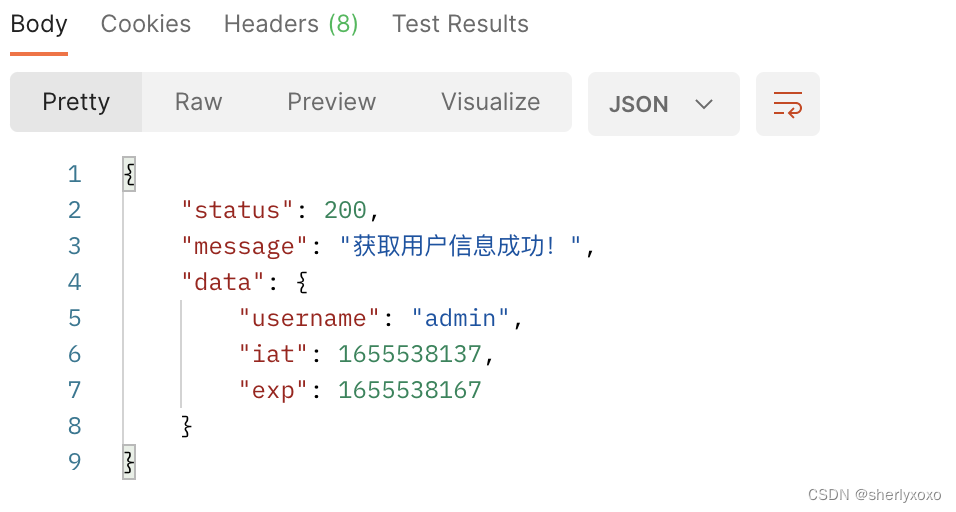
Once parsed successfully, the user data contained in the Token will be automatically mounted on req.auth

// This is an API interface with permissions
app.get('/admin/getinfo', function (req, res) {
  // TODO_05: use req.auth to get the user information and use the data property to send the user information to the client
  console.log(req.auth);
  res.send({
    status: 200,
    message: 'User information retrieved successfully! ,
    data: req.auth// the user information to be sent to the client
  })
})