Author Archives: Robins

When starting Vue project: cannot find module ‘webpack cli / bin / config yargs’ error resolution

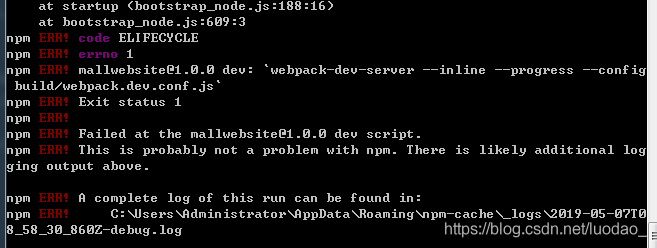
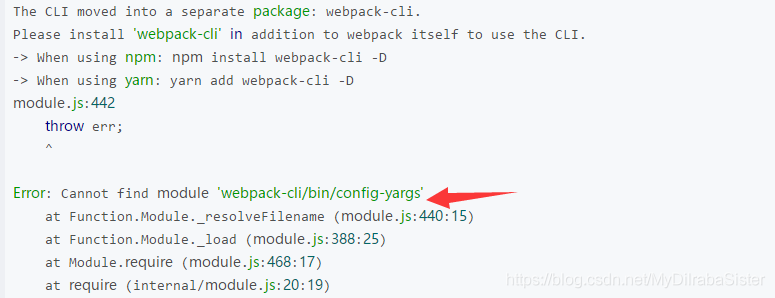
An error is reported when starting Vue project: cannot find module ‘webpack cli/bin/config yargs’, as shown in the following figure:

the reason for this error is that the version of webpack and webpack dev server is incompatible. The solution is as follows:

Under this vue project, type:
npm uninstall webpack -g
npm uninstall -g webpack-dev-server
Uninstall and reinstall:
npm install [email protected] --save-dev

Restart the project, success!

Error:scalac: missing or invalid dependency detected while loading class file ***

An error occurs when developing spark application, as shown in the figure,
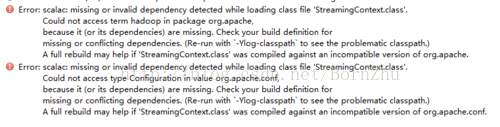
This mistake bothered me for two days, but I generally knew it was the problem of dependency.

First of all, I reemport pom.xml , and still report an error. Adding reimport after deleting dependency is also an error. This step is basically ruled out pom.xml It’s a matter of time.

After that, I suspected that the package downloaded to the local was damaged. I went to the local Maven warehouse to check, deleted all the files in the Maven warehouse, let Maven download again, and still reported an error. Here, we exclude the damage of the local package. Maybe there is something wrong with the download.

Then, I opened the local Maven warehouse and found a file with suffix. Lastupdated in the relevant package. The jar package was not downloaded successfully. I tried to manually download the corresponding jar package and add it, but still reported an error. But the reason for the error is basically locked, which is the problem of downloading!

Finally, I reconfigured Maven’s setting.xml File, and repeat the first two steps, reload dependency, no error after running again, the problem is solved

In a word, if you encounter problems about dependency, you can basically solve them step by step according to the previous ideas. If you encounter problems, don’t be afraid. If you analyze them step by step according to the problems and feedback, you can certainly solve them.
Spring Aop error creating bean with name ‘org.springframework.aop.config.internalAutoProxyCreator

In addition to spring AOP jar package, spring AOP should also be included in spring AOP programming aspectjrt.jar , aspectjweaver.jar , and aopalliance_ 1.0.jar, otherwise an error is reported:

org.springframework.beans . factory.BeanCreationExcspring -aopeption: Error creating bean with name ‘ org.springframework.aop . config.internalAutoProxyCreator ‘: Instantiation of bean failed; nested exception is org.springframework.beans .BeanInstantiationException: Could not instantiate bean class [ org.springframework.aop . aspectj.annotation.AnnotationAwareAspectJAutoProxyCreator ]: Constructor threw exception; nested exception is java.lang.NoClassDefFoundError : org/aopalliance/intercept/MethodInterceptor


aopalliance_ 1.0.jar download address:

http://mirrors.ibiblio.org/pub/mirrors/maven2/aopalliance/aopalliance/1.0/


Firefox: How to Solve Syntax error: invalid regexp group

Error details:

Found that Google and 360 browsers work fine, but on Firefox it reports an error: SyntaxError: invalid regexp group

The reason for the error: my regularization is useful – —?& lt=

eg.(?<=(?:TianYe))[\u4e00-\u9fa5]{2}     	------  Regular match for 2 Chinese characters starting with (TianYe) and ending with (TianYe).
// (? <=(? :TianYe)) ------ matches strings starting with (TianYe) and is not captured (not stored) in the group;
// [\u4e00-\u9fa5] ------ matches Chinese characters;
// {2} ------- matches 2 characters.

Root cause:

Firefox does not support prior assertion(lookahead) 

Solutions:

Match it first, and then slice(0,2) it later.

Exec format error: Java

welcome to my blog

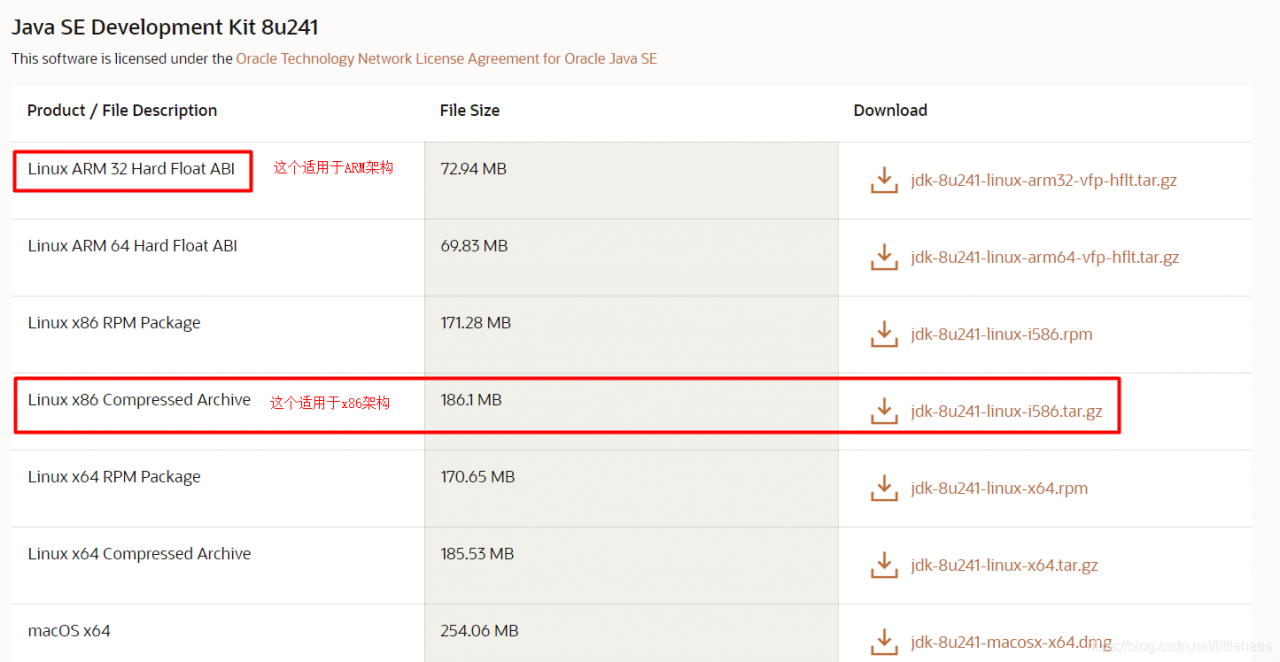
Problem Description: decompress the jdk8 installation package, configure the environment variables, execute the Java command, and report an error: exec format error: Java

Reason: I didn’t look carefully when downloading the compressed package. As a result, the download is wrong. The download is ARM architecture, and the Ubuntu/Linux I use is x64 architecture

Download the correct compressed package and re operate

The usage of Java JUnit unit test and the solution of initialization error

Usage:
1. Select project – right click – build path – add Libraries – JUnit – next – junit4 – finish
2. Write @ test on the method body to be tested

Note:
1. The test method must be modified with public
2. The return value must be void
3. There can be no parameters in the method
4. There can be no class named test under the package
if the test code is OK, an error is still reported, initialization error is not reported in other classes,
it may be because there is an error method in this class
2 Or there are multiple @ test annotations in a class, one of which adds static or has other errors.

[error] error handling of IntelliJ idea

ClassNotFoundExceptionEmpty test suitejavalangNoClassDefFoundError


ClassNotFoundException

Error report:
once IntelliJ idea is running, it will report an error, and no class can be found
in the system java.lang.ClassNotFoundException

Solution:
open project structures (ALT + Ctrl + Shift + s) to check whether the directory set by project – out and module – path – out exists.
Generally, the module – path – out is set under the target directory, but if there is no target directory at the first run, it must be generated by Maven build, so either change the out path or run Maven build first.


Empty test suite

Error:
JUnit running times cannot find the test group
process finished with exit code 1
class not found:“ XXX.XXXTest ”Empty test suite.

Solution:
Run Maven test and download relevant jar packages

java.lang.NoClassDefFoundError

Error:
minaserver logger – & gt; error{ ContextLoader.java:336 }-Context initialization failed java.lang.NoClassDefFoundError : Lcom/cebbank/gage/dao/UserDao;

Solution:
if you want to change the project name, remember to delete all the configuration files (. IML,. Idea, etc.) and leave only the folder and folder of the project code pom.xml File, and then re import the Maven project.

Solution to the problem of spring boot running test class error creating bean with name ‘serverendpoint exporter’ defined

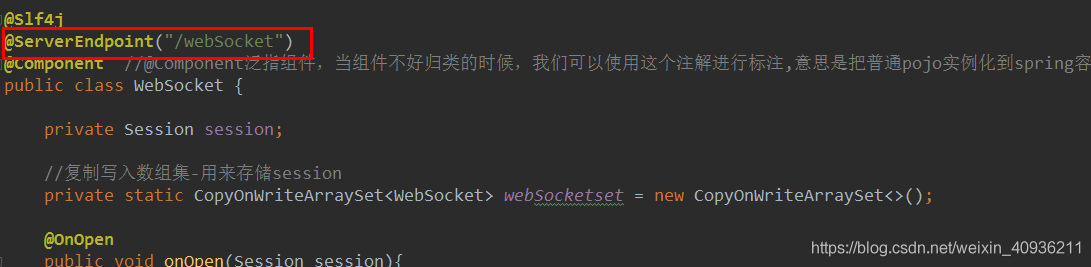
There are many problems in spring boot unit test. When I use websocket, I will run the test class and report an error: error creating bean with name ‘serverendpoint exporter’ defined in class path resource [COM/Jacklin/config]/ WebSocketConfig.class ]Here I introduce the annotation @ serverendpoint:

There are two ways to solve this problem

Method 1: remove the @ runwith of the test class( SpringRunner.class ), but this method will have limitations. For example, when you want a @ authwired class below, you will report an error. I can’t do it here, according to your code situation.

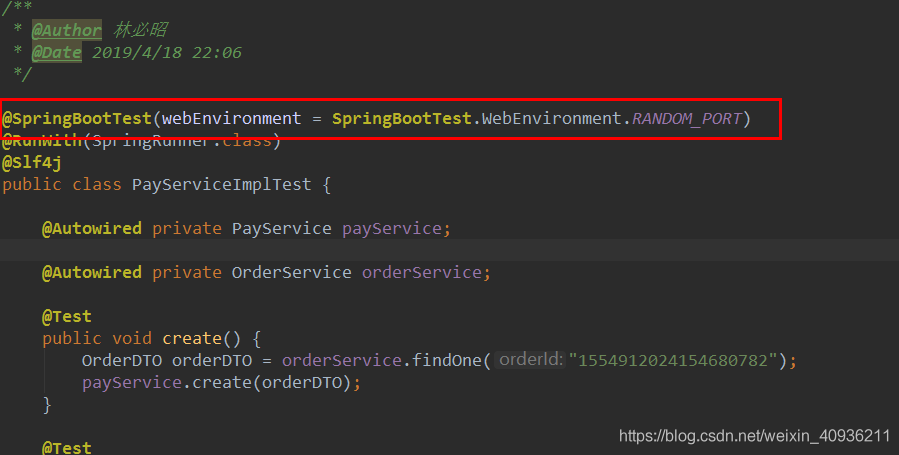
The second way: add webenvironment after springboottest= SpringBootTest.WebEnvironment.RANDOM_ Port means to create a web application context (response based or servlet based). Reason: websocket depends on the startup of Tomcat and other containers. So in the process of testing, we need to really start a Tomcat as a container.

Run after adding, no more error!!

Use of C + + ifstream and error handling

Recently, we are doing the analysis of the text file of prototext: the main reference code is: https://github.com/HoboChen/hoboprototxt

In the process of drawing a cat according to a tiger, some mistakes occurred. The record is as follows:

Errors in use:

1.error: no matching function for call to ‘std::basic_ ifstream<char>::open(const string&)’t.open(fileN)

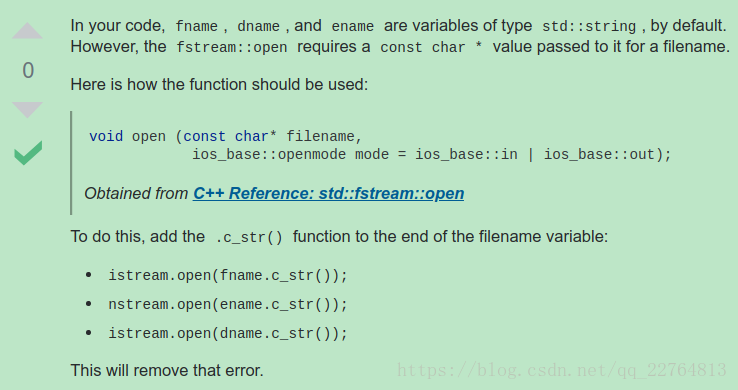
Solution: Reference: https://stackoverflow.com/questions/43105655/no-matching-call-function-error-for-fstream

This mainly means that when the open function is used, the parameter type specified by the function is const char *, but a string type parameter is passed in the process of using it. At this time, the string type parameter needs to be converted to the parameter type required by open. A method proposed in the reference is to use C_ str();


Error in PIP command execution – syntax error: invalid syntax

An error occurred during PIP executing the command. The exception code is as follows:

Traceback (most recent call last):
  File "/usr/bin/pip", line 7, in <module>
    from pip._internal.main import main
  File "/usr/lib/python2.6/site-packages/pip/_internal/main.py", line 13, in <module>
    from pip._internal.cli.autocompletion import autocomplete
  File "/usr/lib/python2.6/site-packages/pip/_internal/cli/autocompletion.py", line 11, in <module>
    from pip._internal.cli.main_parser import create_main_parser
  File "/usr/lib/python2.6/site-packages/pip/_internal/cli/main_parser.py", line 7, in <module>
    from pip._internal.cli import cmdoptions
  File "/usr/lib/python2.6/site-packages/pip/_internal/cli/cmdoptions.py", line 105
    binary_only = FormatControl(set(), {':all:'})
SyntaxError: invalid syntax

Solution:
Add Python installation path to the configuration file:
VI/etc/profile

# python
export PATH=/usr/local/python3/bin:$PATH

Update configuration file
source/etc/profile