resolvent:
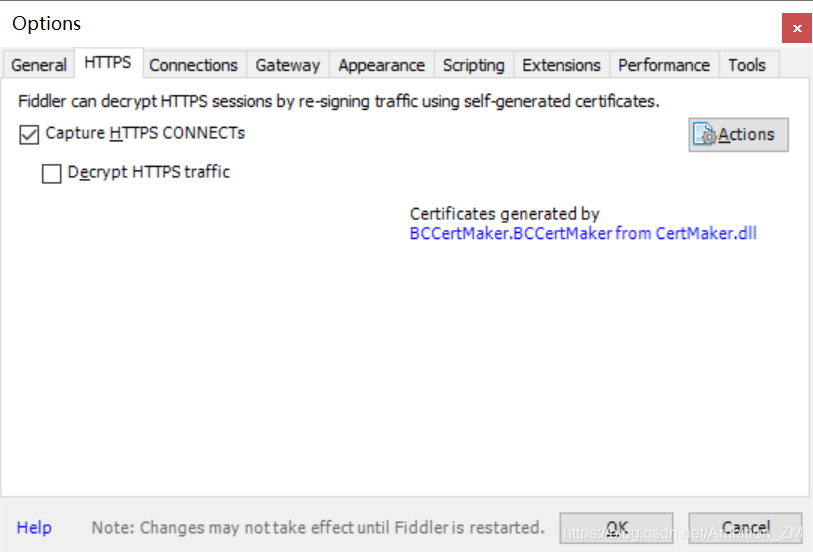
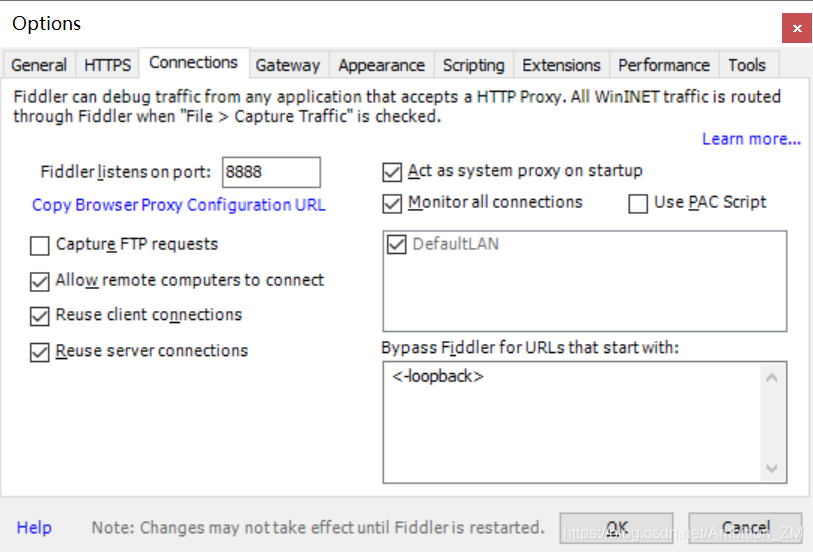
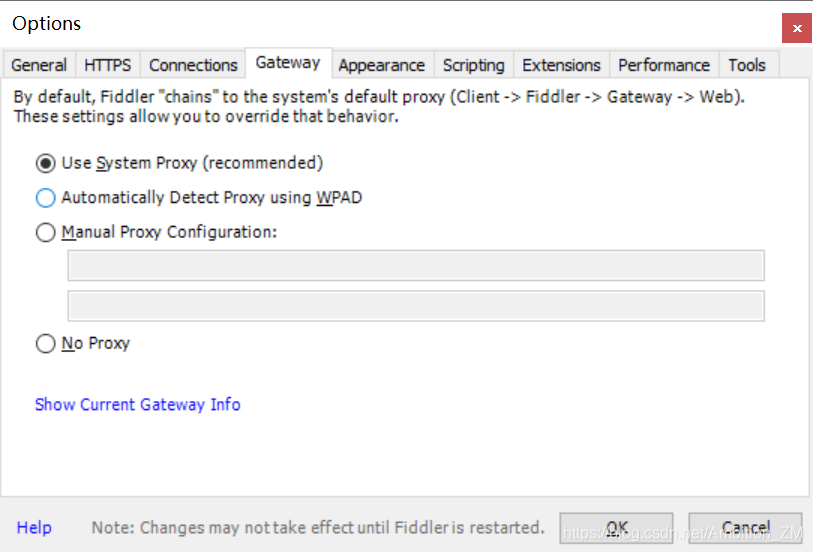
After opening fiddler, click Tools – & gt; In options, set as follows:
(1) HTTPS:
(2) connections
(3) gateway
(4) after setting, click OK
resolvent:
After opening fiddler, click Tools – & gt; In options, set as follows:
(1) HTTPS:
(2) connections
(3) gateway
(4) after setting, click OK
Python script execution requests dependent package warning:
C:\Python36\lib\site-packages\requests\__ init__. py:80: RequestsDependencyWarning: urllib3 (1.26.4) or chardet (4.0.0) doesn’t match a supported version! RequestsDependencyWarning)
Reason: the version of urllib3 (1.26.4) or chardet (4.0.0) in Python library is not compatible
– – – –
let’s talk about the solution first: this prompt means that the current version of urllib3 is 1.26.4 and chardet is 4.0.0__ init__ The version required in the file does not match. Follow the prompts to open the__ init__ File, line 80, you can see that there are detailed regulations for the versions of these two files, which are between the two version numbers. Here, my urllib3 or chardet is higher than the version number specified in the file, so I need to update the requests version to a higher version. Update command to pip install upgrade requests.
Let’s talk about the background of writing this article: last week, I debugged the interface and called the requests method very smoothly. Today, when I suddenly executed this interface again, I reported the initial error. At the beginning, I didn’t know what it meant, so I went to the Internet to search, and then I started to try. For example, someone suggested using the uninstall method to unload urllib and chardet. So I just brain, regardless of all, first to unload the urllib. It’s OK to uninstall it. When I install it again, I can’t understand the error reported. Maybe the requests library can’t run normally. Well, use PIP install third party library name again To install, who knows that my computer has turned on the agent by default when I don’t pay attention to it, so all kinds of errors that failed to install PIP pop up. There is no screenshot. The main idea is that the server host is inconsistent with the proxy host. Because of this mistake, it is another online search solution. Finally, it is found. The answer is concise and accurate. It is precisely located at the problem: the computer agent has been opened. Hurry to shut down the agent So: PIP install urllib3 is successful, PIP install upgrade requests is successful.
Time: it took me about one day to solve this problem, and finally let me solve it. It can also be regarded as a bit of harvest on the way of learning interface automation. I know how to solve this problem in the future.
Perfect, sprinkle flowers
chinese:
Sys.WebForms.PageRequestManagerParserErrorException:
The message received from the server cannot be parsed. The common reason for this error is that response filters, httpmodules, or server tracing will be enabled when the corresponding message is modified by calling response. Write().
Details: error parsing nearby output.
The solution is as follows:
1. If the server control calling the response. Write() method is on the page using the UpdatePanel, you only need to add a node under the UpdatePanel and register the control with postbacktrigger. The code is as follows:
< asp:Button ID= “Button2” runat=“server” OnClick=“Button2_ Click” Text=“Button” />& lt; asp:UpdateProgress ID= “UpdateProgress1” runat=“server”>& lt;/ asp:UpdateProgress> & lt;/ asp:UpdatePanel>
2. However, if the UpdatePanel is used in the master page, the above methods cannot be used to solve the problem. Otherwise, the following error may appear:
A control with ID ‘btnExport’ could not be found for the trigger in UpdatePanel ‘UpdatePanel1’.
This is mainly because updatepanel1 cannot be found & lt; asp:PostBackTrigger ControlID= “btnExport” /> Because we generally do not add this control (btnexport) to the master page( Of course, if a control with ID btnexport is added under the node of the UpdatePanel, there will be no error.)
If there is such an error, what should I do?My solution is to use the page of the control page where the response. Write() method is needed_ Add the following code to the load event:
((ScriptManager) master. Findcontrol (“scriptmanager1”)). Registerpostbackcontrol (btnexport)
// scriptmanager1 is & lt; asp:ScriptManager ID= “ScriptManager1” runat=“server”> & lt;/ asp:ScriptManager> ID of
Reprint address: http://www.cnblogs.com/shenyixin/archive/2012/03/08/2385376.html
In earlier articles, we mentioned the use of Microsoft.mshtml.dll to simulate the example of browser click.
1. The problem of adding references
In general, microsoft.mshtml.dll will be stored in three places in the development environment. So when you add a reference, three seemingly identical items appear. For developers, any one of them will not affect the normal development. But the problem will be after the software release! When running on the client’s machine, it usually prompts that the signature of the file is incorrect and cannot be loaded.
The solution is to delete the current reference to mshtml. Reselect the correct reference. It’s the bottom one. The path is: X: program files, microsoft.net, primary interop assemblies, microsoft.mshtml.dll. Expand the reference dialog box to see the path of the file.
2. Wrong type selection
If the problem is solved, or you choose right from the beginning. Maybe the client is running and reporting system_ Comobject cannot be cast to htmlwindow2class, htmldocumentclass, or other similar errors. It runs on the developer’s machine, but it’s completely normal. At this time, usually we will grab, completely do not know why! In the development environment, using obj. Tostring() to show that htmlxxxxclass gets the result of system_ ComObject.
The solution is very simple. Replace htmlxxxxclass with htmlxxxxx. You can find and replace all the classes following htmlwindow2class, htmldocumentclass, etc. But don’t make your public class XXX public XXX
The above methods are summarized from the actual project development of Visual Studio 2008/2010.
Original text: https://www.cnblogs.com/soundcode/p/9770410.html
About 404
When checking the path and web inf carefully, take a look at the default path of Tomcat and change it to
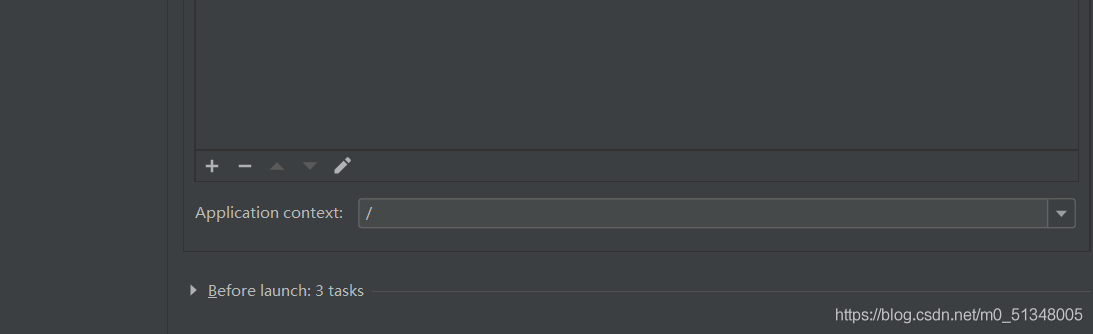
About 505 in refresh to 404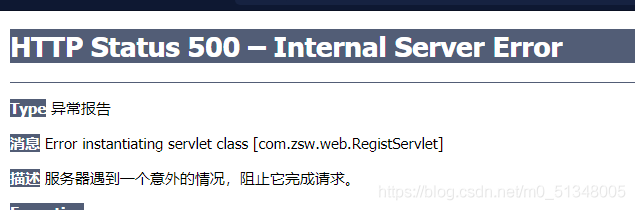
There may be a problem with the jar package. It is recommended to check it carefully and try importing it again
Method failure
was found The connection pool needs to use streams to accept configuration files. I wrote classloder.getsystemclassloder, which is wrong. It should be written as jdbcutils. Class. Getclassloder
instead Classloader.getsystemclassloader is a system class loader (or application class loader), but in Tomcat’s class loader architecture, or ordinary web projects (JavaEE projects, not ordinary Java projects), we write our own business program code and resource files (configuration files are also counted, the code is the code in the SRC directory), When you deploy to the server, you will go to/WEB-INF/classes and/web-infb (you can go and have a look). The contents in these two directories are not loaded by the system class loader, but a webappclassloader (which can be printed) System.out.println(JdbcUtils.class.getClassLoader());), So you can’t
use that
When I encounter a problem, I just turn off the local ntpd service, because the ntpd service conflicts with ntpdate
systemctl stop ntpd
Problems:
problems in pychar debugging:
error:
systemerror: execution of module h5py.utils raised unreported exception
Problem solving
pip install --user --upgrade numpy
The problem has been successfully solved, possibly due to the module version
**
After node.js is installed, use the instruction node version in vscode to show that it is not an external or internal instruction. The solution is as follows:
**
Method 1: restart vscode, and then re-enter node — version
(2) right click the properties
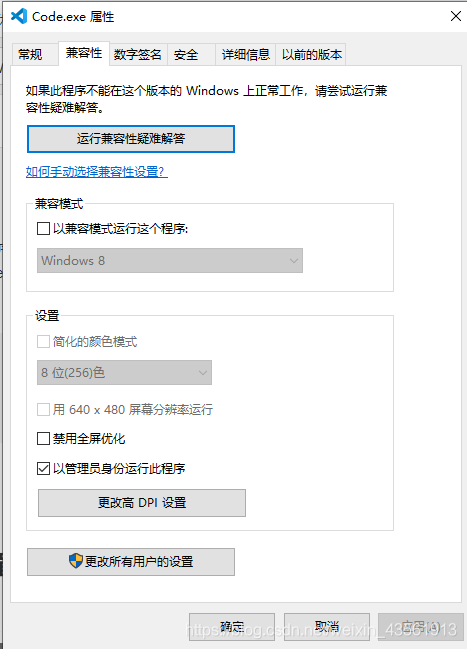
(3) after opening the compatibility, select to run the program as an administrator and click OK
(4) in the last step, restart vscode and re-enter node — version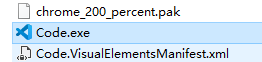
Annotation @ jsonformat is mainly the conversion of time format from background to foreground
Annotation @ dataformat is mainly the conversion of time format from front to back to background
@DateTimeFormat(pattern = "yyyy-MM-dd")
@JsonFormat(pattern = "yyyy-MM-dd HH:mm:ss",timezone="GMT+8")
private Date symstarttime;

@DateTimeFormat(pattern = "yyyy-MM-dd")
@JsonFormat(pattern = "yyyy-MM-dd HH:mm:ss",timezone="GMT+8")
private Date symendtime;
The solution is to create a soft link to the real directory
For example:
here, take creating/data in the root directory as an example, and other directory names are the same
First, create a data directory anywhere you want, such as/users/baixxhao/downloads/work/data. Don’t imitate me directly. Remember to change the user name.
2. Open the terminal (Command + space, then enter the terminal, enter)
2. Input sudo VIM/etc/synthetic.conf from the command line, Enter, enter a similar text editing page, do not close the window!!! Press the letter I, pay attention to the use of English characters throughout the operation, do not use pinyin input method (including all the following, are in English)
3, enter the following line (note that the middle is tab, not spaces)!!! Pay attention to the following parameters, use your own real directory
data /Users/baixxhao/Downloads/work/data
4. Press ESC, press the English colon (Shift + colon), enter WQ, press return, that is, save and exit
5. Then restart, and you will find that/data has
6. If it is successful, like it?
look here
1. MKDIR/users/baixxhao/downloads/work/data
2. Sudo VIM/etc/synthetic. Conf
3
data /Users/baixxhao/Downloads/work/data
4. Restart
5
When R language library is installed, some packages will be brought with it, which can be called directly. However, not all expansion packages come with them. Some packages need to be installed separately. For example, “mvtnorm” needs to be downloaded and installed manually
the following two methods have been tried, but the second one is easier to use. For the official documentation of mvtnorm, see the link: mvtnorm
1. Use the command to install
Open the command line interface (executable program exe) under the path of R, and several interfaces can be used, such as r.exe and rgui.exe. It is recommended to use rgui.exe because it has GUI interface, which is more convenient to operate
then enter the following command:
install.package("mvtnorm")
Choose the image source of cran, it’s better to choose the domestic one, so that the download speed is not too slow
select package – “install package –” and then select the package you want to install in the pop-up box. Note that package names are case sensitive. The reason why I choose this installation method is that I don’t need to search for the matching expansion package on the image URL. It’s easier than the first command line installation
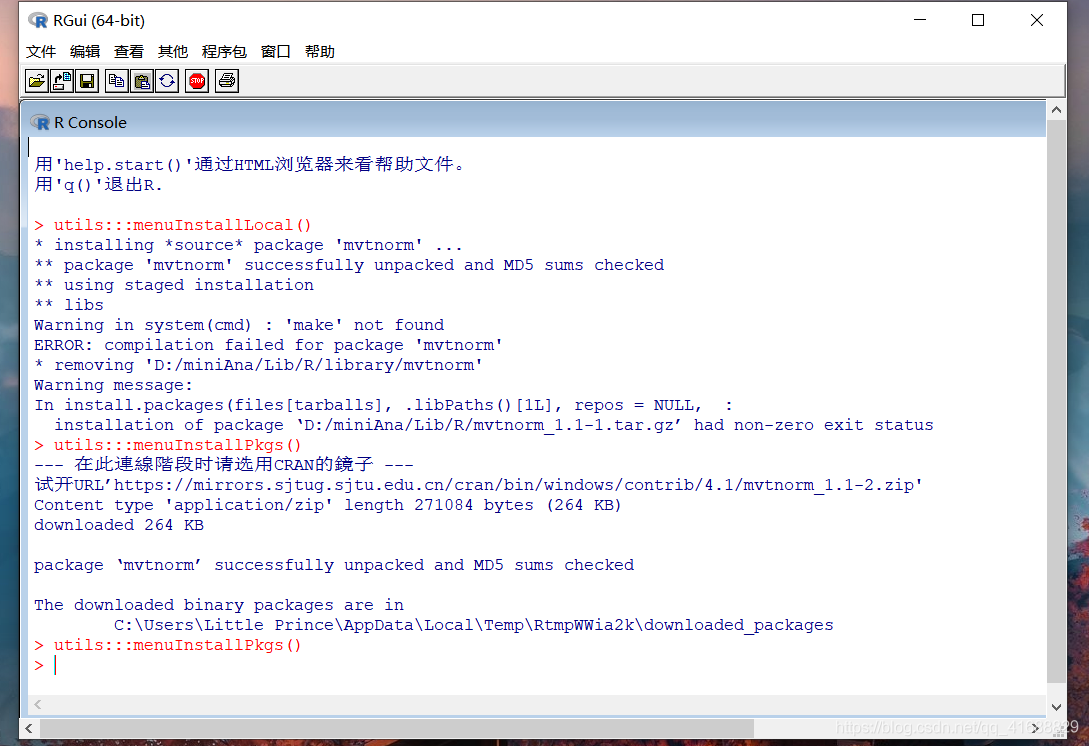
after the installation, the prompt of package: mvtnorm “successfully unpacked and MD5 sums checked” will appear, and the installation path of binary package will be displayed
to check whether the installation is successful, you can enter the
from rpy2.robjects.packages import importr
mvt=importr('mvtnorm')
You can check whether the installation is successful. If there is no display, the mvtnorm package is successfully installed. If: the R package “mvtnorm” is not installed.
3. References
R realization method of multivariate normal distribution test
Zookeeper connection timeout problem, and refused to connect to solve the problem
Code exception
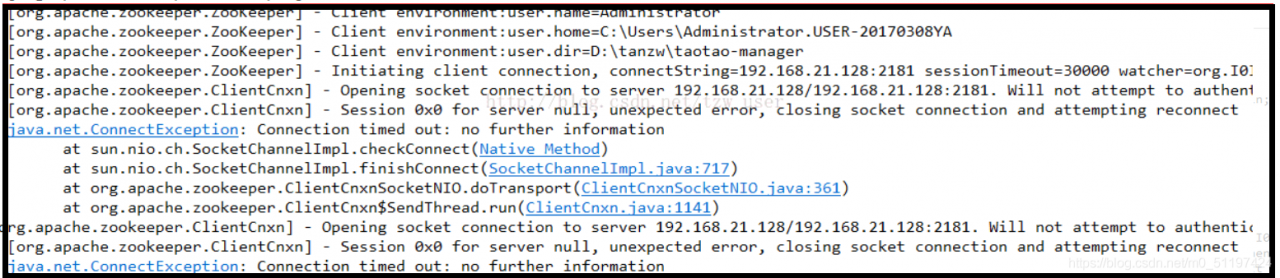 processing method
1. Check and close firewall
2. Check VIM/etc/hosts
port conflict
delete 127.0.0.1 in the first line