Author Archives: Robins

Anaconda Matplotlib drawing Chinese garbled solution

I found a lot of methods to solve the Chinese garbled code of Matplotlib in Anaconda on the Internet. I feel it is not concise enough. Now let’s make a summary. Two steps, one is to find the font, the other is to set it.

1. Font

The system font file is usually saved in the   C:\Windows\Fonts

Open copy any font:

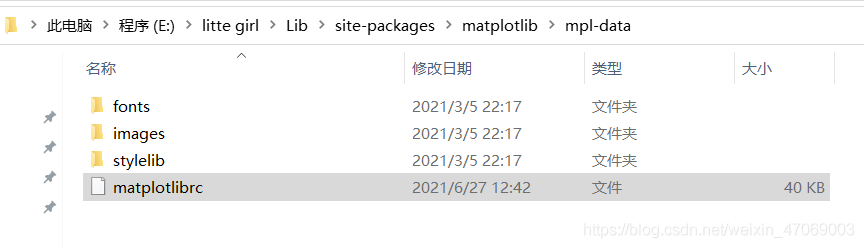
Save it in the TTF folder. Lu Jin’s name is e::’anaconda ‘,’lib’,’site-packages’,’matplotlib ‘,’mpl-data’,’fonts’,’ttf ‘

You can change the file name of Anaconda installed on your computer, and the following path is the same.

So the font is chosen.

2. Setting

Go back to MPL data and open the matplotlibrc file: e:// Anaconda/lib/site packages/Matplotlib/MPL data

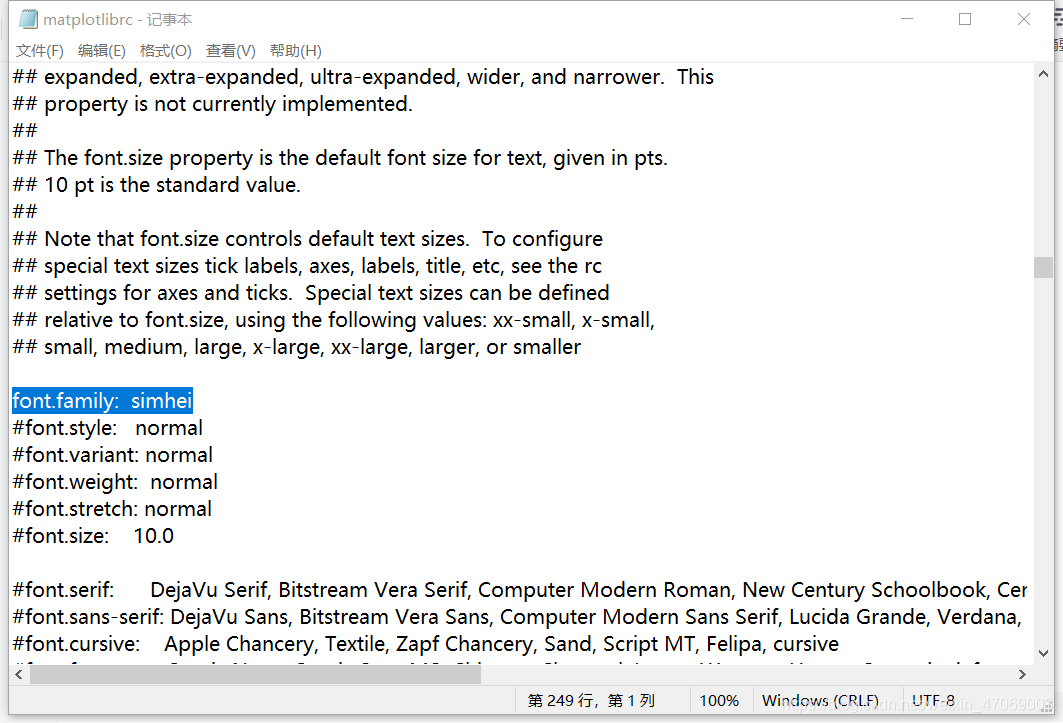
Notepad shows about 249 lines, the upper middle part of the file:

Remove the comment in front of font. Family, and then change the following name to the newly copied font name: simhei.

Save with Ctrl + s and reopen the compiler.

Solve the problem of Tomcat console and HTML garbled

1. Garbled console

This is because the default encoding of windows’s CMD is GBK, while Tomcat is UTF-8. Of course, there will be garbled codes. But for this garbled code, we just need to make the encoding format printed on the console GBK.

Modify the logging.properties configuration
and add it in the logging.properties configuration file under conf

java.util.logging.ConsoleHandler.encoding = GBK

Restart Tomcat to see that the console output log is normal

2. HTML page garbled

Modifying the web.xml file in Tomcat

<servlet>
        <servlet-name>default</servlet-name>
        <servlet-class>org.apache.catalina.servlets.DefaultServlet</servlet-class>
        <init-param>
            <param-name>debug</param-name>
            <param-value>0</param-value>
        </init-param>
		<init-param>
        	<param-name>fileEncoding</param-name>
        	<param-value>UTF-8</param-value>
        </init-param>
        <init-param>
            <param-name>listings</param-name>
            <param-value>false</param-value>
        </init-param>
        <load-on-startup>1</load-on-startup>
    </servlet>

I’ve also read many articles about modifying server.xml and catalina.bat, but they didn’t work for me. I tried to restore all Tomcat configurations, only modifying web.xml here, and finally determined that I only need to modify here

If you don’t succeed according to me, try to modify others!

[Solved] AttributeError: ‘Manager‘ object has no attribute ‘get_by_natural_key‘

Problem description


E:\SweetYaya\MyProj03>python manage.py createsuperuser
Identifier: 12
Traceback (most recent call last):
  File "manage.py", line 22, in <module>
    main()
  File "manage.py", line 18, in main
    execute_from_command_line(sys.argv)
  File "D:\Program Files\Python36\lib\site-packages\django\core\management\__init__.py", line 419, in execute_from_command_line
    utility.execute()
  File "D:\Program Files\Python36\lib\site-packages\django\core\management\__init__.py", line 413, in execute
    self.fetch_command(subcommand).run_from_argv(self.argv)
  File "D:\Program Files\Python36\lib\site-packages\django\core\management\base.py", line 354, in run_from_argv
    self.execute(*args, **cmd_options)
  File "D:\Program Files\Python36\lib\site-packages\django\contrib\auth\management\commands\createsuperuser.py", line 79, in execute
    return super().execute(*args, **options)
  File "D:\Program Files\Python36\lib\site-packages\django\core\management\base.py", line 398, in execute
    output = self.handle(*args, **options)
  File "D:\Program Files\Python36\lib\site-packages\django\contrib\auth\management\commands\createsuperuser.py", line 113, in handle
    error_msg = self._validate_username(username, verbose_field_name, database)
  File "D:\Program Files\Python36\lib\site-packages\django\contrib\auth\management\commands\createsuperuser.py", line 234, in _validate_username
    self.UserModel._default_manager.db_manager(database).get_by_natural_key(username)
AttributeError: 'Manager' object has no attribute 'get_by_natural_key'

terms of settlement


Add to the defined model

class SysUsers(models.Model):
    
	...
	# add
    objects = UserManager()
	
	...

How to display the Chinese name and installation time of installed software in snmp4j walk Windows


import java.io.IOException;
import java.util.Calendar;
import java.util.Date;
import java.util.List;
import java.util.Map;
import java.util.TreeMap;

import org.snmp4j.CommunityTarget;
import org.snmp4j.Snmp;
import org.snmp4j.Target;
import org.snmp4j.TransportMapping;
import org.snmp4j.mp.SnmpConstants;
import org.snmp4j.smi.Address;
import org.snmp4j.smi.GenericAddress;
import org.snmp4j.smi.OID;
import org.snmp4j.smi.OctetString;
import org.snmp4j.smi.VariableBinding;
import org.snmp4j.transport.DefaultUdpTransportMapping;
import org.snmp4j.util.DefaultPDUFactory;
import org.snmp4j.util.TreeEvent;
import org.snmp4j.util.TreeUtils;

public class SnmpWalk2 {

	private static int[] octetStringToBytes(String value_ipar) {
		// ---------------------------
		// Split string into its parts
		// ---------------------------
		String[] bytes;
		bytes = value_ipar.split("[^0-9A-Fa-f]");

		// -----------------
		// Initialize result
		// -----------------
		int[] result;
		result = new int[bytes.length];

		// -------------
		// Convert bytes
		// -------------
		int counter;
		for (counter = 0; counter < bytes.length; counter++)
			result[counter] = Integer.parseInt(bytes[counter], 16);

		// ----
		// Done
		// ----
		return (result);

	}
	// octetString 转 Date

	private static Date octetStringToDate(String value_ipar) throws Exception {
		// ---------------------------
		// Convert into array of bytes
		// ---------------------------
		int[] bytes;
		bytes = octetStringToBytes(value_ipar);

		// -----------------------
		// Maybe nothing specified
		// -----------------------
		if (bytes[0] == 0)
			return (null);

		// ------------------
		// Extract parameters
		// ------------------
		int year;
		int month;
		int day;
		int hour;
		int minute;
		int second;
		int deci_sec = 0;
		int offset = 0;
		year = (bytes[0] * 256) + bytes[1];
		month = bytes[2];
		day = bytes[3];
		hour = bytes[4];
		minute = bytes[5];
		second = bytes[6];
		if (bytes.length >= 8)
			deci_sec = bytes[7];
		if (bytes.length >= 10) {
			offset = bytes[9] * 60;
			if (bytes.length >= 11)
				offset += bytes[10];
			if (bytes[8] == '-')
				offset = -offset;
			offset *= 60 * 1000;
		}

		// ------------------------------------
		// Get current DST and time zone offset
		// ------------------------------------
		Calendar calendar;
		int my_dst;
		int my_zone;
		calendar = Calendar.getInstance();
		my_dst = calendar.get(Calendar.DST_OFFSET);
		my_zone = calendar.get(Calendar.ZONE_OFFSET);

		// ----------------------------------
		// Compose result
		// Month to be converted into 0-based
		// ----------------------------------
		calendar.clear();
		calendar.set(Calendar.YEAR, year);
		calendar.set(Calendar.MONTH, month - 1);
		calendar.set(Calendar.DAY_OF_MONTH, day);
		calendar.set(Calendar.HOUR_OF_DAY, hour);
		calendar.set(Calendar.MINUTE, minute);
		calendar.set(Calendar.SECOND, second);
		calendar.set(Calendar.MILLISECOND, deci_sec * 100);

		// ---------
		// Reset DST
		// ---------
		calendar.add(Calendar.MILLISECOND, my_dst);

		// -----------------------------------------------------------------------------------
		// If the offset is set, we have to convert the time using the offset of
		// our time zone
		// -----------------------------------------------------------------------------------
		if (offset != 0) {
			int delta;
			delta = my_zone - offset;
			calendar.add(Calendar.MILLISECOND, delta);
		}

		// -------------
		// Return result
		// -------------
		return (calendar.getTime());

	}

	// octetString 转 中文

	private static String getChinese(String variable) {
		String result = variable;

		if (!variable.contains(":")) {
			return result;
		}

		if (result.equals(variable)) {
			try {

				String[] temps = variable.split(":");
				byte[] bs = new byte[temps.length];
				for (int i = 0; i < temps.length; i++)
					bs[i] = (byte) Integer.parseInt(temps[i], 16);
				result = new String(bs, "gbk");
			} catch (Exception ex) {

			}
		}
		return result;

	}

	public static void main(String[] args) throws Exception {
		CommunityTarget target = new CommunityTarget();
		target.setCommunity(new OctetString("public"));
		target.setAddress(GenericAddress.parse("udp:127.0.0.1/161")); // supply your own IP and port
		target.setRetries(2);
		target.setTimeout(1500);
		target.setVersion(SnmpConstants.version2c);

		Map<String, String> result = doWalk(".1.3.6.1.2.1.25.6.3.1", target); // ifTable, mib-2 interfaces

		for (Map.Entry<String, String> entry : result.entrySet()) {

			if (entry.getKey().startsWith(".1.3.6.1.2.1.25.6.3.1.2")) {
				System.out.println("name" + entry.getKey().replace(".1.3.6.1.2.1.25.6.3.1.2", "") + ": "
						+ getChinese(entry.getValue()));
			}
			if (entry.getKey().startsWith(".1.3.6.1.2.1.25.6.3.1.4")) {
				System.out.println("type" + entry.getKey().replace(".1.3.6.1.2.1.25.6.3.1.4", "") + ": "
						+ getChinese(entry.getValue()));
			}
			if (entry.getKey().startsWith(".1.3.6.1.2.1.25.6.3.1.5")) {
				System.out.println("datetime" + entry.getKey().replace(".1.3.6.1.2.1.25.6.3.1.5", "") + ": "
						+ octetStringToDate(entry.getValue()));
			}
		}
	}

	public static Map<String, String> doWalk(String tableOid, Target target) throws IOException {
		Map<String, String> result = new TreeMap<>();
		TransportMapping<?extends Address> transport = new DefaultUdpTransportMapping();
		Snmp snmp = new Snmp(transport);
		transport.listen();

		TreeUtils treeUtils = new TreeUtils(snmp, new DefaultPDUFactory());
		List<TreeEvent> events = treeUtils.getSubtree(target, new OID(tableOid));
		if (events == null || events.size() == 0) {
			System.out.println("Error: Unable to read table...");
			return result;
		}

		for (TreeEvent event : events) {
			if (event == null) {
				continue;
			}
			if (event.isError()) {
				System.out.println("Error: table OID [" + tableOid + "] " + event.getErrorMessage());
				continue;
			}

			VariableBinding[] varBindings = event.getVariableBindings();
			if (varBindings == null || varBindings.length == 0) {
				continue;
			}
			for (VariableBinding varBinding : varBindings) {
				if (varBinding == null) {
					continue;
				}

				result.put("." + varBinding.getOid().toString(), varBinding.getVariable().toString());
			}

		}
		snmp.close();

		return result;
	}

}

[Solved] The number of rows returned by the mybatis UPDATE statement is always 1 or useaffectedrows = true

The number of rows returned by the mybatis UPDATE statement is always 1 or useaffectedrows = true

Problem solving explanation useaffectedrows = true

solve the problem

     This is because the database url connection is missing useAffectedRows=true

 The problem is solved here, but I'll explain it later useAffectedRows=true.

Explain useaffectedrows = true

 useAffectedRows defaults to false, and the value returned is the number of rows matched.
    useAffectedRows = true, the value returned is the number of rows affected.

Python netmiko library Cisco telnet switch automation

import time
from netmiko import *
import sys
import os
import getpass

# Read the ip address in the iplist.txt file
iplist = open('iplist_cisco.txt', 'r', encoding='ascii')
ip_addr = iplist.readlines()
iplist.close()

cmdlist = open('cmdlist_cisco.txt', 'r', encoding='ascii')
cmd_line = cmdlist.readlines()
cmdlist.close()

# Iterate through the ip_addr list to connect to the ip
for ip in iter(ip_addr):
    print(ip)
    try:
        S5130 = {
            'device_type': 'cisco_ios_telnet',
            'ip': ip,
            'username': 'cisco',
            'password': 'cisco',
        }
        net_connect = ConnectHandler(**S5130)

        for cmd in iter(cmd_line):
            cmd_result = net_connect.send_command(cmd)
            print('-----------------------------------------------------------------')
            print(cmd)
            print(cmd_result)
            print('-----------------------------------------------------------------')
            print('')
        net_connect.disconnect()
    except (EOFError, NetMikoTimeoutException):
        print('Can not connect to Device')
    except (EOFError, NetMikoAuthenticationException):
        print('username/password wrong!')

Full screen scrolling by Vue + Vue awesomeswiper

1. Install Vue awesomeswiper in Vue

"vue-awesome-swiper": "^3.1.3",

2. Main.js

import VueAwesomeSwiper from 'vue-awesome-swiper';


Vue.use(VueAwesomeSwiper)

3. The following code block is introduced into the. Vue file that needs to slide the page

<template>
    <div>
        <swiper id="swiperBox" :options="swiperOption" ref="mySwiper">
            <swiper-slide class="swiper-slide" v-for="(item, index) in list":key="index">
                <div class="page">
                  <h3>{{item}}</h3>
                </div>
            </swiper-slide>
        </swiper>
    </div>
</template>

<script>
import { swiper, swiperSlide } from "vue-awesome-swiper";
export default {
    data(){
        return{
            list:[1,2,3,4],
            swiperOption: {
                notNextTick: true, //if notNextTick is set to true, the component will not instantiate the swiper via NextTick, which means you can get the swiper object in the first place, if you need to just load the swiper object to do something, then this property must be true
                direction: "vertical", //move in vertical direction
                grabCursor: true, //the pointer will turn into palm shape when the mouse covers the swiper, the pointer will turn into grab hand shape when dragging
                setWrapperSize: true, //Swiper use flexbox layout (display: flex), turn on this setting will add a width or height equal to the sum of the slides on the Wrapper, may need to use in browsers that do not have good support for flexbox layout.
                autoHeight: true, //autoHeight. When set to true, the wrapper and container will change with the height of the current slide
                slidesPerView: 1, //Set the number of slides the slider container can display at the same time (carousel mode). Can be set to a number (can be decimal, decimal cannot be looped), or 'auto' will automatically set the number according to the width of the slides. loop mode if set to 'auto' also need to set another parameter loopedSlides.
                mousewheel: true, //Enable mouse wheel to control Swiper switching. You can set the mouse option, default value false
                mousewheelControl: true, //same as above
                height: window.innerHeight, // height setting, take up the full height of the device
                resistanceRatio: 0, // resistance rate. The ratio of the size of the edge resistance. The smaller the value the greater the resistance the more difficult it is to drag the slide away from the edge, 0 when it is completely impossible to drag away. The business needs
                observeParents: true, //Apply observe to the Swiper's parent element. When Swiper's parent element changes, for example window.resize, Swiper updates
            },
        }
    },
    components:{
        swiper,
        swiperSlide
    },
    computed: {
        swiper() {
            return this.$refs.mySwiper.swiper;
        }
    },
}
</script>

[Solved] com.alibaba.nacos.api.exception.NacosException: failed to req API

Problem statement

When using Nacos as spring’s test center, the following error occurred when enabling the project

Nacos cluster cannot connect to com.alibaba.nacos.api.exception.NacosException: failed to req API:/api//nacos/v1/ns/ins

Solution

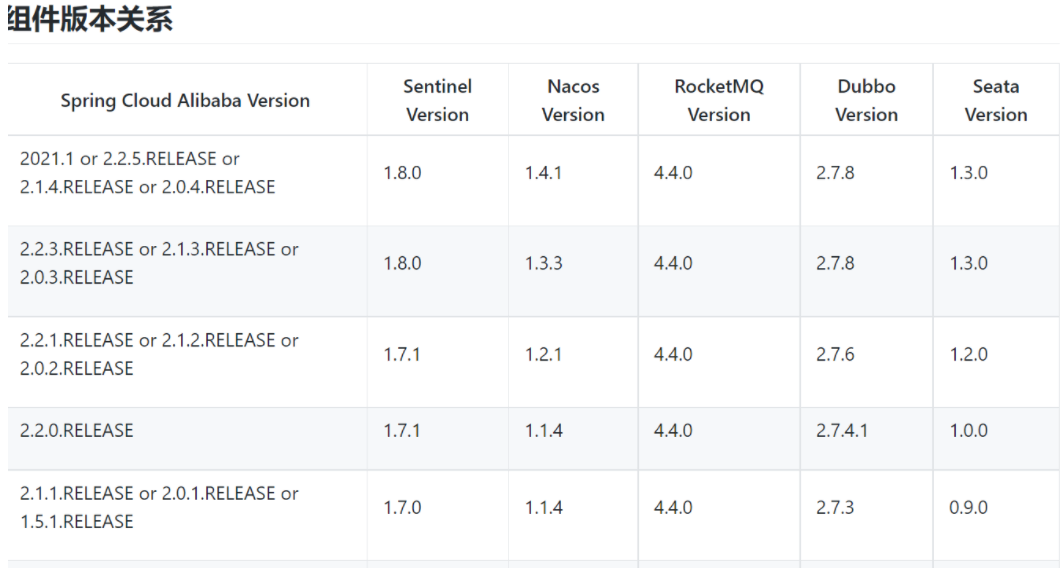
Due to the inconsistency between the versions of spring cloud – Alibaba and Nacos, you can download the appropriate version according to the version provided on the official website

The solution of no such file or directory and cannot load native module running error of python3 pyinstaller after packaging


use  Pyinstaller is often used to package python3 programs   No such file or directory   Or cannot load native module error is because the required file is not entered into the final execution file. In this case, the parameter is needed when using pyinstaller  — Add binary and add code in the entry file function to solve the problem

Example 1. No such file or directory error   — Add binary parameter solution

Package the portal Python file:

pyinstaller -F -w test.py

Run the packaged executable file:

[root@0109c795032d src]# ./dist/test
Traceback (most recent call last):
  File "test.py", line 19, in <module>
    from salt.client.ssh import ssh_py_shim
  File "<frozen importlib._bootstrap>", line 1007, in _find_and_load
  File "<frozen importlib._bootstrap>", line 986, in _find_and_load_unlocked
  File "<frozen importlib._bootstrap>", line 680, in _load_unlocked
  File "PyInstaller/test/pyimod03_importers.py", line 540, in exec_module
  File "salt/client/ssh/__init__.py", line 205, in <module>
  File "salt/utils/files.py", line 396, in fopen
FileNotFoundError: [Errno 2] No such file or directory: '/tmp/_MEIudOUhL/salt/client/ssh/ssh_py_shim.pyc'
[5034] Failed to execute script test

By reporting an error, you can see that the file is missing, and it will be increased when pyinstall  — Add binary parameter, as follows:

pyinstaller -F -w test.py \
--add-binary="/opt/python3/lib/python*/site-packages/salt/client/ssh/ssh_py_shim.py:salt/client/ssh"

Parameter explanation:

–The syntax of add binary is: – add binary  & lt; SRC; DEST or SRC:DEST>
SRC is the packaged executable file. The missing file is in the local location,

Dest is the location of the directory that needs to be dynamically copied to when running the executable file. Dest is the relative directory,

The absolute path of the packaged execution file is from  / tmp/_ MEIudOUhL/   It started here_ Meiudouhl is generated automatically, different every time

Dest just needs to write the relative directory. For example, here is   salt/client/ssh

The final absolute path is  / tmp/_ MEIudOUhL/salt/client/ssh
The separator of SRC and dest is colon in Linux and semicolon in windows;

Adding this parameter means that the   ssh_ py_ The shim.py file is packaged into an executable file and dynamically released to a relative directory at runtime   Salt/client/SSH, so as to solve the problem that the error prompt can not find the file

Note:

The error in the error prompt cannot be found   ssh_ py_ Shim. PyC, but the   ssh_ py_ shim.py

This is because salt/client/SSH is the penultimate layer in the whole function call stack/__ init__. Py has the following code:

if not is_windows():
    shim_file = os.path.join(os.path.dirname(__file__), "ssh_py_shim.py")
    if not os.path.exists(shim_file):
        # On esky builds we only have the .pyc file
        shim_file += "c"
    with salt.utils.files.fopen(shim_file) as ssh_py_shim:
        SSH_PY_SHIM = ssh_py_shim.read()

You can see that   ssh_ py_ The shim. Py file is also available, so just find it   ssh_ py_ Shim.py or   ssh_ py_ Shim.pyc in  ” Salt/utils/files. Py “, line 396   No file not found error occurs in fopen function

Example of official website:

https://pyinstaller.readthedocs.io/en/stable/usage.html#shortening -the-command

There are a number of them  — Examples of using Add binary and other related parameters

Example 2. Cannot load native module error forced introduction solution

The error of pyinstall after packing and running is as follows:

  File "test/test.py", line 41, in init_test
  File "salt/transport/client.py", line 27, in factory
  File "salt/utils/asynchronous.py", line 70, in __init__
  File "salt/transport/client.py", line 131, in factory
  File "<frozen importlib._bootstrap>", line 1007, in _find_and_load
  File "<frozen importlib._bootstrap>", line 986, in _find_and_load_unlocked
  File "<frozen importlib._bootstrap>", line 680, in _load_unlocked
  File "PyInstaller/test/pyimod03_importers.py", line 540, in exec_module
  File "salt/transport/zeromq.py", line 23, in <module>
  File "<frozen importlib._bootstrap>", line 1007, in _find_and_load
  File "<frozen importlib._bootstrap>", line 986, in _find_and_load_unlocked
  File "<frozen importlib._bootstrap>", line 680, in _load_unlocked
  File "PyInstaller/test/pyimod03_importers.py", line 540, in exec_module
  File "salt/crypt.py", line 65, in <module>
  File "<frozen importlib._bootstrap>", line 1007, in _find_and_load
  File "<frozen importlib._bootstrap>", line 986, in _find_and_load_unlocked
  File "<frozen importlib._bootstrap>", line 680, in _load_unlocked
  File "PyInstaller/test/pyimod03_importers.py", line 540, in exec_module
  File "Cryptodome/Cipher/__init__.py", line 27, in <module>
  File "<frozen importlib._bootstrap>", line 1007, in _find_and_load
  File "<frozen importlib._bootstrap>", line 986, in _find_and_load_unlocked
  File "<frozen importlib._bootstrap>", line 680, in _load_unlocked
  File "PyInstaller/test/pyimod03_importers.py", line 540, in exec_module
  File "Cryptodome/Cipher/_mode_ecb.py", line 35, in <module>
  File "Cryptodome/Util/_raw_api.py", line 297, in load_pycryptodome_raw_lib
OSError: Cannot load native module 'Cryptodome.Cipher._raw_ecb': Trying '_raw_ecb.cpython-39-x86_64-linux-gnu.so': cannot load library '/tmp/_MEIPh0VXD/Cryptodome/Util/../Cipher/_raw_ecb.cpython-39-x86_64-linux-gnu.so': /tmp/_MEIPh0VXD/Cryptodome/Util/../Cipher/_raw_ecb.cpython-39-x86_64-linux-gnu.so: cannot open shared object file: No such file or directory.  Additionally, ctypes.util.find_library() did not manage to locate a library called '/tmp/_MEIPh0VXD/Cryptodome/Util/../Cipher/_raw_ecb.cpython-39-x86_64-linux-gnu.so', Trying '_raw_ecb.abi3.so': cannot load library '/tmp/_MEIPh0VXD/Cryptodome/Util/../Cipher/_raw_ecb.abi3.so': /tmp/_MEIPh0VXD/Cryptodome/Util/../Cipher/_raw_ecb.abi3.so: cannot open shared object file: No such file or directory.  Additionally, ctypes.util.find_library() did not manage to locate a library called '/tmp/_MEIPh0VXD/Cryptodome/Util/../Cipher/_raw_ecb.abi3.so', Trying '_raw_ecb.so': cannot load library '/tmp/_MEIPh0VXD/Cryptodome/Util/../Cipher/_raw_ecb.so': /tmp/_MEIPh0VXD/Cryptodome/Util/../Cipher/_raw_ecb.so: cannot open shared object file: No such file or directory.  Additionally, ctypes.util.find_library() did not manage to locate a library called '/tmp/_MEIPh0VXD/Cryptodome/Util/../Cipher/_raw_ecb.so'

This error also started missing files, missing  _raw_ecb.cpython-39-x86_ 64 Linux gnu.so or  _raw_ecb.so   First, add binary

pyinstaller -F -w test.py \
--add-binary="/opt/python3/lib/python*/site-packages/Crypto/Cipher/_raw_ecb.cpython-39-x86_64-linux-gnu.so:Cryptodome/Util/../Cipher"

When running in package or reporting this error, repeatedly check that the source file destination address is correct,

At this point   Copy references in later projects _raw_ECB error code to the entry function

Let pyinstaller know that I can use it  _raw_ecb.cpython-39-x86_64-linux-gnu.so to force the package of this so file

The code is as follows:

if __name__ == "__main__":
    try:
        ip = "127.0.0.1"
        port = 1234

        config = {
            'id': 'root',
            'log_level': 'debug',
            'master_ip': ip ,
            'master_port': port,
            'auth_timeout': 5,
            'auth_tries': 1,
            'master_uri': f'tcp://{ip}:{port}'
        }

        salt.transport.client.ReqChannel.factory(config, crypt='clear')
    except Exception as e:
        pass

Package with pyinstall

pyinstaller -F -w test.py \
--add-binary="/opt/python3/lib/python*/site-packages/Crypto/Cipher/_raw_ecb.cpython-39-x86_64-linux-gnu.so:Cryptodome/Util/../Cipher"

Not at this time  — Add binary should be OK, not tested

Summary

In case of errors, the general idea is to use the function call stack to push backward,

If the file cannot be found, it can be used
1. — add binary parameter

2. Compulsory introduction

To solve the problem

Two methods of fixing WPF menu bar after scrolling to the top

Recently, there is a requirement in the project:

The menu bar is fixed at the top after scrolling to the top.. This is quite common on the mobile end

Look at the effect:

Let’s take a look at the code. There are not many codes

The first method is as follows:

Write a menu as like as two peas, and hide it on top of the window. When the menu is rolled up to the top, it will be displayed, otherwise hidden. br>

Mainwindow1.xaml is as follows:

<Window x:Class="wpfcore.MainWindow1"
        xmlns="http://schemas.microsoft.com/winfx/2006/xaml/presentation"
        xmlns:x="http://schemas.microsoft.com/winfx/2006/xaml"
        xmlns:d="http://schemas.microsoft.com/expression/blend/2008"
        xmlns:mc="http://schemas.openxmlformats.org/markup-compatibility/2006"
        xmlns:local="clr-namespace:wpfcore"
        mc:Ignorable="d"
        Title="MainWindow1" Height="450" Width="800">
    <Grid>
        <ScrollViewer ScrollChanged="ScrollViewer_ScrollChanged">
            <Grid>
                <Grid.RowDefinitions>
                    <RowDefinition Height="200"/>
                    <RowDefinition Height="auto"/>
                    <RowDefinition Height="*"/>
                </Grid.RowDefinitions>
                <Grid Grid.Row="0" x:Name="banner">
                    <Image Source="D:\bizhi\123\2-9.jpg" Stretch="UniformToFill" HorizontalAlignment="Center" VerticalAlignment="Center"/>
                    <TextBlock HorizontalAlignment="Center" VerticalAlignment="Center" FontSize="30" Foreground="White" Text="这是顶部Banner"/>
                </Grid>
                <StackPanel Grid.Row="1" Panel.ZIndex="100" x:Name="menu" Orientation="Horizontal" TextBlock.FontSize="18" Background="LightBlue">
                    <TextBlock Text="Home" Margin="10"></TextBlock>
                    <TextBlock Text="Editor" Margin="10"></TextBlock>
                    <TextBlock Text="Viewer" Margin="10"></TextBlock>
                    <TextBlock Text="Debug" Margin="10"></TextBlock>
                    <TextBlock Text="WPF UI" Margin="10"></TextBlock>
                </StackPanel>
                <Border Height="1000" Grid.Row="22">
                    <Border.Background>
                        <LinearGradientBrush>
                            <GradientStop Color="Red" Offset="0"/>
                            <GradientStop Color="Green" Offset="0.5"/>
                            <GradientStop Color="Blue" Offset="1"/>
                        </LinearGradientBrush>
                    </Border.Background>
                    <TextBlock HorizontalAlignment="Center" VerticalAlignment="Center" FontSize="30" Foreground="White" Text="这是顶部Banner"/>
                </Border>
            </Grid>
        </ScrollViewer>
        <StackPanel x:Name="topMenu" VerticalAlignment="Top" Visibility="Hidden" Orientation="Horizontal" TextBlock.FontSize="18" Background="LightBlue">
            <TextBlock Text="Home" Margin="10"></TextBlock>
             <TextBlock Text="Editor" Margin="10"></TextBlock>
             <TextBlock Text="Viewer" Margin="10"></TextBlock>
             <TextBlock Text="Debug" Margin="10"></TextBlock>
            <TextBlock Text="WPF UI" Margin="10"></TextBlock>
        </StackPanel>
    </Grid>
</Window>

Mainwindow1.cs Code:

using System.Windows;


namespace wpfcore
{
    public partial class MainWindow1 : Window
    {
        public MainWindow1()
        {
            InitializeComponent();
        }
        private void ScrollViewer_ScrollChanged(object sender, System.Windows.Controls.ScrollChangedEventArgs e)
        {
            if (e.VerticalOffset > banner.ActualHeight)
            {
                 topMenu.Visibility = Visibility.Visible;
            }
            else
            {
                topMenu.Visibility = Visibility.Hidden;
            }
        }
    }
}

—————Dividing line——————

Second method:

Add render transform to the menu bar. When the menu scrolls to the top, set translatetransform. Yproperty   The same effect was achieved

Mainwindow.xaml code is as follows:

<Window x:Class="wpfcore.MainWindow"
        xmlns="http://schemas.microsoft.com/winfx/2006/xaml/presentation"
        xmlns:x="http://schemas.microsoft.com/winfx/2006/xaml"
        xmlns:d="http://schemas.microsoft.com/expression/blend/2008"
        xmlns:mc="http://schemas.openxmlformats.org/markup-compatibility/2006"
        xmlns:local="clr-namespace:wpfcore" 
        xmlns:controls="http://metro.mahapps.com/winfx/xaml/controls"
        mc:Ignorable="d"
        UseLayoutRounding="True"
        Title="MainWindow" Width="600" Height="340">
    <Grid>
        <ScrollViewer ScrollChanged="ScrollViewer_ScrollChanged">
            <Grid>
            <Grid.RowDefinitions>
                <RowDefinition Height="200"/>
                <RowDefinition Height="auto"/>
                <RowDefinition Height="*"/>
            </Grid.RowDefinitions>
            <Grid Grid.Row="0" x:Name="banner">
                <Image Source="D:\bizhi\123\2-9.jpg" Stretch="UniformToFill" HorizontalAlignment="Center" VerticalAlignment="Center"/>
                <TextBlock HorizontalAlignment="Center" VerticalAlignment="Center" FontSize="30" Foreground="White" Text="这是顶部Banner"/>
            </Grid>
            <StackPanel Grid.Row="1" Panel.ZIndex="100" x:Name="menu" Orientation="Horizontal" TextBlock.FontSize="18" Background="LightBlue">
                    <StackPanel.RenderTransform>
                        <TranslateTransform x:Name="menuTranslate" Y="0.0"/>
                    </StackPanel.RenderTransform>
                    <TextBlock Text="Home" Margin="10"></TextBlock>
                    <TextBlock Text="Editor" Margin="10"></TextBlock>
                    <TextBlock Text="Viewer" Margin="10"></TextBlock>
                    <TextBlock Text="Debug" Margin="10"></TextBlock>
                    <TextBlock Text="WPF UI" Margin="10"></TextBlock>
                </StackPanel>
            <Border Height="1000" Grid.Row="22">
                <Border.Background>
                    <LinearGradientBrush>
                        <GradientStop Color="Red" Offset="0"/>
                        <GradientStop Color="Green" Offset="0.5"/>
                        <GradientStop Color="Blue" Offset="1"/>
                    </LinearGradientBrush>
                </Border.Background>
                    <TextBlock HorizontalAlignment="Center" VerticalAlignment="Center" FontSize="30" Foreground="White" Text="这是顶部Banner"/>
                </Border>
        </Grid>
    </ScrollViewer>
        <StackPanel x:Name="topMenu" VerticalAlignment="Top" Visibility="Hidden" Orientation="Horizontal" TextBlock.FontSize="18" Background="LightBlue">
            <TextBlock Text="Home" Margin="10"></TextBlock>
            <TextBlock Text="Editor" Margin="10"></TextBlock>
            <TextBlock Text="Viewer" Margin="10"></TextBlock>
            <TextBlock Text="Debug" Margin="10"></TextBlock>
            <TextBlock Text="WPF UI" Margin="10"></TextBlock>
        </StackPanel>
    </Grid>
</Window>


Mainwindow.cs Code:

using System.Windows;
using System.Windows.Media;


namespace wpfcore
{
    public partial class MainWindow : Window
    {
        public MainWindow()
        {
            InitializeComponent();
        }


        private void ScrollViewer_ScrollChanged(object sender, System.Windows.Controls.ScrollChangedEventArgs e)
        {
            menuTranslate.SetValue(TranslateTransform.YProperty, e.VerticalOffset);
            if (e.VerticalOffset > banner.ActualHeight)
            {
                menuTranslate.SetValue(TranslateTransform.YProperty, e.VerticalOffset-banner.ActualHeight);
            }
            else
            {
                menuTranslate.SetValue(TranslateTransform.YProperty, 0.0);
            }
        }
    }
}