Author Archives: Robins

[Solved] Could not find resource COM / atguigu / Dao / studentdao.xm, the mapper file for storing SQL statements could not be found and an error occurred

The mapper file created by using the Maven project mybatis to operate the database is not put under the resource resource file. The following error occurs during compilation

org.apache.ibatis.exceptions.PersistenceException: 
### Error building SqlSession.
### The error may exist in com\atguigu\dao\StudentDao.xml
### Cause: org.apache.ibatis.builder.BuilderException: Error parsing SQL Mapper Configuration. Cause: java.io.IOException: Could not find resource com\atguigu\dao\StudentDao.xml

	at org.apache.ibatis.exceptions.ExceptionFactory.wrapException(ExceptionFactory.java:30)
	at org.apache.ibatis.session.SqlSessionFactoryBuilder.build(SqlSessionFactoryBuilder.java:80)
	at org.apache.ibatis.session.SqlSessionFactoryBuilder.build(SqlSessionFactoryBuilder.java:64)
	at com.atguigu.Test1.test01(Test1.java:23)
	at sun.reflect.NativeMethodAccessorImpl.invoke0(Native Method)
	at sun.reflect.NativeMethodAccessorImpl.invoke(NativeMethodAccessorImpl.java:62)
	at sun.reflect.DelegatingMethodAccessorImpl.invoke(DelegatingMethodAccessorImpl.java:43)
	at java.lang.reflect.Method.invoke(Method.java:498)
	at org.junit.runners.model.FrameworkMethod$1.runReflectiveCall(FrameworkMethod.java:47)
	at org.junit.internal.runners.model.ReflectiveCallable.run(ReflectiveCallable.java:12)
	at org.junit.runners.model.FrameworkMethod.invokeExplosively(FrameworkMethod.java:44)
	at org.junit.internal.runners.statements.InvokeMethod.evaluate(InvokeMethod.java:17)
	at org.junit.runners.ParentRunner.runLeaf(ParentRunner.java:271)
	at org.junit.runners.BlockJUnit4ClassRunner.runChild(BlockJUnit4ClassRunner.java:70)
	at org.junit.runners.BlockJUnit4ClassRunner.runChild(BlockJUnit4ClassRunner.java:50)
	at org.junit.runners.ParentRunner$3.run(ParentRunner.java:238)
	at org.junit.runners.ParentRunner$1.schedule(ParentRunner.java:63)
	at org.junit.runners.ParentRunner.runChildren(ParentRunner.java:236)
	at org.junit.runners.ParentRunner.access$000(ParentRunner.java:53)
	at org.junit.runners.ParentRunner$2.evaluate(ParentRunner.java:229)
	at org.junit.runners.ParentRunner.run(ParentRunner.java:309)
	at org.junit.runner.JUnitCore.run(JUnitCore.java:160)
	at com.intellij.junit4.JUnit4IdeaTestRunner.startRunnerWithArgs(JUnit4IdeaTestRunner.java:68)
	at com.intellij.rt.junit.IdeaTestRunner$Repeater.startRunnerWithArgs(IdeaTestRunner.java:33)
	at com.intellij.rt.junit.JUnitStarter.prepareStreamsAndStart(JUnitStarter.java:230)
	at com.intellij.rt.junit.JUnitStarter.main(JUnitStarter.java:58)
Caused by: org.apache.ibatis.builder.BuilderException: Error parsing SQL Mapper Configuration. Cause: java.io.IOException: Could not find resource com\atguigu\dao\StudentDao.xml
	at org.apache.ibatis.builder.xml.XMLConfigBuilder.parseConfiguration(XMLConfigBuilder.java:121)
	at org.apache.ibatis.builder.xml.XMLConfigBuilder.parse(XMLConfigBuilder.java:98)
	at org.apache.ibatis.session.SqlSessionFactoryBuilder.build(SqlSessionFactoryBuilder.java:78)
	... 24 more
Caused by: java.io.IOException: Could not find resource com\atguigu\dao\StudentDao.xml
	at org.apache.ibatis.io.Resources.getResourceAsStream(Resources.java:114)
	at org.apache.ibatis.io.Resources.getResourceAsStream(Resources.java:100)
	at org.apache.ibatis.builder.xml.XMLConfigBuilder.mapperElement(XMLConfigBuilder.java:371)
	at org.apache.ibatis.builder.xml.XMLConfigBuilder.parseConfiguration(XMLConfigBuilder.java:119)
	... 26 more


This is because the dao.xml file under the mapper file can not find the statement file to operate the database during compilation. There are two solutions to the problem.
the first one is to put the file to store the database statement under the resource file. Remember to modify the mybatis main configuration file

 	 <mappers>
        <mapper resource="com\zixi\dao\StudentDao.xml"/>
    </mappers>

    <!--    Modify your path directly to the following-->

    <mappers>
    <mapper resource="StudentDao.xml"/>
</mappers>
    

If you don’t want to modify and copy, you can directly add the Blid tag under the Maven configuration file and add the following content

  <build>
<!--        To solve the problem of writing sql statements in main.com.**. file, but when compiling, the xmlsql file error does not appear in out-->
        <resources>
            <resources>
                <directory>src/main/java</directory><! --directory where -->
                <includes><! --Includes directories where .properties, .xml files are scanned -->
                    <include>**/*.properties</include>
                    <include>**/*.xml</include>
                </includes>
                <filtering>false</filtering>
            </resource>
        </resources>
    </build>

This is my own practice problems, the above content can only be used as a reference, hope to be useful to you. thank you
Springboot running shows application run failed [How to Solve]

Error:

Error starting ApplicationContext. To display the conditions report re-run your application with 'debug' enabled.
2021-06-28 14:27:13.827 ERROR 7512 --- [  restartedMain] o.s.boot.SpringApplication               : Application run failed

Background

It’s time to review. The teacher asked me to write a springboot project, but I couldn’t run it. Running application shows that application cannot be run
some errors were encountered in the process. I searched Baidu, and the result is as follows:
in the annotation of application, there is @ springbootapplication , which should be replaced by @ springbootapplication (exclude = datasourceautoconfiguration. Class) , but the result still doesn’t work.

Exclude to exclude such autoconfig, that is, to prohibit springboot from automatically injecting data source configuration. In this case, the automatic injection of mybits is excluded. As a result, there is a problem in the mapper layer.

Let the teacher have a look today. There is something wrong with the YML file.

Forget to write spring keywords, which I don’t understand.

server:
  port: 5050 # tomcat port
  servlet:
    context-path: /UserModel

spring:# I forgot to write it here, so that datesource belongs to the server
  datasource:
    type: com.alibaba.druid.pool.DruidDataSource
    driver-class-name: com.mysql.cj.jdbc.Driver
    url: jdbc:mysql://localhost:3306/1202?useSSL=false&serverTimezone=Asia/Shanghai&characterEncoding=utf-8
    username: root
    password: root

An error occurred while accessing the controller

The error reported is the same as this:

would dispatch back to the current handler URL [/UserModel/queryUserById] 

The difference between @Controller and @RestController is actually confusing
@Controller, @RestController?
Forgot the difference between get and post

Written by.
http://localhost:5050/UserModel/deleteUserByIds?ids=3,4

[Solved] org.hibernate.exception.SQLGrammarException: could not extract ResultSet at org.hibernate.exception

org.hibernate.exception.SQLGrammarException: could not extract ResultSet
at org.hibernate.exception.internal.SQLExceptionTypeDelegate.convert(SQLExceptionTypeDelegate.java:80)
at org.hibernate.exception.internal.StandardSQLExceptionConverter.convert(StandardSQLExceptionConverter.java:49)
at org.hibernate.engine.jdbc.spi.SqlExceptionHelper.convert(SqlExceptionHelper.java:126)
at org.hibernate.engine.jdbc.spi.SqlExceptionHelper.convert(SqlExceptionHelper.java:112)
at org.hibernate.engine.jdbc.internal.ResultSetReturnImpl.extract(ResultSetReturnImpl.java:91)
at org.hibernate.loader.Loader.getResultSet(Loader.java:2066)
at org.hibernate.loader.Loader.executeQueryStatement(Loader.java:1863)
at org.hibernate.loader.Loader.executeQueryStatement(Loader.java:1839)
at org.hibernate.loader.Loader.doQuery(Loader.java:910)
at org.hibernate.loader.Loader.doQueryAndInitializeNonLazyCollections(Loader.java:355)
at org.hibernate.loader.Loader.doList(Loader.java:2554)
at org.hibernate.loader.Loader.doList(Loader.java:2540)
at org.hibernate.loader.Loader.listIgnoreQueryCache(Loader.java:2370)
at org.hibernate.loader.Loader.list(Loader.java:2365)
at org.hibernate.loader.hql.QueryLoader.list(QueryLoader.java:497)
at org.hibernate.hql.internal.ast.QueryTranslatorImpl.list(QueryTranslatorImpl.java:387)
at org.hibernate.engine.query.spi.HQLQueryPlan.performList(HQLQueryPlan.java:236)
at org.hibernate.internal.SessionImpl.list(SessionImpl.java:1300)
at org.hibernate.internal.QueryImpl.list(QueryImpl.java:103)
at com.icss.framework.service.BaseService.queryByHql(BaseService.java:746)
at com.icss.aqxxzy.service.SearchService.search147Info(SearchService.java:359)
at com.icss.aqxxzy.controller.SearchController.search147(SearchController.java:149)
at sun.reflect.NativeMethodAccessorImpl.invoke0(Native Method)
at sun.reflect.NativeMethodAccessorImpl.invoke(NativeMethodAccessorImpl.java:39)
at sun.reflect.DelegatingMethodAccessorImpl.invoke(DelegatingMethodAccessorImpl.java:25)
at java.lang.reflect.Method.invoke(Method.java:597)
at org.springframework.web.method.support.InvocableHandlerMethod.doInvoke(InvocableHandlerMethod.java:205)
at org.springframework.web.method.support.InvocableHandlerMethod.invokeForRequest(InvocableHandlerMethod.java:133)
at org.springframework.web.servlet.mvc.method.annotation.ServletInvocableHandlerMethod.invokeAndHandle(ServletInvocableHandlerMethod.java:97)
at org.springframework.web.servlet.mvc.method.annotation.RequestMappingHandlerAdapter.invokeHandlerMethod(RequestMappingHandlerAdapter.java:827)
at org.springframework.web.servlet.mvc.method.annotation.RequestMappingHandlerAdapter.handleInternal(RequestMappingHandlerAdapter.java:738)
at org.springframework.web.servlet.mvc.method.AbstractHandlerMethodAdapter.handle(AbstractHandlerMethodAdapter.java:85)
at org.springframework.web.servlet.DispatcherServlet.doDispatch(DispatcherServlet.java:967)
at org.springframework.web.servlet.DispatcherServlet.doService(DispatcherServlet.java:901)
at org.springframework.web.servlet.FrameworkServlet.processRequest(FrameworkServlet.java:970)
at org.springframework.web.servlet.FrameworkServlet.doPost(FrameworkServlet.java:872)
at javax.servlet.http.HttpServlet.service(HttpServlet.java:650)
at org.springframework.web.servlet.FrameworkServlet.service(FrameworkServlet.java:846)
at javax.servlet.http.HttpServlet.service(HttpServlet.java:731)
at org.apache.catalina.core.ApplicationFilterChain.internalDoFilter(ApplicationFilterChain.java:303)
at org.apache.catalina.core.ApplicationFilterChain.doFilter(ApplicationFilterChain.java:208)
at org.springframework.web.filter.CharacterEncodingFilter.doFilterInternal(CharacterEncodingFilter.java:197)
at org.springframework.web.filter.OncePerRequestFilter.doFilter(OncePerRequestFilter.java:107)
at org.apache.catalina.core.ApplicationFilterChain.internalDoFilter(ApplicationFilterChain.java:241)
at org.apache.catalina.core.ApplicationFilterChain.doFilter(ApplicationFilterChain.java:208)
at com.icss.resourceone.sdk.SdkFilter.doFilter(SdkFilter.java:166)
at org.apache.catalina.core.ApplicationFilterChain.internalDoFilter(ApplicationFilterChain.java:241)
at org.apache.catalina.core.ApplicationFilterChain.doFilter(ApplicationFilterChain.java:208)
at org.apache.catalina.core.StandardWrapperValve.invoke(StandardWrapperValve.java:220)
at org.apache.catalina.core.StandardContextValve.invoke(StandardContextValve.java:122)
at org.apache.catalina.authenticator.AuthenticatorBase.invoke(AuthenticatorBase.java:505)
at org.apache.catalina.core.StandardHostValve.invoke(StandardHostValve.java:170)
at org.apache.catalina.valves.ErrorReportValve.invoke(ErrorReportValve.java:103)
at org.apache.catalina.valves.AccessLogValve.invoke(AccessLogValve.java:956)
at org.apache.catalina.core.StandardEngineValve.invoke(StandardEngineValve.java:116)
at org.apache.catalina.connector.CoyoteAdapter.service(CoyoteAdapter.java:423)
at org.apache.coyote.http11.AbstractHttp11Processor.process(AbstractHttp11Processor.java:1079)
at org.apache.coyote.AbstractProtocol$AbstractConnectionHandler.process(AbstractProtocol.java:625)
at org.apache.tomcat.util.net.JIoEndpoint$SocketProcessor.run(JIoEndpoint.java:318)
at java.util.concurrent.ThreadPoolExecutor$Worker.runTask(ThreadPoolExecutor.java:895)
at java.util.concurrent.ThreadPoolExecutor$Worker.run(ThreadPoolExecutor.java:918)
at org.apache.tomcat.util.threads.TaskThread$WrappingRunnable.run(TaskThread.java:61)
at java.lang.Thread.run(Thread.java:662)
Caused by: java.sql.SQLSyntaxErrorException: ORA-00942: Table or view does not exist

at oracle.jdbc.driver.T4CTTIoer.processError(T4CTTIoer.java:447)
at oracle.jdbc.driver.T4CTTIoer.processError(T4CTTIoer.java:396)
at oracle.jdbc.driver.T4C8Oall.processError(T4C8Oall.java:951)
at oracle.jdbc.driver.T4CTTIfun.receive(T4CTTIfun.java:513)
at oracle.jdbc.driver.T4CTTIfun.doRPC(T4CTTIfun.java:227)
at oracle.jdbc.driver.T4C8Oall.doOALL(T4C8Oall.java:531)
at oracle.jdbc.driver.T4CPreparedStatement.doOall8(T4CPreparedStatement.java:208)
at oracle.jdbc.driver.T4CPreparedStatement.executeForDescribe(T4CPreparedStatement.java:886)
at oracle.jdbc.driver.OracleStatement.executeMaybeDescribe(OracleStatement.java:1175)
at oracle.jdbc.driver.OracleStatement.doExecuteWithTimeout(OracleStatement.java:1296)
at oracle.jdbc.driver.OraclePreparedStatement.executeInternal(OraclePreparedStatement.java:3613)
at oracle.jdbc.driver.OraclePreparedStatement.executeQuery(OraclePreparedStatement.java:3657)
at oracle.jdbc.driver.OraclePreparedStatementWrapper.executeQuery(OraclePreparedStatementWrapper.java:1495)
at org.hibernate.engine.jdbc.internal.ResultSetReturnImpl.extract(ResultSetReturnImpl.java:82)
... 58 more

Error details: the result set cannot be initialized because the table or view does not exist

Solution process:

1. The Java entity class does not correspond to the data type of the database field, no problem

2. If the table name is different from that in the database, add the table name again

3. The value of name corresponding to column does not correspond to the case of database field

4. The configuration file is not connected to the database correctly

The above common error causes have been ruled out, there is no problem

The cause of the error is: the database to which the table is built is different from the database to which the configuration file is connected, and the address of the database to which the table is built is not checked carefully

Reproduced in: https://www.cnblogs.com/baijingting/p/9711813.html

[Solved] UnicodeEncodeError: ‘ascii‘ codec can‘t encode characters in position 3-9: ordinal not in range(128)

linux django UnicodeEncodeError: ‘ascii’ codec can’t encode characters in position 36-45: ordinal not in range(128)
error:

UnicodeEncodeError: 'ascii' codec can't encode characters in position 36-45: ordinal not in range(128)

Solution:

vi ~/.bashrc
export LC_ALL=C.UTF-8
source ~/.bashrc

[Solved] Springboot2.x ElasticSearch Error: availableProcessors is already set to [4], rejecting [4]

Error message:

org.springframework.beans.factory.BeanCreationException: Error creating bean with name 'elasticsearchClient' defined in class path resource [org/springframework/boot/autoconfigure/data/elasticsearch/ElasticsearchAutoConfiguration.class]: Bean instantiation via factory method failed; nested exception is org.springframework.beans.BeanInstantiationException: Failed to instantiate [org.elasticsearch.client.transport.TransportClient]: Factory method 'elasticsearchClient' threw exception; nested exception is java.lang.IllegalStateException: availableProcessors is already set to [4], rejecting [4]

The solution to this problem encountered by the springboot startup class:

@SpringBootApplication
public class Application{
    public static void main(String[] args) {
        System.setProperty("es.set.netty.runtime.available.processors","false");
        SpringApplication.run(Application.class, args);
    }
}

The solution to this problem in unit testing:

@RunWith(SpringRunner.class)
@SpringBootTest(classes = Application.class)
public class ESTest {

    @Autowired
    private ElasticsearchTemplate elasticsearchTemplate;

    public ESTest(){
        // Add this line of code to the test class constructor
        System.setProperty("es.set.netty.runtime.available.processors","false");
    }

    @Test
    public void testCreateIndex() {
        elasticsearchTemplate.createIndex(Users.class);
    }
}

java: java.lang.IllegalAccessError: class lombok.javac.apt.LombokProcessor (in unnamed module @0x590

java: java.lang.IllegalAccessError: class lombok.javac.apt.LombokProcessor (in unnamed module @0x5909b5c9) cannot access class com.sun.tools.javac.processing.JavacProcessingEnvironment (in module jdk.compiler) because module jdk.compiler does not export com.sun.tools.javac.processing to unnamed module @0x5909b5c9
Solution:
Modify the lombok dependency version number in pom.xml to the latest version
If the current one is.

        <dependency>
        <groupId>org.projectlombok</groupId>
        <artifactId>lombok</artifactId>
        <version>1.18.8</version>
        </dependency>

To be amended as follows:

            <dependency>
            <groupId>org.projectlombok</groupId>
            <artifactId>lombok</artifactId>
            <version>1.18.20</version>
              </dependency>
            

[Solved] Go use zoom to connect DM database and start reporting error in Linux

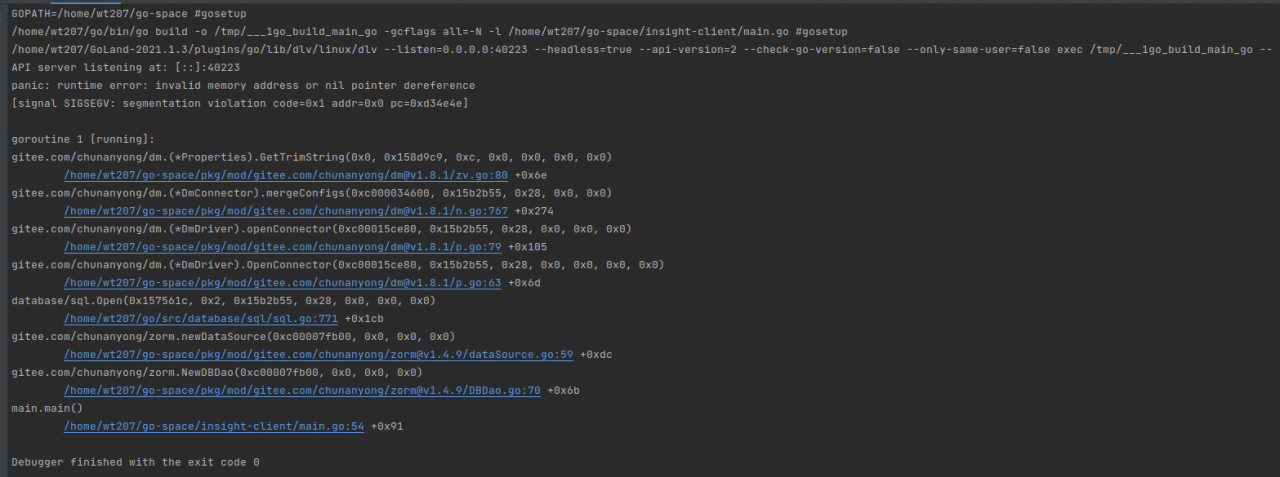
Golang, beego framework uses worm to connect DM database, and starts to report invalid memory address or nil point dereference under Linux

GOPATH=/home/wt207/go-space #gosetup
/home/wt207/go/bin/go build -o /tmp/___1go_build_main_go -gcflags all=-N -l /home/wt207/go-space/insight-client/main.go #gosetup
/home/wt207/GoLand-2021.1.3/plugins/go/lib/dlv/linux/dlv --listen=0.0.0.0:40223 --headless=true --api-version=2 --check-go-version=false --only-same-user=false exec /tmp/___1go_build_main_go --
API server listening at: [::]:40223
panic: runtime error: invalid memory address or nil pointer dereference
[signal SIGSEGV: segmentation violation code=0x1 addr=0x0 pc=0xd34e4e]

goroutine 1 [running]:
gitee.com/chunanyong/dm.(*Properties).GetTrimString(0x0, 0x158d9c9, 0xc, 0x0, 0x0, 0x0, 0x0)
        /home/wt207/go-space/pkg/mod/gitee.com/chunanyong/[email protected]/zv.go:80 +0x6e
gitee.com/chunanyong/dm.(*DmConnector).mergeConfigs(0xc000034600, 0x15b2b55, 0x28, 0x0, 0x0)
        /home/wt207/go-space/pkg/mod/gitee.com/chunanyong/[email protected]/n.go:767 +0x274
gitee.com/chunanyong/dm.(*DmDriver).openConnector(0xc00015ce80, 0x15b2b55, 0x28, 0x0, 0x0, 0x0)
        /home/wt207/go-space/pkg/mod/gitee.com/chunanyong/[email protected]/p.go:79 +0x105
gitee.com/chunanyong/dm.(*DmDriver).OpenConnector(0xc00015ce80, 0x15b2b55, 0x28, 0x0, 0x0, 0x0, 0x0)
        /home/wt207/go-space/pkg/mod/gitee.com/chunanyong/[email protected]/p.go:63 +0x6d
database/sql.Open(0x157561c, 0x2, 0x15b2b55, 0x28, 0x0, 0x0, 0x0)
        /home/wt207/go/src/database/sql/sql.go:771 +0x1cb
gitee.com/chunanyong/zorm.newDataSource(0xc00007fb00, 0x0, 0x0, 0x0)
        /home/wt207/go-space/pkg/mod/gitee.com/chunanyong/[email protected]/dataSource.go:59 +0xdc
gitee.com/chunanyong/zorm.NewDBDao(0xc00007fb00, 0x0, 0x0, 0x0)
        /home/wt207/go-space/pkg/mod/gitee.com/chunanyong/[email protected]/DBDao.go:70 +0x6b
main.main()
        /home/wt207/go-space/insight-client/main.go:54 +0x91

Debugger finished with the exit code 0

The database connection configuration is as follows:

func main() {
	//Custom zorm log output
	//zorm.LogCallDepth = 4 //level of logging calls
	//zorm.FuncLogError = myFuncLogError //function to record exception logs
	//FuncLogPanic = myFuncLogPanic //logging panic log, default use ZormErrorLog implementation
	//FuncPrintSQL = myFuncPrintSQL // function to print sql

	//custom log output format, reassign FuncPrintSQL function
	//SetFlags(log.LstdFlags)
	//zorm.FuncPrintSQL = zorm.

	//dbDaoConfig database configuration. Here is just a simulation, production should be reading configuration configuration file, construct DataSourceConfig
	dbDaoConfig := zorm.DataSourceConfig{
		//DSN database connection string
		DSN: "dm://GO207:[email protected]:5236",
		//DSN: ". /db/test.db",
		//database driver name: mysql,postgres,oci8,sqlserver,sqlite3,dm,kingbase,aci and DBType correspond, handle databases with multiple drivers
		DriverName: "dm",
		// Database type (dialect judgment basis): mysql,postgresql,oracle,mssql,sqlite,dm,kingbase,shentong and DriverName correspond, processing database has more than one driver
		DBType: "dm",
		//MaxOpenConns Maximum number of database connections Default 50
		MaxOpenConns: 50,
		MaxIdleConns: 50, //MaxIdleConns: 50, //MaxIdleConns: 50
		MaxIdleConns: 50,
		//ConnMaxLifetimeSecond connection lifetime seconds. Default is 600 (10 minutes) after the connection is destroyed and rebuilt. MySQL default wait_timeout 28800 seconds (8 hours)
		ConnMaxLifetimeSecond: 600,
		//will use FuncPrintSQL to record SQL.
		PrintSQL: true,
		//DefaultTxOptions default configuration of transaction isolation level, default is nil
		//DefaultTxOptions: nil,
		//TxOptions{Isolation: sql.LevelDefault},
	}

	// Create dbDao according to dbDaoConfig, a database is executed only once, the first database to be executed is defaultDao, the subsequent zorm.xxx method, the default is used is defaultDao
	var err error
	dbDao, err = zorm.NewDBDao(&dbDaoConfig)
	// Mark the test as failed
	if err ! = nil {
		fmt.Println("dm database connection failed:", err)
	} else {
		fmt.Println("dm database connection successful")
	}

	beego.Run()
}

reason

The reason is to get the system default DM_ Svc.conf configuration file failed. According to the error prompt of the console, we can find the following method to get the DM of different systems_ SVC. Conf configuration file.

if filePath == "" {
    switch runtime.GOOS {
        case "windows":
	    filePath = os.Getenv("SystemRoot") + "\\system32\\dm_svc.conf"
        case "linux":
	    filePath = "/etc/dm_svc.conf"
        default:
	    return
    }
}

According to the default file path of windows system, find DM_ Open the SVC. Conf configuration file and find the following

TIME_ZONE=(480)
LANGUAGE=(cn)

Solution

Creating DM in /etc path of Linux virtual machine_ SVC. Conf configuration file, the content of which is similar to the OS. Getenv ("systemroot") + "\ \ system32 \ \ DM of windows_ SVC. Conf " DM under Path_ SVC. Conf configuration file can be consistent

[Solved] Unable to start web server; nested exception is org.springframework.boot.web.server.WebServerExcepti


1、 Background description

Project architecture: spring boot (v2.0.0. Release) + mybatis plus (v3.1.1)

Today, I developed a new function on an old project (running normally). Before adding new functions, the project started and ran normally. As a result, after the development, the project couldn’t start and the background didn’t report any error information. The key is that I didn’t even have a log. For a moment, I couldn’t start it.

2、 Cause analysis

According to the situation analysis, the project can’t be started. Thinking that there must be a problem in starting, a try… Catch… Block is added to the line of starting the project in the starting class (that is, the following code plus).

SpringApplication.run(DailyApplication.class, args);

See if there is an error log.

@Slf4j
@EnableScheduling
@EnableFeignClients(basePackages = "com.iot")
@SpringBootApplication(scanBasePackages={"com.iot"})
@MapperScan({"com.iot.daily.*.dao"})
public class DailyApplication implements ApplicationRunner {

    public static void main(String[] args) {
        try {
            SpringApplication.run(DailyApplication.class, args);
        } catch (Exception e) {
            e.printStackTrace();
            log.error("error: ============== ", e);
        }
    }

    @Override
    public void run(ApplicationArguments args) throws Exception {
        log.info("The daily report system was successfully launched!......");
    }
}

Start the project, and then, as expected, the console displays the error log with the following error message:

Unable to start web server; nested exception is org.springframework.boot.web.server.WebServerException: Unable to start embedded Tomcat

The specific error information will be supplemented later, but now it can’t be reproduced.

3、 Solutions

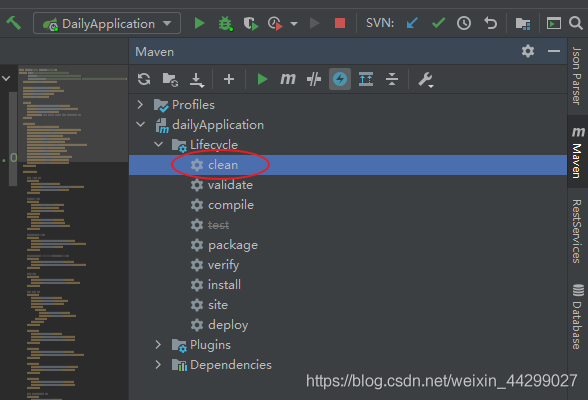
Here is my project solution, very simple, Maven clean once, and then restart.

end!

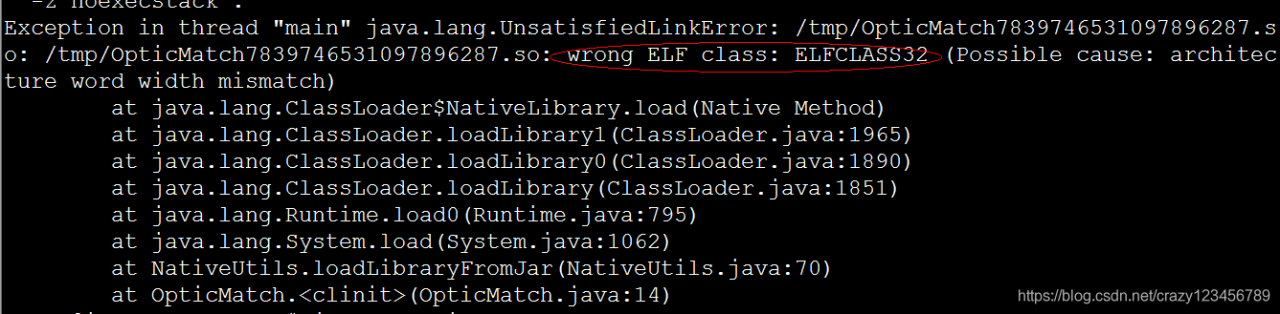
JDK installation exception link it with ‘- Z noexecstack’ and inux 64 bit zendguardloader.so: wrong elf class: elfclass32 error handling

N1.
It’s highly recommended that you fix the library with ‘execstack -c <libfile>’, or link it with ‘-z noexecstack’.
It means that it is recommended to use sunjdk instead of linux’s own openjdk

N2.linux 64bit system ZendGuardLoader.so: wrong ELF class: ELFCLASS32 error
1. Download Zend Guard
32位 http://downloads.zend.com/guard/5.5.0/ZendGuardLoader-php-5.3-linux-glibc23-i386.tar.gz
64位 http://downloads.zend.com/guard/5.5.0/ZendGuardLoader-php-5.3-linux-glibc23-x86_64.tar.gz
mkdir /usr/local/zend
tar -zxvf ZendGuardLoader-php-5.3-linux-glibc23-i386.tar.gz
sudo cp ZendGuardLoader-php-5.3-linux-glibc23-i386/php5.3.x/ZendGuardLoader.so /usr/local/zend/
2. Set
vim /etc/php.ini
Finally add.
zend_extension=/usr/local/zend/ZendGuardLoader.so
The reason for the above error is that the 64-bit system is using the 32-bit ZendGuardLoader.so.
The solution is to download a 64-bit ZendGuardLoader.so file that corresponds to the PHP version
1、Download Zend Guard
32位 http://downloads.zend.com/guard/5.5.0/ZendGuardLoader-php-5.3-linux-glibc23-i386.tar.gz
64位 http://downloads.zend.com/guard/5.5.0/ZendGuardLoader-php-5.3-linux-glibc23-x86_64.tar.gz
mkdir /usr/local/zend
tar -zxvf ZendGuardLoader-php-5.3-linux-glibc23-i386.tar.gz
sudo cp ZendGuardLoader-php-5.3-linux-glibc23-i386/php5.3.x/ZendGuardLoader.so /usr/local/zend/
2. Set
vim /etc/php.ini
Finally Add:
zend_extension=/usr/local/zend/ZendGuardLoader.so

[react+antd] Table Error: Unhandled Rejection (TypeError): data.slice is not a function

1、 Problem description

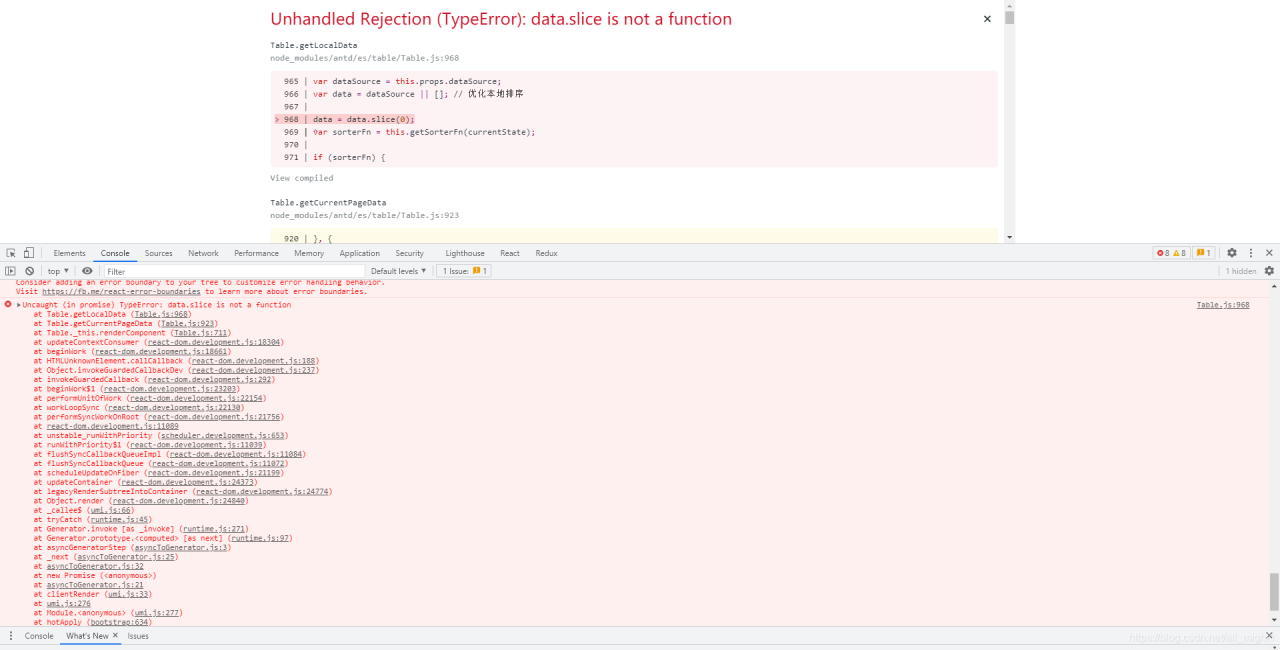
It is required to display the data from the back end in the table. Because there is no joint debugging, the front end and the back end are developing their own, so I wrote pseudo data to fill in as needed. Table.js: 968 uncaught (in promise) typeerror: data.slice is not a function. As shown in the figure below:

2、 Solutions

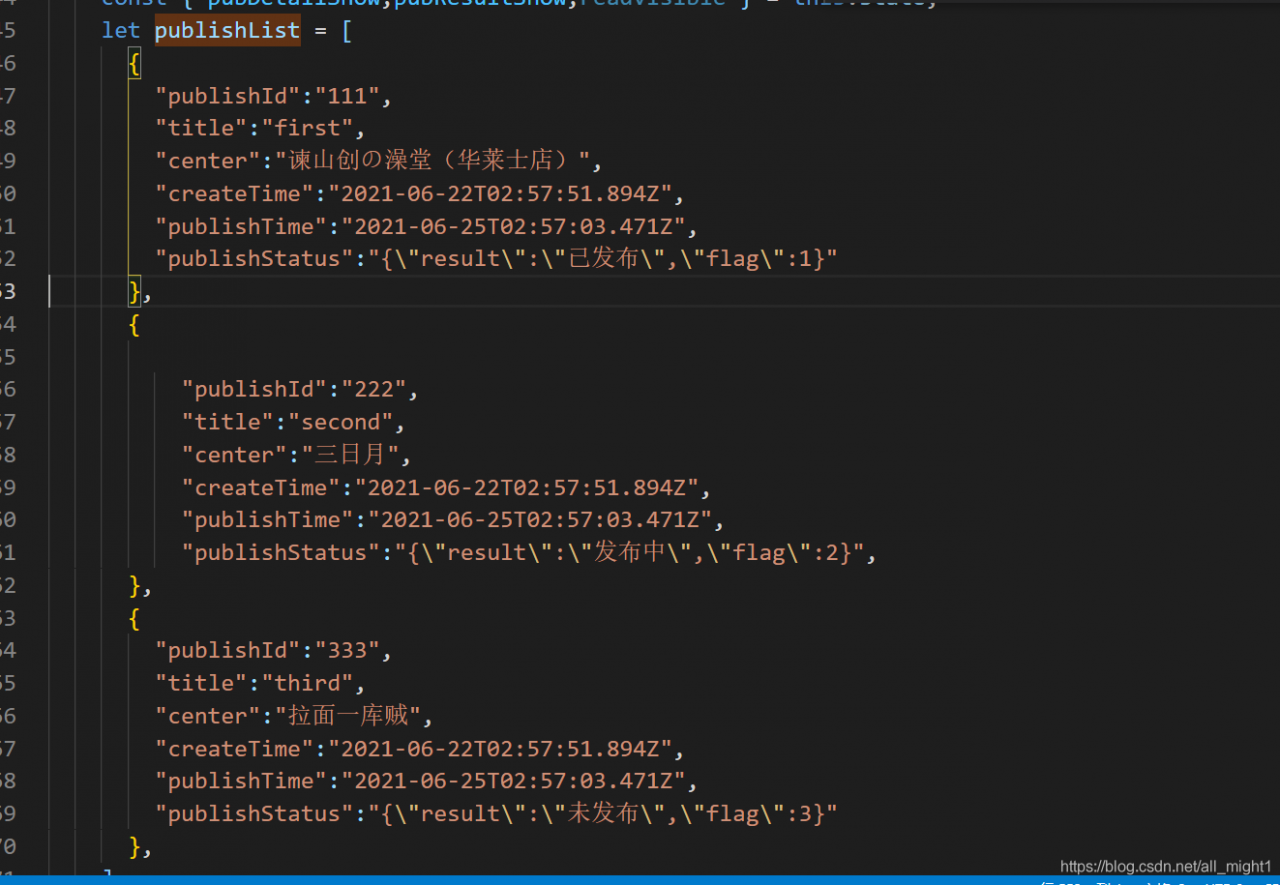
After reading the error report, in table.js, there is something wrong with the use of the table component. Then there must be something wrong with the value. The following is my pseudo data:

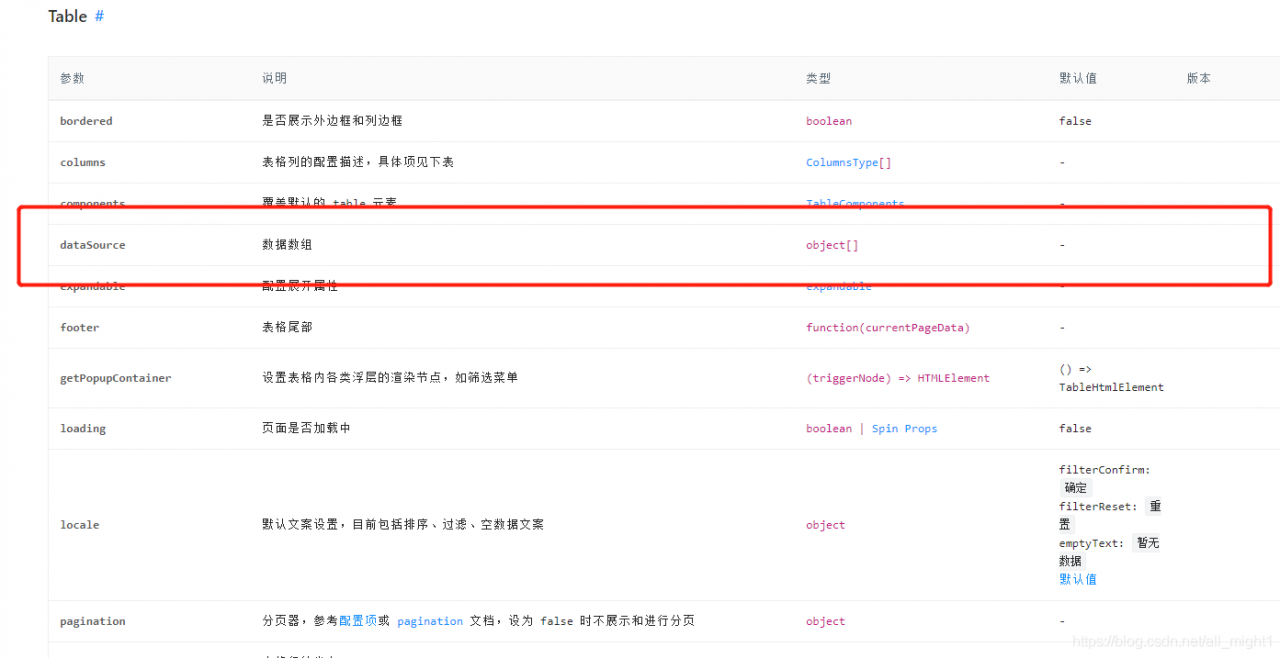
I wondered if there was a problem with the data type, so I went to see the official API, as shown in the following figure:

But it’s an array. It’s OK

I have no choice but to search the Internet and recommend Bing (in the case that the company doesn’t let it over the wall) here. It’s easy to use and the first solution is to find every time. It’s not like a certain degree of flying, either advertising or advertising.

The answer is that the parameter inserted into the datasource is a JSON object when it is initialized, and the JSON object does not support the. Slice (0) method.

3、 Solutions

I use the table component as follows:

<Table
   className="projecttable"
   bordered
   dataSource={publishList!=[]}
   columns={columns}
   loading={releaselistLoading}
   pagination={pagination}
   rowClassName={
      (_,index)=>{
          return index%2?"rowk":"rowt"
      }
   }
/>

There should be a problem in the datasource. The previously retrieved answer says that it can be written as null during initialization. So the code is rewritten as follows:

<Table
   className="projecttable"
   bordered
   dataSource={publishList!=[]?publishList:null}
   columns={columns}
   loading={releaselistLoading}
   pagination={pagination}
   rowClassName={
      (_,index)=>{
          return index%2?"rowk":"rowt"
      }
   }
/>

That’s it.

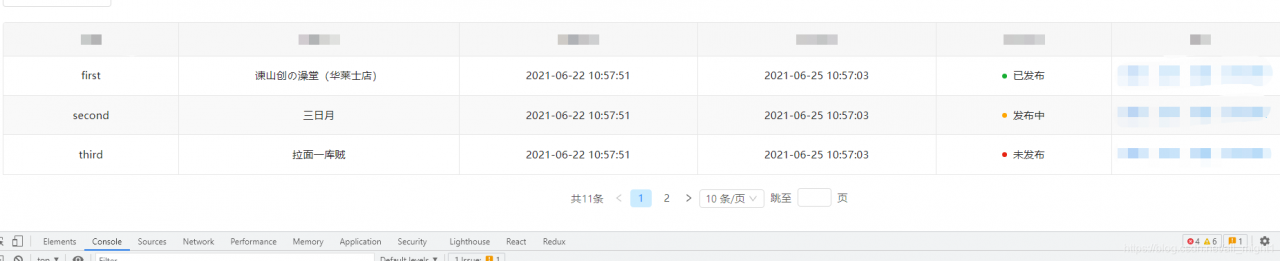
The effect picture is as follows:

All right, record’s over!

[Solved] The version of springcloud must support the current version of springboot, otherwise the startup project will report an error: error starting ApplicationContext

Error starting ApplicationContext. To display the conditions report re-run your application with ‘debug’ enabled.
2021-06-26 15:42:31.976 ERROR 208496 — [           main] o.s.b.d.LoggingFailureAnalysisReporter   :
***************************
APPLICATION FAILED TO START
***************************
Description:
Your project setup is incompatible with our requirements due to following reasons:
– Spring Boot [2.3.0.RELEASE] is not compatible with this Spring Cloud release train

Action:
Consider applying the following actions:
– Change Spring Boot version to one of the following versions [2.4.x, 2.5.x] .
You can find the latest Spring Boot versions here [https://spring.io/projects/spring-boot#learn].
If you want to learn more about the Spring Cloud Release train compatibility, you can visit this page [https://spring.io/projects/spring-cloud#overview] and check the [Release Trains] section.
If you want to disable this check, just set the property [spring.cloud.compatibility-verifier.enabled=false]

Disconnected from the target VM, address: ‘127.0.0.1:10542’, transport: ‘socket’
Process finished with exit code 1
Follow the prompts to upgrade the SpringBoot version or lower the SpringCloud version to make both support each other.The reason for the error is that when I followed the online tutorials to write the code, the SpringBoot version of the pom in the project automatically generated by IDEA was aligned with the tutorials and the project started with an error. In order to follow less errors, I downgraded the version of SpringCloud to be consistent with the one in the tutorial.

2020.03

Amend to read

Hoxton.SR8

Restart project OK