Author Archives: Robins

The solution to the failure of HTML introducing external JS

Problem Description:

JavaScript files are imported from outside the script tag, but it does not work, and the JS code is invalid

<!DOCTYPE html>
<html>
	<head>
		<meta charset="utf-8" />
		<title>Login</title>
		<script src="js/main.js" type="text/javascript"></script>
	</head>
	
	<body>
		<form action="XXXXXX" method="post" name="login">
			Username: <input type="text" name="username" id="username" /> <br>
			Password: <input type="password" name="password" id="password" /> <br>
			<input type="submit" name="login" id="login" value="登录"/>
			<input type="button" name="logon" id="logon" value="注册" />
		</form>
	</body>
</html>

Cause analysis:

The execution order of HTML code is from top to bottom. The browser parses the HTML code from top to bottom. If JS is introduced into the head, the page tag may not be loaded during JS execution, resulting in the failure of JS to find the action object

Solution:

Just import an external JS file after the body

<!DOCTYPE html>
<html>
	<head>
		<meta charset="utf-8" />
		<title>Login</title>
	</head>
	
	<body>
		<form action="http://42.192.60.64:8080/user" method="post" name="login">
			Username: <input type="text" name="username" id="username" /> <br>
			Password: <input type="password" name="password" id="password" /> <br>
			<input type="submit" name="login" id="login" value="登录"/>
			<input type="button" name="logon" id="logon" value="注册" />
		</form>
	</body>
	
	<script src="js/main.js" type="text/javascript"></script>
</html>

k8s kubernetes ingress error: endpoints “default-http-backend“ not found

Phenomenon

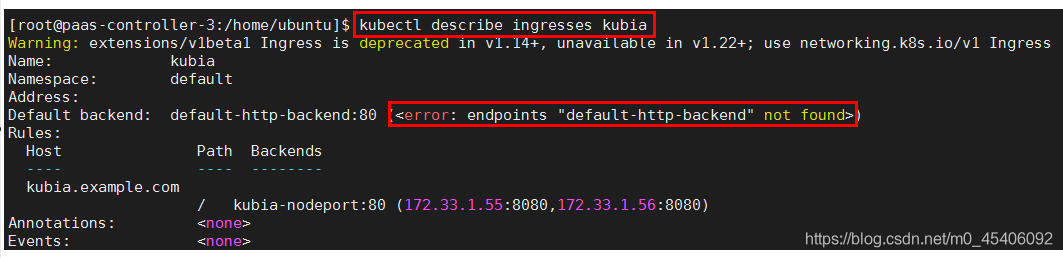
After creating an address, it is found that no address is assigned:

kubectl describe expressions kubia Default HTTP backend not found when viewing expressions

reason

The ingresses component cannot exist alone. It depends on the ingresses controller component. In the process of creating the ingresses controller, you need to configure a default backend.

See [k8s] ingress service and ingress controller

Default backend function:
the principle of ingresses is similar to nginx. For URL forwarding, you need to customize rules. A portal without rules sends all traffic to a default backend. The default backend is usually a configuration option for the progress controller.

If neither the host nor the path in the ingress object matches the HTTP request, the traffic will be routed to the default backend.

Puppeteer Error: Chromium revision is not downloaded. Run “npm install“ or “yarn install“

1. Introduction

Running after local installation, it is found that chromium has not been downloaded

2. Solution

Look at the information carefully

npm install [email protected]

> [email protected] install D:\workspace\team\takewalk\TakeWalks-FrontEnd\node_modules\puppeteer
> node install.js

**INFO** Skipping browser download. "PUPPETEER_SKIP_CHROMIUM_DOWNLOAD" environment variable was found.

The environment variable has been set before. You can delete it

[Solved] Xcode Reportduplicate symbols for architecture x86_64

phenomenon

// error
// a.h
template<typename T>
struct A {
public:
    A(int a):a_(a){std::cout << "A";}
private:
    int a_;
};


template<>
A<std::string>::A(int a):a_(a){std::cout << "string A";}
template<>
A<std::vector<int>>::A(int a):a_(a){std::cout << "vector A";}

// aa.h
void func_aa();

// aa.cpp
#include "a.h"
#include "aa.h"
void func_aa() {
    auto aa = A<std::string>(1);
}

// ab.h
void func_ab();

// ab.cpp
#include "a.h"
#include "ab.h"
void func_ab() {
    auto ab = A<std::string>(1);
    auto ab1 = A<std::vector<int>>(1);
}

// main.cpp
#include "aa.h"
#include "ab.h"
int main(){  
    func_aa();
    func_ab();
    return 0;
}

Solution

Option 1

Merge aa.h aa.cpp ab.h ab.cpp into AA_ ab.h aa_ Ab.cpp this scheme can solve the problem of error reporting, but the reason cannot be explained clearly=_= Welcome experts to solve doubts!

// aa_ab.h
void func_aa();
void func_ab();

// aa_ab.cpp
#include "a.h"
#include "aa_ab.h"
void func_ab() {
    auto ab = A<std::string>(1);
    auto ab1 = A<std::vector<int>>(1);
}
void func_aa() {
    auto aa = A<std::string>(1);
}

Option 2

Change the constructor of a into a function template and move the specialization to the class. Standard practice: specialize the function template

// a.h
template<typename T>
struct A {
public:
    template<typename T1>
    A(T1 a):a_(a){std::cout << "A";}

    template<>
    A(std::string a):a_(a){std::cout << "string A";}

    template<>
    A(std::vector<int> a):a_(a){std::cout << "vector A";}

    T a_;
};

Option 3

Standard Practice for specialization of class template a: specialization of class template

// a.h
template<typename T>
struct A {
public:
    A(int a):a_(a){std::cout << "A";}
    void print(){std::cout << "A print";}
    

private:
    int a_;
};

template<>
struct A<std::string> {
public:
    A(int a){std::cout << "string A";}

private:
    int a_;
};

template<>
struct A<std::vector<int>> {
public:
    A(int a){std::cout << "vector A";}

private:
    int a_;
};

After Vite starts, it will prompt “network: use ` — host ` to expose”, and the service cannot be accessed through network IP

Cause

After using vite to build the project, you need to access the service debugging through the computer or mobile phone in the LAN. It is found that you can’t access it through the IP + port.


Problem recurrence

When you run the NPM run dev | serve command, the following contents will be displayed.

> [email protected] serve /Users/UserName/Workspace/vue-vite
> vite | vite preview


  vite v2.3.7 build preview server running at:

  > Local: http://localhost:3000 | 5000/
  > Network: use `--host` to expose

Cause of problem

When another device in the LAN needs to access the service, it must be accessed through the local IP + port
after trying to access, it is found that the service cannot be found because it is not exposed in the network.


resolvent

The console will display user -- host to expose (use -- host to expose the network)
usually, we will splice -- host on the back of NPM run dev | serve

After executing NPM run dev | serve -- host , the console will still display netvork: user -- host to expose

Server. Host
type: String
Default: ‘127.0.0.1’
specifies which IP address the server should listen to. If this is set to 0.0.0.0, it will listen to all addresses, including LAN and public network addresses.

So we found three solutions by consulting the documents:

1. Modify the vite. Config. JS configuration

Add the following to the vite. Config. JS file in the root directory

import vue from '@vitejs/plugin-vue'

/**
 * https://vitejs.dev/config/
 * @type {import('vite').UserConfig}
 */
export default {
  plugins: [vue()],
  server: {				// ← ← ← ← ← ←
    host: '0.0.0.0'	// ← new content ←
  }						// ← ← ← ← ← ←
}

2. Configure via vite cli

After executing the NPX vite -- host 0.0.0.0 command, you can use http://10.56.116.128:3000/ visited.

  vite v2.3.7 dev server running at:

  > Local:    http://localhost:3000/
  > Network:  http://10.56.116.128:3000/

  ready in 301ms.

3. Modify NPM script

Modify the script under the scripts node in the package. JSON file as follows:

"scripts": {
  "dev": "vite --host 0.0.0.0",
  "build": "vite build",
  "serve": "vite preview --host 0.0.0.0"
}

END

Prompt when executing sh file in Linux: nohup: unable to run command “. / startup. Sh”: insufficient permissions

Scene

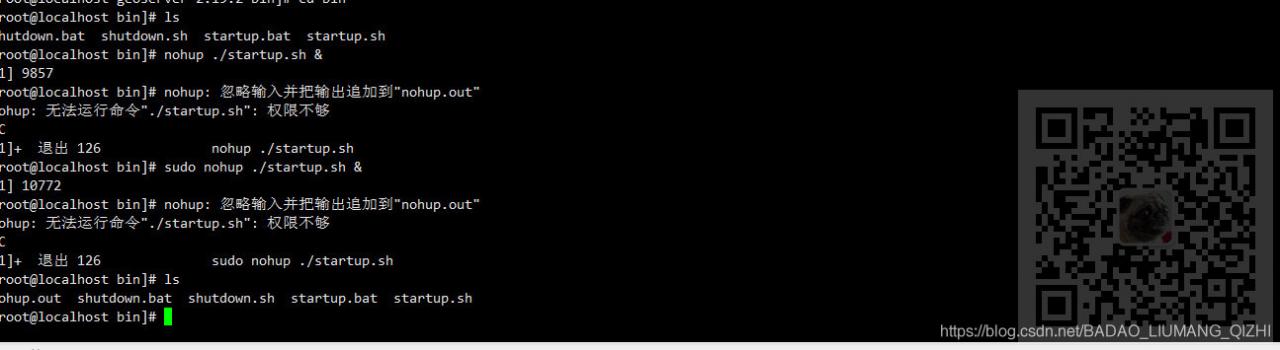
Linux server, when running the started. Sh file

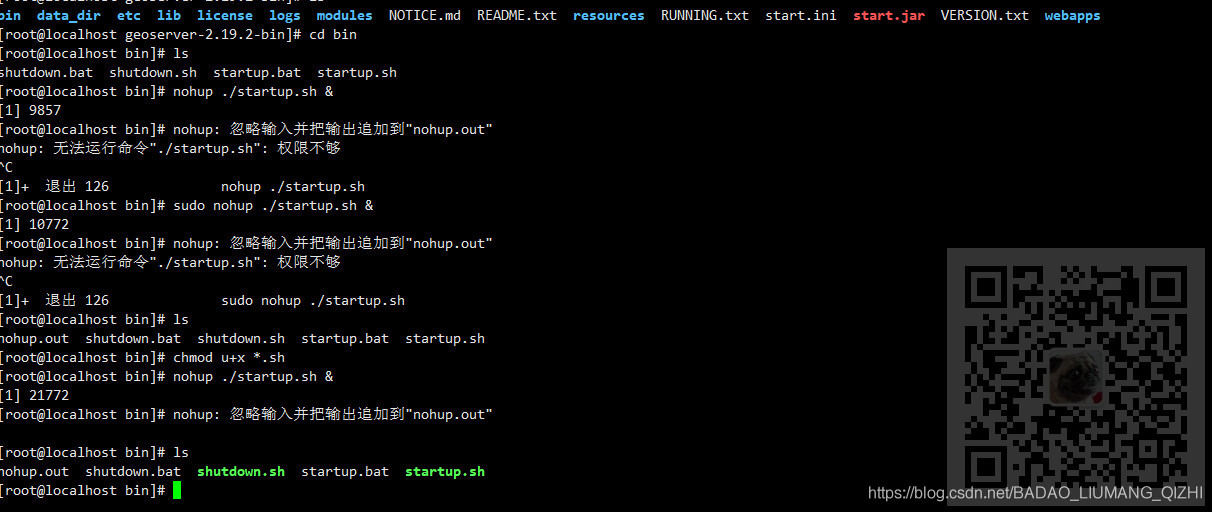
nohup ./startup.sh &

Tips

Nohup: cannot run command ‘./startup. Sh’: insufficient permissions


Note:

Blog:
https://blog.csdn.net/badao_ liumang_ Qizhi
is concerned about the official account of
‘s overbearing program
, which is programmed to get e-books, tutorial push and free download.

realization

This is because the permission is not enough. First enter the bin directory and execute in the bin directory

chmod u+x *.sh

Then run it again


Solution of apt unable to update in the docker container of raspberry pie

Today, apt failed to update when building the image with dockerfile on raspberry pie

...
 ---> Running in 05393fa6f242
Get:1 http://ports.ubuntu.com/ubuntu-ports focal InRelease [265 kB]
Get:2 http://ports.ubuntu.com/ubuntu-ports focal-updates InRelease [114 kB]
Err:1 http://ports.ubuntu.com/ubuntu-ports focal InRelease
  At least one invalid signature was encountered.
Err:2 http://ports.ubuntu.com/ubuntu-ports focal-updates InRelease
  At least one invalid signature was encountered.
Get:3 http://ports.ubuntu.com/ubuntu-ports focal-backports InRelease [101 kB]
Err:3 http://ports.ubuntu.com/ubuntu-ports focal-backports InRelease
  At least one invalid signature was encountered.
Get:4 http://ports.ubuntu.com/ubuntu-ports focal-security InRelease [114 kB]
Err:4 http://ports.ubuntu.com/ubuntu-ports focal-security InRelease
  At least one invalid signature was encountered.
Reading package lists...
W: GPG error: http://ports.ubuntu.com/ubuntu-ports focal InRelease: At least one invalid signature was encountered.
E: The repository 'http://ports.ubuntu.com/ubuntu-ports focal InRelease' is not signed.
W: GPG error: http://ports.ubuntu.com/ubuntu-ports focal-updates InRelease: At least one invalid signature was encountered.
E: The repository 'http://ports.ubuntu.com/ubuntu-ports focal-updates InRelease' is not signed.
W: GPG error: http://ports.ubuntu.com/ubuntu-ports focal-backports InRelease: At least one invalid signature was encountered.
E: The repository 'http://ports.ubuntu.com/ubuntu-ports focal-backports InRelease' is not signed.
W: GPG error: http://ports.ubuntu.com/ubuntu-ports focal-security InRelease: At least one invalid signature was encountered.
E: The repository 'http://ports.ubuntu.com/ubuntu-ports focal-security InRelease' is not signed.
...

The solution is:
in http://ftp.debian.org/debian/pool/main/libs/libseccomp/ Download the latest version of libseccomp2. The current version is libseccomp2_ 2.5.1-1_ Armhf. DEB
install on raspberry pie

>>> sudo dpkg -i libseccomp2_2.5.1-1_armhf.deb

“20999;” 21448;”

[br] https://askubuntu.com/a/1264921/685786
https://stackoverflow.com/a/64463211/7151777

Solve the problem that vscode cannot convert the easy less plug-in to the less expression value

Problems encountered:

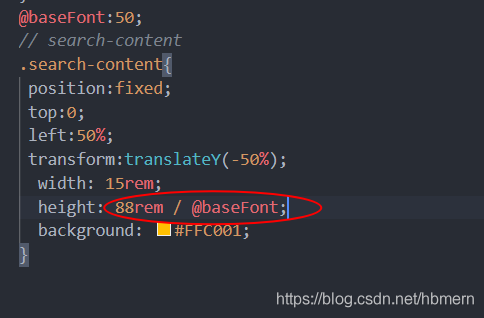
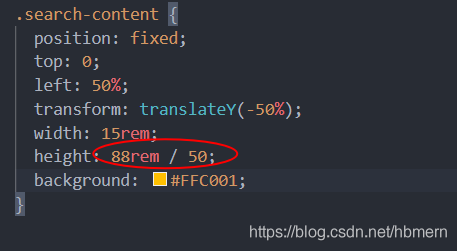
After installing the easy less plug-in in vscode, it is found that the value of the less expression cannot be converted correctly, so it cannot be converted correctly in the browser

Display style!!!

As shown in the figure:

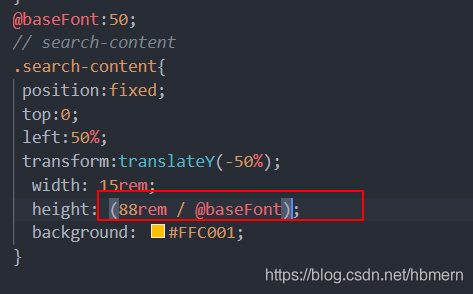
  resolvent:

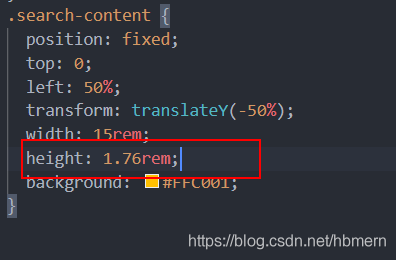
Add a bracket to the expression and you can convert it correctly!!

As shown in the figure:

  Over, over!!


RuntimeError: NCCL error in: /pytorch/torch/lib/c10d/ProcessGroupNCCL.cpp:784 torch

-- Process 6 terminated with the following error:
Traceback (most recent call last):
  File "/media/home/intern/anaconda3/envs/torch17/lib/python3.7/site-packages/torch/multiprocessing/spawn.py", line 19, in _wrap
    fn(i, *args)
  File "/media/home/intern/anaconda3/envs/torch17/lib/python3.7/site-packages/detectron2/engine/launch.py", line 108, in _distributed_worker
    raise e
  File "/media/home/intern/anaconda3/envs/torch17/lib/python3.7/site-packages/detectron2/engine/launch.py", line 103, in _distributed_worker
    timeout=timeout,
  File "/media/home/intern/anaconda3/envs/torch17/lib/python3.7/site-packages/torch/distributed/distributed_c10d.py", line 455, in init_process_group
    barrier()
  File "/media/home/intern/anaconda3/envs/torch17/lib/python3.7/site-packages/torch/distributed/distributed_c10d.py", line 1960, in barrier
    work = _default_pg.barrier()
RuntimeError: NCCL error in: /pytorch/torch/lib/c10d/ProcessGroupNCCL.cpp:784, invalid usage, NCCL version 2.7.8

The code requires 8 GPUs to run, while the machine has only two cards
so set the code to run with two cards.