Author Archives: Robins

Mac Start IDEA Error: Cannot load JVM bundle…Value of IDEA_VM_OPTIONS is (null)

Open the package under the application. Double click MacOS/idea to open it. The following error message is displayed:

Last login: Wed Jul 21 10:25:35 on ttys000
/Applications/IntelliJ\ IDEA.app/Contents/MacOS/idea ; exit;
lyuwalle@lyuwalle ~ % /Applications/IntelliJ\ IDEA.app/Contents/MacOS/idea ; exit;
2021-07-21 10:25:44.347 idea[2312:81949] allVms required 1.8*,1.8+
2021-07-21 10:25:44.349 idea[2312:81953] Cannot load JVM bundle: Error Domain=NSCocoaErrorDomain Code=3585 "dlopen_preflight(/Applications/IntelliJ IDEA.app/Contents/jbr/Contents/MacOS/libjli.dylib): no suitable image found.  Did find:
	/Applications/IntelliJ IDEA.app/Contents/jbr/Contents/MacOS/libjli.dylib: mach-o, but wrong architecture
	/Applications/IntelliJ IDEA.app/Contents/jbr/Contents/MacOS/libjli.dylib: mach-o, but wrong architecture" UserInfo={NSLocalizedFailureReason=The bundle doesn’t contain a version for the current architecture., NSLocalizedRecoverySuggestion=Try installing a universal version of the bundle., NSFilePath=/Applications/IntelliJ IDEA.app/Contents/jbr/Contents/MacOS/libjli.dylib, NSDebugDescription=dlopen_preflight(/Applications/IntelliJ IDEA.app/Contents/jbr/Contents/MacOS/libjli.dylib): no suitable image found.  Did find:
	/Applications/IntelliJ IDEA.app/Contents/jbr/Contents/MacOS/libjli.dylib: mach-o, but wrong architecture
	/Applications/IntelliJ IDEA.app/Contents/jbr/Contents/MacOS/libjli.dylib: mach-o, but wrong architecture, NSBundlePath=/Applications/IntelliJ IDEA.app/Contents/jbr, NSLocalizedDescription=The bundle “OpenJDK 11.0.11” couldn’t be loaded because it doesn’t contain a version for the current architecture.}
2021-07-21 10:25:44.349 idea[2312:81953] Retrying as x86_64...
2021-07-21 10:25:44.390 idea[2312:81955] allVms required 1.8*,1.8+
2021-07-21 10:25:44.392 idea[2312:81968] Current Directory: /Users/lyuwalle
2021-07-21 10:25:44.392 idea[2312:81968] Value of IDEA_VM_OPTIONS is (null)
2021-07-21 10:25:44.392 idea[2312:81968] Processing VMOptions file at /Users/lyuwalle/Library/Application Support/JetBrains/IntelliJIdea2021.1/idea.vmoptions
2021-07-21 10:25:44.393 idea[2312:81968] Done
Improperly specified VM option 'SoftRefLRUPolicyMSPerMB=50Å'
2021-07-21 10:25:44.441 idea[2312:81968] JNI_CreateJavaVM (/Applications/IntelliJ IDEA.app/Contents/jbr) failed: -6
Saving session...
...copying shared history...
...saving history...truncating history files...
...completed.

The reason is that the idea.vmoptions file conflicts. Delete the idea.vmoptions (database library is a hidden folder) under the following folder
/users/XXXX/library/Application Support/JetBrains/intellijidea2020.1/idea.vmoptions

[Solved] JSON parse error: Unexpected character (‘‘‘ (code 39)): was expecting double-quote to start ……

This problem is encountered in spring MVC and JSP simulating asynchronous requests of Ajax.

Complete error message:

JSON parse error: Unexpected character (''' (code 39)): was expecting double-quote to start field name; nested exception is com.fasterxml.jackson.core.JsonParseException: Unexpected character (''' (code 39)): was expecting double-quote to start field name

Error reason: the format of JSON in the front-end Ajax request is incorrect. The outer part of the array should be wrapped in single quotation marks, and the inner key & amp; Value pairs are enclosed in double quotes.

As shown below.

           $.ajax(
                {
                    url:"testAjax",
                    contentType:"application/json;charset=UTF-8",
                    //Right
                    data:'{"username":"zs","password":"12456","age":"18"}',
                    //Wrong
                    data:"{'username':'zs','password':'12456','age':'18'}",
                    dataType:"json",
                    type:"post",
                    success:function (data) {
                    //    data is the server-side response data
                        alert(data);
                        alert(data.username)
                    }
                }

[Solved] ambiguous import: found package github.com/spf13/cobra/cobra in multiple modules

Quoted articles: https://stackoverflow.com/questions/63710830/spf13-cobra-cant-download-binary-to-gopath-bin

When the package is managed by go mod, it will be downloaded to $gopath/PKG/mod.

When downloading cobra, the executable binary Cobra will be automatically created in the $gopath/bin directory. If the following command line ~ /. Bashrc is added, cobra can be automatically referenced as a command line tool:

export PATH=$PATH:$GOROOT/bin:$GOPATH/bin

However, an error is reported in go get github.com/spf13/cobra/cobra: ambiguous import: found package github.com/spf13/cobra/cobra in multiple modules, indicating that duplicate packages exist. At this time, the solution is to set the version value. The replacement installation command is as follows:

go get -u github.com/spf13/cobra/[email protected]

Sns.distplot Error: ‘Rectangle‘ object has no property ‘normed‘” [How to Solve]

Problem Description:
rectangular ‘object has no property’ normalized ‘in seaborn.distplot, but the normalized parameter is not used
reason:
the normalized parameter has been deprecated. The hist () histogram is built into plot, and the normalized parameter is the default parameter of hist
solution:
in Anaconda – > lib–> site-packages-> seaborn–> In distributions.py, change
hist around line 214 of the file_ kws.setdefault("normed", norm_ Hist)
is hist_ kws.setdefault("density", norm_ Hist)
restart

[Solved] CUDA driver version is insufficient for CUDA runtime version

CUDA driver version is insufficient for CUDA runtime version

Question:

An error is reported when docker runs ONEFLOW code of insightface

 Failed to get cuda runtime version: CUDA driver version is insufficient for CUDA runtime version

reason:

1. View CUDA runtime version

cat /usr/local/cuda/version.txt

The CUDA version in my docker is 10.0.130

CUDA Version 10.0.130

2. The CUDA version has requirements for the graphics card driver version, see the following link.
https://docs.nvidia.com/cuda/cuda-toolkit-release-notes/index.html

CUDA Toolkit Linux x86 64 Driver Version Windows x86 and 64 Driver Version
CUDA 11.0.3 Update 1
CUDA 11.0.2 GA >= 450.51.05 >= 451.48
CUDA 11.0.1 RC >= 450.36.06 >= 451.22
CUDA 10.2.89 >= 440.33 >= 441.22
CUDA 10.1 (10.1.105 general release, and updates) >= 418.39 >= 418.96
CUDA 10.0.130 >= 410.48 >= 411.31
CUDA 9.2 (9.2.148 Update 1) >= 396.37 >= 398.26
CUDA 9.2 (9.2.88) >= 396.26 >= 397.44

cat /proc/driver/nvidia/version took a look at the server’s graphics card driver is 418.67, CUDA 10.1 should be installed, and I installed 10.0.130 cuda.

NVRM version: NVIDIA UNIX x86_64 Kernel Module  418.67  Sat Apr  6 03:07:24 CDT 2019
GCC version:  gcc version 7.3.0 (Ubuntu 7.3.0-27ubuntu1~18.04)

solve:

Installing CUDA 10.1

(1) First in https://developer.nvidia.com/cuda-toolkit-archive According to the machine environment, download the corresponding cuda10.1 installation file. For the installer type, I choose runfile (local). The installation steps will be simpler.

wget https://developer.download.nvidia.com/compute/cuda/10.1/Prod/local_installers/cuda_10.1.243_418.87.00_linux.runsudo sh 

(2) Installation

sh cuda_10.1.243_418.87.00_linux.run

The same error occurred, unresolved
it will be updated when a solution is found later.

[Solved] Canal Error: CanalParseException: column size is not match,parse row data failed

1、 Background phenomenon

Background: there is a problem with the company’s flick task, and the data is not written to the result library.

So immediately check the flick task. On the web page, there are no exceptions, checkpoints and backpressure
then the problem is not my program. The spearhead is directed at environmental problems

2、 Environmental investigation

First, I checked the log printed by the task manager of Flink and found that the data was consumed for a certain period of time, and no data came in later
it means that the data is not sent to the Flink program, so there is a problem at the source
after checking Kafka, it is found that there is no message backlog and the consumption rate is normal
then the problem is not Kafka. Then it can only come from a more original place: canal

3、 Culprit canal

The operation and maintenance boss checked the canal log:

com.alibaba.otter.canal.parse.exception.CanalParseException: com.alibaba.otter.canal.parse.exception.CanalParseException: com.alibaba.otter.canal.parse.exception.CanalParseException: parse row data failed.
Caused by: com.alibaba.otter.canal.parse.exception.CanalParseException: com.alibaba.otter.canal.parse.exception.CanalParseException: parse row data failed.
Caused by: com.alibaba.otter.canal.parse.exception.CanalParseException: parse row data failed.
Caused by: com.alibaba.otter.canal.parse.exception.CanalParseException: column size is not match for table:xxxx.xxx,22 vs 21

Obviously, this log says that a new field has been added to the database, which is inconsistent with the number of fields in the previous database. It causes an error in canal, and then the message is not sent

At that time, I thought that canal must support DDL compatibility, which must be a problem with one of canal’s settings
then I went to GitHub to find the document of canal
during the search, an issue was found. The content in the issue is similar to mine.
the key points are:

 canal.instance.filter.query.ddl = true 

Semantically speaking, it is obvious that canal filters out the DDL statements of MySQL, so it is naturally impossible to perceive that MySQL has added a new field. In this way, when a new piece of data comes after adding a field, canal will report an error if it cannot match the number of fields.

Solution

canal.instance.filter.query.ddl = false

In this way, canal can receive DDL statements and adapt to the changes after adding new fields.

The request was rejected because the URL contained a potentially malicious String “//“

Problem description

After the introduction of spring security, there is no problem using Vue proxy locally. There is a problem using nginx. The problem is located in the nginx configuration

Solution:

# rewrite ^(/api/?.*)$ /$1 break;  // old
 rewrite ^/api/(.*)$ /$1 break;    // modified

Explanation
take blog.lhuakai.top/api/getxxx as an example

nginx found /API , replaced the match to /api.getxxx/ with $1 (the content in the first group) getxxx and finally became blog.lhuakai.top/getxxx

[Solved] No serializer found for class org.hibernate.proxy.pojo.bytebuddy.ByteBuddyInterceptor and no propert

@No serializer found for class org.hibernate.proxy.pojo.bytebuddy.ByteBuddyInterceptor and no properties discovered to create BeanSerializer (to avoid exception, disable

Solution:
Add an annotation to the entity class.
@JsonIgnoreProperties(value = {“hibernateLazyInitializer”,“handler”})

[CICD] Jenkins Role-based Authorization Strategy

There are many articles on role-based authorization strategy. Here are some special points.

1. Differences among global roles, item roles and node roles

Since it is role-based permission control, Jenkins naturally defines a variety of roles to control permissions from the perspective of roles. Among them,

Global roles: global roles, such as admin, job creator, anonymous, etc. set permissions for all, credentials, agents, tasks, runs, views, SCM, and lockable resources from a global perspective.

Item roles: create an item role, which allows you to grant job and run permissions from the perspective of the item.

Node roles: create a proxy role that allows you to set node related permissions.

The configuration in global roles acts on all items in Jenkins and overrides the configuration in items roles. If you assign the job read permission under global roles to a role, this role allows you to read all jobs, no matter how you set it in project roles.

2. Several points for attention

1) All non admin roles must be given global read permission in a global role.

2) Permission to create job item: the job create permission in global roles must be assigned to this role.

Selecting create item permission only in item roles does not work. Because creating an item is a global function, after creating an item, determine which role management role it belongs to according to the regular expression.

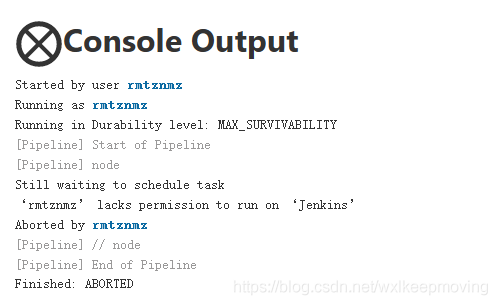
Otherwise, an error will be reported: Lakes permission to run on ‘Jenkins’

Error message

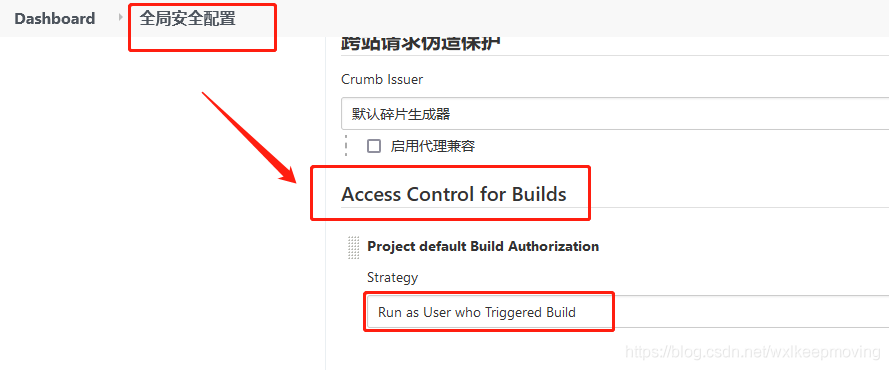
3) If run as user who triggered build is selected in the global security configuration, the agent build permission in the global roles must be assigned to the role.

Access Control for Builds

Node roles have not been used yet, and will be added later.

How to Fix Error: JavaFX cannot find fxml

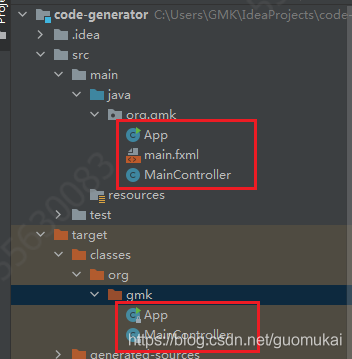
When using idea based on maven to write JavaFX demo, the fxml path is correct, but it keeps reporting error when running that the fxml file does not exist, tried multiple paths, still not working, then found that the files in the src directory, except the .java ones, will not compile.

Exception in Application start method
java.lang.reflect.InvocationTargetException
at sun.reflect.NativeMethodAccessorImpl.invoke0(Native Method)
at sun.reflect.NativeMethodAccessorImpl.invoke(NativeMethodAccessorImpl.java:62)
at sun.reflect.DelegatingMethodAccessorImpl.invoke(DelegatingMethodAccessorImpl.java:43)
at java.lang.reflect.Method.invoke(Method.java:498)
at com.sun.javafx.application.LauncherImpl.launchApplicationWithArgs(LauncherImpl.java:389)
at com.sun.javafx.application.LauncherImpl.launchApplication(LauncherImpl.java:328)
at sun.reflect.NativeMethodAccessorImpl.invoke0(Native Method)
at sun.reflect.NativeMethodAccessorImpl.invoke(NativeMethodAccessorImpl.java:62)
at sun.reflect.DelegatingMethodAccessorImpl.invoke(DelegatingMethodAccessorImpl.java:43)
at java.lang.reflect.Method.invoke(Method.java:498)
at sun.launcher.LauncherHelper$FXHelper.main(LauncherHelper.java:767)
Caused by: java.lang.RuntimeException: Exception in Application start method
at com.sun.javafx.application.LauncherImpl.launchApplication1(LauncherImpl.java:917)
at com.sun.javafx.application.LauncherImpl.lambda$launchApplication$154(LauncherImpl.java:182)
at java.lang.Thread.run(Thread.java:748)
Caused by: java.lang.NullPointerException: Location is required.
at javafx.fxml.FXMLLoader.loadImpl(FXMLLoader.java:3207)
at javafx.fxml.FXMLLoader.loadImpl(FXMLLoader.java:3175)
at javafx.fxml.FXMLLoader.loadImpl(FXMLLoader.java:3148)
at javafx.fxml.FXMLLoader.loadImpl(FXMLLoader.java:3124)
at javafx.fxml.FXMLLoader.loadImpl(FXMLLoader.java:3104)
at javafx.fxml.FXMLLoader.load(FXMLLoader.java:3097)
at org.gmk.App.start(App.java:22)
at com.sun.javafx.application.LauncherImpl.lambda$launchApplication1$161(LauncherImpl.java:863)
at com.sun.javafx.application.PlatformImpl.lambda$runAndWait$174(PlatformImpl.java:326)
at com.sun.javafx.application.PlatformImpl.lambda$null$172(PlatformImpl.java:295)
at java.security.AccessController.doPrivileged(Native Method)
at com.sun.javafx.application.PlatformImpl.lambda$runLater$173(PlatformImpl.java:294)
at com.sun.glass.ui.InvokeLaterDispatcher$Future.run(InvokeLaterDispatcher.java:95)
at com.sun.glass.ui.win.WinApplication._runLoop(Native Method)
at com.sun.glass.ui.win.WinApplication.lambda$null$147(WinApplication.java:177)
… 1 more

The written code and file directories are shown below.

public class App extends Application {
    public static void main( String[] args )
    {
        launch(args);
    }

    @Override
    public void start(Stage primaryStage) throws Exception {
        primaryStage.setTitle("Code Generator");
        Parent root = FXMLLoader.load(getClass().getResource("main.fxml"));
        Scene scene=new Scene(root,818.4,399);
        primaryStage.setScene(scene);
        primaryStage.show();
    }
}

In this case, you need to configure in Maven and declare the files to be compiled during compilation:

<build>
    <resources>
            <!--Add both resource nodes, if you have configuration files in both directories. If you add only one resource node, it will only compile the xml and properties files in the directory configured by this node-->
            <resource>
                <directory>src/main/resources</directory>
                <includes>
                    <include>**/*.fxml</include>
                    <include>**/*.properties</include>
                </includes>
            </resource>
            <resource>
                <directory>src/main/java</directory>
                <includes>
                    <include>**/*.fxml</include>
                    <include>**/*.properties</include>
                </includes>
            </resource>
    </resources>
</build>

Then refresh Maven and compile fxml when recompiling.

[Solved] PVE7.0“run_buffer: 316 Script exited with status 1”

1、 Error phenomenon

In pve7.0, after creating a container with unmanager by running the PCT create command, the container cannot be started.

root@pve:~# pct start 101
run_buffer: 316 Script exited with status 1
lxc_init: 816 Failed to run lxc.hook.pre-start for container "101"
__lxc_start: 2007 Failed to initialize container "101"
startup for container '101' failed

2、 Solution

Refer to the official forum and click here
to open the/usr/share/perl5/PVE/LxC/setup.pm file. Turn to the end and you can see

sub unified_cgroupv2_support {
    my ($self) = @_;
    $self->protected_call(sub {
    $self->{plugin}->unified_cgroupv2_support();
    });
}

Change to

sub unified_cgroupv2_support {
    my ($self) = @_;
    return if !$self->{plugin}; # unmanaged
    $self->protected_call(sub {
    $self->{plugin}->unified_cgroupv2_support();
    });
}

3、 CGroup version warning

Pve7.0 uses cgroupv2 by default. For older systems, there will be the following errors.

WARN: old systemd (< v232) detected, container won't run in a pure cgroupv2 environment! Please see documentation -> container -> cgroup version.
Task finished with 1 warning(s)!

Click here for relevant instructions and handling methods

[Solved] Castle.MicroKernel.ComponentNotFoundException: No component for supporting the service ****** was f

;Castle.MicroKernel.ComponentNotFoundException: No component for supporting the service ****** was found
In Castle.MicroKernel.DefaultKernel.Castle.MicroKernel.IKernelInternal.Resolve(Type service, Arguments arguments, IReleasePolicy policy, Boolean ignoreParentContext)
In Castle.MicroKernel.DefaultKernel.Resolve(Type service, Arguments arguments)
In Castle.Windsor.WindsorContainer.Resolve[T]()
In Abp.Dependency.IocManager.Resolve[T]() location D:\Github\aspnetboilerplate\src\Abp\Dependency\IocManager.cs:line 179
In Abp.Dependency.IocResolverExtensions.ResolveAsDisposable[T](IIocResolver iocResolver) location D:\Github\aspnetboilerplate\src\Abp\Dependency\IocResolverExtensions.cs:line 18

Castle.MicroKernel.ComponentNotFoundException
HResult=0x80131500
Message=No component for supporting the service  was found
Source=Castle.Windsor
StackTrace:
at Castle.MicroKernel.DefaultKernel.Castle.MicroKernel.IKernelInternal.Resolve(Type service, Arguments arguments, IReleasePolicy policy, Boolean ignoreParentContext)
at Castle.MicroKernel.DefaultKernel.Resolve(Type service, Arguments arguments)
at Castle.Windsor.WindsorContainer.Resolve[T]()
at Abp.Dependency.IocManager.Resolve[T]()
at Abp.Dependency.IocResolverExtensions.ResolveAsDisposable[T](IIocResolver iocResolver)

Solution:
using (var bootstrapper = AbpBootstrapper.Create<OrderServiceModule>())
{
//bootstrapper.IocManager
//    .IocContainer
//    .AddFacility<LoggingFacility>(f => f.UseLog4Net().WithConfig(“log4net.config”));
bootstrapper.IocManager.IocContainer.AddFacility<LoggingFacility>(f => f.UseAbpLog4Net().WithConfig(Path.Combine(AppDomain.CurrentDomain.BaseDirectory, “log4net.config”)));
bootstrapper.Initialize();

}