Author Archives: Robins

The problem of error reporting in Ranger connection hive is solved

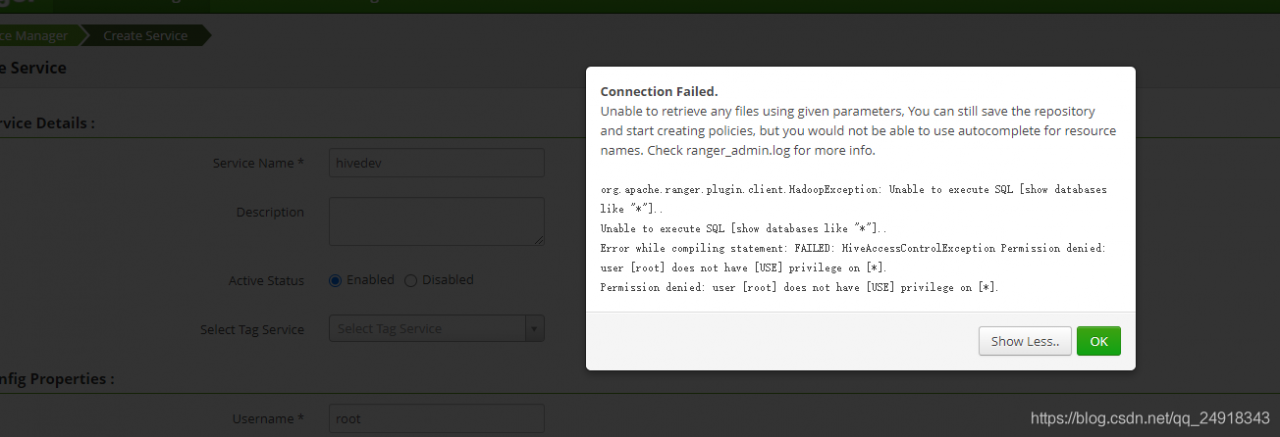
After installing the ranger-1.2.0-hive-plugin plugin, the error is reported in the rangerui interface
org.apache.ranger.plugin.client.HadoopException: Unable to execute SQL [show databases like “*”]..
Unable to execute SQL [show databases like “*”]..
Error while compiling statement: FAILED: HiveAccessControlException Permission denied: user [root] does not have [USE] privilege on [*].
Permission denied: user [root] does not have [USE] privilege on [*].

Also we will get the same error when we connect with beeline -u jdbc:hive2://localhost:10000 in the backend
Error: Error while compiling statement: FAILED: HiveAccessControlException Permission denied: user [anonymous] does not have [USE] privilege on [*] (state=42000,code=40000)

How to Solve Nginx cross compilation Error

1.checking for C compiler … found but is not working
Modify auto/feature
find if [ -x $NGX_AUTOTEST ]; then
Assign the value in front of ngx_feature_run=no
2./configure: 1: auto/types/sizeof: objs/autotest: Exec format error
change auto/types/sizeof
find ngx_test=”$CC $CC_TEST_FLAGS $CC_AUX_FLAGS \
-o $NGX_AUTOTEST $NGX_AUTOTEST.c $NGX_LD_OPT $ngx_feature_libs”
change $CC to gcc
3.objs/src/os/unix/ngx_user.o: In function `ngx_libc_crypt’: ngx_user.c:(.text+0x20): undefined reference to `crypt’
Find the ngx_libc_crypt function in src/os/unix/ngx_user.c:
change value = crypt((char *) key, (char *) salt);
to
value = DES_crypt((char *) key, (char *) salt);

Error report after solving git push origin master

After Solving git push origin master , there is an error:

remote: Permission to `USer-A/project.git` denied to `User-B`.
fatal: unable to access `https://github.com/User-A/project.git/`: The requested URL returned error: 403

Environment: git version 2.24.3 (apple git-128)

The user.name I set in Git is the same as the name of GitHub

Solution:

    1. into your own project
cd [project_path]
      1. Edit URL in. Git/config
vim .git/config

You will see the following code block

[core]
        repositoryformatversion = 0
        filemode = true
        bare = false
        logallrefupdates = true
        ignorecase = true
        precomposeunicode = true
[user]
        name = user-A
        email = [email protected]
[remote "origin"]
        url = https://github.com/User-A/project.git
        fetch = +refs/heads/*:refs/remotes/origin/*

[UNK]
url = https://github.com/User-A/project.git
[email protected]/User-A/project.git

then [UNK] git push origin master,[UNK];

Password for 'https://[email protected]':

Just enter the password

Solution to null pointer error in array

1. Problem description

Here is the object array

 LocHistory[] history = new LocHistory[list2.size()];

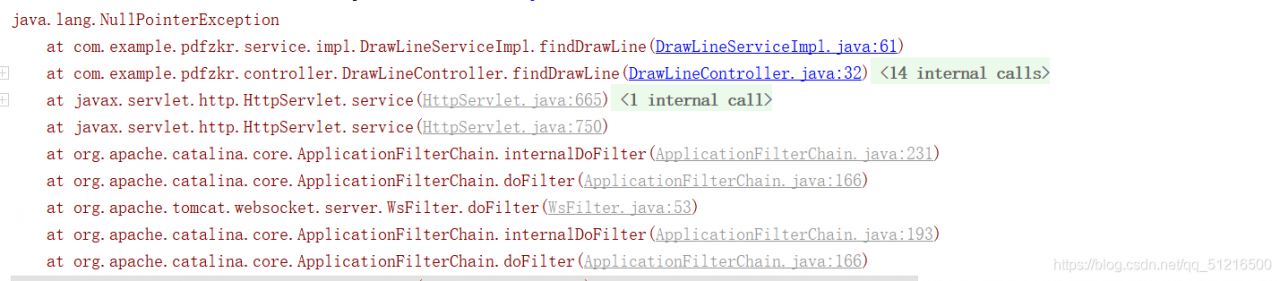
When assigning a value to the history object, the following error is reported

2. Reasons for error reporting

LocHistory[] history = new LocHistory[list2.size()]; Only the size of the array is given, but the instantiated object is not given at the corresponding position. The premise to obtain history [i] is that there is an object under coordinate I.

3. Solutions

Create a new object for each object reference
History [i] = new lochistory();

The specific codes are as follows:

 LocHistory[] history = new LocHistory[list2.size()];
            for (int i = 0; i < list2.size(); i++) {
             history[i] = new LocHistory();
             String PageX = list2.get(i).getPageX();
             String PageY = list2.get(i).getPageY();
                history[i].setPageX(PageX);
                history[i].setPageY(PageY);

An error is reported when compiling OpenVPN

configure: error: lzo enabled but missing

The solution is to manually install this LZO

wget http://www.oberhumer.com/opensource/lzo/download/lzo-2.06.tar.gz 
tar zxvf lzo-2.06.tar.gz 
cd lzo-2.06 
./configure --prefix=/usr/local/ 
make && make install

Android 8.1 compilation error Jack server problem

Compile Android 8.1 and report errors related to Jack server
Jack server is an Android source code compilation tool. Used in Android 6.0 ~ Android 8.1 source code. Later versions are obsolete.

Error type 1:
communication error with Jack server (58), try ‘Jack diagnosis’ or see Jack server log
failed to contact Jack server: problem reading/home/user3 /. Jack server/client.pem. Try’ Jack diagnosis’

Error type 2:
Jack server failed to (RE) start, try ‘Jack diagnose’ or see Jack server log

Solution 1:

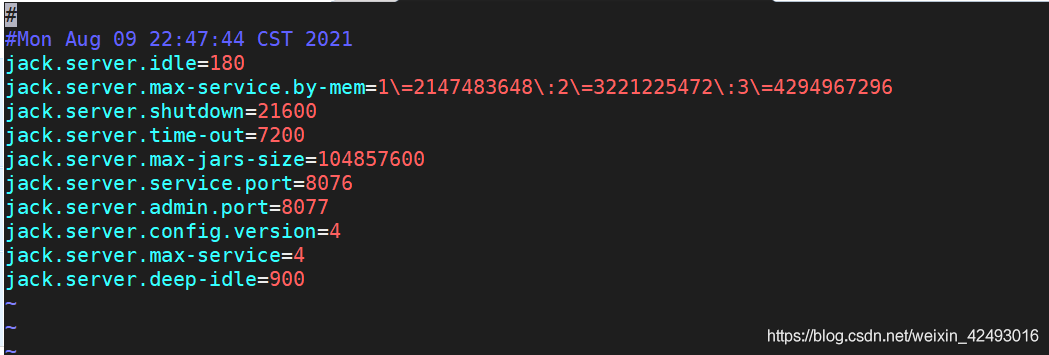
Open ~ /. Jack settings and ~ /. Jcak server/config.properties to change to other port numbers. Like 8976/8977
note that the two corresponding port numbers in the two files should be consistent


idea 2:
delete ~ /. Jack settings and ~ /. Jcak server/config.properties and recompile

Idea 3: JDK version problem
in my practice, openjdk1.8.0.292 will report that the port is occupied
the test method runs./prebuilds/SDK/tools/Jack diagnosis
printing the log will prompt that the port is occupied. For other unused ports, this is still the case
the solution is to use the JDK provided with the Android source code. Path: prebuilds/JDK/
you can also download other versions of openjdk, such as 1.8.0.141
uninstall the server JDK,
remove the openjdk (if installed). First, check which openjdk package is installed.

dpkg –list | grep -i jdk

To remove the openjdk package:

apt-get purge openjdk*

Check that all openjdk packages have been uninstalled:

dpkg –list | grep -i jdk

Configure the Android directory JDK to ~ /. Bashrc

export JAVA_ Home = {absolute path of your own Android source code} prebuilds/JDK/jdk8/Linux x86
export JRE_ HOME=

J

A

V

A

H

O

M

E

/

j

r

e

e

x

p

o

r

t

C

L

A

S

S

P

A

T

H

=

.

:

{JAVA_ HOME}/jre export CLASSPATH=.:

JAVAH​OME/jreexportCLASSPATH=.:{JAVA_ HOME}/lib:

J

R

E

H

O

M

E

/

l

i

b

e

x

p

o

r

t

P

A

T

H

=

.

:

{JRE_ HOME}/lib export PATH=.:

JREH​OME/libexportPATH=.:{JAVA_ HOME}/bin:$PATH

Effective changes:
source ~ /. Bashrc
recompile.

Python fbprophet predicts that the code runs with an error

Prophet was successfully installed before, but the following error occurred when the computer was changed. Record it
if Microsoft Visual C + + 14.0 is missing, download a visual studio installer, https://docs.microsoft.com/en-us/visualstudio/install/install-visual-studio?view=vs -In 2019, you can install visual studio 2017
if the error is plot, install plot
If an error is reported, exception ignored in: ‘stanfit4anon_ Model, Download pystan, delete the pystan package in the site packages under CONDA, delete the cache of pystan in appdata \ local \ temp under the user, and then reinstall it.

Resourcemanger reported an error: the port is unavailable

standby   The resourcemanger machine reports that the port is unavailable, port 8088 is normal, the process is running, and the log is normal

Solution ideas

1. Log in to the two resourcemanger machines and check whether the/var/log/Hadoop yarn/Hadoop Hadoop resourcemanager-emr-header-1.cluster *. Log logs contain error messages

2. Check whether there is an automatically pulled log: startup_ MSG: starting ResourceManager to judge whether active standby switching has occurred

2021-08-10 17:58:01,750 INFO org.apache.hadoop.yarn.server.resourcemanager.ResourceManager: Already in standby state

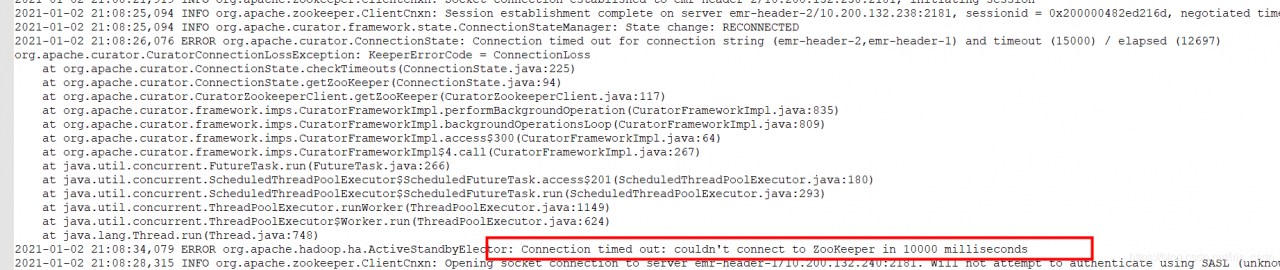
3. Check the standby log and find the problem: I can’t connect ZK and keep trying to reconnect. ZK connection exception lasts for a long time. It may not be reconnected due to timeout, and it may enter the terminated state.

This is because there is a problem with the ResourceManager state of header-1. The state of HA and the state of hazookeeperconnectionstate are terminated.

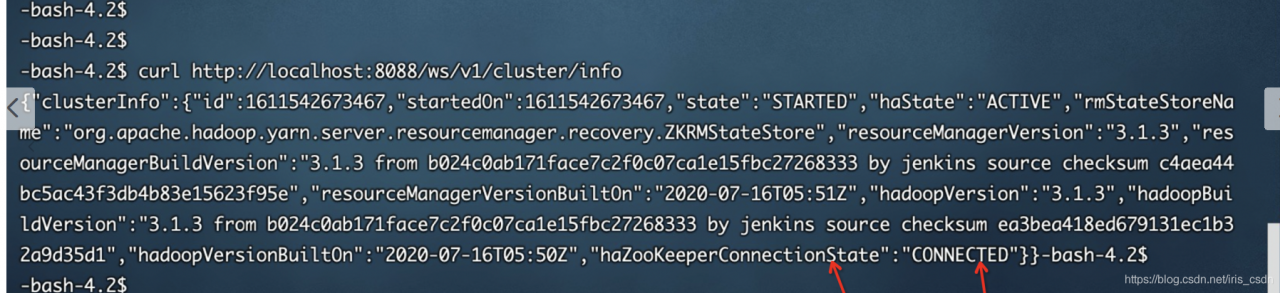
4. Status can be by running on header-1, curl http://localhost:8088/ws/v1/cluster/info

Normal active connection, (active RM) is OK, and yarn service is OK:

5. Solution: ARN active RM can provide normal services. The standby RM is in a wrong state. When restarting active ha later, it may not be switched in time. Restart standby RM to solve the problem.


Solution to the segmentation fault of single chain table in C language

The title is a collection of single linked list operations, including the establishment, deletion, insertion, printing, release and other operations of linked list.

The code runs correctly in CodeBlocks, and an error is displayed when it is submitted to the OJ platform of the school.

The segmentation fault section is wrong, mainly because the array is out of bounds, the pointer is abnormal, and the memory area that should not be accessed is accessed. Single linked list mainly involves pointer operation. After checking that the array is correct (not used in this topic), it mainly checks the pointer.

This is the previous code:

#include <stdio.h>
#include <stdlib.h>

typedef struct student
{
    long int num;
    float score;
    struct student *next;
}Node,*Link;

Link creatlink(void)
{
    Link head,node,rear;
    long int p;
    float q;
    head = (Link)malloc(sizeof(Node));
    head -> next = NULL;
    rear = head;
    while(scanf("%ld %f",&p,&q))
    {
        if(p == 0&&q == 0)
        {
            break;
        }
        node = (Link)malloc(sizeof(Node));
        node -> num = p;
        node -> score = q;
        rear -> next = node;
        rear = node;
    }
    rear -> next = NULL;
    return head;
}

void printlink(struct student *head)
{
    Link p;
    p = head -> next;
    while(p != NULL)
    {
        printf("%ld %.2f\n",p -> num,p -> score);
        p = p -> next;
    }
}

Link dellink(Link head,long int k)
{
    if(head == NULL||head -> next == NULL)
        exit(0);
    Link p,q;
    p = head -> next;
    q = head;
    while(p != NULL)
    {
        if(p -> num == k)
        {
            q -> next = p -> next;
            free(p);
        }
        else
        {
            q = p;
            p = p -> next;
        }
    }
    return head;
}

Link insertlink(Link head,Link stu)
{
    Link p,node,q;
    p = head;
    q = p -> next;
    while(q != NULL&&q -> num < stu -> num)
    {
        p = p -> next;
        q = p -> next;
    }
    if(q == NULL)
        p -> next = NULL;
    node = (Link)malloc(sizeof(Node));
    node -> num = stu -> num;
    node -> score = stu -> score;
    node -> next = p -> next;
    p -> next = node;
    return head;
}

void freelink(Link head)
{
    Link p;
    while(p != NULL)
    {
        p = head;
        head = head -> next;
        free(p);
    }
}

int main()
{
    struct student *createlink(void);
    struct student *dellink(struct student *, long);
    struct student *insertlink(struct student *, struct student *);
    void printlink(struct student *);
    void freelink(struct student *);
    struct student *head, stu;
    long del_num;
    head= creatlink();
    scanf("%ld", &del_num);
    head= dellink(head, del_num);
    scanf("%ld%f", &stu.num, &stu.score);
    head= insertlink(head, &stu);
    scanf("%ld%f", &stu.num, &stu.score);
    head= insertlink(head, &stu);
    printlink(head);
    freelink(head);
    return 0;
}

After excluding the error of other functions, it is finally found that the error occurs in the most insignificant release linked list function. It is found that the while loop end flag is wrong, and the head is always one step faster than the P pointer. If P= If NULL is the loop end flag, the loop is completed when the point pointed by the head is null and P points to the last node. At this time, P is not null, so the loop has to continue and the head has to move back. At this time, the head pointer becomes a wild pointer and has no point, so an error will be reported.

After modification, transpose the while loop end flag to head= Null, when p points to the last node and head is null, the node pointed to by P will be released, and the loop will end without wild pointer.

The modified release single linked list function is:

void freelink(Link head)
{
    Link p;
    while(head != NULL)
    {
        p = head;
        head = p -> next;
        free(p);
    }
}

After modification, submit it to OJ platform again and pass it correctly.