Author Archives: Robins

[SQL ERROR] SQL Error: could not execute statement & query did not return a unique result: 2; nested excepti

Error message:

Operation failed, could not execute statement; SQL [n/a]; nested exception is org.hibernate.exception.DataExcepti

The reason is the limitation of database field length!!

It is also possible that this table field does not exist. It mainly depends on SQL   There are entity class mappings and table structures

Operation failed, query did not return a unique result: 2; nested exception is javax.

This is the interface originally returned an object, but two pieces of data were queried in the database

[SpringBoot] Maven Error: Connection refused to host: 127.0.0.1

This error occurred during package guide today:

java.util.concurrent.ExecutionException: java.rmi.ConnectException: Connection refused to host: 127.0.0.1; nested exception is:
java.net.ConnectException: Connection timed out: connect

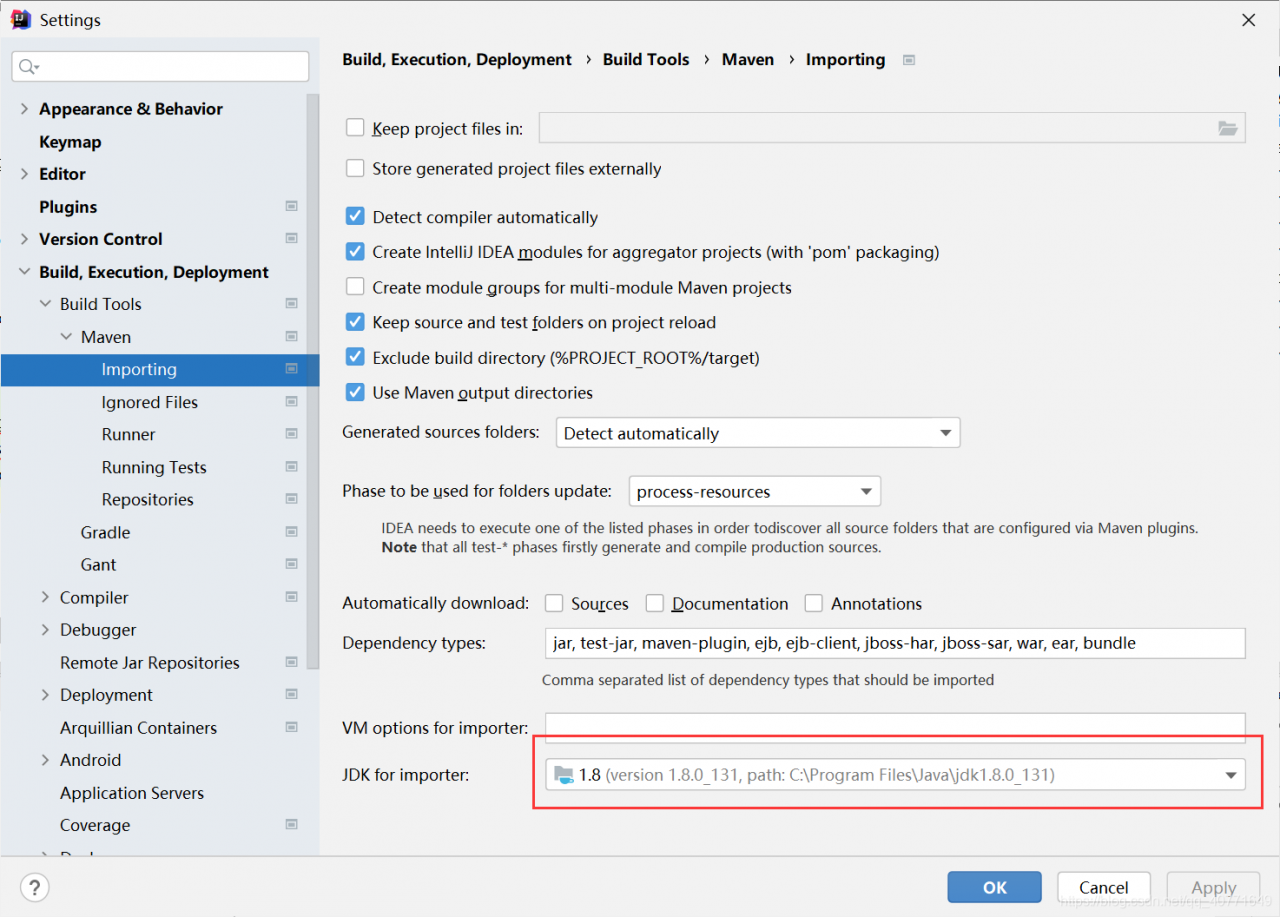
After checking, the reason is that the JDK version used in the project is different from that imported by Maven. Put Maven – & gt; Just change the JDK importer version in importing to the project version.

For example, I use 1.8, so I change it to:

It’s done~

Panda error in modifying line name index does not support mutable operations

During the panda data operation, two tricks appear during expansion:

Using data_PD. Append(), when expanding data in rows, the row names need to be the same in order to realize automatic expansion and use data_ PD. Columns = [], when modifying the row name, slicing is not allowed, and only a list can be created according to the original data length for assignment modification

# Iterate through different individual data and perform data stitching
response_pd = pd.DataFrame() # Create an empty panda
for ii in range(100, 106):
    sub = 'Sub%d'%ii
    index = np.where((np.array(filter_pd[sub+'_fg'])!=-100)&
                    (np.array(filter_pd[sub+'_frt'])!=-100))[0]
    ii=ii-100
    col_index =list(range(2, 7))+list(range(8, 20))+[23+ii*4,21+ii*4,22+ii*4]
    # Filter the data in the specified row
    temp_pd=filter_pd.iloc[index].iloc[:, col_index]
    ## Modify the row names, note that the slicing operation is not allowed here, only the original data length, create a list to assign values
    temp_pd.columns = list(temp_pd.columns)[:-3]+['first glance', 'first RT', 'last RT']
    # Expand the rows, note that you need the same row name to expand the data for the corresponding row
    response_pd = response_pd.append(temp_pd,
                                ignore_index=True)
    print('table shape',response_pd.shape)

[Solved] Vue Error: TypeError: Cannot read property ‘end‘ of undefined

My code:

computed: {
    handleTimestamp() {
    let endData = this.activityList[0].end
    }
}

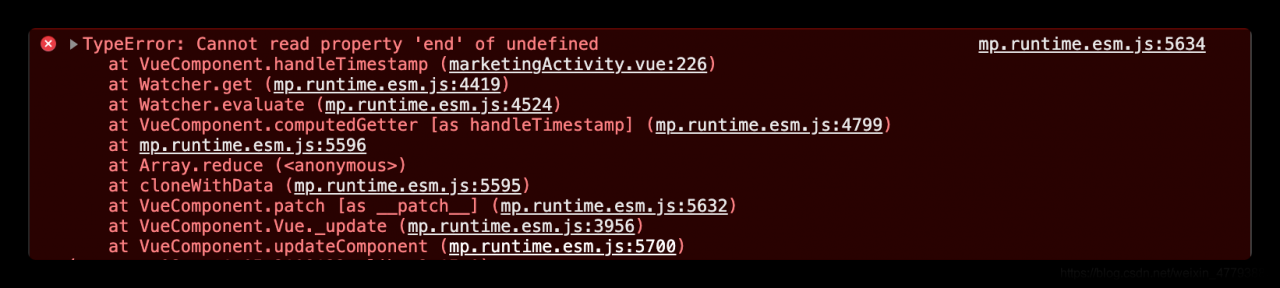
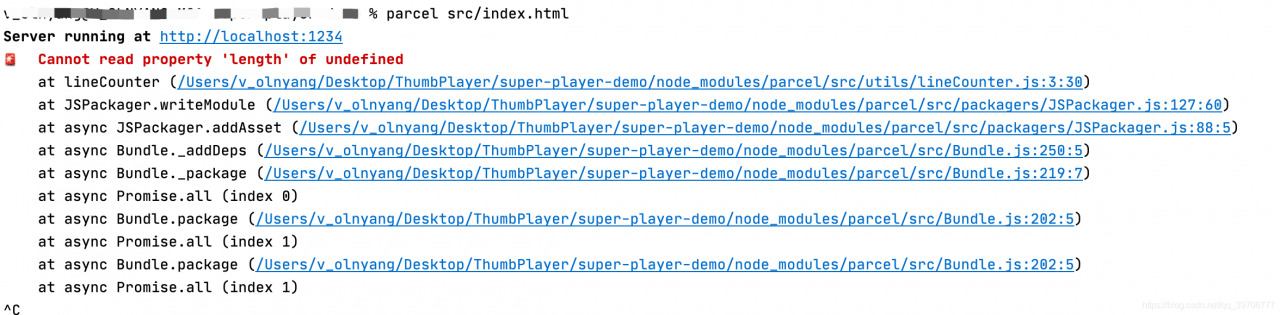
The error message is as follows:
but when I print this.activitylist, it has value

The reason for the error here is:
the page has not rendered data at the beginning. At this time, the activitylist is still empty. Of course, you can’t get its value in the calculated method

Solution:
at the beginning of the method, judge the length of the activitylist. If it is empty, the execution will not continue. If it is not empty, the following code will be executed:

computed: {
    handleTimestamp() {
    if(!this.activityList.length) return
    let endData = this.activityList[0].end
    }
}

That’s it~~~

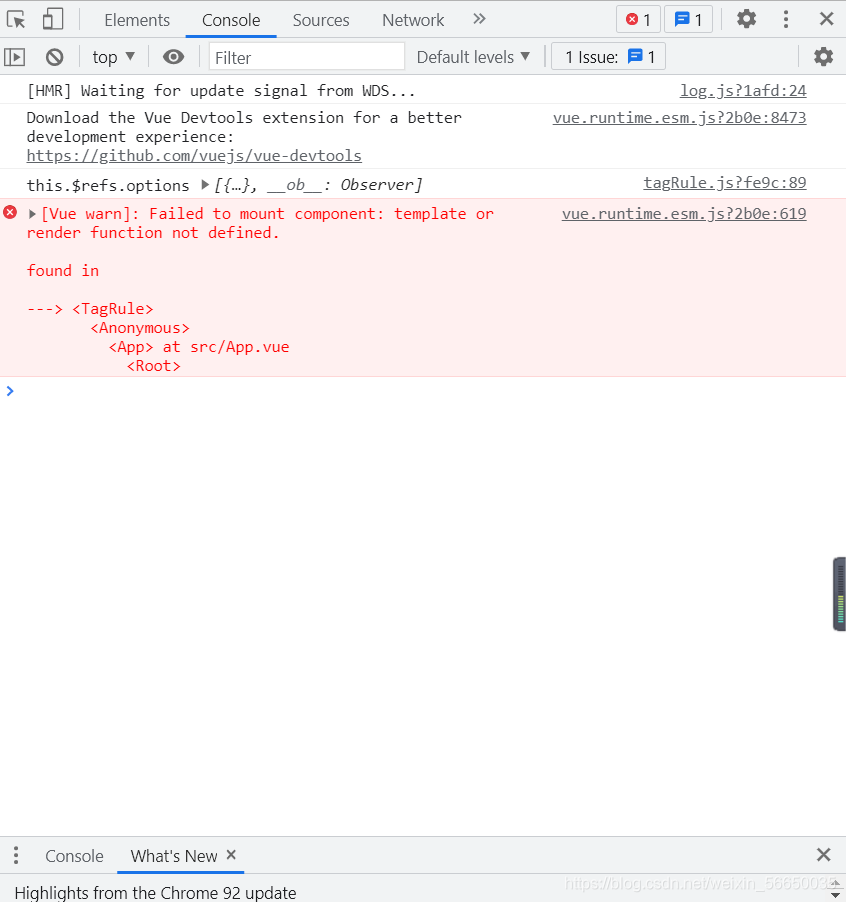
[Solved] Vue Error: Failed to mount component: template or render function not defined

Vue2 fails to mount component: template or render function not defined

There are probably the following situations. Simply record…

1. When a page references a component

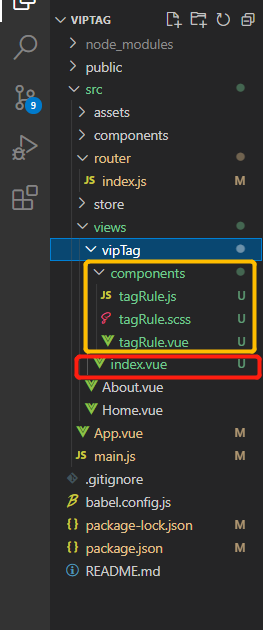
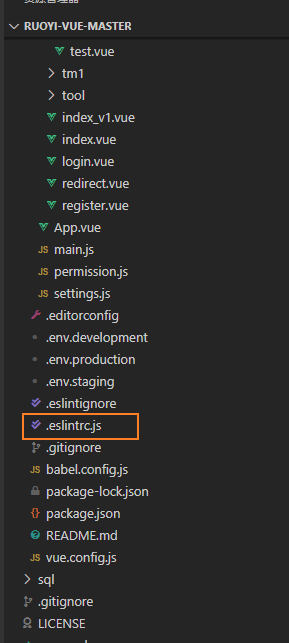
Let’s take a look at the current directory structure

The directory structure of the current page is viptag/index.vue main page; The components composed of tagroute.js, tagroute.scss and tagroute.vue under component are split because the current component logic and style part are relatively long; At this time, let’s go back to the main page of viptag/index.vue and have a look at import

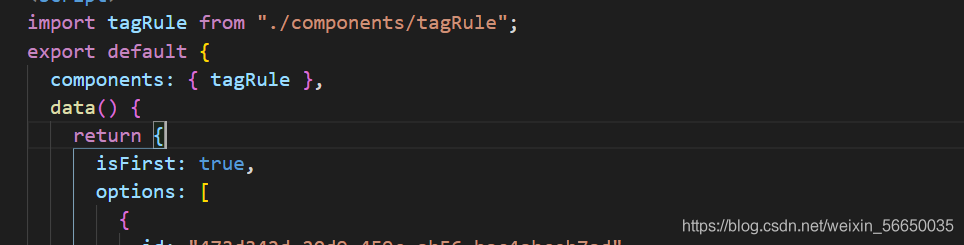
import   tagRule   from  “./ components/tagRule”; In this case, the specific imported file cannot be recognized, resulting in an error message, which is changed to import   tagRule   from  “./ components/tagRule.vue”; Just

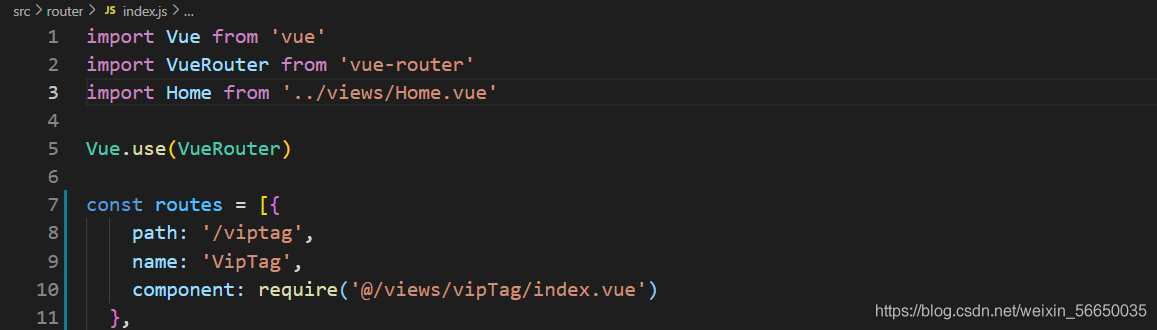
2. When the router/index.js route references the page

Error example

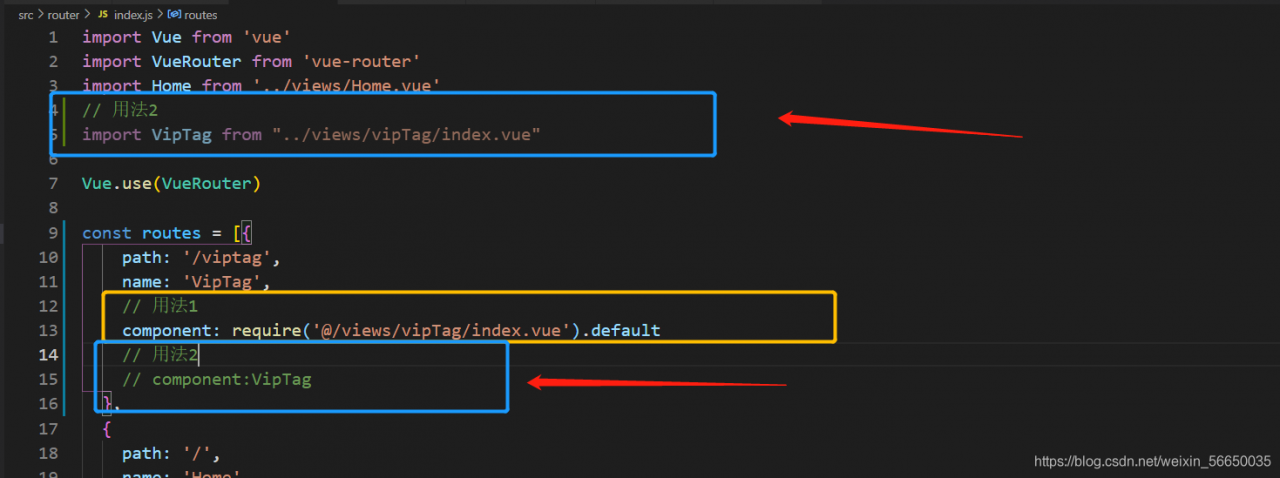
As shown in the figure above, component:   The current writing method of require (‘@/views/viptag/index. Vue’) causes an error

The reason is that: require is the module import method of commonjs, and the export default written during component definition is ES6. Therefore, the result of require import is actually an object with default attribute, so components in Vue will report an error when using this, and it happens that components are used for the registration of named view components in Vue, The reasonable usage should be require (‘xxx. Vue ‘). Default or import

[Solved] Mycat Startup Error: ERROR Startup failed: Timed out waiting for a signal from the JVM

Details of error reporting:

ERROR  | wrapper  | 2021/08/15 10:21:36 | Startup failed: Timed out waiting for a signal from the JVM.
ERROR  | wrapper  | 2021/08/15 10:21:36 | JVM did not exit on request, terminated

Description:
the newly installed MYCAT starts with MYCAT start and directly reports an error. The environment is CentOS 7.6. I don’t have this error on CentOS 7.5 for the same operation. I’m blinded. I read it on the Internet. At first, I said that the memory of the virtual machine was too small. After trying, I still reported this error.

The solution is as follows:

[root@db02 conf]# vim wrapper.conf  #Modify the startup configuration file with the following parameter
wrapper.startup.timeout=300
[root@db02 logs]# vim /etc/hosts #Modify the correspondence between hostname and IP address
10.0.0.52 db02


[root@db02 conf]# mycat start # Restart it (may take more than a few seconds)

[root@db02 logs]# tailf wrapper.log # Check the logs again and see that it started successfully
INFO   | jvm 1    | 2021/08/15 10:24:24 | OpenJDK 64-Bit Server VM warning: ignoring option MaxPermSize=64M; support was removed in 8.0
INFO   | jvm 1    | 2021/08/15 10:24:50 | Wrapper (Version 3.2.3) http://wrapper.tanukisoftware.org
INFO   | jvm 1    | 2021/08/15 10:24:50 |   Copyright 1999-2006 Tanuki Software, Inc.  All Rights Reserved.
INFO   | jvm 1    | 2021/08/15 10:24:50 | 
INFO   | jvm 1    | 2021/08/15 10:25:16 | MyCAT Server startup successfully. see logs in logs/mycat.log

[root@db02 logs]# netstat -anptul |grep java   #Check port is also up
tcp        0      0 127.0.0.1:32000         0.0.0.0:*               LISTEN      8217/java           
tcp6       0      0 :::9066                 :::*                    LISTEN      8217/java           
tcp6       0      0 :::10579                :::*                    LISTEN      8217/java           
tcp6       0      0 :::1984                 :::*                    LISTEN      8217/java           
tcp6       0      0 :::8066                 :::*                    LISTEN      8217/java           
tcp6       0      0 :::10310                :::*                    LISTEN      8217/java           
tcp6       0      0 127.0.0.1:31000         127.0.0.1:32000         ESTABLISHED 8217/java 

Docker Build Error: Failed to get D-Bus connection: Operation not permitted [Solved]

After using CentOS 7 image to create a container, you may encounter such a problem that you use systemctl to start the service and report an error. For this error report, let’s analyze it next!

# docker run -itd –name centos7 centos:7

# docker attach centos7

# yum install vsftpd

# systemctl start vsftpd

Failed to get D-Bus connection: Operation not permitted

The reasons are as follows:

The design concept of docker is that there is no background service running in the container. The container itself is an independent main process on the host, which can also be indirectly understood as the application process running the service in the container. The life cycle of a container exists around the main process, so the correct way to use the container is to run the services in the foreground.

When it comes to SYSTEMd, this suite has become the default service management for mainstream Linux distributions (such as centos7 and Ubuntu 14 +), replacing the traditional Systemv style service management. SYSTEMd maintains system services, which require privileges to access the Linux kernel. The container is not a complete operating system, there is only one file system, and the default startup is only for ordinary users to access the Linux kernel, that is, there is no privilege, so it can’t be used naturally!

Therefore, please follow the container design principles and run a foreground service in one container!!!

Yes, run the container in privileged mode.


The solution is as follows:

Create container:

# docker run -d -name centos7 –privileged=true centos:7 /usr/sbin/init

Enter container:

# docker exec -it centos7 /bin/bash

This allows you to start the service using systemctl
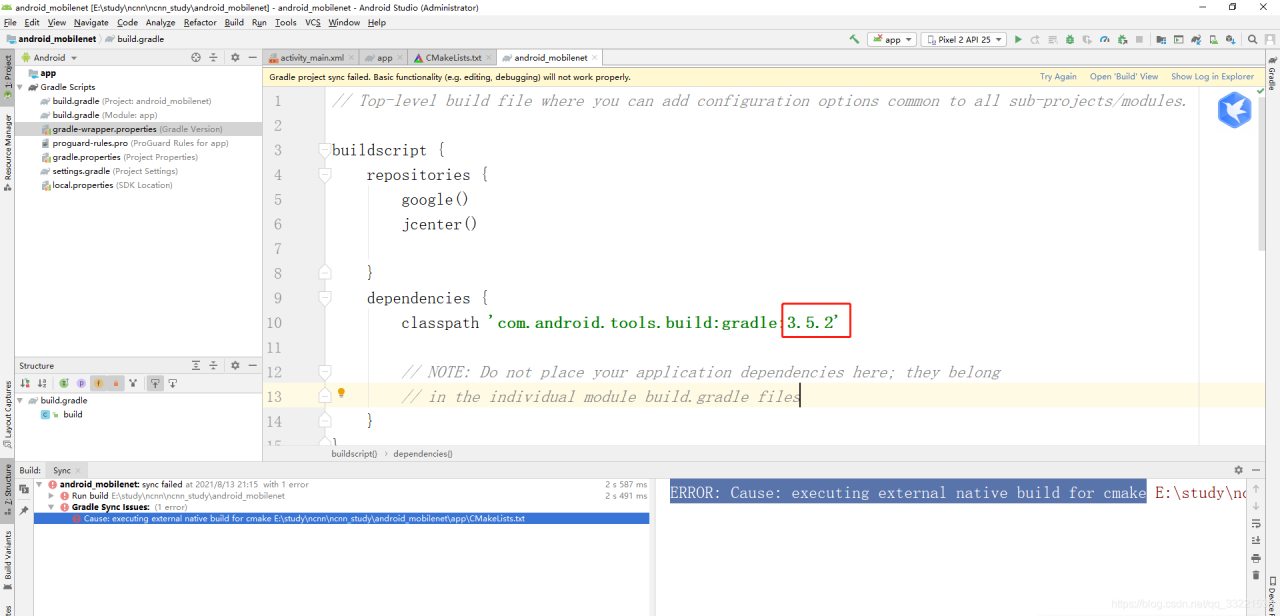
[Solved] Android Studio Error: ERROR: Cause: executing external native build for cmake

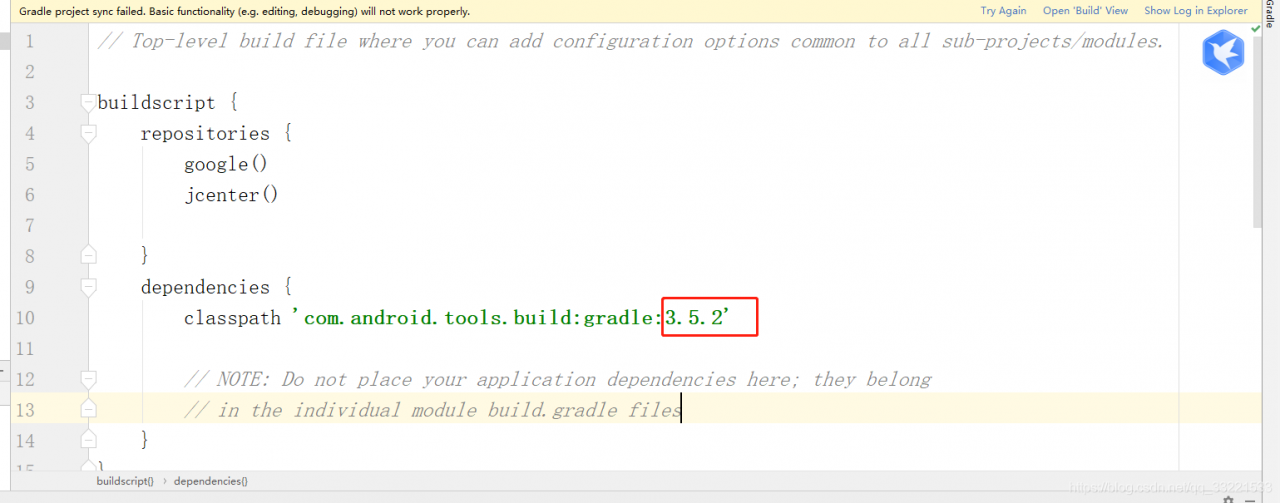
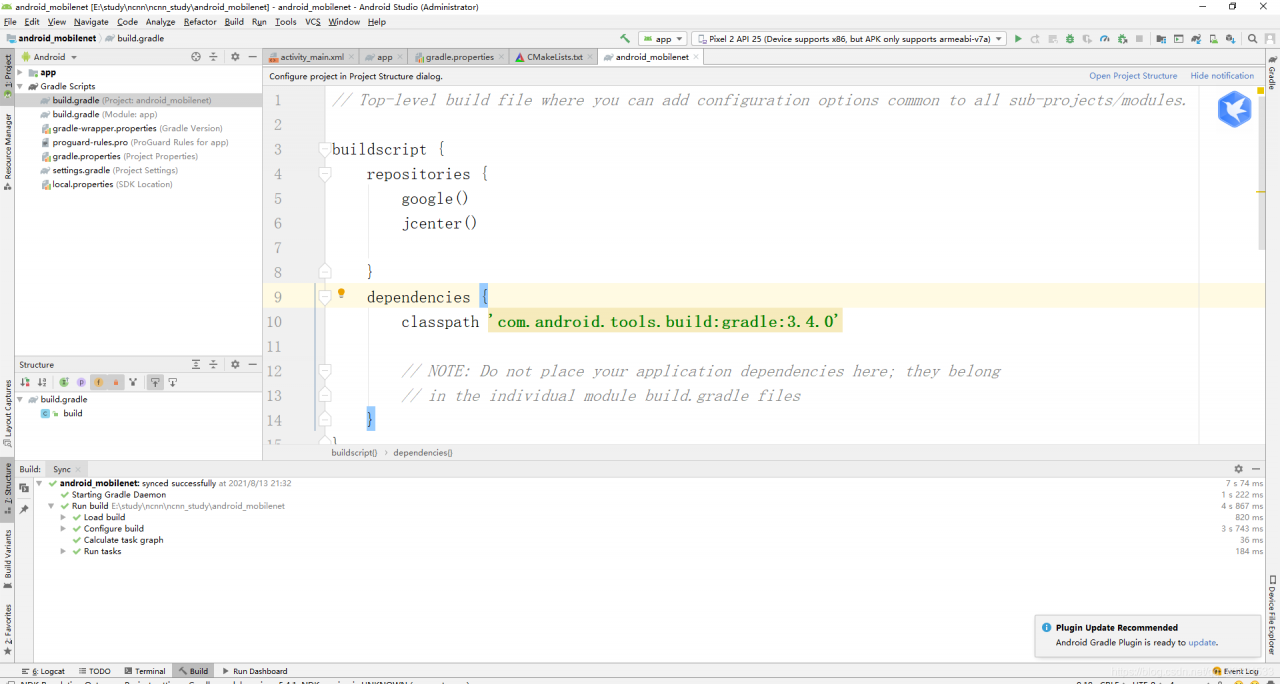
Recently, when editing a project using Android Studio, an error message “error: cause: executing external native build for cmake” appears. Therefore, open Gradle-wrapper.properties and find the following figure: because the as version of is 3.5.2

Open build.gradle

Solution:

I open file -> Project structure, change the plug-in version from 3.5.2. To 3.4.0, and then synchronize again.

Feign Error: Load balancer does not have available server for client:XXX

Feign reports an error: com.netflix.client.clientexception: load balancer does not have available server for client: XXX

The first step is to check whether the name of the service called by feign is correct. Of course, this is a common way. Only when you find that the name is right can you search on the Internet. My problem is that the original call was good. As a result, the versions of springcloud and spring boot were changed to a lower level, but they couldn’t be adjusted. The service name was not changed. So I found that there was a horizontal bar on my service name. Once the horizontal bar was removed, it passed and I was drunk. So I specially wrote an example. It was really the reason for the horizontal bar

com.netflix.client.ClientException: Load balancer does not have available server for client: server-1

Summary: do not add any symbols to the service name. The lower version is incompatible, such as 2.2.6.release hoxton.sr3 I use, and the higher version is OK