Author Archives: Robins

Segmentation fault (core dumped) in open3d operation [Solved]

When using open3d, normal visualization can be performed after the point cloud is established, but it involves calculation, such as calling estimate_ Normals or o3d.pipelines.registration.registration_ ICP, an error segmentation fault (core dumped) will be reported

Solution: import open3d as O3D at the beginning( It seems that the reference order of some packages will affect open3d.)

# Here are my codes below:
pc_pre=o3d.geometry.PointCloud()  
pc_cur=o3d.geometry.PointCloud()
pc_pre.points=o3d.utility.Vector3dVector(pre_cloud)
pc_cur.points=o3d.utility.Vector3dVector(cur_cloud)
res=o3d.pipelines.registration.registration_icp(source=pc_cur,target=pc_pre,
        max_correspondence_distance=threshold)
print(res)

[Solved] Docker Error: Failed to connect to bus: Host is down

docker run -itd –privileged –name=apache -v /var/www/html/:/var/www/html/ -p 8888:80 myapache:v1 /usr/sbin/init

Remember, remember

Error content:

The system has not been booted with systemd as init system (PID 1). Can’t operate.
Failed to connect to bus: Host is down

Solution:

docker run -itd    — privileged –name myCentos centos /usr/sbin/init

After creation: use the following command to enter the container

docker exec -it myCentos /bin/bash

Pay special attention to the bold content and don’t forget it

The reason is that/bin/Bash is executed in the first step by default, and systemctl cannot be used because of a bug in docker

Therefore, we use/usr/SBIN/init and — privileged, so that we can use systemctl, but override the default/bin/bash

Therefore, if we want to enter the container, we can no longer use docker attach mycentos

Instead, you can only use   docker exec -it myCentos /bin/bash   Because exec allows us to execute the overridden default command/bin/bash

At the same time -it is also necessary.

[Solved] – npm run dev Error: listen EADDRINUSE: address already in use :::8000(or 8080 etc.)

today, I’d like to record that when I was implementing a project recently, I found that running NPM run dev always reported errors:
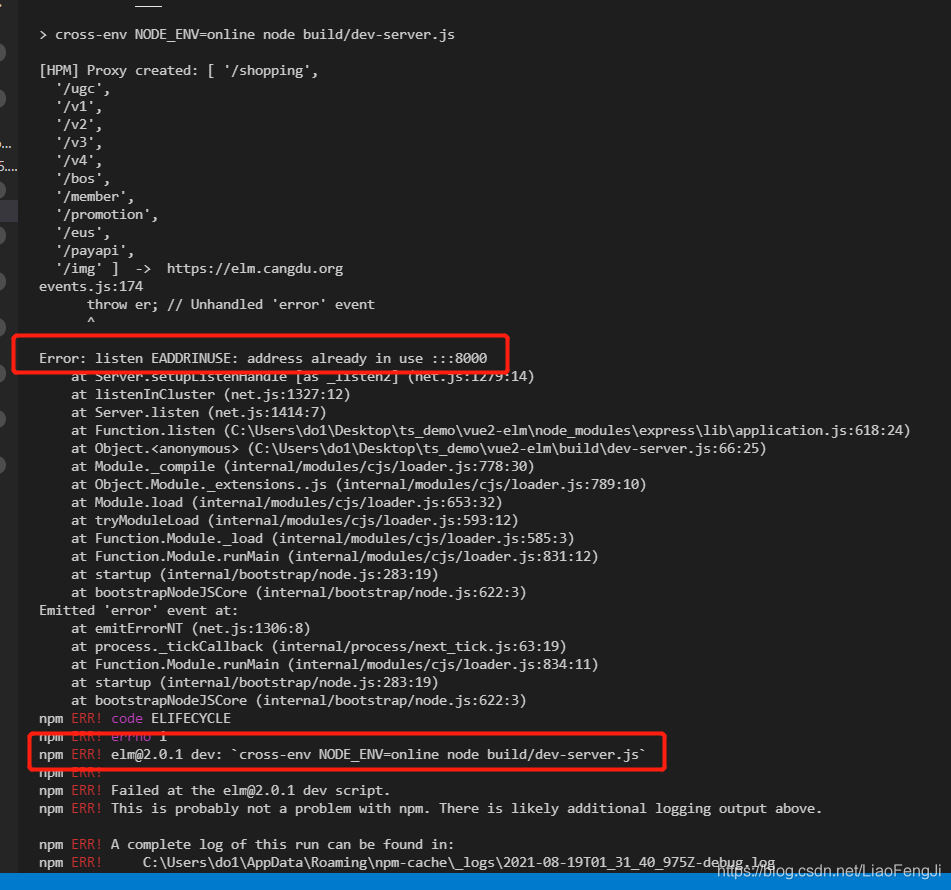
error: listen eaddinuse: address already in use::: 8000
NPM err! [email protected] dev: cross-env NODE_ Env = online node build/dev server. JS
it is found that the port is actually occupied. We can turn off the occupied port or recompile another port to solve this problem.

1.Error reported:

2. Causes and solutions of error reporting

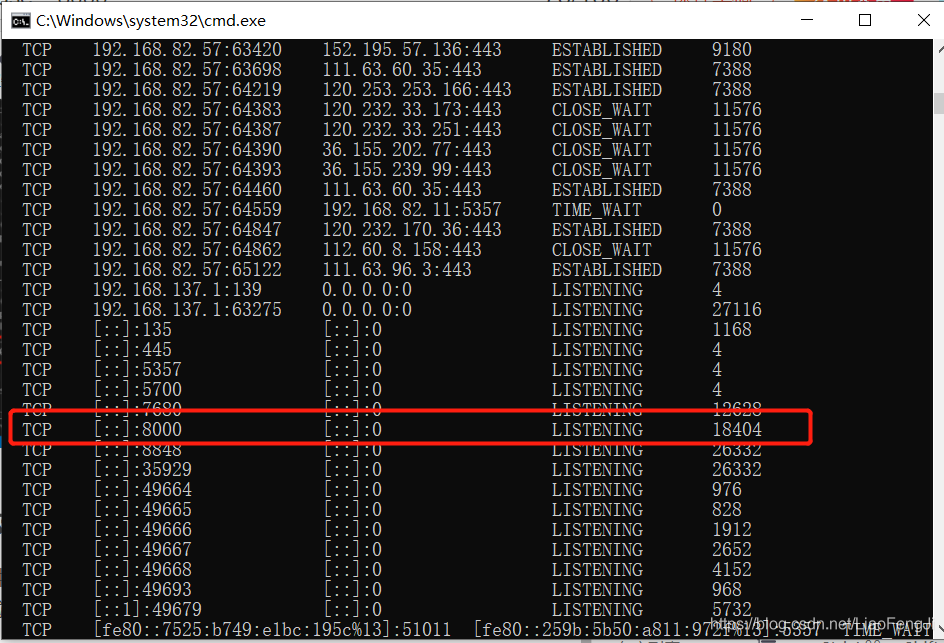
this error occurs because the port is occupied. We can view the port through netstat - ano :

at this time, we can solve it by closing the occupied port or recompiling the code with another port.

[Solved] Python Error: local variable ‘var‘ referenced before assignment

Unboundlocalerror: local variable ‘var’ referenced before assignment
local variable “var” referenced before assignment

error example 1

var = 10
def f1():
    print(var)
    var = 2
    print(var)
f1()

When VaR is a global variable, it is modified and undeclared in the function

solution:
declare the global variable Global var  before calling

error example 2 

def f2():
    var = 0
    def f3():
        var *= 0
        return var
    return f3()
f2()

VaR is a local variable defined in F2. Its value is modified in nested functions and is not declared
solution:
declare nonlocal var  in nested functions in advance

Tidb-dm Synchronous error: binlog checksum mismatch, data may be corrupted

1. Cause of problem:

Binlog checked 4G

2. Processing relay

1. When an upstream confirmation error occurs, the size of the corresponding binlog file exceeds 4GB

2. Stop DM worker

Note that instead of stop task, stop the corresponding DM worker process

3. Copy the upstream binlog file to the relay log directory as the relay log file.

4. Modify the relay .meta file

Update the corresponding relay.meta file in the relay log directory to pull from the next binlog. If DM worker is enabled_gtid, when modifying the relay.meta file, you also need to modify the gtid corresponding to the next binlog. If enable is not enabled_gtid, there is no need to modify the gtid.

R Language Error: variable does not have limits defined by datadist

R language, error reporting

As in nomogram

variable variable name does not have limits defined by datadist 

You need to add the following code after importing data

dd <- datadist(abc)
options(datadist="dd")

abc is your data that imported
For a given set of variables or a data frame, determines summaries of variables for effect and plotting ranges, values to adjust to, and overall ranges for Predict, plot.Predict, ggplot.Predict, summary.rms, survplot, and nomogram.rms. If datadist is called before a model fit and the resulting object pointed to with options(datadist=“name”), the data characteristics will be stored with the fit by Design(), so that later predictions and summaries of the fit will not need to access the original data used in the fit. Alternatively, you can specify the values for each variable in the model when using these 3 functions, or specify the values of some of them and let the functions look up the remainder (of say adjustmemt levels) from an object created by datadist. The best method is probably to run datadist once before any models are fitted, storing the distribution summaries for all potential variables. Adjustment values are 0 for binary variables, the most frequent category (or optionally the first category level) for categorical (factor) variables, the middle level for ordered factor variables, and medians for continuous variables. See descriptions of q.display and q.effect for how display and effect ranges are chosen for continuous variables.

[Solved] Xcode error: cycle inside*******; building could produce unreliable results.

Xcode Error: Cycle inside *******; building could produce unreliable results. This usually can be resolved by moving the target’s Headers build phase before Compile Sources.
Cycle details:


Showing All Issues
Cycle inside rtc_extension; building could produce unreliable results. This usually can be resolved by moving the target's Headers build phase before Compile Sources.
Cycle details:
→ Target 'rtc_extension' has copy command from '/Users/xxx/Documents/SourceCode/base_extension/xxx/third_party/mac/xxx_webrtc.framework' to '/Users/xxx/Documents/SourceCode/base_extension/xxx/bin/Release/xxx_webrtc.framework'
○ Target 'rtc_extension' has link command with output '/Users/xxx/Documents/SourceCode/base_extension/xxx/bin/Release/librtc_extension.dylib'
○ Target 'rtc_extension' has copy command from '/Users/xxx/Documents/SourceCode/base_extension/xxx/third_party/mac/TTTRtcSDK.framework' to '/Users/xxx/Documents/SourceCode/base_extension/xxx/bin/Release/TTTRtcSDK.framework'

Error reason:

Xcode 10 uses new build system by default, which is different from xcode9.


Solution:

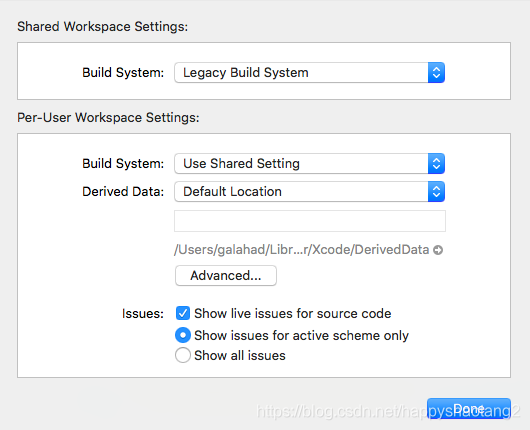
Modify build system
in Xcode menu bar – >File -> Progect setting, modify the build system to legacy build system, and then clean and compile.

[Solved] Eureka related services Start Error: cannot execute request on any known server

Error reporting prompt

DiscoveryClient_SYSTEM-SERVER/localhost:system-server:8851 - was unable to send heartbeat!
com.netflix.discovery.shared.transport.TransportException: Cannot execute request on any 
known server

Error reporting reason

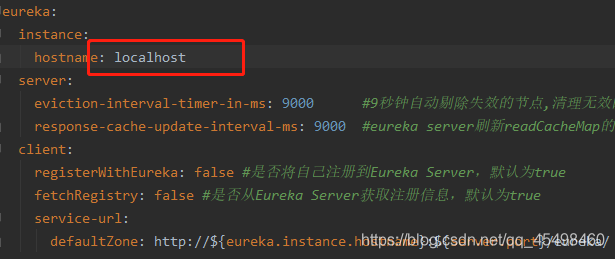
This is the server configuration

My client configuration is like this


Solution:

Replace my client address with localhost address and it will run successfully

Here are some methods on the network
first, change the configuration of the. YML file or. Properties file:

#The lowercase letters after underline + underline are equivalent to the letters after uppercase underline without underline (hump principle)

eureka.client.registerWithEureka=false   #whether to register itself to Eureka-Server, default true registerWithEureka is equivalent to register_with_eureka
eureka.client.fetchRegistry=false #whether to pull service information, default is not true fetchRegistry is equivalent to fetch-registry

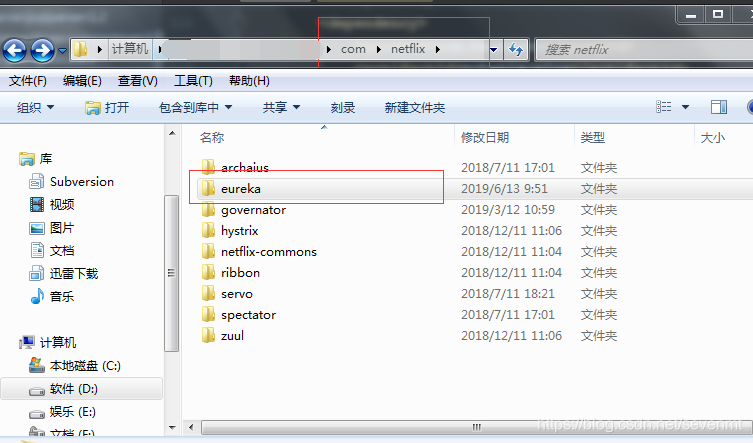
2、 Unregister dependencies and empty downloaded Eureka dependency packages:

<dependency>
   <groupId>org.springframework.cloud</groupId>
   <artifactId>spring-cloud-starter-netflix-eureka-client</artifactId>
   <version>2.1.1.RELEASE</version>
</dependency>


三. Refresh the botton: report all maven projects

[Solved] Docker+uWSGI+Flask Error: ModuleNotFoundError: No module named ‘flask‘

Background

The docker + nginx + uwsgi + flask deployment environment has always been able to run well before. This time, the Python version of the basic image was upgraded from the original 3.6 to 3.8 , and the title was wrong.

docker + nginx + uwsgi + flask deployment can refer to this article

Problem analysis

Let’s take a look at the start log of docker:

Starting nginx: nginx.,
*** Starting uWSGI 2.0.18-debian (64bit) on [Tue Aug 17 02:21:46 2021] ***,
[uWSGI] getting INI configuration from uwsgi.ini,
compiled with version: 8.2.0 on 10 February 2019 02:42:46,
os: Linux-3.10.0-957.el7.x86_64 #1 SMP Thu Nov 8 23:39:32 UTC 2018,
nodename: 9c8cc3ffd4ed,
machine: x86_64,
pcre jit disabled,
detected number of CPU cores: 2,
clock source: unix,
current working directory: /code,
detected binary path: /usr/bin/uwsgi-core,
uWSGI running as root, you can use --uid/--gid/--chroot options,
chdir() to /code,
*** WARNING: you are running uWSGI as root !!! (use the --uid flag) *** ,
*** WARNING: you are running uWSGI without its master process manager ***,
your memory page size is 4096 bytes,
detected max file descriptor number: 1048576,
lock engine: pthread robust mutexes,
thunder lock: disabled (you can enable it with --thunder-lock),
uwsgi socket 0 bound to TCP address :5000 fd 3,
uWSGI running as root, you can use --uid/--gid/--chroot options,
*** WARNING: you are running uWSGI as root !!! (use the --uid flag) *** ,
Python version: 3.7.3 (default, Jan 22 2021, 20:04:44)  [GCC 8.3.0],
Python main interpreter initialized at 0x55fa4f5a8990,
uWSGI running as root, you can use --uid/--gid/--chroot options,
*** WARNING: you are running uWSGI as root !!! (use the --uid flag) *** ,
python threads support enabled,
your server socket listen backlog is limited to 100 connections,
your mercy for graceful operations on workers is 60 seconds,
mapped 825016 bytes (805 KB) for 8 cores,
*** Operational MODE: preforking+threaded ***,
Traceback (most recent call last):,
  File "run.py", line 20, in <module>,
    from server import create_app,
  File "./server/__init__.py", line 14, in <module>,
    from flask import Flask,
unable to load app 0 (mountpoint='') (callable not found or import error),
*** no app loaded. going in full dynamic mode ***,
uWSGI running as root, you can use --uid/--gid/--chroot options,
*** WARNING: you are running uWSGI as root !!! (use the --uid flag) *** ,
*** uWSGI is running in multiple interpreter mode ***,
spawned uWSGI worker 1 (pid: 21, cores: 2),
spawned uWSGI worker 2 (pid: 22, cores: 2),
spawned uWSGI worker 3 (pid: 23, cores: 2),
spawned uWSGI worker 4 (pid: 24, cores: 2)

It can be seen from this that an error is reported when quoting flash .

What causes this problem?

If the program does not find the python Library (flash) when running, it will report an error.

Here, we don’t care why he didn’t find it. Since he didn’t find it, we’ll take the initiative to tell him where to find it.

Solution

Modify uwsgi. Ini , and set the value of Python path to /usr/local/lib/Python 3.8/site packages/.

The content of the modified uwsgi. Ini file is:

[uwsgi]
chdir = /code
socket = :5000
pythonpath = /usr/local/lib/python3.8/site-packages/
wsgi-file = run.py
callable = app
chmod-socket = 666
plugins = python3
buffer-size = 65535
processes = 4
threads = 2

All right, problem solved.