Author Archives: Robins

Yolox_s.pth Convert to tensorRT Error: AttributeError: ‘tensorrt.tensorrt.Builder‘ object has no attribute ‘max_workspace_size‘


yolox_s.pth to tensorRT Error


python tools/trt.py -n yolox-s -c preModels/yolox_s.pth error:


2021-08-26 06:47:14.864 | INFO     | __main__:main:52 - loaded checkpoint done.
[TensorRT] INFO: [MemUsageChange] Init CUDA: CPU +300, GPU +0, now: CPU 1889, GPU 970 (MiB)
[TensorRT] WARNING: Tensor DataType is determined at build time for tensors not marked as input or output.
2021-08-26 06:47:21.311 | ERROR    | __main__:<module>:77 - An error has been caught in function '<module>', process 'MainProcess' (12166), thread 'MainThread' (140257983133504):
Traceback (most recent call last):

> File "tools/trt.py", line 77, in <module>
    main()
    └ <function main at 0x7f8f9f310950>

  File "tools/trt.py", line 62, in main
    max_workspace_size=(1 << 32),

  File "/home/moli/anaconda3/envs/tf25/lib/python3.7/site-packages/torch2trt-0.3.0-py3.7.egg/torch2trt/torch2trt.py", line 558, in torch2trt
    builder.max_workspace_size = max_workspace_size
    │                            └ 4294967296
    └ <tensorrt.tensorrt.Builder object at 0x7f8f94a50970>

AttributeError: 'tensorrt.tensorrt.Builder' object has no attribute 'max_workspace_size'

The solution to this problem is to reduce the version of NVIDIA tensorrt [2021-8-27]
reference link: https://github.com/NVIDIA-AI-IOT/torch2trt/issues/557

pip install nvidia-tensorrt==7.2.* --index-url https://pypi.ngc.nvidia.com

Finally, with the following command, the model conversion was successful. It took 10 minutes, which was outrageous


python tools/trt.py -n yolox-s -c preModels/yolox_s.pth


`0   N/A  N/A      7491      C   python                           6491MiB `

## output:

cuda :  True
2021-08-27 04:09:41.895 | INFO     | __main__:main:57 - loaded checkpoint done.
[TensorRT] WARNING: Tensor DataType is determined at build time for tensors not marked as input or output.
[TensorRT] INFO: Some tactics do not have sufficient workspace memory to run. Increasing workspace size may increase performance, please check verbose output.
[TensorRT] INFO: Detected 1 inputs and 1 output network tensors.
2021-08-27 04:17:33.106 | INFO     | __main__:main:70 - Converted TensorRT model done.
2021-08-27 04:17:33.286 | INFO     | __main__:main:78 - Converted TensorRT model engine file is saved for C++ inference.


Conversion model default path: yolox_ outputs/yolox_ s/

 ll YOLOX_outputs/yolox_s/
 
total 52348

22065949 Aug 27 04:17 model_trt.engine
31524975 Aug 27 04:17 model_trt.pth

Fatal error compiling: invalid target release: 1.8 [How to Solve]

MVN install reports an error in the title, which is checked in two steps:

    1. idea file – setting
    1. Maven – runner
    1. check whether the JDK version is 1.8

2. Confirm POM file configuration

<plugin>                                                                                                                                      
    <!-- Specify the maven compile jdk version, if not specified, maven3 default with jdk 1.5 maven2 default with jdk1.3 -->                                                                           
    <groupId>org.apache.maven.plugins</groupId>                                                                                               
    <artifactId>maven-compiler-plugin</artifactId>                                                                                            
    <version>3.1</version>                                                                                                                    
    <configuration>                                                                                                                           
        <!-- In general, target and source are kept consistent, however, sometimes there are cases where target differs from source in order to allow the program to run in other versions of jdk (for low version target jdk, syntax not supported in low version jdk cannot be used in the source code) -->                    
        <source>1.8</source> <! -- the JDK version used by the source code -->                                                                                             
        <target>1.8</target> <! -- The compiled version of the target class file to be generated -->                                                                                     
        <encoding>UTF-8</encoding><! -- Character set encoding -->
        <skipTests>true</skipTests><! -- skip tests-->                                                                             
        <verbose>true</verbose>
        <showWarnings>true</showWarnings>                                                                                                                        
    </configuration>                                                                                                                          
</plugin>   

org.springframework.http.converter.HttpMessageNotReadableException: JSON parse error: Cannot deseria

org.springframework.http.converter.HttpMessageNotReadableException:
JSON parse error: Cannot deserialize value of type `java.util.Date` from String “NULL”: not a valid representation
(error: Failed to parse Date value ‘NULL’: Unparseable date: “NULL”);
nested exception is com.fasterxml.jackson.databind.exc.InvalidFormatException: Cannot deserialize value of type `java.util.Date` from String “NULL”: not a valid representation (error: Failed to parse Date value ‘NULL’: Unparseable date: “NULL”)
at [Source: (PushbackInputStream); line: 16, column: 14] (through reference chain: com.starsaiot.battery.entity.PledgeOrder[“payTime”])
=====================================================

I encountered this problem in a project where the front-end and back-end are separated
The front-end input data is “payTime”: “NULL”,
“tradeNum”: “null”,
“updateTime”: “2021-08-17 16:39:50”,
“updated”: “null”,
The console reports this error
====================================================
The reason for the error: the type of payTime is not correct, this capital NULL is the data I copied from the database and put in every too much attention, it should be consistent with the following null.


[Solved] Android Error: AAPT: error: unescaped apostrophe in string;Multiple substitutions specified in non-positi

I. AAPT: error: unescaped apostrophe in string </ font>

Cause analysis of error reporting

When doing the internationalization multilingual function, I defined some strings in the arrays.xml file as follows

<item>My name's Lisa</item>

The error report is translated as the apostrophe
that is not replaced by the string. Therefore, I thought that the error report may be caused by ', so I replaced the above code with the following code to solve the error report.

<item>My name&quot;s Lisa</item>

Error reporting solution

apostrophe ' available & amp; quot; replacement, such as: <item> My name& quot; s Lisa you can use double quotation marks to enclose string resources, such as: <item>" My name's Lisa" escape characters can be used before apostrophe ', such as: <item> My name\'s Lisa

II. Multiple substitutions specified in non positive format

Cause analysis of error reporting

First, I defined some strings in the string. XML file

<string name = "upgrade_time"> Driver board: %s\t\t signal version.%s</string>

Error reporting translates to multiple substitutions specified in a non location format. The error reporting prompt mentions setting formatted = "false" , so I change the above code to the following one, so I won’t run error reporting.

<string name = "upgrade_time" formatted="false"> Driver board: %s\t\t signal version.%s</string>

Error resolution
After reviewing some blog posts and trying it out myself, there are these ways to fix the above error.
Add formatted="false" attribute in the string with %% to indicate a %
Third, some common HTML special character encoding
In the Android xml file, involving some special characters may be reported in the display of the error, you need to use HTML special characters to convert.

Special symbols HTML encoding
& &amp;
> &gt;
< &lt;
> &gt;
&quot;
> &gt;
Half a blank space ensp;
A blank space &emsp;
> &gt;

Error while loading error while loading shared libraries [How to Solve]

Error while loading error while loading shared libraries solution

If it’s missing, find it and put it back

Distribution: archlinux
as stated in the title, take the yaourt encountered before writing this article as an example:

➜  ~ yaourt -Ss uswsusp
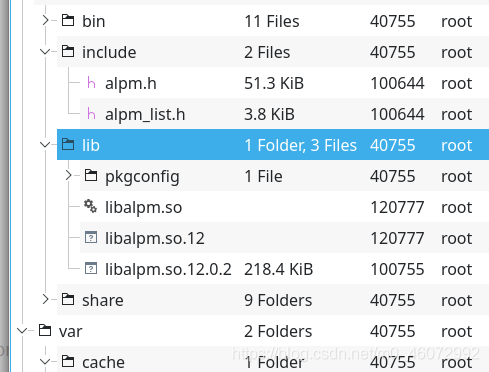
yaourt: error while loading shared libraries: libalpm.so.12

After looking at the in the system, I found that libalpm. So has been upgraded to 13

➜  ~ ls -l /usr/lib/libalpm.so*
lrwxrwxrwx 1 root root     13 Jul 16 03:26 /usr/lib/libalpm.so -> libalpm.so.13
lrwxrwxrwx 1 root root     17 Jul 16 03:26 /usr/lib/libalpm.so.13 -> libalpm.so.13.0.0
-rwxr-xr-x 1 root root 243608 Jul 16 03:26 /usr/lib/libalpm.so.13.0.0

Well, the problem is very simple. The library has been upgraded, but the dependent software developers have not upgraded.

Next, only three steps are required:
confirm the software from libalpm. So and download the old version (which may contain 12 generally open the package. You can directly find the corresponding link library and copy it to under /usr/Lib My detailed steps:
the search discovery may be in the Pacman package

➜  ~ pacman -Ss libalpm
core/pacman 6.0.0-5 (base-devel) [installed]
    A library-based package manager with dependency support
extra/pyalpm 0.10.6-1
    Python 3 bindings for libalpm
(..... Other insignificant packages)

To download the old software package of archlinux, you need to find it in arch archive.

In the /packages/P/Pacman/ directory, I tried to download the previous version of the current version (v6.0.0), pacman-5.2.2-4-x86_ 64.pkg.tar.zst

Open it directly and find libalpm. So. 12

finally, copy the extracted libalpm. So. * to /usr/lib ( Be careful not to copy the one without version suffix ( libalpm. So )

error: initializer element is not constant [How to Solve]

1. Background

C language compilation error: error: initializer element is not constant. The error code is as follows:

    char *info = (char *)malloc(len);
    static char *info_t = info;

The above error is caused by trying to initialize a static variable with the memory pointer allocated by malloc.

2. Error reason

Static variable is a global variable. The value of the global variable cannot be determined at compile time, but at run time (compilation principle). Therefore, the global variable cannot be initialized directly with the return value of malloc at the time of declaration. Replace with the following:

    char *info = (char *)malloc(len);
    static char *info_t; 
    info_t = info;

Compilation passed.

FIX: SSL error when connecting to the Jack server. [How to Solve]

FIX: SSL error when connecting to the Jack server.
##Background
unbuntu16.04 compiles android 8 source code and suddenly reports an error.

FAILED: setup-jack-server 
/bin/bash -c "(prebuilts/sdk/tools/jack-admin install-server prebuilts/sdk/tools/jack-launcher.jar prebuilts/sdk/tools/jack-server-4.11.ALPHA.jar  2>&1 || (exit 0) ) && (JACK_SERVER_VM_ARGUMENTS=\"-Dfile.encoding=UTF-8 -XX:+TieredCompilation\" prebuilts/sdk/tools/jack-admin start-server 2>&1 || exit 0 ) && (prebuilts/sdk/tools/jack-admin update server prebuilts/sdk/tools/jack-server-4.11.ALPHA.jar 4.11.ALPHA 2>&1 || exit 0 ) && (prebuilts/sdk/tools/jack-admin update jack prebuilts/sdk/tools/jacks/jack-4.32.CANDIDATE.jar 4.32.CANDIDATE || exit 47 )"
Jack server already installed in ".jack-server"
Communication error with Jack server (35), try 'jack-diagnose' or see Jack server log
SSL error when connecting to the Jack server. Try 'jack-diagnose'

Solution

Try according to the prompt:

$ jack-diagnose
error: process ID list syntax error

Usage:
 ps [options]

 Try 'ps --help <simple|list|output|threads|misc|all>'
  or 'ps --help <s|l|o|t|m|a>'
 for additional help text.

For more details see ps(1).
Port 8077 is used by another process (pid=), please ensure to free the port or change port configuration in '/.jack-settings' and 'jack-server/config.properties'
error: process ID list syntax error

Usage:
 ps [options]

 Try 'ps --help <simple|list|output|threads|misc|all>'
  or 'ps --help <s|l|o|t|m|a>'
 for additional help text.

For more details see ps(1).
Port 8076 is used by another process (pid=), please ensure to free the port or change port configuration in '.jack-settings' and '/.jack-server/config.properties'
SSL error when connecting to the Jack server. Try 'jack-diagnose'

The problem remains the same, so the focus is still on SSL communication:
finally, it is solved by the following methods:

1. Edit/etc/java-8-openjdk/security/java.security 
#
# Algorithm restrictions for Secure Socket Layer/Transport Layer Security
# (SSL/TLS) processing
#
# In some environments, certain algorithms or key lengths may be undesirable
# when using SSL/TLS.  This section describes the mechanism for disabling
# algorithms during SSL/TLS security parameters negotiation, including
# protocol version negotiation, cipher suites selection, peer authentication
# and key exchange mechanisms.
#
# Disabled algorithms will not be negotiated for SSL/TLS connections, even
# if they are enabled explicitly in an application.
#
# For PKI-based peer authentication and key exchange mechanisms, this list
# of disabled algorithms will also be checked during certification path
# building and validation, including algorithms used in certificates, as
# well as revocation information such as CRLs and signed OCSP Responses.
# This is in addition to the jdk.certpath.disabledAlgorithms property above.
#
# See the specification of "jdk.certpath.disabledAlgorithms" for the
# syntax of the disabled algorithm string.
#
# Note: The algorithm restrictions do not apply to trust anchors or
# self-signed certificates.
#
# Note: This property is currently used by the JDK Reference implementation.
# It is not guaranteed to be examined and used by other implementations.
#
# Example:
#   jdk.tls.disabledAlgorithms=MD5, SSLv3, DSA, RSA keySize < 2048
jdk.tls.disabledAlgorithms=SSLv3, TLSv1, TLSv1.1, RC4, DES, MD5withRSA, \
    DH keySize < 1024, EC keySize < 224, 3DES_EDE_CBC, anon, NULL, \
    include jdk.disabled.namedCurves


2. Find the line of TLSv1, delete TLSv1, TLSv1.1, and save it.

3. switch to the Android compiled source project directory: prebuilts/sdk/tools/

4. Run.

./jack-admin kill-server 

./jack-admin start-server

Robotframework post error“:“Internal Server Error“,“message“:“syntax error, expect

In the post request,
‘content type’: ‘application/JSON; Charset = UTF-8 ‘
data = ${data} is used to transfer parameters, resulting in an error

Error “:” internal server error “,” message “:” syntax error, expect

Solution:
After changing data=data to json{data}, the execution succeeds
PS: in the post request, data parameters need to be transferred according to the content type

Error querying database.Cause: java.sql.SQLException: Error setting driver on UnpooledDataSource.

Record the problems encountered in the learning process of Java mybatis framework

1. An exception occurred while building the first mybatis project:

Exception in thread "main" org.apache.ibatis.exceptions.PersistenceException: 

Error querying database. Cause: java.sql.SQLException: Error setting driver on UnpooledDataSource. 
Cause: java.lang.ClassNotFoundException: Cannot find class: com.mysql.cj.jdbc.Driver

Solution: the MySQL connector Java driver version is used incorrectly
I use MySQL version 8.0.22

import the driver of version 5.1.23, and the dependency declared in pom.xml file is

<dependency>
      <groupId>mysql</groupId>
      <artifactId>mysql-connector-java</artifactId>
      <version>5.1.23</version>
    </dependency>

The two versions do not correspond, so the driver error cannot be found.
the solution is to download the driver of version relative to, that is, the driver of version 8.0.22. The official website address is version 8.0.22
and then change the dependency in the POM file to:

<!--MySQL-->
<dependency>
      <groupId>mysql</groupId>
      <artifactId>mysql-connector-java</artifactId>
      <version>8.0.22</version>
    </dependency>

Another point is that the POM file should include not only driver dependencies, but also mybatis dependencies

<!--mybatis-->
<dependency>
      <groupId>org.mybatis</groupId>
      <artifactId>mybatis</artifactId>
      <version>3.4.5</version>
    </dependency>

Mac office Run-time error ‘53 [How to Solve]

~/Library/Group Containers/UBF8T346G9.Office/User Content.localized/Startup.localized/Word

Just delete the file below this one. You can refer to the following solution.

I had the same problem, and found that it was due to incompatible Adobe Add-in “linkCreation.dotm”.

It is located at:
~/Library/Group Containers/UBF8T346G9.Office/User Content.localized/Startup.localized/Word
Once you remove the file and re-start Word, no more errors.

Mgr [error]: library file libdmhs_exec.so not found, error: 0

DM8 reports an error when building DMHS
Mgr [error]: library file libdmhs_ Exec.so not found, error: 0

DMHS> start exec
CSL[ERROR]: Failed to load execution module

view log

MGR[INFO]: Loading execution module...
MGR[ERROR]: Library file libdmhs_exec.so not found, Error: 0
MGR[ERROR]: Log execution failed to start

Solution:
LDD tracking library file

[dmdba@DM bin]$ ldd libdmhs_exec.so
	linux-vdso.so.1 =>  (0x00007ffe819f6000)
	libc.so.6 => /lib64/libc.so.6 (0x00007f3897ed8000)
	libm.so.6 => /lib64/libm.so.6 (0x00007f3897bd5000)
	librt.so.1 => /lib64/librt.so.1 (0x00007f38979cd000)
	libpthread.so.0 => /lib64/libpthread.so.0 (0x00007f38977b1000)
	libdl.so.2 => /lib64/libdl.so.2 (0x00007f38975ac000)
	libdmhs_pub.so => ./libdmhs_pub.so (0x00007f3897280000)
	libdmhs_ucvt.so => ./libdmhs_ucvt.so (0x00007f3896d25000)
	libdmhs_dm_obj.so => ./libdmhs_dm_obj.so (0x00007f3896b0f000)
	libdmhs_cvt.so => ./libdmhs_cvt.so (0x00007f3896886000)
	libdodbc.so => /opt/dmdbms/bin/libdodbc.so (0x00007f389665a000)
	/lib64/ld-linux-x86-64.so.2 (0x0000563b938c3000)
	libdmhs_exp.so => ./libdmhs_exp.so (0x00007f3896284000)
	libdmhs_xml.so => ./libdmhs_xml.so (0x00007f3896075000)
	libdmoci.so => not found
	libdmdpi.so => /opt/dmdbms/bin/libdmdpi.so (0x00007f3895406000)
	libdmfldr.so => /opt/dmdbms/bin/libdmfldr.so (0x00007f38947d5000)
	libdmelog.so => /opt/dmdbms/bin/libdmelog.so (0x00007f38945ce000)
	libdmutl.so => /opt/dmdbms/bin/libdmutl.so (0x00007f38943bc000)
	libdmclientlex.so => /opt/dmdbms/bin/libdmclientlex.so (0x00007f3894189000)
	libdmos.so => /opt/dmdbms/bin/libdmos.so (0x00007f3893f5c000)
	libdmcvt.so => /opt/dmdbms/bin/libdmcvt.so (0x00007f389387d000)
	libdmstrt.so => /opt/dmdbms/bin/libdmstrt.so (0x00007f3893669000)
	libstdc++.so.6 => /lib64/libstdc++.so.6 (0x00007f3893360000)
	libgcc_s.so.1 => /lib64/libgcc_s.so.1 (0x00007f389314a000)
	libdmmem.so => /opt/dmdbms/bin/libdmmem.so (0x00007f3892f3c000)
	libdmcalc.so => /opt/dmdbms/bin/libdmcalc.so (0x00007f3892cb7000)

Libdmoci.so not found

[dmdba@DM bin]$ pwd
/home/dmdba/dmhs/bin
[dmdba@DM bin]$ find -name libdmoci.so
./stat/libdmoci.so
[dmdba@DM bin]$ cat /home/dmdba/.bash_profile 
export LD_LIBRARY_PATH="$LD_LIBRARY_PATH:/opt/dmdbms/bin"
export DM_HOME="/opt/dmdbms"
export DMHS_HOME=/home/dmdba/dmhs
export LD_LIBRARY_PATH=$LD_LIBRARY_PATH:/home/dmdba/dmhs/bin
[dmdba@DM bin]$ cp ./stat/libdmoci.so ./

Find and find it in/home/dmdba/DMHS/bin/STAT/libdmoci.so, but LD_ LIBRARY_ Path is not specified in this directory. Copy libdmoci.so to LD_ LIBRARY_ Under the directory specified by path, or add LD_ LIBRARY_ The path points to/home/dmdba/DMHS/bin/STAT
(if find is not found, you need to download one online)

Try LDD it again

[dmdba@DM bin]$ ldd libdmhs_exec.so
	linux-vdso.so.1 =>  (0x00007ffcf27be000)
	libc.so.6 => /lib64/libc.so.6 (0x00007f8c25479000)
	libm.so.6 => /lib64/libm.so.6 (0x00007f8c25176000)
	librt.so.1 => /lib64/librt.so.1 (0x00007f8c24f6e000)
	libpthread.so.0 => /lib64/libpthread.so.0 (0x00007f8c24d52000)
	libdl.so.2 => /lib64/libdl.so.2 (0x00007f8c24b4d000)
	libdmhs_pub.so => ./libdmhs_pub.so (0x00007f8c24821000)
	libdmhs_ucvt.so => ./libdmhs_ucvt.so (0x00007f8c242c6000)
	libdmhs_dm_obj.so => ./libdmhs_dm_obj.so (0x00007f8c240b0000)
	libdmhs_cvt.so => ./libdmhs_cvt.so (0x00007f8c23e27000)
	libdodbc.so => /opt/dmdbms/bin/libdodbc.so (0x00007f8c23bfb000)
	/lib64/ld-linux-x86-64.so.2 (0x00005591fe1ef000)
	libdmhs_exp.so => ./libdmhs_exp.so (0x00007f8c23825000)
	libdmhs_xml.so => ./libdmhs_xml.so (0x00007f8c23616000)
	libdmoci.so => ./libdmoci.so (0x00007f8c22ba6000)
	libdmdpi.so => /opt/dmdbms/bin/libdmdpi.so (0x00007f8c21f38000)
	libdmfldr.so => /opt/dmdbms/bin/libdmfldr.so (0x00007f8c21307000)
	libdmelog.so => /opt/dmdbms/bin/libdmelog.so (0x00007f8c21100000)
	libdmutl.so => /opt/dmdbms/bin/libdmutl.so (0x00007f8c20eee000)
	libdmclientlex.so => /opt/dmdbms/bin/libdmclientlex.so (0x00007f8c20cbb000)
	libdmos.so => /opt/dmdbms/bin/libdmos.so (0x00007f8c20a8e000)
	libdmcvt.so => /opt/dmdbms/bin/libdmcvt.so (0x00007f8c203af000)
	libdmstrt.so => /opt/dmdbms/bin/libdmstrt.so (0x00007f8c2019b000)
	libstdc++.so.6 => /lib64/libstdc++.so.6 (0x00007f8c1fe92000)
	libgcc_s.so.1 => /lib64/libgcc_s.so.1 (0x00007f8c1fc7c000)
	libdmmem.so => /opt/dmdbms/bin/libdmmem.so (0x00007f8c1fa6e000)
	libdmcalc.so => /opt/dmdbms/bin/libdmcalc.so (0x00007f8c1f7e9000)

When it is normal, restart DMHS and try to start exec again

Sqoop Error: Error during export:Export job failed [How to Solve]

Sqoop:Error during export:Export job failed !
sqoop export data to mysql exception, usually are very normal today can not, there is nothing to report error information, is not very depressed.
21/08/25 15:03:05 ERROR tool.ExportTool: Error during export:
Export job failed!
at org.apache.sqoop.mapreduce.ExportJobBase.runExport(ExportJobBase.java:439)
at org.apache.sqoop.manager.SqlManager.exportTable(SqlManager.java:931)
at org.apache.sqoop.tool.ExportTool.exportTable(ExportTool.java:80)
at org.apache.sqoop.tool.ExportTool.run(ExportTool.java:99)
at org.apache.sqoop.Sqoop.run(Sqoop.java:147)
at org.apache.hadoop.util.ToolRunner.run(ToolRunner.java:70)
at org.apache.sqoop.Sqoop.runSqoop(Sqoop.java:183)
at org.apache.sqoop.Sqoop.runTool(Sqoop.java:234)
at org.apache.sqoop.Sqoop.runTool(Sqoop.java:243)
at org.apache.sqoop.Sqoop.main(Sqoop.java:252)

Several possibilities
1, conversion: the null problem requires conversion
–input-fields-terminated-by ‘\001’
–input-null-string ‘\N’
–input-null-non-string ‘\N’
2, table structure inconsistencies, hive table fields mysql table must have, mysql fields can be more not less
3, mysql table field length to less, change the structure on the good


