Author Archives: Robins

[Solved] Unity3d reports an error using the opencv plug-in: unsafe code may only appear if compiling with/unsafe.

Problem description

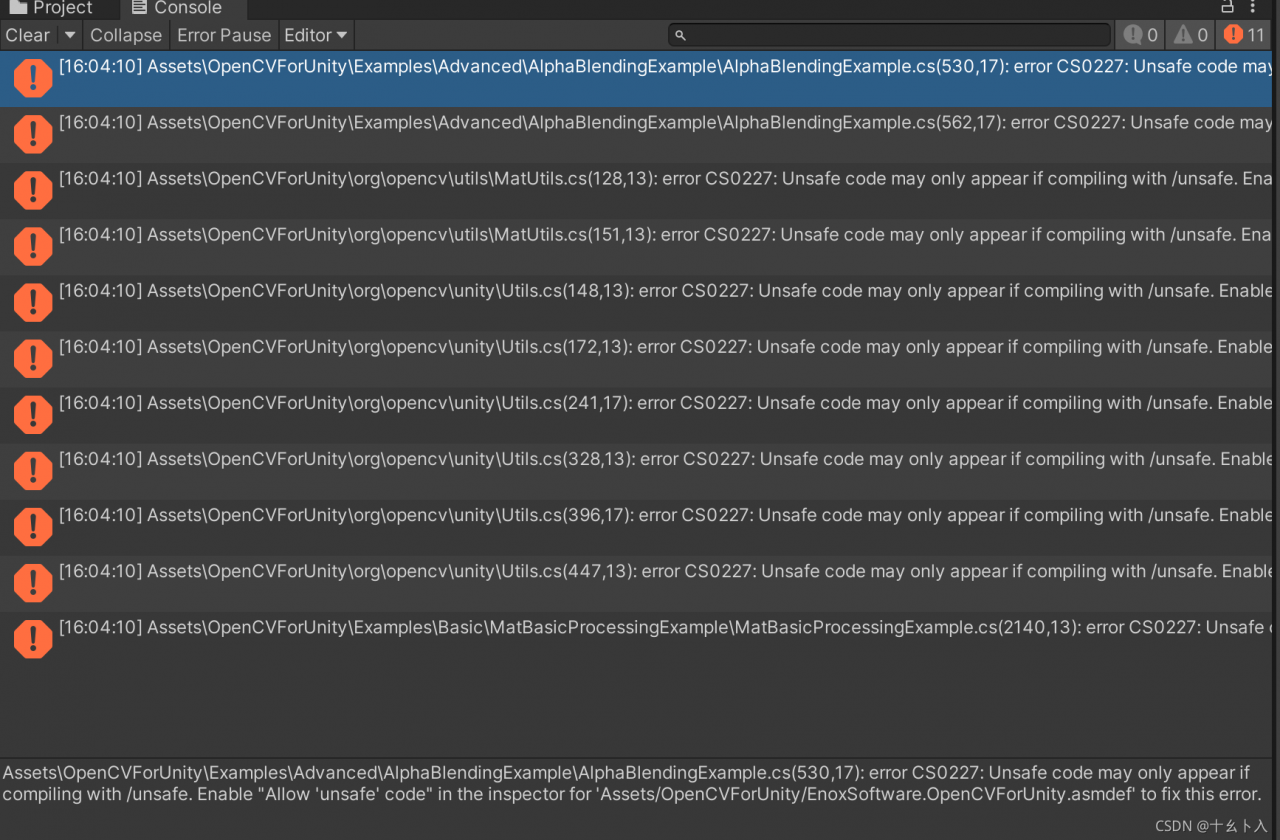
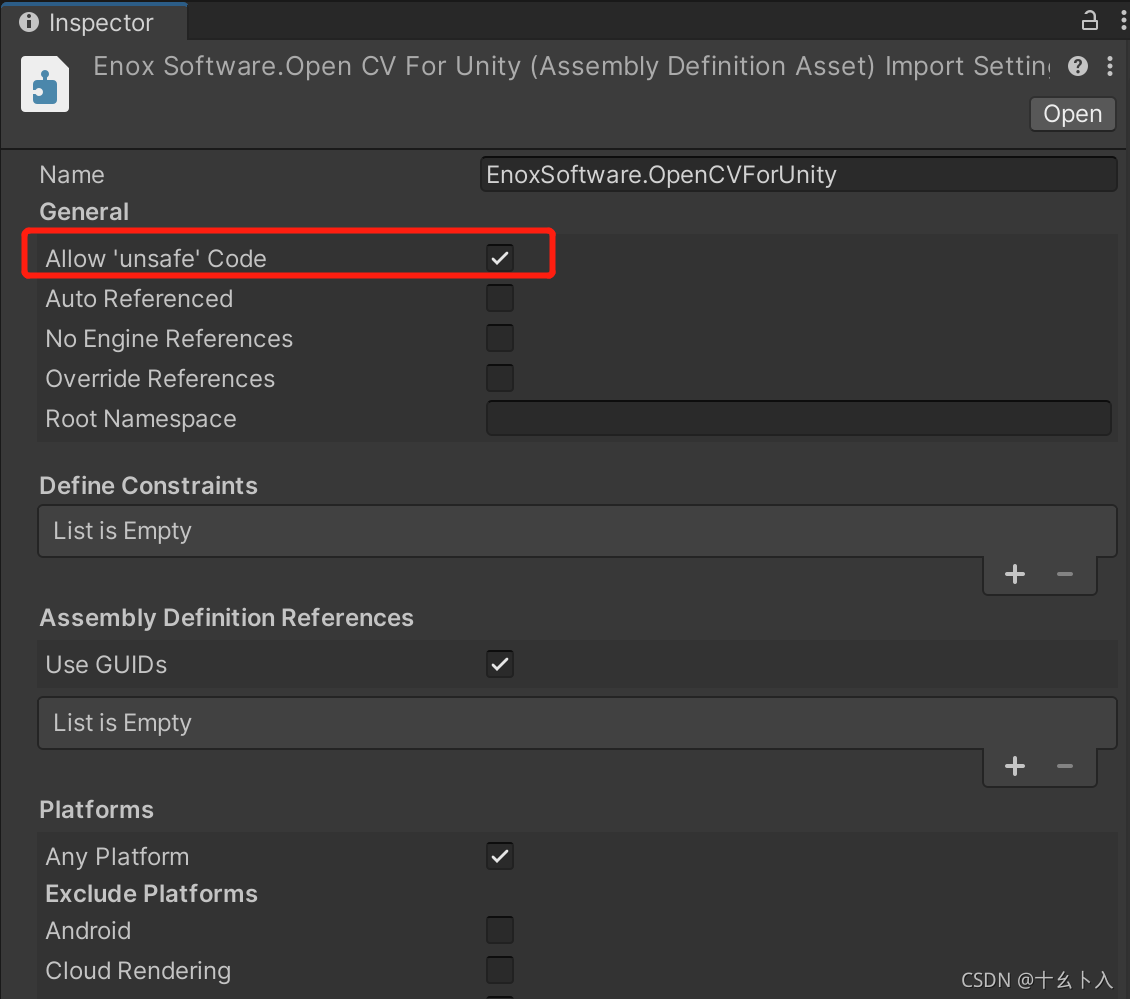
When using the opencv for unity plug-in, the error “assets \ opencvforunity \ examples \ advanced \ alphablendingexample \ alphablendingexample. CS (530, 17): error CS0227: Unsafe code may only appear if compiling with /unsafe. Enable “Allow ‘unsafe’ code” in the inspector for ‘Assets/OpenCVForUnity/EnoxSoftware.OpenCVForUnity.asmdef’ to fix this error.”
Solution:

There are two ways to modify:

1. Tools entry modification

Tools > on the upper side of the window; OpenCV For Unity > Check use unsafe code
as shown below:
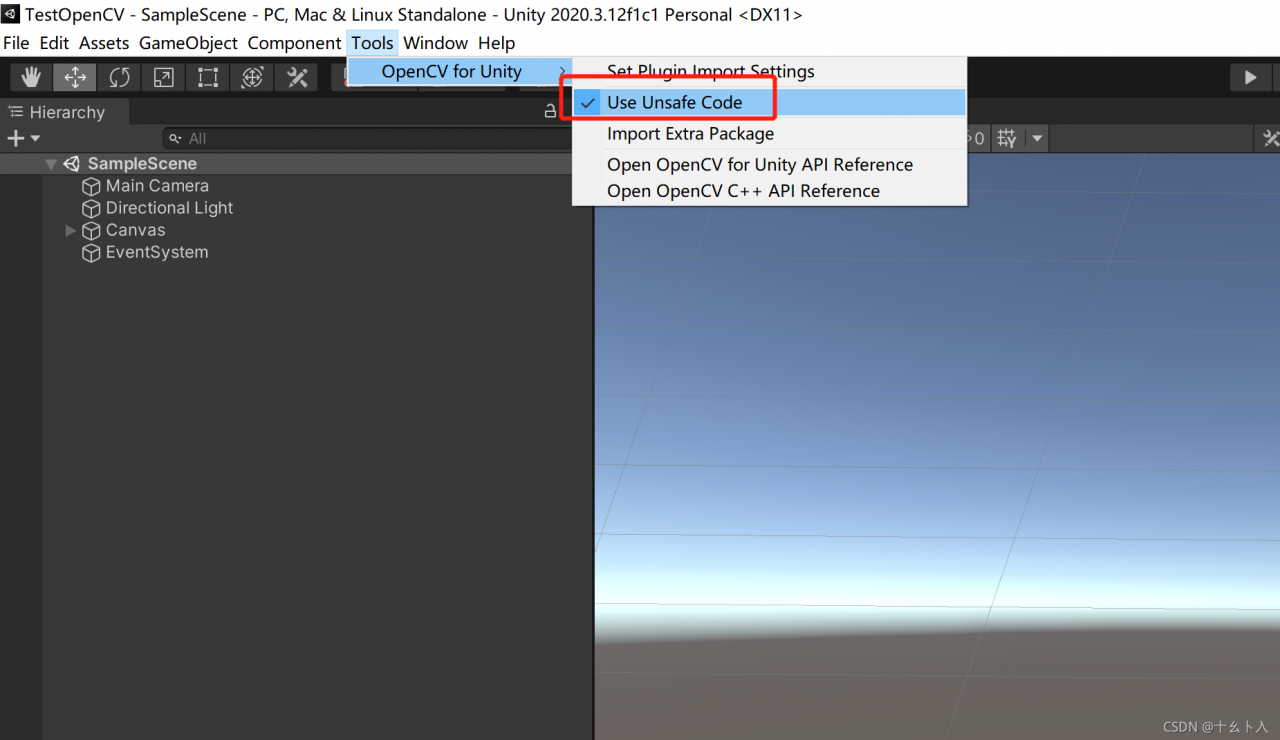
However, if there may be no such entrance, use method 2

2. Modify asmdef file

The. Asmdef file is an assembly definition file. This method is also available in the error prompt
modify the file in the path of assets/opencvforunity/enoxsoftware.opencvforunity.asmdef. After selecting the file, check the allow ‘unsafe’ code option in the inspector window and click apply.
Solutions to errors in ipvsadm startup

Centos7 Yum – y install ipvadm. After installing, start ipvsadm with an error.


# systemctl status ipvsadm. Service finally, I see a reliable solution. Manually generate this file:

ipvsadm --save > /etc/sysconfig/ipvsadm

Service ipvsadm start – confirm

Git report HTTP Basic: Access denied

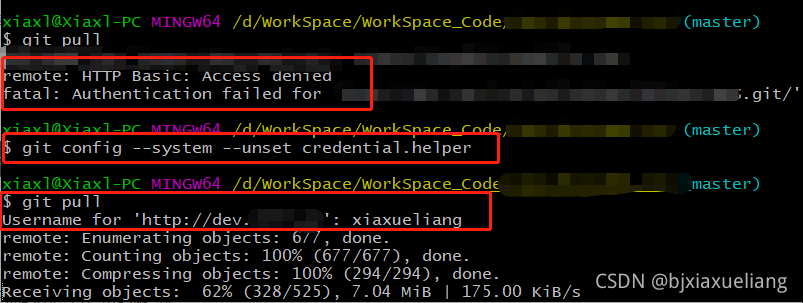
Recently, when submitting code on the company intranet using git, the following error message was encountered:

remote: HTTP Basic: Access denied
fatal: Authentication failed for 'http://dev.xxxxx/gitlab/XXXX.git/'

1、 Error reason

The reason for this error is an error in the verification of user name or password .

I have changed the configuration under the. SSH file before, but the verification is not successful.

2、 Settle

Find the corresponding project directory, execute the following git command, and re-enter the account and password

git config --system --unset credential.helper

An error is reported when uploading a file using commonsmultipartfile

Handler dispatch failed; nested exception is java.lang.NoClassDefFoundError: org/apache/commons/io/output/DeferredFileOutputStream

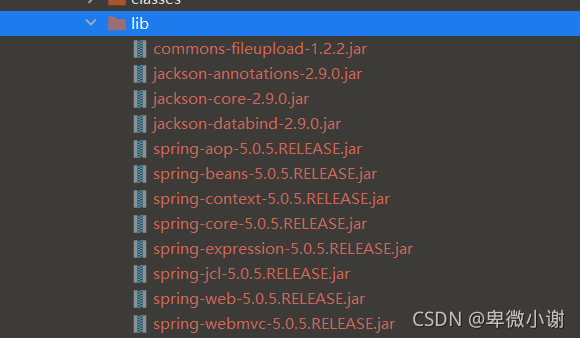
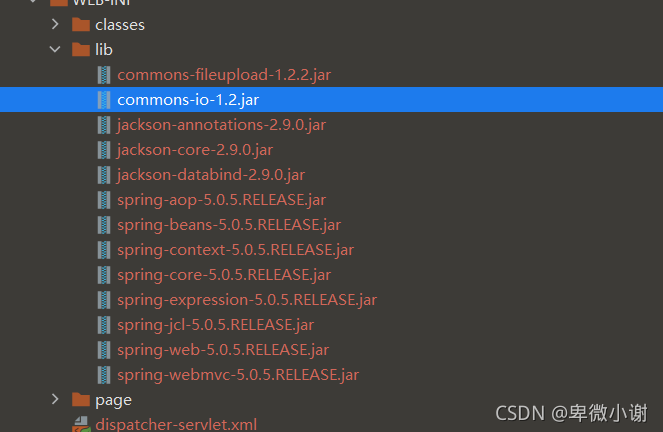
An error is reported when uploading a file using commonsmultipartfile. The error is due to the following reasons: the corresponding jar package of Commons IO is missing

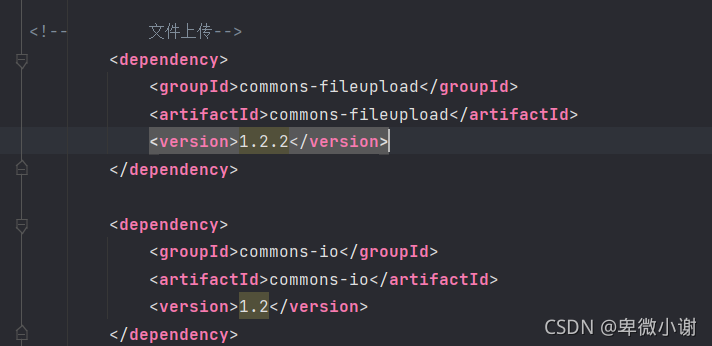
The solution is to import the dependencies of Commons IO in POM. Update the classes jar package and import it successfully

Just run the program

An error is reported when uploading a file using commonsmultipartfile

Errors are reported as follows

HTTP status 500 – internal server error

Type exception report

Message handler dispatch failed; nested exception is java.lang.NoClassDefFoundError: org/apache/commons/io/output/DeferredFileOutputStream

Description the server encountered an unexpected condition that prevented it from completing the request.

Exceptions

org.springframework.web.util.NestedServletException: Handler dispatch failed; nested exception is java.lang.NoClassDefFoundError: org/apache/commons/io/output/DeferredFileOutputStream
org.springframework.web.servlet.DispatcherServlet.doDispatch(DispatcherServlet.java:1006)
org.springframework.web.servlet.DispatcherServlet.doService(DispatcherServlet.java:925)
org.springframework.web.servlet.FrameworkServlet.proc essRequest(FrameworkServlet.java:974)
org.springframework.web.servlet.FrameworkServlet.doPost(FrameworkServlet.java:877)
javax.servlet.http.HttpServlet.service(HttpServlet.java:681)
org.springframework.web.servlet.FrameworkServlet.service(FrameworkServlet.java:851)
javax.servlet.http.HttpServlet.service(HttpServlet.java:764)
or g.apache.tomcat.websocket.server.WsFilter.doFilter(WsFilter.java:52)

reason

The corresponding jar package of Commons IO is missing

terms of settlement

Import common IO dependency in POM

Update the classes

The jar package was imported successfully

Just run the program

GPY installation error: ERROR: Could not find a version that satisfies the requirement scipy…

The following error occurs when installing GPY with PIP

ERROR: Could not find a version that satisfies the requirement scipy<1.5.0,>=1.3.0 (from GPy) (from versions: 0.8.0, 0.9.0, 0.10.0, 0.10.1, 0.11.0, 0.12.0, 0.12.1, 0.13.0, 0.13.1, 0.13.2, 0.13.3, 0.14.0, 0.14.1, 0.15.0, 0.15.1, 0.16.0, 0.16.1, 0.17.0, 0.17.1, 0.18.0, 0.18.1, 0.19.0, 0.19.1, 1.0.0b1, 1.0.0rc1, 1.0.0rc2, 1.0.0, 1.0.1, 1.1.0rc1, 1.1.0, 1.2.0rc1, 1.2.0rc2, 1.2.0, 1.2.1, 1.2.2, 1.2.3)
ERROR: No matching distribution found for scipy<1.5.0,>=1.3.0 (from GPy)

Solution: use PIP3

pip3 install GPy

How to Solve Nosuchmethoderror Error

1. reason
this error may be triggered when the project dependency is complex, there is a problem with the Java running environment, or there are different versions of the same type of jar package. In essence, the JVM cannot find a specific method of a class, that is, the JVM loads the wrong version of the class. To put it bluntly, the JVM can’t find the method it really wants to call! There are two main situations in which this error occurs:

Imported mismatched package version
the development environment is inconsistent with the running environment

2. solutions
check “external libraries” to see whether the error reporting method exists. If it does not exist, there must be a problem with the package. Just update the package; If it exists, it indicates that the package has been successfully introduced, but the integrated development environment may not be synchronized to. You can try to force the update. In addition, you can check whether the development environment is consistent with the running environment. If not, modify it.

3. special reminder
in case of Maven project, there are two main methods in the process of updating the package:

Go to the local Maven warehouse, delete the corresponding package, and then click refresh in “Maven project”
directly enter the command in the command line of “Maven project” to force the update
among them, method 1 is not reliable, and the operation may not be successful. The reason is unknown. Method 2 is strongly recommended. Nothing else, reliable!

[Solved] `handle_argument_error‘: ERROR: “rails console“ was called with arguments [“production“]


Problem background

An error occurs when gitlab modifies the root password:

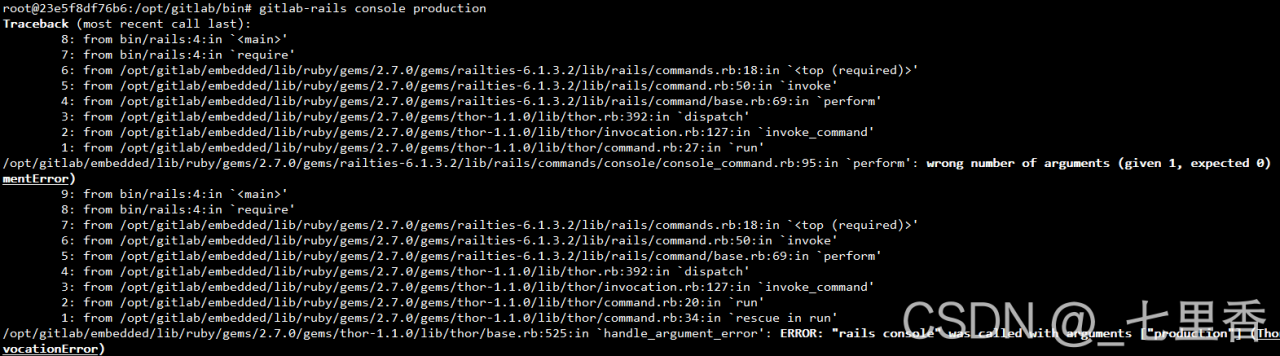
`handle_ argument_ error’: ERROR: “rails console” was called with arguments [“production”] (Thor::InvocationError)

As shown in the figure:

Note that the following prompt: Usage: “rails console [options]” is incorrect

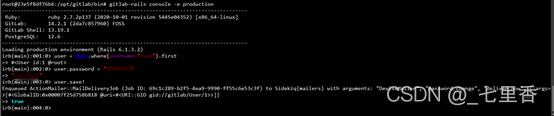
Change password normally

There are only two parameters in total. After trying, the correct instruction is as follows:

gitlab-rails console -e production

be accomplished!

[Solved] Temporary error: Error: spawn E:\vue3-vite\my-app\node_modules\esbuild\esbuild.exe ENOENT

PS E:\vue3-vite\my-app> npm run dev

> [email protected] dev
> vite

events.js:292
      throw er; // Unhandled 'error' event
      ^

Error: spawn E:\vue3-vite\my-app\node_modules\esbuild\esbuild.exe ENOENT
    at Process.ChildProcess._handle.onexit (internal/child_process.js:267:19)
    at onErrorNT (internal/child_process.js:469:16)
    at processTicksAndRejections (internal/process/task_queues.js:84:21)
Emitted 'error' event on ChildProcess instance at:
    at Process.ChildProcess._handle.onexit (internal/child_process.js:273:12)
    at onErrorNT (internal/child_process.js:469:16)
    at processTicksAndRejections (internal/process/task_queues.js:84:21) {
  errno: 'ENOENT',
  code: 'ENOENT',
  syscall: 'spawn E:\\vue3-vite\\my-app\\node_modules\\esbuild\\esbuild.exe',
  path: 'E:\\vue3-vite\\my-app\\node_modules\\esbuild\\esbuild.exe',
  spawnargs: [ '--service=0.12.22', '--ping' ]
}
npm ERR! code 1
npm ERR! path E:\vue3-vite\my-app
npm ERR! command failed
npm ERR! command C:\Windows\system32\cmd.exe /d /s /c vite

npm ERR! A complete log of this run can be found in:
npm ERR!     D:\node\node_cache\_logs\2021-08-26T02_24_14_376Z-debug.log

Solution: node node_modules/esbuild/install.js

PS E:\vue3-vite\my-app> node node_modules/esbuild/install.js
PS E:\vue3-vite\my-app> npm run dev

> [email protected] dev
> vite

Pre-bundling dependencies:
  vue
(this will be run only when your dependencies or config have changed)

  vite v2.5.1 dev server running at:

  > Local: http://localhost:3000/
  > Network: use `--host` to expose

  ready in 1645ms.

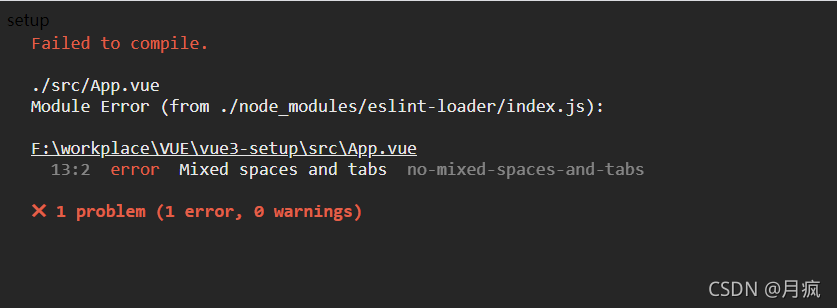
[Solved] Error Mixed spaces and tabs no-mixed-spaces-and-tabs

"extensions": "eslint: Recommended" the attribute in the configuration file enables this rule.

Most code conventions require tabs or spaces for indentation. Therefore, if a single line code is indented with tabs and spaces, an error usually occurs.

This rule does not allow indenting with mixed spaces and tabs.

Example of error code for this rule:

/*eslint no-mixed-spaces-and-tabs: "error"*/

function add(x, y) {
// --->..return x + y;

      return x + y;
}

function main() {
// --->var x = 5,
// --->....y = 7;

    var x = 5,
        y = 7;
}

Example of the correct code for this rule:

/*eslint no-mixed-spaces-and-tabs: "error"*/

function add(x, y) {
// --->return x + y;
    return x + y;
}

This rule has a string option.

"smart tabs" when the latter is used for alignment, it is allowed to mix space and labels.

Smart tag

The correct code example for this rule includes the following "smart tabs" Options:

/*eslint no-mixed-spaces-and-tabs: ["error", "smart-tabs"]*/

function main() {
// --->var x = 5,
// --->....y = 7;

    var x = 5,
        y = 7;
}

Add this line:

/*eslint no-mixed-spaces-and-tabs: [“error”, “smart-tabs”]*/


<template>
	<comp-setup>
		
	</comp-setup>
</template>

<script>
/*eslint no-mixed-spaces-and-tabs: ["error", "smart-tabs"]*/
import CompSetup from './components/setupview'
export default {
  name: 'App',
  components: {
	  CompSetup,
  }
}
</script>

<style>

</style>

[Solved] Error: Failed to download metadata for repo ‘docker-ce-stable‘: Cannot download repomd.xml:

When installing docker, an error message appears (on alicloud server):

Error: Failed to download metadata for repo ‘docker-ce-stable’: Cannot
download repomd.xml: Cannot download repodata/repomd.xml: All mirrors
were triedError: Failed to download metadata for repo
‘docker-ce-stable’: Cannot download repomd.xml: Cannot download
repodata/repomd.xml: All mirrors were tried

Solution:

Here, my work is done on the alicloud server. There are some small problems. According to the alicloud official website, you need to make some minor modifications to your docker-ce.repo

Change the $releasever variable to 7