reason:
My path is written like this
@click="openBlank({ path: '/reissue'},{historyOpinion:ho})"
It belongs to non-standard writing Just change it to this
@click="openBlank('/reissue',{historyOpinion:ho})"
reason:
My path is written like this
@click="openBlank({ path: '/reissue'},{historyOpinion:ho})"
It belongs to non-standard writing Just change it to this
@click="openBlank('/reissue',{historyOpinion:ho})"
Recently, I encountered the following errors when installing fairseq running experiment in machine translation related tasks:
AttributeError: module 'sacrebleu' has no attribute 'compute_bleu'
After consulting, it is a problem with sacrableu version 2.0. Only the following operations are required:
pip uninstall sacrebleu
pip install sacrebleu==1.5.1
Problem solved!
An error occurs when using the for loop in Vue because of duplicate key values
Error 1: there are two for loops nested, and the same value is bound in the key
Error 2: there are duplicate keys in this array of the for loop
My question:
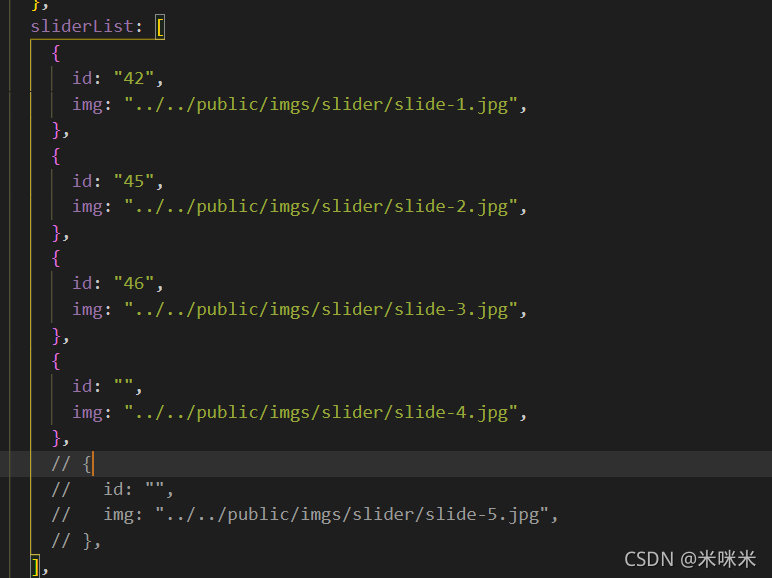
Solution: just comment out the last one
Question

reason
The reason is that the downloaded sass loader version is too high and incompatible
terms of settlement
Yarn remove sass loader uninstall
yarn add sass- [email protected] -D install a lower version
Succeeded
[problem phenomenon]
In springboot, when there is no error in the request link and the controller configuration, an error will be prompted when accessing a controller link interface:
This application has no explicit mapping for /error,so you are seeing this as a fallback
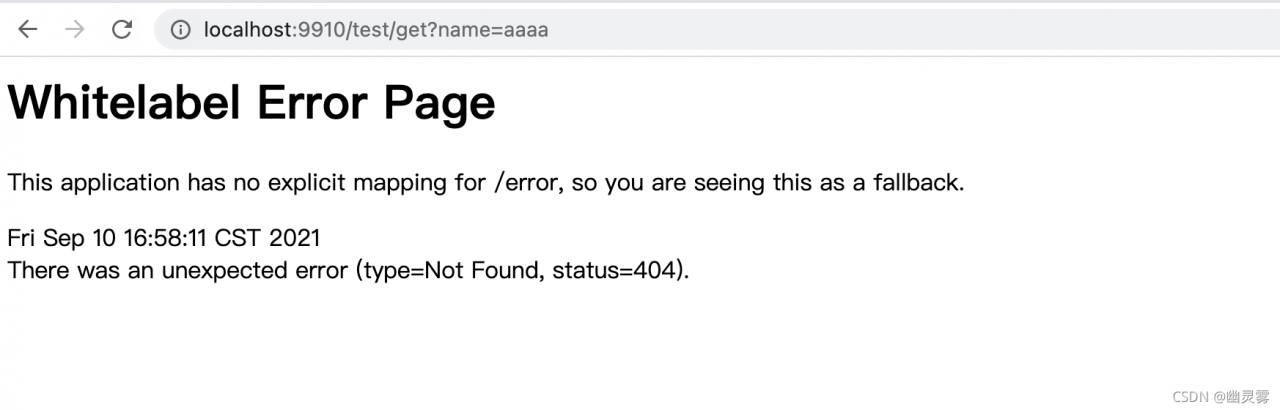
[reason]
The request cannot find the corresponding bean for processing. If there is no error in the request link and the controller configuration, it may also be the problem of springbootapplication package scanning, as follows:
By default, the @springbootapplication annotation will only the beans of this package and its sub-packages, resulting in the corresponding controller beans not being loaded into the spring container
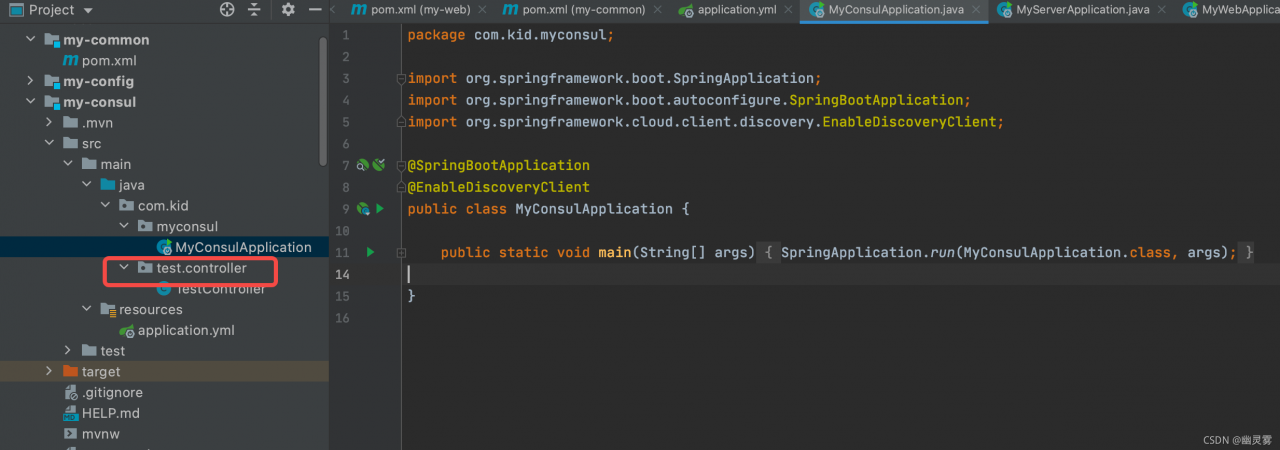
[solution]
Scheme I:
Move all controller classes to the same level package or sub package of application class, as shown in the figure:
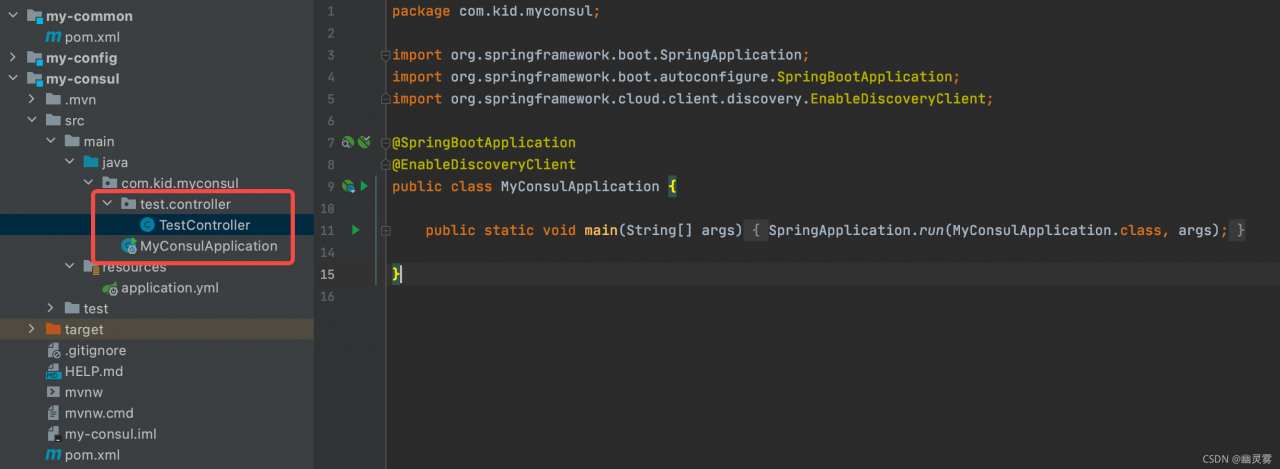
Scheme II:
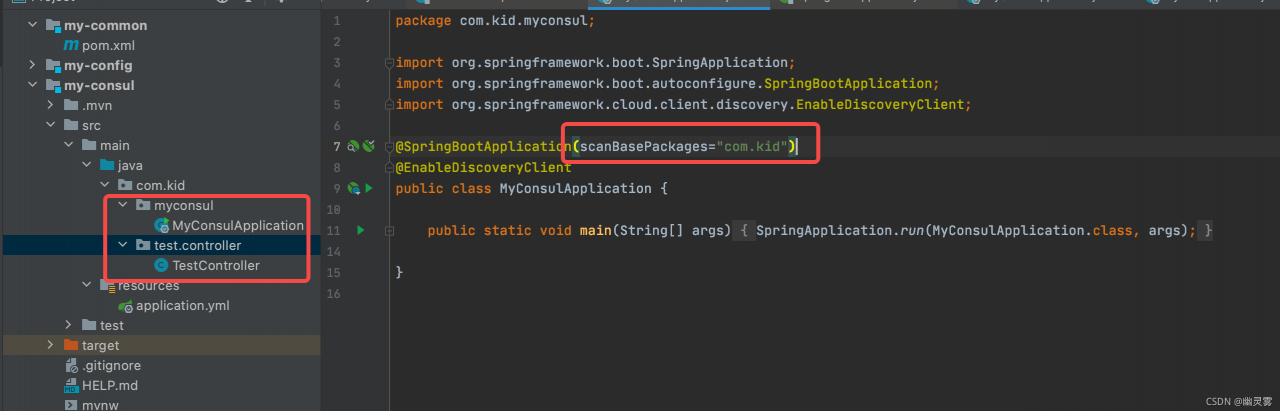
If you don’t want to change the file location, you can specify the scanned package with the @ springbootapplication annotation:
@SpringBootApplication(scanBasePackages="com.kid")
When the data queried by c# datatable is converted to JSON object, the following error is reported.
Newtonsoft.Json.JsonReaderException: 'Error reading JArray from JsonReader. Path '', line 0, position 0.The reason for this problem is that the queried data set directly becomes a string, and then an error is reported when it is empty
solution: add judgment
		if (jsonStr.Length > 0)
                {
                    JArray jArray = JArray.Parse(jsonStr);
                    JProperty Data = new JProperty("Data", jArray);
                    ZzjDataObj.Add(Data);
                }
                else
                {
                    JArray jArray = new JArray();
                    JProperty Data = new JProperty("Data", jArray);
                    ZzjDataObj.Add(Data);
}1. This error occurred when building the UVM environment. I found it in seq0 Called ` UVM_ declare_ p_ Sequencer (my_vsqr) and seq0.start (p_sequencer. P_sqr0); As a result of inconsistency, the sequencer that should be passed in is env.vsqr (where vsqr is a new handle registered by my_vsqr using the factor mechanism)
Installation steps:
1. Download and install luajit 2.1 (both 2.0 and 2.1 are supported, and 2.1 is officially recommended): http://luajit.org/download.html
cd /usr/local/src
wget http://luajit.org/download/LuaJIT-2.1.0-beta3.tar.gz
tar zxvf LuaJIT-2.1.0-beta3.tar.gz
cd LuaJIT-2.1.0-beta2
make PREFIX=/usr/local/luajit
make install PREFIX=/usr/local/luajit
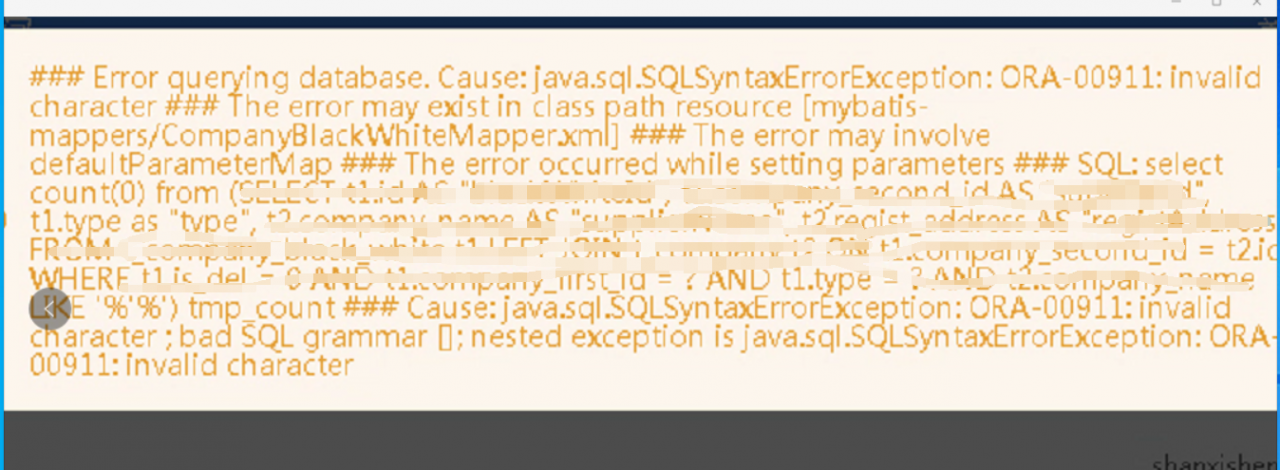
This problem is well positioned. At first glance, it is the problem of parameter transmission. Through this error report, the first thing to consider is the like part of the query condition.
The main idea of this problem is 1. Special characters are passed, such as’ ‘
2. See if the like query uses #{} or ${}
3. Is there a problem with where involving parameter statements
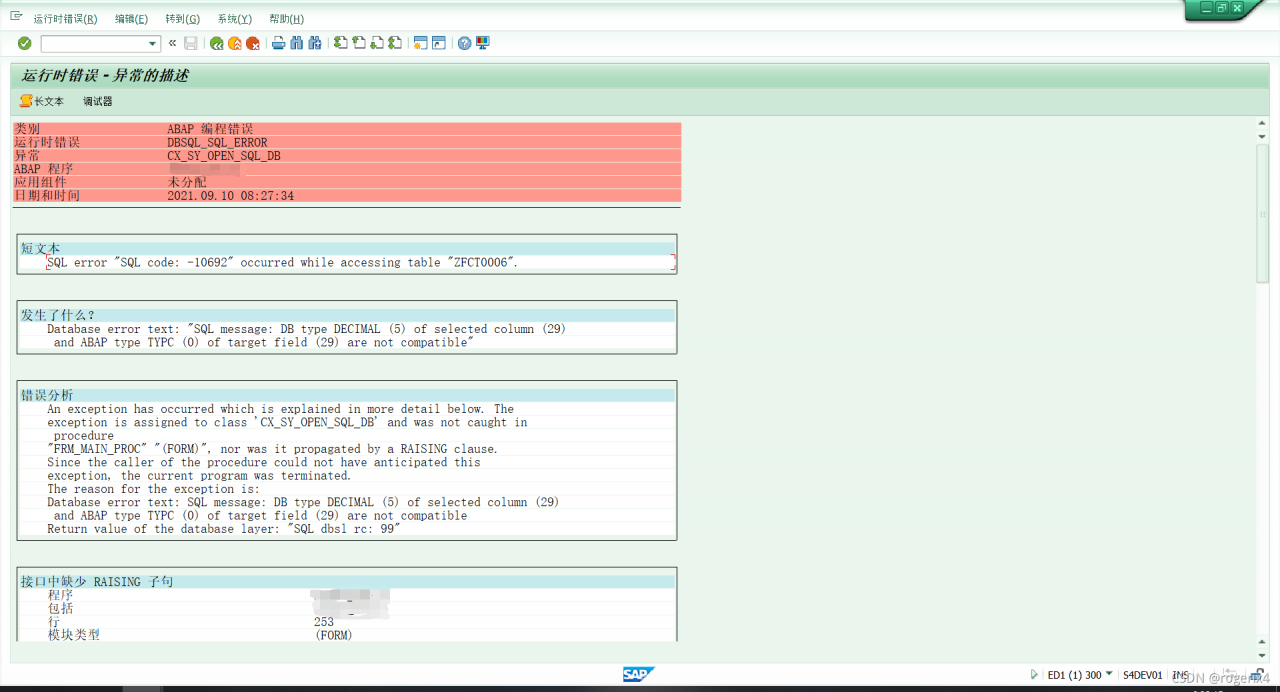
report errors
resolvent
Note:SQL code: -10692 occurred while accessing table < TABLE_ NAME> Use the report cucastat to reset the statement cache for the instance.
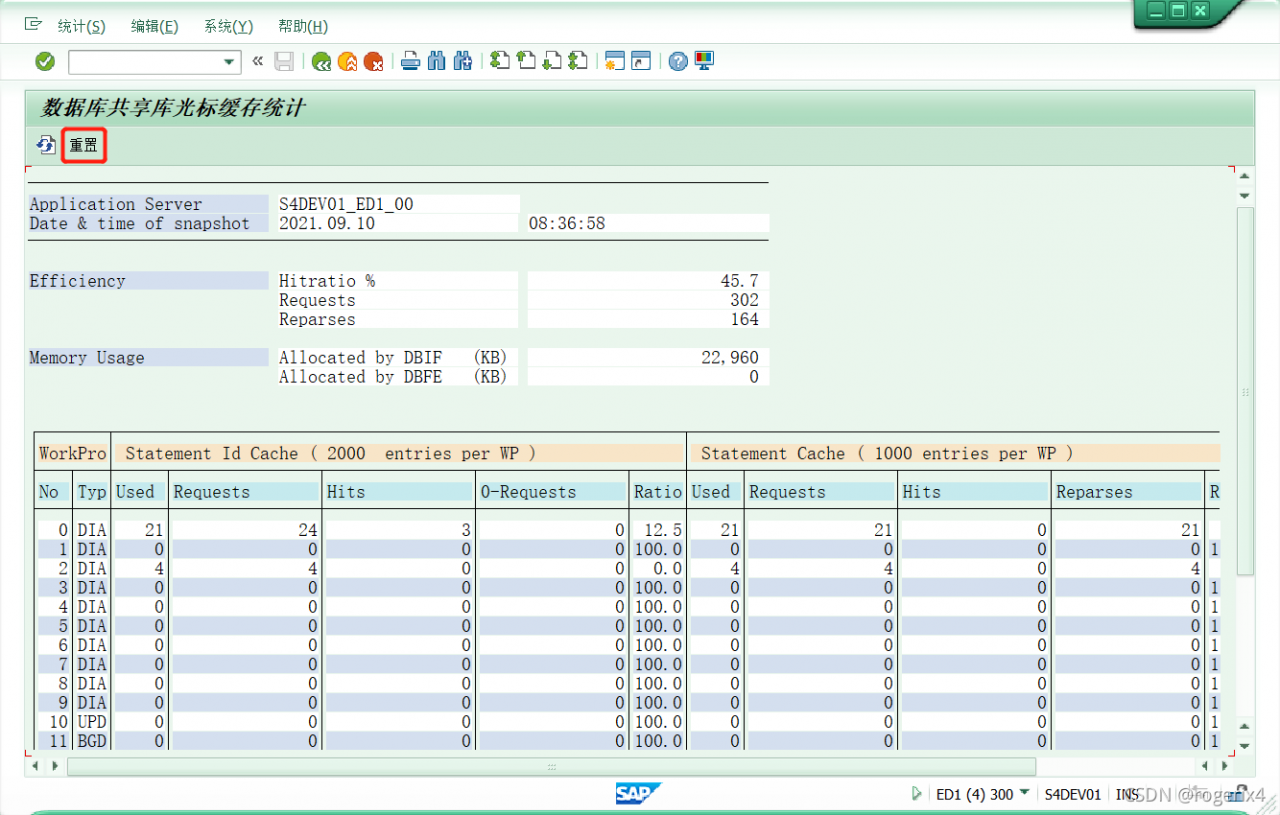
The instance list can be viewed through transaction sm51. Execute the program cucastat in transaction se38; Alternatively, call transaction al12 and select monitor – & gt; cursor cache from the menu.
Select this server. Then select the reset button.
catalogue
1. Error message:
2. Analysis
3. Solution
1. Error message:
D:\InstallSoftware\opencv\OpenCV-MinGW-Build-OpenCV-4.5.2-x64\x64\mingw\bin\libopencv_ calib3d452.dll:-1: error: file not recognized: File format not recognized
2. Analysis
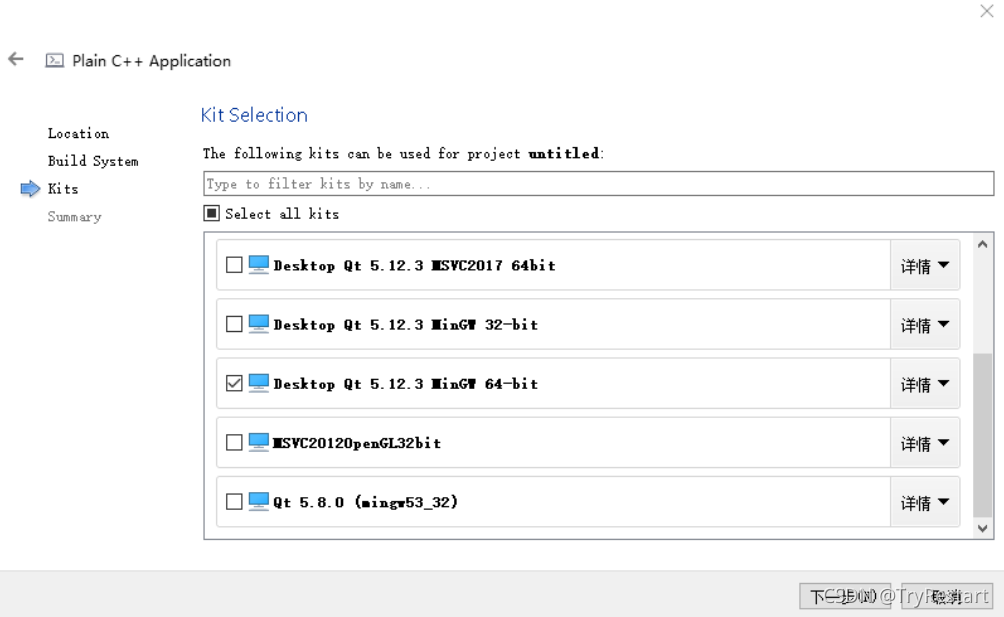
This is because the opencv compiled file version is different from the QT project version. You should choose the correct version of the toolkit.
3. Solution
For example, my opencv compilation file is opencv build_ 64 bit, then select MinGW 64 bit for the project.
Record a problem. Anaconda3 CONDA version 4.6.7 is installed NB_ CONDA failed and damaged the original environment, resulting in an error as shown in the title.
It is speculated that there is a problem with the dependency. First, check the piptree and find that all dependencies are satisfied. However, I manually updated setuptools during the process of CONDA update CONDA. Although the update of CONDA update CONDA failed, the version of setuptools has been updated to 58.0.0,
– setuptools [required: >=36, installed: 58.0.0]
The highest requirement is only 36. It is suspected that the version is too new and the old version is not compatible. Then I tried the degraded version
pip uninstall setuptools

pip install setuptools==36.0.2
Problem solving.