Author Archives: Robins

TIDB-kafka server: Message was too large, server rejected it to avoid allocation error

1、 Background

Using drainer to synchronize to Kafka, an error is reported:

 ["fail to produce message to kafka, please check the state of kafka server"] [error="kafka: Failed to produce message to topic test-tidb: kafka server: Message was too large, server rejected it to avoid allocation error."]

2、 Settle

Error reason: if a large transaction is executed in tidb, the generated binlog data will be large, which may exceed the message size limit of Kafka.

Solution: you need to adjust the configuration parameters of Kafka cluster, as shown below.

message.max.bytes=1073741824
replica.fetch.max.bytes=1073741824
fetch.message.max.bytes=1073741824

android studio:Error inflating class android.support.v4.widget.SwipeRefreshLayout

We just need to add the custom components of XML

Android.support.v4.widget.swiperefreshlayout is changed to:

androidx.swiperefreshlayout.widget.SwipeRefreshLayout

At the same time, the most important thing is to rely on it. This will not be reported wrong. I found it only after looking for someone else’s blog

implementation ‘androidx.swiperefreshlayout:swiperefreshlayout:1.0.0’
 

[Solved] Fatal error: Uncaught Error: Class ‘Imagick‘ not found

Resolve fatal error: uncaught error: class’ imageick ‘not found

reason

PHP requires the imageick extension to be installed

environment

CentOS Linux release 7.9
PHP 7.3.26

Installation steps

Download the appropriate ImageMagick program and ImageMagick extension according to the environment

Installing imagemagic

wget http://www.imagemagick.org/download/ImageMagick.tar.gz

tar zxvf ImageMagick.tar.gz 
cd ImageMagick-7.1.0-8/
./configure --prefix=/usr/local/webservice/imagemagick
make && make install

Check whether the installation is successful

/usr/local/webservice/imagemagick/bin/convert -version

Version: ImageMagick 7.1.0-8 Q16-HDRI x86_64 2021-09-18 https://imagemagick.org
Copyright: (C) 1999-2021 ImageMagick Studio LLC
License: https://imagemagick.org/script/license.php
Features: Cipher DPC HDRI OpenMP(3.1) 
Delegates (built-in): fontconfig freetype jng jpeg lzma png x xml zlib
Compiler: gcc (4.8)

Installing the PHP extension: imagick

Download address

https://pecl.php.net/package/imagick
View the appropriate version download

 wget https://pecl.php.net/get/imagick-3.5.1.tgz
 tar zxvf imagick-3.5.1.tgz

cd imagick-3.5.1/
/usr/local/webservice/php73/bin/phpize
./configure --with-php-config=/usr/local/webservice/php73/bin/php-config --with-imagick=/usr/local/webservice/imagemagick
make && make install

Successful installation is displayed

Build complete.
Don't forget to run 'make test'.

Installing shared extensions:     /usr/local/webservice/php73/lib/php/extensions/no-debug-zts-20180731/
Installing header files:          /usr/local/webservice/php73/include/php/

Modify the configuration file and write extension=imagick.so

Add
extension=/usr/local/webservice/php73/lib/php/extensions/no-debug-zts-20180731/imagick.so at the end of vim /usr/local/webservice/php73/etc/php.ini

Restart php-fpm and test whether the installation is successful
systemctl restart php-fpm

php -m | grep imagick
[Solved] error: external/googletest/googletest: MODULE.TARGET.STATIC_LIBRARIES.libgtest already defined

Android9.0 System compilation error
170/978] including external/google-tv-pairing-protocol/Android.mk …
[171/978] including external/googletest/Android.mk …
build/make/core/base_rules.mk:260: error: external/googletest/googletest: MODULE.TARGET.STATIC_LIBRARIES.libgtest already defined by external/googletest/googletest.
09:42:55 ckati failed with: exit status 1
0;31m#### failed to build some targets (49 seconds) ####
The reason of the error
The compiler server has defined NDK_ROOT environment variable, which conflicts with Android compiler environment variable.
Check whether NDK_ROOT environment variable or SDK_ROOT environment variable is defined.

echo $NDK_ROOT

My compilation server defines NDK_Root environment variable, so echo $NDK_Root outputs the following path:
/xxx_NDK_Root/
indicates that the change amount is defined.

Solution:

Remove the environment variable temporarily

export NDK_ROOT=""

Continue to compile the system.

[Solved] Error:Cannot determine path to ‘tools.jar‘ library for 17

Error: cannot determine path to ‘tools. Jar’ library for 17 solution

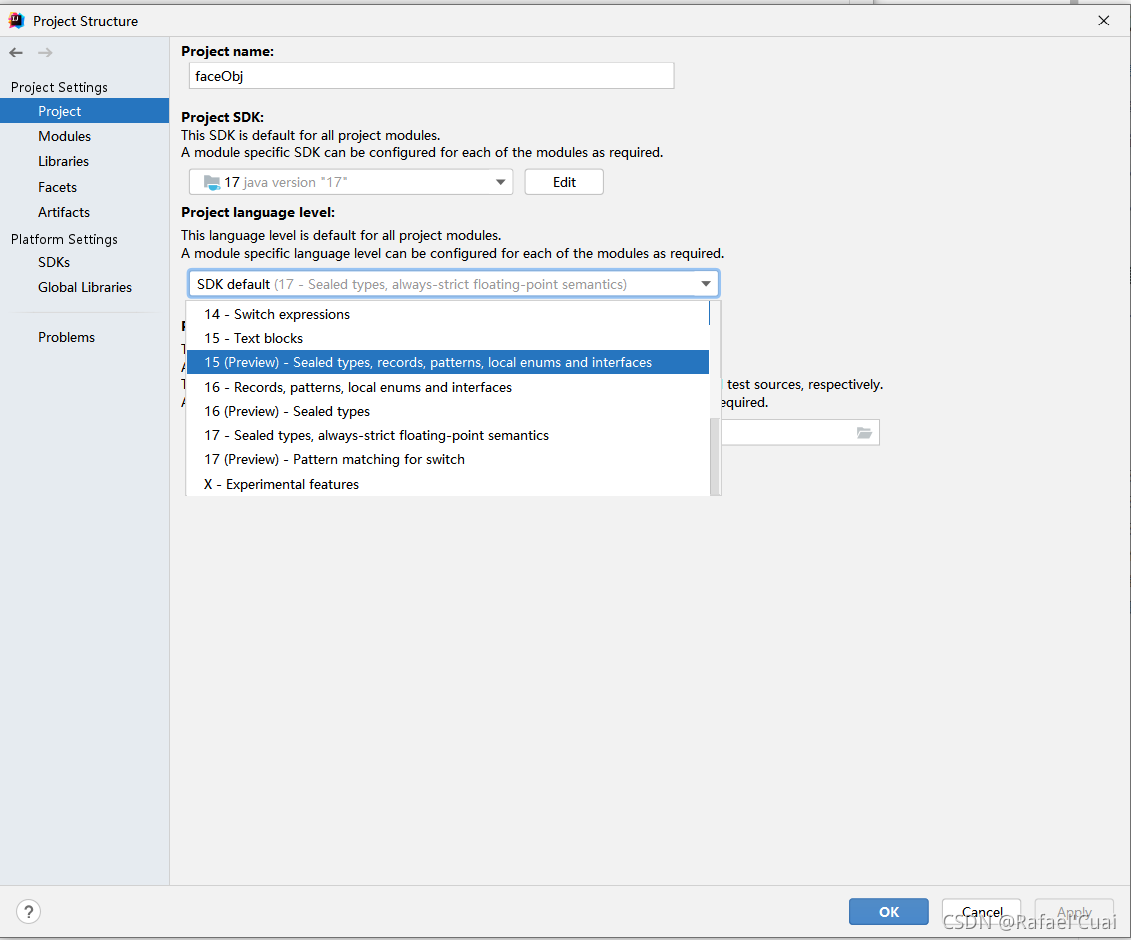
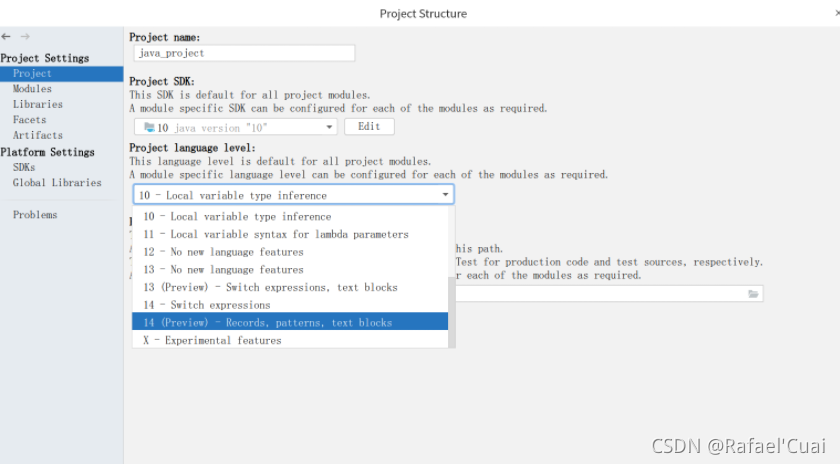
The error shown above occurs when running a java project. The essence is that the current idea version does not support Java 17.
Solution:
1. Download the JDK supported by the current idea version, such as 14
2. Uninstall the current version of idea and download the latest version of idea

I choose 2.
go to the official website of idea to download the latest version of idea
running the project again succeeds

How to Fix PVE Issues: ERROR: migration aborted

2021-09-24 22:11:47 # /usr/bin/ssh -e none -o 'BatchMode=yes' -o 'HostKeyAlias=st-10' [email protected] /bin/true
2021-09-24 22:11:47 [email protected]: Permission denied (publickey,password).
2021-09-24 22:11:47 ERROR: migration aborted (duration 00:00:00): Can't connect to destination address using public key
TASK ERROR: migration aborted

Enter the failed server
root@st -22:~#

ssh-keygen -t rsa

Retract y to generate public key

View public key

cat /root/.ssh/id_rsa.pub

Copy the public key and edit the public key into authorized_Keys file. Delete the wrong part.

Distribute authorized copies to various servers.

scp /root/.ssh/authorized_keys [email protected]:/root/.ssh/

CreateProcess error = 5, access denied. [How to Solve]

CreateProcess error = 5, access denied.

Bugs encountered using java runtime. Getruntime(). Exec()

Bugs encountered using java runtime. Getruntime(). Exec()

Today, when using a wkhtmltopdf tool, you need to use a Java method, * runtime. Getruntime() returns the runtime object of the current application, and the exec() method of the object instructs the Java virtual machine to create a child process, execute the specified executable program, and return the process object instance corresponding to the child process. Through process, you can control the execution of the sub process or obtain the information of the sub process* An introduction link to this function is attached: runtime. Getruntime(). Exec()
when an error code is reported, guess that the reason is that the folder cannot be accessed or the command cannot be called.

public class WKTest {
    public static void main(String[] args) {
        String cmd = "D:/programfiles/wkhtmltopdf/bin --quality 75 https://www.nowcoder.com D:\\work\\wk-images/3.png";

        try{
            Runtime.getRuntime().exec(cmd);
            System.out.println("ok");
        }catch(IOException e){
            e.printStackTrace();
        }
    }
}

java.io.IOException: Cannot run program "D:/programfiles/wkhtmltopdf/bin": CreateProcess error=5,Denied to access.
	at java.lang.ProcessBuilder.start(ProcessBuilder.java:1048)
	at java.lang.Runtime.exec(Runtime.java:620)
	at java.lang.Runtime.exec(Runtime.java:450)
	at java.lang.Runtime.exec(Runtime.java:347)
	at com.nowcoder.community.WKTest.main(WKTest.java:15)
Caused by: java.io.IOException: CreateProcess error=5, Denied to access.

In Java, runtime. Getruntime().Exec() implements calling the server command script to execute the required functions. In other words, this line of code cannot be operated on the folder. You must access the script in the folder. Here I mainly call an. EXE file, which is modified as follows:

public class WKTest {
    public static void main(String[] args) {
        String cmd = "D:/programfiles/wkhtmltopdf/bin/wkhtmltoimage.exe --quality 75 https://www.nowcoder.com D:\\work\\wk-images/3.png";

        try{
            Runtime.getRuntime().exec(cmd);
            System.out.println("ok");
        }catch(IOException e){
            e.printStackTrace();
        }
    }
}

Normal test:

ok

Process finished with exit code 0

[Solved] RuntimeError: CUDA error: out of memory

1. Check whether the appropriate version of torch is used

print(torch.__version__)  # 1.9.1+cu111
print(torch.version.cuda)  # 11.1
print(torch.backends.cudnn.version())  # 8005
print(torch.cuda.current_device())  # 0
print(torch.cuda.is_available())  # TRUE

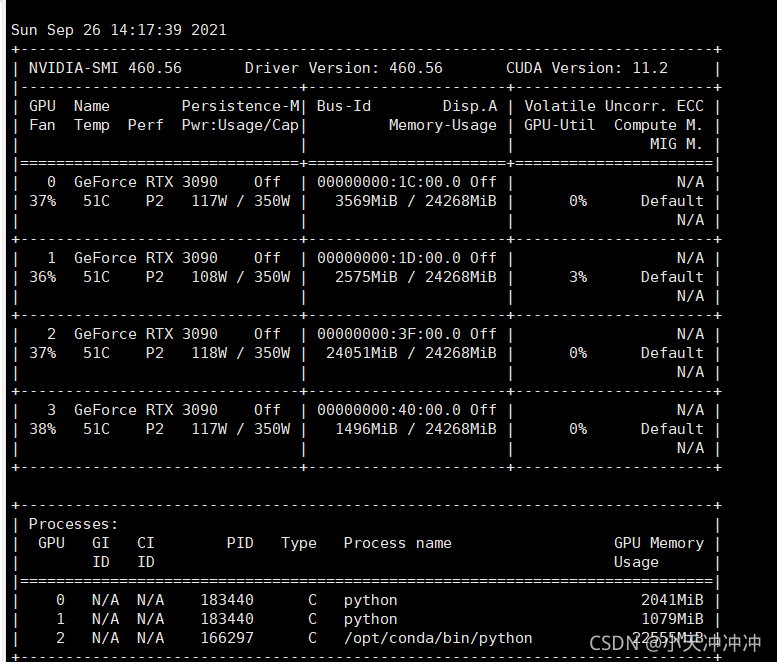
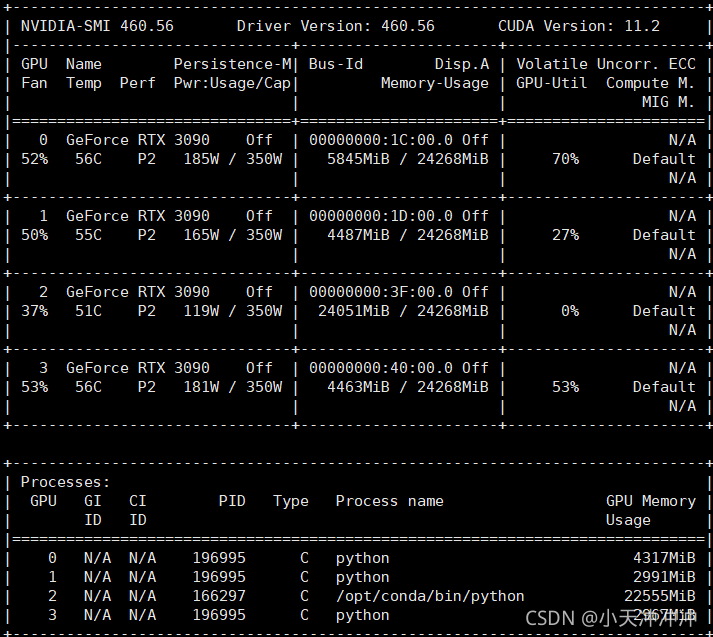
2. Check whether the video memory is insufficient, try to modify the batch size of the training, and it still cannot be solved when it is modified to the minimum, and then use the following command to monitor the video memory occupation in real time

watch -n 0.5 nvidia-smi

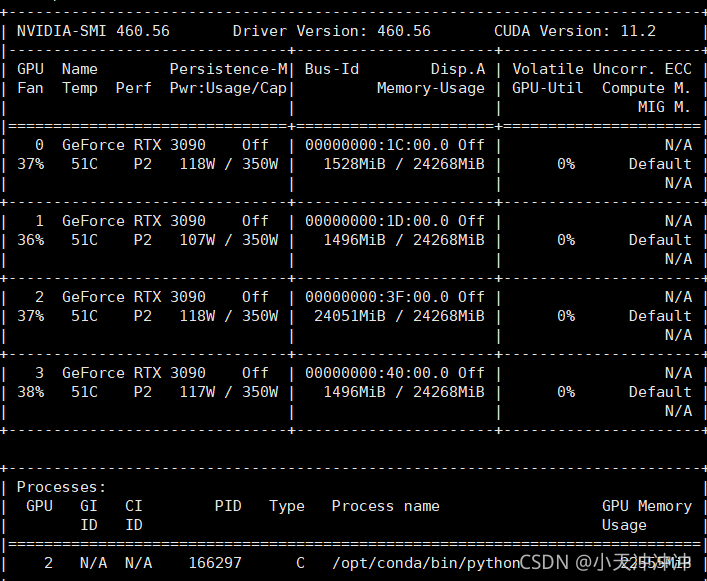
When the program is not called, the display memory is occupied

Therefore, the problem is that the program specifies to use four GPUs. There is no problem when calling the first two resources, but the third block is occupied by the programs of other small partners, so an error is reported.

3. Specify the GPU to use

device = torch.device("cuda" if torch.cuda.is_available() and not args.no_cuda else "cpu")  # cuda Specifies the GPU device to be used
model = torch.nn.DataParallel(model, device_ids=[0, 1, 3])  # Specify the device number to be used for multi-GPU parallel processing

So you can run happily

Impala Find Error: TFetchResultsResp(status=TStatus(errorCode=None, errorMessage=‘UDF ERROR: Decimal express

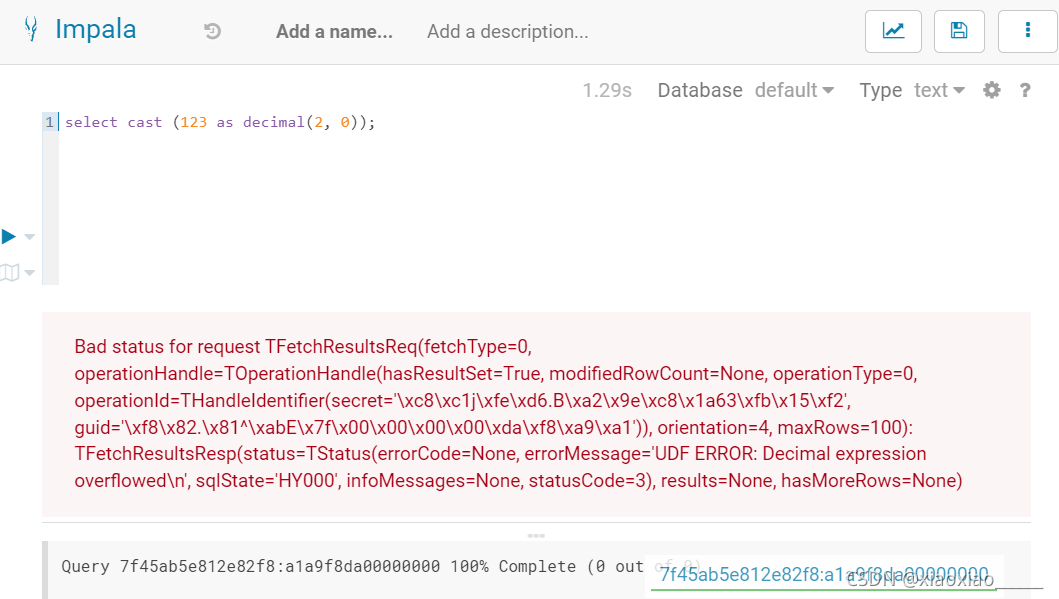
When using impala query, an error will be reported when using cast function to convert data to decimal type:

Bad status for request TFetchResultsReq(fetchType=0, operationHandle=TOperationHandle(hasResultSet=True,
 modifiedRowCount=None, operationType=0, operationId=THandleIdentifier(secret='\xc8\xc1j\xfe\xd6.B\xa2\x9e\xc8\x1a63\xfb\x15\xf2'
 , guid='\xf8\x82.\x81^\xabE\x7f\x00\x00\x00\x00\xda\xf8\xa9\xa1')), orientation=4, maxRows=100)
 : TFetchResultsResp(status=TStatus(errorCode=None, errorMessage='UDF ERROR: Decimal expression 
 overflowed\n', sqlState='HY000', infoMessages=None, statusCode=3), results=None, hasMoreRows=None)

After checking a wave, I found that it was a bug in impala
bug link: https://issues.apache.org/jira/browse/IMPALA-6405

It seems that the bug still exists. Here is a screenshot of my test:

Solution: do not convert to decimal, or convert in other ways.

[Solved] ERROR Error: Cannot find module ‘vue-loader-v16/package.json‘

Error Message:
ERROR  Error: Cannot find module ‘vue-loader-v16/package.json’
Error: Cannot find module ‘vue-loader-v16/package.json’
at Function.Module._resolveFilename (module.js:555:15)
at Function.Module._load (module.js:482:25)
at Module.require (module.js:604:17)
at require (internal/module.js:11:18)
at api.chainWebpack.webpackConfig (D:\3\data\dashboard\node_modules\_@[email protected]@@vue\cli-service\lib\config\base.js:114:23)
at webpackChainFns.forEach.fn (D:\3\data\dashboard\node_modules\_@[email protected]@@vue\cli-service\lib\Service.js:236:40)
at Array.forEach (<anonymous>)
at Service.resolveChainableWebpackConfig (D:\3\data\dashboard\node_modules\_@[email protected]@@vue\cli-service\lib\Service.js:236:26)
at Service.resolveWebpackConfig (D:\3\data\dashboard\node_modules\_@[email protected]@@vue\cli-service\lib\Service.js:240:48)
at PluginAPI.resolveWebpackConfig (D:\3\data\dashboard\node_modules\_@[email protected]@@vue\cli-service\lib\PluginAPI.js:132:25)
npm ERR! code ELIFECYCLE
npm ERR! errno 1
npm ERR! [email protected] serve: `vue-cli-service serve`
npm ERR! Exit status 1
npm ERR!
npm ERR! Failed at the [email protected] serve script.
npm ERR! This is probably not a problem with npm. There is likely additional logging output above.
npm ERR! A complete log of this run can be found in:
npm ERR!     C:\Users\lenovo\AppData\Roaming\npm-cache\_logs\2021-09-22T07_50_43_187Z-debug.log
Solution: Execute the following commands:
cnpm i vue-loader-v16