Author Archives: Robins

Raspberry pie compilation and installation opencv error: fatal error: bootdesc_bgm.i: No such file or directory

~/opencv_contrib/modules/xfeatures2d/src/boostdesc.cpp:673:20: fatal error: boostdesc_bgm.i: No such file or directory

Solution:
Check the /home/pi/Downloads/opencv-3.4.0/build/CMakeDownloadLog.txt log file, search for boostdesc_bgm.i keyword in the log file CMakeDownloadLog.txt, and find that the download of this file has failed.
A total of 11 files were found to be missing as follows:
boostdesc_bgm.i
boostdesc_bgm_bi.i
boostdesc_bgm_hd.i
boostdesc_lbgm.i
boostdesc_binboost_064.i
boostdesc_binboost_128.i
boostdesc_binboost_256.i
vgg_generated_120.i
vgg_generated_64.i
vgg_generated_80.i
vgg_generated_48.i

Download and upzip. put them in the path of /home/pi/Downloads/opencv_contrib3.4.0/modules/xfeatures2d/src/ is OK.
Then re-compile:

make clean
make

How to Solve IntelliJ IDEA Error: Cannot determine path to ‘tools.jar‘ library for 17 (C:\Program Files\Java\jd…

this month, Java 17 was finally released. This is another lts version after Java 11. I decided to try Java 17. Sure enough, something unexpected happened: when I used java 17 to run a project that used to run normally, IntelliJ idea reported the following error:

Operating environment when the author reports an error:

IntelliJ IDEA 2020.1.2 (Ultimate Edition)

JDK 17

Error:Cannot determine path to 'tools.jar' library for 17 (C:\Program Files\Java\jdk-17)

then, as before. The author tried to run a very simple demo project, and sure enough, the same error occurred again. The environment in which the project used to operate normally is:

The environment in which the project previously operated normally:

IntelliJ IDEA 2020.1.2 (Ultimate Edition)

JDK 11

the author has repeatedly installed multiple versions of Java on different operating systems, and is very familiar with this error report. This error indicates that the current IntelliJ idea cannot parse this version of JDK, so it tries to parse tools. Jar from its built-in environment variable classpath , but it still fails, so it throws the above error message.

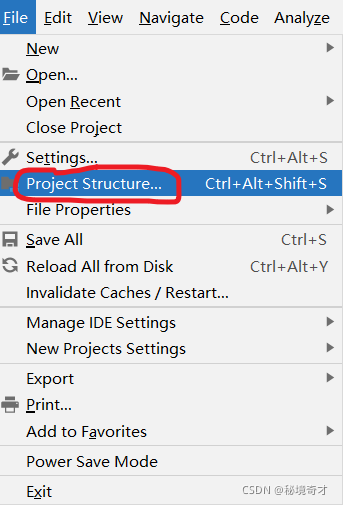
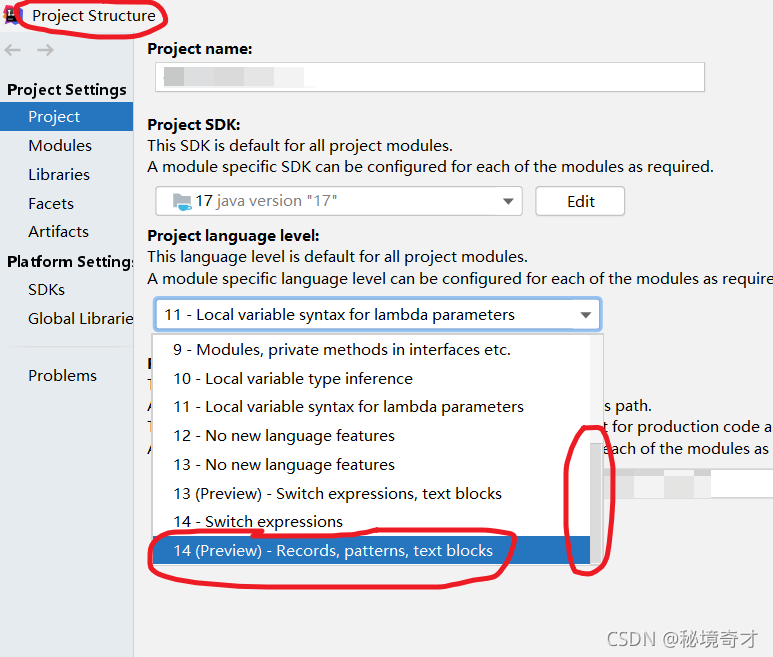
this can be confirmed. It can be clearly seen in the project structure in the figure below that the author’s IntelliJ idea 2020.1.2 (Ultimate Edition) supports parsing JDK 14 at most, so there is nothing to do with Java 17.
Method 1

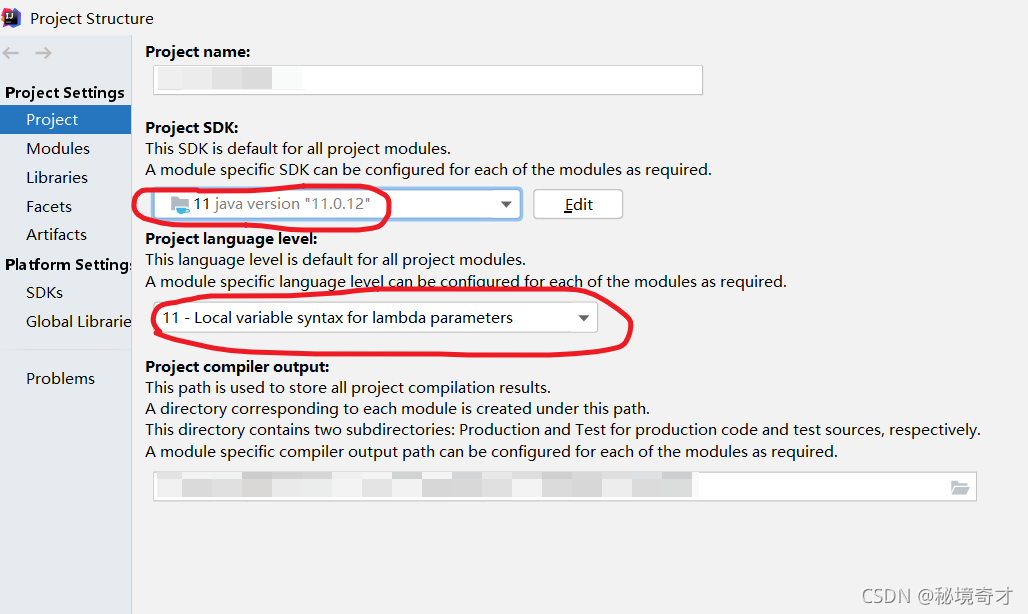
it’s easy to do when you know the reason. One way is to reduce the JDK version so that the current IntelliJ idea can recognize it.

The environment in which the project previously operated normally:

IntelliJ IDEA 2020.1.2 (Ultimate Edition)

JDK 11

install the lower version of JDK first, and then set it in project structure in IntelliJ idea. See the figure below. But I usually don’t like it.
Method 2

another way is to improve the version of IntelliJ idea. Therefore, the author specially downloaded and installed the latest IntelliJ idea 2021.2.2 (Ultimate Edition) . Unexpectedly and reasonably, the author encountered many holes when installing the latest IntelliJ idea. I have always wanted to stand on the shoulders of giants, but in fact, they are always used as stepping stones by giants. For the problem that IntelliJ idea cannot be opened after installation, see another blog of the author:

solve the problem that the interface disappears after IntelliJ idea is installed, and the interface does not move after it is opened again.

when I first downloaded it, I was worried that it could not parse Java 17, but now it seems that this worry is superfluous.

The environment in which the project operates normally:

IntelliJ IDEA 2021.2.2 (Ultimate Edition)

JDK 17

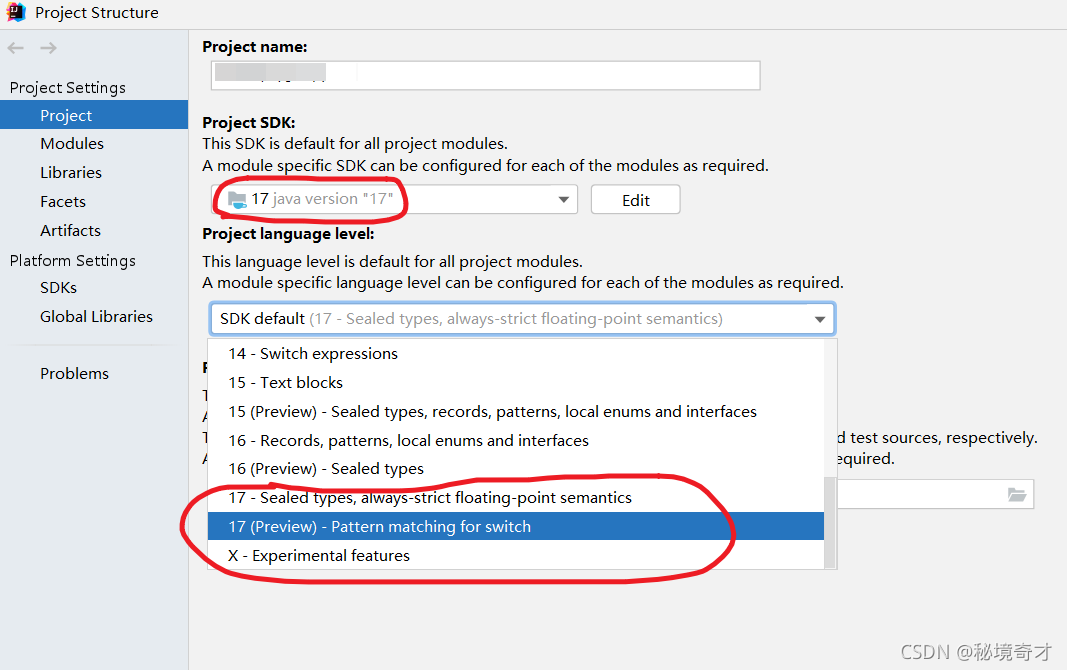
after upgrading IntelliJ idea, configure project structure as follows.
MacTex Font Missing Error: The font “TeX Gyre Termes Math“ cannot be found.

Problem: the font “tex gyre termes math” cannot be found after the installation configuration is completed

\setmathfont{TeX Gyre Termes Math}

Software: mactex + sublime text

Cause: the Mac OS system lacks tex gyre termes math font

Solution:

1. Download font package

get into http://www.gust.org.pl/projects/e-foundry Download, find tex gyre termes math from the font bar on the left and download:

2. Install font

After decompression, there are doc and OpenType folders in the font package, and the OpenType file contains a textgyreterms-math.otf file. Double click the installation directly under the MAC system to install the system font. After successful installation, see the following figure:

For the installation process of other systems, refer to install.txt in the doc folder. After the installation is completed, it can be compiled!

[ERROR] [1632398141.557684, 290.045000]: Spawn service failed. Exiting.

When executing the gazebo startup file it appears:

[ERROR] [1632398141.557684, 290.045000]: Spawn service failed. Exiting.

[urdf_spawner-6] process has died [pid 5510, exit code 1, cmd /opt/ros/noetic/lib/gazebo_ros/spawn_model -urdf -model mrobot -param robot_description __name:=urdf_spawner __log:=/home/wyf/.ros/log/28660358-1c66-11ec-aa75-efd91e7f34ce/urdf_spawner-6.log].
log file: /home/wyf/.ros/log/28660358-1c66-11ec-aa75-efd91e7f34ce/urdf_spawner-6*.log

Solution:

source ~/catkin_ws/devel/setup.bash

Execute the launch file again

Another problem is that the model file is not added

[Solved] Rabbitmq Server Error: unable to perform an operation on node ‘rabbit@nscczzms‘. P

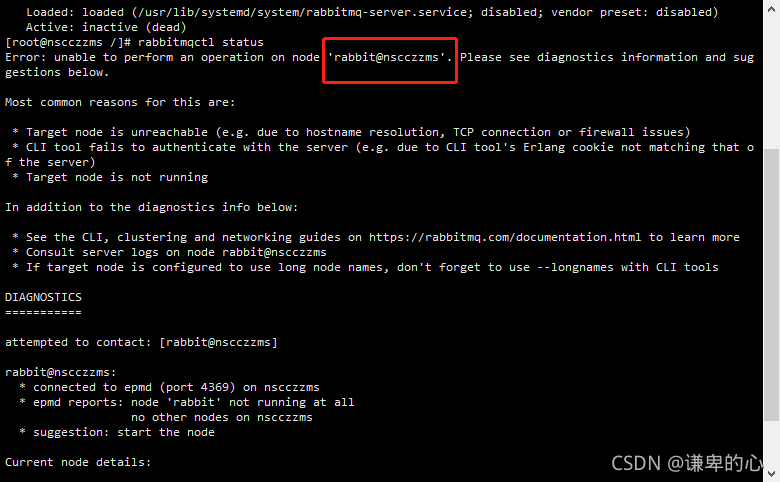
Rabbitmq server reports error: unable to perform an operation on node ‘ rabbit@nscczzms ‘. Please see diagnostics information and suggestions below

Step 1: check the rabbitmq service status:

systemctl status rabbitmq-server.service

Viewing rabbitmq error message: rabbitmqctl status

The above problem occurs: modify the hosts file CD/etc VI hosts

127.0.0.1 the name nscczzms// nscczzms must be consistent with the name circled in the picture above.

Then save and exit

Finally, restart rabbitmq: systemctl restart rabbitmq server

[Solved] Error(22) WARNING: IPv4 forwarding is disabled. Networking will not work.

Question

The following warning is given when docker runs the container ⚠️:

WARNING: IPv4 forwarding is disabled. Networking will not work.

Solution:

# modify configuration
echo "net.ipv4.ip_forward=1" >> /etc/sysctl.conf

# restart network
systemctl restart network

# Check
sysctl net.ipv4.ip_forward
# net.ipv4.ip_forward = 1

# restart docker
systemctl restart docker

Then restart the container ^_^

[Solved] error while loading shared libraries: libmysqlclient.so.20: cannot open shared object file: No such…

Exception: error while loading shared libraries: libmysqlclient.so.20: cannot open shared object file: No such file or directory
Solution:

# find/ -name 'libmysqlclient*'
/usr/local/mysql/lib/libmysqlclient.a
/usr/local/mysql/lib/libmysqlclient.so.20.3.10
/usr/local/mysql/lib/libmysqlclient.so
/usr/local/mysql/lib/libmysqlclient.so.20
/usr/lib64/mysql/libmysqlclient.so.18
/usr/lib64/mysql/libmysqlclient.so.18.0.0

# ln -s /usr/local/mysql/lib/libmysqlclient.so.20 /usr/local/lib/libmysqlclient.so.20
# vim /etc/ld.so.conf
/usr/local/lib				#Write
# ldconfig -v

[Solved] AttributeError: module ‘tensorflow._api.v2.train‘ has no attribute ‘AdampOptimizer‘

Error Message: AttributeError: module ‘tensorflow._api.v2.train’ has no attribute ‘AdampOptimizer’
Tensorflow 2.6.0:

>>> import tensorflow as tf
>>> tf.__version__
'2.6.0'

Error code snippet:

model.compile(optimizer=tf.train.AdampOptimizer(0.001),
              loss='mse',
              metrics=['accuracy'])

Replace with:

from tensorflow.keras.optimizers import Adam
model.compile(optimizer=Adam(learning_rate=0.001), loss='mse', metrics=['accuracy'])

It can also be changed as follows:

model.compile(optimizer='adam',
              loss='mse',
              metrics=['accuracy'])

Both are operational.