Author Archives: Robins

Android Error: Android resource linking failed [How to Solve]

Problems encountered during compilation during development:

Android resource linking failed

Output:  error: resource style/Theme.AppCompat.Light.DarkActionBar (aka com.hp.sortfilebysize:style/Theme.AppCompat.Light.DarkActionBar) not found.

E:\ASWorkSpace\SortFileBySize\app\build\intermediates\incremental\mergeDebugResources\merged.dir\values\values.xml:9: error: style attribute 'attr/colorPrimary (aka com.hp.sortfilebysize:attr/colorPrimary)' not found.

E:\ASWorkSpace\SortFileBySize\app\build\intermediates\incremental\mergeDebugResources\merged.dir\values\values.xml:10: error: style attribute 'attr/colorPrimaryDark (aka com.hp.sortfilebysize:attr/colorPrimaryDark)' not found.

E:\ASWorkSpace\SortFileBySize\app\build\intermediates\incremental\mergeDebugResources\merged.dir\values\values.xml:11: error: style attribute 'attr/colorAccent (aka com.hp.sortfilebysize:attr/colorAccent)' not found.

error: failed linking references.

Command: C:\Users\tangdekun\.gradle\caches\transforms-1\files-1.1\aapt2-3.2.0-beta03-4818971-windows.jar\868db5e9c484c628dee78cdbe6877651\aapt2-3.2.0-beta03-4818971-windows\aapt2.exe link -I\

        N:\ProgramFiles\android\sdk\platforms\android-28\android.jar\

        --manifest\

        E:\ASWorkSpace\SortFileBySize\app\build\intermediates\merged_manifests\debug\processDebugManifest\merged\AndroidManifest.xml\

        -o\

        E:\ASWorkSpace\SortFileBySize\app\build\intermediates\processed_res\debug\processDebugResources\out\resources-debug.ap_\

        -R\

        @E:\ASWorkSpace\SortFileBySize\app\build\intermediates\incremental\processDebugResources\resources-list-for-resources-debug.ap_.txt\

        --auto-add-overlay\

        --java\

        E:\ASWorkSpace\SortFileBySize\app\build\generated\not_namespaced_r_class_sources\debug\processDebugResources\r\

        --custom-package\

        com.hp.sortfilebysize\

        -0\

        apk\

        --output-text-symbols\

        E:\ASWorkSpace\SortFileBySize\app\build\intermediates\symbols\debug\R.txt\

        --no-version-vectors

For errors like this, you have tried to add “implementation ‘Android x.appcompat: appcompat: 1.0.0-alpha1’, but it still fails. You can try the following method to solve it

Enter caches under. Gradle
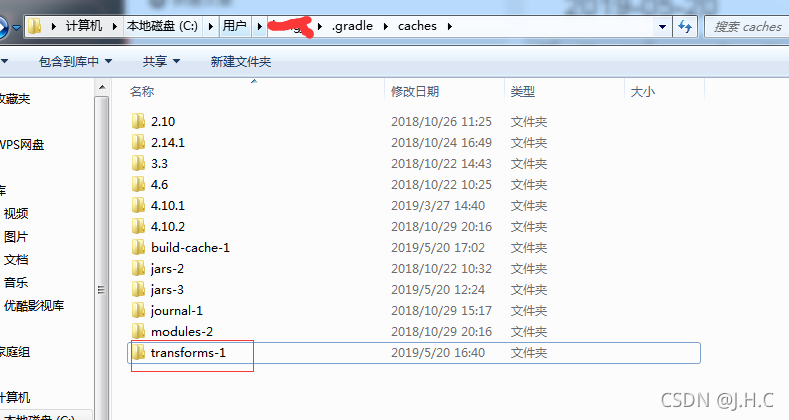
Delete transform-1 and restart Android studio (file → invalidate caches/restart → invalidate caches and restart)
[Solved] Java 9 reflection error: java.lang.reflect.InaccessibleObjectException

Java 9 reflection error

Problem solving

Question

when writing JavaFX, perform the HTTP request database login operation, and convert the returned JSON string into a class object. The following code always reports an error.

// json string to class object
JavaType javaType;
ResponseBean<T> data = new ObjectMapper().readValue(json, javaType);

the following errors are reported:

java.lang.reflect.InaccessibleObjectException: Unable to make protected cc.nsurl.bean.ResponseBean() accessible: module cc.nsurl.controllers does not "opens cc.nsurl.bean" to module com.fasterxml.jackson.databind

if you can’t open the class, you can’t reflect.

Solution:

Add the file module-info.java to the JavaFX project. The overall project structure is as follows:

-- src
   -- main
       -- java
          -- module-info.java

Configure in this java file:

module cc.nsurl.controllers {
    // Classes that require reflection opens Self-written classes to third-party libraries
    opens cc.nsurl.controllers to javafx.fxml;
    opens cc.nsurl.bean to com.fasterxml.jackson.databind;
    exports cc.nsurl.controllers;
}

How to Solve Error in importing scala word2vecmodel

import org.apache.spark.mllib.feature.{Word2Vec, Word2VecModel}
import org.apache.spark.sql.{DataFrame, Row, SparkSession}
model save:
Link: http://spark.apache.org/docs/2.3.4/api/scala/index.html#org.apache.spark.mllib.feature.Word2VecModel

var model = Word2VecModel.load(spark.sparkContext, config.model_path)

model read:
Link: http://spark.apache.org/docs/2.3.4/api/scala/index.html#org.apache.spark.mllib.feature.Word2VecModel$

var model = Word2VecModel.load(spark.sparkContext, config.model_path)

Read Error:

Exception in thread "main" java.lang.IllegalAccessError: tried to access method com.google.common.base.Stopwatch.<init>()V from class org.apache.hadoop.mapred.FileInputFormat
	at org.apache.hadoop.mapred.FileInputFormat.getSplits(FileInputFormat.java:312)
	at org.apache.spark.rdd.HadoopRDD.getPartitions(HadoopRDD.scala:200)
	at org.apache.spark.rdd.RDD$$anonfun$partitions$2.apply(RDD.scala:253)
	at org.apache.spark.rdd.RDD$$anonfun$partitions$2.apply(RDD.scala:251)
	at scala.Option.getOrElse(Option.scala:121)
	at org.apache.spark.rdd.RDD.partitions(RDD.scala:251)
	at org.apache.spark.rdd.MapPartitionsRDD.getPartitions(MapPartitionsRDD.scala:35)
	at org.apache.spark.rdd.RDD$$anonfun$partitions$2.apply(RDD.scala:253)
	at org.apache.spark.rdd.RDD$$anonfun$partitions$2.apply(RDD.scala:251)
	at scala.Option.getOrElse(Option.scala:121)
	at org.apache.spark.rdd.RDD.partitions(RDD.scala:251)
	at org.apache.spark.rdd.RDD$$anonfun$take$1.apply(RDD.scala:1337)
	at org.apache.spark.rdd.RDDOperationScope$.withScope(RDDOperationScope.scala:151)
	at org.apache.spark.rdd.RDDOperationScope$.withScope(RDDOperationScope.scala:112)
	at org.apache.spark.rdd.RDD.withScope(RDD.scala:363)
	at org.apache.spark.rdd.RDD.take(RDD.scala:1331)
	at org.apache.spark.rdd.RDD$$anonfun$first$1.apply(RDD.scala:1372)
	at org.apache.spark.rdd.RDDOperationScope$.withScope(RDDOperationScope.scala:151)
	at org.apache.spark.rdd.RDDOperationScope$.withScope(RDDOperationScope.scala:112)
	at org.apache.spark.rdd.RDD.withScope(RDD.scala:363)
	at org.apache.spark.rdd.RDD.first(RDD.scala:1371)
	at org.apache.spark.mllib.util.Loader$.loadMetadata(modelSaveLoad.scala:129)
	at org.apache.spark.mllib.feature.Word2VecModel$.load(Word2Vec.scala:699)
	at job.ml.embeddingModel.graphEmbedding$.run(graphEmbedding.scala:40)
	at job.ml.embeddingModel.graphEmbedding$.main(graphEmbedding.scala:24)
	at job.ml.embeddingModel.graphEmbedding.main(graphEmbedding.scala)
	

POM file add

    <dependency>
      <groupId>com.google.guava</groupId>
      <artifactId>guava</artifactId>
      <version>15.0</version>
    </dependency>

Run OK again!

How to Solve Git Filename too long Error

report errors

Prompt filename too long when git clone code

Solution:

Open the command window with the administrator and enter git config — system core.longpaths true to solve the problem.

git config --system core.longpaths true

Project startup error: outofmemoryerror [How to Solve]

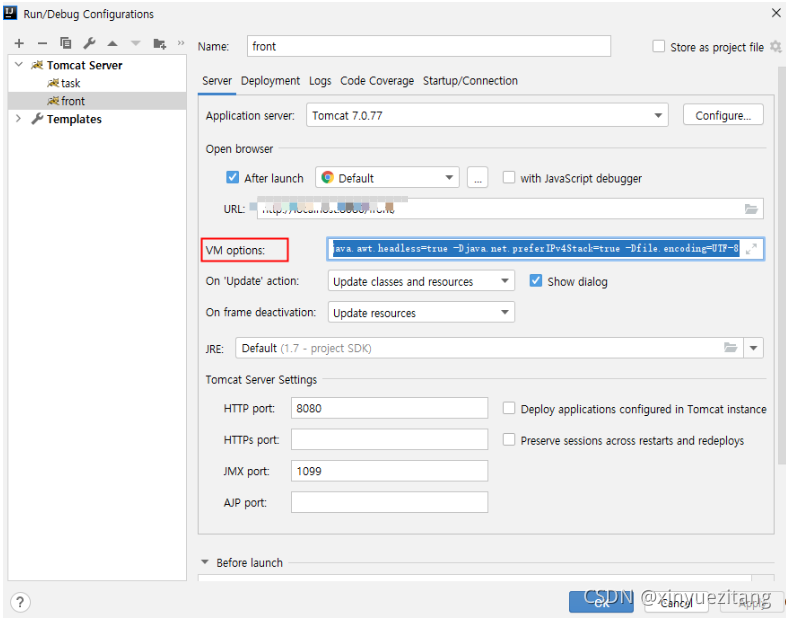
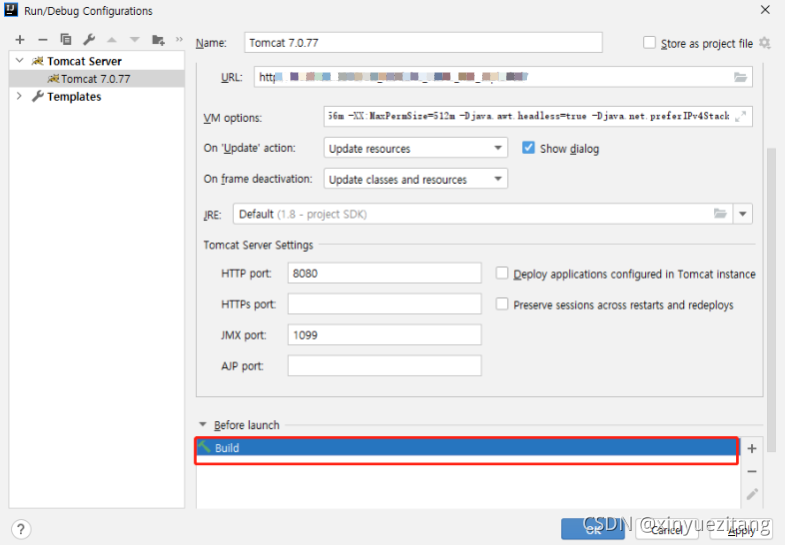
1. check tomcat settings, whether the start is set at the same time build, if so, to remove
2.  configurate tomcat的vm option

-server -Xms512m -Xmx2048m -XX:PermSize=64M -XX:MaxNewSize=256m -XX:MaxPermSize=512m -Djava.awt.headless=true -Djava.net.preferIPv4Stack=true -Dfile.encoding=UTF-8

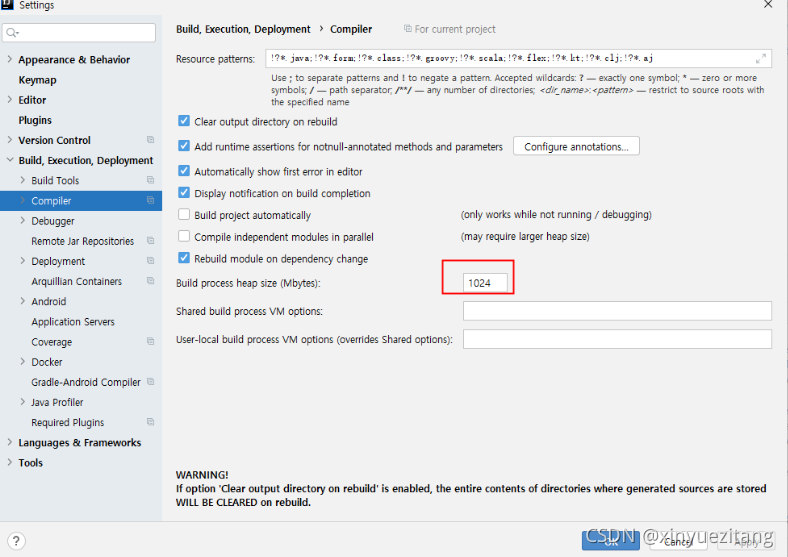
3 Set the compile size
Settings -> Build, Execution, Deployment -> Complier -> Build process heap size VM options

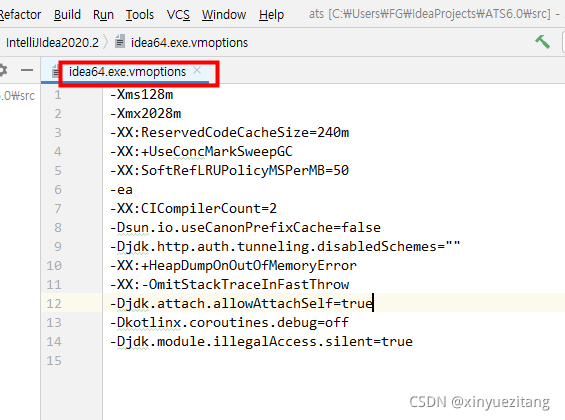
4 Check the VMs that come with Idea
Help – >Edit  Custom VM Options

[Solved] PHP installation Phalcon expansion error

sudo apt-get install php7.1-phalcon
sudo: unable to resolve host official
Reading package lists… Done
Building dependency tree
Reading state information… Done
E: Unable to locate package php7.1-phalcon
E: Couldn’t find any package by glob ‘php7.1-phalcon’
E: Couldn’t find any package by regex ‘php7.1-phalcon’ 

Solution:
sudo apt-get install curl
curl -s https://packagecloud.io/install/repositories/phalcon/stable/script.deb.sh | sudo bash
sudo apt-get install php7.1-phalcon

[Solved] Error in installing backups.lzma for Python on Linux

Error in installing backups.lzma for Python on Linux

pip3.9 install backports.lzma

Error Message:

Running setup.py install for backports.lzma … error
ERROR: Command errored out with exit status 1:
command: /usr/bin/python3.9 -u -c ‘import io, os, sys, setuptools, tokenize; sys.argv[0] = ‘”’”’/tmp/pip-install-pnrkhuf9/backports-lzma_24feded447a34e5a8b1c53cb80e10341/setup.py’”’”’; file=’”’”’/tmp/pip-install-pnrkhuf9/backports-lzma_24feded447a34e5a8b1c53cb80e10341/setup.py’”’”’;f = getattr(tokenize, ‘”’”‘open’”’”’, open)(file) if os.path.exists(file) else io.StringIO(’”’”‘from setuptools import setup; setup()’”’”’);code = f.read().replace(’”’”’\r\n’”’”’, ‘”’”’\n’”’”’);f.close();exec(compile(code, file, ‘”’”‘exec’”’”’))’ install –record /tmp/pip-record-tcqknwy3/install-record.txt –single-version-externally-managed –compile –install-headers /usr/local/python3.9/include/python3.9/backports.lzma
cwd: /tmp/pip-install-pnrkhuf9/backports-lzma_24feded447a34e5a8b1c53cb80e10341/
Complete output (21 lines):
This is backports.lzma version 0.0.14
running install
running build
running build_py
creating build
creating build/lib.linux-x86_64-3.9
creating build/lib.linux-x86_64-3.9/backports
copying backports/init.py -> build/lib.linux-x86_64-3.9/backports
creating build/lib.linux-x86_64-3.9/backports/lzma
copying backports/lzma/init.py -> build/lib.linux-x86_64-3.9/backports/lzma
running build_ext
building ‘backports.lzma._lzma’ extension
creating build/temp.linux-x86_64-3.9
creating build/temp.linux-x86_64-3.9/backports
creating build/temp.linux-x86_64-3.9/backports/lzma
gcc -pthread -Wno-unused-result -Wsign-compare -DNDEBUG -g -fwrapv -O3 -Wall -fPIC -I/usr/local/python3.9/include -I/root/include -I/opt/local/include -I/usr/local/include -I/usr/local/python3.9/include/python3.9 -c backports/lzma/_lzmamodule.c -o build/temp.linux-x86_64-3.9/backports/lzma/_lzmamodule.o
backports/lzma/_lzmamodule.c:115:10: fatal error: lzma.h: No such file or directory
#include <lzma.h>
^~~~~~~~
compilation terminated.
error: command ‘/usr/bin/gcc’ failed with exit code 1
—————————————-
ERROR: Command errored out with exit status 1: /usr/bin/python3.9 -u -c ‘import io, os, sys, setuptools, tokenize; sys.argv[0] = ‘”’”’/tmp/pip-install-pnrkhuf9/backports-lzma_24feded447a34e5a8b1c53cb80e10341/setup.py’”’”’; file=’”’”’/tmp/pip-install-pnrkhuf9/backports-lzma_24feded447a34e5a8b1c53cb80e10341/setup.py’”’”’;f = getattr(tokenize, ‘”’”‘open’”’”’, open)(file) if os.path.exists(file) else io.StringIO(’”’”‘from setuptools import setup; setup()’”’”’);code = f.read().replace(’”’”’\r\n’”’”’, ‘”’”’\n’”’”’);f.close();exec(compile(code, file, ‘”’”‘exec’”’”’))’ install –record /tmp/pip-record-tcqknwy3/install-record.txt –single-version-externally-managed –compile –install-headers /usr/local/python3.9/include/python3.9/backports.lzma Check the logs for full command output.

Solution:

apt install -y liblzma-dev #ubuntu
yum install -y xz-devel    #centos

At this point, there is no problem when executing pip3.9 install backups.lzma

Centos7 Error: initramfs not found

Problem description

Centos7 reports an error: file ‘/ initramfs -… Img’ not found

Problem solving

This problem occurred after I set up the mount. After some guidance from Baidu and Lao Han, it was finally solved

Solution:

yum reinstall kernel

Is to reinstall the kernel

Error reporting under layui dynamic select IE

Layui will report an error when dynamically splicing the option under IE8. Line 447 of the form module does not support this method. The reason for the error is that it is necessary to provide a default option under select, as shown below, and then there will be no error in the dynamic splicing option. This problem does not exist on modern browsers.

<select>
	<option></option>
</select>