Author Archives: Robins

[Solved] org.apache.spark.SparkException: Kryo serialization failed: Buffer overflow

The following errors are reported when running spark task:

21/10/09 14:56:32 ERROR Executor: Exception in task 1.0 in stage 2.0 (TID 4)
org.apache.spark.SparkException: Kryo serialization failed: Buffer overflow. Available: 0, required: 93. To avoid this, increase spark.kryoserializer.buffer.max value.
	at org.apache.spark.serializer.KryoSerializerInstance.serialize(KryoSerializer.scala:299)
	at org.apache.spark.executor.Executor$TaskRunner.run(Executor.scala:265)
	at java.util.concurrent.ThreadPoolExecutor.runWorker(ThreadPoolExecutor.java:1149)
	at java.util.concurrent.ThreadPoolExecutor$Worker.run(ThreadPoolExecutor.java:624)
	at java.lang.Thread.run(Thread.java:748)
21/10/09 14:56:32 INFO TaskSetManager: Starting task 2.0 in stage 2.0 (TID 5, localhost, partition 2,NODE_LOCAL, 2262 bytes)
21/10/09 14:56:32 INFO Executor: Running task 2.0 in stage 2.0 (TID 5)
21/10/09 14:56:32 INFO ShuffleBlockFetcherIterator: Getting 1 non-empty blocks out of 1 blocks
21/10/09 14:56:32 WARN TaskSetManager: Lost task 1.0 in stage 2.0 (TID 4, localhost): org.apache.spark.SparkException: Kryo serialization failed: Buffer overflow. Available: 0, required: 93. To avoid this, increase spark.kryoserializer.buffer.max value.
	at org.apache.spark.serializer.KryoSerializerInstance.serialize(KryoSerializer.scala:299)
	at org.apache.spark.executor.Executor$TaskRunner.run(Executor.scala:265)
	at java.util.concurrent.ThreadPoolExecutor.runWorker(ThreadPoolExecutor.java:1149)
	at java.util.concurrent.ThreadPoolExecutor$Worker.run(ThreadPoolExecutor.java:624)
	at java.lang.Thread.run(Thread.java:748)

21/10/09 14:56:32 INFO ShuffleBlockFetcherIterator: Started 0 remote fetches in 1 ms
21/10/09 14:56:32 ERROR TaskSetManager: Task 1 in stage 2.0 failed 1 times; aborting job

Solution:

### Task submission plus parameters
--conf  spark.kryoserializer.buffer.max=2048m  spark.kryoserializer.buffer=512m 
Error:Request failed with status code 401 [How to Solve]

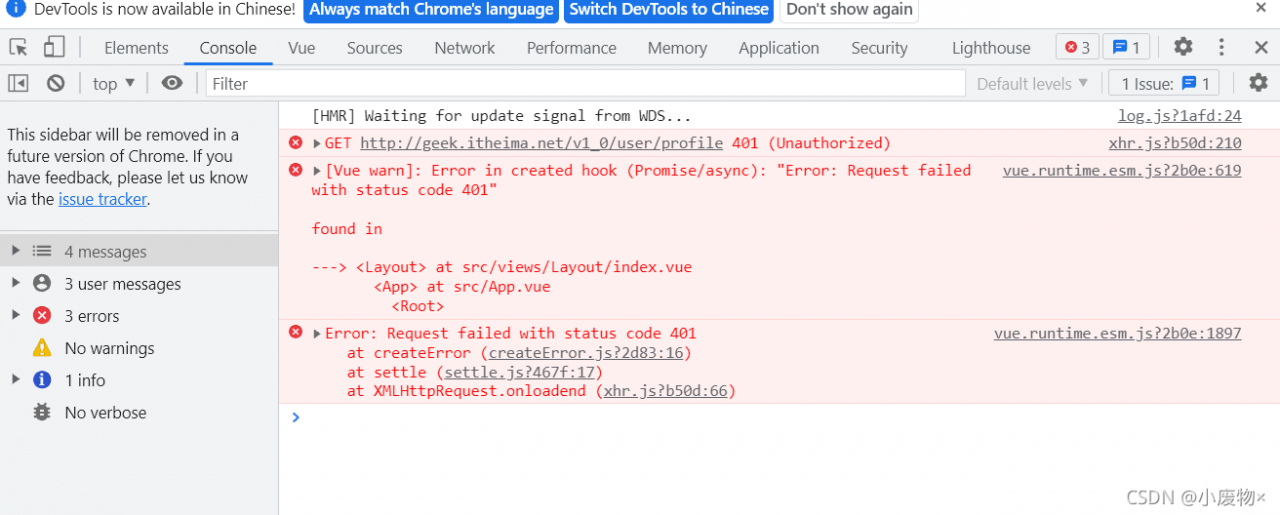
Error: Request failed with status code 401

Error:

// Access to personal information
export const getUserInfoAPI = () => {
  return request({
    url: '/v1_0/user/profile',
    method: 'GET',
    Headers: {
      Authorization: `Bearer ${getToken()}`
    }
  })
}

Correct practice

// Access to personal information
export const getUserInfoAPI = () => {
  return request({
    url: '/v1_0/user/profile',
    method: 'GET',
    headers: {
      Authorization: `Bearer ${getToken()}`
    }
  })
}

In the process of writing request headers, the use of headers did not notice the case problem!!!

[Solved] Fabric_sdk_go:QueryBlockConfig failed: QueryBlockConfig failed: target(s) required

Fabric_sdk_go:[Solved]event service creation failed: could not get chConfig cache reference: QueryBlockConfig failed: QueryBlockConfig failed: target(s) required
Error Message:

Configuration file config_test: channel name is mychannel, in the demo it is orgchannel.
[Solution] Comment out orgchannel in config_test:

  # Mychannel overrides initialBackoff for discovery
  mychannel:
    policies:
      discovery:
        retryOpts:
          #[Required for override] number of retry attempts
          attempts: 4
          initialBackoff: 1s

  # multi-org test channel
  # orgchannel:  //remove

    # orderers:
    #  - orderer.example.com

    peers:
      peer0.org1.example.com:
        endorsingPeer: true
        chaincodeQuery: true
        ledgerQuery: true
        eventSource: true

      peer0.org2.example.com:
        endorsingPeer: true
        chaincodeQuery: true
        ledgerQuery: true
        eventSource: true

Problem-solving:

[Solved] Failed to install the following Android SDK packages as some licences have not been accepted

Question:
Using the Android SDK outside of Android Studio may explode with the following error

Failed to install the following Android SDK packages as some licences have not been accepted.
patcher;v4 SDK Patch Applier v4
emulator Android Emulator
platforms;android-30 Android SDK Platform 30
tools Android SDK Tools
build-tools;29.0.2 Android SDK Build-Tools 29.0.2
To build this project, accept the SDK license agreements and install the missing components using the Android Studio SDK Manager.
Alternatively, to transfer the license agreements from one workstation to another, see http://d.android.com/r/studio-ui/export-licenses.html

Solution:
input. /sdkmanager --licenses in android/sdk/tools/bin
After authorization you can

[Solved] Failed to execute goal org.apache.maven.plugins:maven-dependency-plugin:3.1.1:analyze-only

Question

An exception occurred when compiling an open source project (openlookeng), resulting in compilation failure.

Abnormal content

[ERROR] Failed to execute goal org.apache.maven.plugins:maven-dependency-plugin:3.1.1:analyze-only (default) on project presto-vv: Dependency problems found -> [Help 1]
org.apache.maven.lifecycle.LifecycleExecutionException: Failed to execute goal org.apache.maven.plugins:maven-dependency-plugin:3.1.1:analyze-only (default) on project presto-vv: Dependency problems found
    at org.apache.maven.lifecycle.internal.MojoExecutor.execute (MojoExecutor.java:215)
    at org.apache.maven.lifecycle.internal.MojoExecutor.execute (MojoExecutor.java:156)
    at org.apache.maven.lifecycle.internal.MojoExecutor.execute (MojoExecutor.java:148)
    at org.apache.maven.lifecycle.internal.LifecycleModuleBuilder.buildProject (LifecycleModuleBuilder.java:117)
    at org.apache.maven.lifecycle.internal.LifecycleModuleBuilder.buildProject (LifecycleModuleBuilder.java:81)
    at org.apache.maven.lifecycle.internal.builder.singlethreaded.SingleThreadedBuilder.build (SingleThreadedBuilder.java:56)
    at org.apache.maven.lifecycle.internal.LifecycleStarter.execute (LifecycleStarter.java:128)
    at org.apache.maven.DefaultMaven.doExecute (DefaultMaven.java:305)
    at org.apache.maven.DefaultMaven.doExecute (DefaultMaven.java:192)
    at org.apache.maven.DefaultMaven.execute (DefaultMaven.java:105)
    at org.apache.maven.cli.MavenCli.execute (MavenCli.java:957)
    at org.apache.maven.cli.MavenCli.doMain (MavenCli.java:289)
    at org.apache.maven.cli.MavenCli.main (MavenCli.java:193)
    at sun.reflect.NativeMethodAccessorImpl.invoke0 (Native Method)
    at sun.reflect.NativeMethodAccessorImpl.invoke (NativeMethodAccessorImpl.java:62)
    at sun.reflect.DelegatingMethodAccessorImpl.invoke (DelegatingMethodAccessorImpl.java:43)
    at java.lang.reflect.Method.invoke (Method.java:498)
    at org.codehaus.plexus.classworlds.launcher.Launcher.launchEnhanced (Launcher.java:282)
    at org.codehaus.plexus.classworlds.launcher.Launcher.launch (Launcher.java:225)
    at org.codehaus.plexus.classworlds.launcher.Launcher.mainWithExitCode (Launcher.java:406)
    at org.codehaus.plexus.classworlds.launcher.Launcher.main (Launcher.java:347)
Caused by: org.apache.maven.plugin.MojoExecutionException: Dependency problems found
    at org.apache.maven.plugins.dependency.analyze.AbstractAnalyzeMojo.execute (AbstractAnalyzeMojo.java:253)
    at org.apache.maven.plugin.DefaultBuildPluginManager.executeMojo (DefaultBuildPluginManager.java:137)
    at org.apache.maven.lifecycle.internal.MojoExecutor.execute (MojoExecutor.java:210)
    at org.apache.maven.lifecycle.internal.MojoExecutor.execute (MojoExecutor.java:156)
    at org.apache.maven.lifecycle.internal.MojoExecutor.execute (MojoExecutor.java:148)
    at org.apache.maven.lifecycle.internal.LifecycleModuleBuilder.buildProject (LifecycleModuleBuilder.java:117)
    at org.apache.maven.lifecycle.internal.LifecycleModuleBuilder.buildProject (LifecycleModuleBuilder.java:81)
    at org.apache.maven.lifecycle.internal.builder.singlethreaded.SingleThreadedBuilder.build (SingleThreadedBuilder.java:56)
    at org.apache.maven.lifecycle.internal.LifecycleStarter.execute (LifecycleStarter.java:128)
    at org.apache.maven.DefaultMaven.doExecute (DefaultMaven.java:305)
    at org.apache.maven.DefaultMaven.doExecute (DefaultMaven.java:192)
    at org.apache.maven.DefaultMaven.execute (DefaultMaven.java:105)
    at org.apache.maven.cli.MavenCli.execute (MavenCli.java:957)
    at org.apache.maven.cli.MavenCli.doMain (MavenCli.java:289)
    at org.apache.maven.cli.MavenCli.main (MavenCli.java:193)
    at sun.reflect.NativeMethodAccessorImpl.invoke0 (Native Method)
    at sun.reflect.NativeMethodAccessorImpl.invoke (NativeMethodAccessorImpl.java:62)
    at sun.reflect.DelegatingMethodAccessorImpl.invoke (DelegatingMethodAccessorImpl.java:43)
    at java.lang.reflect.Method.invoke (Method.java:498)
    at org.codehaus.plexus.classworlds.launcher.Launcher.launchEnhanced (Launcher.java:282)
    at org.codehaus.plexus.classworlds.launcher.Launcher.launch (Launcher.java:225)
    at org.codehaus.plexus.classworlds.launcher.Launcher.mainWithExitCode (Launcher.java:406)
    at org.codehaus.plexus.classworlds.launcher.Launcher.main (Launcher.java:347)
[ERROR]
[ERROR] Re-run Maven using the -X switch to enable full debug logging.
[ERROR]
[ERROR] For more information about the errors and possible solutions, please read the following articles:
[ERROR] [Help 1] http://cwiki.apache.org/confluence/display/MAVEN/MojoExecutionException

Causes and Solutions

This is because Maven’s dependency check plug-in is enabled. When checking the plug-in, it is found that some dependencies are not used or used but not defined. As follows:

[INFO] --- maven-dependency-plugin:3.1.1:analyze-only (default) @ presto-vv ---
[WARNING] Used undeclared dependencies found:
[WARNING]    org.apache.pulsar:pulsar-client-api:jar:2.8.0:compile
[WARNING]    org.apache.pulsar:pulsar-metadata:jar:2.8.0:compile
[WARNING]    commons-configuration:commons-configuration:jar:1.10:compile
[WARNING]    org.apache.bookkeeper:bookkeeper-common:jar:4.14.1:compile
[WARNING]    org.slf4j:slf4j-api:jar:1.7.29:compile
[WARNING]    javax.ws.rs:javax.ws.rs-api:jar:2.1:compile
[WARNING]    org.apache.commons:commons-lang3:jar:3.11:compile
[WARNING]    org.jctools:jctools-core:jar:2.1.2:compile
[WARNING]    org.apache.bookkeeper:bookkeeper-server:jar:4.14.1:compile
[WARNING]    org.apache.pulsar:pulsar-client-admin-api:jar:2.8.0:compile
[WARNING]    org.apache.pulsar:pulsar-common:jar:2.8.0:compile
[WARNING]    org.apache.avro:avro:jar:1.9.2:compile
[WARNING]    io.netty:netty-buffer:jar:4.1.63.Final:compile
[WARNING]    org.apache.bookkeeper.stats:bookkeeper-stats-api:jar:4.14.1:compile
[WARNING] Unused declared dependencies found:
[WARNING]    org.projectlombok:lombok:jar:RELEASE:compile

If you do not need to strictly check invalid dependencies, you can set parameters to not check. Please refer to
Maven dependency plugin -> analyze-only

The parameter to be added to skip this check: skip, which is explained as follows:
skip plugin execution complete.
default value is: false.
user property is: mdep.analyze.skip

BeanDefinitionStoreException: Failed to read candidate component class probably due to a new Java

While learning about annotations in the Spring Framework, I had this problem on my first test and couldn’t figure it out
Finally I found out that there is a mismatch between JDK and Spring version, my Spring framework version is 5.2.6 and it only supports up to JDK15 and mine is JDK16, which causes the problem
Spring Framework 5.3.x: JDK 8-17 (expected)Spring Framework 5.2.x: JDK 8-15 (expected)Spring Framework 5.1.x: JDK 8-12Spring Framework 5.0.x: JDK 8-10Spring Framework 4.3.x: JDK 6-8
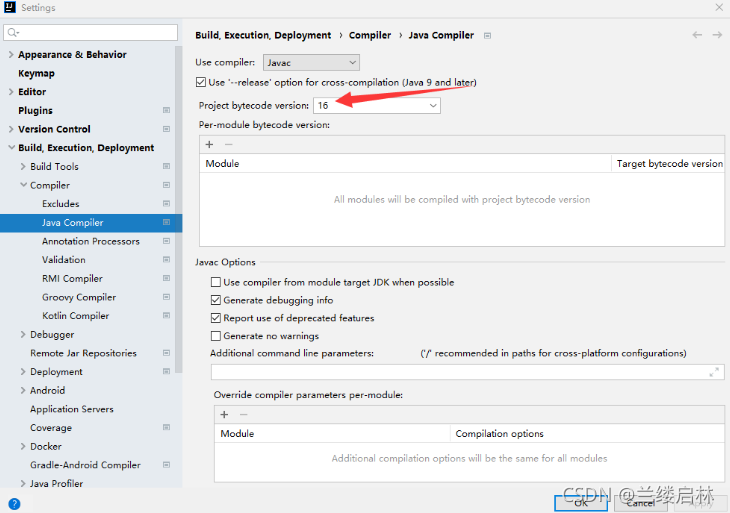
I was going to download another JDK8, but suddenly I found that in File-Setting-Build, Execution... - I was able to adjust Project bytecode version from 16 to 15 in the Java Compiler and the problem was solved.

Error: org.springframework.beans.factory.BeanDefinitionStoreException: Failed to read candidate component class: file [D:\java\spring5_demo3\out\production\spring5_demo3\com\spring5\service\UserService.class]; nested exception is org.springframework.core.NestedIOException: ASM ClassReader failed to parse class file – probably due to a new Java class file version that isn’t supported yet: file [D:\java\spring5_demo3\out\production\spring5_demo3\com\spring5\service\UserService.class]; nested exception is java.lang.IllegalArgumentException: Unsupported class file major version 60

[Solved] Android Studio Manifest merger failed with multiple errors, see logs

When the message “manifest merge failed with multiple errors, see logs” is reported, and there is no other prompt, open manifest first to see if there is any error. If there is any error, there will be a red prompt
if there is no error, run the following command on the terminal: gradlew processdebugmanifest — stacktrace
. After running, an error will be displayed. Follow the prompts to modify. The wireframe is marked with an error message.
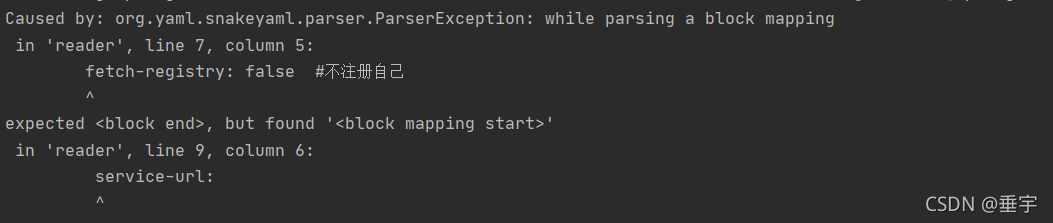
[Solved] Failed to load property source from location ‘classpath:/application.yml‘

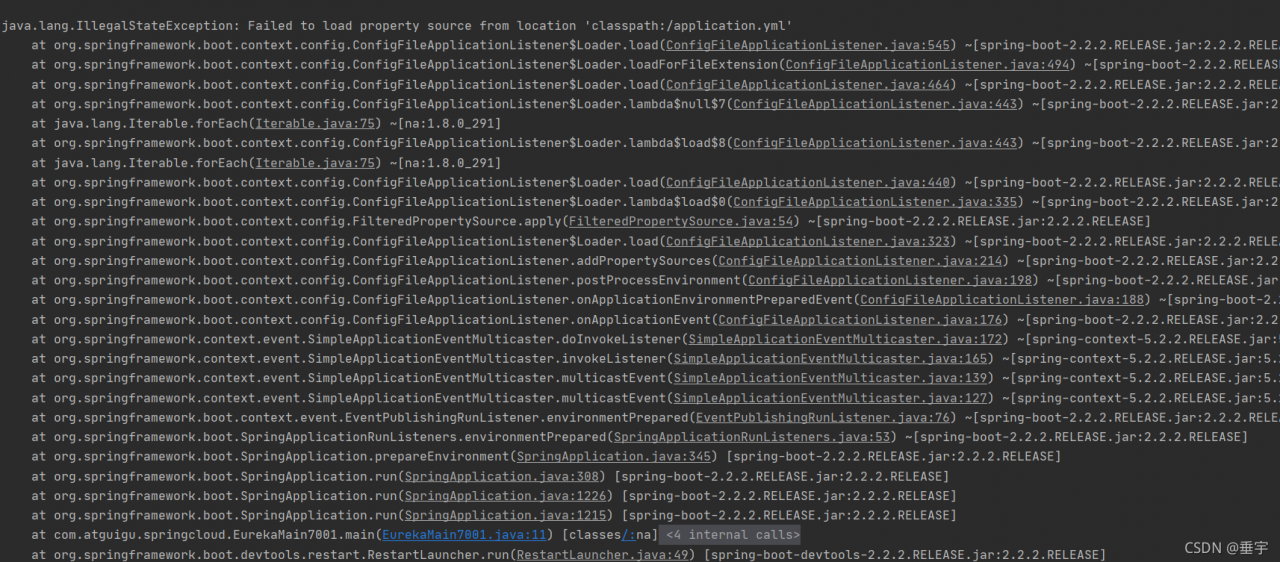
java.lang.IllegalStateException: Failed to load property source from location ‘classpath:/application.yml’

Caused by:

Error Reason:
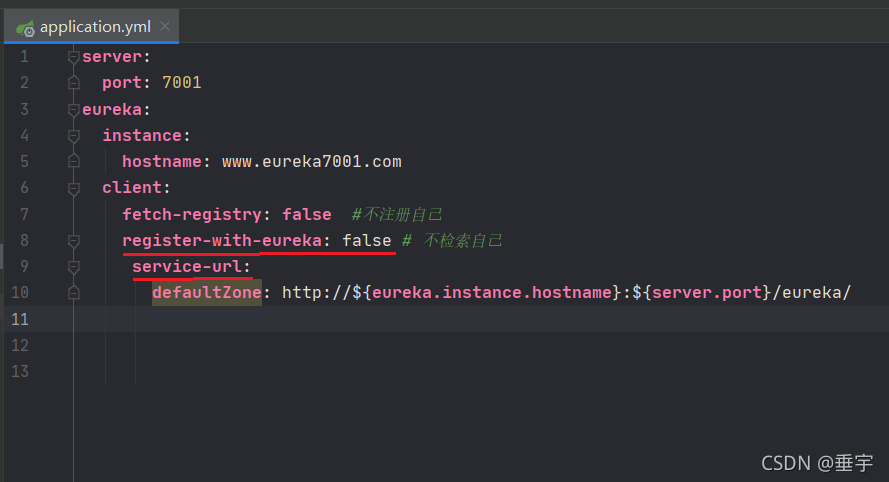
register-with-eureka: false and service-url: are not aligned in the application.yml configuration file
server:
  port: 7001
eureka:
  instance:
    hostname: www.eureka7001.com
  client:
    fetch-registry: false  
    register-with-eureka: false 
    service-url:
       defaultZone: http://${eureka.instance.hostname}:${server.port}/eureka/  

android remount of /system failed: Read-only file system [How to Solve]

Problems encountered:
after ADB root (obtaining root permission), execute ADB remount (adding read-write permission to system files/system,/vendor,/OEM) and report:
remount of/system failed: read-only file system error

Solution:
1. ADB disable verity will appear
verity disabled on/system
now reboot your device for settings to take effect
2. ADB reboot restart the device.
then remout can succeed

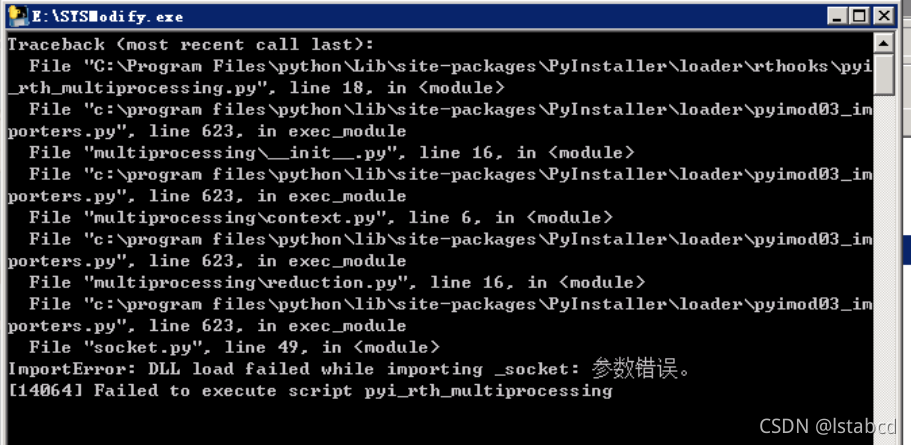
Pyinstaller Error: [ImportError]: DLL load failed while importing _socket: Parameter error

Convert the python program to exe through pyinstaller and run normally on this computer, but an error is reported when running on other computers:
[importerror]: DLL load failed while importing_ Socket: parameter error
as shown in the following figure:

found many places without solutions

Finally, only the pyinstaller is reduced to 3.6, and the python version is also reduced to 3.6.8

Everything is normal after re-conversion!

[Solved] PHP getimagesize(): SSL operation failed with code 1. OpenSSL Error messages: error:14090086:SSL

Today, I encountered a problem with the client application server (CentOS). When using getimagesize(), an error is always reported:

PHP getimagesize(): SSL operation failed with code 1. OpenSSL Error messages: error:14090086:SSL routines:ssl3_ get_ server_ certificate:certificate verify failed

It is preliminarily judged that openssl.cafile in php.ini is not set. After opening the PHP configuration file, it is found that it is set. The current setting value is:

openssl.cafile=/etc/pki/tls/certs/ca-bundle.crt

After that, it was suspected that the certificate might expire. First, compare the contents of the file on your own server. If you find that the size is inconsistent, copy and paste the contents from your own server. After saving, the problem of reloading PHP configuration still exists;

Remember that similar problems have occurred on Windows systems before. At that time, curl.cainfo was configured, so from this website
: http://curl.haxx.se/ca/cacert.pem Download the certificate and put it in the /usr/local/OpenSSL/ directory to modify the configuration

[curl]
curl.cainfo = /usr/local/openssl/cacert.pem

[openssl]
openssl.cafile=/usr/local/openssl/cacert.pem

When this problem occurs on the Internet, the solutions found are also operated in this way. However, the overload configuration problem remains after saving. Change the configuration back again.

Finally, see this article on: https://stackoverflow.com/questions/17084886/ssl-error-routinesssl3-get-server-certificatecertificate-verify-failed

It is found that the Linux system has the command to update the local certificate. The commands are different for different systems. The CentOS operation is as follows:

#Install ca certificate tool
yum install ca-certificates -y

# Update Certificate
update-ca-trust

Problem-solving.