Author Archives: Robins

[Solved] Vue Project Error: Arrow function should not return assignment

Vue item error arrow function should not return assignment

Problem source

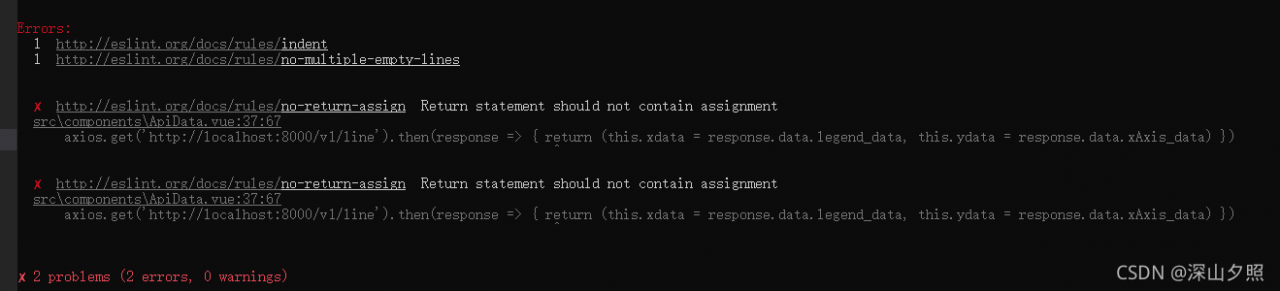
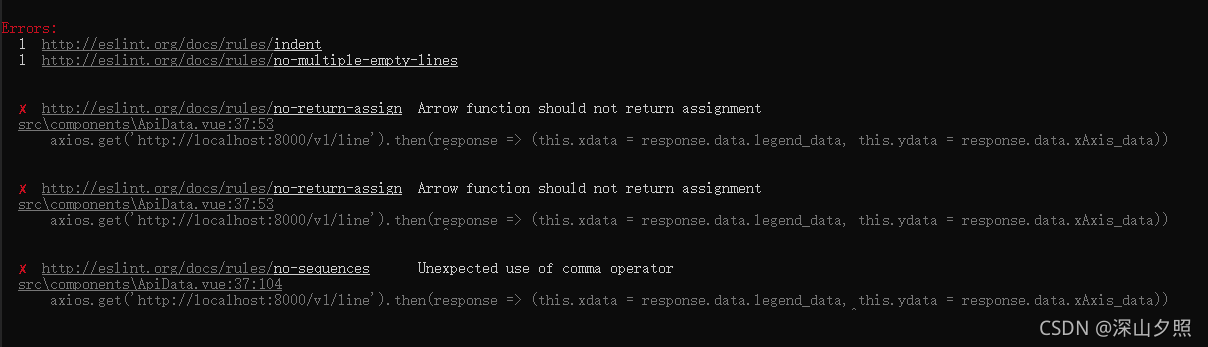
Recently, there was an error arrow function should not return assignment

when creating a startup Vue project. In fact, there is more than one error, but the final reason is that the eslint check code is referenced.

Solution:

1. Modify the code to comply with the rules of eslint (this method does not take effect here)
add {} to the code after the arrow; however, it reports this error again (I don’t know how to solve this error up to now)

2. Remove eslint
and comment ‘standard’
in the. Eslintrc.js file under the project root directory

Python Error: certificate verify failed: certificate has expired

Let’s talk about the situation at that time. Because there is no cifar10 data set on this machine, when downloading cifar10 with the following code:

trainset = torchvision.datasets.CIFAR10(root='./data', train=True,
                                        download=True, transform=transform)

Certificate verify failed: the error message certificate has expired appears.

Later, I found that the following two lines can be added to the file header:

import ssl
ssl._create_default_https_context = ssl._create_unverified_context

Done! happy

Webpack Upgrade Error: webpack.NamedModulesPlugin is not a constructor

Use [email protected] time: wrong type: webpack.namedmodulesplugin is not a constructor

Next, webpack.config.js:

const webpack = require('webpack');
const { merge } = require('webpack-merge');

const baseConfig = require('./webpack.config.base');

module.exports = merge(baseConfig, {
  mode: process.env.NODE_ENV,
  entry: {
    index: './app/index.ts',
  },
  plugins: [
    new webpack.NamedModulesPlugin(),
    new webpack.EnvironmentPlugin({
      NODE_ENV: 'development',
    }),
  ],
});

Cause of problem: in 5.0, namedmodules plugin has been removed

Refer to upgrading obsolete configuration items

NamedModulesPlugin → optimization.moduleIds: ‘named’

optimization: {
 moduleIds: 'named'
}

Modify configuration:

const webpack = require('webpack');
const { merge } = require('webpack-merge');

const baseConfig = require('./webpack.config.base');

module.exports = merge(baseConfig, {
  mode: process.env.NODE_ENV,
  entry: {
    index: './app/index.ts',
  },
  optimization: {
    moduleIds: 'named'
  },
  plugins: [
    new webpack.EnvironmentPlugin({
      NODE_ENV: 'development',
    }),
  ],
});

PS. moduleid it seems that the default value is named?Just remove namedmodules plugin.

[Solved] Error spawn CMD enoent errno when starting Vue project: – 4058

Question

When I set the Vue project to automatically jump to the browser after startup, the console reports the following errors:

DONE  Compiled successfully in 11178ms                                                                      下午3:42:04


  App running at:
  - Local:   http://localhost:8080/
  - Network: unavailable

  Note that the development build is not optimized.
  To create a production build, run npm run build.

events.js:292
      throw er; // Unhandled 'error' event
      ^

Error: spawn cmd ENOENT
    at Process.ChildProcess._handle.onexit (internal/child_process.js:269:19)
    at onErrorNT (internal/child_process.js:465:16)
    at processTicksAndRejections (internal/process/task_queues.js:80:21)
Emitted 'error' event on ChildProcess instance at:
    at Process.ChildProcess._handle.onexit (internal/child_process.js:275:12)
    at onErrorNT (internal/child_process.js:465:16)
    at processTicksAndRejections (internal/process/task_queues.js:80:21) {
  errno: -4058,
  code: 'ENOENT',
  syscall: 'spawn cmd',
  path: 'cmd',
  spawnargs: [ '/c', 'start', '""', '/b', 'http://localhost:8080/' ]
}
npm ERR! code ELIFECYCLE
npm ERR! errno 1
npm ERR! [email protected] serve: `vue-cli-service serve`
npm ERR! Exit status 1
npm ERR!
npm ERR! Failed at the [email protected] serve script.
npm ERR! This is probably not a problem with npm. There is likely additional logging output above.

npm ERR! A complete log of this run can be found in:
npm ERR!     D:\node\node_cache\_logs\2020-12-19T07_42_04_693Z-debug.log

When I don’t set "serve": "Vue cli Service -- Open", it can run normally without any error. According to the error prompt spawn CMD enoent, we can know

spawn XXX enoent: indicates that the environment variable of the corresponding running program is missing. The reason for the error is that the computer lacks the environment variable of the CMD running program. I think the error is probably because to realize automatic jump, you need to enter a command in CMD and then the computer system calls the browser, but the computer lacks the environment variable of the CMD running program, so the error is reported (comments are welcome)

Solution:

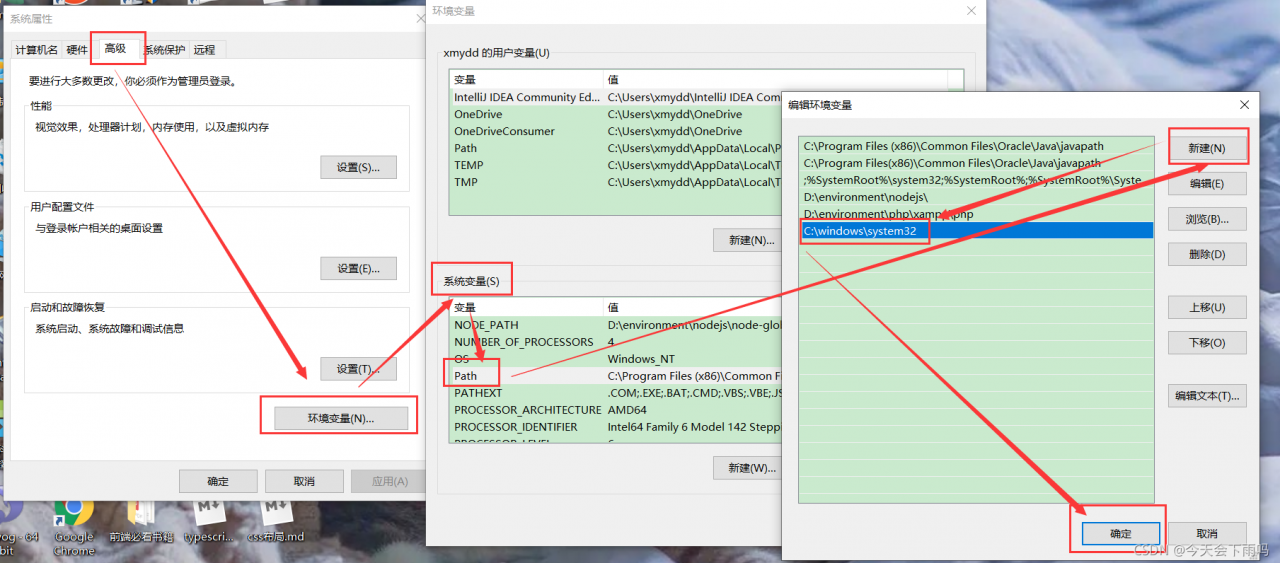
Add C:\windows\system32 to the environment variable path

Right click my computer (this computer) – properties – advanced system settings (search) – Advanced – environment variables – system variables, find path and add it
after adding, close vscode and reopen the startup project

Echarts Map Error: Error: Invalid geoJson format Cannot read property ‘length‘ of undefined

When displaying the districts and counties of Taizhou, Zhejiang Province, I found an error on the page. I found that the difference in the file is that there is a “type”: “geometrycollection”
Modify node in Yuhuan JSON_Modules\charts\lib\coord\geo\parsegeojason.js code

/*
 * Licensed to the Apache Software Foundation (ASF) under one
 * or more contributor license agreements.  See the NOTICE file
 * distributed with this work for additional information
 * regarding copyright ownership.  The ASF licenses this file
 * to you under the Apache License, Version 2.0 (the
 * "License"); you may not use this file except in compliance
 * with the License.  You may obtain a copy of the License at
 *
 *   http://www.apache.org/licenses/LICENSE-2.0
 *
 * Unless required by applicable law or agreed to in writing,
 * software distributed under the License is distributed on an
 * "AS IS" BASIS, WITHOUT WARRANTIES OR CONDITIONS OF ANY
 * KIND, either express or implied.  See the License for the
 * specific language governing permissions and limitations
 * under the License.
 */


/**
 * AUTO-GENERATED FILE. DO NOT MODIFY.
 */

/*
 * Licensed to the Apache Software Foundation (ASF) under one
 * or more contributor license agreements.  See the NOTICE file
 * distributed with this work for additional information
 * regarding copyright ownership.  The ASF licenses this file
 * to you under the Apache License, Version 2.0 (the
 * "License"); you may not use this file except in compliance
 * with the License.  You may obtain a copy of the License at
 *
 *   http://www.apache.org/licenses/LICENSE-2.0
 *
 * Unless required by applicable law or agreed to in writing,
 * software distributed under the License is distributed on an
 * "AS IS" BASIS, WITHOUT WARRANTIES OR CONDITIONS OF ANY
 * KIND, either express or implied.  See the License for the
 * specific language governing permissions and limitations
 * under the License.
 */

/**
 * Parse and decode geo json
 */
import * as zrUtil from 'zrender/lib/core/util';
import Region from './Region';

function decode(json) {
    if (!json.UTF8Encoding) {
        return json;
    }

    var jsonCompressed = json;
    var encodeScale = jsonCompressed.UTF8Scale;

    if (encodeScale == null) {
        encodeScale = 1024;
    }

    var features = jsonCompressed.features;

    for (var f = 0; f < features.length; f++) {
        var feature = features[f];
        var geometry = feature.geometry;

        if (geometry.type === 'Polygon') {
            var coordinates = geometry.coordinates;

            for (var c = 0; c < coordinates.length; c++) {
                coordinates[c] = decodePolygon(coordinates[c], geometry.encodeOffsets[c], encodeScale);
            }
        } else if (geometry.type === 'MultiPolygon') {
            var coordinates = geometry.coordinates;

            for (var c = 0; c < coordinates.length; c++) {
                var coordinate = coordinates[c];

                for (var c2 = 0; c2 < coordinate.length; c2++) {
                    coordinate[c2] = decodePolygon(coordinate[c2], geometry.encodeOffsets[c][c2], encodeScale);
                }
            }
        }
    } // Has been decoded


    jsonCompressed.UTF8Encoding = false;
    return jsonCompressed;
}

function decodePolygon(coordinate, encodeOffsets, encodeScale) {
    var result = [];
    var prevX = encodeOffsets[0];
    var prevY = encodeOffsets[1];

    for (var i = 0; i < coordinate.length; i += 2) {
        var x = coordinate.charCodeAt(i) - 64;
        var y = coordinate.charCodeAt(i + 1) - 64; // ZigZag decoding

        x = x >> 1 ^ -(x & 1);
        y = y >> 1 ^ -(y & 1); // Delta deocding

        x += prevX;
        y += prevY;
        prevX = x;
        prevY = y; // Dequantize

        result.push([x/encodeScale, y/encodeScale]);
    }

    return result;
}

export default function parseGeoJSON(geoJson, nameProperty) {
    decode(geoJson);
    return zrUtil.map(
        zrUtil.filter(geoJson.features, function (featureObj) {
            if (featureObj.geometry.geometries) {
                let geometry = featureObj.geometry.geometries.map(i => {
                    return i.coordinates;
                });
                let { type, properties} = featureObj;
                return {
                    type,
                    properties,
                    geometry
                };
            }
            // Output of mapshaper may have geometry null
            return (
                featureObj.geometry &&
                featureObj.properties &&
                featureObj.geometry.coordinates &&
                featureObj.geometry.coordinates.length > 0
            );
        }),
        function (featureObj) {
            var properties = featureObj.properties;
            var geo = featureObj.geometry;
            var coordinates = geo.coordinates;
            var geometries = [];

            if (geo.type === "GeometryCollection") {
                let geometry = {
                    type: "Polygon"
                };
                let coordinatesArr = featureObj.geometry.geometries.map(i => {
                    return i.coordinates;
                });
                geometry.coordinates = coordinatesArr;
                console.log(coordinatesArr, "coordinatesArr");
                coordinatesArr.forEach(i => {
                    geometries.push({
                        type: "polygon",
                        // According to the GeoJSON specification.
                        // First must be exterior, and the rest are all interior(holes).
                        exterior: i[0],
                        interiors: i.slice(1)
                    });
                });
            }
            if (geo.type === "Polygon") {
                console.log("coordinatesPolygon", coordinates);
                geometries.push({
                    type: "polygon",
                    // According to the GeoJSON specification.
                    // First must be exterior, and the rest are all interior(holes).
                    exterior: coordinates[0],
                    interiors: coordinates.slice(1)
                });
            }

            if (geo.type === "MultiPolygon") {
                zrUtil.each(coordinates, function (item) {
                    if (item[0]) {
                        geometries.push({
                            type: "polygon",
                            exterior: item[0],
                            interiors: item.slice(1)
                        });
                    }
                });
            }
            console.log(
                properties[nameProperty || "name"],
                geometries,
                properties.cp,
                "asdfasdfasdf"
            );
            var region = new Region(
                properties[nameProperty || "name"],
                geometries,
                properties.cp
            );
            region.properties = properties;
            return region;
        })
}

[Solved] Spring Cloud Use Ribbon Error: No instances available for XXX

Question

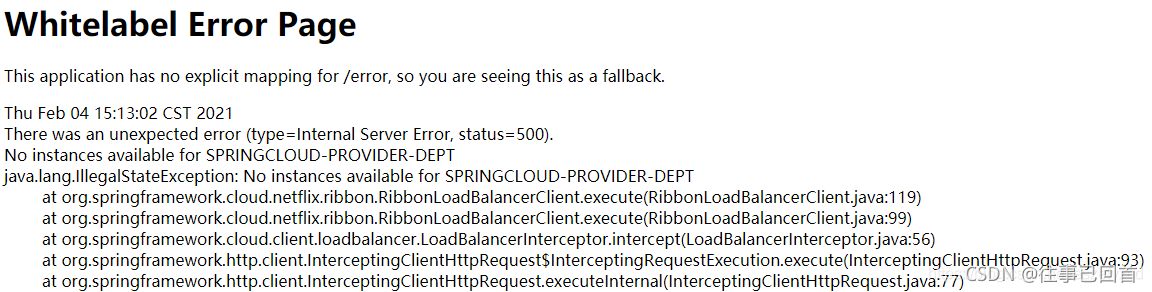
After configuring load balancing, start springboot and report an error

reason

The version difference of jar
I first used ribbon and Eureka. When I added them, I didn’t notice that the following two versions were abandoned

<!-- https://mvnrepository.com/artifact/org.springframework.cloud/spring-cloud-starter-ribbon -->
<dependency>
    <groupId>org.springframework.cloud</groupId>
    <artifactId>spring-cloud-starter-ribbon</artifactId>
    <version>1.4.7.RELEASE</version>
</dependency>

<!-- https://mvnrepository.com/artifact/org.springframework.cloud/spring-cloud-starter-eureka -->
<dependency>
    <groupId>org.springframework.cloud</groupId>
    <artifactId>spring-cloud-starter-eureka</artifactId>
    <version>1.4.7.RELEASE</version>
</dependency>

Solution:

The dependency of replacing the Eureka registry module is

        <dependency>
            <groupId>org.springframework.cloud</groupId>
            <artifactId>spring-cloud-starter-netflix-eureka-server</artifactId>
            <version>3.0.4</version>
        </dependency>

The dependency of replacing the service provider and consumer modules is
the ribbon required by the consumer module has been built-in compatible with the latest version of Eureka

         <dependency>
            <groupId>org.springframework.cloud</groupId>
            <artifactId>spring-cloud-starter-netflix-eureka-client</artifactId>
            <version>3.0.4</version>
        </dependency>

Git Error: failed: The TLS connection was non-properly terminated

Tencent virtual machine doesn’t know why it can’t git clone, and an error is reported:

fatal: unable to access 'https://github.com/asdf-vm/asdf-plugins.git/': gnutls_handshake() failed: The TLS connection was non-properly terminated.
plugin ruby not found in repository

After checking, you need to use libcurl4 OpenSSL dev to replace gnutls to compile GIT.

sudo apt-get install build-essential fakeroot dpkg-dev
mkdir ~/git-openssl
cd ~/git-openssl
sudo apt-get source git
sudo apt-get build-dep git

If there is an error that the source code cannot be found, use the command sudo vim /etc/apt/sources.list to open the file and uncomment the line with deb_src, save and run sudo apt update, and then execute the last command above.
Then:

sudo apt-get install libcurl4-openssl-dev
sudo dpkg-source -x git_2.17.1-1ubuntu0.9.dsc
cd git_2.17.1 # Actual version may differ

Then edit the Debian/control file and use the command sudo VIM deebian/control to change all libcurl4 gnutls dev to libcurl4 OpenSSL dev. (I only met one libcurl4 gnutls dev here)
then run the command:

# This step will take a long time, wait patiently
sudo dpkg-buildpackage -rfakeroot -b

sudo dpkg -i git_2.17.1-1ubuntu0.9_amd64.deb

That’s it. Just git again

+ git clone https://github.com/asdf-vm/asdf.git /root/.asdf --depth 1
Cloning into '/root/.asdf'...
+ echo -e '\n. $HOME/.asdf/asdf.sh'
+ echo -e '\n. $HOME/.asdf/completions/asdf.bash'
+ echo -e 'legacy_version_file = yes'
+ asdf plugin-add ruby
initializing plugin repository...Cloning into '/root/.asdf/repository'...

————————————————————————————Renew

I did it again in the afternoon. There was still the same problem. Finally, the reset agent solved it perfectly

git config --global --unset https.https://github.com.proxy 
git config --global --unset http.https://github.com.proxy 
Ubuntu: pdserving deployment output log.txt Error

Error message:

Changing the config.yaml path in the web_service.py file to an absolute path is also incorrect, and also tried unset https_proxy
unset http_proxy, but the error code is as follows:
More information: The
model is self-trained det (SAST) rec (EN_Number_Lite)
The configuration of the model corresponding to the depoly has also been modified

Traceback (most recent call last):
  File "web_service.py", line 159, in <module>
    uci_service.prepare_pipeline_config("config.yml")
  File "/home/dapeng/.local/lib/python3.7/site-packages/paddle_serving_server/web_service.py", line 65, in prepare_pipeline_config
    self._server.prepare_server(yaml_file)
  File "/home/dapeng/.local/lib/python3.7/site-packages/paddle_serving_server/pipeline/pipeline_server.py", line 172, in prepare_server
    yml_file=yml_file, yml_dict=yml_dict)
  File "/home/dapeng/.local/lib/python3.7/site-packages/paddle_serving_server/pipeline/pipeline_server.py", line 344, in load_server_yaml_conf
    conf = yaml.load(f.read())
TypeError: load() missing 1 required positional argument: 'Loader'

Solution:

vim /home/dapeng/.local/lib/python3.7/site-packages/paddle_serving_server/pipeline/pipeline_server.py
# At line 344, after the conf = yaml.load() brackets addLoader=yaml.FullLoaderv
conf = yaml.load(f.read(), Loader=yaml.FullLoader)

[Solved] SpringMVC Error: element web-app must be declared

Problem background

Today, when learning spring MVC, you need to configure the web.xml file, and an error message element web app must be declared appears.


Solution:

<web-app xmlns="http://xmlns.jcp.org/xml/ns/javaee"
         xmlns:xsi="http://www.w3.org/2001/XMLSchema-instance"
         xsi:schemaLocation="http://xmlns.jcp.org/xml/ns/javaee
                      http://xmlns.jcp.org/xml/ns/javaee/web-app_4_0.xsd"
         version="4.0"
         metadata-complete="true">
</web-app>

[Solved] Errors encountered when using VS to write opengl code

Record the errors encountered when writing opengl code using vs:
problem:
error: the following is a new check for glut 3.0; Update your code.
after checking for a long time, it is found that this may be the reason why the portal
does not write the callback function of the window

Solution:
write the callback function yourself

glutDisplayFunc(&display);

Among them, display is the calling function written by yourself, for example:

glutDisplayFunc(DrawOval);//Draw callback function, glut mechanism, it will be executed when it feels the need to redraw

The drawOval here is the function I wrote to draw an ellipse

[Solved] Gitlab Error: gitlab-ctl reconfigure Error: STDERR: initdb: error: invalid locale settings; check LANG and L

The error report is shown in the figure

There was an error running gitlab-ctl reconfigure:

execute[/opt/gitlab/embedded/bin/initdb -D /var/opt/gitlab/postgresql/data -E UTF8] (postgresql::enable line 49) had an error: Mixlib::ShellOut::ShellCommandFailed: Expected process to exit with [0], but received '1'
---- Begin output of /opt/gitlab/embedded/bin/initdb -D /var/opt/gitlab/postgresql/data -E UTF8 ----
STDOUT: The files belonging to this database system will be owned by user "gitlab-psql".
This user must also own the server process.
STDERR: initdb: error: invalid locale settings; check LANG and LC_* environment variables
---- End output of /opt/gitlab/embedded/bin/initdb -D /var/opt/gitlab/postgresql/data -E UTF8 ----
Ran /opt/gitlab/embedded/bin/initdb -D /var/opt/gitlab/postgresql/data -E UTF8 returned 1
                   Default character set issues

Ensure that there is more than 4G in the

Solution process:

vim /etc/profile
# Add the following to the end of the configuration file
export LC_CTYPE=en_US.UTF-8
export LC_ALL=en_US.UTF-8
# reread the environment variables
[root@localhost src]# source /etc/profile
# Reload
[root@localhost src]# gitlab-ctl reconfigure
It is best to change the password the first time you enter
Details: > https://blog.csdn.net/weixin_46115601/article/details/120721246