Author Archives: Robins

[Solved] liquibase.exception.ValidationFailedException: Validation Failed

Question:

2020-11-12 15:15:14.082  WARN 15972 --- [           main] ConfigServletWebServerApplicationContext : Exception encountered during context initialization - cancelling refresh attempt: org.springframework.beans.factory.BeanCreationException: Error creating bean with name 'liquibase' defined in class path resource [cn/yihuazt/metadata/config/MetaDataConfig.class]: Invocation of init method failed; nested exception is liquibase.exception.ValidationFailedException: Validation Failed:
     1 change sets check sum
          classpath:metadata/db/atmp_service.sql::init-table(pla_log)::[email protected] was: 8:9a740f35c65933423ab693677c08a00c but is now: 8:a4ace2e4bab8493391e401fdff807762

2020-11-12 15:15:14.084  INFO 15972 --- [           main] com.zaxxer.hikari.HikariDataSource       : HikariPool-1 - Shutdown initiated...
2020-11-12 15:15:14.095  INFO 15972 --- [           main] com.zaxxer.hikari.HikariDataSource       : HikariPool-1 - Shutdown completed.
2020-11-12 15:15:14.096  INFO 15972 --- [           main] o.apache.catalina.core.StandardService   : Stopping service [Tomcat]
2020-11-12 15:15:14.115  INFO 15972 --- [           main] ConditionEvaluationReportLoggingListener : 

Error starting ApplicationContext. To display the conditions report re-run your application with 'debug' enabled.
2020-11-12 15:15:14.133 ERROR 15972 --- [           main] o.s.boot.SpringApplication               : Application run failed

org.springframework.beans.factory.BeanCreationException: Error creating bean with name 'liquibase' defined in class path resource [cn/yihuazt/metadata/config/MetaDataConfig.class]: Invocation of init method failed; nested exception is liquibase.exception.ValidationFailedException: Validation Failed:
     1 change sets check sum
          classpath:metadata/db/atmp_service.sql::init-table(pla_log)::[email protected] was: 8:9a740f35c65933423ab693677c08a00c but is now: 8:a4ace2e4bab8493391e401fdff807762

    at org.springframework.beans.factory.support.AbstractAutowireCapableBeanFactory.initializeBean(AbstractAutowireCapableBeanFactory.java:1769) ~[spring-beans-5.1.17.RELEASE.jar:5.1.17.RELEASE]
    at org.springframework.beans.factory.support.AbstractAutowireCapableBeanFactory.doCreateBean(AbstractAutowireCapableBeanFactory.java:592) ~[spring-beans-5.1.17.RELEASE.jar:5.1.17.RELEASE]
    at org.springframework.beans.factory.support.AbstractAutowireCapableBeanFactory.createBean(AbstractAutowireCapableBeanFactory.java:514) ~[spring-beans-5.1.17.RELEASE.jar:5.1.17.RELEASE]
    at org.springframework.beans.factory.support.AbstractBeanFactory.lambda$doGetBean$0(AbstractBeanFactory.java:321) ~[spring-beans-5.1.17.RELEASE.jar:5.1.17.RELEASE]
    at org.springframework.beans.factory.support.AbstractBeanFactory$$Lambda$144/584698209.getObject(Unknown Source) ~[na:na]
    at org.springframework.beans.factory.support.DefaultSingletonBeanRegistry.getSingleton(DefaultSingletonBeanRegistry.java:226) ~[spring-beans-5.1.17.RELEASE.jar:5.1.17.RELEASE]
    at org.springframework.beans.factory.support.AbstractBeanFactory.doGetBean(AbstractBeanFactory.java:319) ~[spring-beans-5.1.17.RELEASE.jar:5.1.17.RELEASE]
    at org.springframework.beans.factory.support.AbstractBeanFactory.getBean(AbstractBeanFactory.java:199) ~[spring-beans-5.1.17.RELEASE.jar:5.1.17.RELEASE]
    at org.springframework.beans.factory.support.AbstractBeanFactory.doGetBean(AbstractBeanFactory.java:308) ~[spring-beans-5.1.17.RELEASE.jar:5.1.17.RELEASE]
    at org.springframework.beans.factory.support.AbstractBeanFactory.getBean(AbstractBeanFactory.java:199) ~[spring-beans-5.1.17.RELEASE.jar:5.1.17.RELEASE]
    at org.springframework.context.support.AbstractApplicationContext.getBean(AbstractApplicationContext.java:1106) ~[spring-context-5.1.17.RELEASE.jar:5.1.17.RELEASE]
    at org.springframework.context.support.AbstractApplicationContext.finishBeanFactoryInitialization(AbstractApplicationContext.java:868) ~[spring-context-5.1.17.RELEASE.jar:5.1.17.RELEASE]
    at org.springframework.context.support.AbstractApplicationContext.refresh(AbstractApplicationContext.java:550) ~[spring-context-5.1.17.RELEASE.jar:5.1.17.RELEASE]
    at org.springframework.boot.web.servlet.context.ServletWebServerApplicationContext.refresh(ServletWebServerApplicationContext.java:141) ~[spring-boot-2.1.16.RELEASE.jar:2.1.16.RELEASE]
    at org.springframework.boot.SpringApplication.refresh(SpringApplication.java:744) [spring-boot-2.1.16.RELEASE.jar:2.1.16.RELEASE]
    at org.springframework.boot.SpringApplication.refreshContext(SpringApplication.java:391) [spring-boot-2.1.16.RELEASE.jar:2.1.16.RELEASE]
    at org.springframework.boot.SpringApplication.run(SpringApplication.java:312) [spring-boot-2.1.16.RELEASE.jar:2.1.16.RELEASE]
    at org.springframework.boot.SpringApplication.run(SpringApplication.java:1215) [spring-boot-2.1.16.RELEASE.jar:2.1.16.RELEASE]
    at org.springframework.boot.SpringApplication.run(SpringApplication.java:1204) [spring-boot-2.1.16.RELEASE.jar:2.1.16.RELEASE]
    at cn.yihuazt.atmp.AtmpServiceApplication.main(AtmpServiceApplication.java:28) [classes/:na]
Caused by: liquibase.exception.ValidationFailedException: Validation Failed:
     1 change sets check sum
          classpath:metadata/db/atmp_service.sql::init-table(pla_log)::[email protected] was: 8:9a740f35c65933423ab693677c08a00c but is now: 8:a4ace2e4bab8493391e401fdff807762

    at liquibase.changelog.DatabaseChangeLog.validate(DatabaseChangeLog.java:288) ~[liquibase-core-3.8.8.jar:na]
    at liquibase.Liquibase.update(Liquibase.java:198) ~[liquibase-core-3.8.8.jar:na]
    at liquibase.Liquibase.update(Liquibase.java:179) ~[liquibase-core-3.8.8.jar:na]
    at liquibase.integration.spring.SpringLiquibase.performUpdate(SpringLiquibase.java:366) ~[liquibase-core-3.8.8.jar:na]
    at liquibase.integration.spring.SpringLiquibase.afterPropertiesSet(SpringLiquibase.java:314) ~[liquibase-core-3.8.8.jar:na]
    at org.springframework.beans.factory.support.AbstractAutowireCapableBeanFactory.invokeInitMethods(AbstractAutowireCapableBeanFactory.java:1828) ~[spring-beans-5.1.17.RELEASE.jar:5.1.17.RELEASE]
    at org.springframework.beans.factory.support.AbstractAutowireCapableBeanFactory.initializeBean(AbstractAutowireCapableBeanFactory.java:1765) ~[spring-beans-5.1.17.RELEASE.jar:5.1.17.RELEASE]
    ... 19 common frames omitted

Disconnected from the target VM, address: '127.0.0.1:61091', transport: 'socket'

Process finished with exit code 1

reason:

Modified menu profile

Solution:

Modify the 8:9a740f35c65933423ab693677c08a00c in the column pla_log in the databasechangelog table to 8:a4ace2e4bab8493391e401fdff807762

JAVA: How to Solve Foreach Loop Remove/add Element Error

In fact, the reason for reporting an error is to throw an exception, which violates the fail fast protection mechanism

At this point, we replace the iterator to implement the loop

List<String> list=new ArrayList<>();
list.add("1");
list.add("2");
Iterator<String> iterator=list.iterator();
while(iterator.hasNext()){
    String item=iterator.next();
    if(Conditions for deleting elements){
        iterator.remove();
    }    
}


Exception Writing
for(String item:list){
    if(Conditions){
        list.remove(item);
    }
}

Vue Use scss Error: this.getOptions is not a function [How to Solve]

Background: an error is reported when installing sass for NPM

Installing sass through NPM

npm install node-sass
npm intall sass-loader

The above command installs the latest version. The reason for the error is that the latest version causes getoptions() incompatibility. The solution is to uninstall sass loader node sass and install the lower version. The commands are as follows

npm uninstall sass-loader //uninstall
npm install [email protected]  //install 8.0
npm uninstall --save node-sass
npm install [email protected] 

[Solved] there are special symbols in the initial password for installing MySQL in Hadoop, and an error is reported

Today, I installed a MySQL database in the server because there was a ‘)’ in the initial password assigned. I always reported an error when entering the password. I tried many changes on the Internet. It’s useless to wrap anything in quotation marks. Next, let’s talk about my solution:

Step 1:

vi /etc/my.cnf

After opening, add a sentence: skip grant tables

The function is equivalent to that no password is required for login

Step 2:

Restart MySQL

systemctl restart mysqld

Step 3:

Direct Logins

mysql -uroot -p

Step 4:

// goto database
use mysql
// refresh the data
flush privileges;

Step 5:

Change password

ALTER USER 'root'@'localhost' IDENTIFIED WITH mysql_native_password BY 'PASSWORD';

Then, delete the just secret free statement and restart MySQL

Login

mysql -uroot -p[NEW PASSWORD]

Chart.js Error: “Canvas is already in use. Chart …must be destroyed before the canvas can be reused”

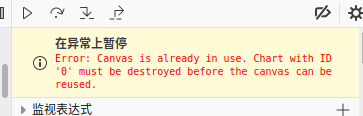
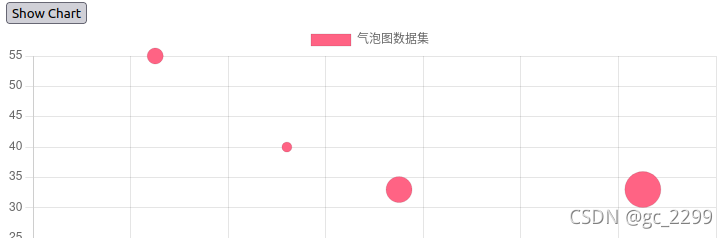
when using jQuery to call webapi to obtain bubble chart data and draw bubble chart with chart.js in the test web page, if you click the display chart button twice, an error of “uncaught error: canvas is already in use. Chart with ID ‘0’ must be destroyed before the canvas can be reused.” will be reported.

from the error prompt, it should be that the canvas used to draw the bubble chart has been occupied, and there will be a conflict when using it to draw the graph again. Find two ways to solve this problem from chart.js official website and online

Call the chart.Destroy() function

The destroy function is introduced in the API help document of chart.js official website. This function is used to destroy the chart instance, clear the saved references in the object and the associated event listener. This function must be used before re using canvas to draw new graphics.
this article adds detection code before creating a new chart instance. If the mybubblechart object is already an instance of chart type, call the destroy function to destroy the instance

					if(myBubbleChart instanceof Chart)
                    {
                        myBubbleChart.destroy();
                    }
                    
                    myBubbleChart = new Chart(bubbleCanvas, {
                    type: "bubble",
                    data: data1,
                    options: []
                });

Clear/add canvas with jquery

Another way of learning as like as two peas in 2 is to remove the canvas element from jQuery before you create the chart instance, and then add the same canvas element, which is shown below:

            $('#bubbleChart').remove();
            $('#chartDiv').append('<canvas id="bubbleChart"></canvas>');

the above two methods support repeatedly clicking the display chart button to generate a bubble chart

[Solved] Decompression error: tar: Error is not recoverable: exiting now

Tar: error is not recoverable: exiting now

[root@node04 soft]# tar -zxvf apache-tomcat-8.0.53-x64.tar.gz

Error message:

gzip: stdin has more than one entry–rest ignored tar: Child returned status 2 tar: Error is not recoverable: exiting now

Solution 1: remove the Z parameter and use tar – xvf to decompress

Find or report an error.

Solution 2: use the unzip command.

Problem-solving.

If you cannot use the unzip command, first follow:

yum install -y unzip zip

How to Solve PIP3 error After upgrading pip3 install –upgrade pip

pip3 install –upgrade pip3 execution error after pip upgrade

Description
Traceback (most recent call last):
File “/home/brian/.local/bin/pip3”, line 7, in
from pip._internal.cli.main import main
File “/home/brian/.local/lib/python3.5/site-packages/pip/_internal/cli/main.py”, line 60
sys.stderr.write(f”ERROR: {exc}”)
^
SyntaxError: invalid syntax

Solution
Execute python3 –version to determine the python3 version visit https://bootstrap.pypa.io/pip/ Find the get-pip.py file for the corresponding python version at this URL and execute wget in the terminal https://bootstrap.pypa.io/pip/3.8/get-pip.pypython3 get-pip.py

[Solved] Go Get Download Dependency Error: is not using a known version control system

Background

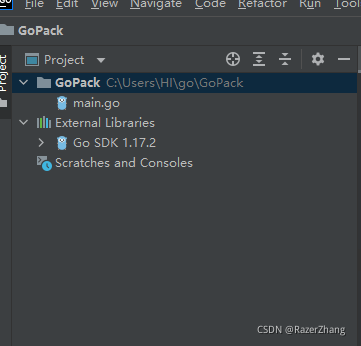
GoLand input command

C:\Users\HI\go\GoPack> go get -u github.com/gin-gonic/gin

Errors are reported as follows

package github.com/gin-gonic/gin: directory "C:\\Users\\HI\\go\\src\\github.com\\gin-gonic\\gin" is not using a known version control system

analysis

This problem belongs to dependency management, go module is an official version management tool launched after go1.11, and from go1.13, go module will be the default dependency management tool of go language
Enter go env to view the specific contents of go module. First, pay attention to go111module, which is the environment variable of go module , and the default is auto
when go111module = off, module support is not enabled. During compilation, dependencies will be found under gopath and vendor
when go111module = on, the module support is enabled. During compilation, the gopath and vendor dependencies will be ignored and downloaded directly from go. Mod
when go111module = auto, when the project is outside $gopath/SRC and there are go. Mod files in the project root directory, open the module support
.

Currently, there is no go.Mod in the root directory of the project I created, so the module supports closing by default

Solution:

 C:\Users\HI\go\GoPack> $env:GO111MODULE="on"

[Solved] MongoDB Error: TypeError: Object of type ObjectId is not JSON serializable

Scene description

After the MongoDB database is used to insert data, an error is reported when the flash restful interface is used to return data:

TypeError: Object of type ObjectId is not JSON serializable

Cause analysis

The reason for this problem is that when data is written to MongoDB, even if you do not specify a _id field, a field will be automatically generated for each piece of data _id, for example:

{
    "_id" : ObjectId("6180af3ef261f0827ea248d6"),
    "省份名称" : "澳门",
    "省份链接" : "https://www.gongkaoleida.com/area/3509",
    "省份代号" : "3509"
}

This field is of ObjectId type and cannot be returned using JSON serialization, so an error will be reported

Solution:

Since _id field cannot be converted and has no effect on our actual data. Then pop it up after inserting the data. An example is as follows:

self.db.filter_result.insert_one(item)
item.pop('_id')

Scrapy runs a crawler with an error importerror: cannot import name suppress

2021-11-02 15:56:03 [twisted] CRITICAL: 
Traceback (most recent call last):
  File "/Users/tanya/Library/Python/2.7/lib/python/site-packages/twisted/internet/defer.py", line 1418, in _inlineCallbacks
    result = g.send(result)
  File "/Users/tanya/Library/Python/2.7/lib/python/site-packages/scrapy/crawler.py", line 104, in crawl
    six.reraise(*exc_info)
  File "/Users/tanya/Library/Python/2.7/lib/python/site-packages/scrapy/crawler.py", line 86, in crawl
    self.engine = self._create_engine()
  File "/Users/tanya/Library/Python/2.7/lib/python/site-packages/scrapy/crawler.py", line 111, in _create_engine
    return ExecutionEngine(self, lambda _: self.stop())
  File "/Users/tanya/Library/Python/2.7/lib/python/site-packages/scrapy/core/engine.py", line 67, in __init__
    self.scheduler_cls = load_object(self.settings['SCHEDULER'])
  File "/Users/tanya/Library/Python/2.7/lib/python/site-packages/scrapy/utils/misc.py", line 46, in load_object
    mod = import_module(module)
  File "/System/Library/Frameworks/Python.framework/Versions/2.7/lib/python2.7/importlib/__init__.py", line 37, in import_module
    __import__(name)
  File "/Users/tanya/Library/Python/2.7/lib/python/site-packages/scrapy/core/scheduler.py", line 7, in <module>
    from queuelib import PriorityQueue
  File "/Users/tanya/Library/Python/2.7/lib/python/site-packages/queuelib/__init__.py", line 1, in <module>
    from queuelib.queue import FifoDiskQueue, LifoDiskQueue
  File "/Users/tanya/Library/Python/2.7/lib/python/site-packages/queuelib/queue.py", line 7, in <module>
    from contextlib import suppress
ImportError: cannot import name suppress

resolvent:

pip uninstall attrs
pip uninstall queuelib
pip install queuelib==1.5.0
pip install attrs