Author Archives: Robins

[Solved] Web server failed to start. Port 8080 was already in use.

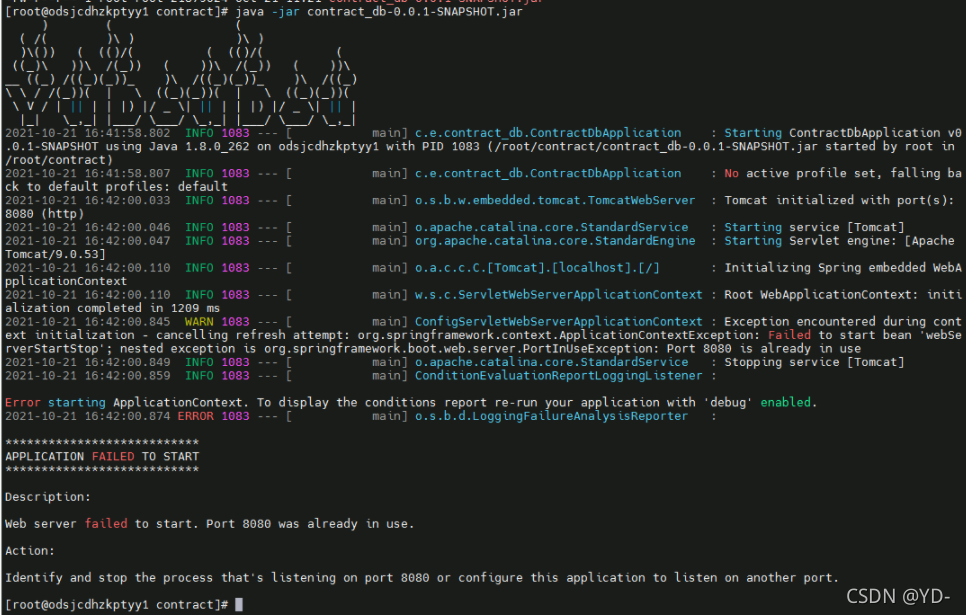
An error occurs when starting the jar package on the Linux server, as follows:

Description:
Web server failed to start. Port 8080 was already in use.
action:
identify and stop the process that’s listening on port 8080 or configure this application to listen on another port.
indicates that the web server failed to start and port 8080 is already in use. Check whether the last started task stopped

Solution steps:

1. Enter the bin directory
CD/usr/local/Tomcat/bin

2. Check whether Tomcat is closed
PS – EF | grep Java

3. Use the Tomcat shutdown command
./shutdown.sh (use with caution)
if you want to kill Tomcat directly, you can use the kill command to kill the process directly
kill – 9 7010

[Solved] Hadoop failed on connection exception: java.net.ConnectException: Connection refused

First use the following command to check whether the port number is enabled

sudo netstat -ntlp

If you don’t find the port number you want to connect to, go to core-site.xml to see if you have this port number.

I don’t deserve 8020. I haven’t been connected with 8020 for a long time.

<property>
        <name>fs.defaultFS</name>
        <value>hdfs://hadoop131:9820</value>
</property>

You can change the port number of the connection to your own

[Solved] UE4 Android Package Error: failed for task :permission_library:compileDebugJavaWithJavac

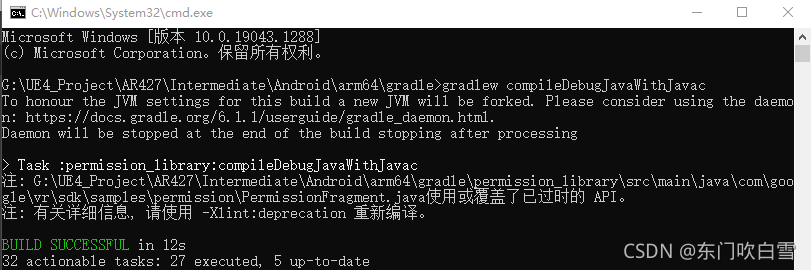
Record ue4.27 Android packaging failure compileDebugJavaWithJavac

Enter the project folder G: \UE4_Project\MyProject\Intermediate\Android\arm64\gradle

Execute CMD  gradlew compileDebugJavaWithJavac

Solutions:

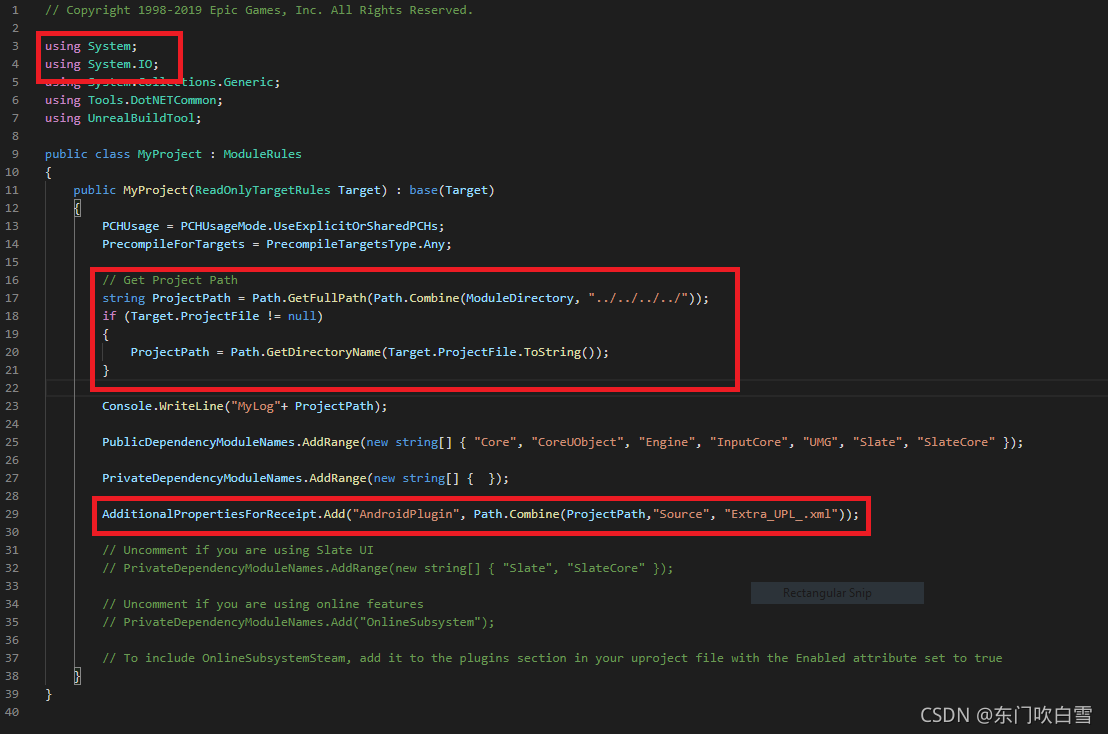
1. Add the red part to the .Build.cs of the project

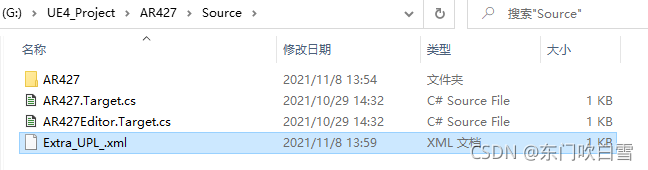
2. Create extra file_UPL_.xml

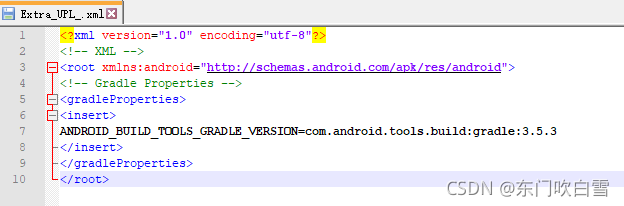
3. Paste the following content into XML

<?xml version="1.0" encoding="utf-8"?>
<!-- XML -->
<root xmlns:android="http://schemas.android.com/apk/res/android">
<!-- Gradle Properties -->
<gradleProperties>
<insert>
ANDROID_BUILD_TOOLS_GRADLE_VERSION=com.android.tools.build:gradle:3.5.3
</insert>
</gradleProperties>
</root>

[Solved] Searching for inspections failed: undefined method `map‘ for nil:NilClass“

Recently, the new project of pod reported this error. My Mac M1, record it

[cocoapods error]: searching for inspections failed: undefined method ` map ‘for nil: nilclass “error

Solution: execute the following command line

sudo arch -x86_64 gem install ffi

Then pop install

[Solved] validateNewTexture:89: failed assertion `BytesPerRow of a buffer-backed texture with pixelFormat

IPA runtime tips compiled after Xcode upgrade (version 13.1)

validateNewTexture:89: failed assertion `BytesPerRow of a buffer-backed texture with pixelFormat(MTLPixelFormatBGRA8Unorm) must be aligned to 64 bytes, found bytesPerRow(5344)'

Solution:
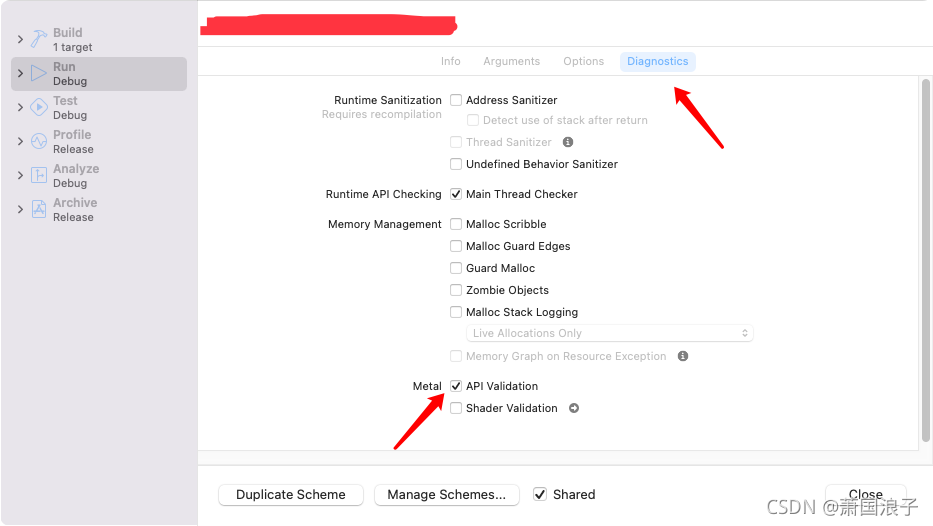
Product->Scheme->Edit Scheme->Diagnostics->Cancel API Validation

Reference: https://stackoverflow.com/questions/58043738/validatenewtexture89-failed-assertion-bytesperrow-of-a-buffer-backed-texture/58051893

[Solved] Unity Package Error: Failed running D:\Program Files\Unity2018.4.1\Editor\Data\il2cpp/build/il2cpp.exe

Today, I tried to access the company’s overseas SDK. The total package error is as follows:

Failed running D:\Program Files\Unity2018.4.1\Editor\Data\il2cpp/build/il2cpp.exe --convert-to-cpp --emit-null-checks --enable-array-bounds-check --dotnetprofile="unityaot" --compile-cpp --libil2cpp-static --platform="Android" --architecture="ARMv7" --configuration="Release" --outputpath="E:\TombNote_tChinese_test\Temp\StagingArea\assets\bin\Data\Native\armeabi-v7a\libil2cpp.so" --cachedirectory="E:\TombNote_tChinese_test\Assets\..\Library\il2cpp_android_armeabi-v7a/il2cpp_cache" --additional-include-directories="D:\Program Files\Unity2018.4.1\Editor\Data\PlaybackEngines\AndroidPlayer/Tools\bdwgc/include" --additional-include-directories="D:\Program Files\Unity2018.4.1\Editor\Data\PlaybackEngines\AndroidPlayer/Tools\libil2cpp/include" --tool-chain-path="E:/AndroidSDK/NDK" --map-file-parser="D:\Program Files\Unity2018.4.1\Editor\Data\Tools\MapFileParser\MapFileParser.exe" --directory="E:\TombNote_tChinese_test\Temp\StagingArea\assets\bin\Data\Managed" --generatedcppdir="E:\TombNote_tChinese_test\Temp\StagingArea\Il2Cpp\il2cppOutput"

stdout:
Building libil2cpp.so with AndroidToolChain
    Output directory: E:\TombNote_tChinese_test\Temp\StagingArea\assets\bin\Data\Native\armeabi-v7a
    Cache directory: E:\TombNote_tChinese_test\Library\il2cpp_android_armeabi-v7a\il2cpp_cache
ObjectFiles: 603 of which compiled: 0
Total compilation time: 242 milliseconds.
il2cpp.exe didn't catch exception: Unity.IL2CPP.Building.BuilderFailedException: E:\AndroidSDK\NDK\toolchains\llvm\prebuilt\windows-x86_64\bin\clang++ @"C:\Users\RFL\AppData\Local\Temp\tmp80DF.tmp" -o "E:\TombNote_tChinese_test\Library\il2cpp_android_armeabi-v7a\il2cpp_cache\linkresult_EC005744B79151E709C4C1D5591AE889\libil2cpp.so" -shared -Wl,-soname,libil2cpp.so -Wl,--no-undefined -Wl,-z,noexecstack -Wl,--gc-sections -Wl,--build-id --sysroot "E:\AndroidSDK\NDK\platforms\android-16\arch-arm" -gcc-toolchain "E:\AndroidSDK\NDK\toolchains\arm-linux-androideabi-4.9\prebuilt\windows-x86_64" -target armv7-none-linux-androideabi -Wl,--wrap,sigaction -L "E:\AndroidSDK\NDK\sources\cxx-stl\gnu-libstdc++\4.9\libs\armeabi-v7a" -lgnustl_static -llog -rdynamic -fuse-ld=gold.exe

E:\TombNote_tChinese_test\Temp\StagingArea\Il2Cpp\il2cppOutput/Bulk_Assembly-CSharp_2.cpp:43762: error: undefined reference to 'CallSDKFunc'
clang++.exe: error: linker command failed with exit code 1 (use -v to see invocation)

Results the data was checked because [dllimport (“_internal”)]
of OS cannot exist when Android is typed.

Solution:
find [dllimport (“_internal”)]
Add judgment platform in the code

#if UNITY_ IOS
[DllImport(“__Internal”)]
#endif

[Solved] Linux Start jar Error: nohup: failed to run command ‘java‘: No such file or directory

This prompt appears when Linux starts the jar package

Scenario:

The server host is transferred from building a to building B, the IP is changed, and the server content is unchanged

Start service prompt nohup: failed to run command ‘Java’: no such file or directory

Solution:

1. View JDK version
java – version
2. Echo $Java_ Home
view the installation directory
3. Execute startup jar
nohup previous result/bin/Java – jar XX. Jar

[Solved] Hive Error: FAILED: Execution Error, return code 3 from org.apache.hadoop.hive.ql.exec.mr.MapredLocalTask

Error while processing statement: failed: execution error, return code 3 from org.apache.hadoop.hive.ql.exec.mr.mapredlocaltask

1. Cluster environment

CDH cluster, hive’s engine is Mr.

2. Origin of error

Today, I ran a hive task in the cluster of the test environment and reported an error while processing statement: failed: execution error, return code 3 from org.apache.hadoop.hive.ql.exec.mr.mapredlocaltask.

3. Error reason

This error is because the map join parameter of hive is on by default:

hive.auto.convert.join=true

When using hive for map join, this type of error will be reported if the node memory is insufficient.

4. Error analysis

Mapjoin refers to join on the map side. Its principle is broadcast join, that is, the small table is used as a complete driving table for join operation. Usually, the data in each table to be connected will be processed in different maps. That is, the value corresponding to the same key may exist in different maps. In this way, you must wait until you connect in reduce. To make mapjoin work smoothly, you must meet the following conditions: except that the data of one table is distributed in different maps, the data of other connected tables must have a complete copy in each map. Map join will read all the small tables into memory and directly match the data of another table with the data of the table in memory in the map stage (at this time, the distributed cache can be used to distribute the small tables to various nodes for mapper loading). Due to the join operation during map, the reduction operation is omitted and the efficiency will be much higher.

When the machine memory is insufficient, an error will be reported if you cannot join on the map side.

5. Solution

1. You can close the above map join and change it to common join
shell command line: set hive. Auto. Convert. Join = false 2. Modify the parameters under the configuration file to close the map join. Use common join
hive_conf.xml

<property>
<name>hive.auto.convert.join</name>
<value>false</value>//Modify true to false
<description>Enables the optimization about converting common join into mapjoin</description>
</property>
[Solved] Warning: Unknown: Failed to write session data using user defined save handler. (session.save_path:


Warning: Unknown: Failed to write session data using user-defined save handler. (session.save_path: D:\Software\phpstudy_pro\Extensions\tmp\tmp) in Unknown on line 0

Reasons:

1. the path of session.save_path is not correct
2. session.save_path's file permissions are not correct
3. and other reasons for the error, (but mine is not the problem) this problem sent me a day of time

My mistake:

The session that occurs when using this method_set_save_handler(‘open’,‘close’,‘read’,‘write’,‘destory’,‘gc’);

reason

	1. the read callback function must return the value of the string, if not, other errors will be reported
	2. write callback function must return true, if false will return the above error
	3. write in the insert statement of the variable value must be added to the single quotes, otherwise it can not be inserted into the database
	4. all but the read callback function must return a bool value, write must return true to insert into the database, and the others I think should also return true (not tested here)

Encounter this wrong idea

1. Check the configuration file for errors first
2. then check for errors in the return value
3. then check the sql statement for errors
4. debug with echo or var_dump at each step

If you solve the big guys’ problems, please give me a favor.

Springboot Project Error: Failed to execute goal org.apache.maven.plugins

Failed to execute goal org.apache.maven.plugins:maven-resources-plugin:3.1.0:resources (default-resources) on project heima-leadnews-user: Error loading property file ‘D:\Develop\springboot_ project\heima-leadnews\heima-leadnews-user\maven_ test.properties’

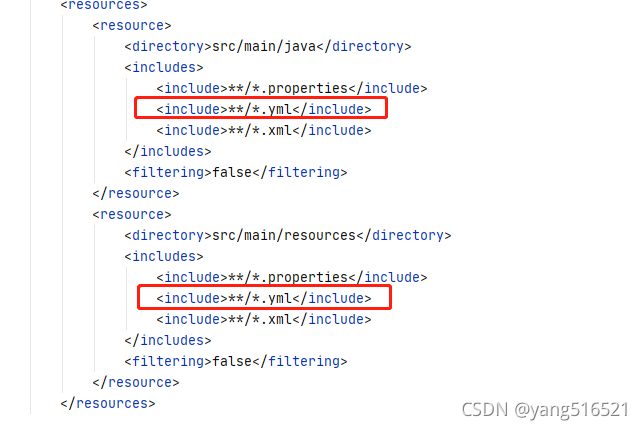
When installing the springboot project, the above errors were compiled. Baidu’s reason is that the Maven version, JDK version and packaging program are occupied. My reason is that the parent project of the project has the following profiles:

<!--<profiles>
        <profile>
            <id>dev</id>
            <build>
                <filters>
                    <filter>maven_dev.properties</filter>
                </filters>
            </build>
        </profile>
        <profile>
            <id>test</id>
            <activation>
                <activeByDefault>true</activeByDefault>
            </activation>
            <build>
                <filters>
                    <filter>maven_test.properties</filter>
                </filters>
            </build>
        </profile>
        <profile>
            <id>prod</id>
            <build>
                <filters>
                    <filter>maven_prod.properties</filter>
                </filters>
            </build>
        </profile>
    </profiles>-->

Because my child project inherits the parent project, but there is no corresponding directory under the child project, the above code in the parent project is cancelled (the specific reason is unknown, learning from the teacher), recompiled and packaged successfully

Gitee Idea Push Error: Invocation failed Server returned invalid Response. java.lang.RuntimeException

Invocation failed Server returned invalid Response. java.lang.RuntimeException: Invocation failed Server returned invalid Response. at org.jetbrains.git4idea.GitAppUtil.sendXmlRequest(GitAppUtil.java:22) at org.jetbrains.git4idea.http.GitAskPassApp.main(GitAskPassApp.java:56) Caused by: java.io.IOException: Server returned invalid Response. at org.apache.xmlrpc.LiteXmlRpcTransport.sendRequest(LiteXmlRpcTransport.java:242) at org.apache.xmlrpc.LiteXmlRpcTransport.sendXmlRpc(LiteXmlRpcTransport.java:90) at org.apache.xmlrpc.XmlRpcClientWorker.execute(XmlRpcClientWorker.java:72) at org.apache.xmlrpc.XmlRpcClient.execute(XmlRpcClient.java:194) at org.apache.xmlrpc.XmlRpcClient.execute(XmlRpcClient.java:185) at org.apache.xmlrpc.XmlRpcClient.execute(XmlRpcClient.java:178) at org.jetbrains.git4idea.GitAppUtil.sendXmlRequest(GitAppUtil.java:19) … 1 more unable to read askpass response from ‘C:\Users\WD\AppData\Local\JetBrains\IntelliJIdea2021.1\tmp\intellij-git-askpass-local.sh’ bash: /dev/tty: No such device or address failed to execute prompt script (exit code 1) could not read Username for ‘https://gitee.com’: No such file or directory


Solution:
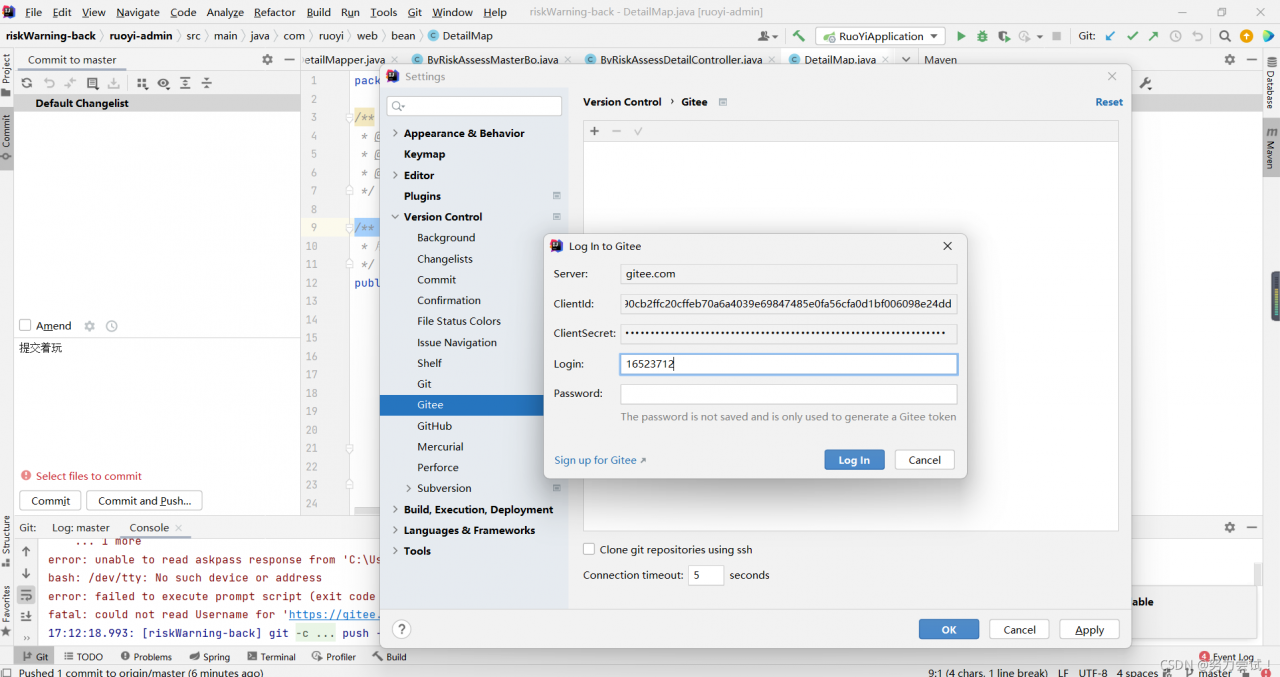
Click File -> Settings -> Version Control -> Gitee,
and refresh your Gitee account.