Prompt GWL when porting 32-bit programs to 64 bit compilation_ Wndproc undeclared identifier
Solution: use gwlp_wndproc replaces GWL_wNDPROC
Author Archives: Robins
AttributeError: ‘WebDriver‘ object has no attribute ‘w3c‘
Problems encountered in the process of automatic testing of mobile terminal with Python + appnium.
Reason: I reported an error in selenium 3.3.1. After uninstalling selenium, I reinstalled selenium 4.0.0 (installed by default and the latest version). I ran it again and the problem was solved. Only the positioning mode needs to be changed to the latest, otherwise there will be a warning.
The new positioning method of mobile terminal is as follows:
from appium.webdriver.common.mobileby import MobileBy

driver.find_element(MobileBy.ID, "com.tencent.mm:id/hej").click()
[Solved] Error occurred during connect to primary: exception 3000301: Connection could not be established
Problem:
the Hana system replication standby machine cannot take over the host, and the Hana host can be used normally.
The following errors are reported in the trace file:
SR_dataaccess DisasterRecoverySecondaryImpl.cpp(00882) : Error occurred during connect to primary: exception 3000301: Connection could not be established
Solution:
this problem is generally caused by a network problem between the active and standby computers
for the above error reports, you can first check whether the 3xx00-3xx99 port segment of the standby machine to the host is occupied or blocked.
Vivado Error: (vlog-7) Failed to open design unit file
Error: (vlog-7) failed to open design unit file
Phenomenon
Vivado cannot call the external simulation tool, and the prompt error is: error: (vlog-7) failed to open design unit file
reason
The file path name is too long
terms of settlement
Move project to root folder
Exception occurred when Django created app: from exc ^ syntaxerror: invalid syntax
Execute command Python manage.py startapp Myjango
App reports an error: file “manage. Py”, line 16) from exc ^ syntax error: invalid syntax
reason:
Python 3 is installed, but Python is used for execution
solve:
Change Python to python3 and execute the above command
python3 manage.py startapp myjango
[Solved] Redis Error: creating server tcp listening socket 127.0.0.1:6379: bind No error
Error when starting redis service under window:
Creating server TCP listening socket 127.0.0.1:6379: bind no error
solution
- before starting redis, make sure to switch to the redis installation directory. If the environment variable is configured, it can be ignored. Enter the following command redis-cli.exeshutdownexitredis-server.exe redis .windows.conf
[Solved] java.sql.SQLSyntaxErrorException: You have an error in your SQL syntax; check the manual that corres
0. Foreword: this error is an error reported by using mybatis in the spring boot project to query a piece of data in the database according to the ID value
1. Error message
2021-11-14 15:37:38.168 ERROR 9936 --- [nio-8086-exec-7] o.a.c.c.C.[.[.[/].[dispatcherServlet]    : Servlet.service() for servlet [dispatcherServlet] in context with path [] threw exception [Request processing failed; nested exception is org.springframework.jdbc.BadSqlGrammarException:
### Error querying database.  Cause: java.sql.SQLSyntaxErrorException: You have an error in your SQL syntax; check the manual that corresponds to your MySQL server version for the right syntax to use near '' at line 1
### The error may exist in file [E:\smallTools\idea\code\spring\springboot-new-2021_11_09\springboot-new-mybatis\target\classes\mybatis\mapper\BookMapper.xml]
### The error may involve com.feng.mybatis.mapper.BookMapper.getBookById-Inline
### The error occurred while setting parameters
### SQL: select * from book where id={#id}
### Cause: java.sql.SQLSyntaxErrorException: You have an error in your SQL syntax; check the manual that corresponds to your MySQL server version for the right syntax to use near '' at line 1
; bad SQL grammar []; nested exception is java.sql.SQLSyntaxErrorException: You have an error in your SQL syntax; check the manual that corresponds to your MySQL server version for the right syntax to use near '' at line 1] with root cause

java.sql.SQLSyntaxErrorException: You have an error in your SQL syntax; check the manual that corresponds to your MySQL server version for the right syntax to use near '' at line 1
	at com.mysql.cj.jdbc.exceptions.SQLError.createSQLException(SQLError.java:120) ~[mysql-connector-java-8.0.27.jar:8.0.27]
2. Mapper.xml file content
<select id="getBookById" parameterType="com.feng.mybatis.bean.Book">
        select * from book where id={#id}
</select>
3. Error reason: the SQL statement is written incorrectly. It should be where id = #{id}
<select id="getBookById" parameterType="com.feng.mybatis.bean.Book">
        select * from book where id=#{id}
</select>
error Newline required at end of file but not found eol-last
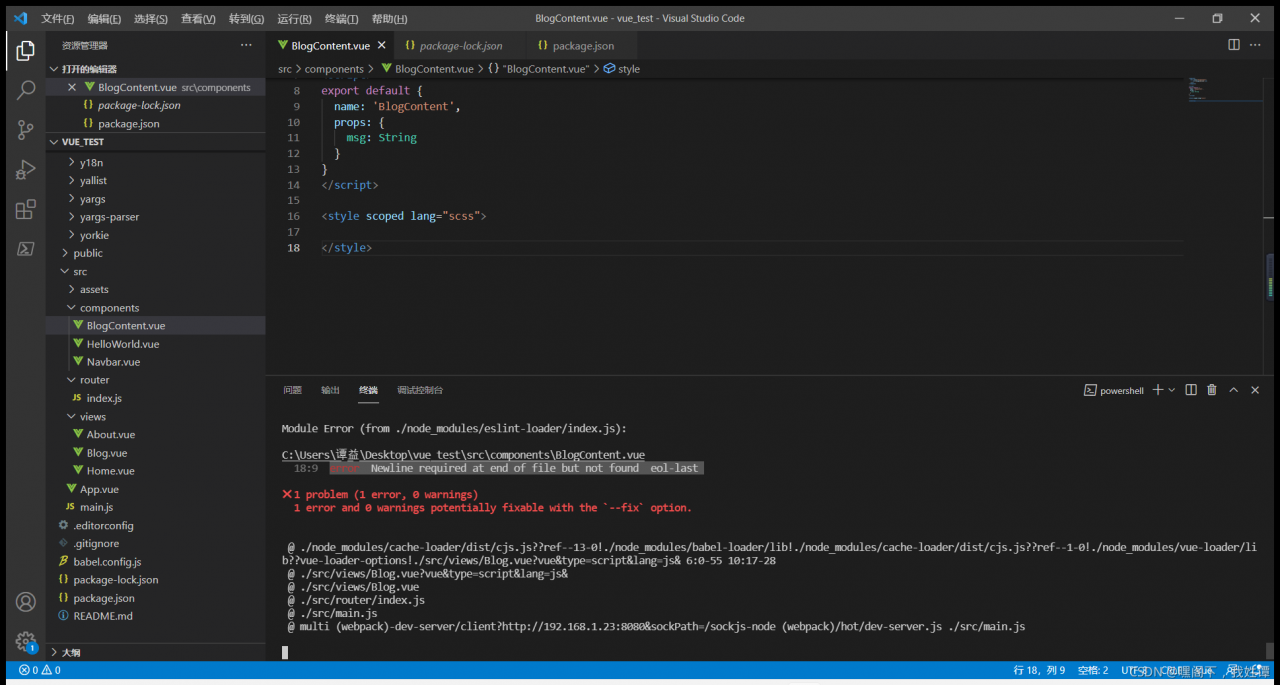
Solution: add a space at 18:9, the end of line 18
The source of this problem is: (1 message) Vue reports an error: newline required at end of file but not found EOL last_ 521 face CSDN blog
[Solved] Mac Unity Export Android Project Error: Error building Player: Win32Exception
Error building Player: Win32Exception: ApplicationName=’/Applications/Unity/Hub/Editor/2019.3.0a6/PlaybackEngines/AndroidPlayer/SDK/tools/bin/sdkmanager’, CommandLine=’–list’,
Solution:
1. Copy the SDK manager with errors to any place
2. Delete the sdkmanager under the error path
3. Put back the copied SDK manager
[Solved] push declined due to email privacy restrictions (GH007 error code)
Push trusted due to email privacy restrictions (gh007 error code) solution
An error is reported when pushing the local warehouse to GitHub:
exception information:
! [remote rejected] master -> master (push declined due to email privacy restrictions)
Exception reason: when configuring git, the author’s email information is set, triggering GitHub privacy protection settings: block command line pushes that expose my email
Solution:
Turn off block command line pushes that expose my email:
Many people choose to turn off the email setting option block command line pushes that expose my email in GitHub; It’s rude, but it’s not recommended.
Personal recommendation:
Change the email address of GIT configuration: if you don’t want to turn off the above settings, you can solve it by modifying email:
1. Use the command to view the current global user email: git config — global user.email
2. Find GitHub recommended email: in setting — & gt; Email –> Email under keep my email private; The format is: ID+ [email protected]
3. Reset global user email: git config — global user.email “recommended email from GitHub”
4. Reset last submitted author information git commit — amend — reset author
After entering the command, enter VI mode (GIT default editor);
5. Resubmit git push
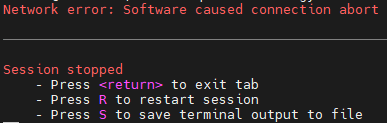
Mobaxterm connects to Ubuntu server through SSH network error: software caused connection abort
Recently, mobaxterm is used to connect to the remote Ubuntu server through SSH. After not operating for a period of time, the connection will be broken and a prompt “network error: software caused connection abort” will be displayed.
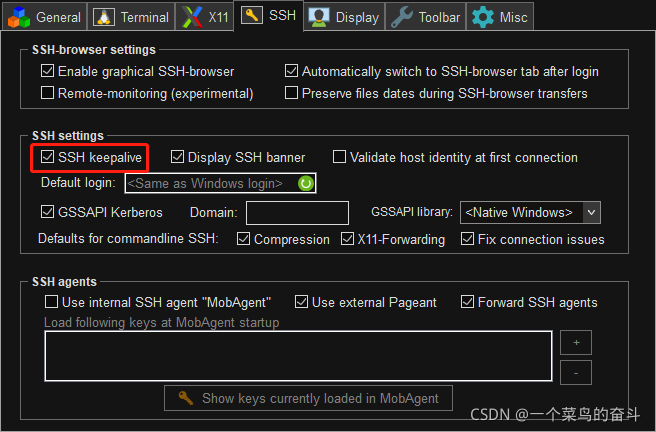
You can modify the SSH configuration item in mobaxterm and check SSH keepalive to solve the problem of disconnection.
In addition, you need to modify the configuration file on the Ubuntu server side.
sudo vi /etc/ssh/sshd_config1. Find tcpkeepalive yes and # remove the previous one;
2. Find the clientaliveinterval parameter, remove the previous #, and change the following 0 to 60, indicating that the request is sent every minute to maintain the connection.
Digression. To maintain the connection, you can use commands such as top to refresh the command line in real time.
[Solved] AttributeError: ‘NoneType‘ object has no attribute ‘append‘
Problem: in Python, when adding an element to a list, an error is reported attributeerror: ‘nonetype’ object has no attribute ‘append’
my code at that time was:
loss=[]
loss=loss.append(0.1)
Solution: change the code to the below
oss=[]
loss.append(0.1)
The append in the list can directly update the list of added elements without assignment