Author Archives: Robins

Apex library Install Error: amp not installed error [How to Solve]

Problem Description:

the apex library is missing and needs to be installed! Note: do not use PIP install apex. Although it can be installed successfully, it will still be found that there are errors when running the program in the end. It can’t be used

The specific installation steps are as follows:

# When you execute git to download the apex folder, if the download is too slow, you can manually enter the URL https://github.com/NVIDIA/apex to download and unzip and perform subsequent operations
git clone https://github.com/NVIDIA/apex
cd apex
python setup.py install

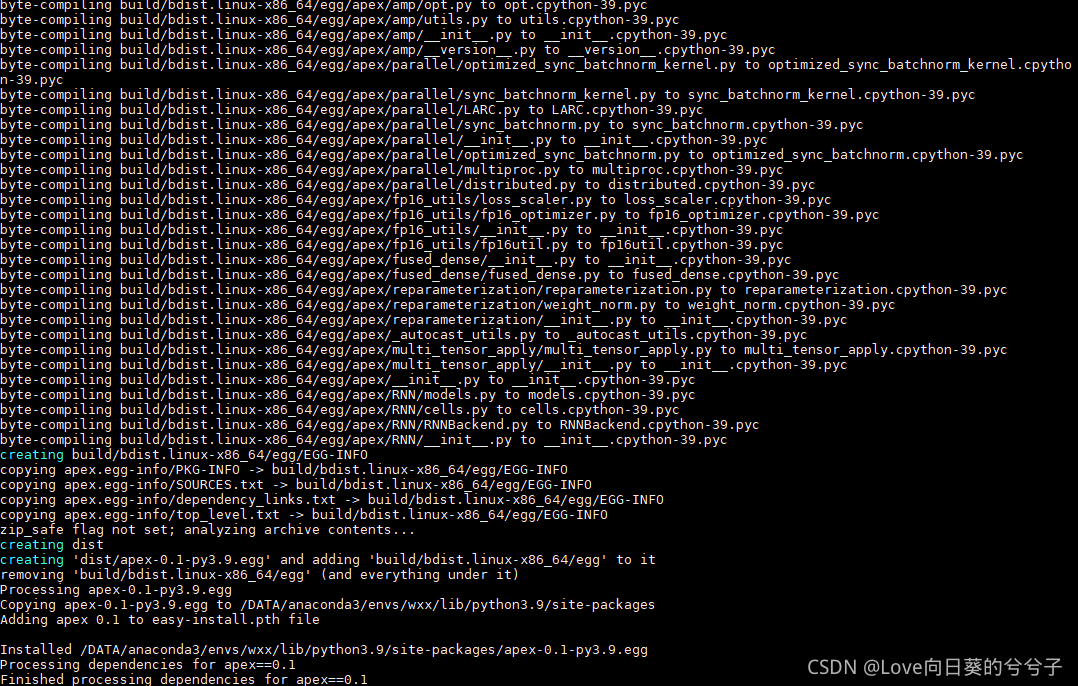
After execution, if the results shown in the figure below appear, the installation is successful

Remember to collect, in case you can’t find it next time
for my sake, please give me a compliment before you leave

[Solved] Flyter uses screenutil to obtain screen width and height initialization error

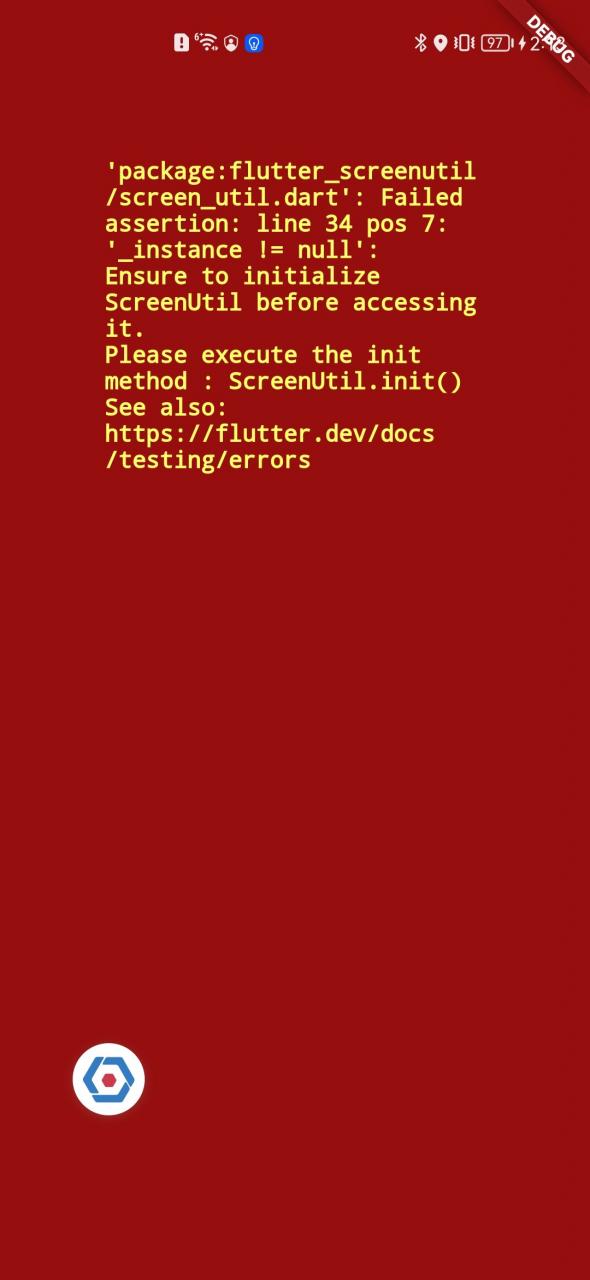
Errors are reported as follows

reason

We use screenutil().Screenwidth to obtain the screen width in the layout. When initializing the unloaded view, we can’t get it for the first time, and the above crash will occur.

Solution

import 'package:flutter_screenutil/screenutil_init.dart';
import 'package:flutter_screenutil/flutter_screenutil.dart';
@override
Widget build(BuildContext context) {
  //Wrap the entire body layout with screen initialization
  return ScreenUtilInit(
    //set initial screen size
    designSize: Size(375, 812),
    builder: () => Scaffold(
      backgroundColor: WBColors.color_f4f5f7,
      body: Container(
          height: 263.5,
          width: ScreenUtil().screenWidth,
        )
    )
  );
}

Use the screenutilinit screen initialization component to wrap the outermost layer of the entire page layout and set the initial screen size. The API for obtaining screen width and height can be used arbitrarily in the body

IndexError: list index out of range [How to Solve]

IndexError: list index out of range

When training ctpn, some pictures report this error
the error code is as follows. Because the mean value is subtracted from three channels respectively when subtracting the mean value, some pictures are of two channels, and the length does not match, so an error is reported
solution: convert to RGB three channel diagram here

    vggMeans = [122.7717, 102.9801, 115.9465] 
    imageList = cv2.split(image.astype(np.float32))
    imageList[0] = imageList[0]-vggMeans[0]  
    imageList[1] = imageList[1]-vggMeans[1]
    imageList[2] = imageList[2]-vggMeans[2]
    image = cv2.merge(imageList) 

[Solved] JQuery each Method Error: $XXX is not defined

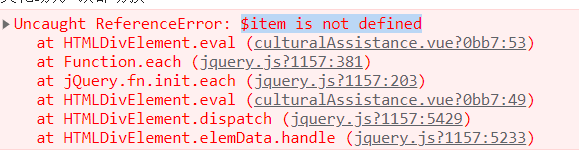
When using each method to traverse the array in JQ, the error $item is not defined is reported

Structure:

 <div class="right">
      <div class="img_bg rightOne" @click="clickLeft('Company Mission')">Company Mission</div>
      <div class="img_bg rightTwo" @click="clickLeft('Core Values')">Core Values</div>
      <div class="img_bg rightThree" @click="clickLeft('Corporate Spirit')">Corporate Spirit</div>
      <div class="img_bg rightFour" @click="clickLeft('Brand Slogan')">Brand Slogan</div>
    </div>

js:

 $('.right div').each(function(index,item){       
        	// var $this = $(item);
          // $this.removeClass('is_active_right');
          item.removeClass('is_active_right');
        })

Solution:

 $('.right div').each(function(index,item){       
          var $this = $(item);
          $this.removeClass('is_active_right');
        })

[Solved] Win 10 VS Code Connect to the container of the server error: Cannot connect to the Docker daemon at … Is the docker daemon running

Background

After solving the installation of docker desktop above, I continue to operate according to the instructions of vs code plug-in remote container, in order to connect and edit the files in the container on the remote server (Linux) on the PC (Windows).

After everything is completed, the container is connected, but an error is reported. The log content is cannot connect to the docker daemon at http://docker.example.com. Is the docker daemon running. However, the docker desktop of my PC has already started docker, no problem.

After searching, I found that my account on the server is not in the docker group, that is, I need sudo to execute the docker instruction every time. The solution is to add my account to the docker group.

Solution:

Add according to the instructions on the official website, and then everything goes well and the problem is solved. The following code is a simple version, you can go directly to the official website.

cat /etc/group | grep docker # Print group information and filter with grep to view onlydocker
# If there are no results, run the following command to create a new docker group 
sudo groupadd docker 
# If the cat command yields results, then instead of creating a new group, just run the following command
sudo usermod -aG docker $USER # where $USER is replaced by your account name
newgrp docker # In Linux environment, make the group update take effect; other environments see the official website link
docker run hello-world # Check if docker can be executed without sudo

Post-installation steps for Linux | Docker Documentation


To access files in a remote server’s container with vs Code
1. Install VS code on PC
2. Connect to the server remotely: Find the Remote-SSH plug-in in the extension of VS code, configure the ssh file after installation, and connect to the server successfully
3. Find Remote-Container in the extension of VS code, install it, and then install docker and WSL2 software according to the extension’s introduction ( the link where the problem occurred above )
4. Connect to the server according to the introduction of Remote-Container (the problematic link in this article)

[Solved] Data Set reproduct loam_velodyne Fully error: [multiscanregistration-1]

System overview

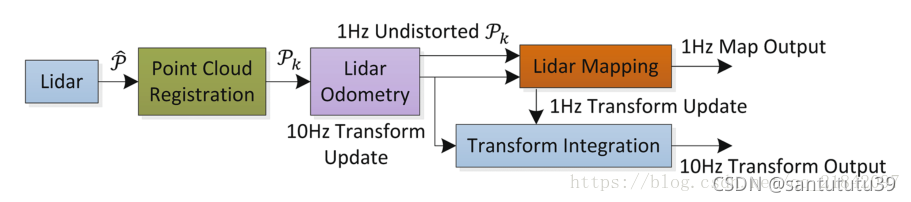
Loam is a must eat algorithm for entry slam. Its overall idea is to divide complex slam problems into:

1. High-frequency motion estimation;

2. Low-frequency environmental mapping.

Environmental Science:

ubuntu18.04, ros-melodic, pcl1.8

1. Loam_Velodyne installation

$ mkdir -p loam_ws/src
$ cd ~/loam_ws/src
$ git clone https://github.com/laboshinl/loam_velodyne.git
$ cd ..
$ catkin_make
$ source ~/loam_ws/devel/setup.bash

2. Run data set

1. Start roscore

$ roscore

2. Open a new terminal and start the loam_velodyne.launch

$ source ~/loam_ws/devel/setup.bash
$ roslaunch loam_velodyne loam_velodyne.launch

3. Test dataset NSH_indoor_outdoor.bag

3.1. To get a data set, the first thing is to analyze the information of the data set. One mistake that is easy to make when you get started is to directly use the data set downloaded from the Internet to run the algorithm. As a result, you can’t run anything. The so-called knowing yourself and the enemy can win every battle!

##View information about this dataset to facilitate modification of the launch file
rosbag info nsh_indoor_outdoor.bag
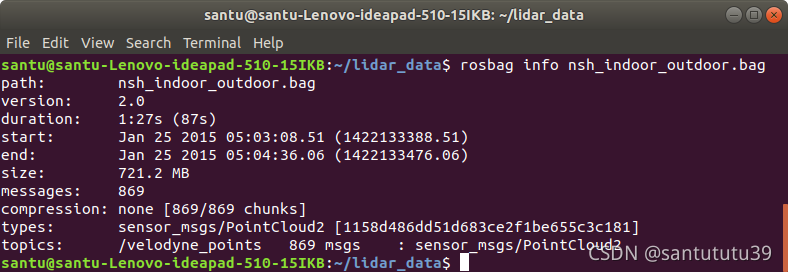
You can see the size, messages, types and topics of the package (focus on ensuring that the topics in the launch file are the same as here). The data set adopts 16 line radar, and the lidar value should be changed to vlp-16.

Open loam_Velodyne.launch file to check whether the red line part is consistent with the dataset.
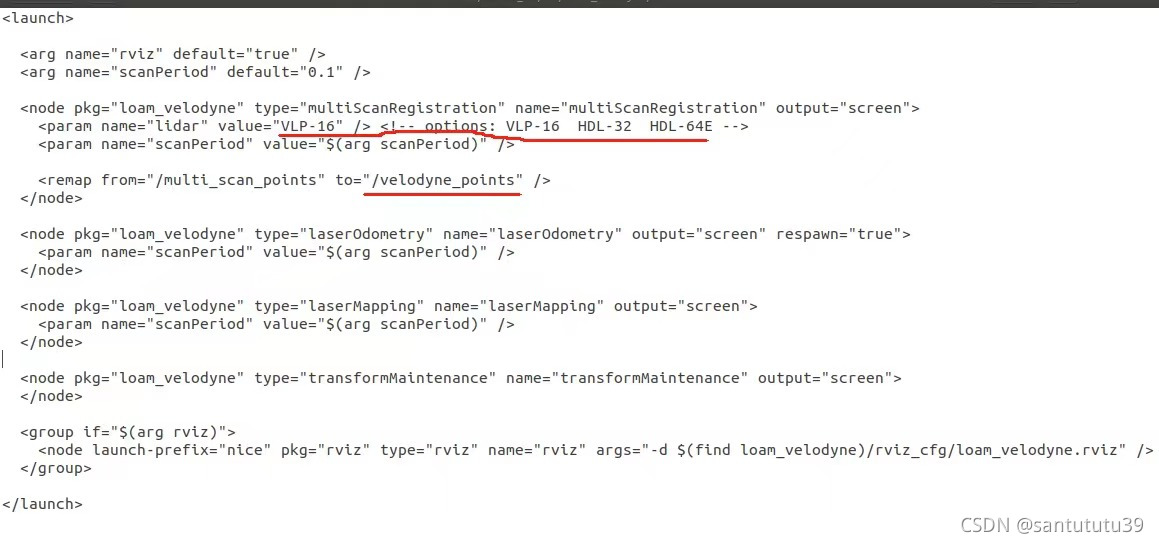
3.2. If it is consistent, you can run the package.

rosbag play nsh_indoor_outdoor.bag
##Or adjust the playback speed, if the computer performance is not good, you can reduce the playback speed, or build out the map will have problems
rosbag play -r 0.5 nsh_indoor_outdoor.bag

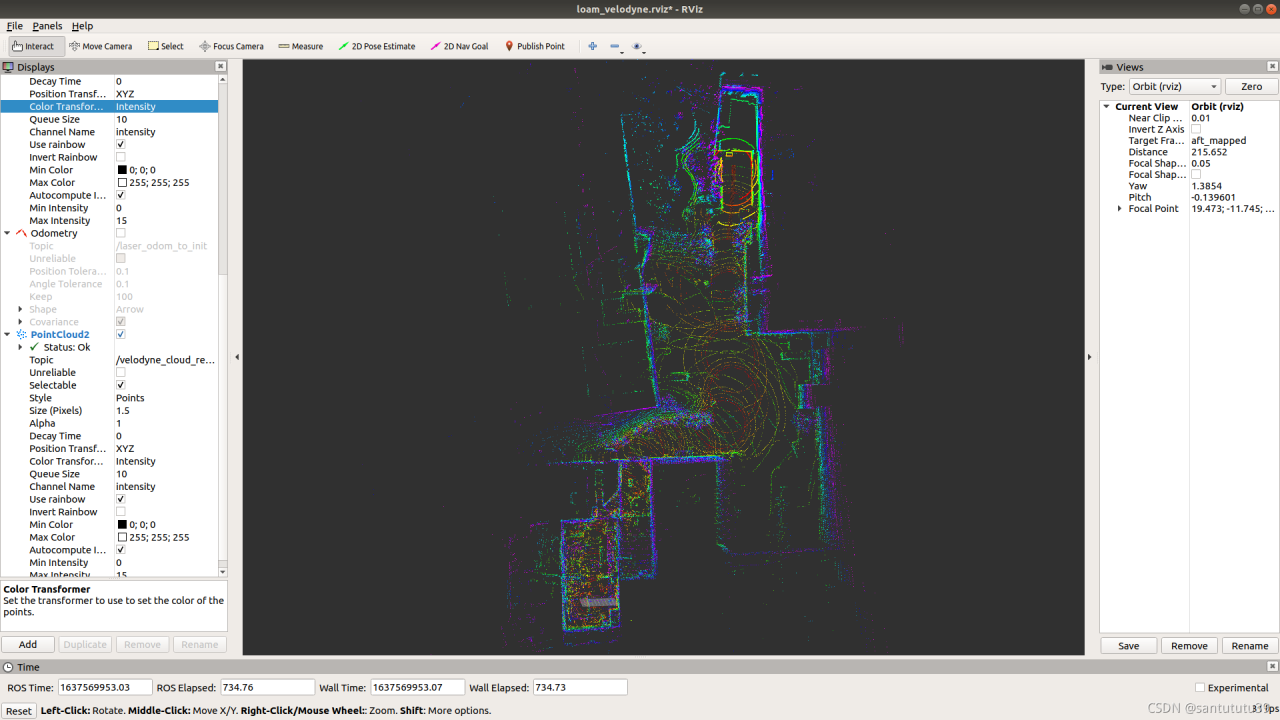
The effects are as follows:
4. Save the last point cloud map

##Start the recording node halfway through the build
rosbag record -o nsh_.bag<output bag file name,set by yourself> /laser_cloud_surround
## Convert the above bag file to a pcd file
rosrun pcl_ros bag_to_pcd nsh_2021-11-22-18-13-54.bag<output bag filename> /laser_cloud_surround pcd_nsh<save pcd file's first level filename>
## look at the last pcd file and find the last file name
pcl_viewer last_pcd.pcd

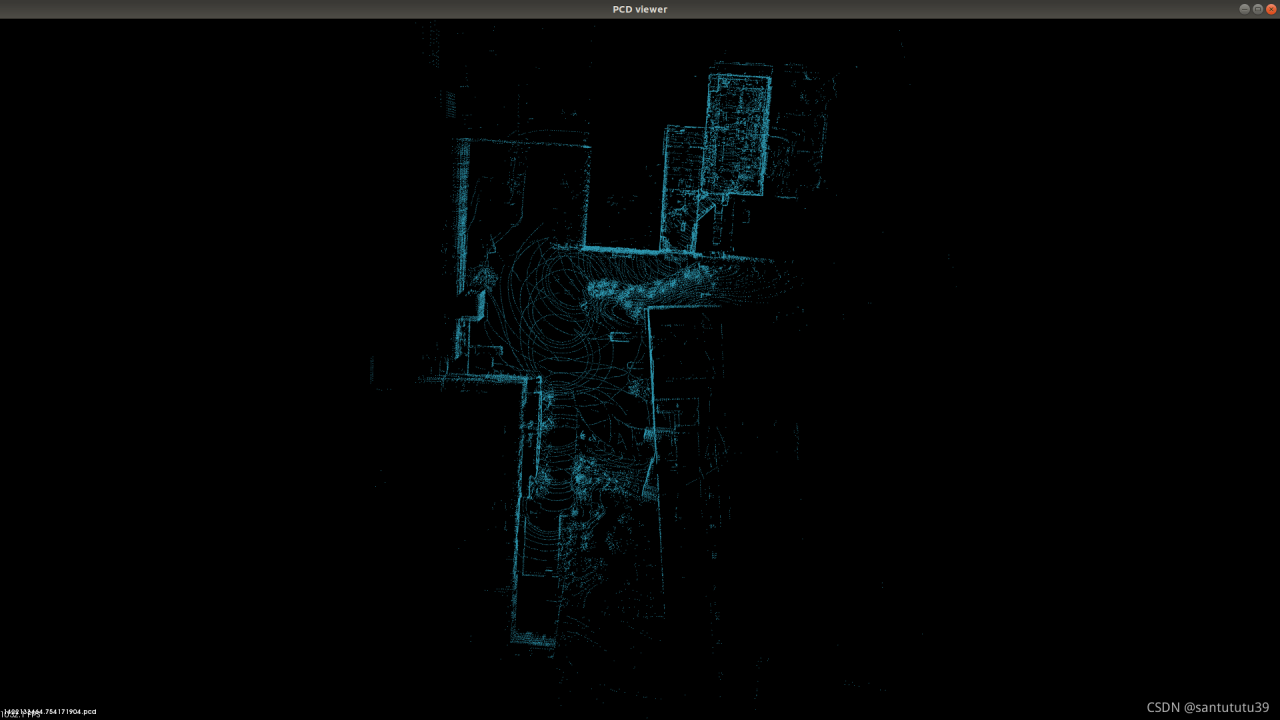
The effects are as follows:
5. Test data set test.bag

5.1. Proceed as above. First analyze the package.

##View information about this dataset to facilitate modification of the launch file
rosbag info test.bag
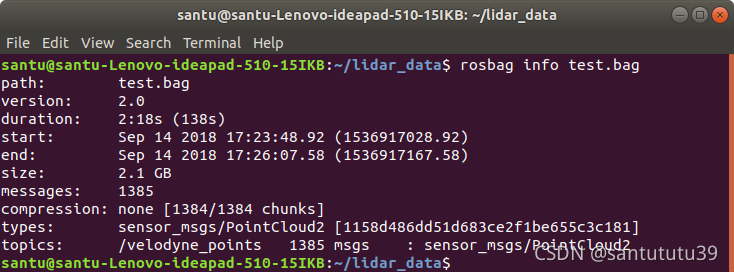
The topics of the data are consistent with the previous data set, so there is no need to modify it, but the data set adopts 32 line radar, and the radar parameters need to be changed.
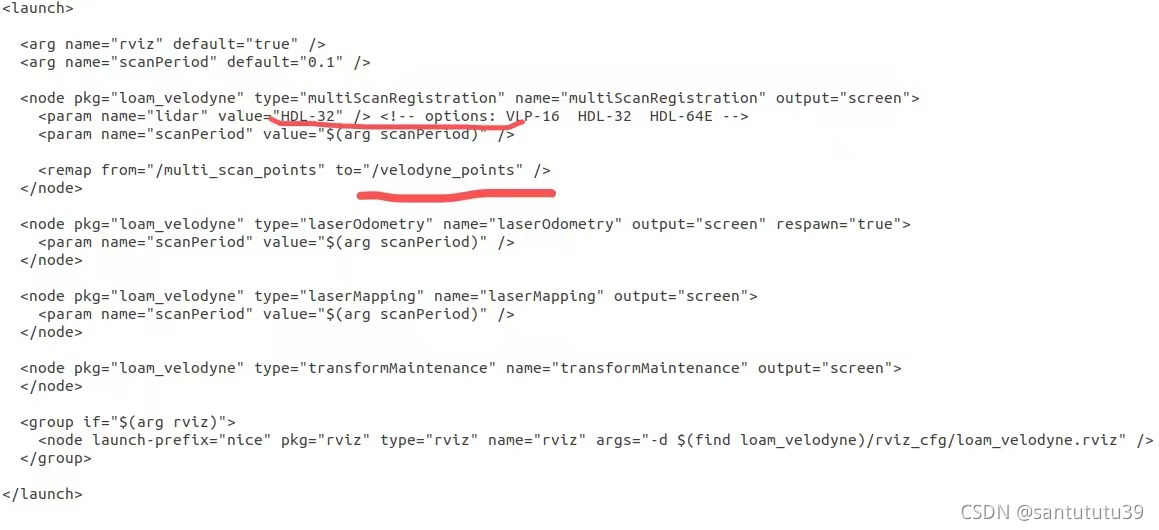
5.2. The steps of package running are the same as above. Let’s see the effect:
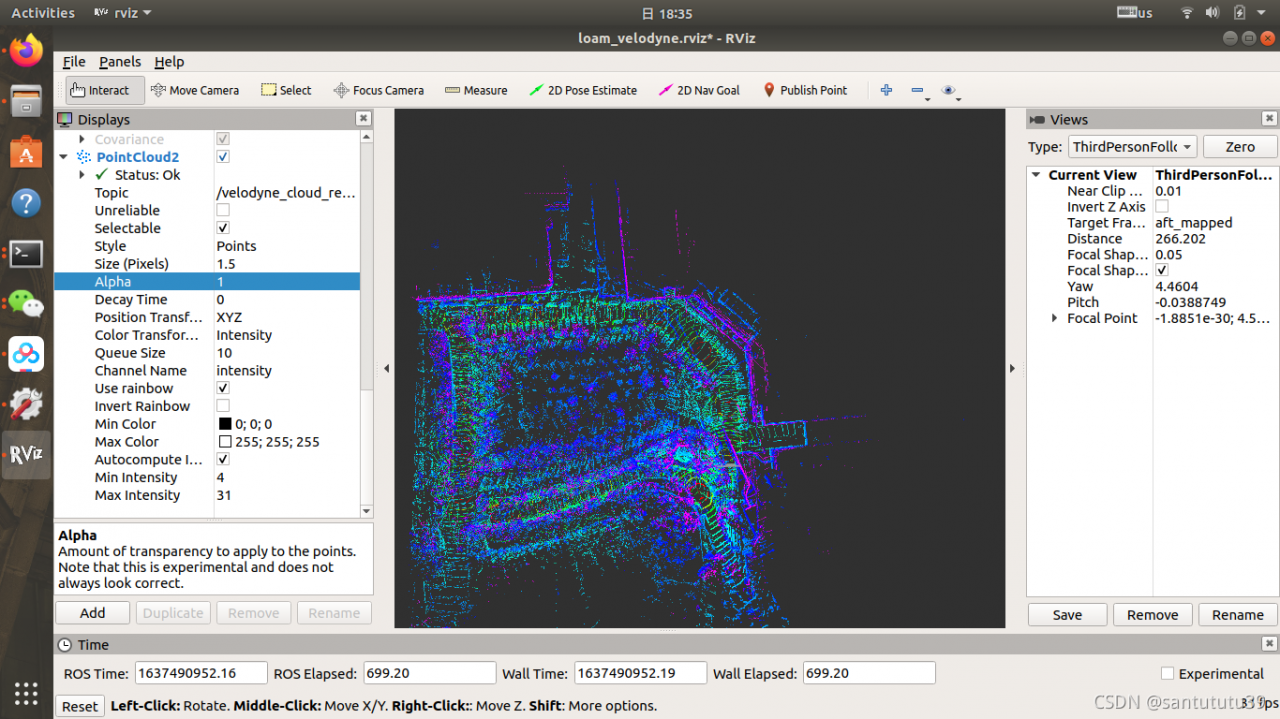
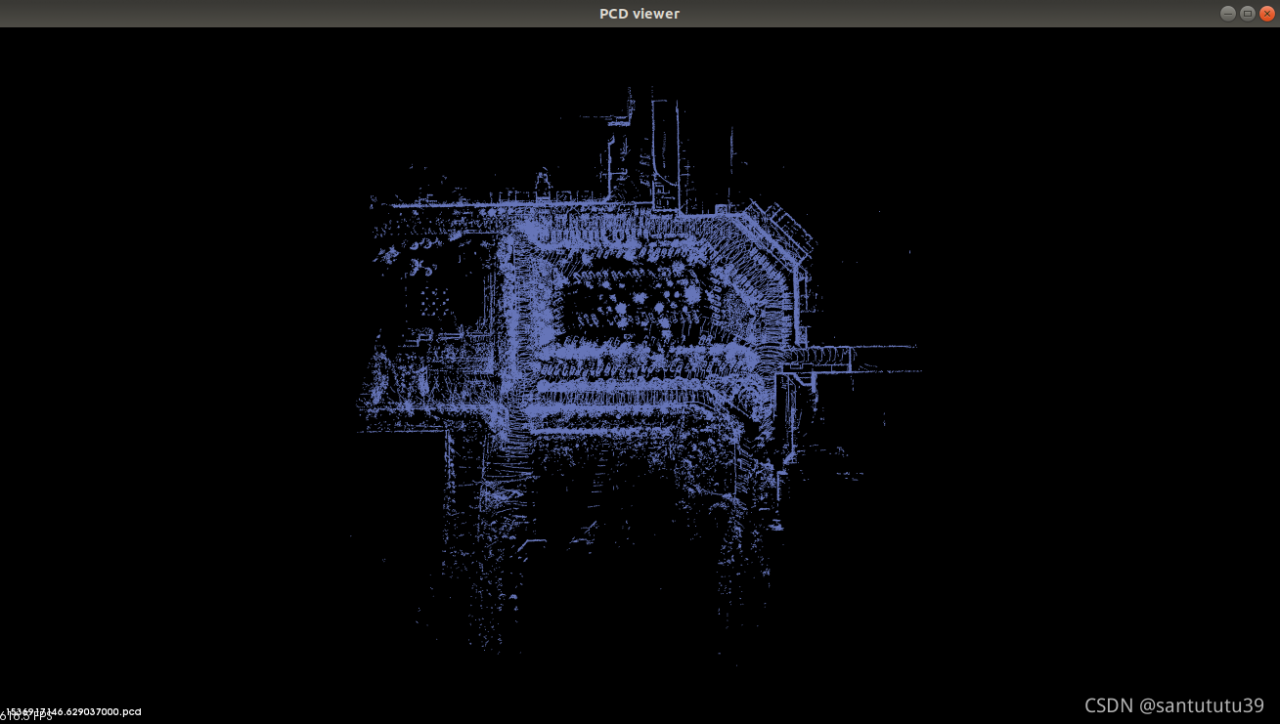
The effect is pretty good. Those who need data sets can comment on private letters to me.

6. Test data set kitti.bag

As above, view the dataset information~
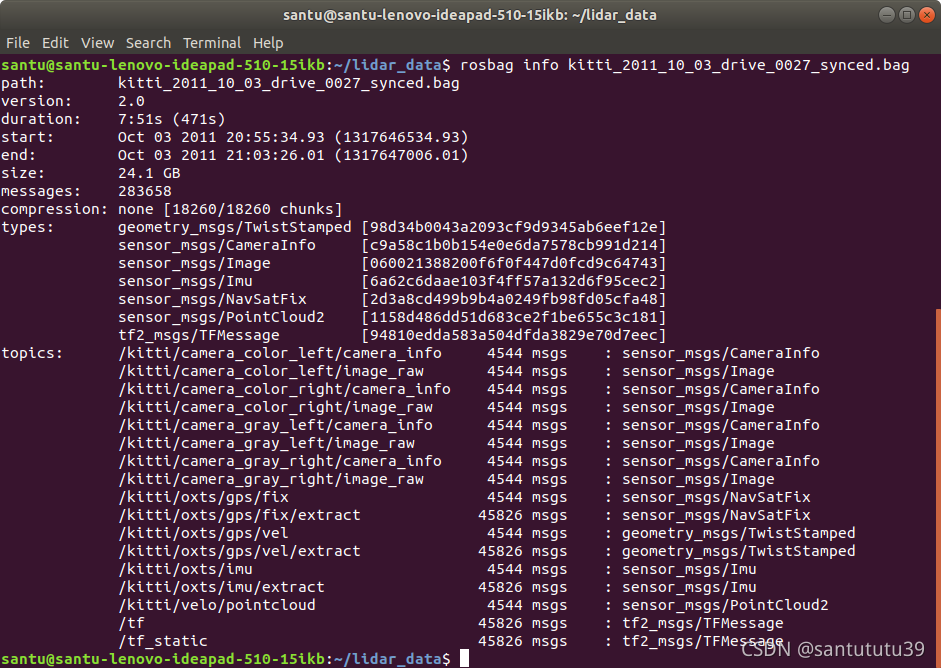
It can be seen that the topics of Kitti dataset are much richer than the first two datasets, but we only need to focus on pointcloud. Change the place in the launch file to/Kitti/velo/pointcloud. Because Kitti dataset adopts 64 line radar, the corresponding in the launch file should also be changed to hdl-64e.

Since I forgot the screenshot after building the drawing, there are no attached drawings here~~


If you also encountered the following error when playing the data set after launching loam_velodyne.launch [multiScanRegistration-1] process has died [pid 10718, exit code -11, cmd /home/santu/rslidar_ws/devel/lib/loam_velodyne
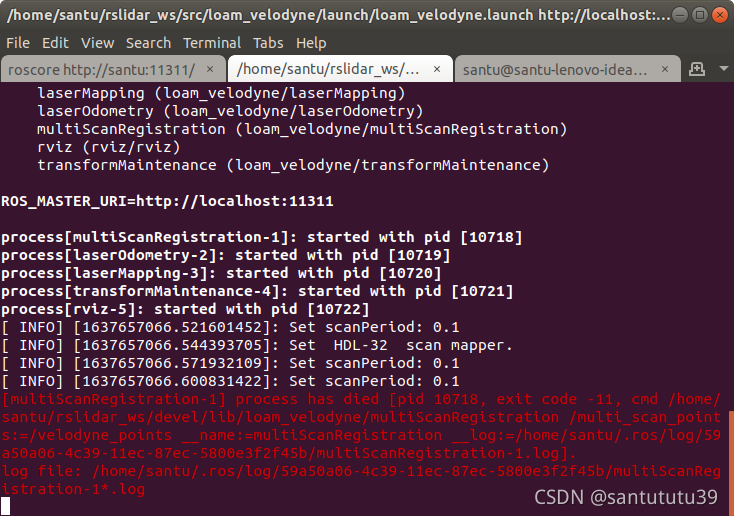
Solution:

Just find cmakelists.txt under the path Src/loam_velodyne and comment out line 35!!
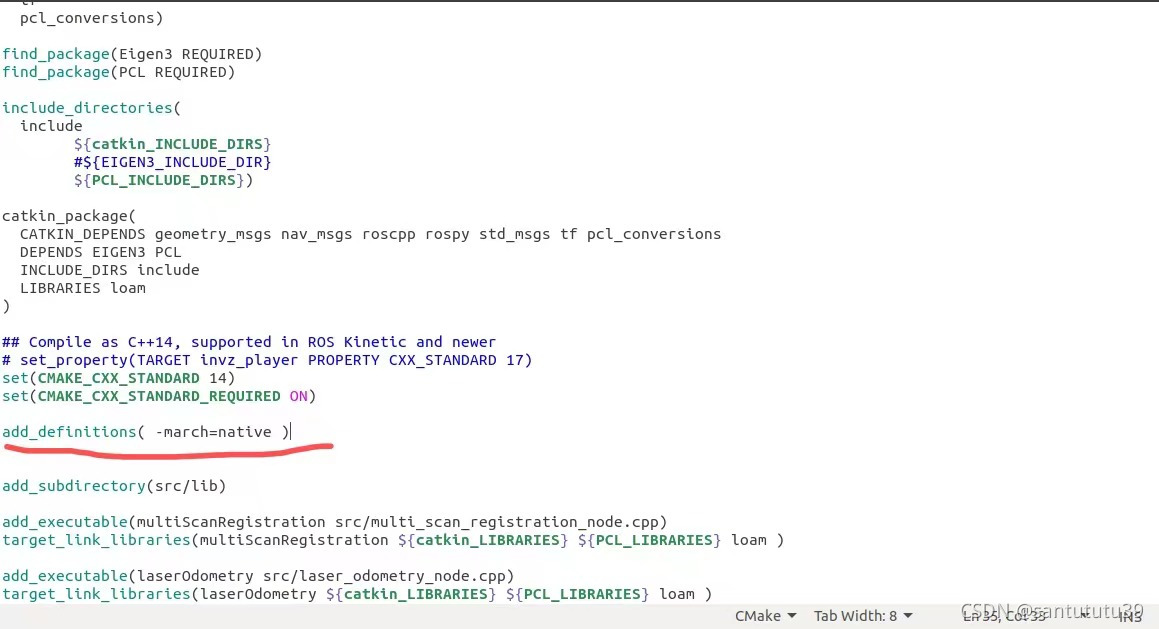
After commenting out, go back to the directory loam_ws, open the terminal and re-catkin_make ! Now restart the launch and release the package.

[Solved] PyInstaller Error: ValueError: too many values to unpack

Execution: pyinstaller .\checkattendance.spec

report errors:

for name, pth in format_binaries_and_datas(datas, workingdir=spec_dir):
File "d:\python\winpython-64bit-2.7.10.3\python-2.7.10.amd64\lib\site-packages\PyInstaller\building\utils.py", line 440, in format_binaries_and_datas
for src_root_path_or_glob, trg_root_dir in binaries_or_datas:
ValueError: too many values to unpack

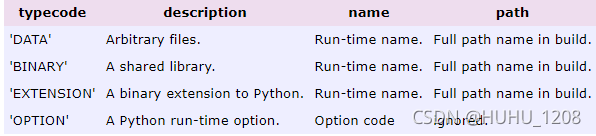
When reading an error, there should be a problem with the format of the data in the data or binaries. Think of adding content to the data field of the spec file, such as data = [“config.Ini”, ‘.’]

According to the information, the list of data is a list of tuples, and the tuple is a tuple of two elements. The first element is the position when reading the file in Python code, and the second element represents the real directory of the data file to be read.

So the format should be data = [(“config.Ini”, ‘.’)]

After modification, execute pyinstaller .\checkattendance.spec

It can be packed smoothly. I hope it can help you with the same problem~

[Solved] Spring Boot Package Error: Failed to execute goal org.apache.maven.plugins:maven-resources-plugin:3.2.0

When starting the spring boot project, the following error is suddenly reported:

[ERROR] Failed to execute goal org.apache.maven.plugins:maven-resources-plugin:3.2.0:resources (default-resources) on project xxxxxxx: Input length = 1 -> [Help 1]

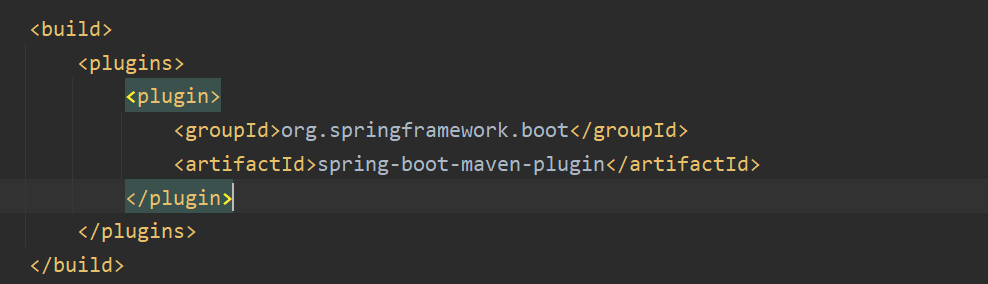
According to the error message, the versions of the introduced Maven plug-in Maven resources plugin may conflict. The spring boot version I use is 2.5.7, while the Maven plug-in used here is 3.2.0 the default introduced plug-in:
directly specify its version as follows, and then refresh it
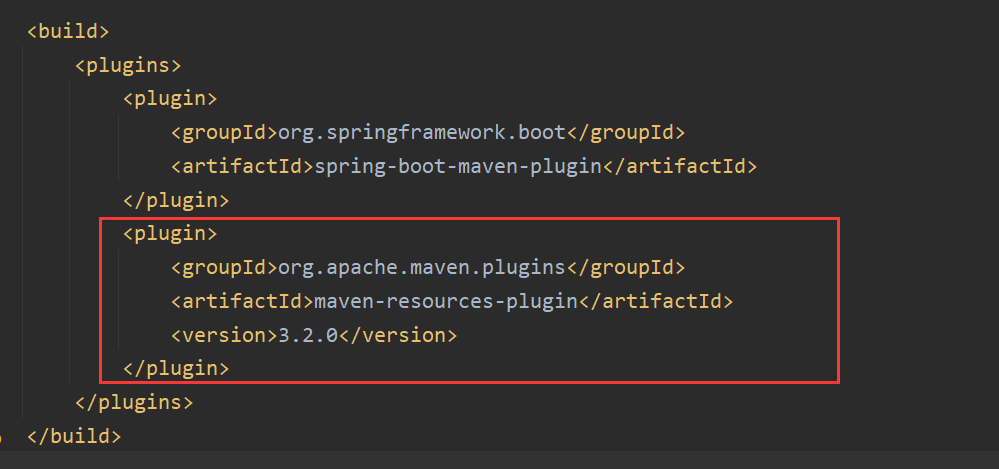
<plugin>
	<groupId>org.apache.maven.plugins</groupId>
	<artifactId>maven-resources-plugin</artifactId>
	<version>3.2.0</version>
</plugin>

Mybatis sets the primary key Auto-Increment error: No setter found for the keyProperty

Mybatis sets the auto increment of the primary key, and an error is reported: no setter found for the keyproperty

SQL statement in XML:

<insert id="registerReader" parameterType="com.by.tsgl.bean.Reader" useGeneratedKeys="true" keyProperty="reader_id">
    insert into reader(deposit_num,borrowing_num,reader_state,grade_id,user_id)
    values(0,0,"normal",1,#{user_id});
</insert>

Test Times Error
org.mybatis.spring.MyBatisSystemException: nested exception is org.apache.ibatis.executor.ExecutorException: Error getting generated key or setting result to parameter object. Cause: org.apache.ibatis.executor.ExecutorException: No setter found for the keyProperty 'reader_id' in 'java.lang.String'.
Solution:
Remove the keyProperty property from the insert tag
Change it to.

<insert id="registerReader" parameterType="com.by.tsgl.bean.Reader" useGeneratedKeys="true">

Cause analysis

The corresponding value in keyProperty is a property of the entity class, not a database field.

The fields that have been set up for primary key auto-increment in the database only need to configure the useGeneratedKeys attribute.

useGeneratedKeys=“true” keyProperty=“id”
When useGeneratedKeys is set to true, it means that if the inserted table id has an auto-incrementing column as the primary key, JDBC is allowed to support automatic primary key generation.

keyProperty=“id” The automatically generated primary key id can be returned to the id of the passed in object . Since the object we passed in does not have the id field, it naturally does not have its set method, so an error will be reported.

What if there is no primary key in the inserted table?

Can use attributeskeyColumn

<insert id="registerReader" parameterType="com.by.tsgl.bean.Reader" useGeneratedKeys=true keyProperty="userId" keyColumn="user_id">
    

This annotation means to use the primary key automatically increased by the database and user from the table_ In the ID field, put the data into the member variable userid of the incoming object. If we have specified the primary key in the database table, the keycolumn attribute can be defaulted</ ol>

The following is from the mybatis document

usegeneratedkeys (only applicable to insert and update) this will make mybatis use JDBC’s getgeneratedkeys method to retrieve the primary key generated internally by the database (such as the auto increment field of relational database management systems such as MySQL and SQL Server). The default value is false
keyproperty (only applicable to insert and update) specifies the property that can uniquely identify the object. Mybatis will use the return value of getgeneratedkeys or the selectkey sub element of the insert statement to set its value. The default value is unset. If more than one column is generated, multiple attribute names can be separated by commas.

[Solved] Android Studio Compile Error: Invalid main APK outputs : EarlySyncBuildOutput

Invalid main APK outputs : EarlySyncBuildOutput(type=com.android.build.gradle.internal.scope.InternalArtifactTypeKaTeX parse error: Undefined control sequence: \work at position 65: …on=0, output=F:\ ̲ w ̲ o ̲ r ̲ k ̲\ MobileWMS\app\… APK@1c2249b8 , apkType=MAIN, filtersData=[], version=0, output=F:\work\MobileWMS\app\build\outputs\apk\debug\output-metadata.json)

An error is reported when the version is too low. An error is reported when compiling again
after modifying the gradle version, an error is reported when compiling again, which is caused by the previously compiled APK

Solution:
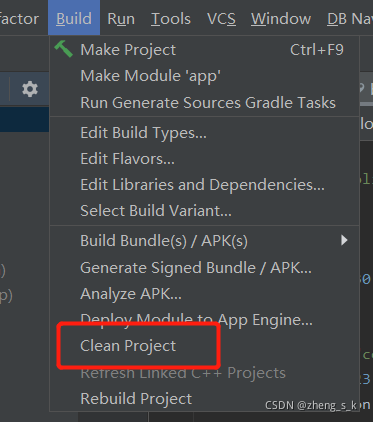
Click clean project under the build directory to clear the previously compiled data

clear and then compile!

Client Error: Could not get a resource from the pool [How to Solve]

Client error: could not get a resource from the pool

1. Reason & Solution

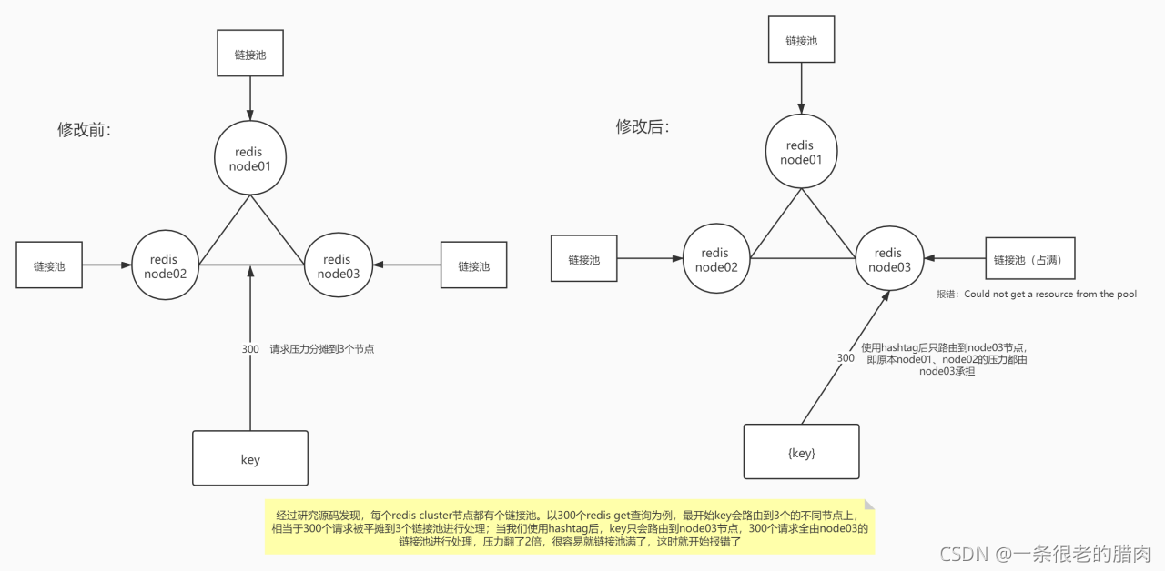
Concurrency is indeed too high, and the link pool configuration parameters are unreasonable. Solution: adjust the configuration parameters; The execution queue of the capacity expansion node redis is occupied by a large number of operations or time-consuming operations. Solution: optimize slow operations; Slow operation is prohibited. There is a hot key solution: split the key and distribute the pressure to each redis node; Increase the local memory. First check the local memory, and then go to a node in redis. The link pool is exhausted. Solution: solve the problem of data skew, execute time-consuming commands, resulting in Ping timeout. Solution: disable time-consuming commands, such as: keys *; Optimize the time-consuming operation. There is a bug in the lower version of jedis package. Solution: upgrade the jedis version

2. Hot key scene sorting

Question 01:

Frequent IP access in a region

Solution:

Increase the application local cache and LRU maintain a certain number of hot IP addresses

Question 02:

Frequently query a large Zset set

Solution:

Split by business dimension; Split by data number segment

3. Sort out the scenario when a node’s link pool is exhausted

Homicide caused by hashtag abuse

[Solved] Pointsift Error: – ltensorflow not found_framework

My environment: Ubuntu 18.04 tensorflow 2.1
when reproducing pointsift, follow the readme prompt, modify the locations of tensorflow and Lib in the. Sh file, compile the. Sh file, and report an error:
/usr/bin/LD: cannot find – ltensorflow_framework
collect2: error: ld returned 1 exit status

The reason is that the shell file is connected to the dynamic library In libtensorflow_framework.so, the dynamic library name of tensorflow 2.1 is libtensorflow_Frame.So.2, so the link is not available

Solution: create a connection symbol to make libtensorflow_Framework. So. 2 and libtensorflow_Framework.so points to the same

cd /usr/local/lib/python3.6/dist-packages/tensorflow_core //My files are in this directory, some are in the tensorflow directory, as long as they are in the same directory as .so.2
ln -s libtensorflow_framework.so.1 libtensorflow_framework.so