Author Archives: Robins

[Solved] Canal 1.1.5 Startup Error: caching_sha2_password Auth failed

1. Phenomenon

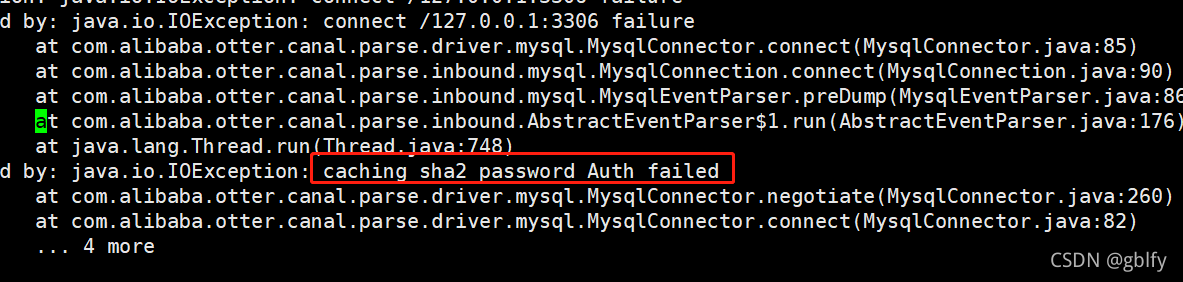
java.io.IOException: caching_sha2_password Auth failed
        at com.alibaba.otter.canal.parse.driver.mysql.MysqlConnector.negotiate(MysqlConnector.java:260) ~[canal.parse.driver-1.1.5.jar:na]
        at com.alibaba.otter.canal.parse.driver.mysql.MysqlConnector.connect(MysqlConnector.java:82) ~[canal.parse.driver-1.1.5.jar:na]
        ... 4 common frames omitted
2021-11-20 16:43:40.852 [destination = example , address = /127.0.0.1:3306 , EventParser] ERROR com.alibaba.otter.canal.common.alarm.LogAlarmHandler - destination:example[com.alibaba.otter.canal.parse.exception.CanalParseException: java.io.IOException: connect /127.0.0.1:3306 failure
2. Analysis and positioning

Since MySQL 8.0.3, the authentication plug-in uses caching by default_sha2_password

3. Solution

Solution: modify the authentication plug-in corresponding to the canal user to MySQL_native_password

mysql> select host,user,plugin from mysql.user ;
mysql> ALTER USER 'canal'@'%' IDENTIFIED WITH mysql_native_password BY 'password';

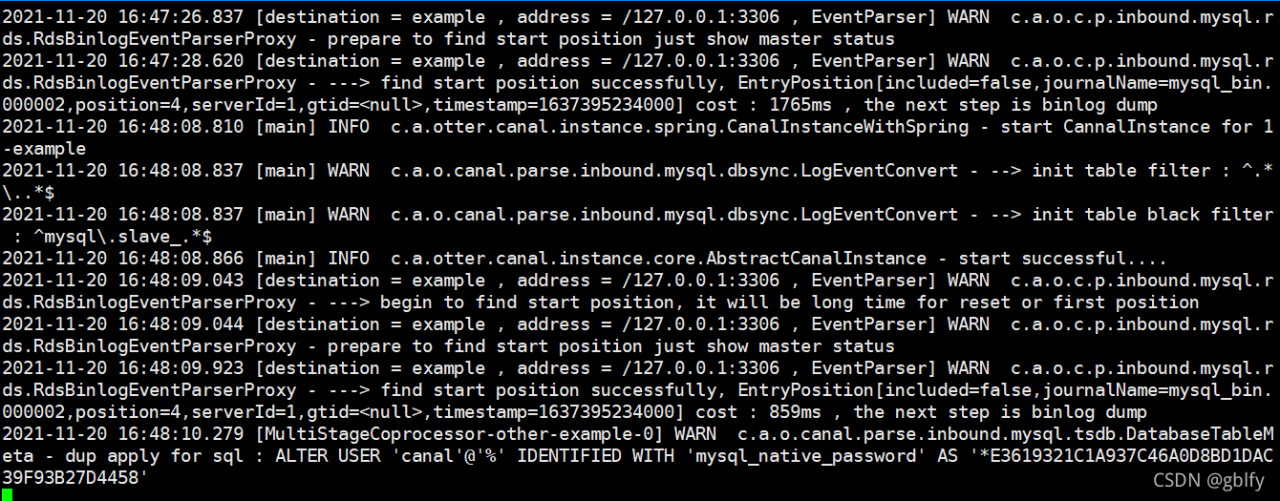
renderings

Euopenler 21.09 sudo Yum Update Error: Errors during downloading metadata for repository ‘EPOL’

openEuler
openEuler-21.09-everything-x86_64-dvd.iso
sudo yum update error

EPOL
Errors during downloading metadata for repository 'EPOL':
	-Status code: 404 for htpp://repo.openeuler.org/openEuler-21.09/EPOL/repomd.xml

Please note that:

sudo vi/etc/yum.rest.d/openeuler.repo

Please note that

[EPOL]
name=EPOL
baseurl=http://repo.openeuler.org/openEuler-21.09/EPOL/$basearch/
enabled=1
gpgcheck=1
gpgkey=http://repo.openeuler.org/openEuler-21.09/OS/$basearch/RPM-GPG-KEY-openEuler

The correct address is:

name=EPOL
baseurl= http://repo.openeuler.org/openEuler-21.09/EPOL/main/ $basearch/

Save, exit and execute again.

[Solved] Python install kenlm error: ERROR: Command errored out with exit status 1: …

Use pip install kenlm error:

python/kenlm.cpp:6381:13: error: ‘PyThreadState {aka struct _ts}’ has no member named ‘exc_traceback’; did you mean ‘curexc_traceback’?
tstate->exc_traceback = *tb;
^~~~~~~~~~~~~
curexc_traceback
error: command ‘gcc’ failed with exit status 1

ERROR: Command errored out with exit status 1: …

It seems to be the GCC Issue

Solution:
Use pypi-kenlm

pip install pypi-kenlm

SCP path contains special characters Error [How to Solve]

Question

From a file on the local copy server, use the following command:

scp [email protected]:/home/test/files(202110~202111).xls .

Error reporting:
bash: – C: line 0: syntax error near unexpected token ` (‘

Solution:

    1. enclose the entire path in single quotation marks;
  1. before the parentheses, add the escape character
scp [email protected]:'/home/test/files\(202110~202111\).xls' .

The semget function error: errno is set to 28 [How to Solve]

When running semget under Linux to create semaphores, it returns – 1 and the creation fails;

1. This function is a system function. You can only confirm the actual error code with errno, print errno through strError, and return no space left on device. Is the system space insufficient? Insufficient space to create semaphores?

2. Go to errno. H to check the error message enospc corresponding to the actual error code. What does this field mean?

3. Does the semget function have its own error field? Check the function manual: check the man Manual of semget function: a semaphore set has to be created but the system limit for the maximum number of semaphore sets (semmni), or the system-wide maximum number of semaphores. Semaphore exceeds system limit.

It is basically determined that it is caused by the system semaphore. First, temporarily modify the kernel semaphore parameters and run again to see whether it has been solved.

4. The following commands are used in viewing semaphores

#1)The sysctl command can view and set system kernel parameters
# The 4 corresponding values from left to right are SEMMSL, SEMMNS, SEMOPM and SEMMNI.
sysctl -a | grep sem #View the setting value of the system semaphore
kernel.sem = 250 32000 32 128


#2) There are three ways to modify: the numbers are for reference only
echo 610 86620 100 142 > /proc/sys/kernel/sem

sysctl -w kernel.sem="610 86620 100 142"

echo "kernel.sem=610 86620 100 142" >> /etc/sysctl.conf`


#3) View the current semaphore and pid of the system as well as user information, view more information and check --help
ipcs -s -p -c


#4) Delete the semaphore method of the specified semid, and check more usage --help
ipcrm -s semid


#5) Delete all semid semaphore methods
ipcrm  -asem

5. Here, in the process of finding semaphore resource leakage, in order to facilitate real-time viewing of semaphore information, the semaphore output is written into the script and printed circularly

#ipcs.sh
echo “ipcs -s loop”

while [ 1 ]
do
	sleep 1
	ipcs -s
done

6. Note: the final problem here is to see why the semaphore in the code exceeds the limit. Normally, the semaphore will not exceed the system limit.

Spring integrated HBase error [How to Solve]

Problem 1
ClassNotFoundException:org/springframework/data/hadoop/configuration/ConfigurationFactoryBean
Solution
Replace the jar package with spring-data-hadoop-1.0.0.RELEASE version
Problem 2
ClassNotFoundException:org/apache/hadoop/conf/Configuration
Solution
Introduce hadoop-client-3.1.3.jar and hadoop-common-3.1.3.jar
Problem 3
java.lang.NoClassDefFoundError: org/apache/commons/configuration2/ConfigurationSolution
Introduce commons-configuration2-2.3.jar
Problem 4
java.lang.NoClassDefFoundError: org/apache/hadoop/util/PlatformName
Solution
Introduce hadoop-auth-3.1.3.jar
Problem 5
java.lang.NoClassDefFoundError: org/apache/hadoop/mapred/JobConf
Solution
Introduce hadoop-mapreduce-client-common-3.1.3.jar, hadoop-mapreduce-client-core-3.1.3.jar and
hadoop-mapreduce-client-jobclient-3.1.3.jar
Problem 6
java.lang.NoClassDefFoundError: com/ctc/wstx/io/SystemId
Solution
Introduce woodstox-core-5.0.3.jar
Problem 7
java.lang.NoClassDefFoundError: com/google/common/collect/Interners
Solution
Introduce guava-30.1.1-jre.jar
Problem 8
java.lang.NoSuchMethodError: com.google.common.collect.MapMaker.keyEquivalence(Lcom/google/common/base/Equivalence;)Lcom/google/ common/collect/MapMaker
Solution
Remove the google-collect-1.0.jar package, guava conflict
Problem 9
java.lang.NoClassDefFoundError: com/fasterxml/jackson/core/JsonGenerator
Solution
Introduce jackson-annotations-2.12.4.jar, jackson-core-2.12.4.jar and jackson-databind-2.12.4.jar
Problem 10
java.lang.NoClassDefFoundError: org/apache/hadoop/hbase/HBaseConfiguration
Solution
Introduce hbase-common-2.2.4.jar
Problem 11
java.lang.NoClassDefFoundError: org/apache/hadoop/hbase/client/HTableInterface
Solution
After searching for a long time, I found that it is written in the configuration file
<bean id=”htemplate” class=”org.springframework.data.hadoop.hbase.HbaseTemplate”>
<property name=”configuration” ref=”hbaseConfiguration”>
</property>
</bean>
Comment it out Summary
Most of the problem is the lack of jar packages, Spring integration with Hbase requires 15 packages.
Among them.
spring-data-hadoop-1.0.0.RELEASE.jar
hadoop-client-3.1.3.jar
hadoop-common-3.1.3.jar
hadoop-auth-3.1.3.jar
hadoop-mapreduce-client-common-3.1.3.jar
hadoop-mapreduce-client-core-3.1.3.jar
hadoop-mapreduce-client-jobclient-3.1.3.jar
commons-configuration2-2.3.jar
guava-30.1.1-jre.jar
jackson-annotations-2.12.4.jar
jackson-core-2.12.4.jar
jackson-databind-2.12.4.jar
These packages are also required when integrating HDFS

Android Studio compile error: build tools is corrupt [Solved]

Error Messages:
Installed Build Tools revision 32.0.0 rc1 is corrupted. Remove and install again using the SDK Manager.
Problem Cause.
File corruption in buildTools after AndroidSutdio version upgrade.

Solution:
1 Modify d8.bat to dx.bat
2 Modify d8.jar to dx.jar

[Solved] Multithreading uses jsch to obtain a session for connection error: session.connect: java.net.socketexception: connection reset

Phenomenon

The project uses the spring batch framework. Multiple slices use jsch to obtain SFTP connections to read files and report errors

In fact, it is multithreading, using jsch to obtain the session connection and report an error

com.jcraft.jsch.JSchException: Session.connect: java.net.SocketException: Connection reset

Jsch version

version=0.1.54
groupId=com.jcraft
artifactId=jsch

reason

Various reasons have been found on the Internet. Some say the number of SSH terminal connections is limited, and some say there is a TCP connection problem. The final reason has not been found yet. Please inform us in the comment area

Reappearance

public static Session getSshSession(String sftpHost, int sftpPort, String userName, String password) {
	JSch jsch = new JSch();
	// GET sshSession
	Session sshSession = null;
	try {
		sshSession = jsch.getSession(userName, sftpHost, sftpPort);
	} catch (JSchException e) {
		e.printStackTrace();
	}
	if (StringUtils.isNotBlank(password)) {
		sshSession.setPassword(password);
	}
	Properties sshConfig = new Properties();
	sshConfig.put("StrictHostKeyChecking", "no");
	sshSession.setConfig(sshConfig);
	return sshSession;
}


static void test() {
	for (int i = 1; i < 50; i++) {
		new Thread(() -> {
			Session sshSession = getSshSession("*.*.*.*", 22, "root", "***");
			try {
				Thread.sleep(100);
				sshSession.connect();
			} catch (Exception e) {
				e.printStackTrace();
			} finally {
				sshSession.disconnect();
			}

		}).start();
	}
}

Solution:

Create a channel pool using apache.commons.pool2

Since the SFTP configuration of the project is dynamic and not fixed, the following code is not encapsulated as a spring boot managed bean

Connection pool configuration:

public class ConnPoolConfig extends GenericObjectPoolConfig {
    public ConnPoolConfig() {
        // https://blog.csdn.net/weixin_42340670/article/details/108431381
        // The minimum number of free objects in the object pool should be
        setMinIdle(4);
        // The maximum capacity of the pool. The maximum number of objects to be stored in the pool
        setMaxTotal(10);
        // Check the validity of an object when it is borrowed from the pool.
        setTestOnBorrow(true);
        // How often the recycler thread performs idle object recovery (polling interval, in milliseconds)
        setTimeBetweenEvictionRunsMillis(60 * 60000);
        // Whether to verify the validity of the object when the recycler is scanning for idle objects.
        // If an object has not reached the specified threshold of idle time, and if testWhileIdle is configured to true
        // then it checks if the object is still valid, and if the object's resources have expired (e.g., the connection is disconnected), then he can be recycled.
        setTestWhileIdle(true);
    }
}

Connection pool factory:

public class ConnPoolFactory extends BasePooledObjectFactory<ChannelSftp> {

    private String host;
    private Integer port;
    private String userName;
    private String password;
    private final String strictHostKeyChecking = "no";

    public ConnPoolFactory(String host, Integer port, String userName, String password) {
        this.host = host;
        this.port = port;
        this.userName = userName;
        this.password = password;
    }

    @Override
    public ChannelSftp create() throws Exception {
        JSch jsch = new JSch();
        Session session = jsch.getSession(userName, host, port);
        session.setPassword(password);
        Properties config = new Properties();
        config.put("StrictHostKeyChecking", strictHostKeyChecking);
        session.setConfig(config);
        session.connect();
        ChannelSftp channel = (ChannelSftp) session.openChannel("sftp");
        channel.connect();
        return channel;
    }

    @Override
    public PooledObject<ChannelSftp> wrap(ChannelSftp obj) {
        return new DefaultPooledObject<>(obj);
    }

    // https://segmentfault.com/a/1190000003920723
    // Destroy the object, if the object pool detects that an "object" idle timeout,
    // or if the operator detects that the "object" is no longer valid when "returning the object" to the object pool, then this will result in "object destruction";
    // The design of the "destroy object" operation is far different, but it must be clear:
    // When this method is called, the life of the "object" must end. If object is a thread, then the thread must exit at this point;
    // If object is a socket operation, then the socket must be closed;
    // If object is a file stream operation, then "data flush" is done and closed normally.
    @Override
    public void destroyObject(PooledObject<ChannelSftp> pooledObject) throws Exception {
        Channel channel = pooledObject.getObject();
        Session session = channel.getSession();
        channel.disconnect();
        session.disconnect();
    }

    // Check if the object is "valid";
    // The Pool cannot hold invalid "objects", so the "background detection thread" will periodically check the validity of the "objects" in the Pool,
    // If the object is invalid, it will be removed from the Pool and destroyed;
    // In addition, when the caller gets an "object" from the Pool, it also checks the validity of the "object" to make sure that no "invalid" objects can be output to the caller;
    // When the caller returns the "object" to the Pool after use, the validity of the object is still checked. By validity,
    // The validity of the object is whether the object is in the expected state and can be used directly by the caller;
    // If the object is a socket, then its validity is whether the socket's channel is open/blocking timeout, etc.
    @Override
    public boolean validateObject(PooledObject<ChannelSftp> pooledObject) {
        return pooledObject.getObject().isConnected();
    }

    // "Activate" an object, an additional "activation" action when the Pool decides to remove an object for delivery to the caller,
    // For example, you can "reset" the list of parameters in the activateObject method to make it feel like a "newly created" object when the caller uses it;
    // If the object is a thread, you can reset the "thread break flag" in the "activate" operation, or wake up the thread from blocking, etc;
    // If the object is a socket, then you can refresh the channel in the "activate" operation,
    // or rebuild the link to the socket (if the socket is unexpectedly closed), etc.
    @Override
    public void activateObject(PooledObject<ChannelSftp> pooledObject) throws Exception {
        ChannelSftp channelSftp = pooledObject.getObject();
        Session session = channelSftp.getSession();
        if (!session.isConnected()) {
            session.connect();
            channelSftp.connect();
        }
    }

    // "Passivate" the object, when the caller "returns the object", the Pool will "passivate the object".
    // The implication of passivate is that the "object" needs a "rest" for a while.
    // If the object is a socket, then you can passivateObject to clear the buffer and block the socket;
    // If the object is a thread, you can sleep the thread or wait for an object in the thread during the "passivate" operation.
    // Note that the methods activateObject and passivateObject need to correspond to each other to avoid deadlocks or confusion about the state of the "object".
    @Override
    public void passivateObject(PooledObject<ChannelSftp> pooledObject) throws Exception {
    }
}

Connection pool:

public class ConnPool extends GenericObjectPool<ChannelSftp> {

    private static final Map<String, ConnPool> MAP = new ConcurrentHashMap<>();

    private ConnPool(String host, Integer port, String userName, String password) {
        super(new ConnPoolFactory(host, port, userName, password), new ConnPoolConfig());
    }

    public static ConnPool getConnPool(String host, Integer port, String userName, String password) {
        String key = host + ":" + port;
        ConnPool connPool = MAP.get(key);
        if (connPool == null) {
            synchronized (ConnPool.class) {
                connPool = MAP.get(key);
                if (connPool == null) {
                    connPool = new ConnPool(host, port, userName, password);
                    MAP.put(key, connPool);
                }
            }
        }
        return connPool;
    }
}

The connection pool supports the establishment of different pools for different remote IP

Tool class encapsulation:

public static ChannelSftp borrowChannel(ConnectionConfig connCfg) {
	ConnPool connPool = ConnPool.getConnPool(connCfg.getHost(), connCfg.getPort(), connCfg.getUserName(),
			connCfg.getPassword());
	try {
		return connPool.borrowObject();
	} catch (Exception e) {
		logger.error("Get channelSftp from pool fail", e);
	}
}

public static void returnChannel(ConnectionConfig connCfg, ChannelSftp channel) {
	ConnPool connPool = ConnPool.getConnPool(connCfg.getHost(), connCfg.getPort(), connCfg.getUserName(),
			connCfg.getPassword());
	try {
		connPool.returnObject(channel);
	} catch (Exception e) {
		logger.error("Return channelSftp to pool fail", e);
	}
}

No problem with the test:

static void test2() {
	AtomicInteger j = new AtomicInteger(0);
	for (int i = 0; i < 50; i++) {
		new Thread(() -> {
			ConnPool connPool = ConnPool.getConnPool("*", 22, "root", "*");
			System.out.println(connPool + "--" + j.getAndIncrement());
			ChannelSftp channelSftp = null;
			try {
				channelSftp = connPool.borrowObject();
			} catch (Exception e) {
				e.printStackTrace();
			} finally {
				connPool.returnObject(channelSftp);
			}
		}).start();
	}
}
How to Solve shiro Set sessionIdUrlRewritingEnabled Error (jessionid Removed)

Project scenario:

When using Shiro for authority authentication, the login address always carries the jeonid automatically for the first access. Now it needs to be removed and cannot be displayed.

Problem Description:

First, I searched Baidu and found that most solutions are to set SessionManager when defaultwebsecuritymanager is injected. This method also needs Shiro 1.3.2 or above. Coincidentally, my 1.3.0 is definitely not good. Go to POM directly to change the version number
annotation method:

    @Bean
    public DefaultWebSessionManager sessionManager(){
        DefaultWebSessionManager sessionManager = new DefaultWebSessionManager();
        sessionManager.setSessionIdUrlRewritingEnabled(false);
        return sessionManager;
    }

    @Bean
    public DefaultWebSecurityManager securityManager(){
        DefaultWebSecurityManager securityManager = new DefaultWebSecurityManager();
        securityManager.setSessionManager(sessionManager());
        return securityManager;
    }

XML mode:

		<bean id="sessionManager" class="org.apache.shiro.web.session.mgt.DefaultWebSessionManager">
		<property name="sessionIdUrlRewritingEnabled" value="false"/>
	</bean>

	<!-- Shiro Security Manager -->
	<bean id="securityManager" class="org.apache.shiro.web.mgt.DefaultWebSecurityManager">
		<property name="sessionManager" ref="sessionManager"/>
	</bean>

Remember to add package scanning in XML mode.My:

<context:component-scan base-package="config" />

Then run the project and report the same error as before. Anyway, there is no getter method.

Cause analysis:

During debugging, it is found that there are three versions of Shiro in the project, and two are from other modules, so it doesn’t matter. However, during debugging, it is found that the number of lines is not matched. After downloading the source code, it is found that this.sessionidurlrewritingenabled = true; There are no breakpoints in this line, and then the rebuild project, MVN clean install, repackaging and restarting idea are all used, and then the breakpoints can be interrupted. However, after debugging starts, the breakpoint icon turns into a circle slash, which is not the Shiro version of my current project at all
finally, you can only guess whether there are problems with multiple versions at the same time.

Solution:

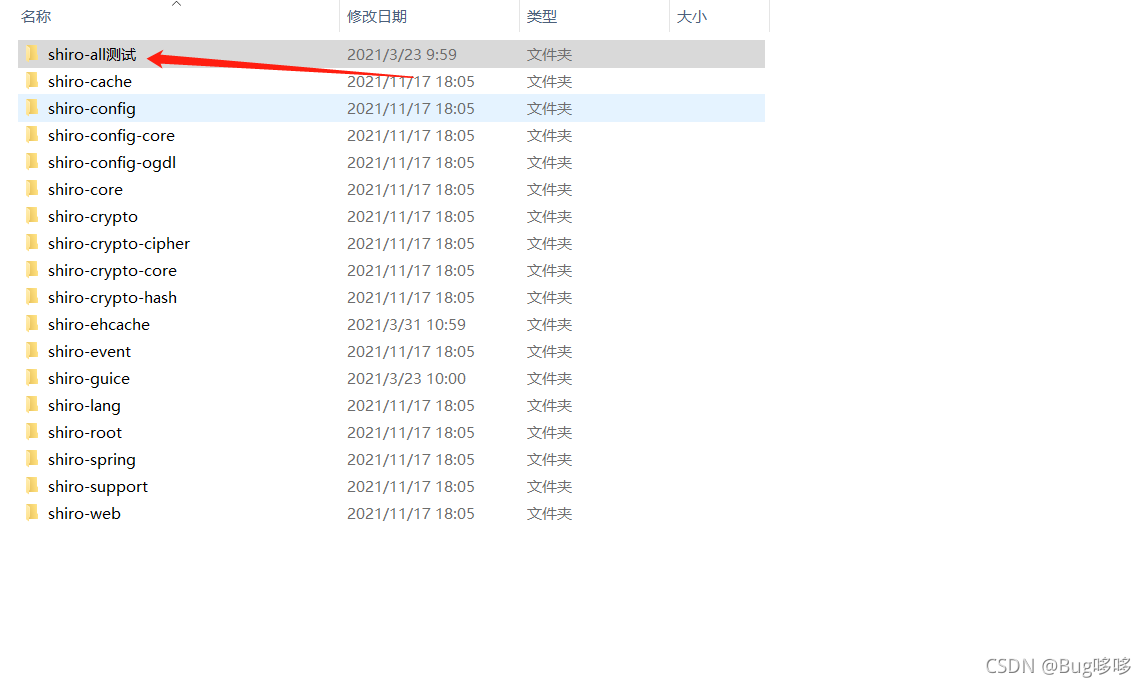
It is found that one of the three versions is very old 1.2.4, but there is no place to import the whole project. Then, according to the warehouse, it is still imported in the way of Shiro all, so the name is temporarily modified. After running the project, it can run as expected

[Solved] Git Error: fsmonitor–daemon failed to start

Scenario:

Today, I want to upload local notes to gitee, and then when I git add., I report an error
no solution was found on Baidu. I saw the idea on GitHub later

First try to
turn off the daemon

git config core.useBuiltinFSMonitor false

Error reporting is not reported, but it does not solve the problem

Then try to start the daemon manually

git fsmonitor--daemon start

Fail

Solution:

Check if your git path has Chinese
it’s probably better to change the Chinese on the path
I haven’t noticed before, because this is the first time I met this problem and successfully solved it

Mongodb Crash Error: Too many open files [How to Solve]

Problem analysis of mongodb crash error too many open files

during the actual use of the project, the customer reported that he could open the web page but could not log in. He felt that the database server should hang up for the first time, so he checked the mongodb database server log, and sure enough, it hung up. The error information is as follows:

2020-12-28T13:21:21.731+0800 E STORAGE  [conn2624] WiredTiger error (24) [1609132881:731616][23581:0x7fe157189700], WT_SESSION.create: __posix_directory_sync, 151: /data1/mongodb/data/db/collection-1063-1706476241051221735.wt: directory-sync: Too many open files Raw: [1609132881:731616][23581:0x7fe157189700], WT_SESSION.create: __posix_directory_sync, 151: /data1/mongodb/data/db/collection-1063-1706476241051221735.wt: directory-sync: Too many open files

Cause of problem:

The number of open files on the system has reached the maximum
The reason for the above problem is that Centos7 gives each user a default number of files to open at the same time of 1024, which can be checked with the ulitme -u command

Problem solving:

1. Modify the limits.conf default parameters and add the following under the file.
* soft nofile 65536
* hard nofile 65536
PS: After saving as above, you need to reboot the system to take effect permanently

2, dynamic modification (no need to restart the system and mongo)
2.1, check the mongodb service pid file
        ps aux | grep mongo
2.2、After getting the pid file, check the corresponding pid limits, the following command
        cat /proc/95051/limits
2.3、Run the following command to achieve dynamic changes
        prlimit --pid 95051 --nofile=65535:65535
2.4. Check again, the modification is successful

proposal

It is recommended that new servers first change the system default parameters

[Solved] mqttfx Error: Error Loading External CSS Resource

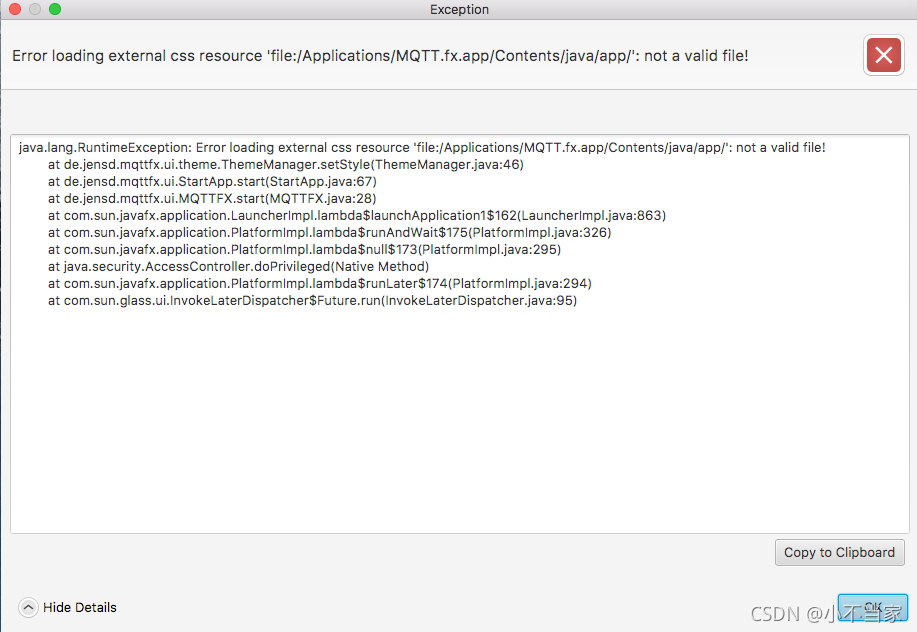
1. Error message

2. Reasons

This is because the custom mode is selected when using mqtt.fx. The software remembers this configuration and does not completely clean the configuration when reinstalling or uninstalling

3. Treatment method

Modify the configuration file
Path: C:\users\{administrator user name}\appdata\local\mqtt FX
the following: mqttfx config.xml
Modify: modify custom to light

<styleName>LIGHT</styleName>