Author Archives: Robins

[Solved] Fatal error LNK1169: one or more multiple defined symbols were found

Declare the global variable. The global function must be declared in CPP. If other classes refer to the global variable, include the H file of the CPP, and then extern. Otherwise, the repeated definition error is likely to occur.

How does this “easy” explain?

For example, if a global variable is declared in A.H

int Global;

In B.H

include "A.h"
.....
extern int Global;
......

If you include A.H, it is equivalent to including the declaration of global variables in A.H, and the compiler will consider it a duplicate definition.

Therefore, global variables and function declarations must be in CPP when The vs compiler reports this error when there is a function implementation in the H file.

Solution:
1 Yes Add inline
2 before the function declaration in H In project – > Attribute – > Linker – > Command line – > Add/force to additional options

The above is loaded from David_H

I also encountered this error, but the whole project contains too many files to analyze the inclusion relationship, but the problem should be similar.

my solution is:

Project – > Properties – > Linker – > Command line – > Add /force 

to additional options

It solved the error, but there were a lot of warnings.

[Solved] Error: Cannot find module ‘@/views/xxx‘ at webpackEmptyContext

When you clone a Vue project from the open source platform, it is reported that the corresponding module cannot be found after logging in.

After searching a lot, it was finally solved.

export const loadView = (view) => {
  return () => import(`@/views/${view}`)
}

Change to the following

export const loadView = (view) => {
  return (resolve) => require([`@/views/${view}`], resolve)
}

It can be solved.

Cause: there is a problem with the webpack version. Dynamic import in webpack 4 does not support variable mode

The project can be seen in the elephant template.

[Solved] flask db migrate execute error: ERROR [flask_migrate] Error: Can‘t locate revision identified by ‘8d1ad59dc71a‘

Recently, a new table has been added to the flash project, but an error is reported when executing flash DB migrate, as shown in the following figure:

Google around the Internet and finally know the problem:
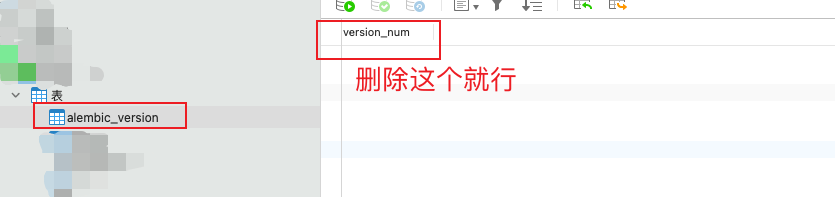
although the migration directory in the project has been deleted, the version information has been saved in the database. Yes, this is the table – alembic_ version

So all you have to do is delete the version record of this table:

After deletion, execute flash DB migrate again, no error is reported, and the table is generated normally ~

How to Solve Go Error: concurrent map iteration and map write

Pure dry goods.

Direct cause: problems caused by concurrent read/write of map. The source of your problem must be among the following reasons.

catalogue

Reason 1: abnormal loading and unlocking

Reason 2: adding unlock code looks normal

Reason 3: incomplete locking

Reason 4: the same lock is not added to the map


Reason 1: abnormal loading and unlocking

The code is not written rigorously, the lock is not unlocked, and a single closed loop is not formed
solution: if a closed loop is formed, there must be a solution

Reason 2: adding unlock code looks normal

In fact, the internal code of the lock is lonely. The map operation is not within the scope of the lock. The (read and write together) or the same map (same address) is used with the external code. The lock does not play a practical role

Solution: transfer the map data without using the old map, generate a new map between locking and unlocking,
transfer the data to the new map (or other data structures), and then return to the new map

Or

Just adjust the code position

Reason 3: incomplete locking

Only the goroutine that writes the map is unlocked, but the goroutine that reads the map is not or only goroutine reading map is unlocked, but goroutine writing is not or unlocked

Reason 4: the same lock is not added to the map

For example: for a map, there are two goroutines for reading the map and two goroutines for writing the map. The four are numbered 1,2,3,4. The first three use mu1 and the last one uses mu2, which will cause the error.

Warm tips:
the same lock can act on multiple maps, but the same map cannot have two locks.

[Solved] Error: ENOSPC: System limit for number of file watchers reached

Project environment

Vue project

Cause of problem

The number of file monitoring is too large and the system limits it

Modify {etc/sysctl.d

 fs.inotify.max_user_watches = 524288

Apply changes

sudo sysctl -p --system

Docker inherits some setting files on the host. In order to prevent global impact, the above files will be set to read only in docker. Therefore, you need to change the above configuration on the host. After the host changes, docker automatically inherits.

Win10 remote connection submits error by using cluster: Batch: error: batch script contains DOS line breaks (\R\n) sbatch: error

Description:

The notebook of win10 system is remotely connected to the win10 workstation of the office, and then the win10 workstation is used to submit tasks to the cluster server. At this time, you can edit bash directly in the Linux environment of the cluster server The SH file cannot be run normally. If you use VIM to open the file and edit it again, the error will be prompted as follows:

batch: error: Batch script contains DOS line breaks (\r\n)
sbatch: error: instead of expected UNIX line breaks (\n)

In this case, use vscode to bash The SH file can be changed from CRLF to LF to solve the problem.

[Solved] Tableau Desktop Install Error: 0x80070643 fatal error during installation

Problem description

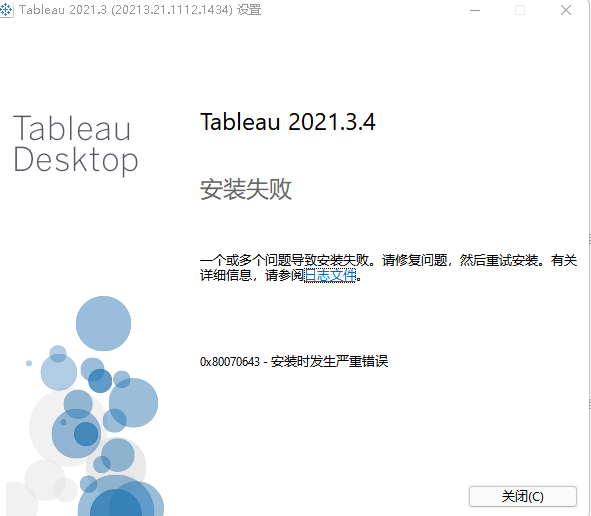
When installing tableau desktop, the following errors may occur:

0x80070643 fatal error during installation

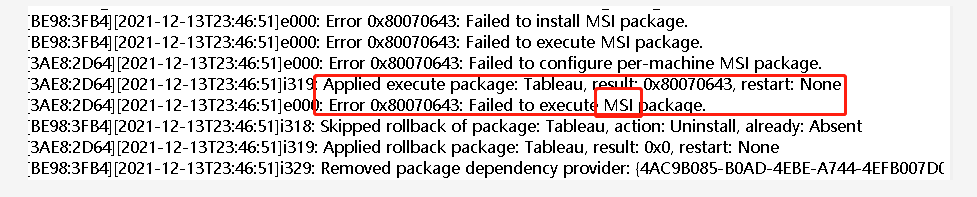
The error log is as follows:
in addition, the following errors can be found in the log:

Error 0x80070643: unable to execute MSI package

reason

Required installation components failed to start
Please note that error 0x80070643 is an error of Microsoft
.

Solution:

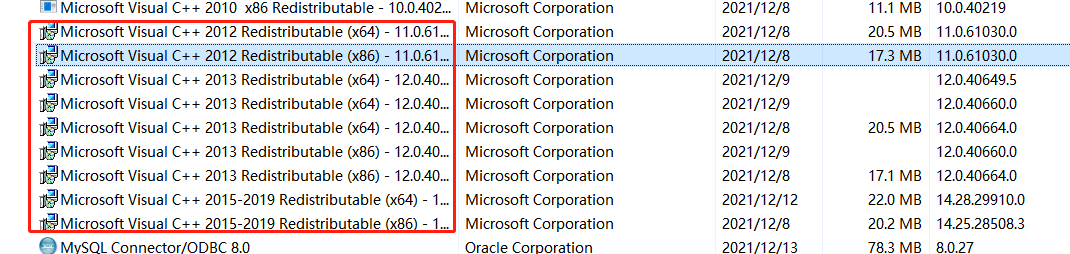
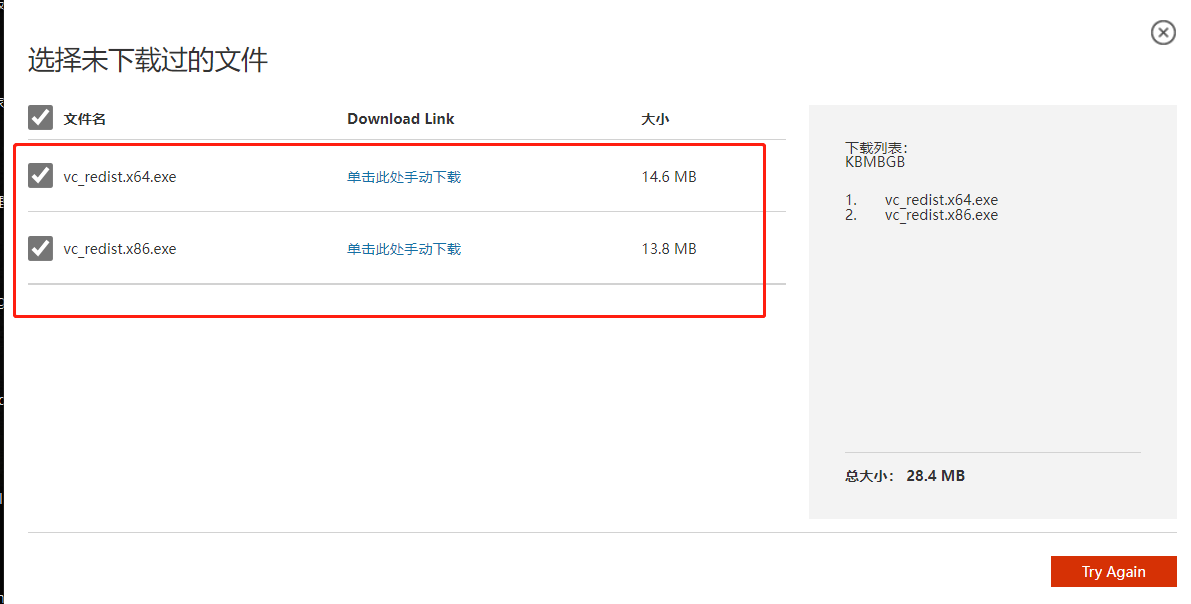
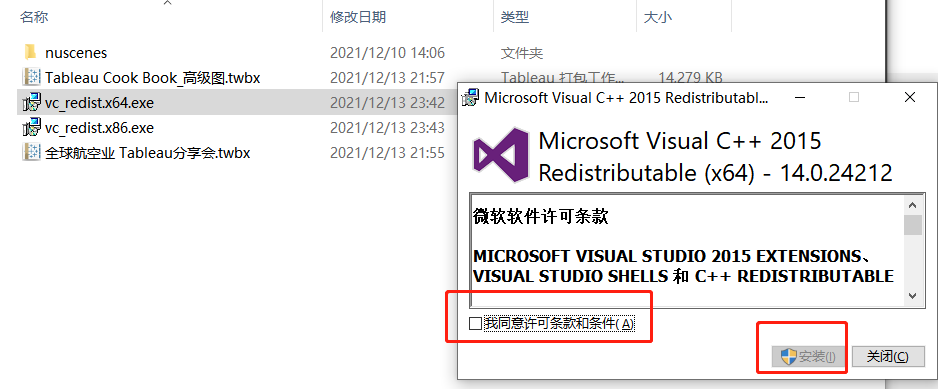
1. In windows, navigate to control panel > “Programs and features >”, Locate the visual c + + redistributable package shown in the setup file. For example, tableau desktop 2018.2 3 installation procedure Exe file contains 2013 and 2014 x64 Visual C + + redistributable component packages (as well as. MSI installer and some Database Driver Installer files of tableau desktop)

2. If not, go to the Microsoft official website to download
download link: https://www.microsoft.com/zh-cn/download/confirmation.aspx?id=53587

3. Just download and install
run the installer from tableau desktop Exe file, and then run tableau desktop MSI installer

[Solved] ioctl_cfg80211.c:1141:45: error: ‘struct wireless_dev’ has no member named ‘sme_state’

Environmental description

System: centos7 (3.10.0)

Driver version: 00014996-rtl8192eu_linux_v5.6.3.1_34030_COEX20171113-0047.20190613.zip

Network card: Realtek rtl8192eu

Error log

rtl8192EU_WiFi_linux_v5.6.3.1_34030.20190613_COEX20171113-0047/os_dep/linux/ioctl_cfg80211.c:1141:45: error: ‘struct wireless_dev’ has no member named ‘sme_state’
   RTW_INFO("pwdev->sme_state(b)=%d\n", pwdev->sme_state);
                                             ^

rtl8192EU_WiFi_linux_v5.6.3.1_34030.20190613_COEX20171113-0047/os_dep/linux/ioctl_cfg80211.c:1152:45: error: ‘struct wireless_dev’ has no member named ‘sme_state’
   RTW_INFO("pwdev->sme_state(a)=%d\n", pwdev->sme_state);
                                             ^

rtl8192EU_WiFi_linux_v5.6.3.1_34030.20190613_COEX20171113-0047/os_dep/linux/ioctl_cfg80211.c:1207:45: error: ‘struct wireless_dev’ has no member named ‘sme_state’
   RTW_INFO("pwdev->sme_state(b)=%d\n", pwdev->sme_state);
                                             ^

/home/w1206/RTL8192EU_linux_v5.6.3.1_34030_COEX20171113-0047.20190613/driver/rtl8192EU_WiFi_linux_v5.6.3.1_34030.20190613_COEX20171113-0047/os_dep/linux/ioctl_cfg80211.c:1209:12: error: ‘struct wireless_dev’ has no member named ‘sme_state’
   if (pwdev->sme_state == CFG80211_SME_CONNECTING) {
            ^
/home/w1206/RTL8192EU_linux_v5.6.3.1_34030_COEX20171113-0047.20190613/driver/rtl8192EU_WiFi_linux_v5.6.3.1_34030.20190613_COEX20171113-0047/os_dep/linux/ioctl_cfg80211.c:1209:27: error: ‘CFG80211_SME_CONNECTING’ undeclared (first use in this function)
   if (pwdev->sme_state == CFG80211_SME_CONNECTING) {
                           ^
/home/w1206/RTL8192EU_linux_v5.6.3.1_34030_COEX20171113-0047.20190613/driver/rtl8192EU_WiFi_linux_v5.6.3.1_34030.20190613_COEX20171113-0047/os_dep/linux/ioctl_cfg80211.c:1213:19: error: ‘struct wireless_dev’ has no member named ‘sme_state’
   } else if (pwdev->sme_state == CFG80211_SME_CONNECTED) {
                   ^
/home/w1206/RTL8192EU_linux_v5.6.3.1_34030_COEX20171113-0047.20190613/driver/rtl8192EU_WiFi_linux_v5.6.3.1_34030.20190613_COEX20171113-0047/os_dep/linux/ioctl_cfg80211.c:1213:34: error: ‘CFG80211_SME_CONNECTED’ undeclared (first use in this function)
   } else if (pwdev->sme_state == CFG80211_SME_CONNECTED) {
                                  ^

Solution:

Modify IOCTL_cfg80211.c

 	} else {
-		#if LINUX_VERSION_CODE < KERNEL_VERSION(3, 11, 0) || defined(COMPAT_KERNEL_RELEASE)
+		#if LINUX_VERSION_CODE < KERNEL_VERSION(3, 10, 0) || defined(COMPAT_KERNEL_RELEASE) //change by wellnw 20211213
 		RTW_INFO("pwdev->sme_state(b)=%d\n", pwdev->sme_state);
 		#endif
 
@@ -1148,7 +1158,7 @@
 				, pmlmepriv->assoc_rsp + sizeof(struct rtw_ieee80211_hdr_3addr) + 6
 				, pmlmepriv->assoc_rsp_len - sizeof(struct rtw_ieee80211_hdr_3addr) - 6
 				, WLAN_STATUS_SUCCESS, GFP_ATOMIC);
-		#if LINUX_VERSION_CODE < KERNEL_VERSION(3, 11, 0) || defined(COMPAT_KERNEL_RELEASE)
+		#if LINUX_VERSION_CODE < KERNEL_VERSION(3, 10, 0) || defined(COMPAT_KERNEL_RELEASE)//change by wellnw 20211213
 		RTW_INFO("pwdev->sme_state(a)=%d\n", pwdev->sme_state);
 		#endif
 	}
@@ -1203,7 +1213,7 @@
 	_enter_critical_bh(&pwdev_priv->connect_req_lock, &irqL);
 
 	if (padapter->ndev_unregistering || !rtw_wdev_not_indic_disco(pwdev_priv)) {
-		#if LINUX_VERSION_CODE < KERNEL_VERSION(3, 11, 0) || defined(COMPAT_KERNEL_RELEASE)
+		#if LINUX_VERSION_CODE < KERNEL_VERSION(3, 10, 0) || defined(COMPAT_KERNEL_RELEASE)//change by wellnw 20211213
 		RTW_INFO("pwdev->sme_state(b)=%d\n", pwdev->sme_state);
 
 		if (pwdev->sme_state == CFG80211_SME_CONNECTING) {
@@ -1217,6 +1227,7 @@

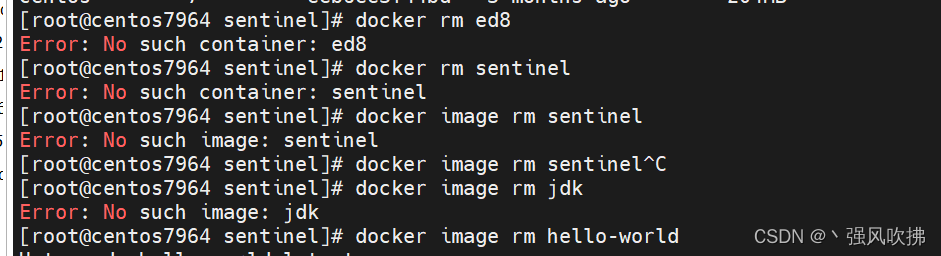
[Solved] Docker failed to delete image error: no such image: CentOS

The docker image cannot be deleted. If you view the image through docker images, it clearly exists, but it cannot be deleted.

Deletion prompt: error: no such image: XXXXXXXX

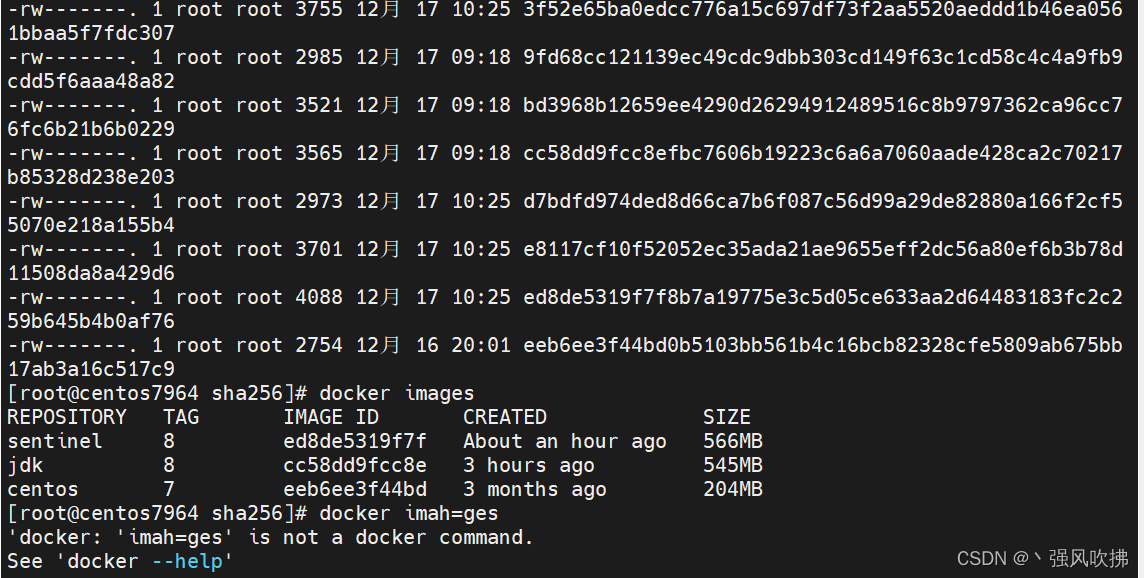
The specific screenshots are as follows:

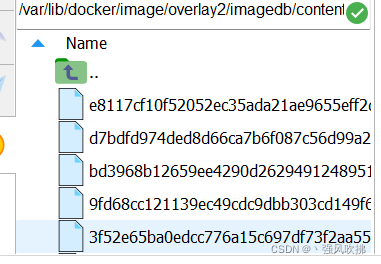
Problem solving:

get into

cd /var/lib/docker/image/overlay2/imagedb/content/sha256

This directory is all the image files in docker

Which to delete? Don’t panic, image ID in docker images can determine the image file.

Delete the file after confirmation: RM -rf + file name

After deletion, there is no in the docker images list.

[Solved] bug: error Command failed with exit code 1.

After nodemon is installed, the data is updated,

Instead, an error was reported.

I tried to search for a solution, but I couldn’t solve it,

Tell me about my own operation,

Finally, it is handled:

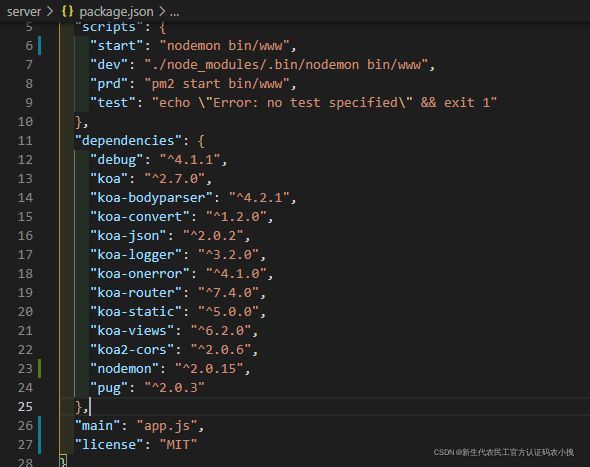
Main here I have a look. It turned into index.js

Now it’s changed to app.js, that is, the background entry file.

Then it’s all right.