Author Archives: Robins

[Solved] Fatal error C1001 internal error occurred in the compiler openmesh6 three

Internal Compiler Error VS 2015 Update1
VS2015 Update1 An error occurred when compiling the OpenMesh code:

fatal error c1001 An internal error occurred in the compiler OpenMesh6.3
(compiler file ‘f:\dd\vctools\compiler\cxxfe\sl\p1\c\special.c’, line 6211)
1> To work around this problem, try simplifying or changing the program near the locations listed above.

The reason is that codes such as this appear

OpenMesh::Vec3f normal[4];

Solution: change this kind of code to the following.

OpenMesh::Vec3f normal[4] = { {},{},{},{} };

[Solved]ERROR 1067 (42000): Invalid default value for ‘end_time‘ Mysql

1. Error message

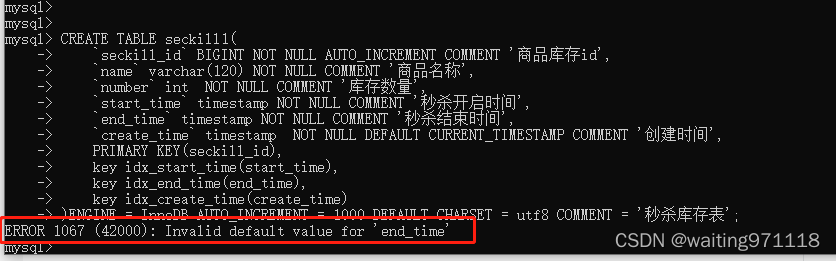
When executing the following SQL statement, an error message appears: error 1067 (42000): invalid default value for ‘end’_ time’

CREATE TABLE seckill1(
    `seckill_id` BIGINT NOT NULL AUTO_INCREMENT COMMENT 'Commodity inventory id',
     `name` varchar(120) NOT NULL COMMENT'product name',
     `number` int NOT NULL COMMENT'Stock quantity',
     `start_time` timestamp NOT NULL COMMENT'second kill start time',
     `end_time` timestamp NOT NULL COMMENT'second kill end time',
    `create_time` timestamp  NOT NULL DEFAULT CURRENT_TIMESTAMP COMMENT 'Creation time',
    PRIMARY KEY(seckill_id),
    key idx_start_time(start_time),
    key idx_end_time(end_time),
    key idx_create_time(create_time)
)ENGINE = InnoDB AUTO_INCREMENT = 1000 DEFAULT CHARSET = utf8 COMMENT = 'Spike inventory table';

The error message is as follows:

2. Solution

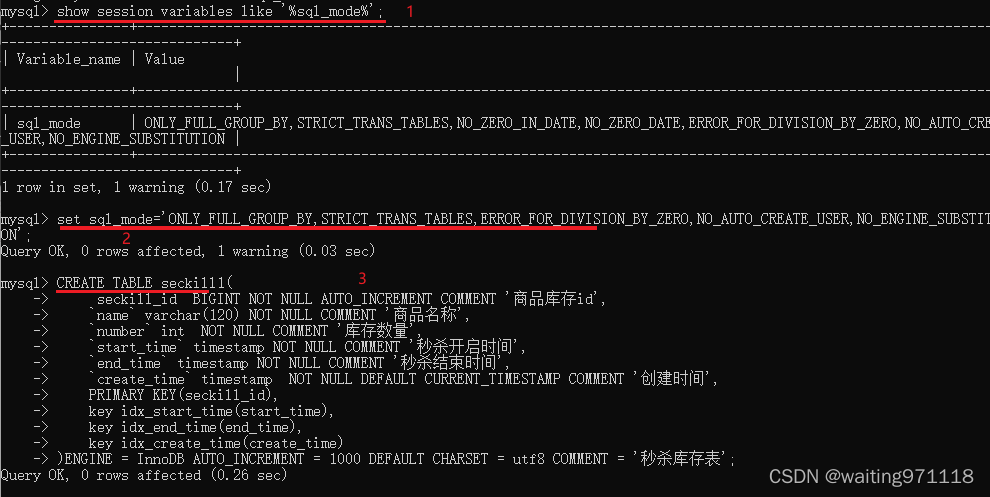
(1) View SQL_mode :

show session variables like '%sql_mode%

(2) Modify sql_mode(remove NO_ZERO_IN_DATE,NO_ZERO_DATE) :

 set sql_mode='ONLY_FULL_GROUP_BY,STRICT_TRANS_TABLES,ERROR_FOR_DIVISION_BY_ZERO,NO_AUTO_CREATE_USER,NO_ENGINE_SUBSTITUTION';

(3) Re-execute the SQL statement in 1:
the table creation success is displayed.
the screenshot of the three steps is as follows:

3. Reasons for error reporting

(1) Error explanation: the first timestamp column in the
table (that is, the start_time row in the SQL statement of 1) (if it is not declared null or the default or on update clause is displayed) will automatically assign the default current_timestamp and on update current_timestamp attributes.
the timestamp column after the first one (that is, the end_time line in the SQL statement of 1) if it is not declared null or the default clause is displayed), the default ‘0000-00-00 00:00’ (zero timestamp) will be automatically allocated, which does not meet the no_zero_date in sql_mode and an error will be reported.
(2) solution (three) Note: the solution in 2 is only for the created table
method 1: execute select @ @ sql_mode, copy the queried value, delete the no_zero_date, and then execute set sql_mode = 'modified value'. This method only takes effect in the current session
method 2: execute select @ @ global.sq first l_Mode , copy the queried value and put no in it_ZERO_Delete date and execute set global SQL_Mode = 'modified value', this method takes effect in the current service, and becomes invalid after re MySQL service
method 3: open my.In the MySQL installation directory Ini or my CNF file, add the following line,

 sql_mode = ONLY_FULL_GROUP_BY,STRICT_TRANS_TABLES,NO_ZERO_IN_DATE,ERROR_FOR_DIVISION_BY_ZERO,NO_AUTO_CREATE_USER,NO_ENGINE_SUBSTITUTION,   

Then restart mysql. This method is permanent

[Solved] ERROR: THESE PACKAGES DO NOT MATCH THE HASHES FROM THE REQUIREMENTS FILE

pip Install tensorflow Error:

ERROR: THESE PACKAGES DO NOT MATCH THE HASHES FROM THE REQUIREMENTS FILE. If you have updated the package versions, please update the hashes. Otherwise, examine the package contents carefully; someone may have tampered with them. tensorflow<1.14,>=1.13 from https://www.piwheels.org/simple/tensorflow/tensorflow-1.13.1-cp35-none-linux_armv7l.whl#sha256=6c00dd13db0791e83cb08d532f007cc7fd44c8d7b52662a4a0065ac4fe7ca18a (from mycroft-precise==0.3.0): Expected sha256 6c00dd13db0791e83cb08d532f007cc7fd44c8d7b52662a4a0065ac4fe7ca18a Got f679035a7cd96d24f826463bef208cd04f1eee50eb6023a158c05b529e17a71b

The above error shows that the expected hash value when downloading the package is not the real hash, the package is damaged during pip installation, and it may also be caused by its own network problem or the version compatibility of the Python package.
Solution: Add a --no-cahce-dir when installing the pip package to solve the problem as follows:

pip install tensorflow --no-cache-dir

[Solved] AttributeError: ‘DataParallel‘ object has no attribute ‘save‘

Error message:

trainer.model.save(self.dir, epoch, is_best=is_best)
AttributeError: 'DataParallel' object has no attribute 'save'

Source code analysis:

 trainer.model.save(self.dir, epoch, is_best=is_best)

The above code is the code before using single machine multi card parallel. My parallel code is implemented as follows:

os.environ["CUDA_VISIBLE_DEVICES"] = "3,2,1"
model = torch.nn.DataParallel(model,device_ids=[0,1]).cuda()

Cause analysis: attributeerror: ‘dataparallel’ object has no attribute ‘save‘

Under torch multi GPU training, the whole model is stored instead of the model state_Dict(), so we need to use model when calling model Module mode. After using the above modification method, the code is as follows:

 trainer.model.module.save(self.dir, epoch, is_best=is_best)

[Solved] ERROR: You don‘t have the SNMP perl module installed.

net-snmp mib2c error:

ERROR: You don't have the SNMP perl module installed.  Please obtain
this by getting the latest source release of the net-snmp toolkit from
http://www.net-snmp.org/download/ .  Once you download the source and
unpack it, the perl module is contained in the perl/SNMP directory.
See the README file there for instructions.
Solution:
apt-get install libperl-dev
apt-get install libsnmp-perl

[Solved] octave Error: -error: ‘squareThisNumber‘ undefined near line 1 column 1

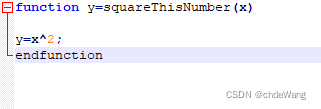
. M file name should also be capitalized: squarethisnumber m

Question 2:

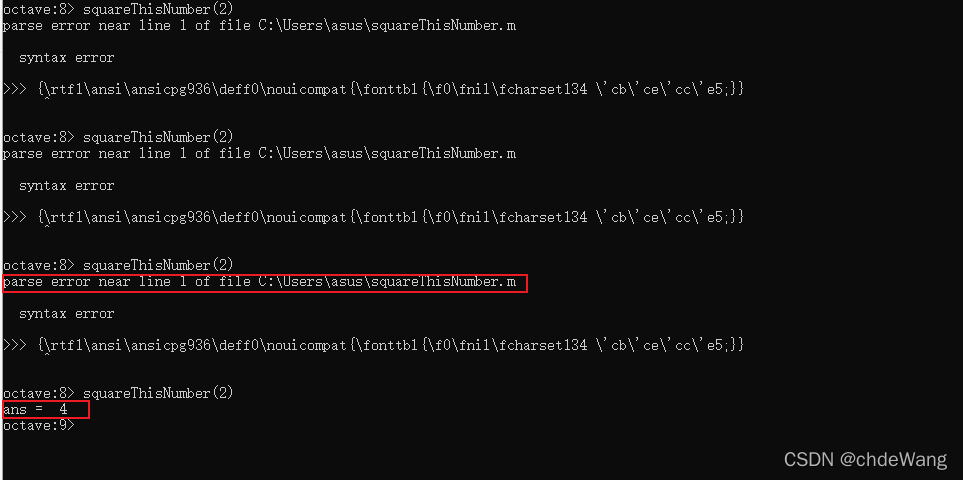
parse error near line 1 of file C:\Users\asus\squareThisNumber. m

syntax error

>>> {\rtf1\ansi\ansicpg936\deff0\nouicompat{\fonttbl{\f0\fnil\fcharset134 \’cb\’ce\’cc\’e5;}}

Solution: the WordPad program (nodepad) opens the file and finds many redundant characters. Delete them and add endfunction at the end.

[Solved] mariadb Startup Error: Job for mariadb.service failed because the control process exited with error code.

The arm architecture CentOS MariaDB starts with an error job for MariaDB service failed because the control process exited with error code.

As a branch of MySQL, MariaDB is installed differently from mysql, but the specific startup principles are similar

[root@ecs-6ab1 bin]# systemctl start mysql
Job for mariadb.service failed because the control process exited with error code.
See "systemctl status mariadb.service" and "journalctl -xe" for details.

MySQL installed on Kunpeng server (ARM Architecture) suddenly hangs up, thinking it is a problem with the configuration file. Therefore, modify the my.ini file to restart, but this problem will occur when executing systemctl start MySQL command.

    1. this error message can’t be seen in real time. The specific error is just a prompt of startup failure. However, when the installation is OK, the startup failure is generally a problem with the configuration file. Since systemctl start MySQL is a global startup method, it is displayed in/var/log/MariaDB/MariaDB There is no specific error message in the log (mariadb.log has a default configuration in my.ini under etc or in my.cnf.d folder. My configuration is in/etc/my.cnf.d/mariadb-server.cnf, which is true on my server, or there may be something wrong with my global boot configuration, and I didn’t go deep into it)
[mysqld]
datadir=/var/lib/mysql
socket=/var/lib/mysql/mysql.sock
log-error=/var/log/mariadb/mariadb.log
pid-file=/run/mariadb/mariadb.pid

If you can’t see the log, you can start the MySQL startup program to find the location where the program starts

[root@ecs-6ab1 bin]# find /usr /home -name mysqld_safe
/usr/bin/mysqld_safe

After finding the location, you can use mysqld_ Start safe

./mysqld_safe  --user=root --basedir=/var/lib/mysql  --datadir=/var/lib/mysql &

I should also introduce the problem here. After the restart, the loss of the sock leads to a startup failure. After the startup, check the log every time and solve the problem step by step
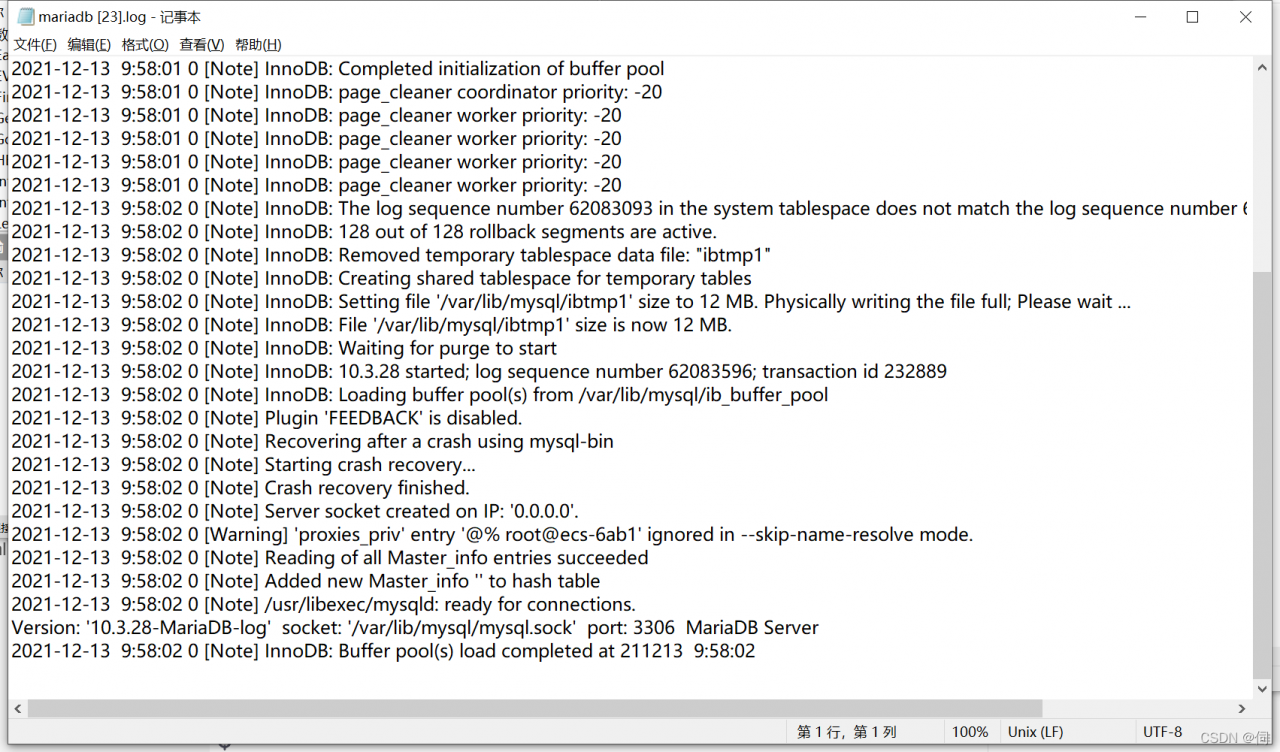
until there is no error in the log. Use the command line to connect

[root@ecs-6ab1 ~]# mysql -u root -p
Enter password: 
Welcome to the MariaDB monitor.  Commands end with ; or \g.
Your MariaDB connection id is 10
Server version: 10.3.28-MariaDB-log MariaDB Server

Copyright (c) 2000, 2018, Oracle, MariaDB Corporation Ab and others.

Type 'help;' or '\h' for help. Type '\c' to clear the current input statement.

MariaDB [(none)]> 

Success!
[Solved] electron project Package Error: spawn exe\dll ENOENT

Error after electron packaging: spawn exe enoent error solution.

Today, an error occurred when the project was running after packaging: spawn exe enoent error. When looking for a solution, I thought it should be that the referenced exe program was packaged into the app It is caused by the ASAR file, so the EXE file is not packaged into the app ASAR files should solve the problem.

I packed it with electron builder in Vue config.JS file, in Vue config.JS add the following code

pluginOptions: {
		electronBuilder: {
			builderOptions: {
				asar: true,
				asarUnpack: ['exeFiles'],//The folder where the referenced dll/exe files are stored
				extraFiles: {
					from: 'exeFiles',// the folder where the referenced dll/exe files are stored, my project is in the same directory as vue.config.js
					to: '. /exeFiles'//the location of the folder after packaging, I packaged this way before and after the reference relationship does not change, spawn code will not have to change
				},		
		}
	}

If you use the older version of Vue cli, it should be in package JSON, the principle is similar.

IDEA was Filed to Start: error launching idea (Failed to create JVM )

Failed to start idea

reason:

There is a problem with the configuration file

Solution:

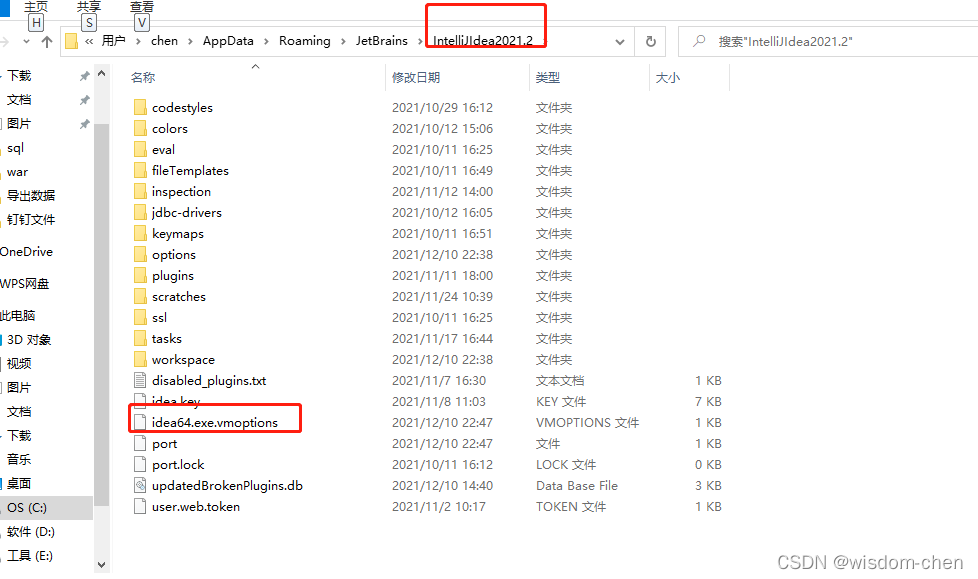
Find the path where idea loads the cache

C:\Users\chen\AppData\Roaming\JetBrains\IntelliJIdea2021.2

Set idea64 exe. The vmoptions parameter is adjusted reasonably, and the error parameters are removed.

You can start successfully!!!

[Solved] Kafka in Windows error:java. nio. file. Filesystemexception: this file is in use by another program and cannot be accessed by the process

Problem description

Kafka deployed in Windows environment hangs up after running for a period of time
view logs logs/server Log the following errors are found:

 ERROR Failed to clean up log for __consumer_offsets-44 in dir D:\kafka\kafka_2.13-2.8.0\kafkakafka_2.13-2.8.0kafka-logs due to IOException (kafka.server.LogDirFailureChannel)
java.nio.file.FileSystemException: D:\kafka\kafka_2.13-2.8.0\kafkakafka_2.13-2.8.0kafka-logs\__consumer_offsets-44\00000000000000000000.timeindex.cleaned -> D:\kafka\kafka_2.13-2.8.0\kafkakafka_2.13-2.8.0kafka-logs\__consumer_offsets-44\00000000000000000000.timeindex.swap: 另一个程序正在使用此文件,进程无法访问。

	at sun.nio.fs.WindowsException.translateToIOException(WindowsException.java:86)
	at sun.nio.fs.WindowsException.rethrowAsIOException(WindowsException.java:97)
	at sun.nio.fs.WindowsFileCopy.move(WindowsFileCopy.java:387)
	at sun.nio.fs.WindowsFileSystemProvider.move(WindowsFileSystemProvider.java:287)
	at java.nio.file.Files.move(Files.java:1395)
	at org.apache.kafka.common.utils.Utils.atomicMoveWithFallback(Utils.java:904)
	at kafka.log.AbstractIndex.renameTo(AbstractIndex.scala:210)
	at kafka.log.LazyIndex$IndexValue.renameTo(LazyIndex.scala:155)
	at kafka.log.LazyIndex.$anonfun$renameTo$1(LazyIndex.scala:79)
	at kafka.log.LazyIndex.renameTo(LazyIndex.scala:79)
	at kafka.log.LogSegment.changeFileSuffixes(LogSegment.scala:496)
	at kafka.log.Log.$anonfun$replaceSegments$4(Log.scala:2402)
	at kafka.log.Log.$anonfun$replaceSegments$4$adapted(Log.scala:2402)
	at scala.collection.immutable.List.foreach(List.scala:333)
	at kafka.log.Log.replaceSegments(Log.scala:2402)
	at kafka.log.Cleaner.cleanSegments(LogCleaner.scala:613)
	at kafka.log.Cleaner.$anonfun$doClean$6(LogCleaner.scala:538)
	at kafka.log.Cleaner.$anonfun$doClean$6$adapted(LogCleaner.scala:537)
	at scala.collection.immutable.List.foreach(List.scala:333)
	at kafka.log.Cleaner.doClean(LogCleaner.scala:537)
	at kafka.log.Cleaner.clean(LogCleaner.scala:511)
	at kafka.log.LogCleaner$CleanerThread.cleanLog(LogCleaner.scala:380)
	at kafka.log.LogCleaner$CleanerThread.cleanFilthiestLog(LogCleaner.scala:352)
	at kafka.log.LogCleaner$CleanerThread.tryCleanFilthiestLog(LogCleaner.scala:332)
	at kafka.log.LogCleaner$CleanerThread.doWork(LogCleaner.scala:321)
	at kafka.utils.ShutdownableThread.run(ShutdownableThread.scala:96)
	Suppressed: java.nio.file.FileSystemException: D:\kafka\kafka_2.13-2.8.0\kafkakafka_2.13-2.8.0kafka-logs\__consumer_offsets-44\00000000000000000000.timeindex.cleaned -> D:\kafka\kafka_2.13-2.8.0\kafkakafka_2.13-2.8.0kafka-logs\__consumer_offsets-44\00000000000000000000.timeindex.swap: 另一个程序正在使用此文件,进程无法访问。

		at sun.nio.fs.WindowsException.translateToIOException(WindowsException.java:86)
		at sun.nio.fs.WindowsException.rethrowAsIOException(WindowsException.java:97)
		at sun.nio.fs.WindowsFileCopy.move(WindowsFileCopy.java:301)
		at sun.nio.fs.WindowsFileSystemProvider.move(WindowsFileSystemProvider.java:287)
		at java.nio.file.Files.move(Files.java:1395)
		at org.apache.kafka.common.utils.Utils.atomicMoveWithFallback(Utils.java:901)
		... 20 more

reason

When the consumer offsets the log cleanup or the log file scrolls, Kafka broker will shut down because the file renaming fails. This is because cannot modify the file in use in windows.

Solution

In server In the properties configuration file:
1.Modify log retention. Hours = - 1
2.Add log at the end of the file cleaner. Enable = false
3.Restart

Suggestion

There are similar issues and PR in GitHub, but they are not merged. The author uses kafka_2.13-2.8.0 version has this problem. Kafka is not recommended for win environments.

[Solved] FLask Error: AttributeError: ‘Blueprint‘ object has no attribute ‘register_blueprint‘

Recently, a flash was deployed on alicloud, and an error was reported during startup

AttributeError: ‘Blueprint’ object has no attribute ‘register_blueprint’

I checked the location. There was an error below!

admin_bp = Blueprint('admin',__name__)
admin_bp.register_blueprint(activity_bp,url_prefix='/activity')

First of all, there is no problem running locally. When uploading to the server (CentOS 7, py39), an error is reported. Maybe it is because it is not standardized, but it should also be reported on the window. I don’t understand.

Solution:

Blueprint cannot call Method of register_blueprint(), register_Blueprint() is handed over to the app, and this line is moved to the place where the app is referenced

app.register_blueprint(activity_bp,url_prefix='/activity')

This should be no problem!

[Solved] error: ‘IEEE80211_BAND_2GHZ’ undeclared here (not in a function)

Environmental description

System: centos7 linux-3.10 0 kernel

Driver version: 00014996-rtl8192eu_linux_v5. 6.3. 1_34030_COEX20171113-0047.20190613.zip

Network card: Realtek rtl8192eu

Problem log

rtl8192EU_WiFi_linux_v5.6.3.1_34030.20190613_COEX20171113-0047/include/../os_dep/linux/ioctl_cfg80211.h:414:27: error: ‘IEEE80211_BAND_2GHZ’ undeclared here (not in a function)
 #define NL80211_BAND_2GHZ IEEE80211_BAND_2GHZ
                           ^

Solution:

Modify IOCTL_cfg80211.h

 #if (LINUX_VERSION_CODE >= KERNEL_VERSION(2, 6, 26)) && (LINUX_VERSION_CODE < KERNEL_VERSION(4, 7, 0))
+#define IEEE80211_BAND_2GHZ 0 //add by wellnw 20211213
 #define NL80211_BAND_2GHZ IEEE80211_BAND_2GHZ
 #define NL80211_BAND_5GHZ IEEE80211_BAND_5GHZ
 #if (LINUX_VERSION_CODE >= KERNEL_VERSION(3, 6, 0))