Author Archives: Robins

[Solved] Maven compile error: Blocked mirror for repositories

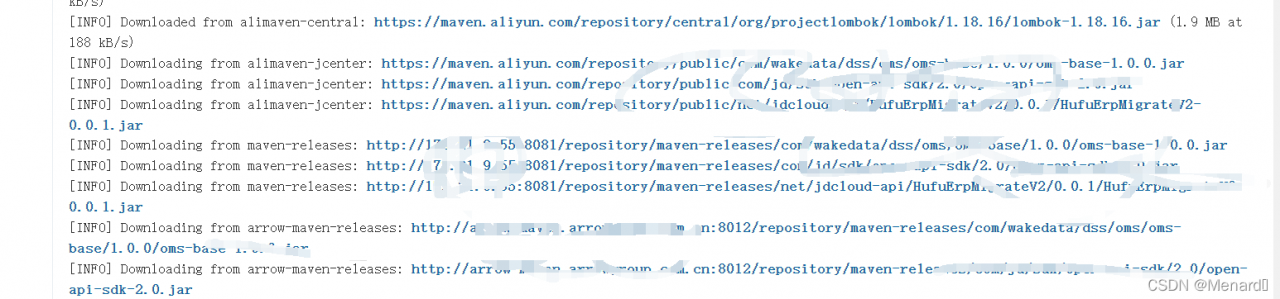
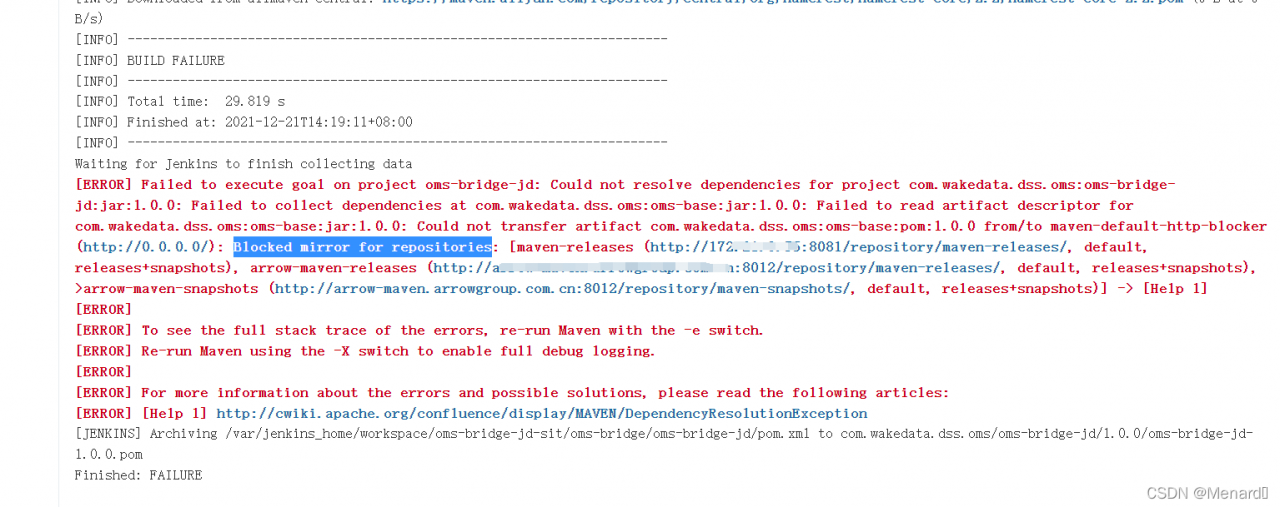
1. The following error is reported when compiling with Maven. The developer uses the same setting locally XML file compilation is OK

Could not resolve dependencies for project
Could not transfer artifact
Blocked mirror for repositories

2. The solution is to find the data because it is found in 3.8.1. In later versions, all HTTP protocol repositories are lost in the block, which can be solved by setting the values of mirror of and blocked attributes in the mirror to false. In consideration of setting XML is a general-purpose file, so we do not intend to modify it, but reduce the Maven version to 3.6 three

3. After reducing the version, rebuild and solve the problem

How to Solve HiveServer2 & Beeline Error

1. Hive hiveserver2 starts, the process exists, but the exception of port 10000 is not found?

Add a configuration in hive-site.xml and restart the hiveserver2 service

<property>
    <name>hive.metastore.event.db.notification.api.auth</name>
    <value>false</value>
</property>

2. Beeline can’t connect to hiveserver2, report to org apache.hadoop.security.authorize.AuthorizationException?

Permission problem. Entity users such as root are not allowed to access

Add the following configuration in core-site.xml, distribute the configuration, remember to distribute , restart Hadoop, and connect again

<property>
    <name>hadoop.proxyuser.root.hosts</name>
    <value>*</value>
</property>
<property>
    <name>hadoop.proxyuser.root.groups</name>
    <value>*</value>
</property>

[Solved] scikit-learn Error: ModuleNotFoundError: No module named ‘sklearn.utils.linear_assignment_’

Record some scikit-learn errors

The questions are as follows:

ModuleNotFoundError: No module named ‘sklearn. utils. linear_ assignment_’

Solution:
the sciki-learn version here is too high (it was 1.0.1 before, and it should be made into 0.19.X or before).
my operation is directly in the compiler In (IDE), set -> project: XXXXXX -> Python interpreter, and directly reinstall the corresponding version.

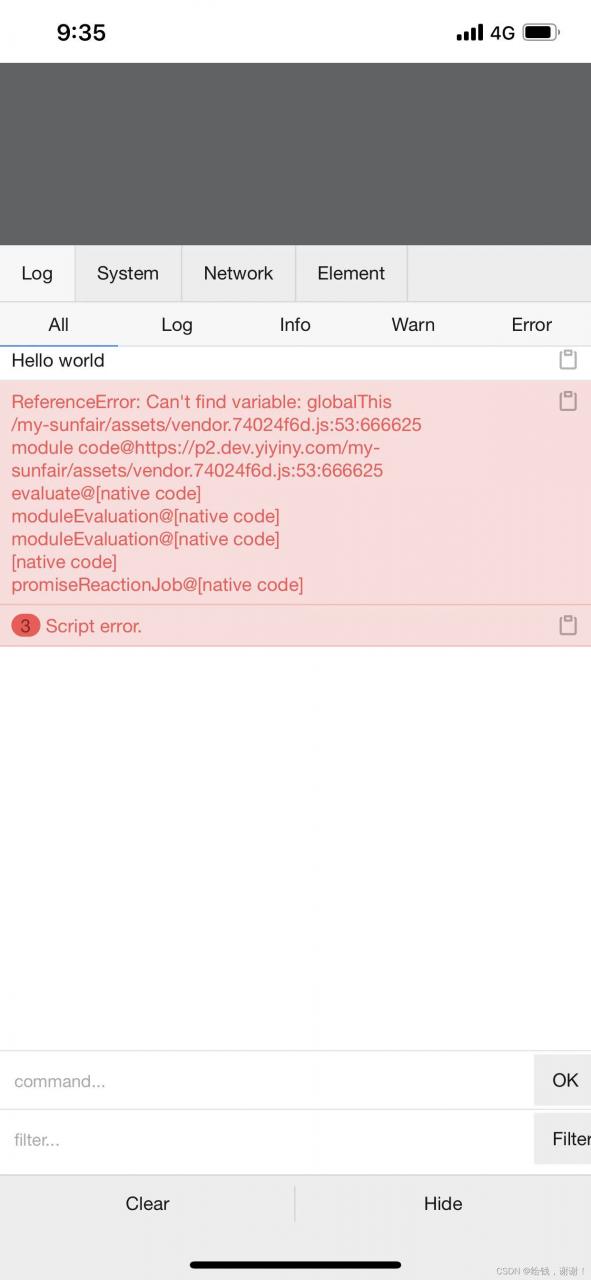
[Solved] Vue3 Error: Cant find variable: GlobalThis

After the project is packaged, use a browser with a lower version to open it and report an error

Solution
Vue config.js

import { defineConfig } from 'vite';
import vue from '@vitejs/plugin-vue';
import legacy from '@vitejs/plugin-legacy';

// https://vitejs.dev/config/
export default defineConfig({
  base: './',
  plugins: [
    vue(),
    legacy({
      targets: ['> 1%, last 1 version, ie >= 11'],
      additionalLegacyPolyfills: ['regenerator-runtime/runtime'],
    }),
  ],
});

How to Solve nacos Startup Error and Connect to MYSQL

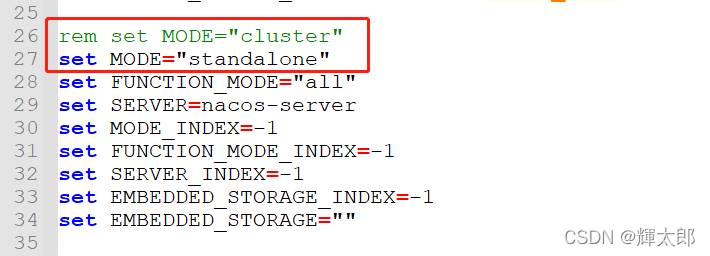
Error reason for Nacos startup: the default configuration of Nacos is cluster startup, which can be modified to stand-alone startup (after Nacos 1.3.2, the default mode of Nacos is cluster mode).

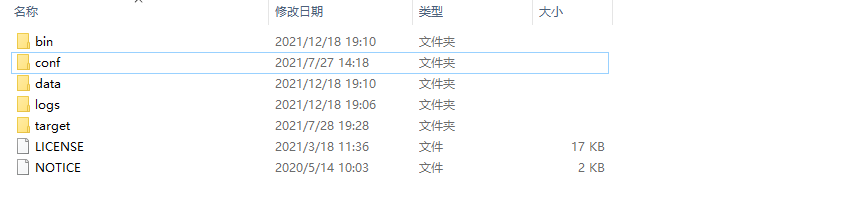
The Nacos directory structure is as follows (the version of Nacos I use is 2.0.3):

1.open the bin directory and modify startup.com script

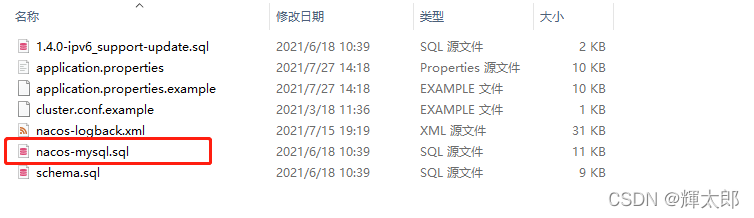
2.connects to MySQL, executes the SQL statement

opens the conf folder, creates a Nacos database, executes the following script

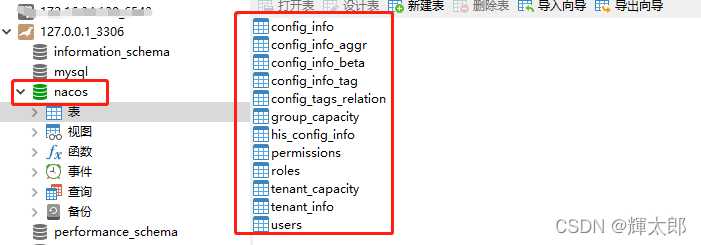
after execution, the results are as follows

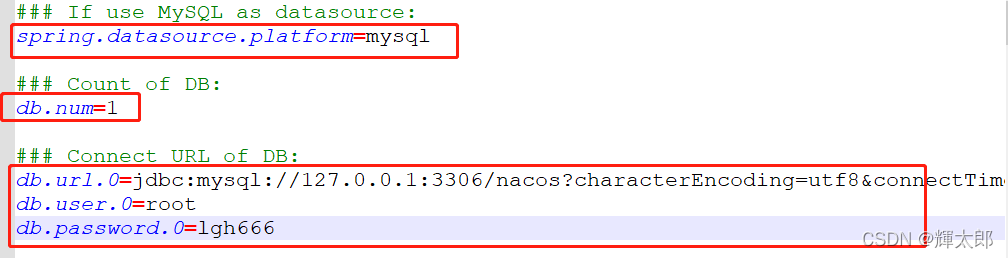
3.opens the conf folder, modifies the configuration information

finds the following configuration in the conf folder and modifies the marked configuration items

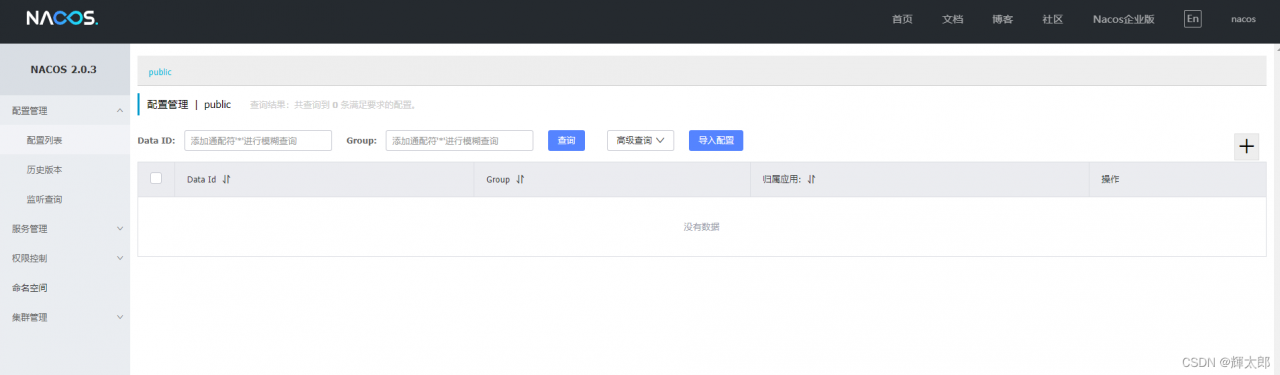
test access 127.0 0.1:8848/Nacos account/password: Nacos/Nacos successfully opened the following page

The Java class generated by protocol reports an error: cannot access

The Java class generated by protocol reports an error:

The generated template class reported an error. It was said on the Internet that the version was wrong, but I was sure that the version used was correct. Later, it was checked that a proto was introduced into the command_Path causes the generated template class to report an error

Error command:

protoc --proto_path=D:\000\hadoop-2.7.2-src\hadoop-yarn-project\hadoop-yarn\hadoop-yarn-api\src\main\proto\ --proto_path=D:\000\hadoop-2.7.2-src\hadoop-common-project\hadoop-common\src\main\proto\ --proto_path=.\ --java_out=.\ .\*.proto

Change to the following command:

protoc --proto_path=D:\000\hadoop-2.7.2-src\hadoop-common-project\hadoop-common\src\main\proto\  --proto_path=.\ --java_out=.\ .\*.proto

One less — proto_Path, and then the problem is solved

How to Solve Keras calls plot_model error

1. Error information

When building the neural network model, you can call plot in keras_ The model module draws a schematic diagram of the model to facilitate the adjustment of the model structure:

from tensorflow.keras.models import Model
from tensorflow.keras.utils import plot_model
model = Model(dense_inputs+sparse_inputs, output_layer)
plot_model(model, "fm_model.png", show_shapes=True)

As a result, the following error messages appear:

(‘Failed to import pydot. You must pip install pydot and install graphviz (ht

tps://graphviz.gitlab.io/download/ ), ‘, ‘for pydotprint to work.’)

Understand the error message: the installation is complete without pydot and graphviz packages

2. Solutions

2.1 installation of graphviz package

pip install graphviz

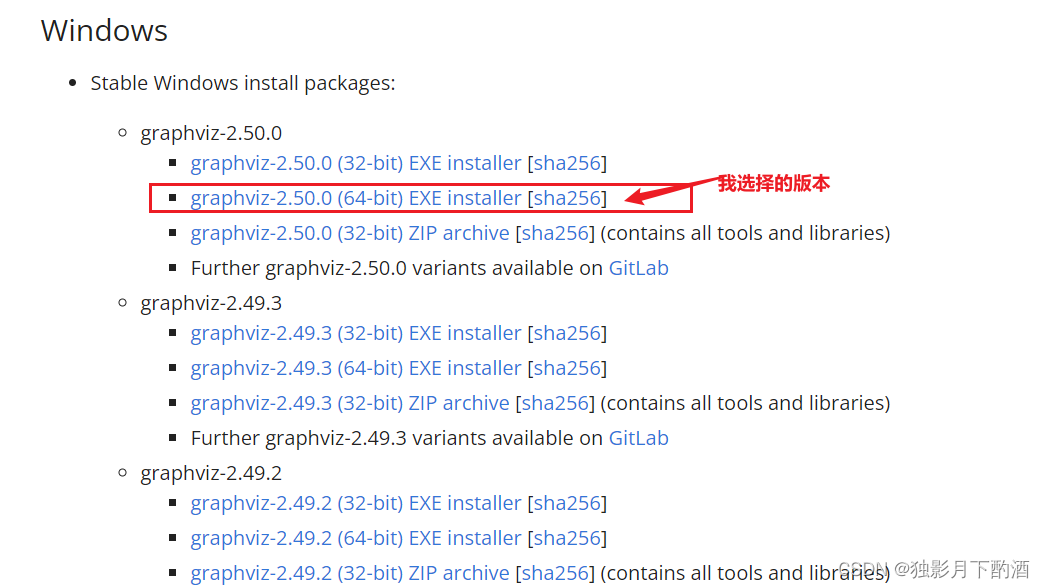
2.2 download and install graphviz Exe file and install

In Windows Environment

Download address: https://graphviz.gitlab.io/download/

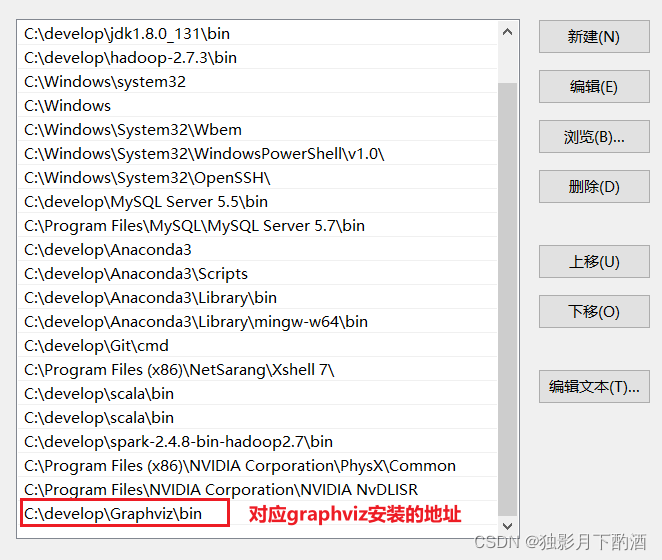
2.3 configuring environment variables for graphviz

2.4 installing pydot package

pip install pydot-ng

2.5 restart development tools

Restart the IDE or other development tools (Jupiter notebook) with immediate effect.

3. Summary

1. Installing pydot and graphviz packages directly according to the error message does not work

2. You need to go to the website to download the corresponding EXE file or zip file. After installation, specify the environment variables

3. Don’t forget to restart your ide or other development tools

How to Solve Junit Unit Test Error: “No runnable methods“

Abnormal

The errors reported by JUnit unit test are as follows:

java.lang.Exception: No runnable methods

	at org.junit.runners.BlockJUnit4ClassRunner.validateInstanceMethods(BlockJUnit4ClassRunner.java:191)
	at org.junit.runners.BlockJUnit4ClassRunner.collectInitializationErrors(BlockJUnit4ClassRunner.java:128)
	at org.junit.runners.ParentRunner.validate(ParentRunner.java:416)
	at org.junit.runners.ParentRunner.<init>(ParentRunner.java:84)
	at org.junit.runners.BlockJUnit4ClassRunner.<init>(BlockJUnit4ClassRunner.java:65)
	at org.junit.internal.builders.JUnit4Builder.runnerForClass(JUnit4Builder.java:10)
	at org.junit.runners.model.RunnerBuilder.safeRunnerForClass(RunnerBuilder.java:59)
	at org.junit.internal.builders.AllDefaultPossibilitiesBuilder.runnerForClass(AllDefaultPossibilitiesBuilder.java:26)
	at org.junit.runners.model.RunnerBuilder.safeRunnerForClass(RunnerBuilder.java:59)
	at org.junit.internal.requests.ClassRequest.getRunner(ClassRequest.java:33)
	at org.junit.internal.requests.FilterRequest.getRunner(FilterRequest.java:36)
	at com.intellij.junit4.JUnit4IdeaTestRunner.startRunnerWithArgs(JUnit4IdeaTestRunner.java:50)
	at com.intellij.rt.junit.IdeaTestRunner$Repeater.startRunnerWithArgs(IdeaTestRunner.java:33)
	at com.intellij.rt.junit.JUnitStarter.prepareStreamsAndStart(JUnitStarter.java:221)
	at com.intellij.rt.junit.JUnitStarter.main(JUnitStarter.java:54)

error code

import org.junit.Test;

public class Test01 {

    @Test
    public void test(){
        System.out.println("hello world");
    }
}

reason

There is no problem with the code @ test annotation is placed on the method, and the @test annotation is also from the package org.junit.Test

Simulate the environment where the problem code occurs: Maven project, with a main/Java/test01.Java and test/Java/test01.Java class
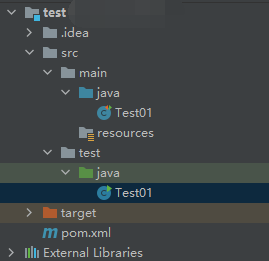
main/java/Test01.java

import org.junit.Test;

public class Test01 {
    @Test
    public void test01() {
        System.out.println("hello world - main/java/Test01.java");
    }
}

test/java/Test01.java

public class Test01 {
    public static void main(String[] args) {
        System.out.println("hello world - test/java/Test01.java");
    }
}

To solve the above problems, the following conditions must be met:

1.The same path. It means that the path of the class must be at the same level. If the test/java/Test01.javaand mian/java/Test01.javais the same level, the test/java/Test01.javaand mian/java/hello/Test01.javais not the same level , and there will be no conflict.
2.Same class name. Refer to the same class name in the same path as test/java/Test01.javathe main/java/Test01.javasame path and is both the name of the same class, test/java/Test02.javawith the main/java/Test01.javaconflict although the same path but different class name, it will not happen.
3.Use @Testcomments or not. In the case where the path and class name are the same, if main/java/Test01.javathere is an @Testannotated method in it, and test/java/Test01.javathere must be no @Testannotated method in it, this conflict will occur. If there is an @Testannotated method and the method name is different, it will be reported to use Junit Unit test error “No tests found matching Method test01(Test01) from ClassRequest@5387f9e0” .

After the above conditions are met, the above error will be reported by executing the test method with @test annotation under main/Java .

Solution:

Make their class paths different.

Make their class names different

Under test/Java, there must be methods using @test annotations

In short, it is recommended not to write test methods with @test comments under main/Java, let alone conflict them.

DingDing Error: missing mainframe dll [How to Solve]

Repair steps:
1. Press “windows logo key + X”, Start Windows PowerShell (administrator) Enter the command “auto repair system
2. Dism/online/cleanup image/scanhealth” to scan all system files and compare them with the official system files to scan for inconsistencies in the computer
3. The command dism/online/cleanup image/checkhealth must be used when the system file is found to be damaged after the previous command is executed
4. Dism/online/cleanup image/restorehealth this command restores those different system files into official system source files
5. Restart after completion. No matter whether the above is successful or not, type the following command: SFC/scannow

Jenkins error: exception message 137

ERROR: Exception when publishing, exception message [Exec exit status not zero. Status [137]]
Build step 'Send files or execute commands over SSH' changed build result to UNSTABLE
Finished: UNSTABLE

At present, there is no better information to support this error. Now record it. Due to too many execution script directories, try to put the script under the remote directory of the remote server