Author Archives: Robins

[Solved] Compile Error: AAPT: error: resource android:attr/lStar not found

Question

When using a third-party library, an error is reported during compilation

C:\Users\Administrator\.gradle\caches\transforms-2\files
2.1\b29f469d834fe6ac53c0c0e264e4ef98\core-1.7.0\res\values\values.xml
:105:5-114:25: AAPT: error: resource android:attr/lStar not found.

reason

Compatibility problems have caused the project to be compiled. However, the core-1.7.0 version is used in the third party library and core-1.6.0 is used in the project.

Solution:

Add the following code above dependencies{} in build.gradle

configurations.all {
    resolutionStrategy {
        force 'androidx.core:core:1.6.0'
    }
}

dependencies {
}

[Solved] dbeaver Connect clickhouse Error: Unexpected driver error occurred while connecting to the database

Unexpected driver error occurred while connecting to the database when dbeaver is used to connect to the Clickhouse;

First:

The probability is because the Clickhouse configuration file/preprocessed_configs/config.xml file

<listen_host>::</listen_host>

In the annotation state, unlock the annotation.

Second:

In my personal case, I started the clikehouse image with the docker container

Before starting the container:

docker run -d --name ck-server --network=ck_net --ulimit nofile=262144:262144 --volume=$HOME/some_clickhouse_database:/var/lib/clickhouse yandex/clickhouse-server

Replace with:

docker run -d --name ck-server --ulimit nofile=262144:262144  -p 8123:8123 -p 9000:9000 -p 9009:9009 --volume=$HOME/Documents/ck2_database:/var/lib/clickhouse yandex/clickhouse-server

The test connection is successful.

[Solved] Error creating bean with name ‘enableRedisKeyspaceNotificationsInitializer‘ defined in class path re

Check the database configuration of redis

1. It may also be the configuration of local port number

2. Test whether the redis link can be tested

3. Is the effective address of the environment consistent with the current database address

Warning: for items that can be started normally, please do not modify the configuration and comments of the class where the startup item is located!

[Solved] CMake Error: The current CMakeCache.txt directory is different than xxx

CMake Error: The current CMakeCache.txt directory xxx/CMakeCache.txt
is different than the directory
xxx where CMakeCache.txt was created. This may result in binaries being
created in the wrong place. If you are not sure, reedit the
CMakeCache.txt CMake Error: The source
“xxx/CMakeLists.txt”
does not match the source
“xxx/CMakeLists.txt”
used to generate cache. Re-run cmake with a different source
directory.


You copied the project file, but the cache file in the build still retains the previous information. Just delete the build folder and recompile.

[Solved] ./configure: error: the HTTP rewrite module requires the PCRE library

report errors

./configure: error: the HTTP rewrite module requires the PCRE library.

Solution:

Install prce
official website: https://ftp.pcre.org/pub/pcre/

sudo wget https://udomain.dl.sourceforge.net/project/pcre/pcre/8.45/pcre-8.45.tar.gz
sudo tar -zxvf pcre-8.45.tar.gz
cd pcre-8.45
sudo ./configure
sudo make && make install

Error:
configure: error: Invalid C++ compiler or C++ compiler flags

yum install -y gcc-c++

[Solved] bushi RuntimeError: version_ <= kMaxSupportedFileFormatVersion INTERNAL ASSERT FAILED at /pytorch/caffe2/s

Error Messages:

RuntimeError: version_ <= kMaxSupportedFileFormatVersion INTERNAL ASSERT FAILED at /pytorch/caffe2/serialize/inline_container.cc:132, please report a bug to PyTorch. Attempted to read a PyTorch file with version 3, but the maximum supported version for reading is 2. Your PyTorch installation may be too old. (init at /pytorch/caffe2/serialize/inline_container.cc:132)
frame #0: c10::Error::Error(c10::SourceLocation, std::string const&) + 0x33 (0x7fdcd0189193 in /home/a430/intel/intelpython3/envs/zayn/lib/python3.6/site-packages/torch/lib/libc10.so)
frame #1: caffe2::serialize::PyTorchStreamReader::init() + 0x1f5b (0x7fdcd33119eb in /home/a430/intel/intelpython3/envs/zayn/lib/python3.6/site-packages/torch/lib/libtorch.so)
frame #2: caffe2::serialize::PyTorchStreamReader::PyTorchStreamReader(std::string const&) + 0x64 (0x7fdcd3312c04 in /home/a430/intel/intelpython3/envs/zayn/lib/python3.6/site-packages/torch/lib/libtorch.so)
frame #3: <unknown function> + 0x6c53a6 (0x7fdd1b2423a6 in /home/a430/intel/intelpython3/envs/zayn/lib/python3.6/site-packages/torch/lib/libtorch_python.so)
frame #4: <unknown function> + 0x2961c4 (0x7fdd1ae131c4 in /home/a430/intel/intelpython3/envs/zayn/lib/python3.6/site-packages/torch/lib/libtorch_python.so)
<omitting python frames>

Some people say there is a problem with the torch version. My torch version is 1.4.0, try upgrading to 1.6.0, torchvision was upgraded to 0.7.0, this problem will be reported:

RuntimeError: Attempting to deserialize object on a CUDA device but torch.cuda.is_available() is False. If you are running on a CPU-only machine, please use torch.load with map_location=torch.device('cpu') to map your storages to the CPU.

Just follow the hint and add map_location=torch.device(‘cpu’) when loading the model, as follows:
best_model = torch.load("../weights/September01-Unet-se_resnext50_32x4d/checkpoint.pth.tar", map_location=torch.device('cpu'))

IE8 browser Webloader will always go uploaderror and report error: http

When using Baidu webloader, the IE8 browser will always use the uploaderror when debugging

uploader.on( 'uploadError', function( file,reason ) {
     alert(reason) ;
});

The reason error is http. The reason is:
the reason why JSON is returned when it is returned in the background.

The backend of webuploader cannot return json, convert json to string type, take com.alibaba.fastjson.JSONObject as an example,
com.alibaba.fastjson.JSONObject.toJSONString([json or object data]);

[Solved] Eclipse Update Error: An error occurred while uninstalling session context was…

When updating Eclipse, the following error was reported:

An error occurred while uninstalling session context was:
(profile=D__…_…_eclipse_jee-2021-09_eclipse, phase=org.eclipse.equinox.internal.p2.engine.phases.Uninstall, operand=[R]org.eclipse.platform.ide.executable.win32.win32.x86_64 4.21.0.I20210906-0500 --> null, action=org.eclipse.equinox.internal.p2.touchpoint.natives.actions.CleanupzipAction).
Backup of file D:…eclipse.exe failed.
Can not remove : D:…eclipse.exe


Solution:

    1.Run eclipse and Rename eclipse.exe to eclipse.exe.back
    2.Run updates
    3.Updates executed successfully

简而言之就是在启动eclipse后,再把eclipse exe重命名为eclipse.exe.back然后更新。
希望能帮到更新时也有报此错误的童鞋!

[Solved] Error creating bean with name ‘mvcContentNegotiationManager‘: Lookup method resolution failed

Recently, I encountered various strange exceptions when I used idea to build an aggregation project. Here is an exception reported by the operation of its sub module:

The prompt of exception information is:

Error creating bean with name ‘mvcContentNegotiationManager’: Lookup method resolution failed; nested exception is java.lang.IllegalStateException: Failed to introspect Class [org.springframework.web.accept.ContentNegotiationManagerFactoryBean] from ClassLoader [sun.misc.Launcher$ AppClassLoader@18b4aac2 ]

Solution 1:

Check whether the POM file of the sub module depends on the parent class. Of course, many people will find that when wearing the submodule, the POM file of the sub module will automatically depend on the parent class (as shown in the figure below)
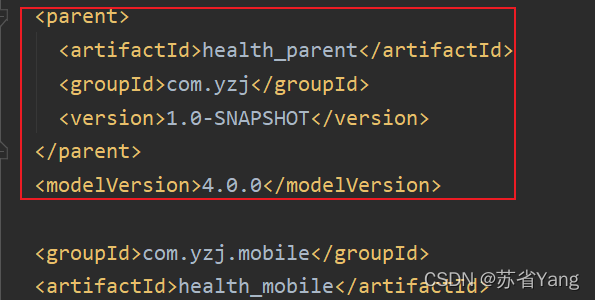
If the dependency in the above figure is not automatically generated after inspection, and you have the same exception as me, then the parent project dependency is added to solve the exception with a high probability

After consulting relevant posts on the Internet and repeated experiments for many times, I found that:

This bug is because we created a module with the same name before, and then we removed it. Then we automatically generate webapp module through the skeleton, so that the module generated by the skeleton will completely overwrite your original POM file!!!

Unfortunately, you need the parent project dependency to start the project, then you will have this bug!

The safest and most reliable solution to avoid problem reproduction: check the dependency of POM file every time you create a sub module. If not, solve it manually

Of course, there are various online solutions, but I have tried and found that it can temporarily solve the problem, but it will still be overwritten the next time I use the skeleton to generate a module with the same name

Solution 2 (slightly reliable):

Setting — build — Maven — ignored files, cancel the ignored POM file, and the parent project dependency will be automatically added!
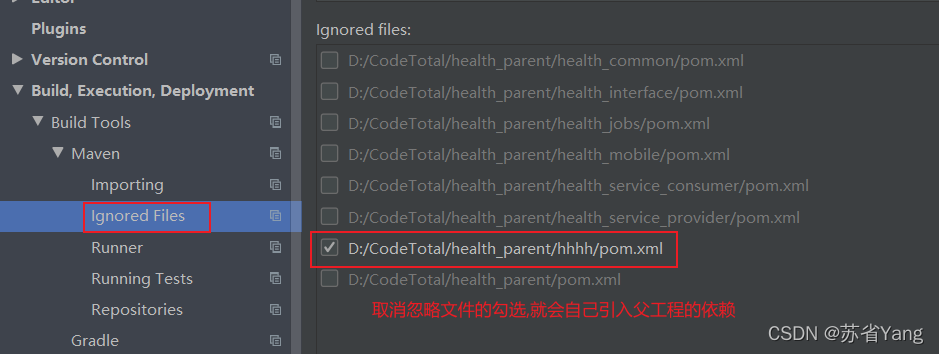
Summary:

The root cause is that we have created modules with the same name before, but they are not really removed There is still a lot of information about deleting modules in the idea, so when creating a new module, the idea will automatically ignore the new module with the same name we wrote

Of course, a large part of the impact is because we use automatic skeleton generation!