There is a mature Django project. After it is opened locally, an error is reported: importerror: couldn’t import Django Are you sure it’s installed and available on your PYTHONPATH environment variable? Did you forget to activate a virtual environment?
solution step 1: because this Django project uses python2.7. My local configuration environment variable is 3.7.7. After importing the Django project locally, the python compiler has been modified to 2.7
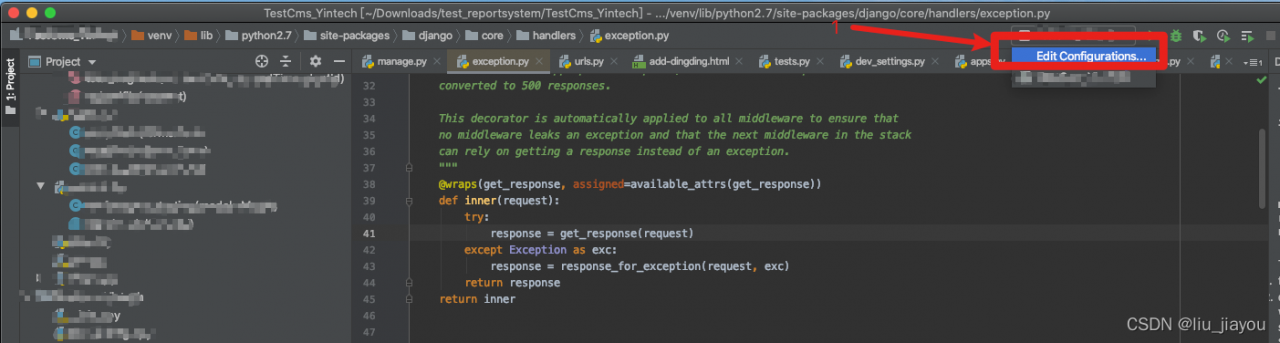
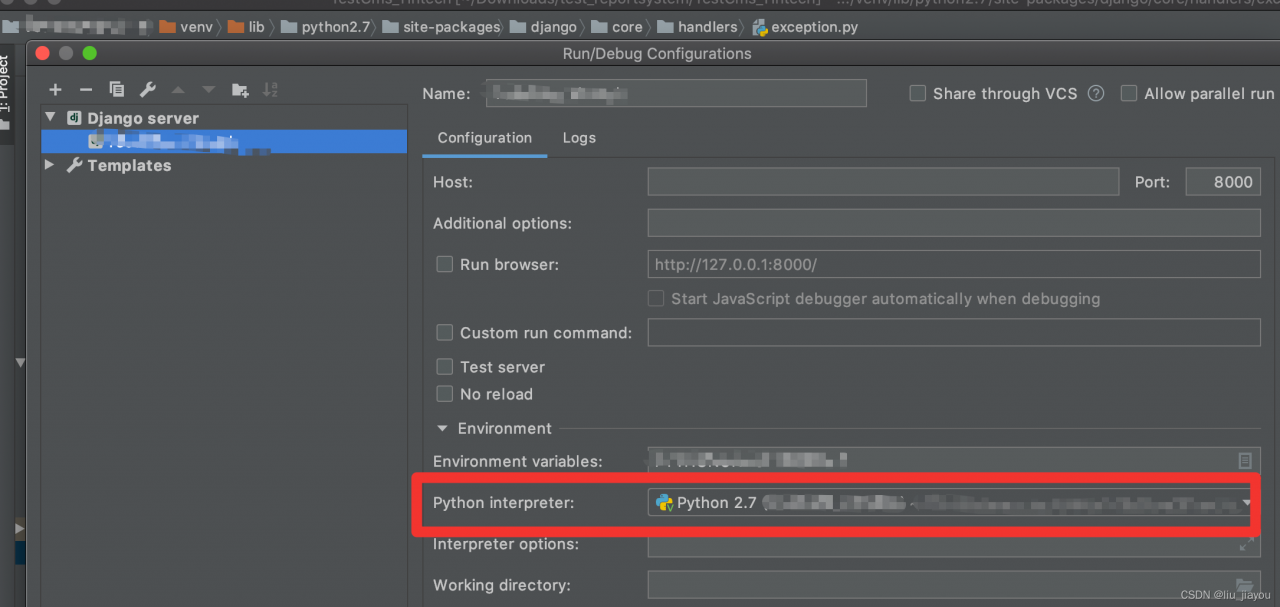
but an error is still reported after execution
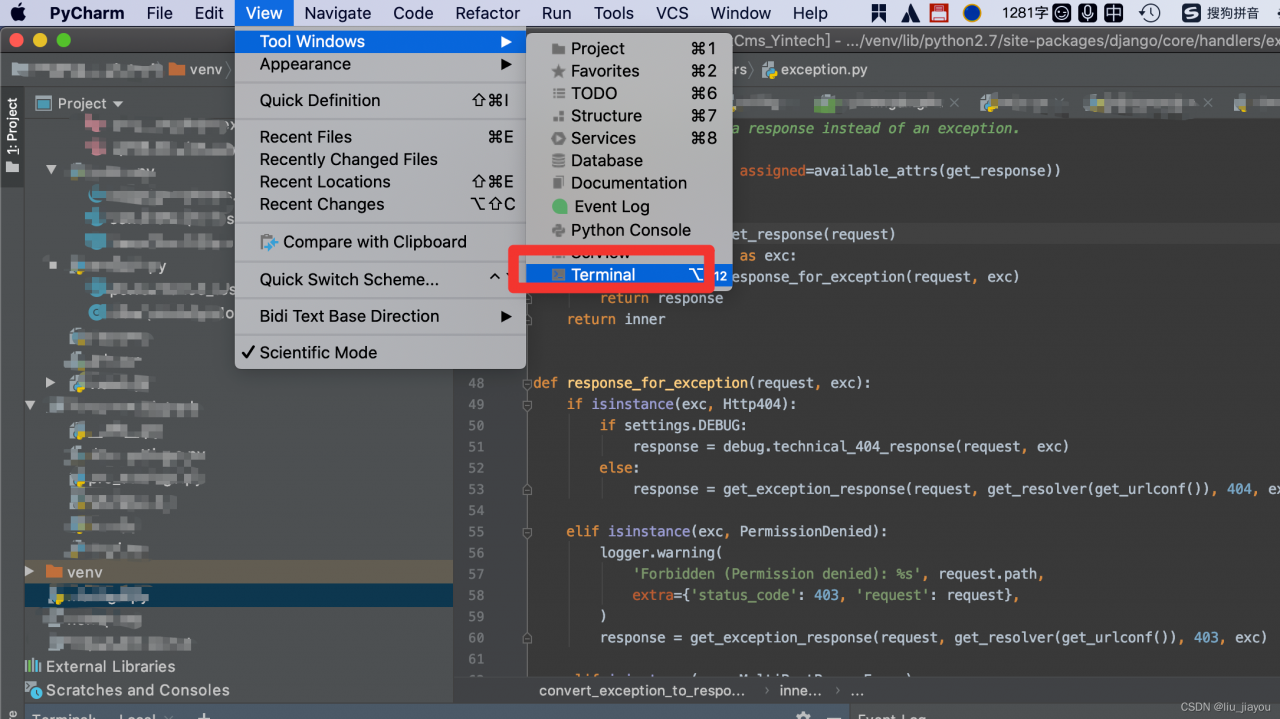
solution step 2: open the teminal terminal of pycharm
execute the command: source venv/bin/activate
start the Django project: Python manage Py runserver
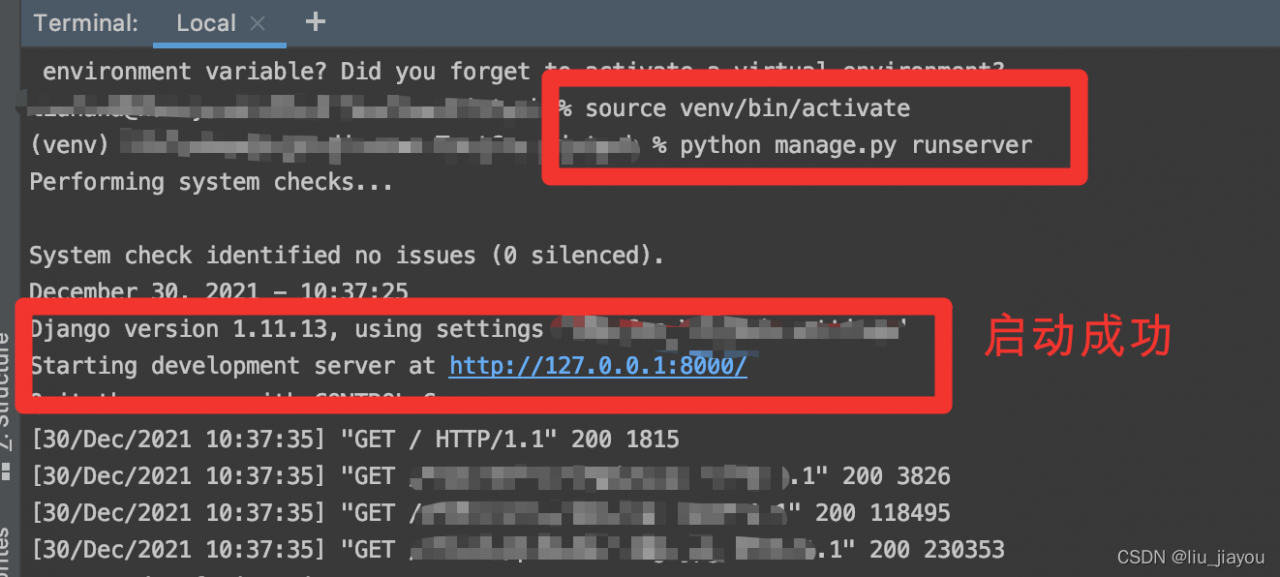
the Django project was started successfully and the problem was solved perfectly.
Author Archives: Robins
[Solved] QT error: error: undefined reference to ` VTable`
Question:
QT compilation error:
error: undefined reference to `vtable ...`
reason:
1.Qt uses signals and slots to implement communication features.
2.Signals and slots can be used when the class is derived from QObject and the Q_OBJECT macro is added to the header file.
3.When Q_OBJECT is added to the class header file QtCreator will automatically create a moc_***.cpp file that implements the code for signal and slot communication.
4.However, sometimes when we create a class through QtCreator without selecting the IDE option to derive it from the QObject class, but add it later, QtCreator will not automatically create the moc_***.cpp file. In this case it will report an error: undefined reference to `vtable for ***.
Solution:
According to various online methods, it can not be solved, nor can rebuild
mine is a small project. Just delete the build-XXX folder and rebuild it.
[Solved] Could not resolve placeholder ‘XXX‘ in value “${XXX}“
Problem overview:
The code is determined to be bug-free, but it cannot run after switching to a new environment or git from a remote warehouse.

Development environment:
IDEA
reason:
Because idea may have problems recognizing folder types. Especially when there are many switching spaces, GIT codes and new modules. We just need to set the folder type correctly.
Solution:
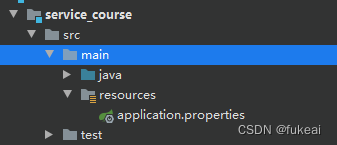
Set the Resources folder as a resource folder. If there are problems with other folders, the same is true.

After setting, the folder icon changes, indicating success.
[Solved] The Bean Validation API is on the classpath but no implementation could be found
Question
When starting the springboot service, the service reports an error. The specific error information is as follows:
Description:
The Bean Validation API is on the classpath but no implementation could be found
Action:
Add an implementation, such as Hibernate Validator, to the classpath
reason:
Dependency in POM
<dependency>
            <groupId>org.hibernate.validator</groupId>
            <artifactId>hibernate-validator</artifactId>
            <version>7.0.0.Final</version>
        </dependency>
And
<dependency>
            <groupId>com.alibaba.cloud</groupId>
            <artifactId>spring-cloud-starter-alibaba-sentinel</artifactId>
            <version>2.2.6.RELEASE</version>
        </dependency>
Conflict.
Solution:
The dependency is deleted because it is not used in the service
<dependency>
            <groupId>org.hibernate.validator</groupId>
            <artifactId>hibernate-validator</artifactId>
            <version>7.0.0.Final</version>
        </dependency>
Restart the service normally.
VScode debug error: configured debug type ‘Python’ is not supported
When using vscode to debug, an error is reported in the pop-up window:
Configured debug type 'python' is not supported
Refer to the reference website: https://github.com/microsoft/vscode/issues/136712
The measured solution is metaphysical, as follows:
Delete Jupiter and python in vscope extensions, and then reinstall them; Close all vscodes; (this step is very important.) Open vscode again and you can debug normally.
[Solved] Asp.Net Core IIS Error: HTTP Error 500.30 – ASP.NET Core app failed to start
The error message prompts you to check whether there is an error message in the system event log
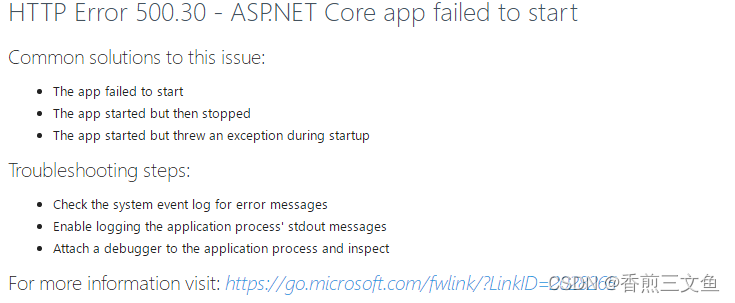
check the event log and find
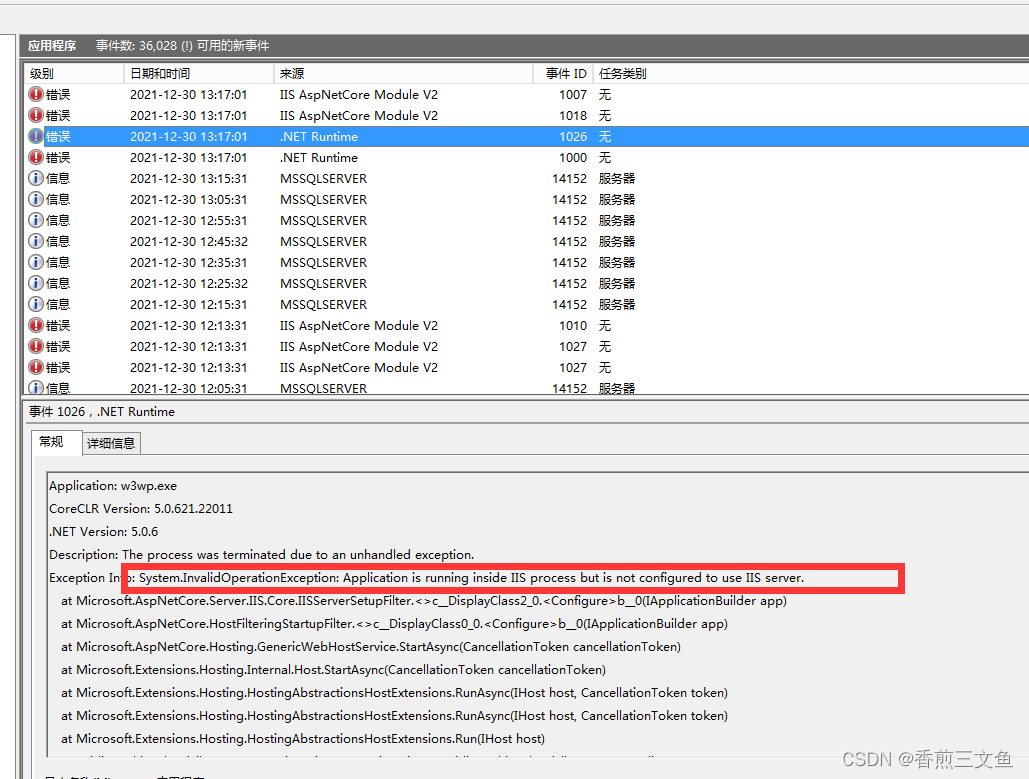
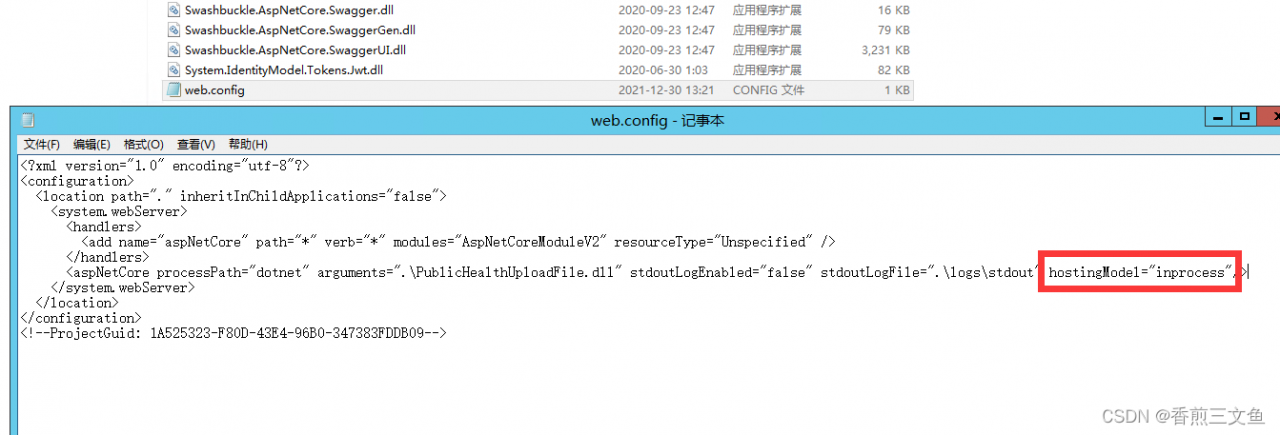
according to ASP Net core module – Microsoft docs shows that the default configuration is in-process hosting, which is set to inprocess. It shows that the specified web project is out of process hosting
Solution:
only the published web Change hostingmodel = “inprocess” in config file to hostingmodel = “outofprocess” or delete hostingmodel = “inprocess” directly.
[Solved] MYSQL Start Project Error: this is incompatible with sql_mode=only_full_group_by
1. Error information

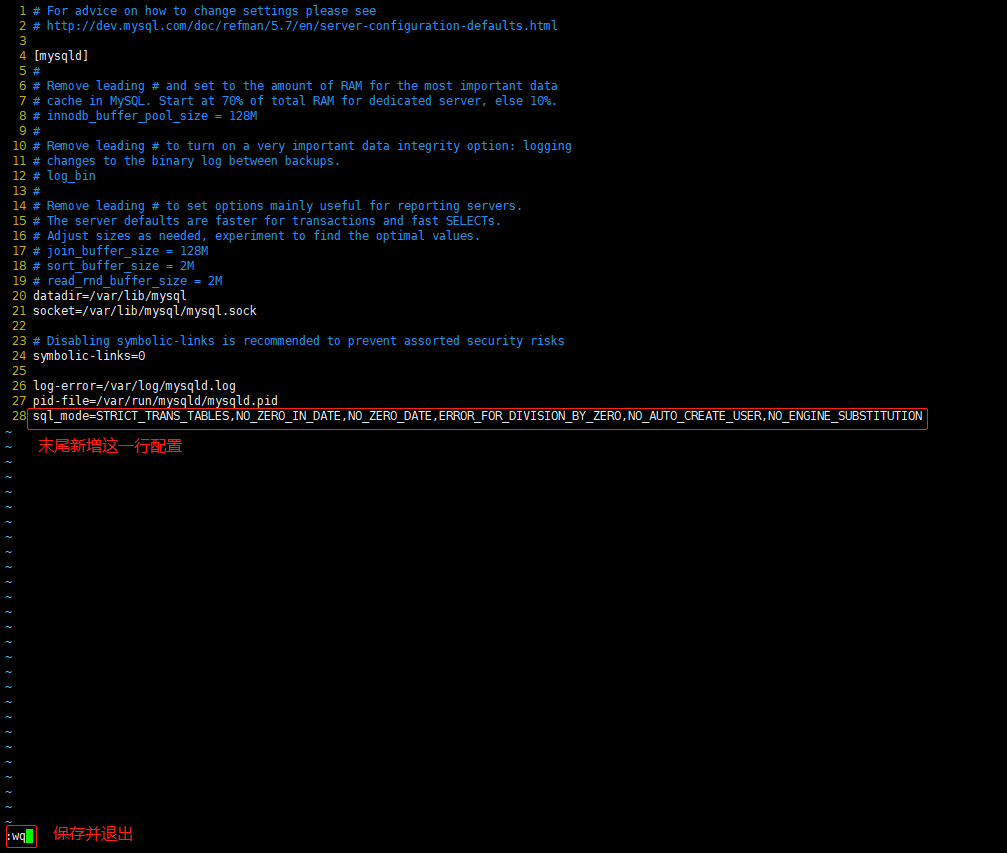
2. Edit file
# open the configuration file
vim /etc/my.cnf

# add this line in the end
sql_mode=STRICT_TRANS_TABLES,NO_ZERO_IN_DATE,NO_ZERO_DATE,ERROR_FOR_DIVISION_BY_ZERO,NO_AUTO_CREATE_USER,NO_ENGINE_SUBSTITUTION
3. Restart MySQL
systemctl restart mysqld
4. Test
# Start
nohup java -jar xxx.jar &
# Checnk the console
tail -f nohup.out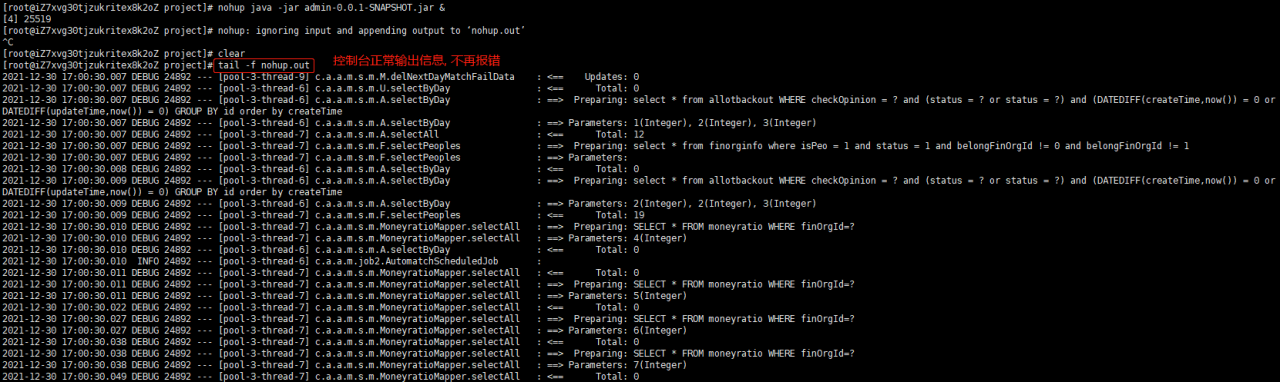
[Solved] Django Error: Attributeerror: ‘wsgirequest’ object has no attribute ‘is_ajax ‘
My Django version here is version 4.0
After running, the page reports an error, as shown in the figure below
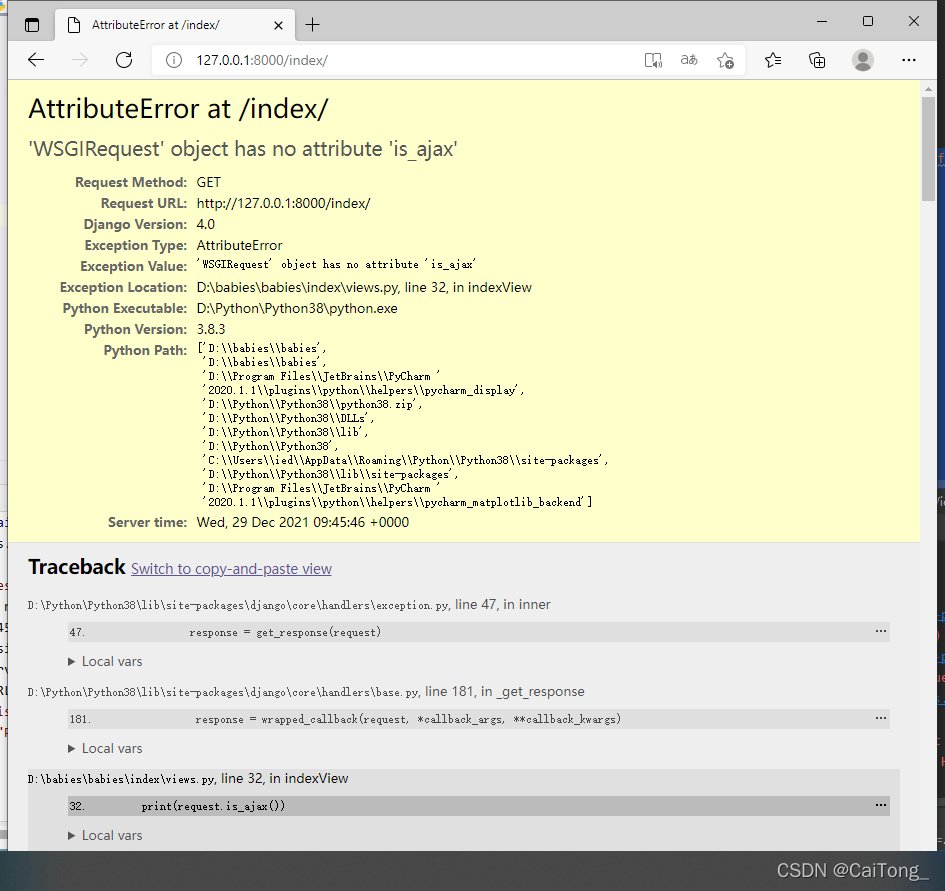
Then we need to reduce the version of Django to 3.2.2
Click file to find setting,
The next steps are shown in the figure below:
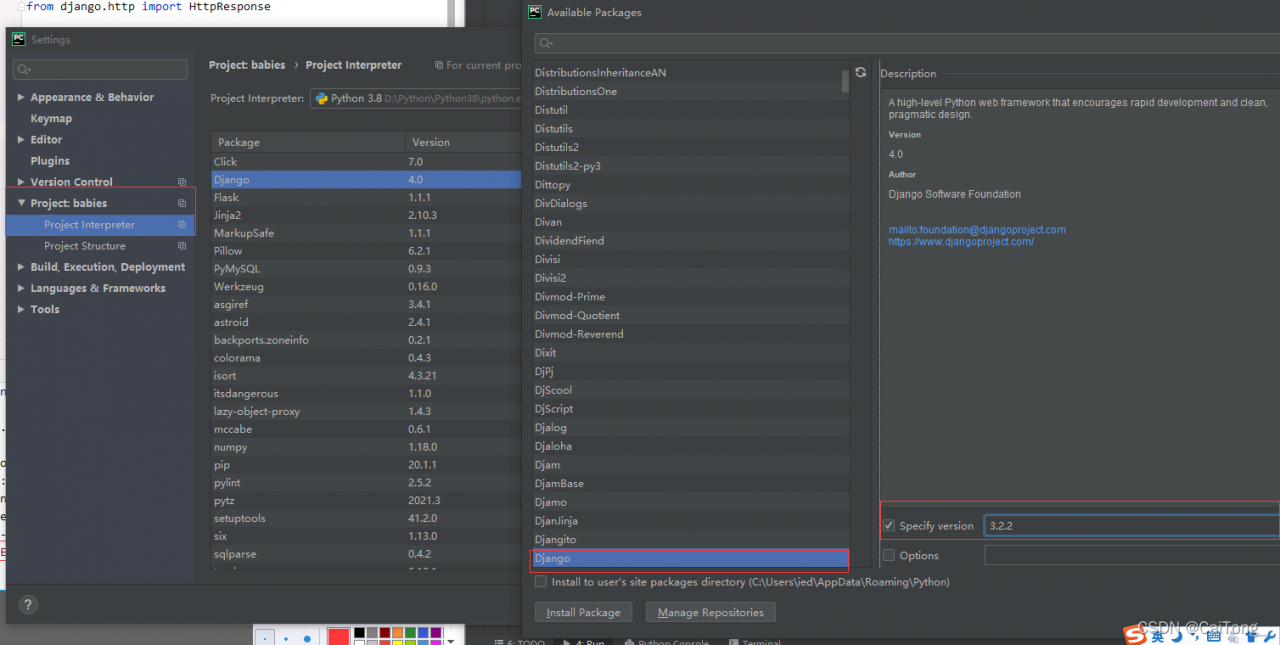
Finally, click Install Package
[Solved] Node sass version 7.0.0 is incompatible with ^ 4.0.0 | ^ 5.0.0 | ^ 6.0.0
Today, when writing the Vue page, according to the tutorial, I want to install sass-loader and node-sass, but when running the project after installation, the following errors are reported:
Node Sass version 7.0.0 is incompatible with ^4.0.0 || ^5.0.0 || ^6.0.0
The solution is as follows
Stop using node-sass and replace it with sass.
If you want to use SCSS or sass in your application, you need to do this:
First uninstall the previously installed node-sass
yarn remove node-sass
If NPM is used, then
npm uninstall node-sass
Then install sass instead of node-sass
yarn add -D sass
perhaps
npm i -D sass
Then your SCSS/sass file will be compiled correctly.
Vue3 Error: [vue/no-multiple-template-root] The template root requires exactly one element
vue3.0 supports <template/></template> tag to delegate more than one root element
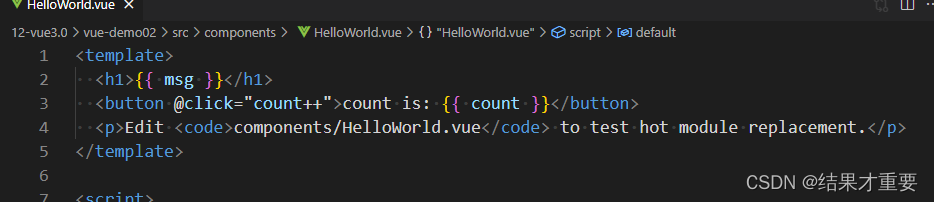
Building the project with the latest Vite, the code in the default app.vue is as follows:

The code can run normally, but the vscode gives an error prompt:
[vue/no-multiple-template-root]
The template root requires exactly one element. eslint-plugin-vue
The reason is that the vetur plug-in has not been updated
The temporary solution is
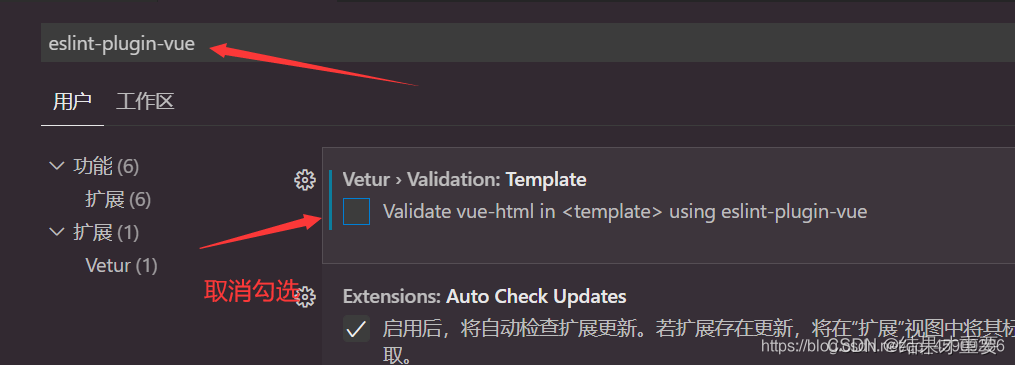
Settings -> Search: eslint plugin Vue -> Uncheck the first (Vetur › Validation: Template )
Pycharm error: original error was: DLL load failed while importing _multiarray _Umath: the specified module could not be found
Anaconda is installed under the window system and the virtual environment is configured
everything runs normally using the command line, but an error is reported when running on pychram:
original error was: DLL load failed while importing _multiarray _umath
Tried:
1. Uninstall numpy and reinstall numpy
2. Add the python path again many times in the python settings
Final solution:
add system variables
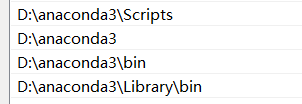
after installing anaconda, only the first two are added, but not enough!!! \Bin and \library\bin should also be added!!!
Since it runs normally on the command line, the version problem between packages can be ignored. The problem must be the configuration of pycharm or system variables
Reference link: https://github.com/conda/conda/issues/7833
[Solved] MariaDB Add Datas Error: SQL error [1366] [22007]: (cIncorrect string value: ‘\xE5\xBC\xA0\xE4\xB8\x89’ for column
MariaDB add datas error:
SQL error [1366] [22007]: (conn=17) Incorrect string value: ‘\xE5\xBC\xA0\xE4\xB8\x89’ for column `SAOS`.`user`.`userName` at row 1
SQL:
INSERT into `user` values(1, "ZHANGSAN","123456");The reason for this is the encoding problem. We can check the database character set encoding:
SHOW VARIABLES LIKE 'character%';Variable_name |Value |
———————— +—————————-+
character_set_client |utf8mb4 |
character_set_connection |utf8mb4 |
character_set_database |latin1 |
character_set_filesystem |binary |
character_set_results |utf8mb4 |
character_set_server |latin1 |
character_set_system |utf8 |
character_sets_dir |/usr/share/mariadb/charsets/|
Above is the result displayed. You can see that there are two latin1 encodings. So to change the encoding, find the my.ini file at
whereis my.iniThe results are as follows:
my: /etc/my. cnf
That means this file replaces my Ini, we modify this file.
Add two lines of configuration:
default-character-set=utf8
character-set-server=utf8
Note that this file will tell you that it is read-only when it is modified. You should empower it:
sudo chmod 777 /etc/my.cnfThen restart MariaDB.
systemctl restart mariadb.serviceYou need identity authentication. We can just enter the password.
Then view the database character set encoding:
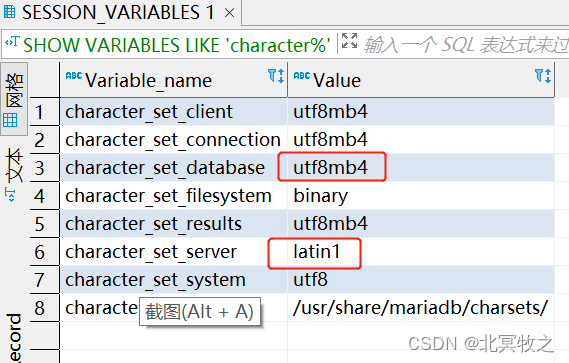
In this way, insert the data just now, and the result is still an error. It seems that you need to continue to modify the configuration file.