Author Archives: Robins

The import Maven project appears http://cwiki.apache.org/confluence/display/MAVEN/MojoFailureException Solutions

error occurs when importing maven project, conducting maven clean, and maven install:

[ERROR] Failed to execute goal. Org. Apache maven. Plugins: maven — the compiler plugin: 3.1: the compile (default – the compile) on project mvc2: Compilation failure
[ERROR] No compiler is provided in this environment. Perhaps you are running on a JRE rather than a JDK?
[ERROR] -> [Help 1]
[ERROR]
[ERROR] To see the full stack trace of the errors, re-run Maven with the -e switch.
[ERROR] Re-run Maven using the -X switch to enable full debug logging.
[ERROR]
[ERROR] For more information about the errors and possible solutions, please read the following articles:
[ERROR] [Help 1] http://cwiki.apache.org/confluence/display/MAVEN/MojoFailureException

is running on a JRE rather than a JDK version.

is running on a JRE rather than a JDK version

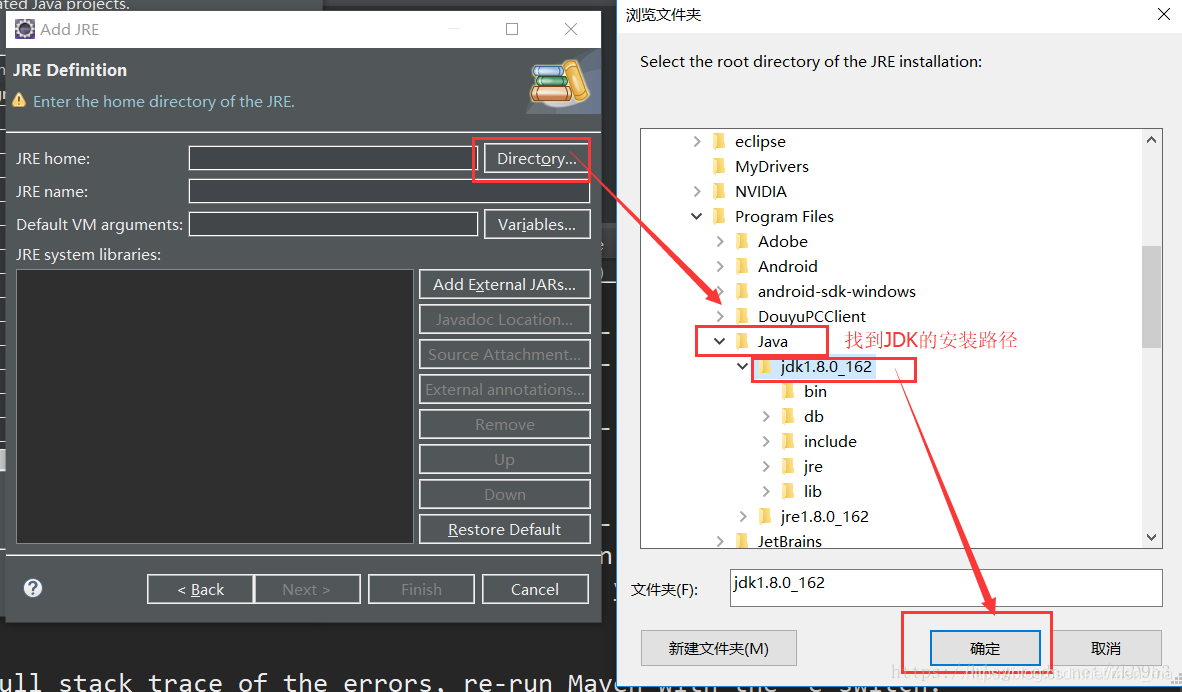
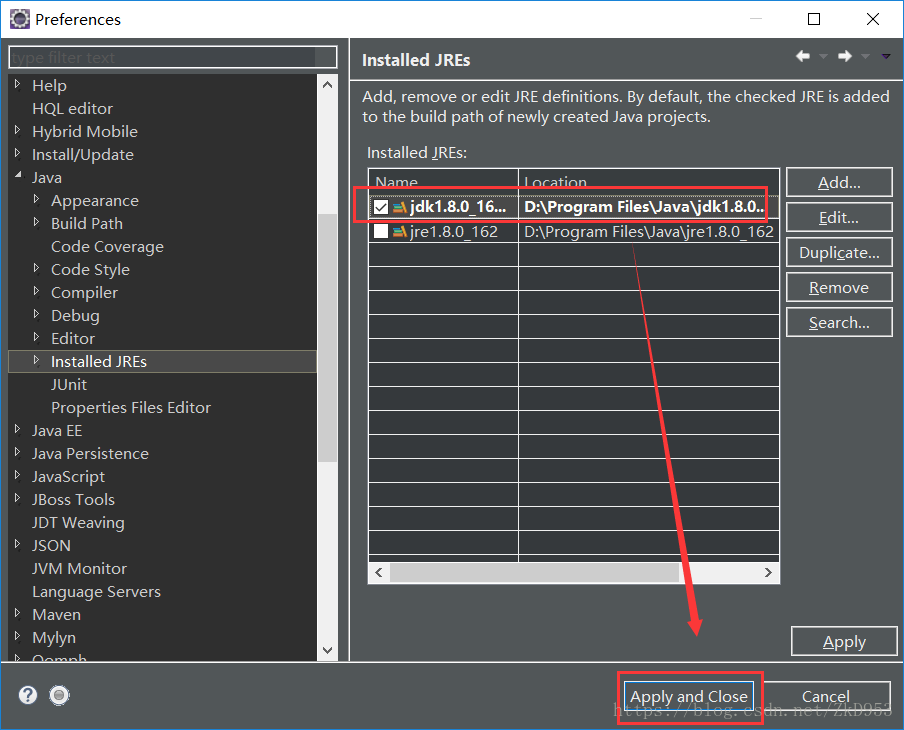
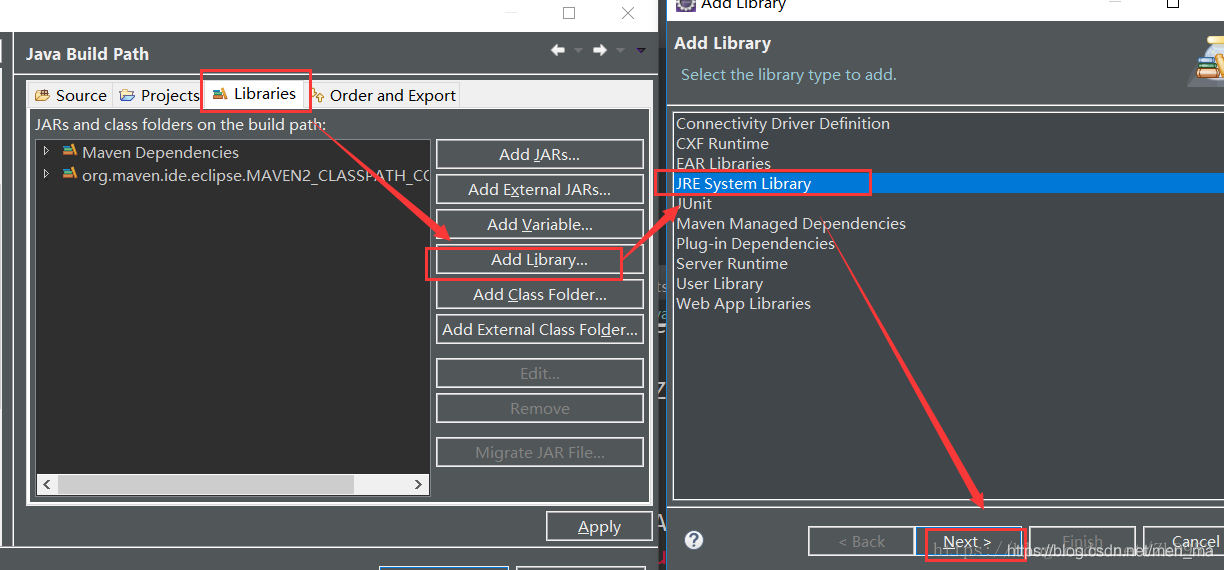
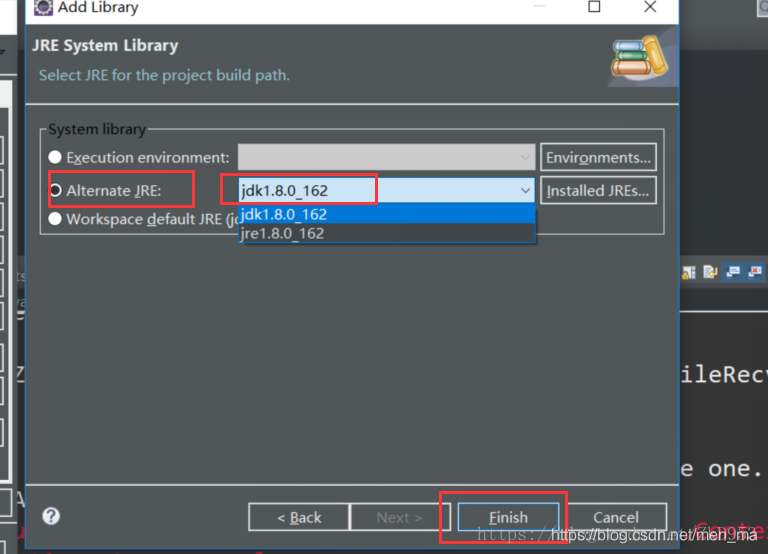
  1. window – & gt; The preferences – & gt; Java – & gt; Installed JREs
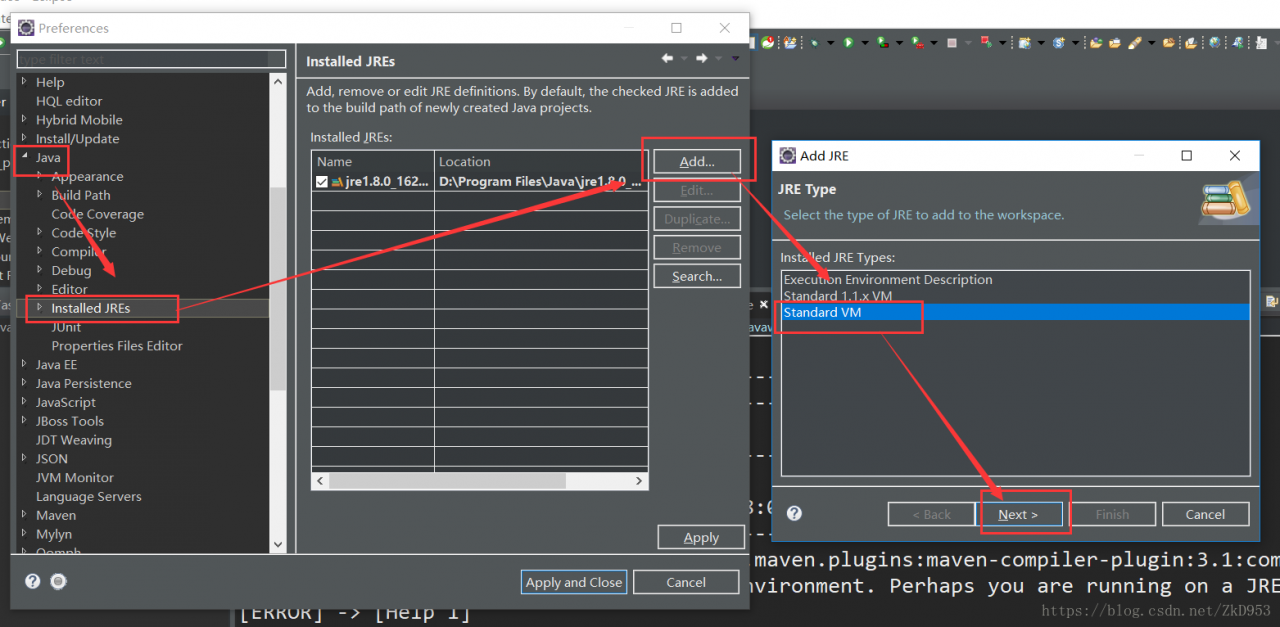
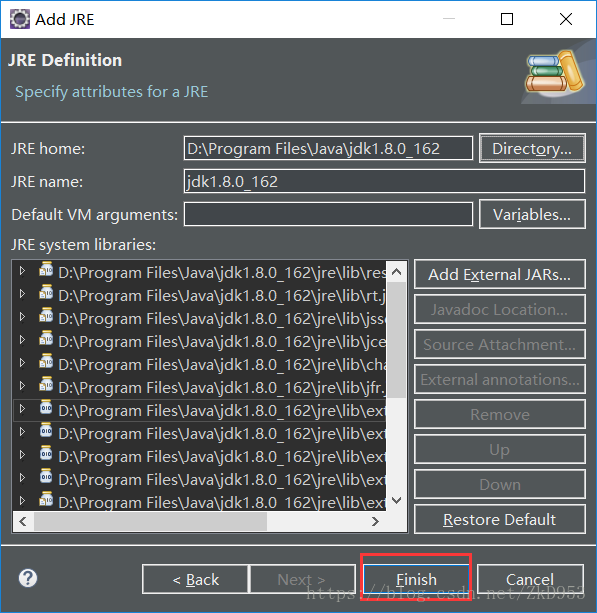
  2. find JDK installation path

  3. select the JDK – & gt; apply
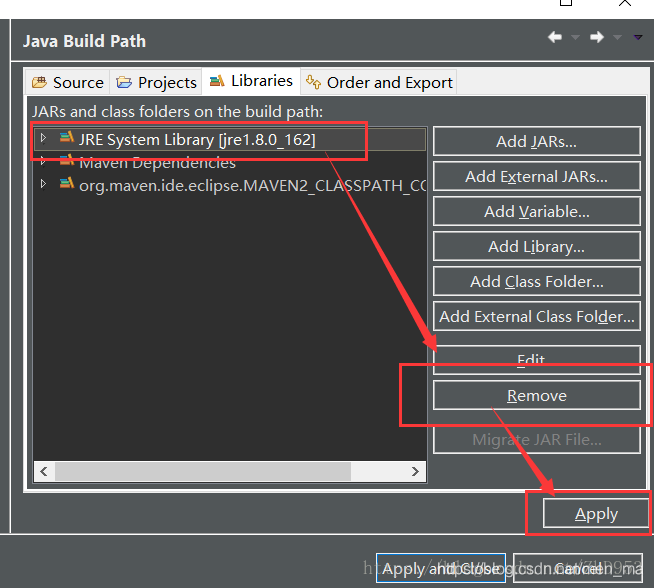
  4. maven clean again, maven install, if the problem remains, For the operation:


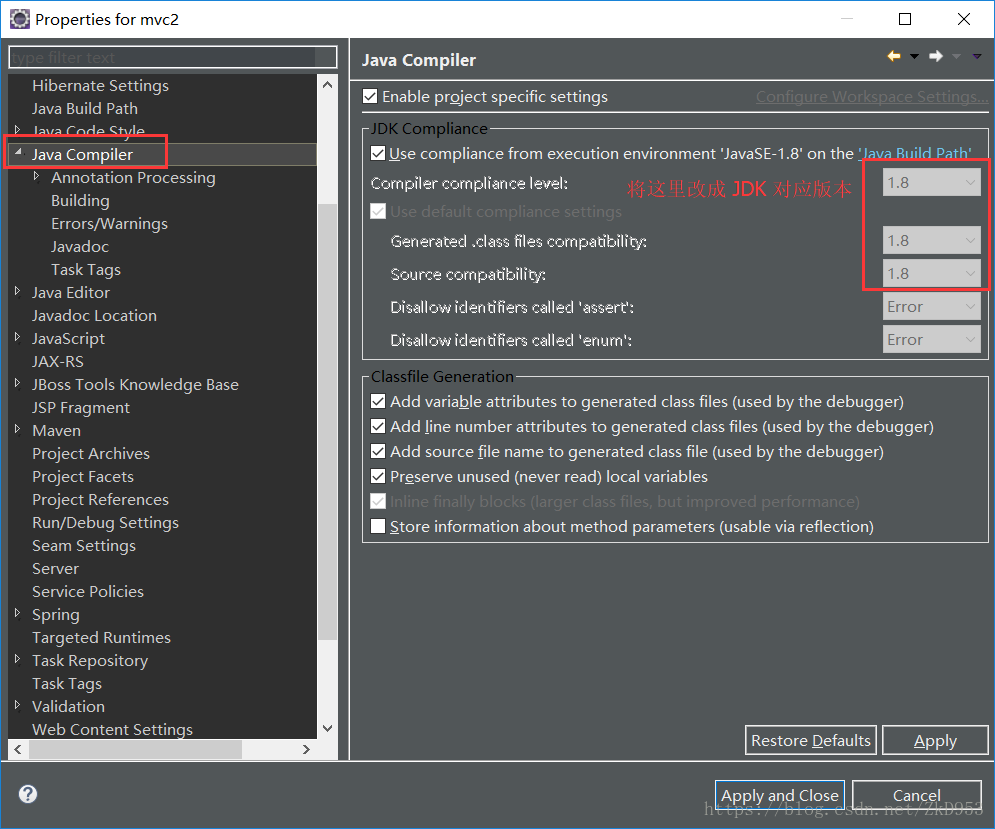
  5. open pom. The XML file, The following configuration under the plugins will source target to correspond to the JDK version (I was) 1.8:
<plugin>
 <groupId>org.apache.maven.plugins</groupId>
 <artifactId>maven-surefire-plugin</artifactId>
 <version>2.4.2</version>
 <configuration> 
 <source>1.8</source>
 <target>1.8</target>
 </configuration>
 </plugin>

set the JDK version 1.8
maven clean again, maven install, no error, can be loaded, But the project may still be small Red Cross on the top left corner, specific error is as follows:
Dynamic Web Module 3.0 requires Java 1.6 or newer.


specific solution is as follows:
find apache – maven installation path;
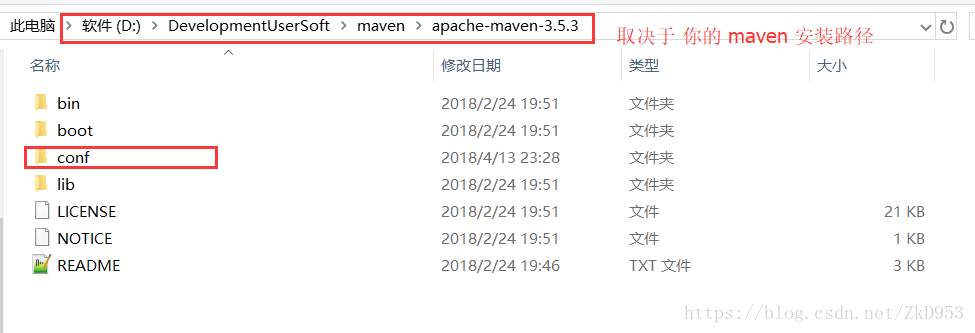
in Apache-maven-3.5.3 /conf/settings.xml file with the following configuration (depending on JDK version, mine is 1.8) :

<profiles>     
       <profile>       
            <id>jdk-1.8</id>       
            <activation>       
                <activeByDefault>true</activeByDefault>       
                <jdk>1.8</jdk>       
            </activation>       
            <properties>       
                <maven.compiler.source>1.8</maven.compiler.source>       
                <maven.compiler.target>1.8</maven.compiler.target>       
                <maven.compiler.compilerVersion>1.8</maven.compiler.compilerVersion>       
            </properties>       
    </profile>      
</profiles>   

re Maven > Update project can solve this problem.

this article reprinted in: https://blog.csdn.net/ZkD953/article/details/79935520

Solution: Solving Environment: failed with initial frozen solve. Retrying with flexible solve

Anaconda

problems with some environment installation using Anaconda Prompt

if Solving environment: failed with initial frozen solve. Retrying with flexible solve., the solution is to update the configuration package in conda and conda.

1, upgrade conda

After

enters Prompt, enter conda update-n base conda, confirm the update and upgrade, and wait, which may take a long time.

2, upgrade package

in conda

enter: conda update --all, just wait.

3, install and deploy your own environment

may not be the general method, but my Anaconda did not download the latest version, the installation environment has a problem, through this method can solve some friends’ problems.
if it cannot be solved, please find another way.

CentOS solves the problem of modulenotfounderror when salt calls python3 script remotely, and solves the problem that PIP3 module cannot be shared by different users

to describe the scenario, a function on the company’s Jboss server needs to call a python script on a centos7.3 machine with salt mode. Python version is 3.7, and the script will call back an HTTP interface to feedback the execution result. In the test environment, I had Linux machine root privileges, installed Python and dependent modules, and tested that the local execution of the PY script was normal and the JBoss Salt calls were normal. After publishing production, it was found that there were no callbacks after the call was issued, and the problem was located.

production environment configuration, the python script has been manually executed, confirm that the script can execute properly. First confirm that the command was actually sent to the Linux server. Listen to the /var/log/messages log and see the failed salt call:

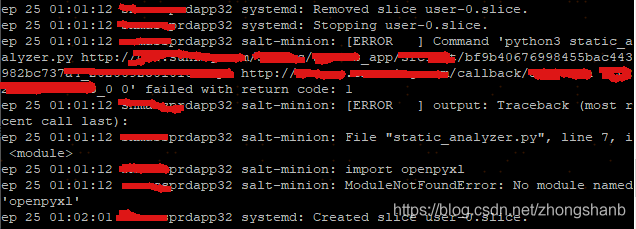
there is an error reason: salt-minion: ModuleNotFoundError: No module named ‘openpyxl’, which is very strange. It is executed directly on the machine, and all the dependencies are there. Why does salt call fail?Therefore, I started to search various baidu sites, and found that there were a lot of materials in this field but not many directly related ones. Either it was a method to solve the installation of Python modules, or the salt-related package missing problem occurred when salt stack called Python, which could not solve my problem.

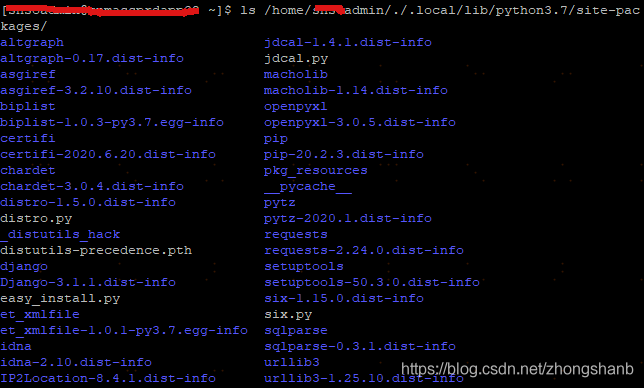
after communication with colleagues, colleagues suspected that it was caused by different paths of PIP installation modules for different users on the Linux machine. I had no root rights in the production environment, which was the most significant difference from the test environment. Based on this idea, I first inquired the path of the module installed in pip3:

modules were stored in the private path of the current user. Meanwhile, when I wanted sudo to execute the pip3 installation, I found that the system prompt command did not exist and the same error message appeared when I executed the python script as in the messages log:

$ sudo -H python3 static_analyzer.py

File "static_analyzer.py", line 7, i <module>
import openpyxl
ModuleNotFoundError: no module named 'openpyxl'


$ sudo -H pip3 install openpyxl -i http://mirrors.aliyun.com/pypi/simple/ --trusted-host mirrors.aliyun.com --user

sudo:pip3: command not found

is a good idea, so I looked for ways to share the PIP installation module by user, or at least make it Shared by root. According to the command that this does not exist, one of the blog posts suggests a simple solution, which is to hang the soft connection directly so that root users can find python3 and pip3:

#如下软连接是为了使命令在root用户下 也能正常使用
sudo ln -snf /usr/local/python3/bin/python3  /usr/bin/python3

sudo ln -snf /usr/local/python3/bin/pip3  /usr/bin/pip3

Sure enough, after a soft connection, sudo mode can use python3 and pip3 normally:

sudo -H pip3 install openpyxl -i http://mirrors.aliyun.com/pypi/simple/ --trusted-host mirrors.aliyun.com --user

With this in mind, let’s run the python script in sudo mode to verify that the current environment root user can execute properly:

sudo -H python3 python_script.py

is completely normal. Without the above soft connection, a ModuleNotFoundError in the Messages log would have appeared in the same command, and so far we have solved the problem that the root user of the PIP3 installed module cannot find.

at the end of the last, through the jboss production environment service page to submit the request, the whole process smoothly completed, perfect!

reference:

view the path to installing a python module using PIP install under Linux

solve pip3 command to install the installation package in the home. Local/lib/python3.5/dist – the problem of packages directory

python3: command not found

sudo used with python

Pytorch RuntimeError: Error(s) in loading state_ dict for Dat aParallel:.. function submit.py Solutions for reporting errors

after the Image Retrieval training run today, some errors appeared when running subs.py like this:

RuntimeError: the Error (s) in loading state_dict for DataParallel: </ strong>
Missing key (s) in state_dict: “Module. Backbone. 0. Weight”, “module. Backbone. 1. The weight”, “module. Backbone. 1. The bias”, “module. Backbone. 1. Running_mean”, “module. Backbone. 1. Running_var”, “module. Backbone. 4.0. Conv1. Weight”. “Module. Backbone. 4.0. Bn1. Weight”, “module. Backbone. 4.0. Bn1. Bias”, “module. Backbone. 4.0. Bn1. Running_mean”, “module. Backbone. 4.0. Bn1. Running_var”, “module. Backbone. 4.0. Conv2. Weight”. “Module. Backbone. 4.0. Bn2. Weight”, “module. Backbone. 4.0. Bn2. Bias”, “module. Backbone. 4.0. Bn2. Running_mean”, “module. Backbone. 4.0. Bn2. Running_var”, “module. Backbone. 4.0. Conv3. Weight”. “Module. Backbone. 4.0. Bn3. Weight”, “module. Backbone. 4.0. Bn3. Bias”, “module. Backbone. 4.0. Bn3. Running_mean”, “module. Backbone. 4.0. Bn3. Running_var”, “module. Backbone. 4.0. Downsample. 0. Weight”. “Module. Backbone. 4.0. The downsample. 1. The weight”, “module. Backbone. 4.0. The downsample. 1. The bias”, “module. Backbone. 4.0. The downsample. 1. Running_mean”, “module. Backbone. 4.0. The downsample. 1. Running_var”, “Module. Backbone. 4.1. Conv1. Weight”, “module. Backbone. 4.1. Bn1. Weight”, “layer4.2. Bn3. Running_var”, “layer4.2. Bn3. Weight”, “layer4.2. Bn3. Bias”, “fc. Weight”, “fc. Bias,”… And so on.

is incorrectly located to line 95 and traced back to a path not generated by the training. PTH file.

solution:

find their own training after the file path is ok.

</ p>

How to Fix ”is not in the sudoers file“ in Linux

reason
sometimes when we use the sudo command to switch users may encounter the following error:

XXX is not in the sudoers file. This incident will be reported

XXX is your current user name, is because the user does not have to join sudo configuration file, The solution is to open the configuration file and add user permissions.

solution </ strong>
step1: using su in as the root user, and enter the following command to enter sudo configuration file

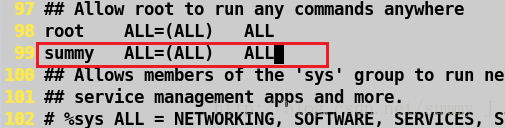
step2: the location of the bottom was found in the configuration file, and add user permissions, save the exit.


tep3: use sudo command again won’t appear error message.

How to Fix Parser rerror: error tokenizing data. C error: expected 2 fields in line 53, saw 3

successfully solved the File “pandas \ _libs \ parsers pyx”, line 2021, in pandas. _libs. Parsers. Raise_parser_error
pandas. Errors. ParserError: Error tokenizing data. C Error: Expected 2 fields in line 53, saw three </ p>


directory 

solve the problem

solution

solution


problem solving

File “pandas\_libs\parsers.pyx”, line 2021, in pandas._libs.parsers.raise_parser_error
pandas.errors.ParserError: Error tokenizing data. C error: Expected 2 fields in line 53, saw 3


solution

pandas. Errors. ParserError: parsing error: tag data error. C error: expect 2 fields in line 53, see 3


solution

because the CSV file is read, the default separation is comma. Analysis shows that the data read contains two fields in a certain cell, that is, two commas may be contained in the value.

,
data= pd.read_csv(data_file, error_bad_lines=False)


How to Fix “junit.framework.Comparison Failure Expected: but was”

junit.framework.ComparisonFailure: expected:< . > But was: solution

an error occurred while running the MVN instruction: MVN clean test using the DOS window:

[ERROR] Please refer to D:\ learning gadgets \ first semester of junior \ enterprise application construction and management \ experiments \maven_demo\target\surefire-reports for the individual test results

error display from the surefire – reports file to find errors, check the surefire – reports file:

error body is this:
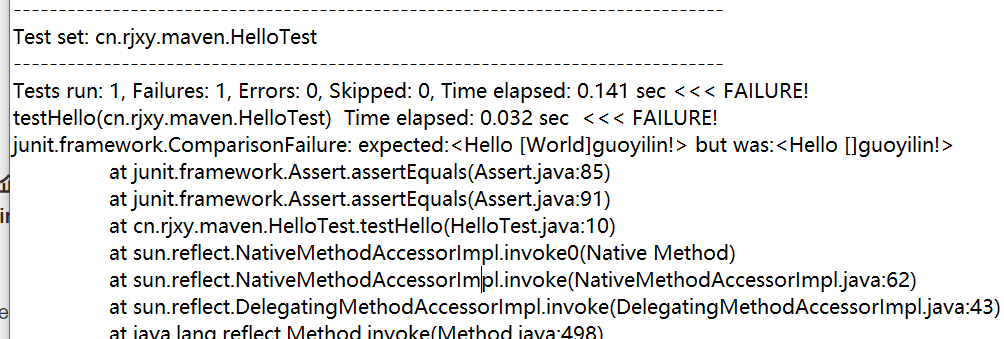
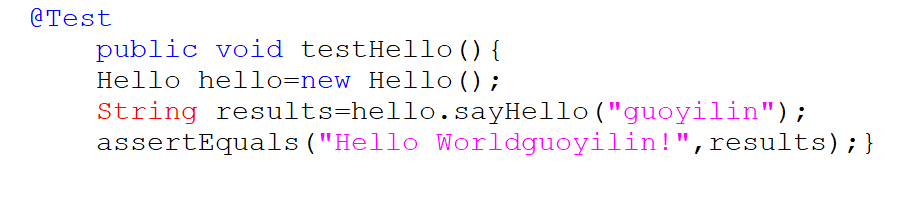
junit.framework.ComparisonFailure: expected:< Hello [World]guoyilin! > but was:< Hello []guoyilin! >

in the test file called assetEquals method, the method to compare the the statement with a specified in parentheses, if different than the error


you can see, The statement returned in the sayHello method is different from the statement specified in the test module, and that’s where the error is, just change the statement to be the same.

Solution of redisconnection factory in springboot2 not Autowired

1. No redis package imported, then import the following jar package to solve

<dependency>
            <groupId>org.springframework.boot</groupId>
            <artifactId>spring-boot-starter-data-redis</artifactId>
        </dependency>

2. Do the project separation, so pay attention to the @component scanning scope of the Application startup class, default scanning of the Application startup class package and the beans under the subpackage.
is redis – common such as A project, A project of the package name is com.zhangsan.com mon. Redis. B project imports the JAR package of A project, the package name of B project is com. Zhangsan.service.B, then the Application start-up class of B project should be placed under com. Zhangsan, so as to load the beans of A project into A project.


svn: E230001: Server SSL certificate verification failed: certificate issued

svn: E230001: Server SSL certificate verification failed: certificate issued

literally means that the server’s SSL certificate validation failed.

solution:

execute SVN ls on terminal https://*/ SVN / (your project address)

and then the terminal will ask you to choose R, t, or p. P stands for accept

after we enter p, press enter, and then the computer user’s password and SVN account password will be prompted to input, according to the prompt operation line

input is completed, press enter to do

Spring boot can’t scan XML (invalid bound statement (not found))

in a recent work on a project, a headache problem, the background and foreground, after a successful start in obtaining some mapper, always show can not find the mapper, but if use Ctrl or can enter this method, on the Internet to find a lot of solutions, did not solve my problem, the following are some of the common rule out way:

1, check whether namespace in your XML file is correct

2. Check whether the mapper method written by yourself is consistent or missing with the method in XML, and whether the return type or name is consistent

3. If it is not possible yet, take a look to see if the XML configuration path of mapper is correct

4. Delete some Spaces in XML

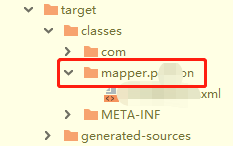
5, I encountered myself, to see if the target file exists and is a level 1 directory:

, if you’re like me, you can delete the new mapper, and when you create a new mapper, you can create a new mapper, and you can create a new directory on the mapper.

and finally the target should look like this:

is just like that.

if not solved, you can leave a message to communicate with oh ~