Author Archives: Robins

bug-JAVA call SAP function Connect to SAP gateway failed

Problem: com. SAP. Conn. Jco. JCoException: (102) RFC_ERROR_COMMUNICATION: Connect to SAP gateway failed
Recently, my colleague made a mistake in the following figure when he called SAP system function with Java. Later, my colleague asked for my assistance. I used its code to run the machine and report the same error. Finally, the problem is solved by searching and trying in many ways.
Summarize the processing methods:
1. First, check whether the code has been written and whether the JAR package and DLL file have been added. Ping/Telnet can try to check whether the network is normal.
2, adjust the JDK version, you can use 1.7/1.8 try it;
3, modify the computer user name, not including Chinese, (after the modification, please shut down, and then start, sometimes restart is really unreliable).
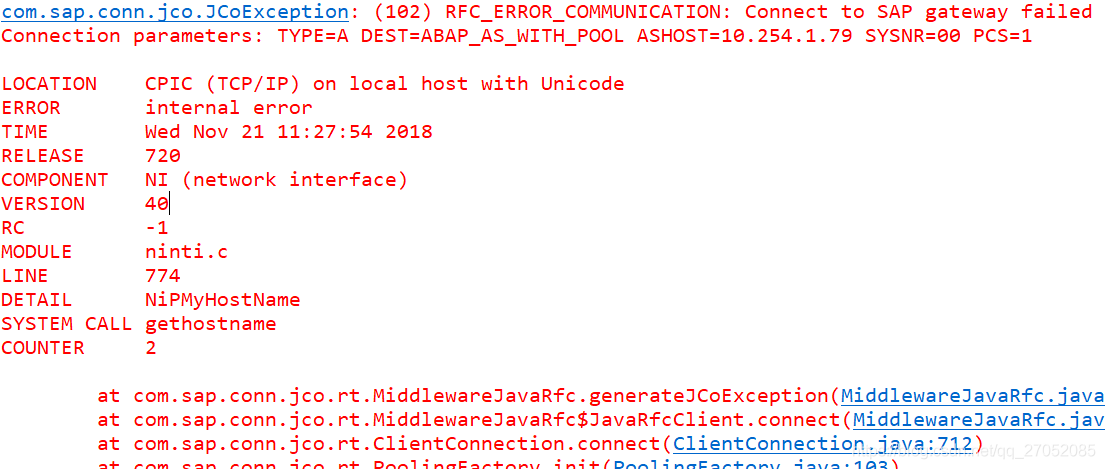
Finally, I successfully solved the problem by modifying the computer name, and ran on JDK1.7 and 1.8 without any problem.

[Windows] Socket Server Failed to bind, error 10048

Addresses that are already in use.
Normally, each socket address (protocol/IP address/port) is allowed to be used only once.
This error occurs if the application tries to bind a socket to an IP address/port that is already in use for an existing socket, or a socket that is not properly closed, or is still in the process of being closed.
For server applications that need to bind multiple sockets to the same port number, such as when a client process is taskkill and starts again, consider using setsockopt (SO_REUSEADDR).
Client applications usually do not need to call bind-connect to automatically select an unused port. When calling bind with a wildcard address (including ADDR_ANY), the WSAEADDRINUSE error may be delayed until a specific address is committed. This may occur later when another function is called, including connect, listen, WSAConnect, or WSAJoinLeaf.

        BOOL bOptVal = TRUE;
        int bOptLen = sizeof(BOOL);
        iResult = setsockopt(ListenSocket, SOL_SOCKET, SO_REUSEADDR, (char *)&bOptVal, bOptLen);
        if (iResult == SOCKET_ERROR)
        {
            char m[500];
            snprintf(m, 500, "%s %d: setsockopt failed, port %d failed with error: %d",
                __func__, __LINE__, port_number, WSAGetLastError());
            printf("%s\n", m);
            freeaddrinfo(result);
            closesocket(ListenSocket);
            WSACleanup();
            return -1;
        }

https://docs.microsoft.com/en-us/windows/desktop/api/winsock/nf-winsock-setsockopt

Reproduced in: https://www.cnblogs.com/liujx2019/p/10811330.html

When Dbeaver starts on Mac, it reports an error: “fail to create java virtual machine”

Dbeaver started up today with an error “Fail to create Java Virtual Machine” and no other notifications. I remember that I installed Hadoop and Spark on my computer last week. During the process, I downloaded the JDK. It may be the Java version.


When it comes to environmental problems, there is no trick, but to search for the solutions of predecessors on the Internet.


1. Search for solutions
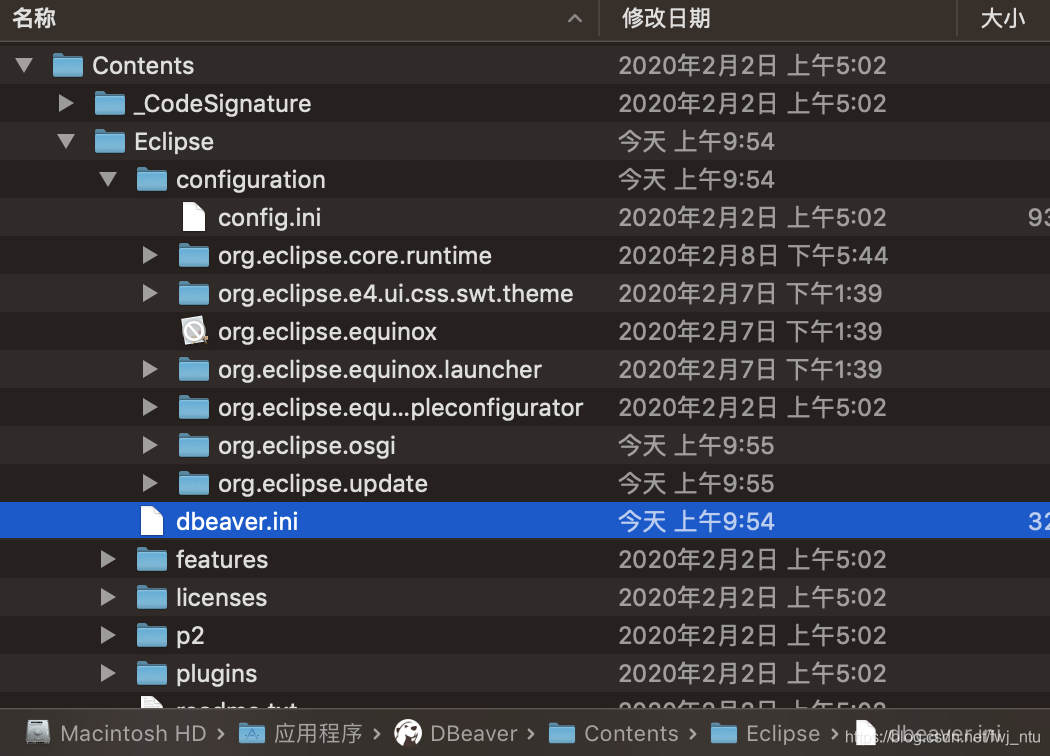
I looked at several scenarios and said that I wanted to modify the parameters in the myeclipse.ini file. So I went to see what’s in the Dbeaver package Contents, and I found the dbeaver.ini file in Eclipse.

opens the dbeaver.ini file and sees the following configuration information:

-startup
../Eclipse/plugins/org.eclipse.equinox.launcher_1.5.600.v20191014-2022.jar
--launcher.library
../Eclipse/plugins/org.eclipse.equinox.launcher.cocoa.macosx.x86_64_1.1.1100.v20190907-0426
-vmargs
-XX:+IgnoreUnrecognizedVMOptions
--add-modules=ALL-SYSTEM
-Xms64m
-Xmx1024m
-XstartOnFirstThread

There is a lot of talk on the Internet about modifying Xmx parameters, and reducing the maximum memory size by half would solve the problem. I tried it, but it didn’t work. Some other means can only be sought. Another solution was found, which meant manually specifying the Java installation directory in the.ini file.
Taking another look at the dbeaver.ini file indicates that you don’t understand the configuration files, so you open readme.txt. To be honest, after installing software that is used to fooling around, we don’t think about reading these very detailed readme.txt files, but there is a lot of useful information.

  -vm <java vm path>
    Use Java VM installed in <java vm path> folder instead of default
    location.

  -vmargs <jvm parameters>
    Allows to pass any number of additional parameters to JVM.
    Additional parameters may be used to customize environment or
    3-rd party jdbc drivers.

– VM is used to specify the location of the Java Virtual Machine installation:
If this parameter is configured, the specified &lt is used; java vm path> Java Virtual Machine installed in; If you do not configure this parameter, you will go to the default path for the JVM. So far, the dbeaver.ini file already has the -vmargs parameter, but it doesn’t have any value after it, and there’s no -VM in the file.
2. Solve problems
The JDK is already installed on this machine, so open the path information previously configured in the ~ /.bash_profile file and add the JDK path to the dbeaver.ini file.

-vm
/Library/Java/JavaVirtualMachines/openjdk-14.jdk/Contents/Home

Turn on Dbeaver again. However, instead of succeeding, I reported another error, saying that the Java version did not match, directly providing a JRE download link to download – Java for OS X 2017-001.
Ini file – The Java Virtual Machine installation directory after vm is /Applications/ JRE, after saving the file, open Dbeave again, success!

-vm
/Applications/jre

This article in my Java version conflict problems of MAC played an important role, can refer to:
https://blog.csdn.net/gaofenglxx/article/details/102565883

Welcome to WeChat official number
“data analyst notes”

nginx: [emerg] bind() to 0.0.0.0:443 failed (98: Address already in use)

During the test of Nginx functionality today, the following problems occurred:
Nginx: [emerg] bind() to 0.0.0.0:443 failed (98: Address already in use)
nginx: [emerg] bind() to 0.0.0.0:80 failed (98: Address already in use) [emerg] bind() to 0.0.0.0:8083 failed (98: Address already in use)
nginx: [emerg] bind() to 0.0.0.0:7091 failed (98: Address already in use)
nginx: [emerg] bind() to 0.0.0.0:7092 failed (98: Address already in use)
nginx: [emerg] bind() to 0.0.0.0:8081 failed (98: Address already in use)
nginx: [emerg] bind() to 0.0.0.0:1935 failed (98: Address already in use)

The reason is:
During the test, turn off the port number of RTMP,./kill -9 PID (RTMP :1935)
Results in starting the Nginx,./Nginx – c/usr/local/Nginx/conf/Nginx. Conf
The above error occurs

The result process is as follows:
First use lsof – I :80 to see what program is using port 80. Lsof returns the following:
[root@localhost sbin]# lsof – I :80
COMMAND PID USER FD TYPE DEVICE SIZE/OFF NODE NAME
nginx 63170 root 9u IPv4 14243472 0t0 TCP *: HTTP (LISTEN)
Close process: Kill -9 63170
Restart the Nginx: [root @ localhost sbin] #./Nginx – c/usr/local/Nginx/conf/Nginx. Conf
Problem solving

ESXi creates datastore error Fail to create VMFS datastore solution

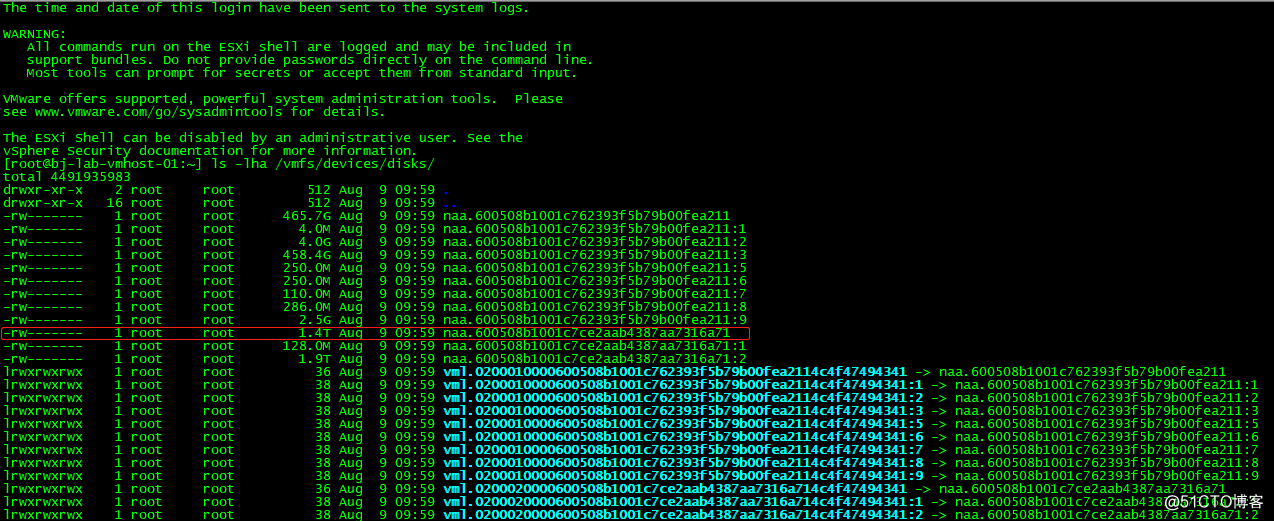
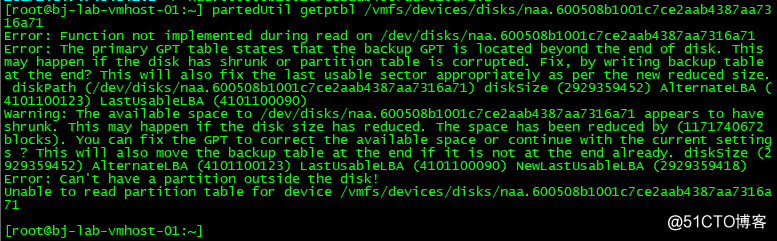
When you create a new data warehouse datastore in VMware vShere/ESXi, the following error message pops up! “Fail to create VMFS Datastore VMFS XXXX” – Cannot change the host Configuration. For the first time, it’s hard to know what to do about this bug, so here’s how to fix it!

Log in to your VMware vShere/ESXi host using SSH or Telnet, and run the following command, which lists all the storage partitions, and then copy out the ID number of the partition where the creation failed. My example is shown in red below.

Then enter the copied id after the following command:

Then fix it with the following command:

With the above fixes, you can go back to VMware vShere/ESXi host again to create datastore and no longer report errors!
Attach a KB for reference: https://kb.vmware.com/s/article/1008886

Centos8 Install Failed to synchronize cache for repo ‘AppStream’, ignoring this repo.

Problem: Centos8 installation software appears
 
Cenos-8-appstream 28 B/s | 38 B 00:01
cenos-8-base 111 B/s | 38 B 00:00
cenos-8-extras 114 B/s | 38 B 00:00
Failed to synchronize cache for ‘AppStream’, ignoring this repo.
Failed to synchronize cache for repo ‘BaseOS’, ignoring this repo.
Failed to synchronize cache for repo ‘extras’, ignoring this repo.
No matches found.
 
————————————————————————————————–
Solution: Go to the configuration file and open /etc/yum.repos. D to change basEURl to the address of Ali Cloud.
cd /etc/yum.repos.d
vi CentOS-Base.repo
Change ## to the following
CentOS-Base.repo [BaseOS] name=CentOS-$releasever – Base baseurl=https://mirrors.aliyun.com/centos/$releasever/BaseOS/$basearch/os/
gpgcheck=1
enabled=1
gpgkey=file:///etc/pki/rpm-gpg/RPM-GPG-KEY-centosofficial
vi CentOS-AppStream.repo
## CentOS-AppStream.repo [AppStream] name=CentOS-$releasever – AppStream baseurl=https://mirrors.aliyun.com/centos/$releasever/AppStream/$basearch/os/
gpgcheck=1
enabled=1
gpgkey=file:///etc/pki/rpm-gpg/RPM-GPG-KEY-centosofficial
 
The DNF command or yum command can be executed after modification
DNF Clean All # clears all cache files
DNF Makecache # make metadata cache
 
Refer to the link: https://my.oschina.net/u/930279/blog/3112152/print
 

iOS clang: error: linker command failed with exit code 1 (use -v to see invocation)

Clang: error: Linker Command failed with exit code 1 (use-v to see Invocation) will occur if the project is not built properly due to errors in XCode.

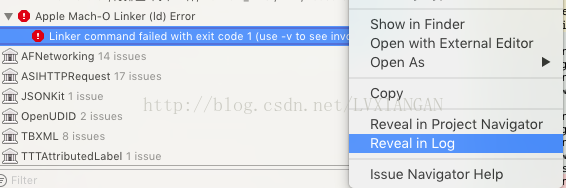
This error is usually caused by referring to duplicate files, but a project refers to so many files, how do you find it?If you click on the error message, XCode will not display the details of the error. Is this a bug in XCode?

To see what caused the error, click error – right – and select Reveal in Log

At this point, I finally saw the reason for the error.

Duplicate symbol XXX, the truth is out, the project refers to two ASIClient, re-modify the project, successfully passed!

NBU recovery report error socket read failed: errno = 119-System call timed out

Problem description: when using NBU to restore DB2 database, because the file System type is EXT3, so the table space allocation took a lot of time, NBU reported Error
Error BPBRM (pid=38928526) socket read failed: errno = 199-system call out
..
Restore errno (2850)
Problem fixed:
adds CLIENT_READ_TIMEOUT to the bp.conf file in Master Server
Resources:
https://www.veritas.com/support/en_US/article.100014724

ubuntu executes apt-get update and reports Failed to fetch/replace Ali source

Copyright Notice: This article is the original article of the blogger, and follows CC 4.0 BY-SA copyright agreement. Please attach the link of the original text and this statement.

the article links: https://blog.csdn.net/feiniao8651/article/details/60332535

in the ubuntu perform sudo apt to get the update, often an error:
 
Err http://security.ubuntu.com precise-security InRelease
Err, http://security.ubuntu.com precise ws-security the GPG
Temporary failure resolving ‘security.ubuntu.com’
Err http://cn.archive.ubuntu.com precise InRelease
Err http://cn.archive.ubuntu.com precise-updates InRelease
Err http://cn.archive.ubuntu.com precise-backports InRelease
Err, http://cn.archive.ubuntu.com precise the GPG
Temporary failure resolving ‘cn.archive.ubuntu.com’
Err http://cn.archive.ubuntu.com precise – updates the GPG
Temporary failure Resolving the ‘cn.archive.ubuntu.com’
Err http://cn.archive.ubuntu.com precise – backports the GPG
Temporary failure resolving ‘cn.archive.ubuntu.com’
Reading package lists… The Done
W: Failed to fetch HTTP:// http://cn.archive.ubuntu.com/ubuntu/dists/precise/InRelease
W: Failed to fetch HTTP:// http://cn.archive.ubuntu.com/ubuntu/dists/precise-updates/InRelease
W: Failed to fetch HTTP:// http://cn.archive.ubuntu.com/ubuntu/dists/precise-backports/InRelease
W: Failed to fetch HTTP:// http://security.ubuntu.com/ubuntu/dists/precise-security/InRelease
W: Failed to fetch http://security.ubuntu.com/ubuntu/dists/precise-security/Release.gpg Temporary failure resolving ‘security.ubuntu.com’
W: Failed to fetch http://cn.archive.ubuntu.com/ubuntu/dists/precise/Release.gpg Temporary failure resolving ‘cn.archive.ubuntu.com’
W: Failed to fetch http://cn.archive.ubuntu.com/ubuntu/dists/precise-updates/Release.gpg Temporary failure resolving ‘cn.archive.ubuntu.com’
W: Failed to fetch http://cn.archive.ubuntu.com/ubuntu/dists/precise-backports/Release.gpg Temporary failure resolving ‘cn.archive.ubuntu.com’
W: Some index files failed to download. They have been ignored, or old ones used instead.12345678910111213141516171819202122232425262728293031323334
It is generally recommended to use a domestic mirror source, such as 163 or aliyun’s mirror server
to add the following text to the /etc/apt/ source.list file
 
Deb http://mirrors.aliyun.com/ubuntu/ raring main restricted universe multiverse
deb http://mirrors.aliyun.com/ubuntu/ raring ws-security main restricted universe multiverse
deb http://mirrors.aliyun.com/ubuntu/ raring – updates the main restricted universe multiverse
deb raring – http://mirrors.aliyun.com/ubuntu/ programs main restricted universe multiverse
deb http://mirrors.aliyun.com/ubuntu/ raring – backports main restricted universe multiverse
deb – SRC http://mirrors.aliyun.com/ubuntu/ raring main restricted universe multiverse
deb – SRC http://mirrors.aliyun.com/ubuntu/ raring ws-security main restricted universe multiverse
deb – SRC http://mirrors.aliyun.com/ubuntu/ raring – updates the main restricted universe multiverse
deb – SRC http://mirrors.aliyun.com/ubuntu/ raring – programs main restricted universe multiverse
deb – SRC http://mirrors.aliyun.com/ubuntu/ raring – backports main restricted universe multiverse, 12345678910
However, executing sudo Apt-get update still gives an error. The problem is that DNS is not properly configured.
solution:
 
sudo vi /etc/resolv.conf1
add
 
Dynamic resolv.conf(5) file for glibc resolver(3) generated by resolvconf(8)
# DO NOT EDIT THIS file by HAND — YOUR CHANGES WILL BE OVERWRITTEN
nameserver 127.0.1.1

nameserver 223.5.5.5
nameserver 223.6.6.6
Then the SUdo Apt-get Update will work.
Reference:
ubuntu apt-get update failed to resolve.
Ubuntu operating system “Failed to fetch” error solution
docker Ubuntu container to replace the alibaba source
— — —
copyright notice: this article is the original article of CSDN blogger “feiniao8651”, following CC 4.0 by-sa copyright agreement, reprint please attach the original source link and this statement.
the original link: https://blog.csdn.net/feiniao8651/article/details/60332535

command/usr/bin/codesign failed with exit code 1- code sign error

I’ve now spent 3 hours searching for the error mentioned above:

command /usr/bin/codesign failed, exit code 1

Here’s what I’ve done to try and fix this:
Set the bundle identifier to com.server. code signing to “any Iphone OS device” set the code signing identity to my distribution identity. The error only happens when I try to set it on my device and everything works fine on the emulator. Do you have any suggestions? Thank you very much in advance! I have the exact same error and have tried everything, including the suggestions elsewhere on this page. My problem is that in Keychain Access, the actual Apple WWDR certificate is marked as “always trusted”. It needs to be “system default”. This also applies to your Development Certificates and Issuing Certificates. If either of them is incorrectly set to “Always Trusted”, this will obviously cause the problem. So, in Keychain Access, click Apple Worldwide Developer Relations Certificate Authority Certificate, select Get Info. then, expand the Trust setting, and for ” When using this certificate:” combo box, select “System defaults”.
Sigh:For those who insist on vetoing this answer, I’m not saying this is the only solution to the problem. It’s a solution. It may not work for you.

[Git & GitHub] Solution: error: failed to push some refs to’https://github.com/xxxx.git’

Problem description: after creating the repository remotely on github, the following error occurs while submitting a local file using gitbash
$ git push -u origin master
fatal: HttpRequestException encountered.
An error occurred while sending the request.
Username for ‘https://github.com’: bluetata
To https://github.com/bluetata/Javascript-AngularJS.git
! [rejected] master -> master (non-fast-forward)
error: failed to push some refs to ‘https://github.com/bluetata/Javascript-AngularJS.git’
hint: Updates were rejected because the tip of your current branch is behind
hint: its remote counterpart. Integrate the remote changes (e.g.
hint: ‘git pull … ‘) before pushing again.
hint: See the ‘Note about fast-forwards’ in ‘git push –help’ for details.
Problem analysis: I created the empty repository on Github first, checked the create READme.md file, but did not pull it locally when Using Gitbash. Then use gitbash to submit the local file to the warehouse, an error occurred while pushing.
Solution: error message can be seen in the local and remote matching is not complete, also found on the Internet, summed up for the local warehouse and remote warehouse conflict caused by.
The following solutions are summarized:
1: Pull the remote warehouse to the local warehouse before push
$git pull origin master #git pull –rebase origin master
$git push-u origin master
2: force push local warehouse to remote (this case does not merge, remote files may be lost after force push is not recommended)
$ git push -u origin master -f
3: to avoid conflict resolution, temporarily submit the local file to the remote branch
$git branch [name]
# after creating the branch, then push
$git push-u origin [name]
Note: This article was originally published in ‘bluetata’ on blog.csdn.net.