Author Archives: Robins

Talking about the errors encountered in installing MySQL ODBC (error 1918)

Today, when I was doing the database configuration of mysql with the packaging tool, I found that the target machine was always reporting an error when installing ODBC driver.
Error notification: Error 1918. Error driver MySQL ODBC5.3 ANSI driver,ODBC Error 13: unable to load the installation routines of MySQL ODBC5.3 ANSI driver ODBC driver,
Because there is a system error code 126: The specified module cannot be found.
The error report figure is as follows:
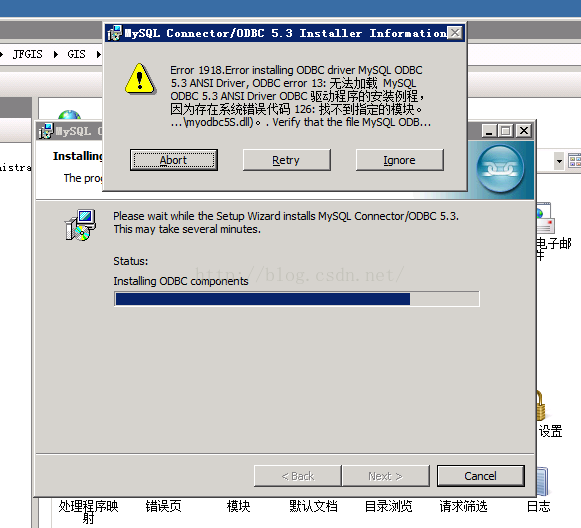
This error is very confusing, I have been thinking that it is a permission problem, checked for a long time, finally, after searching, found that the VC2010 library has not been installed…
After installing the libraries for the corresponding system version, install the ODBC driver again and you are ready to install correctly.
The official download address of the VC2010 library of the corresponding system is attached:
Microsoft Visual C++ 2010 redistributable component package (x64)
Microsoft Visual C++ 2010 redistributable component package (x86)

PS: MYSQL officially provides the command line version of the ODBC driver installation, this version is very strange, if you are a 64-bit system, after the installation of the 32-bit version of the VC2010 library, use the green version of the installation, in the system ODBC inside the driver column to see is no version, release company driver, but still can be used.
This is not recommended, but use the corresponding version of the library to install.

Cannot find module ‘lodash’

The scenarios in which this problem occurs vary, but the solutions are basically the same. This article takes lodash module as an example

    if Cannot find module lodash appears after the pull code is run, usually someone else USES a plug-in lodash, but you do not have it in your local environment, you can directly go to the package. Json to check if there is lodash, if there is, that proves that you do not install the lodash, use CNPM install to install it. Json package.json not found, Cannot find module lodash, global search under the file lodash, if the file is not used, then delete node_module, re-use CNPM install can be installed; Json . Just ask the relevant person to submit it, and then refer to step 1. Json, node_module package-lock. Use NPM cache clean --force to clear the cache. Then use NPM install to install.

Json copy a copy of packing-lock-. jsoncopy a copy of packing-lock. jsoncopy a copy of packing-lock. json copy a copy of packing-lock-. (Of course, if the file is u update status, then don't bother, check the update content, and then submit it)

Solution to msxml3.dll error ‘800c0008’ the system cannot locate the resource specified

msxml3.dll ?펳 ‘800 c0005’

The system always locate The resource specified.

/plugins. Asp??А 165

this is usually used when collecting information or statically updating a web page with XMLHTTP, and I’ve used similar errors before

set objXmlHttp = server.createobject (” microsoft.xmlhttp “) ‘is generally used in versions below msxml2.6

‘ set objXmlHttp = server.createobject (” msxml2.xmlhttp “) ‘supported by msxml3.dll+

is used instead of
, but now every error is reported.

has searched all the technical forums and search engines I know on the Internet, and there may be a variety of situations that could cause such a problem. Here is a summary:

(a) that is the most basic, your server does not support XMLHTTP or component version low, you need to download the corresponding component. This is not required by the average server, and XMLHTTP is supported in most cases, so this is a rare case.

(2) msxml3.dll file may be corrupted or the file is not authorized enough (this case is less likely), if the file is corrupted, you can download the corresponding system environment’s msxml3.dll file to replace (2003 system seems to be under c:// Windows /system32), need to close the corresponding service such as iis and so on to overwrite.

(three) fireproof or anti-virus software has disabled the corresponding port, the specific how to set it depends on different software, you can try to close the firewall or anti-virus software and then test to determine whether it is the problem.

(4) try re-registering the component. Start & gt; > Run: RegsvR32 MSxml3.DLL

(5) DNS resolution error, check your network Settings or correct DNS access

(6) check your IP filter Settings (this is not very clear)

(7) resource failure of the other party. For example, when collecting some information, the other party does not have the error that leads to program termination, which may also be the case. This error occurs when the XMLHTTP component’s Open method is called, followed by the Send method. An 8000005 error occurs when the URL parameter of the open method is not accessible. And if such an error occurs, the application terminates and cannot continue. Most programs are written like this:

Function functionName(pararm …)

Dim Http

= Set Http Server. CreateObject (” MSXML2. XMLHTTP. 4.0 “)

With Http

.open “GET”,HttpUrl,False

.Send

End With

If Http.Readystate< > 4 then

Set Http=Nothing

……

Exit function

End if

End Function

most programs use the XMLHTTP Readystate property to determine the return status from the server. This is not always the case, and many times using the ReadyState property does not actually detect errors in the program flow. When an error is encountered, the program will still be terminated. In fact, modify the above code, it is possible to achieve the process of skipping the execution of the program encountered errors, so that the program continues to run. The modified code is as follows:

Function functionName(pararm …)

Dim Http

= Set Http Server. CreateObject (” MSXML2. XMLHTTP. 4.0 “)

With Http

.open “GET”,HttpUrl,False

.Send

End With

On Error Resume Next

If Http.Status< > 200 then

Set Http=Nothing

……

Exit function

End if

End Function
When the
Send method produces an error, the ReadyState value may be 4, but the Status value must not be 200. Well, I’ve tracked ReadyState and Status’s worth to previous results many times. There may be mistakes. I haven’t found them so far.

hope the above program solution can help you!! If you have a better solution, please let me know.

, which I illustrate with msxml2.xmlhttp.4.0, is also suitable for other versions of the XMLHTTP component. To check which versions of the XMLHTTP component you have installed on your system, look under HKEY_CLASSES_ROOT in the registry.

(8) go to the server and set your IE security options (try setting the level to medium or low). Just add the domain name you want in the trusted website.

(9) I have tried all of the above methods after looking at them, but none of them worked out. So I went to Microsoft and downloaded MSXML4.0 Service Pack 2 (Microsoft XML Core Services) and Hotfix for MSXML4.0 Service Pack 2 – KB832414 – Simplified Chinese (KB832414_MSxml4.0_x86.exe) and installed it. The problem was finally solved!!

(10) if your case, I can solve the above methods, it is back, you continue to look for other possible to online, if you don’t want to continue to find you reinstall your iis or simply reshipment system (do this before you can try to restart the system to see, may probably as if lucky can use again

Google payment error prompt: error retrieving information from server [df-aa-20]

Google in-purchase payment test, released the beta version for testing, download and install after payment error prompt: error when retrieving information from the server [df-aa-20]
The reasons may be:
1. This product does not create in-purchase goods. (It takes time for the creation to take effect, so you can wait 10 minutes to try again)
2. The app was not released in the Google Play store, at least in alpha.
3. The app or developer account is blocked.
 

Websocket code 200 error

WebSocket connection to ‘XXX’ fails: Error during WebSocket handshake: Unexpected Response code 200
This problem is mainly the problem of background, the front-end address access is yes
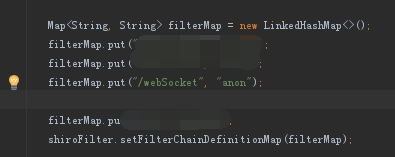
in my own configuration used in the project of the security framework of Shiro, because no open access permissions so appeared the error
it is good to open the access here

if it is not the problem can look for the background does not open access what
if the address was wrong will directly at 404 mistakes, instead of 200

Using xrdp to realize windows remote desktop Ubuntu Linux


In general, we use SSH client to remotely log in Linux system. As for Linux remote login tools under the graphical interface, we usually think of VNC, but its security is not enough.
Here, I introduce the XRDP installation configuration method. We can easily use Windows remote desktop Linux.
XRDP installation configuration method
Open terminal: Install in turn
sudo apt-get install xrdp
sudo apt-get install vnc4server tightvncserver

Set the XRDP
echo “gnome-session –session=gnome-classic” > ~/.xsession
Ubuntu12.04 has unity and gnome multiple desktop managers. You need to specify one when you start up, otherwise
Even if the remote login is successful, it is only background.
XRDP’s configuration documents are in the /etc/xrdp directory of xrdp.ini and Sesman.in, generally selected by default.

Restart XRDP
sudo /etc/init.d/xrdp restart

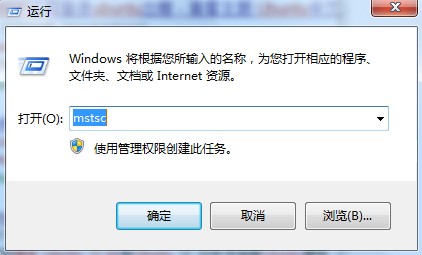
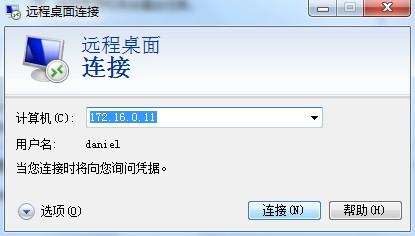
Run MSTSC for Windows

Windows remote desktop, open the input remote Ip, connection, enter the user password can be remote Linux.

Error encountered
1, XRDP access to Ubuntu only see the background, not the menu bar solution
Gnome-panel
sudo apt-get install gnome-panel

2, Failed to load session “gnome”
Try
on the desktop with ubuntu-2d
Type the command: echo “gnome-session — session= Ubuntu-2D “> ~/.xsession, and then restart XRDP.

3. Error:
Possiblitie to sesman IP 127.0.0.1 port 3350
sesman connect ok
sending login info to sesman
login successful for display 14

connecting to 127.0.0.1 5914
error – problem connecting
XRDP – Sesman. log, error:

[INFO ] starting Xvnc session…
[ERROR] X server for display 10 startup timeout[INFO ] starting xrdp-sessvc – xpid=2924 – wmpid=2923
[ERROR] X server for display 10 startup timeout
[ERROR] another Xserver is already active on display 10
[DEBUG] aborting connection…
if your log also has things like Xserver for display 10 startup timeout and another Xserver is already active on display 10
The root cause of the problem is TightvNC. The version in question conflicts with the X font, causing an error in connection to the Xserver.
Solutions:
apt-get purge tightvnc xrdp
apt-get install tightvncserver xrdp
Finally:
Start the XRDP service, sudo /etc/init.d/ XRDP restart, at which point the port is enabled and the aspect is configured by default.
By command: netstat -tnl
Check 3350 3389 5910 these three ports in LISTEN, generally no problem.
The name of the DPkg-L + package that tells you what files the package contains.
4, ubuntu 13.10 and later without background:
Thanks for the Suggestions in the comments:
XRDP does not support 13.10 GNOME. The solution is to install an XFCE interface.

sudo apt-get install xubuntu-desktop

And then:
echo xfce4-session > ~/.xsession

Set up the configuration file again
sudo gedit /etc/xrdp/startwm.sh
Insert
xfce4-session on the front line of./etc/x11/xsession
Restart XRDP
sudo service XRDP

Ubuntu14.04 installation error: no such partition

Reference:
Ubuntu boot up with GRUB Rescue> Terminal mode repair methods: http://www.linuxidc.com/Linux/2012-07/65249.htm
Windows& Ubuntu double system a key Ghost, prompt grub rescue solution: http://www.linuxidc.com/Linux/2015-01/111189.htm

# # # # # # # # # # # # # # # # # # # # # # # # # # # # # # # # # # # # # # # # # # #

Windows 7+Ubuntu14.04 dual system has been installed, a Ubuntu14.04 has been installed, the following error occurs after boot:

error:no such partition
Entering rescue mode...
grub rescue>

has been reinstalled in the system before, so this problem has been encountered several times. Record it today

There are not many commands available in this case, ls, set, insmod

Enter LS and the following information appears:

(hd0) (hd0,msdos7) (hd0,msdos6) (hd0,msdos5)

this information should be the disk partition information, the mode is approximately (hd0,msdosX), X represents the number

Enter SET and the following information appears:

cmdpath=(hd0)
prefix=(hd0,msdos8)/boot/grub
root=hd0,msdox8


To find out which partition Ubuntu is installed on, here’s how:

ls (hd0,msdosX)/grub  OR  ls (hd0,msdosX)/boot/grub

enter the above command in turn, X is the number, is the ls command appears in the number, if there is a lot of file information, is the partition

Assume that the input LS (HD0, MSDOS4) is a lot of information. Next, set:

set root=(hd0,msdos4)
set prefix=(hd0,msdos4)/grub

Note: If /boot/ GRUB is above, change the following command accordingly

After setting, you can input set command to view, and the output information will change to:

cmdpath=(hd0)
prefix=(hd0,msdos4)/grub
root=hd0,msdos4


Continue typing the command:

insmod normal

This works for me or

insmod /grub/normal.mod

Or change to the corresponding /boot/grub/…

Finally, enter:

normal

Grub’s boot menu is restored

After entering Ubuntu, enter the following command:

sudo apt-get install grub2
sudo update-grub
sudo update-install /dev/sda

restart, return to normal


Problems in compiling and using node FFI under electron

The project needed to load DLLS in NodeJS, learned that the easiest solution was to use Node-FFI, and then started a half-day of novice tramp.
This problem occurs when NPM install FFI sets up the project

error: no member named 'ForceSet' in 'v8::Object'

After checking on the official website, the author indicated that FFI does not support nodeJS 10 or above at present. Then I researched and walked through a lot of pothoods and found electronrebuild, which actually automatically goes down the corresponding Node header file and lib according to the electron version and platform version used in your project, and successfully solved the COMPILATION problem of FFI. After that, I tried to package and release, but there was another problem. Debugging code in Vscode was running well, and lifting directly with Electron. Exe would indicate that dynamic library loading failed

ffi.Library('./libfactorial'

This DLL loading code, please use the absolute path, modify the dynamic scheme, done

java.net.SocketException: software caused connection abort: socket write error resolution (selenium)

First, the problem: Using eclipse to run test cases, report the following error
socket write error
at java.net.SocketOutputStream.socketWrite0(local method)
at java.net.SocketOutputStream.socketWrite(unknown source)
at java.net.SocketOutputStream.write(unknown source)
at sun.nio.cs.StreamEncoder. writeBytes(unknown source)
at sun.nio. css . streamencoder. implFlushBuffer(unknown source)
at sun.nio. ces . streamencoder. implFlush(Unknown Source)
StreamEncoder. Refresh at java.io.OutputStreamWriter (unknown source).
. BufferedWriter at java.io.
. Flushing (unknown source)

org.testng.remote.strprotocol.JsonMessageSender.sendMessage (JsonMessageSender.java: 41)
org.testng.remote.strprotocol.MessageHub.sendMessage (MessageHub.java: 42)
org.testng.remote.strprotocol.RemoteTestListener1.onTestStart (RemoteTestListener1.java: 49)
org.testng.internal.Invoker.runTestListeners (Invoker.java: 1904)
org.testng.internal.Invoker.runTestListeners (Invoker.java: 1879)
org.testng.internal.Invoker.invokeMethod (Invoker.java: 685)
org.testng.internal.Invoker.invokeTestMethod (Invoker.java: 901)
org.testng.internal.Invoker.invokeTestMethods (Invoker.java: 1231)
org.testng.internal.TestMethodWorker.invokeTestMethods (TestMethodWorker.java: 127)
org.testng.internal.TestMethodWorker.run (TestMethodWorker.java: 111)在org.testng.TestRunner.privateRun

(TestRunner.java: 767)org.testng.TestRunner.run (TestRunner.java: 617)
org.testng.SuiteRunner.runTest (SuiteRunner.java: 334)
org.testng.SuiteRunner.runSequentially (SuiteRunner.java: 329)
org.testng.SuiteRunner.privateRun (SuiteRunner.java: 291)
org.testng.SuiteRunner.run (SuiteRunner.java: 240)
org.testng.SuiteRunnerWorker.runSuite (SuiteRunnerWorker.java: 52)在org.testng.SuiteRunnerWorker.run

(SuiteRunnerWorker.java: 86)org.testng.TestNG.runSuitesSequentially (TestNG.java: 1198)
org.testng.TestNG.runSuitesLocally (TestNG.java: 1123)
org.testng.TestNG.run (TestNG.java: 1031)
org.testng.remote.AbstractRemoteTestNG.run (AbstractRemoteTestNG.java: 114)
org.testng.remote.RemoteTestNG.initAndRun (RemoteTestNG.java: 251)
org.testng.remote.RemoteTestNG.main (RemoteTestNG.java: 77)
[SeleniumAutoConsole]

Information [Main] com.cases.KfglTest.kfgl_0001_LoginSucc | (36) kfgl_0001_LoginSucc Run!
[SeleniumAutoConsole] info [main] com.cases.KfglTest.kfgl_0001_LoginSucc(40) | decibels –:zhangsan
Database result is: zhangsan// there are two data, the English data read correctly, the Chinese data read failed
SocketException:Software cause connection broken: socket write error
at java.net.SocketOutputStream.socketWrite0(local method)
at java.net.SocketOutputStream.socketWrite(unknown source)
at java.net.SocketOutputStream.write(unknown source)
at sun.nio. css . streamencoder. writeBytes(unknown source)
at sun.nio. css . streamencoder. implFlushBuffer(unknown source)
at sun.nio. ces . streamencoder. implFlush(Unknown Source)
StreamEncoder. Refresh at java.io.OutputStreamWriter (unknown source).
. BufferedWriter at java.io.
. Flushing (unknown source)

Translated with www.DeepL.com/Translator (free version)

org.testng.remote.strprotocol.JsonMessageSender.sendMessage (JsonMessageSender.java: 41)
org.testng.remote.strprotocol.MessageHub.sendMessage (MessageHub.java: 42)
org.testng.remote.strprotocol.RemoteTestListener1.onTestSuccess (RemoteTestListener1.java: 88)
org.testng.internal.Invoker.runTestListeners (Invoker.java: 1899)
org.testng.internal.Invoker.runTestListeners (Invoker.java: 1879)
org.testng.internal.Invoker.invokeMethod (Invoker.java: 778)
org.testng.internal.Invoker.invokeTestMethod (Invoker.java: 901)
org.testng.internal.Invoker.invokeTestMethods (Invoker.java: 1231)
org.testng.internal.TestMethodWorker.invokeTestMethods (TestMethodWorker.java: 127)
org.testng.internal.TestMethodWorker.run (TestMethodWorker.java: 111)在org.testng
II. Causes of the problem
Test data containing Chinese
III. Solutions
eclipse modify. ini, set system properties to utf – 8
-Dfile.encoding = utf – 8