Author Archives: Robins

Error when Struts2 started Tomcat: org.apache.catalina.core.StandardContext filterStart

Use Struts2 + JSP to do a website, to the website production later, started Tomcat was unable to start, hung. It has been useful for a long time, but today I added something and it hung up. After deleting it, I still couldn’t start the Tomcat server.
Here is the error code:

<span style="color:#ff0000;"> org.apache.catalina.core.StandardContext filterStart
SEVERE: Exception starting filter struts</span>
<span style="color:#ff0000;">include - file:/C:/tomcat7.059/webapps/MusicWeb/WEB-INF/classes/struts.xml:41:43</span>
	at com.opensymphony.xwork2.config.providers.XmlConfigurationProvider.loadConfigurationFiles(XmlConfigurationProvider.java:833)
	at com.opensymphony.xwork2.config.providers.XmlConfigurationProvider.loadConfigurationFiles(XmlConfigurationProvider.java:864)
	at com.opensymphony.xwork2.config.providers.XmlConfigurationProvider.loadDocuments(XmlConfigurationProvider.java:131)
	at com.opensymphony.xwork2.config.providers.XmlConfigurationProvider.init(XmlConfigurationProvider.java:100)
	at com.opensymphony.xwork2.config.impl.DefaultConfiguration.reload(DefaultConfiguration.java:130)
	at com.opensymphony.xwork2.config.ConfigurationManager.getConfiguration(ConfigurationManager.java:52)
	at org.apache.struts2.dispatcher.Dispatcher.init_PreloadConfiguration(Dispatcher.java:395)
	at org.apache.struts2.dispatcher.Dispatcher.init(Dispatcher.java:452)
	at org.apache.struts2.dispatcher.FilterDispatcher.init(FilterDispatcher.java:201)
	at org.apache.catalina.core.ApplicationFilterConfig.initFilter(ApplicationFilterConfig.java:279)
	at org.apache.catalina.core.ApplicationFilterConfig.getFilter(ApplicationFilterConfig.java:260)
	at org.apache.catalina.core.ApplicationFilterConfig.<init>(ApplicationFilterConfig.java:105)
	at org.apache.catalina.core.StandardContext.filterStart(StandardContext.java:4854)
	at org.apache.catalina.core.StandardContext.startInternal(StandardContext.java:5542)
	at org.apache.catalina.util.LifecycleBase.start(LifecycleBase.java:150)
	at org.apache.catalina.core.StandardContext.reload(StandardContext.java:4033)
	at org.apache.catalina.startup.HostConfig.reload(HostConfig.java:1479)
	at org.apache.catalina.startup.HostConfig.checkResources(HostConfig.java:1462)
	at org.apache.catalina.startup.HostConfig.check(HostConfig.java:1646)
	at org.apache.catalina.startup.HostConfig.lifecycleEvent(HostConfig.java:328)
	at org.apache.catalina.util.LifecycleSupport.fireLifecycleEvent(LifecycleSupport.java:117)
	at org.apache.catalina.util.LifecycleBase.fireLifecycleEvent(LifecycleBase.java:90)
	at org.apache.catalina.core.ContainerBase.backgroundProcess(ContainerBase.java:1374)
	at org.apache.catalina.core.ContainerBase$ContainerBackgroundProcessor.processChildren(ContainerBase.java:1546)
	at org.apache.catalina.core.ContainerBase$ContainerBackgroundProcessor.processChildren(ContainerBase.java:1556)
	at org.apache.catalina.core.ContainerBase$ContainerBackgroundProcessor.run(ContainerBase.java:1524)
	at java.lang.Thread.run(Thread.java:722)
Caused by: Connection timed out: connect - [unknown location]
	at com.opensymphony.xwork2.util.DomHelper.parse(DomHelper.java:123)
	at com.opensymphony.xwork2.config.providers.XmlConfigurationProvider.loadConfigurationFiles(XmlConfigurationProvider.java:830)
	... 26 more
Caused by: java.net.ConnectException: Connection timed out: connect
	at java.net.DualStackPlainSocketImpl.connect0(Native Method)
	at java.net.DualStackPlainSocketImpl.socketConnect(DualStackPlainSocketImpl.java:69)
	at java.net.AbstractPlainSocketImpl.doConnect(AbstractPlainSocketImpl.java:339)
	at java.net.AbstractPlainSocketImpl.connectToAddress(AbstractPlainSocketImpl.java:200)
	at java.net.AbstractPlainSocketImpl.connect(AbstractPlainSocketImpl.java:182)
	at java.net.PlainSocketImpl.connect(PlainSocketImpl.java:157)
	at java.net.SocksSocketImpl.connect(SocksSocketImpl.java:391)
	at java.net.Socket.connect(Socket.java:579)
	at java.net.Socket.connect(Socket.java:528)
	at sun.net.NetworkClient.doConnect(NetworkClient.java:180)
	at sun.net.www.http.HttpClient.openServer(HttpClient.java:378)
	at sun.net.www.http.HttpClient.openServer(HttpClient.java:473)
	at sun.net.www.http.HttpClient.<init>(HttpClient.java:203)
	at sun.net.www.http.HttpClient.New(HttpClient.java:290)
	at sun.net.www.http.HttpClient.New(HttpClient.java:306)
	at sun.net.www.protocol.http.HttpURLConnection.getNewHttpClient(HttpURLConnection.java:995)
	at sun.net.www.protocol.http.HttpURLConnection.plainConnect(HttpURLConnection.java:931)
	at sun.net.www.protocol.http.HttpURLConnection.connect(HttpURLConnection.java:849)
	at sun.net.www.protocol.http.HttpURLConnection.getInputStream(HttpURLConnection.java:1299)
	at com.sun.org.apache.xerces.internal.impl.XMLEntityManager.setupCurrentEntity(XMLEntityManager.java:632)
	at com.sun.org.apache.xerces.internal.impl.XMLEntityManager.startEntity(XMLEntityManager.java:1270)
	at com.sun.org.apache.xerces.internal.impl.XMLEntityManager.startDTDEntity(XMLEntityManager.java:1237)
	at com.sun.org.apache.xerces.internal.impl.XMLDTDScannerImpl.setInputSource(XMLDTDScannerImpl.java:260)
	at com.sun.org.apache.xerces.internal.impl.XMLDocumentScannerImpl$DTDDriver.dispatch(XMLDocumentScannerImpl.java:1153)
	at com.sun.org.apache.xerces.internal.impl.XMLDocumentScannerImpl$DTDDriver.next(XMLDocumentScannerImpl.java:1049)
	at com.sun.org.apache.xerces.internal.impl.XMLDocumentScannerImpl$PrologDriver.next(XMLDocumentScannerImpl.java:962)
	at com.sun.org.apache.xerces.internal.impl.XMLDocumentScannerImpl.next(XMLDocumentScannerImpl.java:607)
	at com.sun.org.apache.xerces.internal.impl.XMLNSDocumentScannerImpl.next(XMLNSDocumentScannerImpl.java:116)
	at com.sun.org.apache.xerces.internal.impl.XMLDocumentFragmentScannerImpl.scanDocument(XMLDocumentFragmentScannerImpl.java:489)
	at com.sun.org.apache.xerces.internal.parsers.XML11Configuration.parse(XML11Configuration.java:835)
	at com.sun.org.apache.xerces.internal.parsers.XML11Configuration.parse(XML11Configuration.java:764)
	at com.sun.org.apache.xerces.internal.parsers.XMLParser.parse(XMLParser.java:123)
	at com.sun.org.apache.xerces.internal.parsers.AbstractSAXParser.parse(AbstractSAXParser.java:1210)
	at com.sun.org.apache.xerces.internal.jaxp.SAXParserImpl$JAXPSAXParser.parse(SAXParserImpl.java:568)
	at com.sun.org.apache.xerces.internal.jaxp.SAXParserImpl.parse(SAXParserImpl.java:302)
	at com.opensymphony.xwork2.util.DomHelper.parse(DomHelper.java:121)
	... 27 more

<span style="color:#ff0000;">Apr 09, 2015 9:23:59 AM org.apache.catalina.core.StandardContext startInternal
SEVERE: Error filterStart
Apr 09, 2015 9:23:59 AM org.apache.catalina.core.StandardContext startInternal
SEVERE: Context [/MusicWeb] startup failed due to previous errors</span>


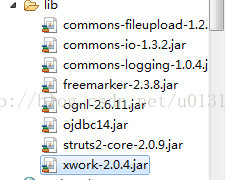
The imported jar package :(it is said on the Internet that there are fewer or more jars, which are useful before, but some jar packages have been changed properly later, which is still useless)
Configuration of web.xml :(Filter Filter is a problem, but I don’t use any Filter)

<?xml version="1.0" encoding="UTF-8"?>
<web-app version="2.5" 
xmlns="http://java.sun.com/xml/ns/javaee" 
xmlns:xsi="http://www.w3.org/2001/XMLSchema-instance" 
xsi:schemaLocation="http://java.sun.com/xml/ns/javaee 
http://java.sun.com/xml/ns/javaee/web-app_2_5.xsd">

<!-- org.apache.struts2.dispatcher.FilterDispatcher
org.apache.struts2.dispatcher.ng.filter.StrutsPrepareAndExecuteFilter
org.apache.struts2.dispatcher.ng.filter.StrutsPrepareFilter
 -->
<filter>
<filter-name>struts</filter-name>
<filter-class>
org.apache.struts2.dispatcher.FilterDispatcher
</filter-class>
</filter>

<filter-mapping><span style="color:#ff0000;">
</span><filter-name>struts</filter-name>
<url-pattern>/*</url-pattern>
</filter-mapping>

  <display-name></display-name>	
  <welcome-file-list>
    <welcome-file>login.jsp</welcome-file>
  </welcome-file-list>
  
  <error-page> 
<error-code>404</error-code> 
<location>/error.jsp</location> 
</error-page> 
</web-app>

because it feels either
Jar packages are inconsistent or conflicting, struts.xml configuration file is problematic, and Web.xml configuration file is problematic, and I’ve been working on these three areas for a long time without failing to launch.

Who knows the next day to open the computer, restart tomcat server did not hang up, the project can also be deployed, everything is normal.

Then I had to pick up where I left off yesterday and finally found the cause of the server error in my Struts.xml configuration file

		<action name="multiFileUpload_*" class="com.action.UploadAction" method="{1}">
			<result name="addMusicInfo" type="redirect-action">Another Action method </result> If you write it this way, you get the above error
		</action>

But if the

Put <span style="color:#ff0000;"><result name="addMusicInfo" type="redirect-action"></span>another Action method. lt;/result> change it to <span style="color:#ff0000;"><result name="addMusicInfo" >/error.jsp</result></span> and it won't. The server still can't be started even after the error is reported and corrected.
The reason for the problem has been found, but it is still unclear why and how to solve it, so I hope those who have errors can discuss it with us

.
Add the log file when the error occurs:

127.0.0.1 - - [09/Apr/2015:09:19:36 +0800] "GET /gg_bd_ad_720x90.js HTTP/1.1" 404 -
127.0.0.1 - - [09/Apr/2015:09:19:36 +0800] "GET /follow.js HTTP/1.1" 404 -
127.0.0.1 - - [09/Apr/2015:09:19:36 +0800] "GET /MusicWeb/upload//%E5%87%BA%E9%94%99%E5%A3%81%E7%BA%B8.jpg HTTP/1.1" 304 -


PHP Fatal error: Call to a member function query() on a non-object in

Call the function $this-> _db-> Query ($SQL), PHP Fatal error: Call to a member function query() on a non-object in.
At first I thought this function would not work, but later I found out that it was myself $this-> _DB does not exist.
My problem is that static variables are called directly within the class using $DBNAME,
It should be self: : DBNAME
I’ve sorted this out before, but I can’t remember it…

How to Fix error: ‘for’ loop initial declarations are only allowed in C99 mode

During the makefile execution today, the following error occurred:

error: 'for' loop initial declarations are only allowed in C99 mode

note: use option -std=c99 or -std=gnu99 to compile your code

The reason for this is that GCC is based on the C89 standard at compile time, and the C89 standard does not support circular statements defined as follows:

 for(int i=0; i<width; i++)

I in a loop statement is not supported to be defined in a loop statement, so change it to:

 int i;
for(i=0; i<width; i++);

Reexecution will not error ~

VMware Workstation unrecoverable error: (vcpu-0) c.382

Today, I copied the virtual machine from the old machine to the new machine. I made an error starting the virtual machine:
VMware Workstation is not recoverable error: (vcpu-0)
vcpu-0:VERIFY vmcore/vmm/main/cpuid.c.382
bugNr=1036521
.
See online that there is a way to add the following content to the.vmx file of the virtual machine:
smc.version = 0
Then save and restart.
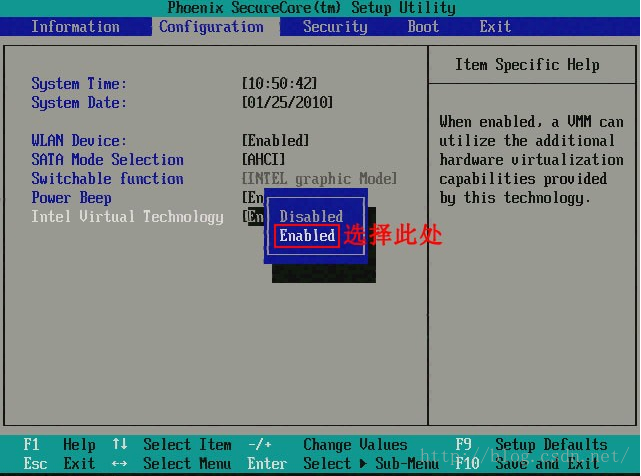
But I just couldn’t live without it, and then I found another way online, turning on CPU virtualization in my computer’s BIOS Settings.
Find the Intel Virtual Technology in the BIOS, set it to ENABLE, save the restart, and the virtual machine will open normally.

error while loading shared libraries: requires glibc 2.5 or later dynamic linker

C development environment under Linux setup process
– install glibc
 
Some software may require that your system’s Glibc be higher than a certain version to work, and if your Glibc is lower than the required version, you will have to upgrade your Glibc in order to run the software. Such as:
Error while loading Shared Libraries: Requires glibc 2.5 or later Dynamic Linker
 
You can look for compiled RPM packages or use source code to upgrade Glibc.
 
RPM package glibc
RPM is relatively easy to install, but the dependency problem is difficult to solve. Give a download address:
http://mirrors.jtlnet.com/centos/5.5/os/i386/CentOS/
$ RPM – the ivh glibc 2.5-49.. I386 RPM
 
But I’m using CentOS 4.8 and it doesn’t seem to be compatible…
error: Failed dependencies:
Glibc-common = 2.5-49 is needed by glibC-2.5-49. I386
glibc > 2.3.4 conflicts with glibc – common – 2.3.4-2.43 el4_8. 3. The i386
 
After the installation is complete, you can check whether you have upgraded:
$ ls -l /lib/libc.so.6
lrwxrwxrwx 1 root root 11 10-08 22:08 /lib/libc.so.6 -> Libc – 2.5. So
 
compile and install glibc
Download the glibc
[root@localhost test]# pwd
/test
[root @ localhost test] # wget http://ftp.gnu.org/gnu/glibc/glibc-2.9.tar.bz2
 
Download the glibc – linuxthreads
[root @ localhost test] # wget http://ftp.gnu.org/gnu/glibc/glibc-linuxthreads-2.5.tar.bz2
 
Unpack the
[root-@localhost test]# tar-jvxf glibc-2.9.tar.bz2
[root @ localhost test] # CD glibc 2.9
[root-@localhost glibc-2.9]# tar-jvxf../glibc – linuxthreads – 2.5. Tar..bz2
 
configuration
[root @ localhost glibc 2.9] # CD..
[root@localhost test]# exportCFLAGS=”-g -O2 -march=i486″
[root@localhost test]# mkdir glibc-build
[root@localhost test]# cd glibc-build
[root@localhost glibc-build]# .. /glibc-2.9/configure –prefix=/usr –disable-profile — enabling -add-ons –with-headers=/usr/include –with-binutils=/usr/bin
 
The installation
[root@localhost glibc-build]# make
[root@localhost glibc-build]# make install
 
Three points should be paid attention to during installation and compilation:
1. To unzip glibC-LinuxThreads into glibc directory.
2. Cannot run configure in glibc’s current directory.
Otherwise, if there is an error: error “Glibc cannot be Compiled without optimization”, please add the optimization switch: [root-@localhost test]# export CFLAGS=” -g-O2-March =i486″

Reproduced in: https://blog.51cto.com/rockhooray/787500

Error 2738. Could not access VBScript run time for custom action.

This error literally means that the VBScript runtime cannot be accessed. This error is common during the installation or uninstallation of various applications under Windows.
The installation/uninstallation of some applications USES VBScript as a procedure script, and the operation of VBScript depends on its runtime environment.
The solution is simple:
1. Make sure you have vbscript.DLL on your machine.
If so, skip this step. If not, you can make a copy from another Windows system that has the same version installed.
For 64-bit Windows, vbscript.dll appears in two paths, namely:
c:\windows\system32\
c:\windows\syswow64\
What’s missing, what’s missing.
2. Manually register vbscript.DLL components in the console using the regSVR32 command.
After entering, a window will pop up saying “DllRegisterServer has succeeded in vbscript.dll”, indicating that the registration was successful.
Basically, at this point, this error will be resolved.
Similarly, Error 2739 (meaning that the JavaScript runtime cannot be accessed, which corresponds to a jscript.dll file) can also be handled in this way.
There are also articles on the web where the solution is to start with a registry, to look up a particular registry key and include some risky actions such as deletion. The personal understanding is to determine whether the relevant components have been registered correctly. For general users, the individual does not recommend this approach, may not solve the problem, but also introduce other troubles.
It is important to note that many applications to install/uninstall program when encounter this problem, only gives an error code, or add a such as “internal error”, make people confused about the prefix, it is the mistake of Windows, but to mislead the user thought is to install/uninstall the program itself.

Error inflating class fragment error when loading custom fragment with fragment (valid)

Most of the ways that this error occurs online are
1. Check fragment package name, support.v4 is not the same as normal
Check your activity. If you are using a v4 fragment, you must inherit FragmentActivity (v4), or you can use CompatActivity(V7).
3. Static load fragment must give id
There may also be some other logic errors, such as whether the oncreateview fragment has loaded the correct layout, whether the parse is correct, whether the return is correct, etc.

If the above operation can not solve the error, then there is only one way, dynamic loading, it seems that the V4 package fragment does not support static loading, the specific reason has not been found, try dynamic loading can be used normally
V4 package dynamic loading: getSupportFragmentManager (). The beginTransaction (). The replace (layoutId, fragments, the tag). The commit ();
Non-v4 packages can load statically and dynamically.

Error: connect econnreused 127.0.0.1:7890 in postman

Description of the problem: I checked Consle and found Postman had been frantically trying to link to port 7890, which I didn’t use. Could not send request.
Solution: 1. I installed Postman on my computer and then used the same service port. Check conSLE and find no connection to local port 7890. The two Settings were compared and found the same.
2. However, I always thought it was the problem of setting. Later, I tried to remove the check of setting- proxy-use the system Proxy
 
I guess the local proxy set the pot.

Error 2104 Silverlight Could Not download the Silverlight Application

There are a number of online fixes for Error 2104, mostly because IIS doesn’t support Silverlight’s MIME type, but usually these don’t solve the problem. I hope you found this article helpful by listing how to fix the 2104 errors you encountered.
Recently, I have been working on a Silverlight + ASP.NET project. After the adoption of Sprint2, I found that my solution could not load Silverlight applications properly after Branch introduced the new Sprint3. The display error is:

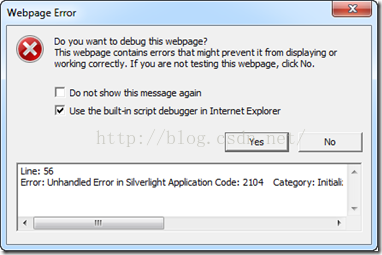
Line: 56
Error: Unhandled Error in Silverlight Application
Code: 2104
Category: InitializeError
Message: Could not download the Silverlight Application.check Web Server Settings
It’s strange that the same Solution loaded and ran well the last time. Check the MIME type Settings for IIS following the online prompts and find definitions for.xAP,.xAML, and.xBAP. So why is that?I stumbled upon the fact that in Silverlight Web projects, the default location for the compiled.xAP ClientBin directory is empty, which means there are no source objects needed for the Siliverlight control. Suddenly, there would be an error initializing Silverlight objects without a.xAP file.
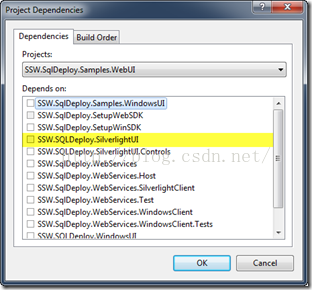
Solution: Right-click a Web Project and select Project Denpendents, and in the dialog that opens, place the Silverlight Project as a dependent on the Web Project, so that each time it is compiled, the Silverlight Project is first compiled and the.xAP file is copied to the Web Project’s ClientBin(default) directory:


Of course, for some environments that haven’t run Silverlight projects, try adding MIME types first.