Author Archives: Robins

win7 VMware Error:1325 Documents Is not a valid short name solution

Recently, when installing VMware8.0 in Win7, I encountered Error:1325 Documents is not an valid short name. I still cannot install it. There are many answers on the Internet, but I failed to solve them one by one. Finally, combined with the solutions on the Internet, I summed up an effective method, at least on my machine is a success.
Found in the registry HKEY_CURRENT_USER/Software/Microsoft/Windows/CurrentVersion/Explorer/Shell Folders directory, double-click the Favorites options. The diagram below:

Check whether the computer has D partition (D disk). If it does not (where the problem is), set it as follows:


Change the partition identifier specified by the Favorites string. Mine is D:\Favorites.
Note: at the beginning, there were no D disks on my machine, there were C, E, F and G disks, but I changed G disks to D disks.

A solution to the refusal of rdesktop connection to windows host

1. On the Windows host to be connected, right click ‘My Computer’ -& GT; Attribute “- & gt; “Advanced System Settings” – & GT; Remote setting “-& GT; In the Remote Desktop option, select the connection that allows you to run any version of the remote desktop. 2. Check whether the Linux host and the Windows host to be connected can ping each other; 3. Check whether the IP address appended to rdesktop is correct; 4. Create passwords for users on Windows hosts. Sometimes rdesktop cannot support password-less remote connections. 5. Close the firewall on the Windows host.
in general, rdesktop can connect to remote Windows hosts after the above five steps.

Ora-00257: archiver error. Connect internal only, until free

No configuration environment variable is loaded once
The source/home/oracle 11 g /. Following
Connect super administrator
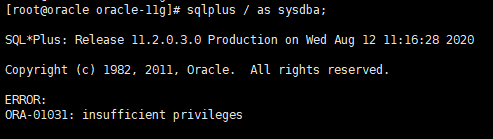
(1) SQLPLUS/AS SYsdBA;
There are errors under The Times

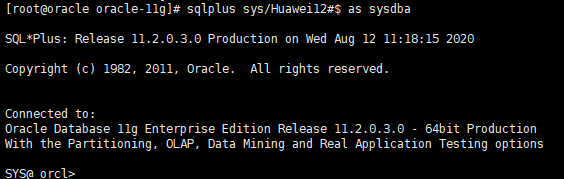
(2) SQLPLUS SYS/Password as SYsdBA

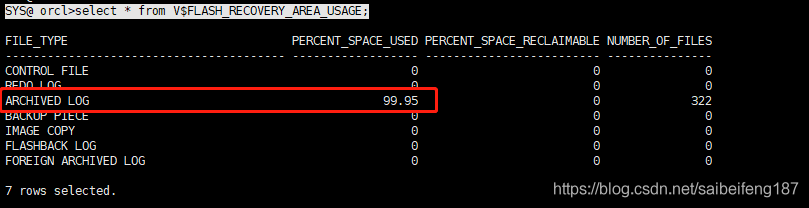
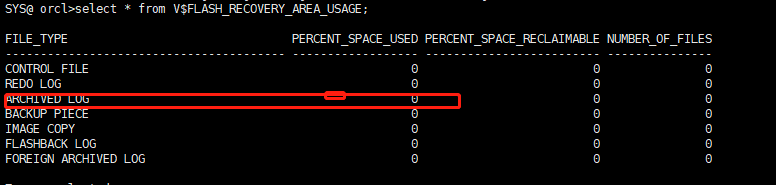
Look at V$FLASH_RECOVERY_AREA_USAGE to see how the archive directory is being used. Sure enough, the file is full.
SYS@ orcl> select * from V$FLASH_RECOVERY_AREA_USAGE;

Note: As you can see, ARCHIVELOG logs have reached 99.9%. The reason why the archive is full is that a user is doing a lot of add, delete and change operations, which results in a lot of redo logs.
archive logs switch frequently. The solution is to clear out a lot of archived logs!
there are two ways to solve this problem.
1 use RMAN to clear archive logs.
2 modify the size of the flashback recovery area DB_RECOVERY_FILE_DEST_SIZE.

the first method USES RMAN to clear archive logs.
[root@oracle fast_recovery_area]# rman target sys/Huawei12#$
Note: System is Oracle user, MyOracle is Oracle user password, orCL is the database name SID of connection.
RMAN> crosscheck archivelog all;
RMAN> Delete noprompt EXPIRED Archivelog all;
Note: Delete expired archives
This removes the archive. Go into SQLPlus again to see ARCHIVELOG log usage!
 
The second method is to increase the size of the flash recovery area. As follows:
SYS@ orcl> ALTER SYSTEM SET DB_RECOVERY_FILE_DEST_SIZE=8g;
Make a backup strategy in the archived data. To avoid causing the problem.
configure retention policy to recovery window of 15 days;
or delete the log information at backup time. Use rman Target sys/Huawei12#$to execute the following two commands
DELETE ARCHIVELOG ALL COMPLETED BEFORE ‘SYSDATE-7’; // Delete an archive from 7 days ago
DELETE ARCHIVELOG FROM TIME ‘SYSDATE-7’; // Delete seven days to the present archive
After I delete it

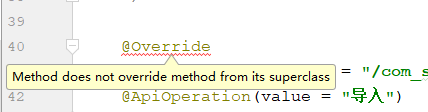
“Method does not override method from its superclass”

The @override annotation in IDEA gives error message “Method does not override Method from its superclass”

Cause of problem:
!! First check to see if the method overloads a parent class. If it doesn’t have a parent class, using @override will get an error.
!!!!!! Check to see if the method name/parameter is different when overloaded;
if none of the above problems exist, it may be the following reasons:
!! There are bugs in IDK5 version of the reference; Override is already available in JDK5, but does not support the implementation of the interface, arguing that it is not override error. JDK6 fixes this bug by annotating either the Override of the parent method or the implementation of the interface with @override.
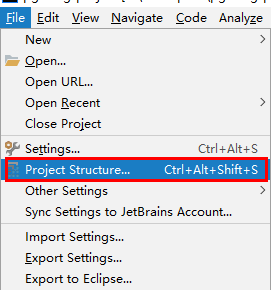
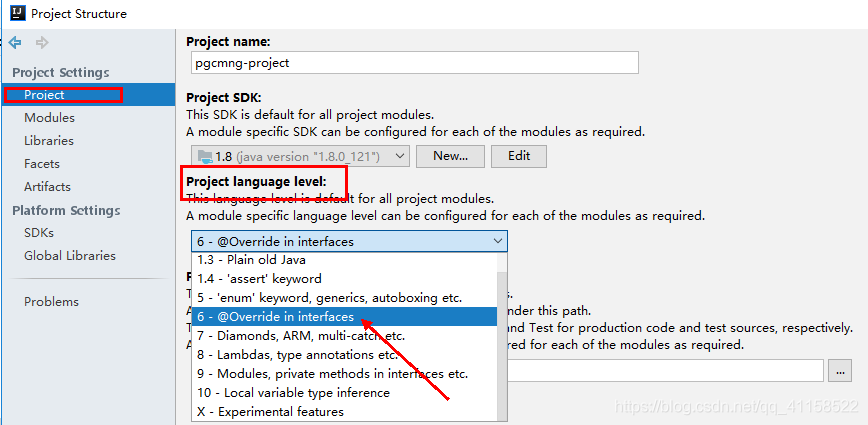
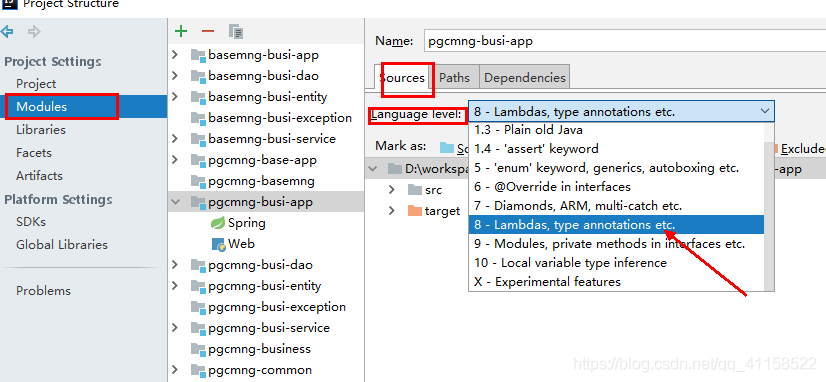
Project Structure—->

select the version above 6 in the Project language level.

2. After this setting, the problem has not been solved. The following Settings are required:
file– > Project Structure—–> Modules

STOP: c000021a { Fatal System Error } the initial session process or system process terminated …

Error:
STOP: c000021a { Fatal System Error } the initial session process or system process terminated unexpectedly with a status of 0x000000001 (0xc0000034 0x0010038c). The system has been shut down
What went wrong:
Windows7 automatic upgrade to windows10, restart the computer after the beginning of the first step “file copy” process, because to be eager to use the computer, but the replication speed is very slow, waited for almost three minutes to copy 1%, the operation interface and there is no return or undo options, so I decided to force a shutdown. Then the tragedy, boot again, after the display of boot animation will enter the blue screen mode, blue screen display error as above.
try safe mode entry and system recovery will not work, keep going into this terrible blue screen mode.
this is obviously a software error, not hardware related. And the system handler error (abnormal termination), copy 1%, the problem should not be serious.
through PE, can enter the disk and access all the contents of the system disk.
Check the files under the system32 directory of the system disk, found that not many files have been changed, the generated log files are not affected, and several files under C:\Windows\System32\config have been changed.
Solutions:
Copy C:\Windows\System32\config\RegBack to C:\Windows\System32\config

SFTP login error: fatal error: received unexpected end of file from SFTP server

STFP suddenly failed to log in, no restart, no configuration change, and suddenly an error was reported
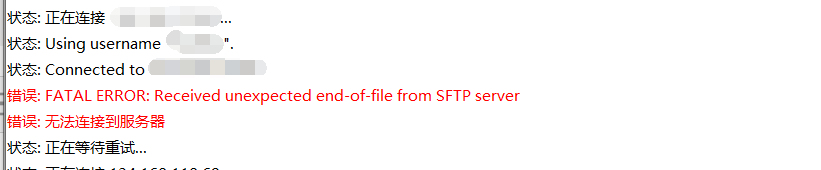
ERROR: Received unexpected end-of-file from SFTP server
ERROR: unable to connect to server
status: waiting for retry…

The first possibility:
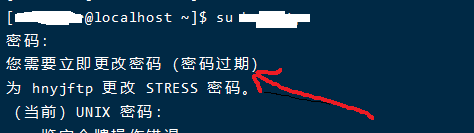
Password expired, change password, verify this problem, just su (SFTP username) on the server, for example: su Test

If the password prompt has expired, directly change the password, you can log in
Change password command
1. Switch to SFTP user: Su Test
2. Enter the old password for Test
3. Press the prompt to enter a new password. Don’t repeat the old password
Suggestion: The password expiration time can be changed, the default is 90 days, we can change a little longer
 
The second possibility:
Modify the configuration file and remember to back up the file
1. The vi/etc/SSH/sshd_config
Delete the Subsystem SFTP/usr/libexec/openssh/SFTP – “#” in front of the server,
Save the exit and restart SSH
# service SSHD restart
Then reconnect to the FTP test.
 

ThinkPad T400 fan error error report: an example of solving non fan problem

Many ThinkPad players have encountered fan error when starting up, the common situation is fan dust accumulation or bearing oil dry fan start-up difficulties caused by the error, the solution to this kind of fault is very simple, remove the fan dust or refueling. There are two cases we are not willing to encounter, because the word means to spend money, one is fan scrap, one is the motherboard fault, these two kinds of failure to solve up to say simple, fan leaf replacement or repair, according to the situation around to spend dozens to hundreds of oceans is necessary. My T400 is very unfortunate also medium recruit, and still want to spend money that kind, fortunately did not spend money, changed an insurance to solve a problem only, write out to give everybody a reference now, it is a solution train of thought to the machine friend with strong ability to begin, perhaps really encountered the same situation to be able to save a lot of ocean.

Let me start with my specific situation. One night when I was playing games, I suddenly cut off the power and turned it off. Then Fan Error reported that it was very hot at the bottom of the machine. I searched for Fan Error solutions online and found that most of them mentioned dust accumulation or dry oil, so I took apart the dust collection. However, when we take apart the fan, we can only see some dust spots sticking to the surface. It is also very smooth to gently blow the air, thus eliminating the problem of dust accumulation or oil drying. Since you’ve ruled out the easiest solution, plan for the cost — a broken fan, or a broken motherboard. So he contacted a local shop selling new and original fans online. He took the machine to the shop to try out the fans. After several attempts, the shop owner thought the fan he bought was defective, because he said he had not tested when he bought it. After testing all ten of the fans at his counter, none of them worked. had to be found dead on the motherboard.

Later, I thought someone in the altar had sent the circuit diagram of T400, so I downloaded it to see if I could solve it. Open the circuit diagram and find the FAN CONNECTOR page. It has an insurance F4,2.0A. Pump out the machine to take down the C shell U-frame, under the keyboard with A4 paper size magazine pad to prevent short circuit on the boot, and then boot with a multimeter to measure the voltage of each pin fan base, found almost no voltage, more suspected that the safety was broken. However, no F4 insurance was found near the fan socket. It seems that on the other side, had to be disassembled and removed from the motherboard. Refer to the dismantler manual for the specific dismantler process. Since no dismantler process was taken at that time, only the motherboard photos were kept.

I took off the main board and looked at the position of the fan socket on the back, and found F4 insurance. I measured it with a multimeter and it broke. Luckily, it was . I found a replacement card from another used board, installed it, and prayed before starting the machine. I pressed the power switch. After the logo was turned on for a short time, no error was reported, and the long-lost whirring of the fan started up again.

The T400 fan circuit diagram and F4 insurance location diagram of the motherboard are attached below, hoping to provide a reference for those who encounter the same situation. Of course, I hope that everyone will not encounter the best , because if encountered, at least relatively strong hands-on ability, to be bold and careful, at least to ensure that machine dismantling will not make mistakes .

[attachment=84441]

[attachment=84437]

[attachment=84438]

[Err] ERROR: invalid input syntax for integer: “1.0”

I. Problem description
This error was reported during the query operation, and by analysis, it was not an SQL statement syntax error, if it was an SQL statement syntax error, which row would be reported as a problem, it was a query with a PostgreSQL data type error, a non-Bigint data type, and a value of 1.0 saved in the database. Query as a bigint type. SQL example:

select  (
        ext ->> 'weekly_outpatient_days'
    ) :: BIGINT AS weekly_outpatient_days from test

Ii. Solutions
Get the question SQL, see which fields are designated as Bigint, then change it to something else, which I call numeric, and that’s fine.

select  (
        ext ->> 'weekly_outpatient_days'
    ) :: numeric AS weekly_outpatient_days from test

Third, summary
The problem arises because of a lack of understanding of PostgreSQL data types.
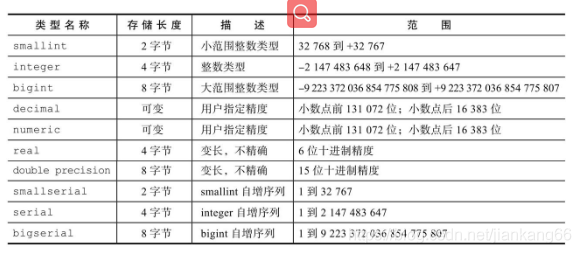
1. The number types are as follows

2. The string type is as follows:

3. Generally, Integer or Bigint is used as the type, while numeric is used for the high-precision type and text is used for the string type. Please refer to the form for the specific refinement. If helpful, welcome to focus on Java basic notes public account.

NSIS error error launching installer: installing during startup

Nsis Error Error Launching Installer, nSIS error error launch installation

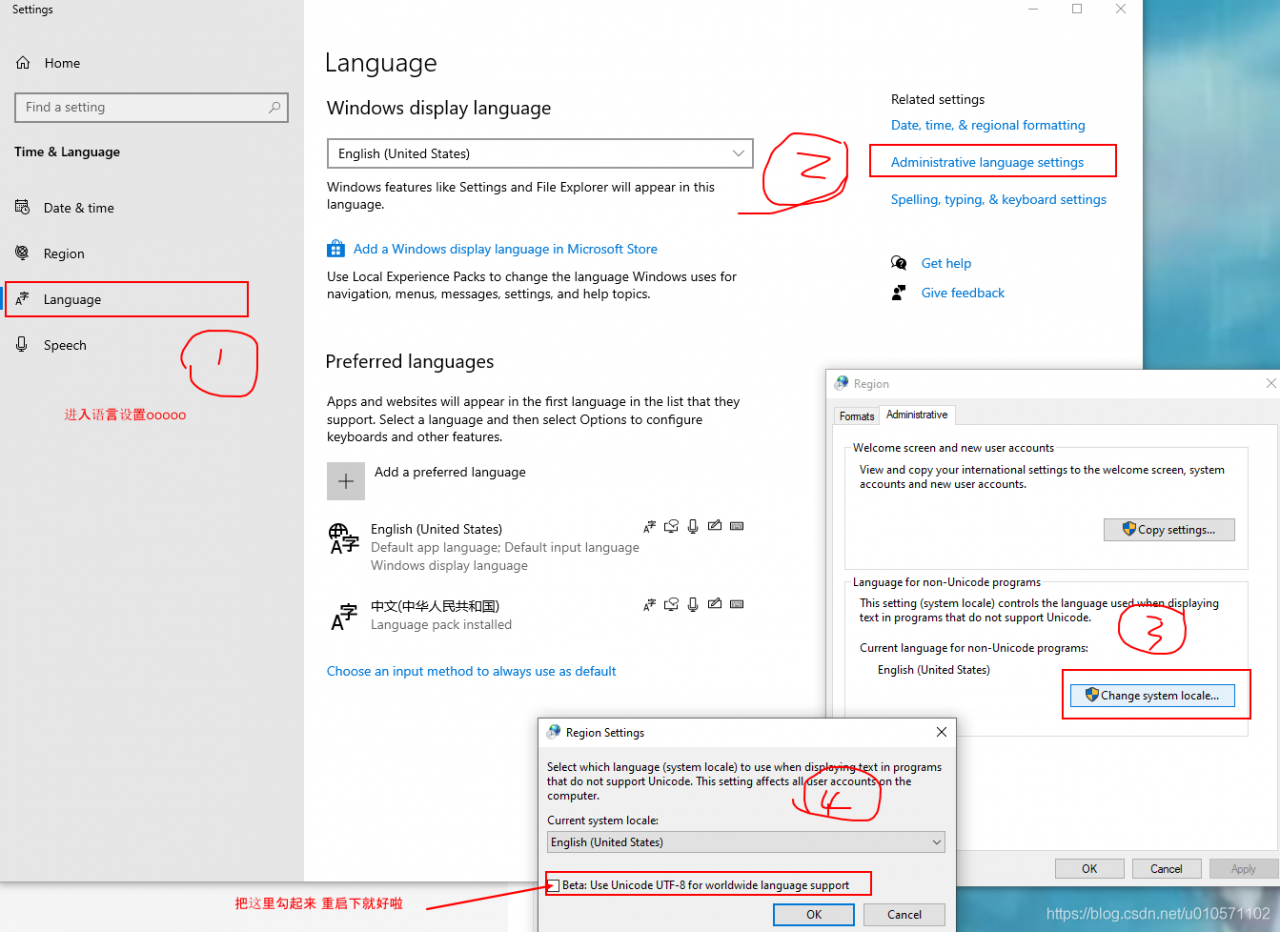
when installing WPS, maybe the system is Windows English monolingual package, not only to set the display language to Chinese, but also the control panel -> Region and language -& GT; Change the system area.

if not changed, some programs can be installed, but the installation interface is all messy code