Arm developer board for HTTPS client (libcurl implementation)
Root certificate, server certificate and private key, client certificate and private key are generated on Ubuntu. Error “Error 9 at 1 Depth Lookup: Certificate is not Yet Valid” is reported when verifying the certificate on the development board or connecting HTTPS.
openssl verify -CAfile cacert.pem cert.pemReason: The time zones don’t correspond. It is UTC time zone on the development board and CST time zone on Ubuntu. If the certificate is generated at 7 o ‘clock on the development board and executed on Ubuntu, the time on Ubuntu is only 11 o ‘clock and the certificate does not reach the legal start time. So the certificate will report an illegal error.
Solution: Change CST time zone on Ubuntu to UTC time zone:
ln -sf /usr/share/zoneinfo/UTC /etc/localtime
ASP compilation error 800a03ea
If ASP makes an error like this:
Microsoft VBScript compilation error ‘800a03ea’
Syntax error
class.asp, line 2
Class clsClass
^ — — — — — — — — — — — — —
Most likely, the following reasons:
1. Included files are written in the control statement, such as included in if… Between then and else or end if;
2. The class has been redefined, that is, the file has been contained multiple times.
control reaches end of non-void function
warning: control reaches end of non-void function
It means: control to the end of a non-void function. This means that some of your functions that should return a value may not return any value when they reach the end. At this point, it’s a good idea to check to see if each control flow has a return value.
For example, add: return 0;
SQL Server 2012 installation exception: error while enabling windows feature: netfx3, error code: – 2146498298
OS: Windows 2012 R2
SQL: SQL Server 2012
2. Fault description
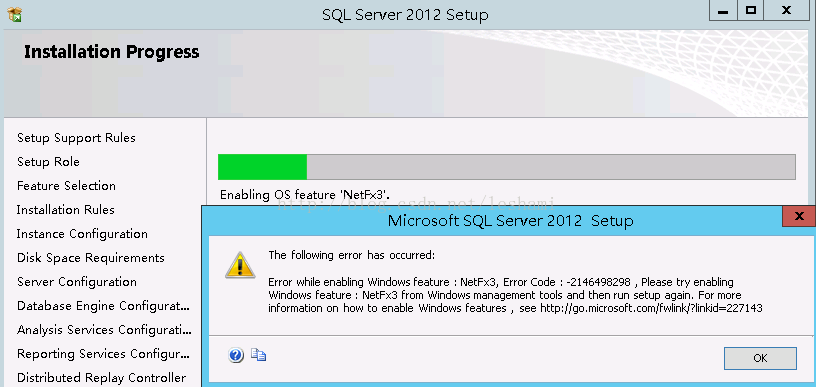
3. Troubleshooting
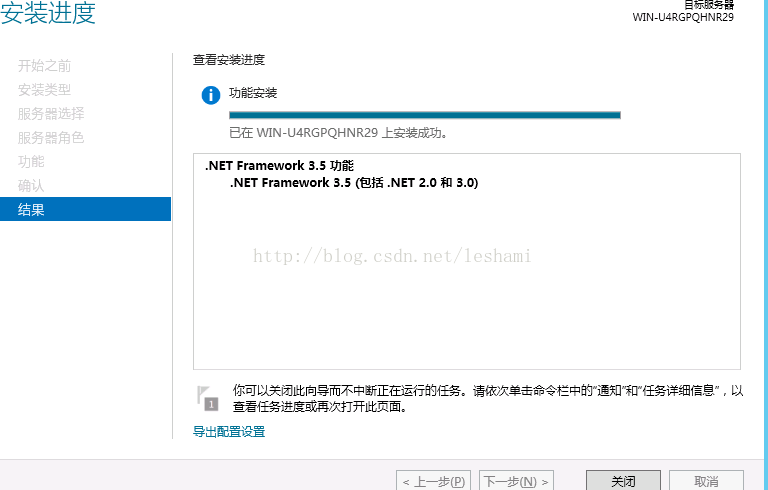
It was found that the problem was due to the.net Framework 3.5 not being installed. .net 4.0 is out now, need to install.net 3.5?Sweat, it should be compatible! Here is the installation process.
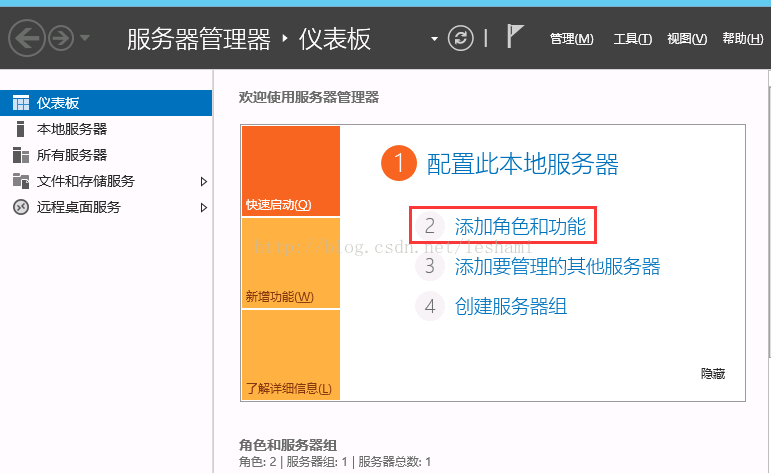
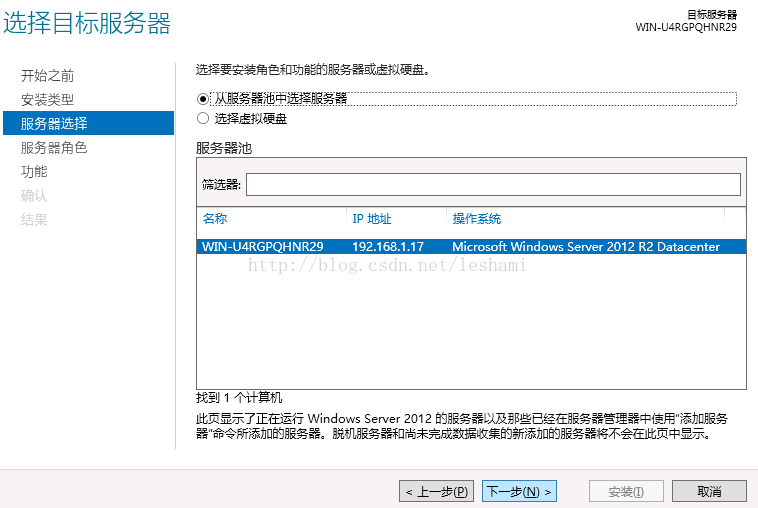
Select the next step in the selection of the server to be installed, as shown below
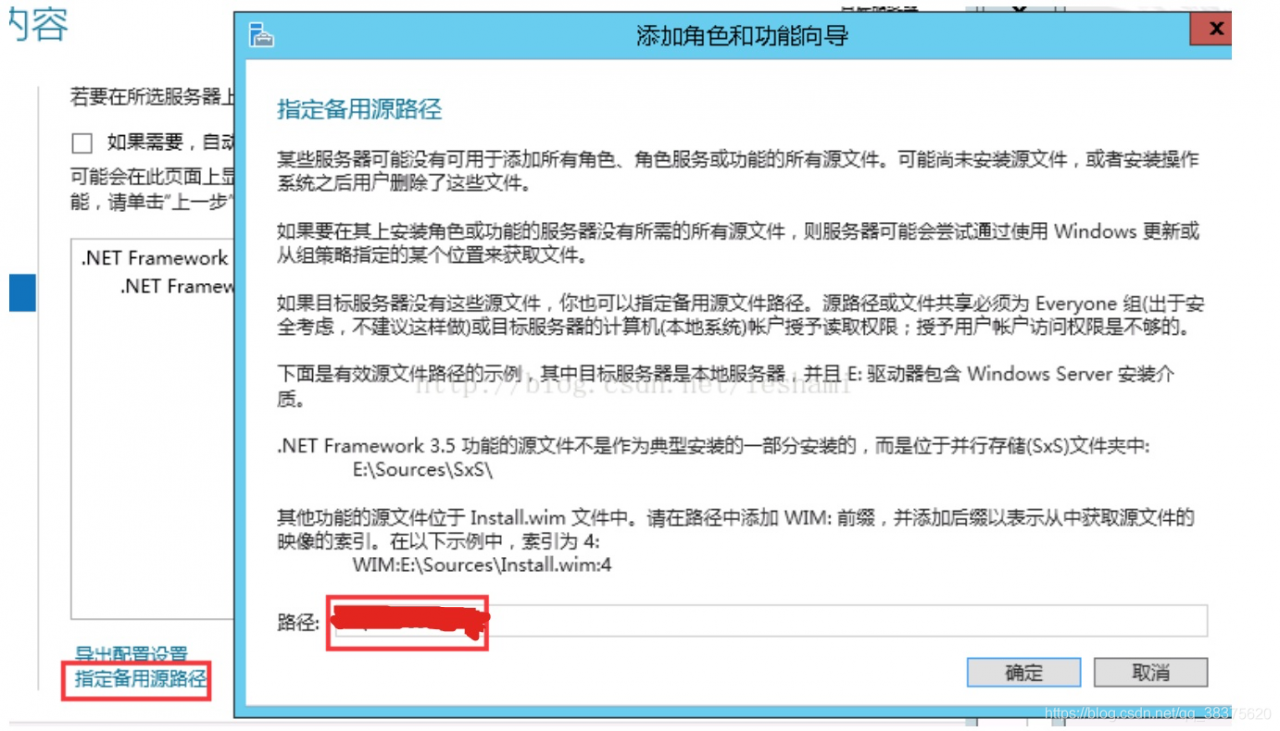
Select the next step, go to the function module, and check the.NET Framework 3.5. Here you must select the alternate source path and specify the location of the installation file, as shown in the figure below.
The installation is complete
Git push failed, prompt unpack error / unpack failed solution
after you execute the command git commit -amend to amend the commit, then execute git push review HEAD:refs/for/ XXXX to submit the code to Gerrit, but the commit failed and print out the following prompt:
qidi.huang@droid10$ git push review HEAD:refs/for/xxxx

Writing objects: 100% (1/1), 258 bytes | 0 bytes/s, done.
Total 1 (delta 0), reused 0 (delta 0)
error: unpack failed: error Missing tree a0abf7e9827e74b7d729485fcd3714bc6a1ce898
fatal: Unpack error, check server log
To ssh://[email protected]:29418/kernel/common
 ! [remote rejected] HEAD -> refs/for/xxxx (n/a (unpacker error))
we can solve this problem by adding the --no-thin parameter to the submission. In other words, we can use the following command to submit:
$ git push --no-thin review HEAD:refs/for/xxxxGit push –help) git push –help
--[no-]thin
    These options are passed to git-send-pack(1). A thin
transfer significantly reduces the amount of sent data when
the sender and receiver share many of the same objects in
common. The default is --thin.
failure should be analyzed from the log of Gerrit server. I didn’t check the log (as if I didn’t have permission), but according to other colleagues, the problem may be “Gerrit is not compatible with git. This is because when Git is committed, an open review request is generated in Gerrit, but this request does not belong to any of the commits.
[reference]
[1] git flow and gerrit
[2] git push error: unpack failed: index-pack abnormal exit
Adobe Acrobat installation error experience of e1935 0x80070bc9
An Error occurred during the installation of assembly component {43cc1b37-b20c-3ebc-9c04-f809989e4fd3}. HRESULT: 0x80070BC9
Try to run with administrator identity, disable kill soft, all not line, helpless Baidu of.
1. Restart and install
2. Uninstall and reinstall.net framwork (with multiple versions of.net framwork)
3. Since I just reinstalled the system and installed.net 4.7.2, I tried to run the installation program to fix it. The result found that it could not be run. The original reason was that I ran the update and did not restart. Then reboot and install again without any problems.
conclusion
Seems to be some installer will call Windows update function, if you are running Windows update not restart, especially when they are in use third-party plug-ins to install updates (due to the inability of third-party plug-ins like Windows update in the tray with the state of the prompt you to restart, so it’s easy to forget yourself not restart, this time you install a few large software, such as office, acrobat, autocad, etc., can produce the problem.
The reason should be that Windows Update set the restart, but we delayed, and then the program used the UPDATE.
If you have the same problem, try rebooting first, and if not, follow the link above.
How to register spotify music converter for Mac?
Spotify Music Converter for Mac converts iTunes, Audible and M4P Music to MP3, AAC and WAV, and gives you instant access to millions of songs, from old collections to the latest viewing. Spotify Music Converter for Mac is so good that many friends wonder how to sign up for Spotify Music Converter for Mac?Below with small make up look together!
Spotify Music Converter for Mac?
run NoteBurner and click the menu button in the top right corner, then select register from the drop-down list. You can also click the “Key” icon directly, and you will get a pop-up window of registered entries. Simply copy and paste the registration email and code into the registration pop-up dialog. 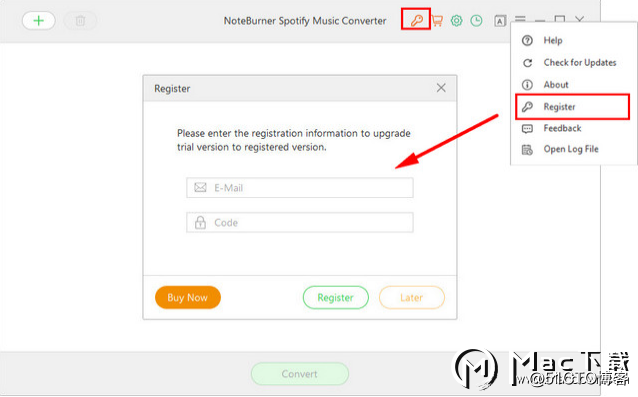
Reproduced in: https://blog.51cto.com/14291436/2380029
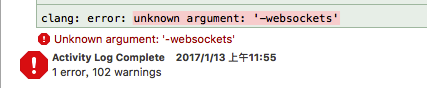
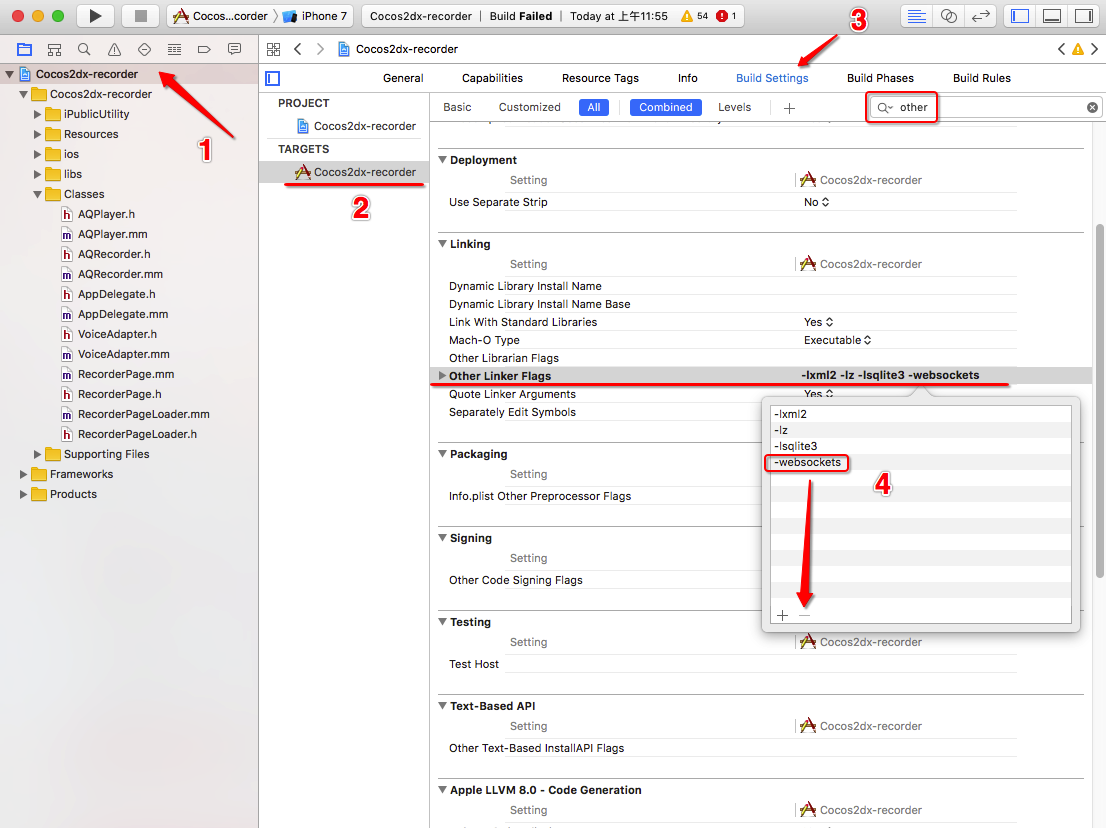
(resolved) Xcode running error: clang: error: unknown argument: ‘- WebSockets’
Error contents:
Solutions:
【ERROR_2】Call to a member function bind_param() on a non-object
Fatal error: Call to a member function bind_param() on a non-object in …
The error statement for the report is:
$prepareQuery-> bind_param(“sssd”,$isbn,$author,$title,$price);
— Error reasons:
$query=”insert into boks values(?,?,?,?) “;
$prepareQuery=$db-> prepare($query);
$prepareQuery-> bind_param(“sssd”,$isbn,$author,$title,$price);
The name of the table Boks is wrong. It should be books
So: when encountering an error like this, you should double-check your SQL!
A fatal error occurred while trying to Sysprep the machine
The following error was encountered while running SyspREP:
A fatal error occurred while trying to Sysprep the machine
Resolution:
Running command: SLMGR/DLV can discover the Remaining Windows Rearm Count :0
Modify the registry:
HKEY_LOCAL_MACHINE \ SOFTWARE \ Microsoft \ Windows NT \ CurrentVersion \ SoftwareProtectionPlatform \ SkipRearm set it from 0 to 1
HKEY_LOCAL_MACHINE\SYSTEM\Setup\Status\SysprepStatus\GeneralizationState sets it from 3 to 7
Run sySPREP again, and if you still report an error, uninstall the reinstall component mSDTC-uninstall, -install
Cause:
When you encapsulate the system with sysprep/commune, the system reduces the number of rearm, and when REARM is 0, the problem that cannot be encapsulated occurs. The default number of Rearm is 3, which means you can only encapsulate 3 times.
Interesting undefined columns selected from read.table and read.csv
Enter the following syntax:
read.table(site_file,header=T)-> data
data< -data[which(data[,5]==”ADD”),]
A:
Error in `[.data.frame`(data, , 5) : undefined columns selected
Calls: plot_manhatton -> [ -> [.data.frame -> which -> [ -> [.data.frame
After a few attempts, change the command to:
read.csv(site_file,header=T)-> data
data< -data[which(data[,5]==”ADD”),]
It’s ready to run.
The reason for undefined Columns selected error is that What I imported was a CSV file, but I used read.table when Reading the file. After changing to read.csv, there is no problem.
Reproduced in: https://www.cnblogs.com/chenwenyan/p/5384714.html
[Vue] install vuex, error: eperm: operation not permitted, rename
Vue vuex installed in Vue, error:
npm ERR! path F:\fristvue\node_modules\vue-loader
npm ERR! code EPERM
npm ERR! errno -4048
npm ERR! syscall rename
npm ERR! Error: EPERM: operation not permitted, rename 'F:\fristvue\node_modules\vue-loader' -> 'F:\fristvue\node_modules\.vue-loader.DELETE'
npm ERR!  { [Error: EPERM: operation not permitted, rename 'F:\fristvue\node_modules\vue-loader' -> 'F:\fristvue\node_modules\.vue-loader.DELETE']
npm ERR!   cause:
npm ERR!    { Error: EPERM: operation not permitted, rename 'F:\fristvue\node_modules\vue-loader' -> 'F:\fristvue\node_modules\.vue-loader.DELETE'
npm ERR!      errno: -4048,
npm ERR!      code: 'EPERM',
npm ERR!      syscall: 'rename',
npm ERR!      path: 'F:\\fristvue\\node_modules\\vue-loader',
npm ERR!      dest: 'F:\\fristvue\\node_modules\\.vue-loader.DELETE' },
npm ERR!   stack:
npm ERR!    'Error: EPERM: operation not permitted, rename \'F:\\fristvue\\node_modules\\vue-loader\' -> \'F:\\fristvue\\node_modules\\.vue-loader.DELETE\'',
npm ERR!   errno: -4048,
npm ERR!   code: 'EPERM',
npm ERR!   syscall: 'rename',
npm ERR!   path: 'F:\\fristvue\\node_modules\\vue-loader',
npm ERR!   dest: 'F:\\fristvue\\node_modules\\.vue-loader.DELETE',
npm ERR!   parent: 'fristvue' }
npm ERR!
npm ERR! The operation was rejected by your operating system.
npm ERR! It's possible that the file was already in use (by a text editor or antivirus),
npm ERR! or that you lack permissions to access it.
npm ERR!
npm ERR! If you believe this might be a permissions issue, please double-check the
npm ERR! permissions of the file and its containing directories, or try running
npm ERR! the command again as root/Administrator (though this is not recommended).

npm ERR! A complete log of this run can be found in:
npm ERR!     C:\Users\Administrator\AppData\Roaming\npm-cache\_logs\2019-04-07T11_22_51_179Z-debug.log
solution:
1. Run command
under administrator permissions to start selecting command prompt (administrator)
2. Cleans up the cache in the specified directory
npm cache clean -force
3. Reinstall
npm install vuex --save
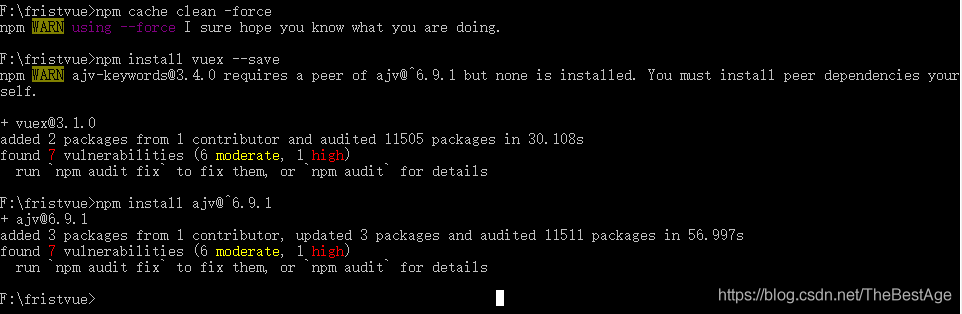
NPM error!
NPM error! Error :EPERM: operation is not allowed. Rename
NPM +EPERM+operation+not+ suspension +rename resolves