Tag Archives: java

[Solved] Error getting bean using springboot: no qualifying bean of type ‘xxx’ available

Recently, I encountered a bug in my work.
the project uses springboot, and uses springcontexthloder, getBean (); No qualifying bean of type ‘xxx’ available

Caused by: org.springframework.beans.factory.NoSuchBeanDefinitionException: No qualifying bean of type 'com.tension.web.disabledevaluate.service.DisabledEvaluateService' available

Generally, this error indicates that there is no bean available. Check the code carefully to ensure that this class exists and is injected into spring correctly

Controller:

 public Map loadForm(String round,String instanceId) {
 		//error
        DisabledEvaluateService disabledEvaluateService = SpringContextHolder.getBean(DisabledEvaluateService.class);
 }

Service:

@Service
@Transactional(readOnly = true)
public class DisabledEvaluateService extends CrudService<DisabledEvaluateDao, DisabledEvaluate> {
    public DisabledEvaluate getByBjId(Map map){
        return dao.getByBjIdOrInstanceId(map);
    }

After several hours of exploration, we finally found the information on the Internet because we used the devtools hot deployment plug-in. As a result, when the program starts, we use the classloader rewritten by the devtools hot deployment plug-in instead of the Java default classloader. As a result, some classes may not be loaded correctly, resulting in the inability to obtain beans.

Solution:
this error can be solved without using hot deployment plug-in

How to Solve Tomcat Error: Could not resolve view with name ‘xxx/xxxxxxx‘ in servlet with

Click the control to not receive the returned JSON object, Tomcat reports an error.

reason:

Because the return information is a JSON object, the annotation added to the entry class where the controller method is located is: @ controller

The @controller is not suitable for returning JSON content

Method 1: change the @ controller annotation to @restcontroller without affecting the use of other methods

Method 2: add @ ResponseBody annotation to the method that needs to request to return the JSON object

Some of the other methods in the class of this method in the project return to the specified page, so @restcontroller cannot be used to replace @ controller directly, so method 2 is adopted to solve the problem.

The difference between @controller and @restcontroller is as follows

@Restcontroller is a stereotype annotation that combines @ ResponseBody and @ controller.
it means:
@restcontroller annotation is equivalent to the combined function of @ ResponseBody + @controller.

1) If you only use @restcontroller to annotate the controller, the methods in the controller cannot return the JSP page, the configured view parser internalresourceviewresolver does not work, and the returned content is the content in return.

For example, if you should go to the success.jsp page, success.jsp will be displayed

2) If you need to return to the specified page, you need to use @ controller with the view parser internalresourceviewresolver
3) if you need to return JSON, XML or custom media type content to the page, you need to add @ ResponseBody annotation to the corresponding method

How to Solve Error: Failed to execute goal org.codehaus.mojo:……..

How to Solve:Failed to execute goal org.codehaus.mojo:exec-maven-plugin:3.0.0:exec (default-cli) on project spring_aop: Command execution failed.error


error:

Failed to execute goal org.codehaus.mojo:exec-maven-plugin:3.0.0:exec (default-cli) on project 
spring_aop: Command execution failed.

Solution 1: in this case, I will use the main method to execute the program and use the unit test @ test instead

~It used to be like this: running with main

public class MyTest {
    public static void main(String[] args) {
    
        ClassPathXmlApplicationContext context = new ClassPathXmlApplicationContext("applicationContext.xml");

        //Dynamic proxies represent interfaces
        UserService userservice = (UserService) context.getBean("userservice");

        userservice.add();
    }
}

~Changed to: use @ test

import com.niuyun.service.UserService;
import com.niuyun.service.UserServiceImpl;
import org.junit.Test;
import org.springframework.context.support.ClassPathXmlApplicationContext;

public class MyTest {

    @Test
    public void test(){
        ClassPathXmlApplicationContext context = new ClassPathXmlApplicationContext("applicationContext.xml");

        //Dynamic proxies represent interfaces
        UserService userservice = (UserService) context.getBean("userservice");

        userservice.add();
    }
}

~Finish the work and run successfully

! Expansion

@Test is the basis of JUnit testing, and its functions are as follows:
1. Specify the type of exception to be thrown
2. Test the running time of the code.


Solution 2: if you have to use the main function, you can introduce two plug-ins in Maven (compiler can not be introduced), but it may lead to Chinese garbled.

Maven compiler plugin: used to compile java files, specify JDK version, etc.
exec Maven plugin: used to execute class files, in which the path of executing class should be indicated in plug-in configuration.

<build>
     <plugins>
         <plugin>
             <groupId>org.codehaus.mojo</groupId>
             <artifactId>exec-maven-plugin</artifactId>
             <version>1.6.0</version>
             <executions>
                 <execution>
                     <goals>
                         <goal>java</goal>
                     </goals>
                 </execution>
             </executions>
             <configuration>
                 <classpathScope>test</classpathScope>
             </configuration>
         </plugin>
     </plugins>
</build>

~Run successfully


Solve the problem of garbled code

Method 1:
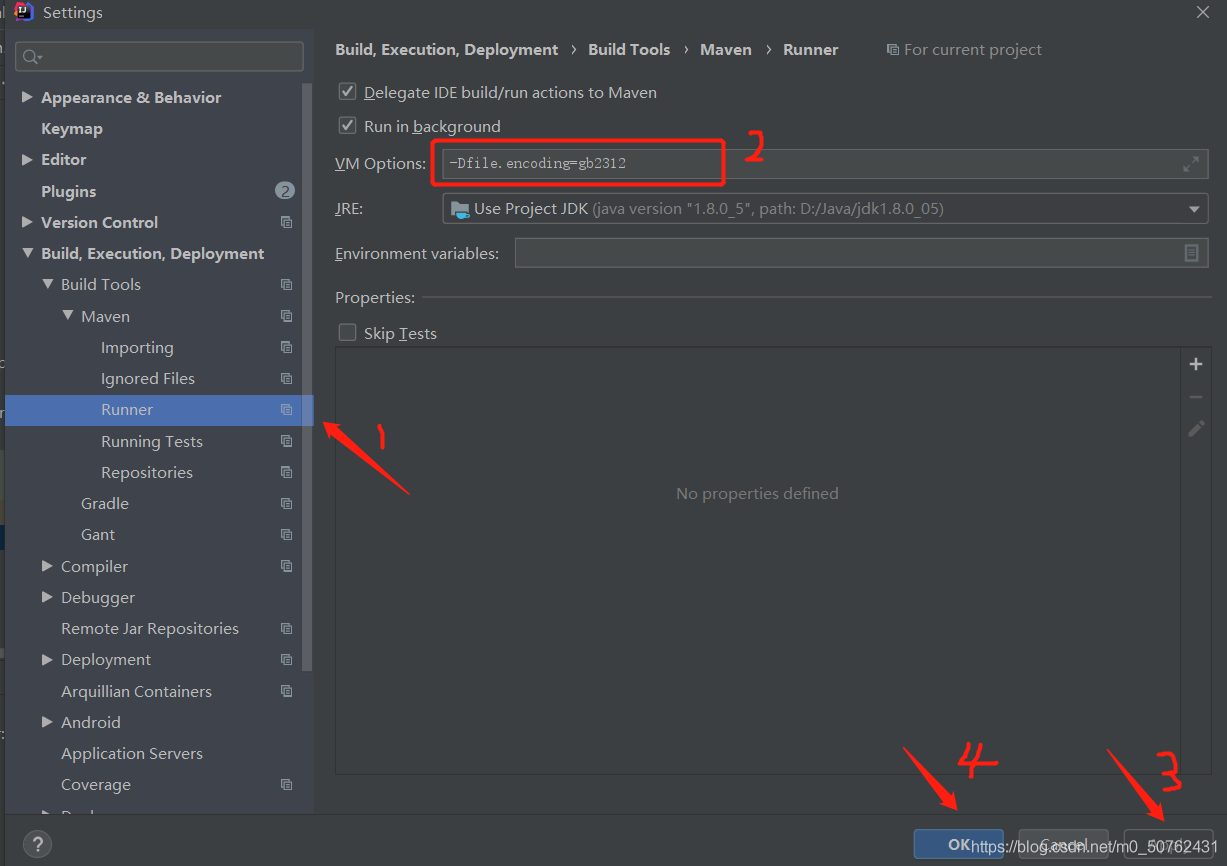
in setting – & gt; maven-> Runner-> Fill in the column VM options
with – dfile. Encoding = GB2312

Method 2: add in pom.xml (I tried this method, but I didn’t solve the garbled code, which may be useful to you)

<properties>
	<!-- Encoding when copying files -->
	<project.build.sourceEncoding>UTF-8</project.build.sourceEncoding>
	<project.reporting.outputEncoding>UTF-8</project.reporting.outputEncoding>
	<!-- Compile-time coding -->
    <maven.compiler.encoding>UTF-8</maven.compiler.encoding>
</properties> 

Request processing failed;nested exception is java.lang.*

catalogue

Questions

analysis

solve

Appendix

be careful

reference resources


Questions

Error 1:

Httpclient sends a request to the server, and the server sometimes returns 500 errors to the client,

Open the server error log and report the following error:

2021-05-28   21:05:06.548 default [http-nio-0.0.0.0-xxxx-exec-6] ERROR o.a.c.c.C.[.[localhost].[/].[dispatcherServlet] – L ine:175 – Servlet.service() for servlet [dispatcherServlet] in context with path [] threw exception [Request processing failed; nested exception is java.lang.NullPointerException] with root cause
java.lang.NullPointerException: null

(the problem is that there is no specific empty pointer in which line, which is not easy to locate. Moreover, it does not report an error every time, but occasionally.)

Error 2:

java.net.SocketTimeoutException

analysis

Error 1 Analysis

After further analysis, it is found that the problem lies in InputStream,

InputStream inputstream =request.getInputStream()

inputstream.read()

After obtaining the InputStream in the request, the above error 2: java.net.sockettimeoutexception appears in the process of reading the InputStream. However, the program only catches this exception and does not handle it, resulting in a null pointer.

So the question is, why do you report error 2, and sometimes.

Error 2 Analysis

Error 2 is caused by the timeout of httpclient getting response, that is, before the server has finished reading the InputStream, httpclient has already responded to the timeout, and broken the link after the timeout, resulting in the exception of reading InputStream.

There are many reasons why response timeout is triggered,

It may be due to the network, which leads to the slow network transmission;

It may also be that httpclient carries a large amount of data in this request and the server reads it slowly;

It is also possible that the load of the server is high, the data processing is slow, and so on.

solve

After analyzing the reasons, we can solve the problem from two aspects,

For the server, it is necessary to handle the exception capture and respond to the corresponding prompt information to the client. For the client, the response time (HTTP. Socket. Timeout) can be increased appropriately.

Appendix

About the setting of two timeouts of httpclient,

Request timeout (HTTP. Connection. Timeout): that is, connection timeout, refers to the time from the establishment of HTTP link initiated by the client to the completion of the establishment of HTTP link. Response timeout (HTTP. Socket. Timeout): that is, reading data timeout, refers to the time from the client sending the HTTP request to the server receiving the response.

be careful

To write Java, we must catch all kinds of exceptions and handle them; Otherwise, it is difficult to locate the problem. For all kinds of file streams, network streams, etc., we must close the stream in finally {} to ensure that the stream is closed under both normal conditions and abnormal conditions. Otherwise, it may lead to the occupation of resources under abnormal conditions, resulting in the server can not normally provide external services. The problem that is relatively difficult to locate is that sometimes an error is reported, sometimes it is normal, and sometimes it is normal for the same request. Sometimes this problem has to be considered from the network, hardware, CPU, memory, or operating system level.

reference resources

https://blog.csdn.net/goodlixueyong/article/details/50676821

https://blog.csdn.net/weixin_ 38629529/article/details/89788963

https://blog.csdn.net/senblingbling/article/details/43916851

https://blog.csdn.net/u010142437/article/details/18091545

https://tech.kujiale.com/ying-yong-pin-fan-bao-chu-cause-java-net-sockettimeoutexception-read-timed-outzen-yao-ban/
java.nio.charset.MalformedInputException: Input length = 1

Project scenario:

Using springboot to build a personal blog system
reference video: reference video link

Problem Description:

Error reported:

20:40:41.091 [restartedMain] ERROR org.springframework.boot.SpringApplication - Application run failed
org.yaml.snakeyaml.error.YAMLException: java.nio.charset.MalformedInputException: Input length = 1
	at org.yaml.snakeyaml.reader.StreamReader.update(StreamReader.java:218)
	at org.yaml.snakeyaml.reader.StreamReader.ensureEnoughData(StreamReader.java:176)
	at org.yaml.snakeyaml.reader.StreamReader.ensureEnoughData(StreamReader.java:171)
	at org.yaml.snakeyaml.reader.StreamReader.peek(StreamReader.java:126)
	at org.yaml.snakeyaml.scanner.ScannerImpl.scanToNextToken(ScannerImpl.java:1177)
	at org.yaml.snakeyaml.scanner.ScannerImpl.fetchMoreTokens(ScannerImpl.java:287)
	at org.yaml.snakeyaml.scanner.ScannerImpl.checkToken(ScannerImpl.java:227)
	at org.yaml.snakeyaml.parser.ParserImpl$ParseImplicitDocumentStart.produce(ParserImpl.java:195)
	at org.yaml.snakeyaml.parser.ParserImpl.peekEvent(ParserImpl.java:158)
	at org.yaml.snakeyaml.parser.ParserImpl.checkEvent(ParserImpl.java:148)
	at org.yaml.snakeyaml.composer.Composer.checkNode(Composer.java:82)
	at org.yaml.snakeyaml.constructor.BaseConstructor.checkData(BaseConstructor.java:123)
	at org.yaml.snakeyaml.Yaml$1.hasNext(Yaml.java:507)

Cause analysis:

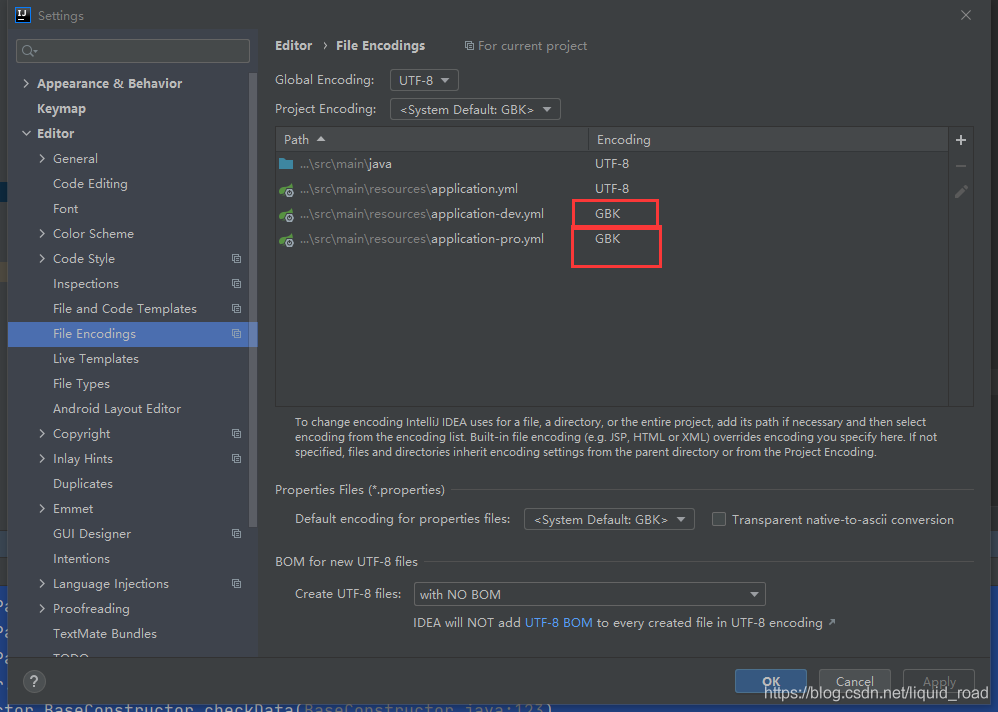
I remember converting the suffixes of properties files to YML files directly according to the video, and then the Chinese comments on the page became garbled, so I naturally converted them to GBK format, and then the above error was reported

The first possibility is that there is a problem with the encoding format of your application.yml file, which is changed to UTF-8
the second possibility is that your application.yml file is generated by directly changing the suffix of other types of files to YML. At this time, you need to copy all the contents in application.yml, delete them, and then create a new application.yml file, Copy the copied content into it and then run the project, and no error will be reported.

Solution:

Find file coding in the setting of idea

Convert GBK to UTF-8, and then rewrite the Chinese annotation to run normally

Resolve nginx startup failure

Nginx startup error: startup failed

nginx: [error] CreateFile() "C:\web\nginx-1.17.9/logs/nginx.pid" failed (2: The system cannot find the file specified)

Execute the command nginx – t to query the configuration of nginx

C:\web\nginx-1.17.9>nginx.exe -t
nginx: the configuration file C:\web\nginx-1.17.9/conf/nginx.conf syntax is ok
nginx: [emerg] bind() to 0.0.0.0:8090 failed (10013: An attempt was made to access a socket in a way forbidden by its access permissions)
nginx: configuration file C:\web\nginx-1.17.9/conf/nginx.conf test failed

The question is about the same

 
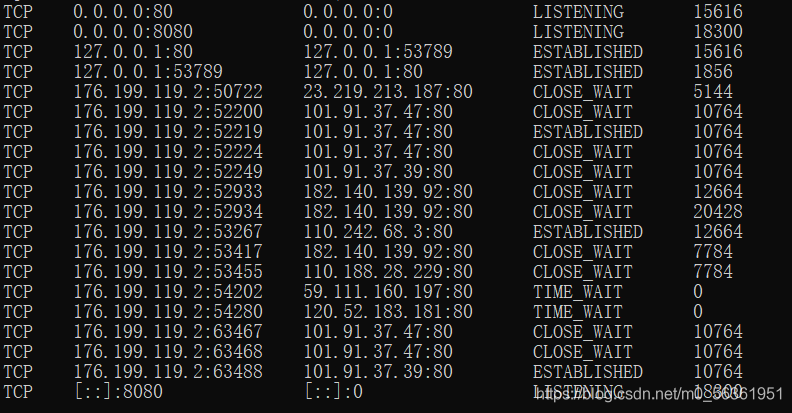
The problems are as follows   Port 80 is occupied

10013: An attempt was made to access a socket in a way forbidden by its access permissions

terms of settlement:

cmd   input    netstat -aon | findstr :80

input   tasklist|findstr “15616”

Find Task Manager – details

Manual closing

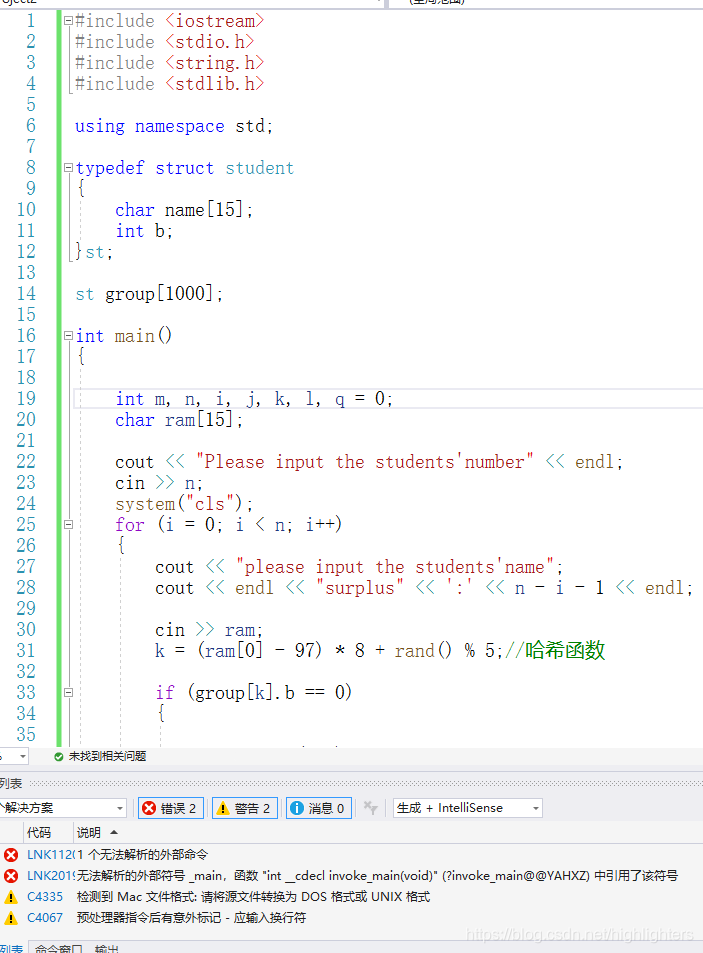
Vs error unresolved external symbol_ Main, the symbol in the function “int”__ cdecl invoke_ main

Cause analysis

There are many reasons for this problem. The first and most common one is that there are multiple CPP files in your project, which contain multiple main functions
the second is that your code is copied from QQ or other ways (such as Notepad). In this case, the newline character may change. According to the explanation of the online boss, the newline character has many codes. If the format is wrong, there will be problems. At this time, you will be prompted to convert the source file to DOS or UNIX format, If there is a warning, it means that you are in this situation. You need to find the advanced save option in the file menu of vs (the advanced version needs to be called out in the settings, but not Baidu search), and then select window (CR LF), which means that the new line character supported by the window system indicates that the problem is solved ~
the third is that your project is created incorrectly, If your compiler’s preprocessor is not right, you can copy the code directly to the new correct project, or open the project settings and modify your preprocessor. You can search for it.

JAVA Error Illegal access: this web application instance has been stopped already. Could not load net.sf

This exception occurs when you restart tomcat, but it does not affect the normal function.

Exception code:

Message: Illegal access: this web application instance has been stopped already.  Could not load net.sf.ehcache.store.disk.DiskStore$KeySet.  The eventual following stack trace is caused by an error thrown for debugging purposes as well as to attempt to terminate the thread which caused the illegal access, and has no functional impact.
java.lang.IllegalStateException
	at org.apache.catalina.loader.WebappClassLoaderBase.loadClass(WebappClassLoaderBase.java:1776)
	at org.apache.catalina.loader.WebappClassLoaderBase.loadClass(WebappClassLoaderBase.java:1734)
	at net.sf.ehcache.store.disk.DiskStore.keySet(DiskStore.java:521)
	at net.sf.ehcache.store.disk.DiskStorageFactory$DiskExpiryTask.run(DiskStorageFactory.java:828)
	at java.util.concurrent.Executors$RunnableAdapter.call(Executors.java:471)
	at java.util.concurrent.FutureTask.runAndReset(FutureTask.java:304)
	at java.util.concurrent.ScheduledThreadPoolExecutor$ScheduledFutureTask.access$301(ScheduledThreadPoolExecutor.java:178)
	at java.util.concurrent.ScheduledThreadPoolExecutor$ScheduledFutureTask.run(ScheduledThreadPoolExecutor.java:293)
	at java.util.concurrent.ThreadPoolExecutor.runWorker(ThreadPoolExecutor.java:1145)
	at java.util.concurrent.ThreadPoolExecutor$Worker.run(ThreadPoolExecutor.java:615)
	at java.lang.Thread.run(Thread.java:745)

Exception analysis: restart Tomcat repeatedly and frequently, resulting in the thread in the last tomat not closing normally
solutions:

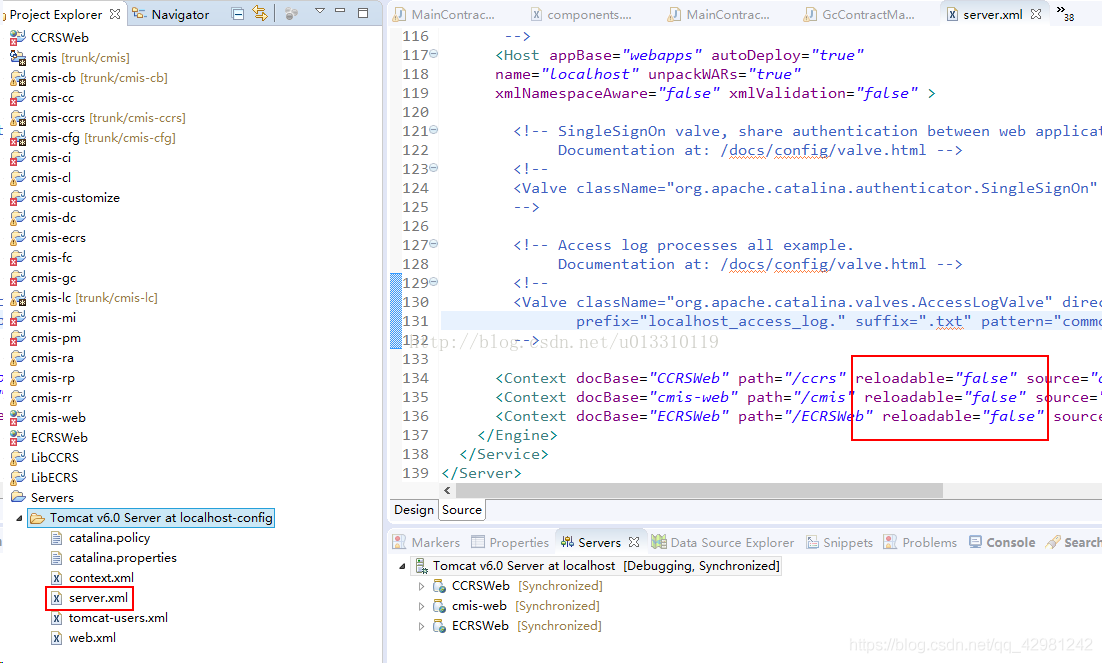
Change the reloadable in server.xml in Tomcat from true to false.

After setting reloadable = “true”, Tomcat will monitor the source code of the project in real time, and restart the Tomcat server in case of any change. When debugging a program, relaodable = true is usually not set. It is unreasonable to restart Tomcat frequently. If you set reloadable = false, or do not set this property, only when you add, delete or rename method or instance fields, do you require the service to restart, which is suitable for you to debug programs.

File settings: server.xml & gt; reloadable=“false”。

How to get the current time in java time string

How to get the current time by Java
and convert it into java.sql.date format.

		long l = System.currentTimeMillis();
		//new date pair
		Date date = new Date(l);
		//convert to date output format
		SimpleDateFormat dateFormat = new SimpleDateFormat("yyyy-MM-dd HH:mm:ss");
		System.out.println(dateFormat.format(date)); 
		
		String response = dateFormat.format(date).replaceAll("[[\\s-:punct:]]","");
		System.out.println("response="+response);

2021-05-07 09:35:47response=202105