Tag Archives: java

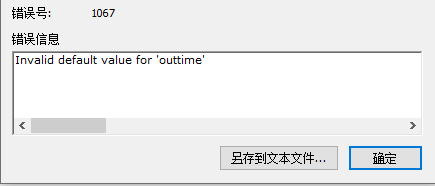
An error was reported in the process of importing the table from mysql5.7: [err] 1067 – invalid default value for ‘***‘

It is said on the Internet that my.ini or my.cnf files should be changed so that they can be used. I didn’t use them. I used the following method

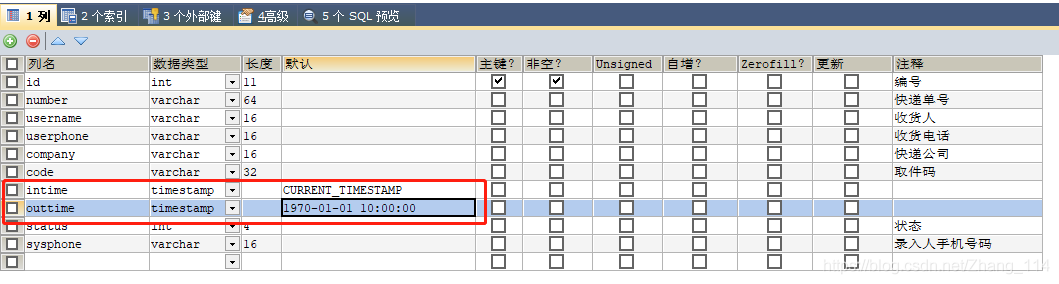
My problem is that when creating database tables visually, I choose timestamp as the data type and report an error

solution: add current to the default value_ The value of timestamp can be from 10:00:00 on January 1, 1970 to 23:59:59 on December 31, 2037

[Solved] Spring AOP Error creating bean with name

When learning the AOP configuration of spring, I encountered an error as follows:

Warning: Exception encountered during context initialization - cancelling refresh attempt: org.springframework.beans.factory.BeanCreationException: Error creating bean with name 'userService' defined in class path resource [applicationContext.xml]: Initialization of bean failed; nested exception is java.lang.NoClassDefFoundError: com/jeremy/service/userServiceImpl (wrong name: com/jeremy/service/UserServiceImpl)

org.springframework.beans.factory.BeanCreationException: Error creating bean with name 'userService' defined in class path resource [applicationContext.xml]: Initialization of bean failed; nested exception is java.lang.NoClassDefFoundError: com/jeremy/service/userServiceImpl (wrong name: com/jeremy/service/UserServiceImpl)

An error occurred when creating the bean because the class NoClassDefFoundError could not be found

Cause of the problem: the class name of pointcut configured in execution is filled in lowercase by mistake, so an error is reported
solution: change the class name to the correct uppercase

    <aop:config>
        <aop:pointcut id="pointcut" expression="execution(* com.jeremy.service.userServiceImpl.*(..))"/>

        <aop:advisor advice-ref="afterLog" pointcut-ref="pointcut"/>
        <aop:advisor advice-ref="beforeLog" pointcut-ref="pointcut"/>
    </aop:config>

Change to

 <aop:config>
     <aop:pointcut id="pointcut" expression="execution(* com.jeremy.service.UserServiceImpl.*(..))"/>

     <aop:advisor advice-ref="afterLog" pointcut-ref="pointcut"/>
     <aop:advisor advice-ref="beforeLog" pointcut-ref="pointcut"/>
 </aop:config>

RabbitMQ The channelMax limit is reached. Try later. [How to Solve]

Anomaly interpretation

In a high concurrency scenario, the number of channels reaches the limit, so they cannot continue to be created

Self-built rabbitmq solution

1. Custom configuration

@Configuration
@Slf4j
public class RabbitMQConfig {


    @Bean
    public RabbitTemplate rabbitTemplate(final ConnectionFactory connectionFactory) {
        CachingConnectionFactory cachingConnectionFactory = (CachingConnectionFactory) connectionFactory;
        // set ChannelMax as 4095
        cachingConnectionFactory.getRabbitConnectionFactory().setRequestedChannelMax(4095);
        final RabbitTemplate rabbitTemplate = new RabbitTemplate(cachingConnectionFactory);
        rabbitTemplate.setMessageConverter(jackson2MessageConverter());
        rabbitTemplate.setMandatory(true);
        rabbitTemplate.setConfirmCallback((correlationData, b, s) -> {
            if(!b){
                log.error("confirmCallBack Sending failed data: {}",correlationData);
                log.error("confirmCallBack Confirmation status: {}",b);
                log.error("ConfirmCallBack Reason for sending failure: {}",s);
            }
        });
        rabbitTemplate.setReturnCallback((message, i, s, s1, s2) -> {
            log.error("returnCallBack message: {}",message);
            log.error("returnCallBack response code: {}",i);
            log.error("returnCallBack response message: {}",s);
            log.error("returnCallBack Switch: {}",s1);
            log.error("returnCallBack Routing Key.{}",s2);
        });
        return rabbitTemplate;
    }

    @Bean
    public Jackson2JsonMessageConverter jackson2MessageConverter() {
        return new Jackson2JsonMessageConverter();
    }
}

2. Modify the configuration of MQ server synchronously
rabbitmq.conf

## Set the max permissible number of channels per connection.
## 0 means "no limit".
##In the configuration file, just enter the following parameters and the value you want to set, if you don't use 2047, then you don't need to configure
# channel_max = 128

Rabbitmq solution for cloud services

For paid versions of MQ cloud services, you can try the following to configure rabbitMq connection caching

springBoot 2.3+

  rabbitmq:
    cache:
      connection:
        size: 1000
      channel:
        size: 64

Solution to the problem that some special characters in finereport cannot be displayed or displayed as question mark

M ² In the case of no processing, finereport will ² What is it
it’s not that finereport doesn’t support it, it’s because of the problem of character set conversion
solution:
in WEB-INF/resources/config.xml

<Write serverCharacterEncoding="GBK"/>

Change to:

<Write serverCharacterEncoding="UTF-8"/>

After restarting the service, you can see the ² It’s over

JMeter: java.net.bindexception: address already in use: connect solution

The operating system will reserve a temporary port for TCP/IP services, and JMeter will start every thread (new operation) when running concurrency test

reason:

Windows reserves a temporary port for TCP/IP service. When JMeter runs concurrency test, every thread (new socket operation) will occupy a temporary port. If the TCP/IP port is occupied and not released in time (socket. Close() operation can not release the bound port immediately, but set the port to time_ Wait status, it will be released after a period of time, the default is 240s), and java.net.bindexception: address already in use: connect will appear.

resolvent:

To increase the number of ports reserved for TCP/IP service, it is necessary to operate on the system installed with JMeter. This paper introduces the solution on Windows system.

1. Key win + R, enter regedit to open the registry, or enter regedit command in CMD to open the registry;

2. Choose HKEY_ LOCAL_ MACHINE\SYSTEM\CurrentControlSet\Services\Tcpip\Parameters;

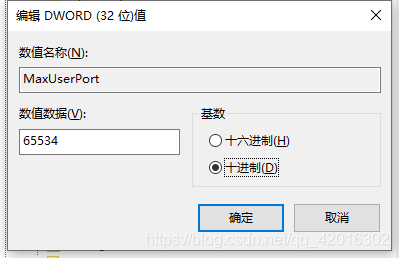
3. Right click parameters to create a new DWORD named maxuserport;

4. Then double-click maxuserport, select decimal base, input value data as 6553465534, which is the maximum value, exceeding     The system uses the closest effective value (min 5000 or max 65534);

5. Right click parameters to create a new DWORD named   TCPTimedWaitDelay;

6. Double click tcptimed waitdelay, select decimal base, input numerical data as 30, set time as 30 seconds, default is 240 seconds;

7. Restart the computer to take effect!!


About LCM spy running error in LCM v1.4.0

I am a little white, but recently in the Linux system running LCM spy encountered a variety of error messages. Finally, after collecting all kinds of information on the Internet and a little bit of my imagination, I successfully solved the problem, so I want to share it with you and leave a file for myself, so as not to be at a loss when I encounter the same problem in the future.

First, follow the official LCM guidelines   Before installing LCM, be sure to download its recommended default JDK. This automatic download is the latest version of Java (I don’t know much about Java, but it also seems to download javac). Bloggers download Java 11 by default. Note: Java 8 can’t run make successfully, at least the blogger failed.

Default JDK installation steps:

$ sudo apt update
$ sudo apt install default-jdk

Then follow the steps to install according to the official website (cmake may say that some files in other languages cannot be found, but you can try to run make first)

$ mkdir build
$ cd build
$ cmake ..
$ make
$ sudo make install

If there is no error in make and make install, please check whether there is an LCM Java folder and whether there is lcm.jar in the folder under build. This is very important, because it determines whether you can run LCM spy

Next, you need to download Java 8 and change the default version of Java to Java 8. The method is as follows (the first and second behaviors download Java 8, and the third behavior change the version)

$ sudo apt-get update
$ sudo apt-get install openjdk-8-jdk
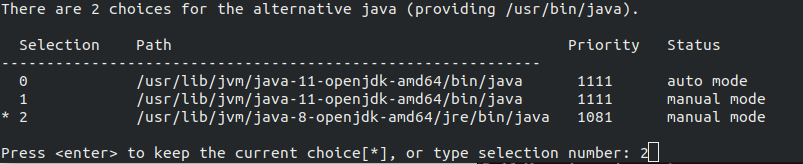
$ sudo update-alternatives --config java

Then select the number corresponding to Java 8 in the pop-up window and press enter:
Next, you need to move the lcm.jar to the Java folder. Note: the specific address varies from person to person. Please check the address of the Java folder in usr. Bloggers provide their own examples:

$ sudo cp ~/lcm-1.4.0/build/lcm-java/lcm.jar /usr/share/java/

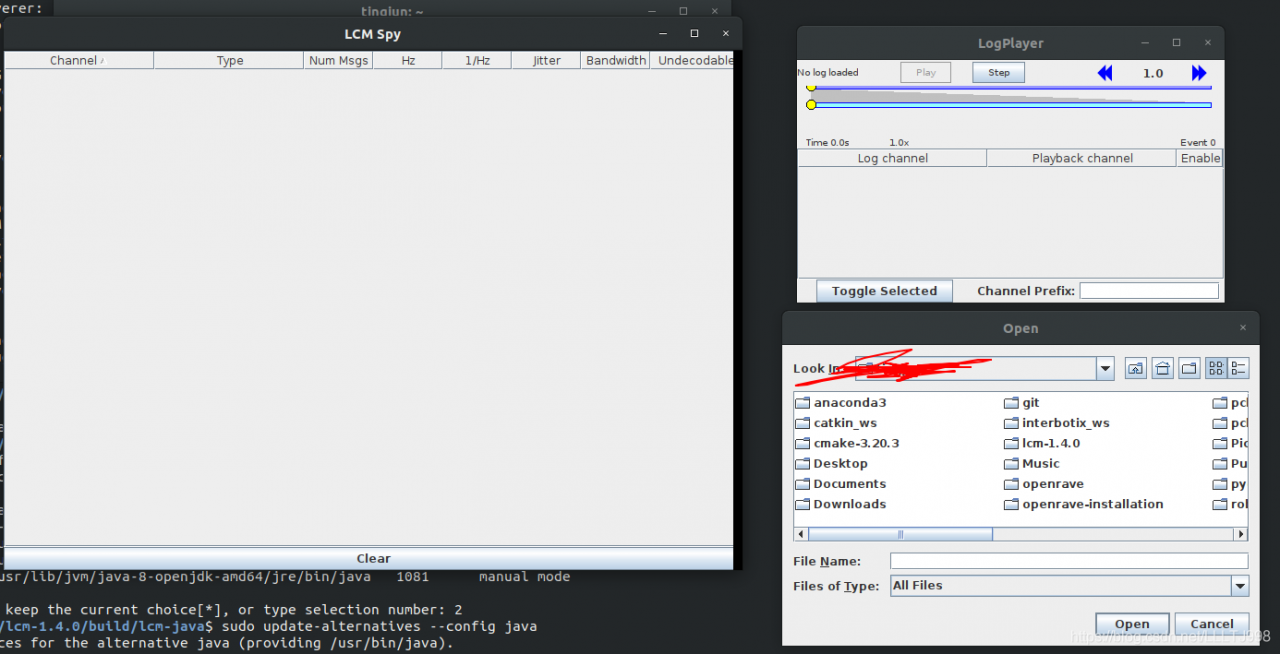
In this way, you can find the LCM. Jar file in the Java folder. If there is no accident, you can run LCM spy and LCM logplayer GUI in any path.
——————————————————————————————————————————

PS:

1. Two versions of Java are needed because during the installation of LCM v1.4.0, Java related files only support Java 11 (maybe Java 10), but not Java 8. However, the operation of LCM spy does not support Java 11, because Java 11 has deleted an option named “xincgc” in Java 8, so it needs to change the Java version to Java 8 to run successfully;

2. A Java application notes in the official website   Bloggers did not run successfully, so they have to manually copy LCM. Jar to the Java folder. If you are interested, you can also try whether the official website tutorial is useful.
SSM project controller layer calls static method to report an error

The controller layer of the SSM project calls the util tool class written by oneself. In the tool class, some static methods in some jar packages are invoked, and
runs up to report errors. Br> solution: add the jar package to the modules directory in the project
idea operation:
. Add through dependencies of modules:
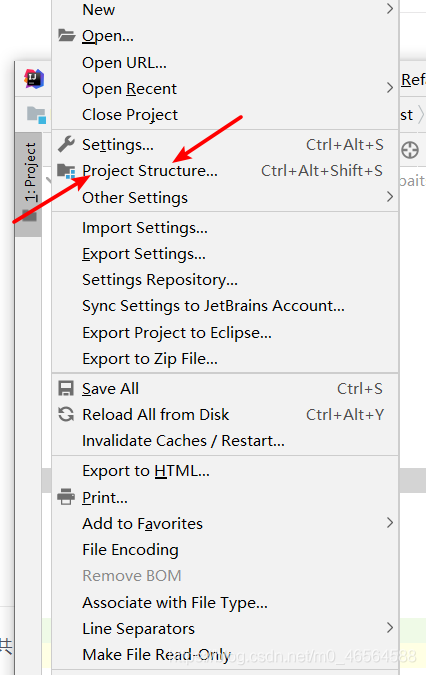
1. Open file – & gt; Project Structure (Ctrl + Shift + Alt + S)

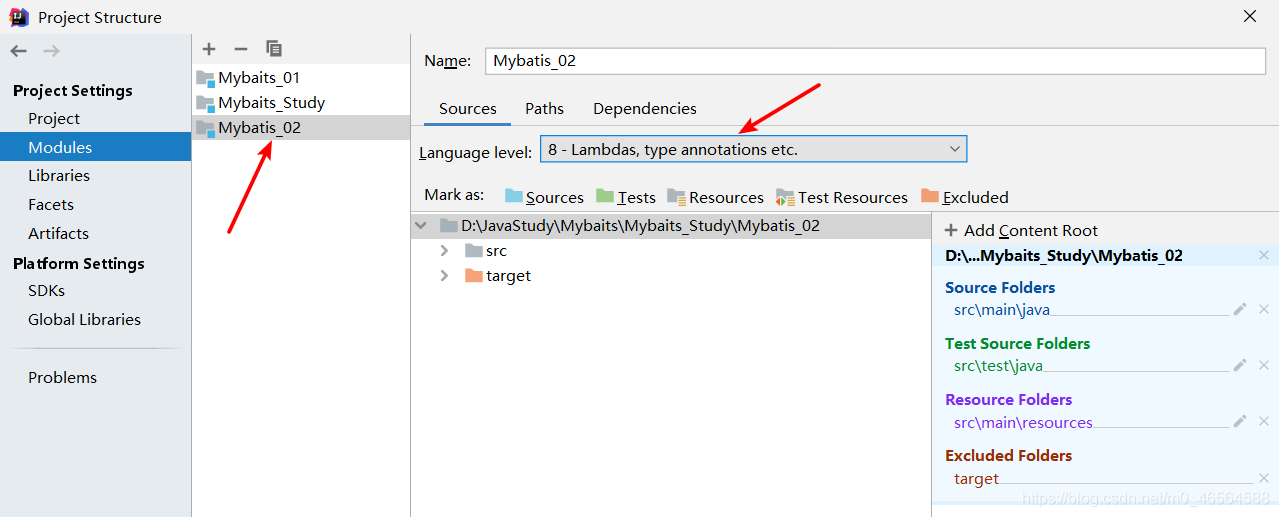
2. Click modules – & gt; Dependencies -> “+” -& gt; “ Jars or directories”

3. Select the project jar package
4. Apply – & gt; OK

Spring Cloud:org.springframework.web.client.HttpClientErrorException: 404 null

@RestController
@RequestMapping("/page")
public class PageController {

    @Autowired
    private RestTemplate restTemplate;

    @GetMapping("/getProduct/{id}")
    public Products getProduct(@PathVariable Integer id){
        String url = "http://127.0.0.1:9000/product/query/"+id;
        Products forObject = restTemplate.getForObject(url, Products.class);
        return forObject;
    }

}

Share an error report solution

Adding @ pathvariable annotation to the request parameter solves the problem

Springboot uses druid to log in MySQL. An error occurred: access denied: errorcode 1045, state 28000

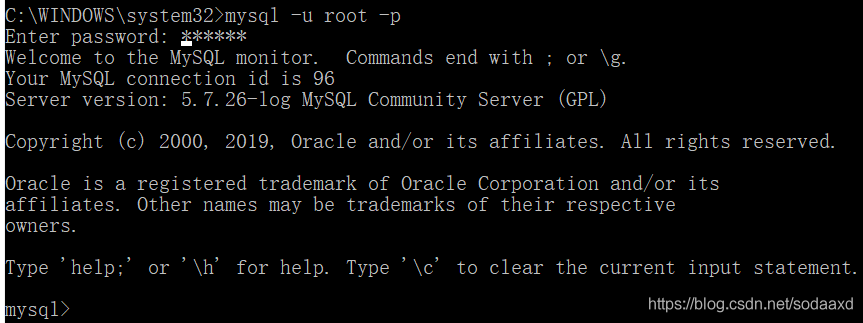
In case of an error, first of all, check whether the database can be accessed correctly through MySQL instructions:
it is found that the database can be accessed normally

later, when I observed my configuration, I found that my password was all digital. There would be a little problem with all digital passwords in the YML file, so I need to add ‘single quotation mark to correctly identify them. The correct configuration is as follows:

spring:
  datasource:
    url: jdbc:mysql://127.0.0.1:3306/mall?useUnicode=true&characterEncoding=utf8&useOldAliasMetadataBehavior=true&zeroDateTimeBehavior=convertToNull&allowMultiQueries=true&serverTimezone=UTC
    username: root
    password: '123456'
    driver-class-name: com.mysql.cj.jdbc.Driver
    type: com.alibaba.druid.pool.DruidDataSource

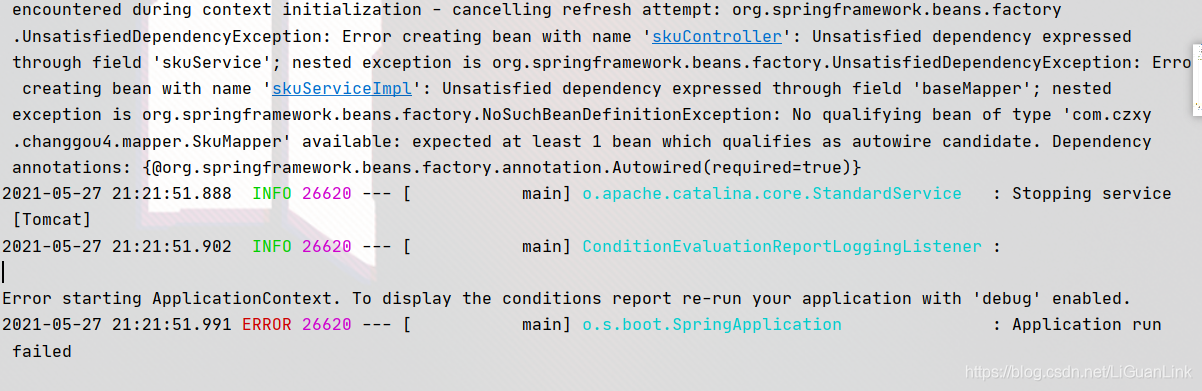
Error creating bean with name [How to Solve]

I ran into a bug today

org.springframework.beans.factory.UnsatisfiedDependencyException: Error creating bean with name 'skuController'


The solution:

1. Maybe the implementation class didn’t add @servcie annotation. After you add it, click start, and the error still exists. Heartbreak X1 2. It may be that @mapperscan (“com. XXX. Mapper”) is not added to the startup class. After you add it, click start, and the error still exists. Heartbreak x2 3. Maybe the Dao package in serviceimpl is not imported into @ Autowired. After you add it, click start, and the error still exists. How about heartbreak X3
is it endless fun to be immortal and die? In the end, you have listed three possibilities, but you still need a note:
@ enable autoconfiguration

@The main functions of enable autoconfiguration are as follows:

Enable automatic configuration of the spring application context and try to guess and configure the beans you may need. Automatic configuration classes are usually based on class paths and defined bean applications. For example, if you have
tomcat-embedded.jar in your classpath, you may want a Tomcat embedded servletcontainerfactory (unless you define your own embedded servletcontainerfactory
bean). When using springbootapplication, automatic configuration of the context is automatically enabled and this annotation is added, so there is no extra effect
autoconfiguration tries to be as intelligent as possible and will be backed up when you define more of your own configurations. You can always manually exclude () any configuration you don’t want to apply (if you can’t access them). You can also exclude them through spring.
autoconfigure. Exclude attributes. After the user-defined bean is registered, auto configuration is always applied. Packages of classes annotated with @
enable autoconfiguration, usually through @
spring boot application, have special significance and are often used as “default”. For example, it will be used to scan the @ entity class. It is generally recommended to place @
enable autoconfiguration in the root package (if you do not use @ springbootapplication) so that you can search all subpackages and classes conditionalonclass and @ conditionalonsingbean).

The above explanations about @ enableautoconfiguration are copied from other places by bloggers. If it’s a bit difficult to understand, you just need to know that it’s Bean’s automatic assembly tool. Maybe you will ask, why do I do this?Can’t I use @ import directly in my project?Of course, since it is automatic configuration, of course, you want the project to start and load.


[Solved] com.alibaba.druid.pool.DruidDataSource – create connecti

A service deployed in the server docker reported the following error when connecting to the database:

I have searched a lot of information on the Internet, but I can’t solve it by trying various ways,
ERROR com.alibaba.druid.pool.DruidDataSource - create connection SQLException, url: jdbc:mysql://10.10.20.16:3306/acs?&useUnicode=true&characterEncoding=UTF-8&zeroDateTimeBehavior=convertToNull&allowMultiQueries=true&serverTimezone=Asia/Kolkata, errorCode 0, state 08S01
com.mysql.cj.jdbc.exceptions.CommunicationsException: Communications link failure

The last packet sent successfully to the server was 0 milliseconds ago. The driver has not received any packets from the server.

The specific error information is as follows:

ERROR com.alibaba.druid.pool.DruidDataSource – create connection SQLException, url: jdbc:mysql ://10.10.20.16:3306/acs?& amp; useUnicode=true& characterEncoding=UTF-8& zeroDateTimeBehavior=convertToNull& allowMultiQueries=true& serverTimezone=Asia/Kolkata, errorCode 0, state 08S01
com.mysql.cj.jdbc.exceptions.CommunicationsException: Communications link failure

The last packet sent successfully to the server was 0 milliseconds ago. The driver has not received any packets from the server.

Cause of error:

It may be due to the different versions of JDK. This error message is probably caused by the SSL protocol of MySQL

solution: I tried to remove SSLv3 from java.security in jdk-8 on my local machine and restart the service, but I still couldn’t solve it
finally, add this to the MySQL connection string in the service configuration; Usessl = false, that is, disable SSL, problem solved