Tag Archives: java

[Solved] Android Could not determine artifacts for XXXX: Skipped due to earlier error

Recently, I encountered the following problems when using robolectric unit test:

It has been reported that the resource class cannot be found, so it needs to be added to gradle under the app (the code is manually typed, there may be an error, sorry)

testOptions{
	unitTests{
			includeAndroidResources = true
	}
}

After adding the above code, there is an error in the title, specifically android.test.monitor2… This can’t be found. Each time sync takes a long time, and then report the same error. Refer to the following link article, but it doesn’t help me much.

Ask colleagues for help. After comparing our configurations, we found that the gradle version references are different (gradle/wrapper/gradle wrapper. Properties). The previous references are:

distributionUrl:=https\://service.gradle.org/distributions/gradle-5.4.1-all.zip

Mine is taken directly from the company mapping Maven library. It is a local reference with a lower version:

distributionUrl:=../../../../tools/gradle-4.1-all.zip

I changed the gradle configuration according to her configuration and synced again. The problem was solved.

[Solved] Method threw ‘java.lang.StackOverflowError‘ exception. Cannot evaluate

Cause of problem

This error occurs when traversing the binary tree hierarchy. At first, it is thought that the stack overflow is caused by circular reference
later, it was found that the causes of the problem are as follows:
because the attribute references the child attribute, the toString method will constantly call the attribute of the child node. Finally, the stack overflowed.

Solution

Rewrite the toString method. Be careful not to print the properties of the calling child nodes
finally, paste a section of tree level traversal implementation code.

package com.zouch.onetoten;

import lombok.Data;
import lombok.Getter;
import lombok.Setter;
import org.springframework.util.CollectionUtils;

import java.util.*;

/**
 * @author Zouch
 * @date 2021/8/25 下午1:13
 * Hierarchical tree traversal (no restriction that it must be a binary tree)
 * Idea.
 * Use a queue, and the condition for the outgoing loop is that the queue element is empty.
 * judge each time a node is out of the queue, and when there is a node in the queue, add all its children to the queue
 * Then add the nodes to the list
 */

@Getter
@Setter
public class TreeOfBfs {

    private TreeNode rootNode;

    @Override
    public String toString() {
        return "TreeOfBfs{" +
                "rootNode=" + rootNode +
                '}';
    }

    @Data
    public static class TreeNode {
        private Object key;

        private TreeNode parent;

        private List<TreeNode> treeNodes;

        @Override
        public String toString() {
            return "TreeNode{" +
                    "key=" + key +
                    ", parent=" + parent;
        }
    }

    public static List<TreeNode> levelTraverse(TreeNode rootNode) {
        if (Objects.isNull(rootNode)) {
            return null;
        }
        Queue<TreeNode> queue = new LinkedList<>();
        queue.add(rootNode);
        List<TreeNode> list = new LinkedList<>();
        while (queue.size() > 0) {
            TreeNode poll = queue.poll();
            list.add(poll);
            List<TreeNode> treeNodes = poll.getTreeNodes();
            if (CollectionUtils.isEmpty(treeNodes)){
                continue;
            }
            queue.addAll(treeNodes);
        }
        return list;
    }

    public static void main(String[] args) {
        TreeOfBfs treeOfBfs = new TreeOfBfs();
        TreeNode rootNode = new TreeNode();
        treeOfBfs.setRootNode(rootNode);

        TreeNode node1 = new TreeNode();
        node1.setParent(rootNode);
        node1.setKey("Left 1");

        TreeNode node2 = new TreeNode();
        node2.setParent(rootNode);
        node2.setKey("Right 2");

        TreeNode node3 = new TreeNode();
        node3.setParent(node2);
        node3.setKey("Left 3");

        TreeNode node4 = new TreeNode();
        node4.setParent(node2);
        node4.setKey("Right4");

        List<TreeNode> treeNodes = new ArrayList<>();
        treeNodes.add(node1);
        treeNodes.add(node2);
        rootNode.setTreeNodes(treeNodes);

        List<TreeNode> treeNodes2 = new ArrayList<>();
        treeNodes2.add(node3);
        treeNodes2.add(node4);
        node2.setTreeNodes(treeNodes2);

        List<TreeNode> result = levelTraverse(rootNode);
        System.out.println(result.toString());

    }

}

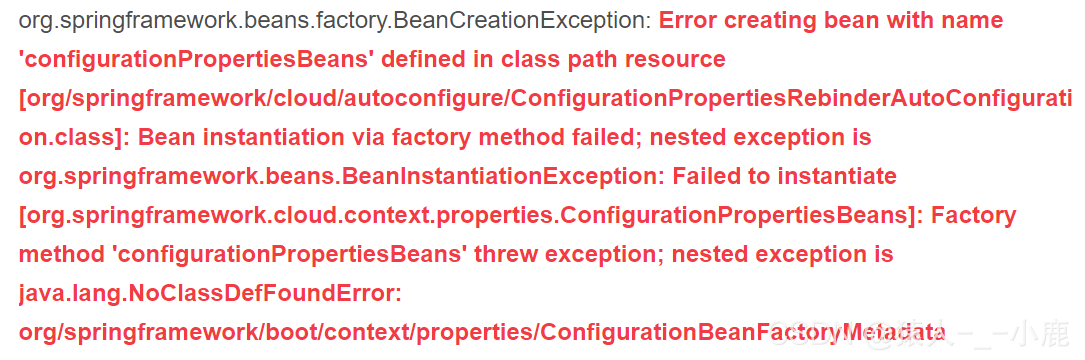
[Solved] Error creating bean with name ‘configurationPropertiesBeans‘ defined in class path resource

Register your spring boot project with the Nacos service using spring cloud, and start the project after configuring the file

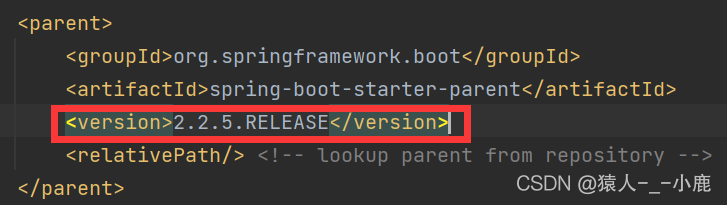
Springboot version

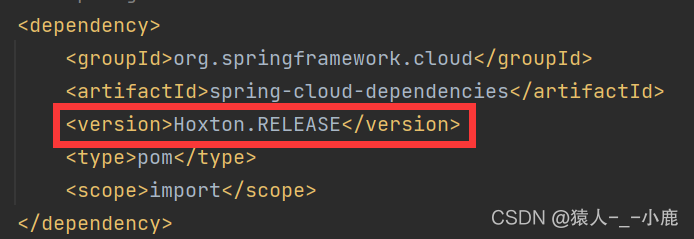
Spring cloud version

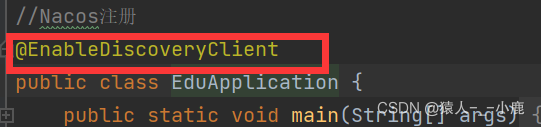
Startup class annotation

Start the class, and the result is an error

Solution:

Because the springboot version does not correspond to the Nacos version in springcloud, students who have studied springcloud should know that the springboot version and the Nacos version in springcloud must correspond, and the responsible person cannot register. My problem is that the version does not correspond

Changing my springboot version to 2.2.5 release can solve the problem

This kind of problem is mainly caused by version mismatch

[Solved] Vue Error: Duplicate keys detected: ‘74004’. This may cause an update error

Problems and Solutions

This may cause an update error

This error indicates that in your V-for loop, key   The value may be duplicate.

Duplicate key will cause rendering errors.

The reason for the error is that I didn’t add the key attribute at the beginning. The error code fragment is as follows:

<template>
    <vue-aplayer
            :audio="audio"
            :lrc-type="3"
            :fixed='fixed'
            :autoplay='autoplay'
            :order='order'
            :volume='volume'
            :theme='theme'
            :listFolded='listFolded '
    />
</template>


No more errors will be reported after adding key

<template>
    <vue-aplayer
            :audio="audio"
            :lrc-type="3"
            :fixed='fixed'
            :autoplay='autoplay'
            :order='order'
            :volume='volume'
            :theme='theme'
            :listFolded='listFolded '
            :key="audio.name"
    />
</template>


Note: audio attribute is the list I want to traverse, and name is the primary key in my list, so here I take audio. Name as the value of key ,   key must be unique.

Official description

key

Expectation: the special attributes of number | string key are mainly used in Vue’s virtual DOM algorithm to identify vnodes when comparing old and new nodes. If you do not use keys, Vue will use an algorithm that minimizes dynamic elements and tries to modify/reuse elements of the same type in place as much as possible. When using a key, it rearranges the order of elements based on the change of the key, and removes elements that do not exist in the key. Child elements with the same parent element must have a unique key. Duplicate keys can cause rendering errors. The most common use case is the combination of V-for :

<ul>
  <li v-for="item in items" :key="item.id">...</li>
</ul>


It can also be used to force replacement of elements/components rather than reuse it. It may be useful when you encounter the following scenarios:

Completely trigger the life cycle hook of the component to trigger the transition, for example:

<transition>
  <span :key="text">{{ text }}</span>
</transition>


When text changes, <span> is always replaced rather than modified, so a transition is triggered.

Android Compile Error: “SSL error when connecting to the Jack server. Try ‘jack-diagnose‘”

The code compilation of 8909 A7 has never been a problem before. Suddenly, one day, the compilation encountered SSL-related errors. The specific errors are as follows:

[  0% 12/6140] Ensure Jack server is installed and started
FAILED: /bin/bash -c "(prebuilts/sdk/tools/jack-admin install-server prebuilts/sdk/tools/jack-launcher.jar prebuilts/sdk/tools/jack-server-4.8.ALPHA.jar  2>&1 || (exit 0) ) && (JACK_SERVER_VM_ARGUMENTS=\"-Dfile.encoding=UTF-8 -XX:+TieredCompilation\" prebuilts/sdk/tools/jack-admin start-server 2>&1 || exit 0 ) && (prebuilts/sdk/tools/jack-admin update server prebuilts/sdk/tools/jack-server-4.8.ALPHA.jar 4.8.ALPHA 2>&1 || exit 0 ) && (prebuilts/sdk/tools/jack-admin update jack prebuilts/sdk/tools/jacks/jack-2.28.RELEASE.jar 2.28.RELEASE || exit 47; prebuilts/sdk/tools/jack-admin update jack prebuilts/sdk/tools/jacks/jack-3.36.CANDIDATE.jar 3.36.CANDIDATE || exit 47; prebuilts/sdk/tools/jack-admin update jack prebuilts/sdk/tools/jacks/jack-4.7.BETA.jar 4.7.BETA || exit 47 )"
Jack server already installed in "/fwork1/yuwl/.jack-server"
Communication error with Jack server (35), try 'jack-diagnose' or see Jack server log
SSL error when connecting to the Jack server. Try 'jack-diagnose'
[  0% 12/6140] target R.java/Manifest.java: SnapdragonCamera (out/target/common/obj/APPS/SnapdragonCamera_intermediates/src/R.stamp)

Judging from the error log, it was an SSL exception when connecting to the jack server. At first, it was considered to be a jack server problem. The processing process included restarting the jack server service and configuring the jack server port number. It was ineffective. Finally, it was found that many people encountered the same problem through the network. The solutions are as follows. The personal test is effective

Solution:
delete the tlsv1 and tlsv1.1 configurations of the jdk.tls.disabledalgorithms parameter in the/etc/java-8-openjdk/security/java.security file

Hzero – if the local swagger fails to register, the connection timeout or gateway error will be displayed

This blog is only for the hzero platform. You can row away what you haven’t heard of!!

connect timed out; nested exception is java.net.SocketTimeoutException: connect timed out

  This is the root of evil!!

Test in swagger:

{“requestStatus”:”UNKNOWN_ GATEWAY_ Error “,” requestcode “:” error. Unknowngatewayerror “,” requestmessage “:” connection timed out:/10.211.99.1:8275 “,” detailsmessage “:” unknown error occurred in the service, please try again later “}

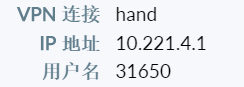
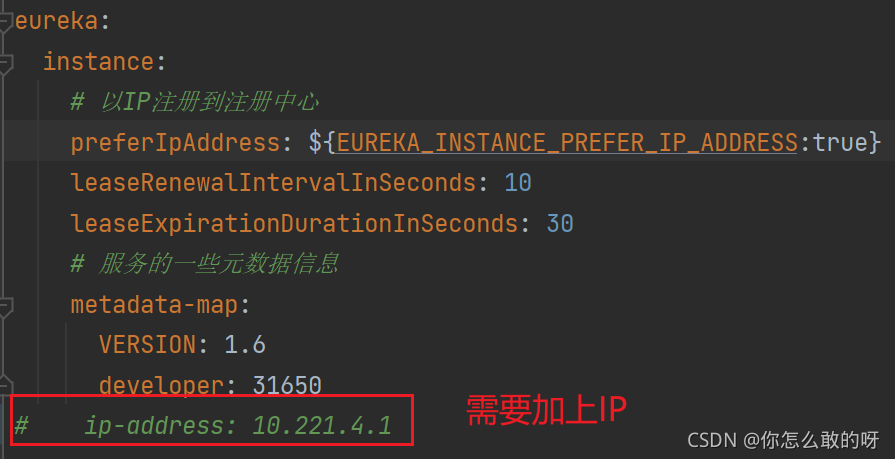
The reason for the error is that the IP address is not configured in the configuration file. Note that if it is connected to the company’s VPN, it needs to be modified to the address on the VPN


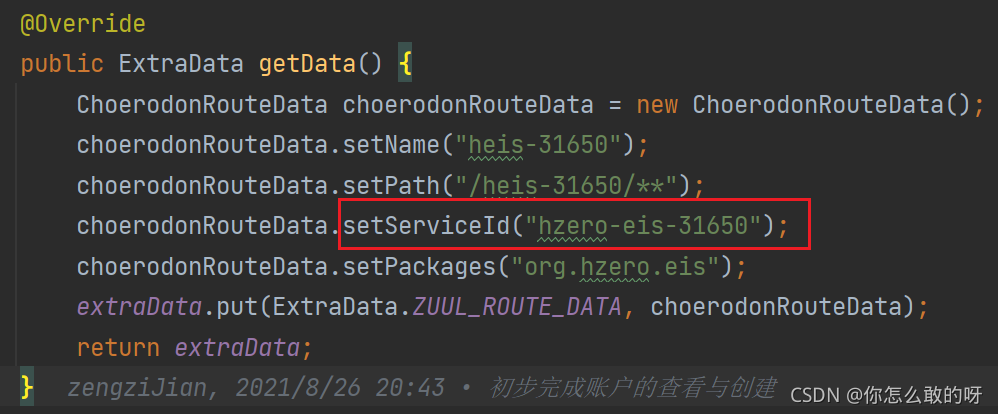
If the error is still reported, there is also the problem of routing configuration

  The data in the red box needs and

application.name

The names in the are consistent

According to the above two bugs, you should be able to fix the problem that you can’t register swagger

If this blog is helpful to you, you can talk to me on enterprise wechat    :)


org.apache.ibatis.type.TypeException: Error setting non null for parameter #4 with JdbcType null

preface

        The spring boot project uses the mybatis plus framework.

Phenomenon

        When I used mappr to execute the method updatebyid again, the following error occurred

nested exception is org.apache.ibatis.type.TypeException: Could not set parameters for mapping: ParameterMapping{property='et.props', mode=IN, javaType=class java.lang.Object, jdbcType=null, numericScale=null, resultMapId='null', jdbcTypeName='null', expression='null'}. Cause: org.apache.ibatis.type.TypeException: Error setting non null for parameter #4 with JdbcType null . Try setting a different JdbcType for this parameter or a different configuration property. Cause: org.apache.ibatis.type.TypeException: Error setting non null for parameter #4 with JdbcType null . Try setting a different JdbcType for this parameter or a different configuration property. Cause: org.postgresql.util.PSQLException: No hstore extension installed.
org.mybatis.spring.MyBatisSystemException: nested exception is org.apache.ibatis.type.TypeException: Could not set parameters for mapping: ParameterMapping{property='et.props', mode=IN, javaType=class java.lang.Object, jdbcType=null, numericScale=null, resultMapId='null', jdbcTypeName='null', expression='null'}. Cause: org.apache.ibatis.type.TypeException: Error setting non null for parameter #4 with JdbcType null . Try setting a different JdbcType for this parameter or a different configuration property. Cause: org.apache.ibatis.type.TypeException: Error setting non null for parameter #4 with JdbcType null . Try setting a different JdbcType for this parameter or a different configuration property. Cause: org.postgresql.util.PSQLException: No hstore extension installed.

Problem location

        Through the literal meaning of the exception, we can understand it as a mybatis type error.

        Following up with debug, we found that an exception occurred when setting typehandler for one of the fields, indicating that there is no type that can identify the field.
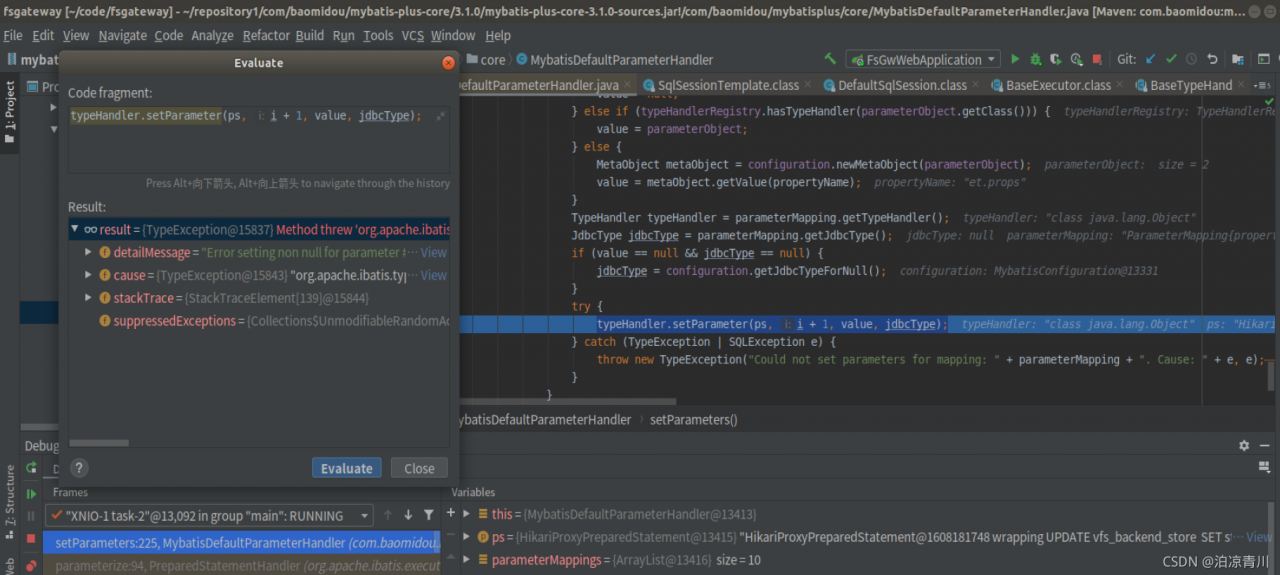
  Cause analysis

        We now check the type of this field in the entity class and find that it is a map type
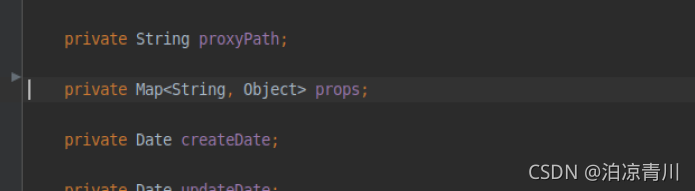
          View the type of this field setting in the database  , You can see that the JSON type is stored in the database

  Solution

        Set typehandler and JDBC type for entity class

@TableField(el = "props,jdbcType=OTHER,typeHandler=com.embracesource.cloud.fsgw.entity.HashMapJsonTypeHandler")
private Map<String, Object> props;

        Hashmapjsontypehandler class

import com.alibaba.fastjson.JSON;
import org.apache.ibatis.type.BaseTypeHandler;
import org.apache.ibatis.type.JdbcType;
import org.postgresql.util.PGobject;

import java.sql.CallableStatement;
import java.sql.PreparedStatement;
import java.sql.ResultSet;
import java.sql.SQLException;
import java.util.HashMap;
import java.util.Map;

public class HashMapJsonTypeHandler extends BaseTypeHandler<Map<String,Object>> {
    @Override
    public void setNonNullParameter(PreparedStatement ps, int i, Map<String,Object> parameter,
                                    JdbcType jdbcType) throws SQLException {
        PGobject jsonObject = new PGobject();
        jsonObject.setType("json");
        jsonObject.setValue(JSON.toJSONString(parameter));
        ps.setObject(i, jsonObject);
    }

    @Override
    public Map<String,Object> getNullableResult(ResultSet rs, String columnName)
            throws SQLException {

        return JSON.parseObject(rs.getString(columnName), HashMap.class);
    }

    @Override
    public Map<String,Object> getNullableResult(ResultSet rs, int columnIndex) throws SQLException {

        return JSON.parseObject(rs.getString(columnIndex), HashMap.class);
    }

    @Override
    public Map<String,Object> getNullableResult(CallableStatement cs, int columnIndex)
            throws SQLException {

        return JSON.parseObject(cs.getString(columnIndex), HashMap.class);
    }
}

         Start the project again and find the problem to be solved
Error querying database. Cause: java.util.ConcurrentModificationException

Caused by: org.apache.ibatis.exceptions.PersistenceException:
### Error querying database. Cause: java.util.ConcurrentModificationException
### Cause: java.util.ConcurrentModificationException
at org.apache.ibatis.exceptions.ExceptionFac

For the iterative stability problem, it is used for database query. The value of lastbyparam.getid is re assigned to ID, and an error is reported due to the reference of the object; Another problem is that valueconfig is the value obtained from Nacos. The global variable cannot always add ID, and the collection will slowly grow

List<Long> Ids = valueConfig.getIds();
Ids.add(Id);
ObjectDO lastByParam = testMapper.getLastByParam(userId, Ids, null);
if (lastByParam != null){
    Id = lastByParam.getId();
}

The solution is to re new a collection

JNI ERROR (2354): JNI connection is NULL [How to Solve]

JNI error (2354) encountered by tdengine during springboot integration: JNI connection is null
possible problems are as follows
1. The client version of tdengine is inconsistent with the server version
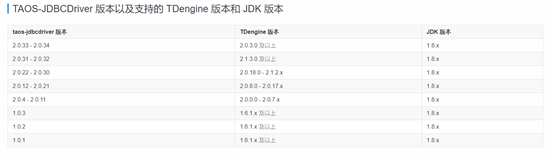
2. The server version and jdbc driver version are not matched. The following figure shows the version correspondence figure