Tag Archives: java

When Jenkins deploys the project, GIT reports an error fatal: index file smaller than expected

@When Jenkins deploys the project, GIT reports an error fatal: index file smaller than expectedtoc

Recently, when learning to deploy Jenkins, microservice construction has been reporting errors:

Caused by: hudson.plugins.git.GitException: Command "git fetch --tags --progress https://gitee.com/xxx +refs/heads/*:refs/remotes/origin/*" returned status code 128:
stdout: 
stderr: fatal: index file smaller than expected

	at org.jenkinsci.plugins.gitclient.CliGitAPIImpl.launchCommandIn(CliGitAPIImpl.java:2450)
	at org.jenkinsci.plugins.gitclient.CliGitAPIImpl.launchCommandWithCredentials(CliGitAPIImpl.java:2051)
	at org.jenkinsci.plugins.gitclient.CliGitAPIImpl.access$500(CliGitAPIImpl.java:84)
	at org.jenkinsci.plugins.gitclient.CliGitAPIImpl$1.execute(CliGitAPIImpl.java:573)
	at hudson.plugins.git.GitSCM.fetchFrom(GitSCM.java:994)
	... 11 more
ERROR: Error fetching remote repo 'origin'
Finished: FAILURE

The GIT problem found on the Internet is solved as follows:

View links

Because Jenkins uses git deployed on the server to pull the remote warehouse, I handle it according to the above method and re push it. It still doesn’t work.

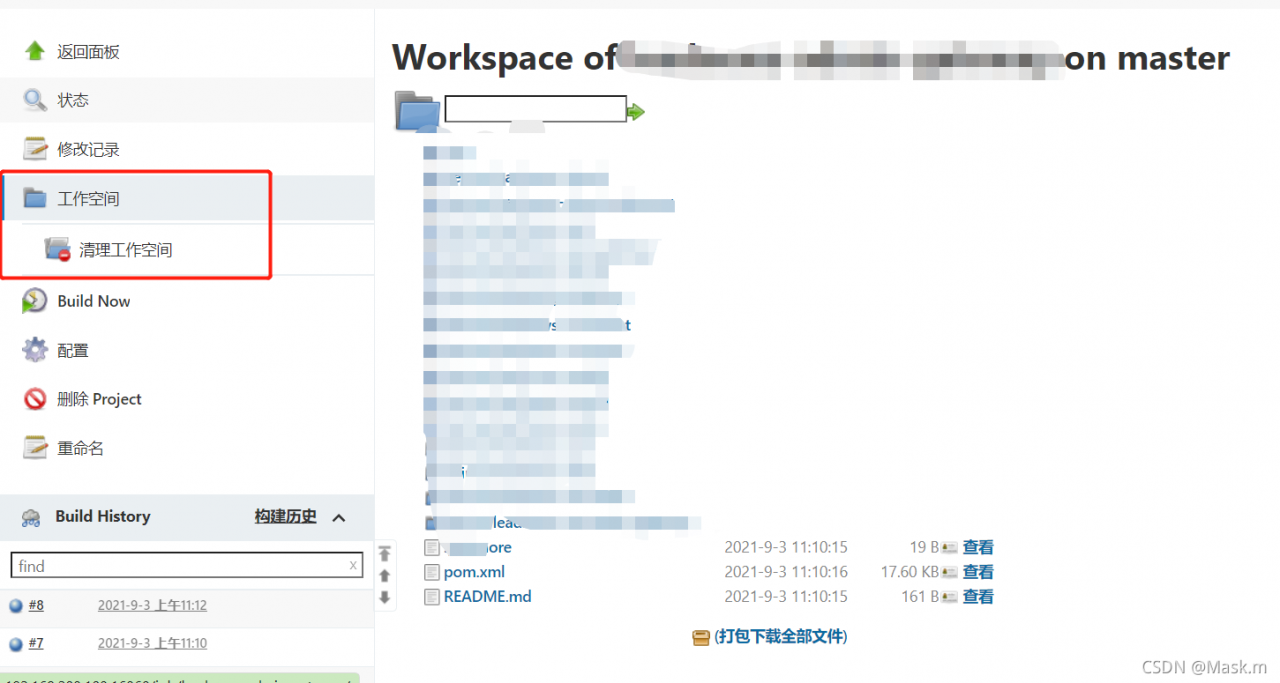
Later, it was found that the workspace in Jenkins should be cleaned up first, and Jenkins should be pulled from the remote warehouse again. The problem was solved. As shown in the figure:
Docker Nacos deployment uses container name to access 400 bad request

Springboot error

Ignore the empty nacos configuration and get it based on dataId

Curl test error

< HTTP/1.1 400 
< Content-Type: text/html;charset=utf-8
< Content-Language: en
< Content-Length: 435
< Date: Fri, 03 Sep 2021 03:06:16 GMT
< Connection: close
< 
* Closing connection 0
<!doctype html><html lang="en"><head><title>HTTP Status 400 – Bad Request</title><style type="text/css">body {font-family:Tahoma,Arial,sans-serif;} h1, h2, h3, b {color:white;background-color:#525D76;} h1 {font-size:22px;} h2 {font-size:16px;} h3 {font-size:14px;} p {font-size:12px;} a {color:black;} .line {height:1px;background-color:#525D76;border:none;}</style></head><body><h1>HTTP Status 400 – Bad Request</h1></body></html>

Original request address

http://private_ appstore_ cloud_ nacos:8848

Modify container name and new request address

http://private-appstore-cloud-nacos:8848

Through curl test, it is found that the original request address server responds to 400 and the new address responds to 200. The reason is that the Nacos server determines that the HTTP protocol header host contains non-standard domain name characters.

Uninstall JDK and run Java – version with error

Uninstall JDK and run Java – version with error

Error: could not open `F:\environment\JDK8\JDK8Install\lib\amd64\jvm.cfg’

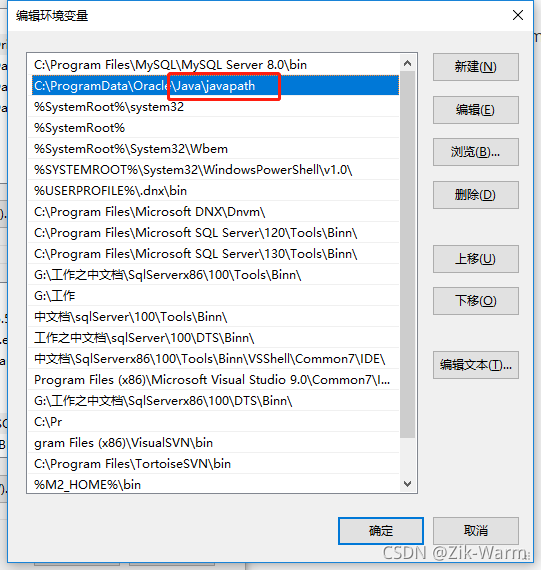
Reason: except deleting Java_ Except for the home variable, the JDK cache file of the previous version was not deleted completely,

Solution: delete the Java \ javapath variable and the three exe cache files in this directory

Lamdba in the studio part reports an error. Observe lamdba reports an error but can run

Question:

Ordinary lamdba can be used, such as view. Setonclicklistener {}

Some lamdbas are popular but can run, such as livedata. Observe() {}

solve:

It’s not because the Java version is backward. I updated the kotlin plug-in to solve this problem

Studio even pops up a warning pop-up window of “plug-in needs to be updated” in the lower right corner, but I ignore it everyday… Try to update the Java version and still can’t solve it before you notice it

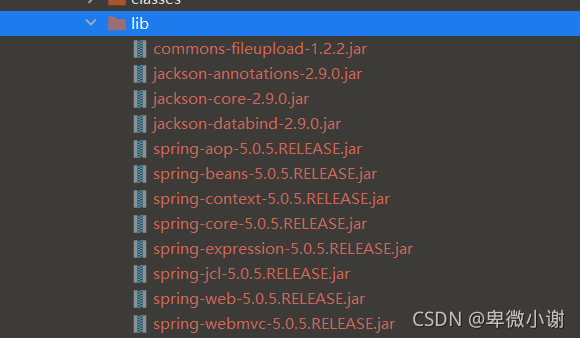
An error is reported when uploading a file using commonsmultipartfile

Handler dispatch failed; nested exception is java.lang.NoClassDefFoundError: org/apache/commons/io/output/DeferredFileOutputStream

An error is reported when uploading a file using commonsmultipartfile. The error is due to the following reasons: the corresponding jar package of Commons IO is missing

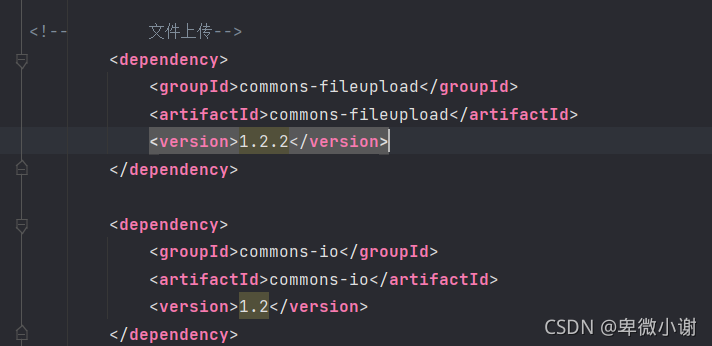
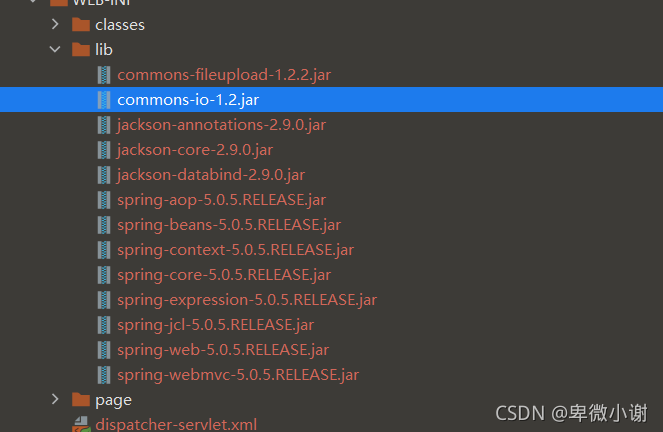
The solution is to import the dependencies of Commons IO in POM. Update the classes jar package and import it successfully

Just run the program

An error is reported when uploading a file using commonsmultipartfile

Errors are reported as follows

HTTP status 500 – internal server error

Type exception report

Message handler dispatch failed; nested exception is java.lang.NoClassDefFoundError: org/apache/commons/io/output/DeferredFileOutputStream

Description the server encountered an unexpected condition that prevented it from completing the request.

Exceptions

org.springframework.web.util.NestedServletException: Handler dispatch failed; nested exception is java.lang.NoClassDefFoundError: org/apache/commons/io/output/DeferredFileOutputStream
org.springframework.web.servlet.DispatcherServlet.doDispatch(DispatcherServlet.java:1006)
org.springframework.web.servlet.DispatcherServlet.doService(DispatcherServlet.java:925)
org.springframework.web.servlet.FrameworkServlet.proc essRequest(FrameworkServlet.java:974)
org.springframework.web.servlet.FrameworkServlet.doPost(FrameworkServlet.java:877)
javax.servlet.http.HttpServlet.service(HttpServlet.java:681)
org.springframework.web.servlet.FrameworkServlet.service(FrameworkServlet.java:851)
javax.servlet.http.HttpServlet.service(HttpServlet.java:764)
or g.apache.tomcat.websocket.server.WsFilter.doFilter(WsFilter.java:52)

reason

The corresponding jar package of Commons IO is missing

terms of settlement

Import common IO dependency in POM

Update the classes

The jar package was imported successfully

Just run the program

How to Solve Nosuchmethoderror Error

1. reason
this error may be triggered when the project dependency is complex, there is a problem with the Java running environment, or there are different versions of the same type of jar package. In essence, the JVM cannot find a specific method of a class, that is, the JVM loads the wrong version of the class. To put it bluntly, the JVM can’t find the method it really wants to call! There are two main situations in which this error occurs:

Imported mismatched package version
the development environment is inconsistent with the running environment

2. solutions
check “external libraries” to see whether the error reporting method exists. If it does not exist, there must be a problem with the package. Just update the package; If it exists, it indicates that the package has been successfully introduced, but the integrated development environment may not be synchronized to. You can try to force the update. In addition, you can check whether the development environment is consistent with the running environment. If not, modify it.

3. special reminder
in case of Maven project, there are two main methods in the process of updating the package:

Go to the local Maven warehouse, delete the corresponding package, and then click refresh in “Maven project”
directly enter the command in the command line of “Maven project” to force the update
among them, method 1 is not reliable, and the operation may not be successful. The reason is unknown. Method 2 is strongly recommended. Nothing else, reliable!

Fatal error compiling: invalid target release: 1.8 [How to Solve]

MVN install reports an error in the title, which is checked in two steps:

    1. idea file – setting
    1. Maven – runner
    1. check whether the JDK version is 1.8

2. Confirm POM file configuration

<plugin>                                                                                                                                      
    <!-- Specify the maven compile jdk version, if not specified, maven3 default with jdk 1.5 maven2 default with jdk1.3 -->                                                                           
    <groupId>org.apache.maven.plugins</groupId>                                                                                               
    <artifactId>maven-compiler-plugin</artifactId>                                                                                            
    <version>3.1</version>                                                                                                                    
    <configuration>                                                                                                                           
        <!-- In general, target and source are kept consistent, however, sometimes there are cases where target differs from source in order to allow the program to run in other versions of jdk (for low version target jdk, syntax not supported in low version jdk cannot be used in the source code) -->                    
        <source>1.8</source> <! -- the JDK version used by the source code -->                                                                                             
        <target>1.8</target> <! -- The compiled version of the target class file to be generated -->                                                                                     
        <encoding>UTF-8</encoding><! -- Character set encoding -->
        <skipTests>true</skipTests><! -- skip tests-->                                                                             
        <verbose>true</verbose>
        <showWarnings>true</showWarnings>                                                                                                                        
    </configuration>                                                                                                                          
</plugin>   

org.springframework.http.converter.HttpMessageNotReadableException: JSON parse error: Cannot deseria

org.springframework.http.converter.HttpMessageNotReadableException:
JSON parse error: Cannot deserialize value of type `java.util.Date` from String “NULL”: not a valid representation
(error: Failed to parse Date value ‘NULL’: Unparseable date: “NULL”);
nested exception is com.fasterxml.jackson.databind.exc.InvalidFormatException: Cannot deserialize value of type `java.util.Date` from String “NULL”: not a valid representation (error: Failed to parse Date value ‘NULL’: Unparseable date: “NULL”)
at [Source: (PushbackInputStream); line: 16, column: 14] (through reference chain: com.starsaiot.battery.entity.PledgeOrder[“payTime”])
=====================================================

I encountered this problem in a project where the front-end and back-end are separated
The front-end input data is “payTime”: “NULL”,
“tradeNum”: “null”,
“updateTime”: “2021-08-17 16:39:50”,
“updated”: “null”,
The console reports this error
====================================================
The reason for the error: the type of payTime is not correct, this capital NULL is the data I copied from the database and put in every too much attention, it should be consistent with the following null.


FIX: SSL error when connecting to the Jack server. [How to Solve]

FIX: SSL error when connecting to the Jack server.
##Background
unbuntu16.04 compiles android 8 source code and suddenly reports an error.

FAILED: setup-jack-server 
/bin/bash -c "(prebuilts/sdk/tools/jack-admin install-server prebuilts/sdk/tools/jack-launcher.jar prebuilts/sdk/tools/jack-server-4.11.ALPHA.jar  2>&1 || (exit 0) ) && (JACK_SERVER_VM_ARGUMENTS=\"-Dfile.encoding=UTF-8 -XX:+TieredCompilation\" prebuilts/sdk/tools/jack-admin start-server 2>&1 || exit 0 ) && (prebuilts/sdk/tools/jack-admin update server prebuilts/sdk/tools/jack-server-4.11.ALPHA.jar 4.11.ALPHA 2>&1 || exit 0 ) && (prebuilts/sdk/tools/jack-admin update jack prebuilts/sdk/tools/jacks/jack-4.32.CANDIDATE.jar 4.32.CANDIDATE || exit 47 )"
Jack server already installed in ".jack-server"
Communication error with Jack server (35), try 'jack-diagnose' or see Jack server log
SSL error when connecting to the Jack server. Try 'jack-diagnose'

Solution

Try according to the prompt:

$ jack-diagnose
error: process ID list syntax error

Usage:
 ps [options]

 Try 'ps --help <simple|list|output|threads|misc|all>'
  or 'ps --help <s|l|o|t|m|a>'
 for additional help text.

For more details see ps(1).
Port 8077 is used by another process (pid=), please ensure to free the port or change port configuration in '/.jack-settings' and 'jack-server/config.properties'
error: process ID list syntax error

Usage:
 ps [options]

 Try 'ps --help <simple|list|output|threads|misc|all>'
  or 'ps --help <s|l|o|t|m|a>'
 for additional help text.

For more details see ps(1).
Port 8076 is used by another process (pid=), please ensure to free the port or change port configuration in '.jack-settings' and '/.jack-server/config.properties'
SSL error when connecting to the Jack server. Try 'jack-diagnose'

The problem remains the same, so the focus is still on SSL communication:
finally, it is solved by the following methods:

1. Edit/etc/java-8-openjdk/security/java.security 
#
# Algorithm restrictions for Secure Socket Layer/Transport Layer Security
# (SSL/TLS) processing
#
# In some environments, certain algorithms or key lengths may be undesirable
# when using SSL/TLS.  This section describes the mechanism for disabling
# algorithms during SSL/TLS security parameters negotiation, including
# protocol version negotiation, cipher suites selection, peer authentication
# and key exchange mechanisms.
#
# Disabled algorithms will not be negotiated for SSL/TLS connections, even
# if they are enabled explicitly in an application.
#
# For PKI-based peer authentication and key exchange mechanisms, this list
# of disabled algorithms will also be checked during certification path
# building and validation, including algorithms used in certificates, as
# well as revocation information such as CRLs and signed OCSP Responses.
# This is in addition to the jdk.certpath.disabledAlgorithms property above.
#
# See the specification of "jdk.certpath.disabledAlgorithms" for the
# syntax of the disabled algorithm string.
#
# Note: The algorithm restrictions do not apply to trust anchors or
# self-signed certificates.
#
# Note: This property is currently used by the JDK Reference implementation.
# It is not guaranteed to be examined and used by other implementations.
#
# Example:
#   jdk.tls.disabledAlgorithms=MD5, SSLv3, DSA, RSA keySize < 2048
jdk.tls.disabledAlgorithms=SSLv3, TLSv1, TLSv1.1, RC4, DES, MD5withRSA, \
    DH keySize < 1024, EC keySize < 224, 3DES_EDE_CBC, anon, NULL, \
    include jdk.disabled.namedCurves


2. Find the line of TLSv1, delete TLSv1, TLSv1.1, and save it.

3. switch to the Android compiled source project directory: prebuilts/sdk/tools/

4. Run.

./jack-admin kill-server 

./jack-admin start-server

Error querying database.Cause: java.sql.SQLException: Error setting driver on UnpooledDataSource.

Record the problems encountered in the learning process of Java mybatis framework

1. An exception occurred while building the first mybatis project:

Exception in thread "main" org.apache.ibatis.exceptions.PersistenceException: 

Error querying database. Cause: java.sql.SQLException: Error setting driver on UnpooledDataSource. 
Cause: java.lang.ClassNotFoundException: Cannot find class: com.mysql.cj.jdbc.Driver

Solution: the MySQL connector Java driver version is used incorrectly
I use MySQL version 8.0.22

import the driver of version 5.1.23, and the dependency declared in pom.xml file is

<dependency>
      <groupId>mysql</groupId>
      <artifactId>mysql-connector-java</artifactId>
      <version>5.1.23</version>
    </dependency>

The two versions do not correspond, so the driver error cannot be found.
the solution is to download the driver of version relative to, that is, the driver of version 8.0.22. The official website address is version 8.0.22
and then change the dependency in the POM file to:

<!--MySQL-->
<dependency>
      <groupId>mysql</groupId>
      <artifactId>mysql-connector-java</artifactId>
      <version>8.0.22</version>
    </dependency>

Another point is that the POM file should include not only driver dependencies, but also mybatis dependencies

<!--mybatis-->
<dependency>
      <groupId>org.mybatis</groupId>
      <artifactId>mybatis</artifactId>
      <version>3.4.5</version>
    </dependency>

org.postgresql.util.PSQLException: ERROR: operator does not exist: character varying XXX

PG database SQL error:
error reason: is caused by SQL writing error or parameter transfer error
database error information

[42883] ERROR: operator does not exist: character varying = record 
No operator matches the given name and argument types. You might need to add explicit type casts. 
line: 1063

error example:

select * from d_allotmoveai_setarea a where a.bills_id = ('123','456')

correct example:

select * from d_allotmoveai_setarea a where a.bills_id = ('456')
select * from d_allotmoveai_setarea a where a.bills_id in ('123','456')

ERROR Message:
org.postgresql.util.PSQLException: ERROR: operator does not exist: character varying <> record No operator matches the given name and argument types. You might need to add explicit type casts. line: 323 at org.postgresql.core.v3.QueryExecutorImpl.receiveErrorResponse(QueryExecutorImpl.java:2578) ~[postgresql-42.2.11.jar:42.2.11] at org.postgresql.core.v3.QueryExecutorImpl.processResults(QueryExecutorImpl.java:2313) ~[postgresql-42.2.11.jar:42.2.11] at org.postgresql.core.v3.QueryExecutorImpl.execute(QueryExecutorImpl.java:331) ~[postgresql-42.2.11.jar:42.2.11] at org.postgresql.jdbc.PgStatement.executeInternal(PgStatement.java:448) ~[postgresql-42.2.11.jar:42.2.11] at org.postgresql.jdbc.PgStatement.execute(PgStatement.java:369) ~[postgresql-42.2.11.jar:42.2.11] at org.postgresql.jdbc.PgPreparedStatement.executeWithFlags(PgPreparedStatement.java:159) ~[postgresql-42.2.11.jar:42.2.11] at org.postgresql.jdbc.PgPreparedStatement.executeQuery(PgPreparedStatement.java:109) ~[postgresql-42.2.11.jar:42.2.11] at com.p6spy.engine.wrapper.PreparedStatementWrapper.executeQuery(PreparedStatementWrapper.java:78) ~[p6spy-3.9.1.jar:na] at com.zaxxer.hikari.pool.ProxyPreparedStatement.executeQuery(ProxyPreparedStatement.java:52) ~[HikariCP-3.4.2.jar:na] at com.zaxxer.hikari.pool.HikariProxyPreparedStatement.executeQuery(HikariProxyPreparedStatement.java) ~[HikariCP-3.4.2.jar:na]