Tag Archives: java

[Solved] Mybatis-Plus Error: Invalid bound statement (not found)

Mybatis plus reports an error: invalid bound statement (not found)

After integrating mybatis plus in the spring boot project, it is found that the user-defined query method will report an error: “invalid bound statement (not found): * * *.” your method “, which means that your user-defined method cannot be found in the XML file. Various methods are tried and the problem is finally solved. This problem exists in the following situations:

1. Mapper file and XML file cannot correspond

1. Check whether mapper file and XML file names are consistent

UserMapper and UserMapper.xml

2. Check whether the attribute configuration of namespace in the XML file corresponds to the corresponding mapper file

<mapper namespace="com.*.*.mapper.UserMapper">

3. Check whether the method binding ID in the XML file is consistent

Mapper:
    List<User> getUserList();
xml:
    <select id="getUserList" resultType="com.*.*.entity.User">
        SELECT * FROM user
    </select>

2. The XML file is placed in the resources directory at different levels and is not packaged into the target

By default, all will be packaged. Check whether the property of not packaging is configured in the POM file, and modify it

Note: this configuration is to package the resources directory and check the differences

	<build>
        <!-- Pack the files in the resources directory -->
        <resources>
            <resource>
                <directory>src/main/resources</directory>
                <includes>
                    <include>**/*.*</include>
                </includes>
            </resource>
        </resources>
     </build>

(focus on configuration, which is also my problem) third, the XML file is placed in the resources directory at different levels and has been packaged into the target, but the corresponding method cannot be found

It is thought that after packaging, you can match according to the name. Finally, it is found that even if the XML file is packaged, it still belongs to a different level from mapper, so check whether the mybatis plus configuration matching the location of the XML file is missing

mybatis-plus.mapper-locations = classpath:mapping/*.xml
# The "mapping" in this configuration corresponds to the name of the directory where your xml is located
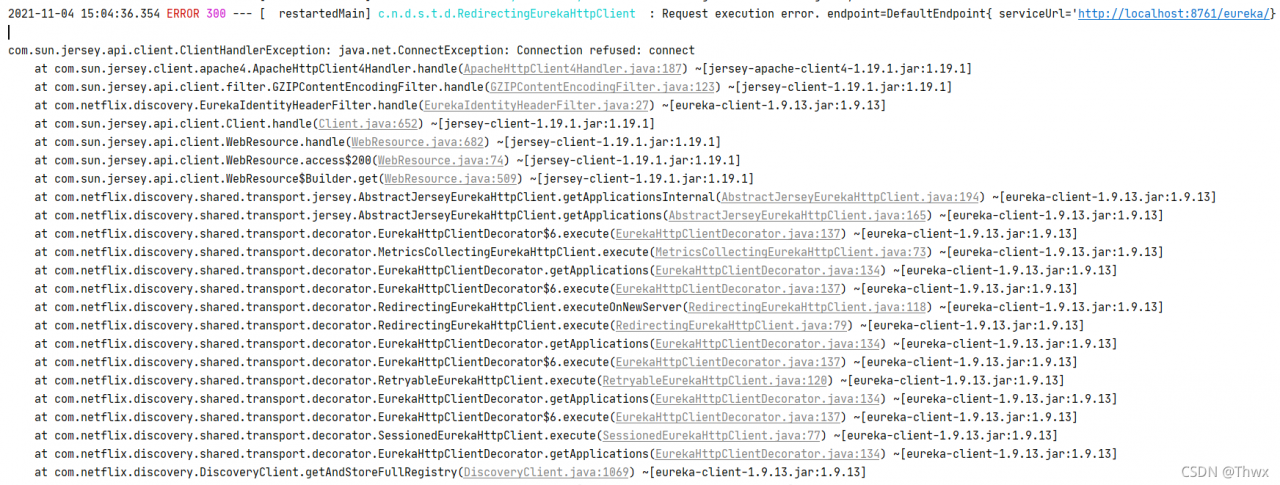
An error is reported during Java operation due to the problem of static resource export

In this case, you need to add the following configuration in the pom.xml file

 <build>
    <resources>
        <resource>
            <directory>src/main/resources</directory>
            <includes>
                <include>**/*.properties</include>
                <include>**/*.xml</include>
            </includes>
            <filtering>true</filtering>
        </resource>

        <resource>
            <directory>src/main/java</directory>
            <includes>
                <include>**/*.properties</include>
                <include>**/*.xml</include>
            </includes>
            <filtering>true</filtering>
        </resource>
    </resources>
</build>

Consumer service instance error: HTTP get http://xxx/actuator/health: 503 output: {“status”: “out_of_service”

Phenomenon

Some back-end services register with consumer and report an error HTTP get http://xxx/actuator/health: 503 output: {"status": "out_of_service", but other services can be registered normally. Find a way to print thin error messages on the Internet

Print detailed error information

Configure in the error reporting module: application.YML or bootstrap.YML as follows:

management:
  endpoint:
    health:
      show-details: always  
  endpoints:
    web:
      exposure:
        include: '*'    

Or add the following configuration in application.Properties :

management.endpoint.health.show-details=always
management.endpoints.web.exposure.include=*

Finally, after printing the detailed error information, I found that it was the ES cluster. I thought it was the problem of the consumer configuration that led to the wrong direction during troubleshooting.

Jd-gui error: ERROR launching ‘JD-GUI’ [How to Solve]

JD-GUI

Check ide of jar

URL
http://java-decompiler.github.io/
Found JD-GUI error after upgrading Big Sur

ERROR launching ‘JD-GUI’
No suitable Java version found on your system!
This program requires Java 1.8+
Make sure you install the required Java version.

Need to replace files
[The source site may have anti-theft chain mechanism, we suggest to save the image and upload it directly (img-tyA4R80g-1635526847601)(evernotecid://4E256570-D902-4601-B913-1C7B0CBD5BA0/appyinxiangcom/ 23501392/ENResource/p275)]
Content
Replace the content

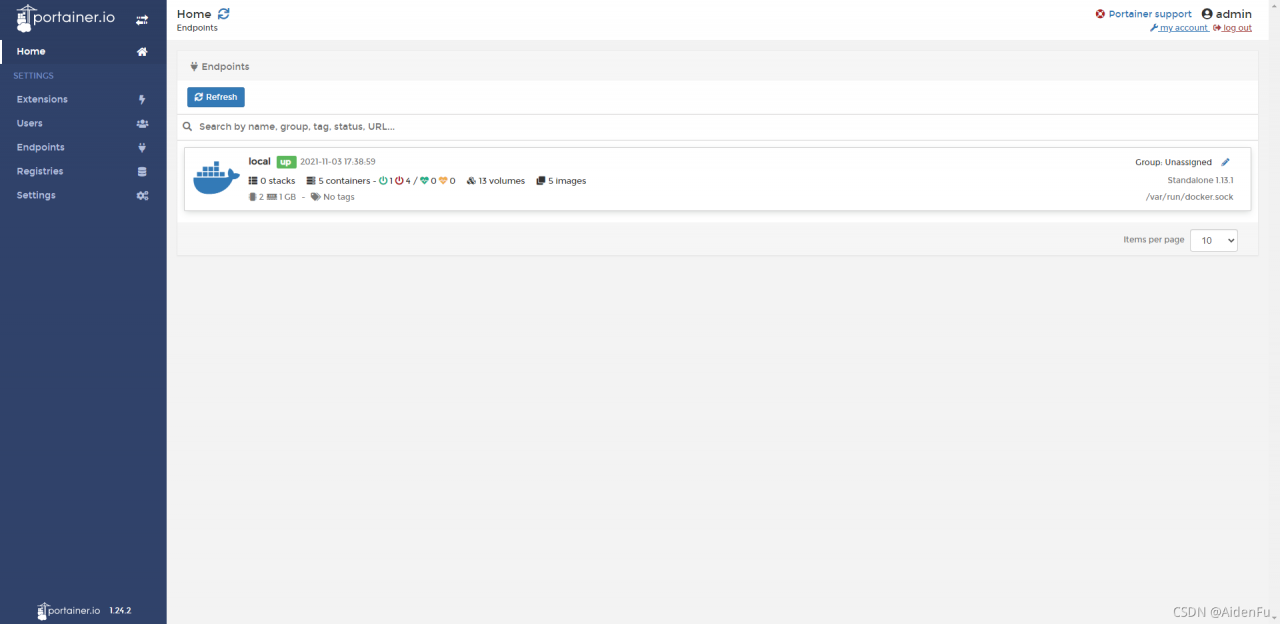
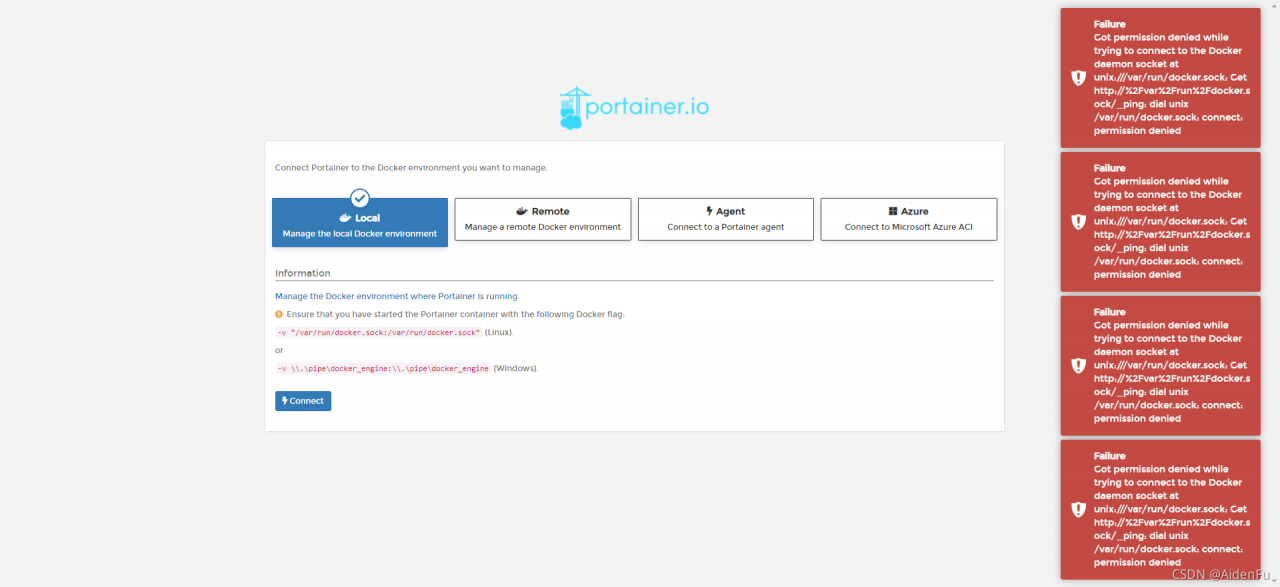
How to Solve Docker Portainer Connect Error

Container startup

[root@shusheng run]# docker run -d -p 9000:9000 --restart=always -v /var/run/docker.sock:/var/run/docker.sock --name prtainer-test portainer/portainer

Portal interface access

Connect error resolution

Many Google articles talk about permission, but I use root to start it
until later

[root@shusheng run]# setenforce 0

Successfully solved

[Solved] Mybatis.generator error: Failed to execute goal org.mybatis.generator:mybatis-generator-maven-plugin:1.3.2

Failed to execute goal org.mybatis.generator:mybatis-generator-maven-plugin:1.3.2:generate (default-cli) on project pas-service-devops: Execution default-cli of goal org.mybatis.generator:mybatis-generator-maven-plugin:1.3.2:generate failed: Plugin org.mybatis.generator:mybatis-generator-maven-plugin:1.3.2 or one of its dependencies could not be resolved: Failure to find com.oracle:ojdbc14:jar:10.2.0.3 in http://maven.aliyun.com/nexus/content/repositories/central/ was cached in the local repository, resolution will not be reattempted until the update interval of alimaven has elapsed or updates are forced
maven dependency did not enter
Re-select dependency version :14 before, change to 8

				<dependency>
					<groupId>com.oracle.database.jdbc</groupId>
					<artifactId>ojdbc8</artifactId>
					<version>21.1.0.0</version>
				</dependency>
				<dependency>
					<groupId>cn.easyproject</groupId>
					<artifactId>orai18n</artifactId>
					<version>12.1.0.2.0</version>
				</dependency>

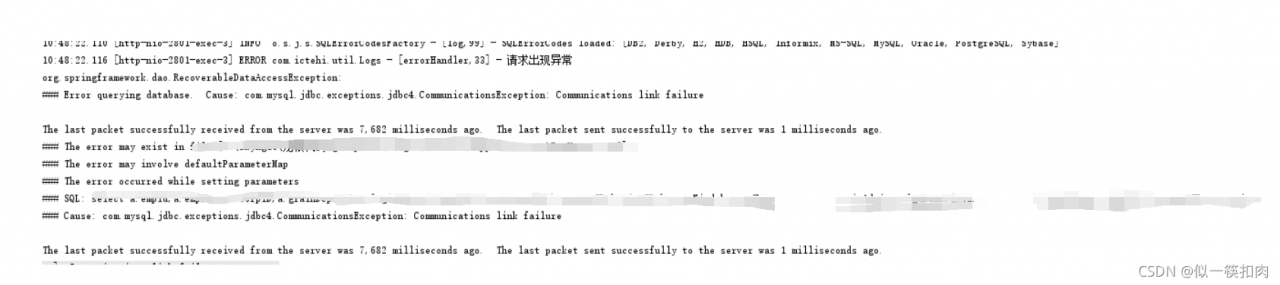
[Solved] MySQL connection error: communications link failure

com.mysql.jdbc.exceptions.jdbc4.CommunicationsException:Communications link failure

com.mysql.jdbc.exceptions.jdbc4.CommunicationsException: Communications link failure
The last packet sent successfully to the server was 0 milliseconds ago. The driver has not received any packets from the server.

1. Causes

Communication link failure occurs when Java connects to the database. Why can’t you log in

2 solution (my situation is invalid)

Method 1

[1] Login mysql,cmd command
mysql -h host address -u username -p user password (for example mysql -hlocalhost -uroot -p123456)

[2] Check the wait_timeout,cmd command.
show global variables like 'wait_timeout';


[3] If the wait_timeout is too small, modify it. cmd command:
set global wait_timeout=604800;
set global interactive_timeout=604800;

Method 2

Add the following parameter to the connection URL: &autoReconnect=true

3. Troubleshooting of other causes

If the above two methods are not solved, check whether there are problems in the server environment and database port.

After investigation, if the database port passes through nginx reverse proxy, or if the database port performs proxy operations through other servers, it is caused by nginx reverse proxy timeout that the database cannot be connected

You need to modify the configuration file of nginx and use steam agent Mysl

stream {
     upstream mysql {
         zone myapp1 64k;
         server localhost:3306 weight=1 max_fails=3 fail_timeout=30s;
     }
     server {
         listen 10086;
         proxy_connect_timeout 1s;
         proxy_timeout 3s;
         proxy_pass mysql;
    }
}

In other cases, you can also check whether the MySQL port has been proxy

Feign calls cannot use “_” to report errors [How to Solve]

Solution: Change “_” to “-” or other
Note that the profile service name should be changed as well

at org.springframework.util.Assert.state(Assert.java:73) ~[spring-core-5.2.1.RELEASE.jar:5.2.1.RELEASE]
at org.springframework.cloud.openfeign.FeignClientsRegistrar.getName(FeignClientsRegistrar.java:103) ~[spring-cloud-openfeign-core-2.2.0.RELEASE.jar:2.2.0.RELEASE]
at org.springframework.cloud.openfeign.FeignClientsRegistrar.getName(FeignClientsRegistrar.java:278) ~[spring-cloud-openfeign-core-2.2.0.RELEASE.jar:2.2.0.RELEASE]
at org.springframework.cloud.openfeign.FeignClientsRegistrar.registerFeignClient(FeignClientsRegistrar.java:233) ~[spring-cloud-openfeign-core-2.2.0.RELEASE.jar:2.2.0.RELEASE]
at org.springframework.cloud.openfeign.FeignClientsRegistrar.registerFeignClients(FeignClientsRegistrar.java:219) ~[spring-cloud-openfeign-core-2.2.0.RELEASE.jar:2.2.0.RELEASE]
at org.springframework.cloud.openfeign.FeignClientsRegistrar.registerBeanDefinitions(FeignClientsRegistrar.java:144) ~[spring-cloud-openfeign-core-2.2.0.RELEASE.jar:2.2.0.RELEASE]
at org.springframework.context.annotation.ImportBeanDefinitionRegistrar.registerBeanDefinitions(ImportBeanDefinitionRegistrar.java:86) ~[spring-context-5.2.1.RELEASE.jar:5.2.1.RELEASE]
at org.springframework.context.annotation.ConfigurationClassBeanDefinitionReader.lambda$loadBeanDefinitionsFromRegistrars$1(ConfigurationClassBeanDefinitionReader.java:385) ~[spring-context-5.2.1.RELEASE.jar:5.2.1.RELEASE]
at java.util.LinkedHashMap.forEach(LinkedHashMap.java:684) ~[na:1.8.0_131]
at org.springframework.context.annotation.ConfigurationClassBeanDefinitionReader.loadBeanDefinitionsFromRegistrars(ConfigurationClassBeanDefinitionReader.java:384) ~[spring-context-5.2.1.RELEASE.jar:5.2.1.RELEASE]
at org.springframework.context.annotation.ConfigurationClassBeanDefinitionReader.loadBeanDefinitionsForConfigurationClass(ConfigurationClassBeanDefinitionReader.java:148) ~[spring-context-5.2.1.RELEASE.jar:5.2.1.RELEASE]
at org.springframework.context.annotation.ConfigurationClassBeanDefinitionReader.loadBeanDefinitions(ConfigurationClassBeanDefinitionReader.java:120) ~[spring-context-5.2.1.RELEASE.jar:5.2.1.RELEASE]
at org.springframework.context.annotation.ConfigurationClassPostProcessor.processConfigBeanDefinitions(ConfigurationClassPostProcessor.java:337) ~[spring-context-5.2.1.RELEASE.jar:5.2.1.RELEASE]
at org.springframework.context.annotation.ConfigurationClassPostProcessor.postProcessBeanDefinitionRegistry(ConfigurationClassPostProcessor.java:242) ~[spring-context-5.2.1.RELEASE.jar:5.2.1.RELEASE]
at org.springframework.context.support.PostProcessorRegistrationDelegate.invokeBeanDefinitionRegistryPostProcessors(PostProcessorRegistrationDelegate.java:275) ~[spring-context-5.2.1.RELEASE.jar:5.2.1.RELEASE]
at org.springframework.context.support.PostProcessorRegistrationDelegate.invokeBeanFactoryPostProcessors(PostProcessorRegistrationDelegate.java:95) ~[spring-context-5.2.1.RELEASE.jar:5.2.1.RELEASE]
at org.springframework.context.support.AbstractApplicationContext.invokeBeanFactoryPostProcessors(AbstractApplicationContext.java:706) ~[spring-context-5.2.1.RELEASE.jar:5.2.1.RELEASE]
at org.springframework.context.support.AbstractApplicationContext.refresh(AbstractApplicationContext.java:532) ~[spring-context-5.2.1.RELEASE.jar:5.2.1.RELEASE]
at org.springframework.boot.web.servlet.context.ServletWebServerApplicationContext.refresh(ServletWebServerApplicationContext.java:141) ~[spring-boot-2.2.1.RELEASE.jar:2.2.1.RELEASE]
at org.springframework.boot.SpringApplication.refresh(SpringApplication.java:747) [spring-boot-2.2.1.RELEASE.jar:2.2.1.RELEASE]
at org.springframework.boot.SpringApplication.refreshContext(SpringApplication.java:397) [spring-boot-2.2.1.RELEASE.jar:2.2.1.RELEASE]
at org.springframework.boot.SpringApplication.run(SpringApplication.java:315) [spring-boot-2.2.1.RELEASE.jar:2.2.1.RELEASE]
at org.springframework.boot.SpringApplication.run(SpringApplication.java:1226) [spring-boot-2.2.1.RELEASE.jar:2.2.1.RELEASE]
at org.springframework.boot.SpringApplication.run(SpringApplication.java:1215) [spring-boot-2.2.1.RELEASE.jar:2.2.1.RELEASE]
at com.yelin.ServiceHrUserApplication.main(ServiceHrUserApplication.java:16) [classes/:na]
at sun.reflect.NativeMethodAccessorImpl.invoke0(Native Method) ~[na:1.8.0_131]
at sun.reflect.NativeMethodAccessorImpl.invoke(NativeMethodAccessorImpl.java:62) ~[na:1.8.0_131]
at sun.reflect.DelegatingMethodAccessorImpl.invoke(DelegatingMethodAccessorImpl.java:43) ~[na:1.8.0_131]
at java.lang.reflect.Method.invoke(Method.java:498) ~[na:1.8.0_131]
at org.springframework.boot.devtools.restart.RestartLauncher.run(RestartLauncher.java:49) [spring-boot-devtools-2.2.1.RELEASE.jar:2.2.1.RELEASE]

JAVA: How to Solve Foreach Loop Remove/add Element Error

In fact, the reason for reporting an error is to throw an exception, which violates the fail fast protection mechanism

At this point, we replace the iterator to implement the loop

List<String> list=new ArrayList<>();
list.add("1");
list.add("2");
Iterator<String> iterator=list.iterator();
while(iterator.hasNext()){
    String item=iterator.next();
    if(Conditions for deleting elements){
        iterator.remove();
    }    
}


Exception Writing
for(String item:list){
    if(Conditions){
        list.remove(item);
    }
}

Idea ignores compilation errors and runs in eclipse compilation mode

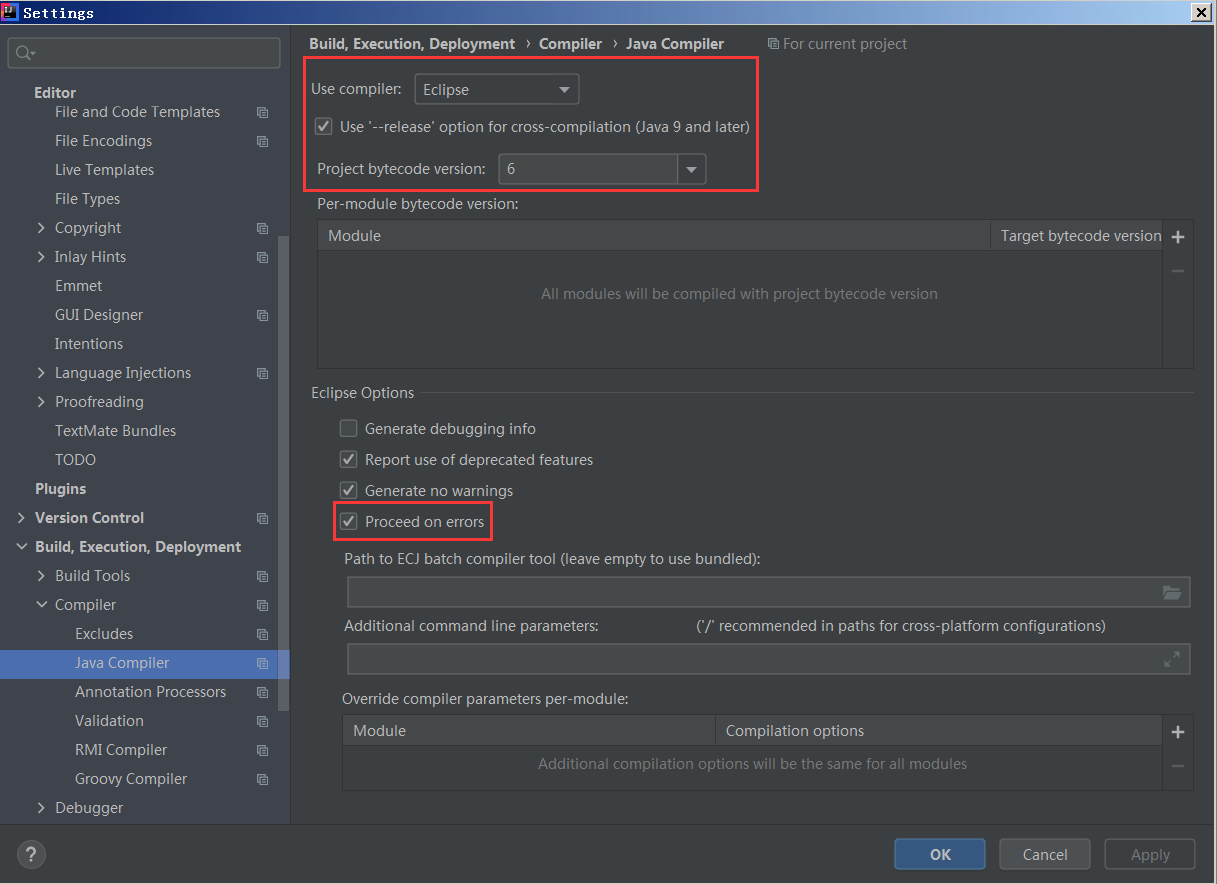
1. Enter file settings compiler java compiler

Modifying the configuration:
use compiler: change javac to eclipse
select “processed on errors” in eclipse options

Change project bytecode version to 6

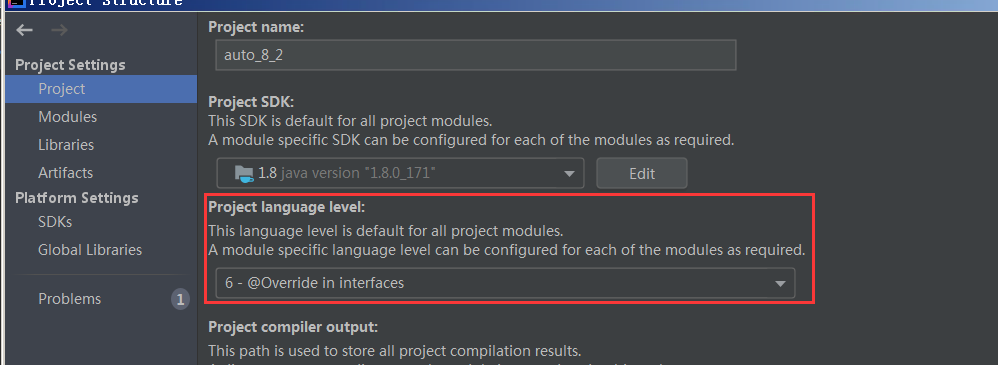
   Enter project configuration: project structure – & gt; Project   -& gt; Project name interface

Setting: Project language level: setting 6 version

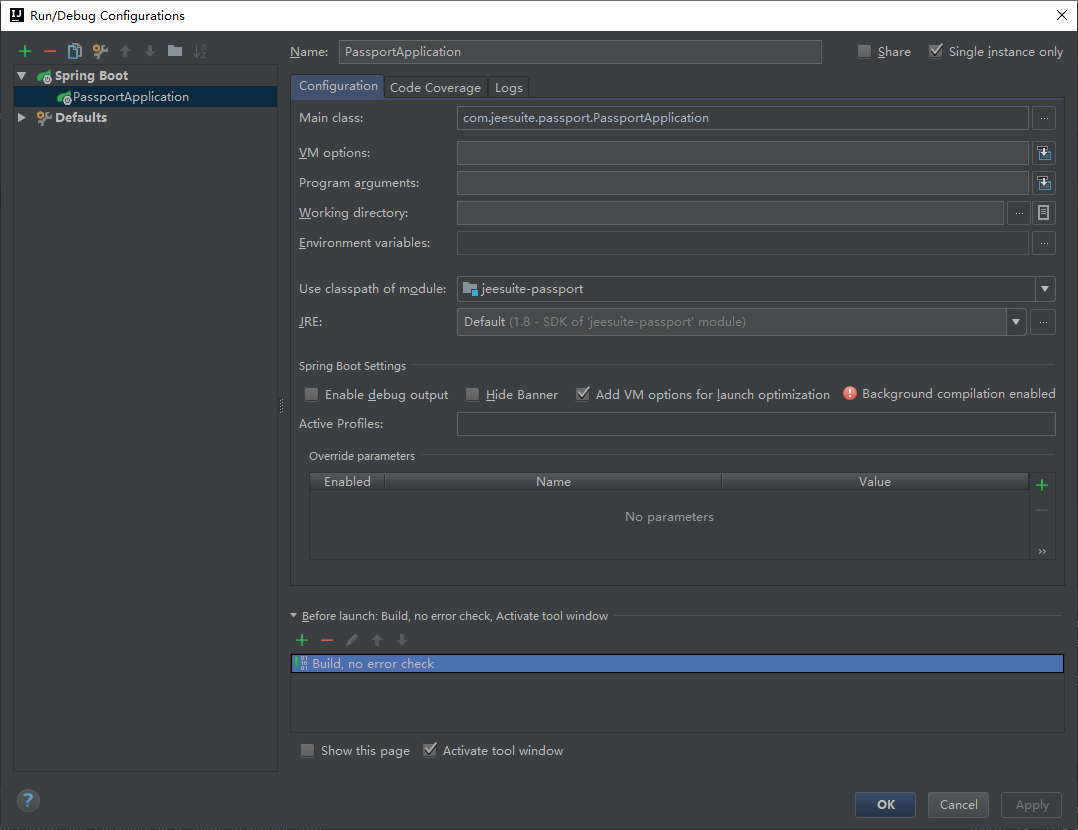
Set run/debug configurations

Run/Debug Configurations

For web projects, set “before launch” to “make, no error check” (the default should be make)
for ordinary projects, set “before launch” to “build, no error build” (the default should be build)

  Return to the editing area and click build – & gt; build Project