Tag Archives: java

Springboot integration redis reports non null key required (solved)

SpringBoot integrated Redis reports non null key required(resolved)

notice if the key value given or passed is empty, if it is empty it will report this error

1. Create the SpringBoot project, create the necessary package
; 2. Create application.yml for relevant configuration

server:
  port: 8080
  servlet:
    context-path: /redis
    #mybatis配置
mybatis-plus:
  configuration:
    map-underscore-to-camel-case: true
  type-aliases-package: com.today.springboot.dao
  mapper-locations: classpath*:mapper/*.xml
spring:
  datasource:
    username: root
    password: 123456
    url: jdbc:mysql://localhost:3306/mysql_begin?serverTimezone=UTC&useUnicode=true&characterEncoding=utf8&allowPublicKeyRetrieval=true&useSSL=false
    type: com.alibaba.druid.pool.DruidDataSource
  redis:
    host: 127.0.0.1
    port: 6379

3. Write redisconfig. Java configuration class

@Configuration
@EnableCaching
public class RedisConfig {

    //编写我们自己的redisTemplate
    //这是写好的一个固定模板,在企业中可以直接使用
    @Bean
    @SuppressWarnings("all")
    public RedisTemplate<String, Object> redisTemplate(RedisConnectionFactory factory){
        //我们为了自己开发方便,一般直接使用<String, Object>
        RedisTemplate<String, Object> template = new RedisTemplate<>();
        template.setConnectionFactory(factory);

        //json序列化配置
        Jackson2JsonRedisSerializer<Object> j2rs = new Jackson2JsonRedisSerializer<Object>(Object.class);
        ObjectMapper om=new ObjectMapper();
        om.setVisibility(PropertyAccessor.ALL, JsonAutoDetect.Visibility.ANY);
        om.enableDefaultTyping(ObjectMapper.DefaultTyping.NON_FINAL);
        j2rs.setObjectMapper(om);
        //String的序列化
        StringRedisSerializer srs = new StringRedisSerializer();

        //key采用String序列化方式
        template.setKeySerializer(srs);
        //hash的key采用String的序列化方式
        template.setHashKeySerializer(srs);
        //value序列化方式采用jackson
        template.setValueSerializer(j2rs);
        //hash的value序列化方式采用jackson
        template.setHashValueSerializer(j2rs);
        template.afterPropertiesSet();

        return template;
    }

    /**
     * 对hash类型的数据操作
     *
     * @param redisTemplate
     * @return
     */
    @Bean
    public HashOperations<String, String, Object> hashOperations(RedisTemplate<String, Object> redisTemplate) {
        return redisTemplate.opsForHash();
    }

    /**
     * 对redis字符串类型数据操作
     *
     * @param redisTemplate
     * @return
     */
    @Bean
    public ValueOperations<String, Object> valueOperations(RedisTemplate<String, Object> redisTemplate) {
        return redisTemplate.opsForValue();
    }

    /**
     * 对链表类型的数据操作
     *
     * @param redisTemplate
     * @return
     */
    @Bean
    public ListOperations<String, Object> listOperations(RedisTemplate<String, Object> redisTemplate) {
        return redisTemplate.opsForList();
    }

    /**
     * 对无序集合类型的数据操作
     *
     * @param redisTemplate
     * @return
     */
    @Bean
    public SetOperations<String, Object> setOperations(RedisTemplate<String, Object> redisTemplate) {
        return redisTemplate.opsForSet();
    }

    /**
     * 对有序集合类型的数据操作
     *
     * @param redisTemplate
     * @return
     */
    @Bean
    public ZSetOperations<String, Object> zSetOperations(RedisTemplate<String, Object> redisTemplate) {
        return redisTemplate.opsForZSet();
    }
}

4, write redisutil.java helper class. To encapsulate Redis operations, of course, write the appropriate helper class

for your own coding

@Component
public class RedisUtil {


    @Autowired
    private RedisTemplate<String, Object> redisTemplate;

    //=================common==================

    /**
     * 指定缓存失败时间
     *
     * @param key  键
     * @param time 时间(秒)
     * @return
     */
    public boolean expire(String key, long time) {
        try {
            if (time > 0) {
                redisTemplate.expire(key, time, TimeUnit.SECONDS);
            }
            return true;
        } catch (Exception e) {
            e.printStackTrace();
            return false;
        }
    }

    /**
     * 根据key 获取过期时间
     *
     * @param key 键 不能为null
     * @return 时间(秒) 返回0代表为永久有效
     */
    public long getExpire(String key) {
        return redisTemplate.getExpire(key, TimeUnit.SECONDS);
    }


    /**
     * 判断key是否存在
     *
     * @param key 键
     * @return true存在  false不存在
     */
    public boolean hasKey(String key) {
        try {
            return redisTemplate.hasKey(key);
        } catch (Exception e) {
            e.printStackTrace();
            return false;
        }
    }


    /**
     * 删除缓存
     *
     * @param key 可以传一个或多个值
     */
    @SuppressWarnings(value = "unchecked")
    public void del(String... key) {
        if (key != null && key.length > 0) {
            if (key.length == 1) {
                redisTemplate.delete(key[0]);
            } else {
                redisTemplate.delete(CollectionUtils.arrayToList(key));
            }
        }
    }

    // ================String==================

    /**
     * 普通缓存获取
     *
     * @param key 键
     * @return 值
     */
    public Object get(String key) {
        return key == null ? null : redisTemplate.opsForValue().get(key);
    }

    /**
     * 普通缓存放入
     *
     * @param key   键
     * @param value 值
     * @return true成功 false失败
     */
    public boolean set(String key, Object value) {
        try {
            redisTemplate.opsForValue().set(key, value);
            return true;
        } catch (Exception e) {
            e.printStackTrace();
            return false;
        }
    }

    /**
     * 普通缓存放入并设置时间
     *
     * @param key   键
     * @param value 值
     * @param time  时间(秒) time要大于0 如果time小于等于0 将设置无限制
     * @return true成功 false失败
     */
    public boolean set(String key, String value, long time) {
        try {
            if (time > 0) {
                redisTemplate.opsForValue().set(key, value, time, TimeUnit.SECONDS);
            } else {
                set(key, value);
            }
            return true;
        } catch (Exception e) {
            e.printStackTrace();
            return false;
        }
    }

    /**
     * 递增
     *
     * @param key   键
     * @param delta 要减少几个
     * @return
     */
    public long incr(String key, long delta) {
        if (delta < 0) {
            throw new RuntimeException("递减因子必须大于0");
        }
        return redisTemplate.opsForValue().increment(key, delta);
    }

    /**
     * 递减
     *
     * @param key   键
     * @param delta 要减少几个
     * @return
     */
    public long decr(String key, long delta) {
        if (delta < 0) {
            throw new RuntimeException("递减因子必须大于0");
        }
        return redisTemplate.opsForValue().increment(key, -delta);
    }

    // =================Map===================

    /**
     * HashGet
     *
     * @param key  键 不能为null
     * @param item 项 不能为null
     * @return
     */
    public Object hget(String key, String item) {
        return redisTemplate.opsForHash().get(key, item);
    }

    /**
     * 获取hashKey对应的所有键值
     *
     * @param key 键
     * @return map 对应多个键值
     */
    public Map<Object, Object> hmget(String key) {
        return redisTemplate.opsForHash().entries(key);
    }

    /**
     * HashSet
     *
     * @param key 键
     * @return map 对应多个键值
     */
    public boolean hmset(String key, Map<String, Object> map) {
        try {
            redisTemplate.opsForHash().putAll(key, map);
            return true;
        } catch (Exception e) {
            e.printStackTrace();
            return false;
        }
    }

    /**
     * HashSet并设置时间
     *
     * @param key  键
     * @param map  对应多个键值
     * @param time 时间(秒)
     * @return true成功 false失败
     */
    public boolean hmset(String key, Map<String, Object> map, long time) {
        try {
            redisTemplate.opsForHash().putAll(key, map);
            if (time > 0) {
                expire(key, time);
            }
            return true;
        } catch (Exception e) {
            e.printStackTrace();
            return false;
        }
    }

    /**
     * 向一张hash表中放入数据,如果不存在将创建
     *
     * @param key   键
     * @param item  项
     * @param value 值
     * @return true成功 false失败
     */
    public boolean hset(String key, String item, Object value) {
        try {
            redisTemplate.opsForHash().put(key, item, value);
            return true;
        } catch (Exception e) {
            e.printStackTrace();
            return false;
        }
    }

    /**
     * 向一张hash表中放入数据,如果不存在将创建
     *
     * @param key   键
     * @param item  项
     * @param value 值
     * @param time  时间(秒) 注意:如果已存在的hash表有时间,这里将会替换原有的时间
     * @return true成功 false失败
     */
    public boolean hset(String key, String item, Object value, long time) {
        try {
            redisTemplate.opsForHash().put(key, item, value);
            if (time > 0) {
                expire(key, time);
            }
            return true;
        } catch (Exception e) {
            e.printStackTrace();
            return false;
        }
    }

    /**
     * 删除hash表中的值
     *
     * @param key  键 不能为null
     * @param item 项 可以有多个 不能为null
     */
    public void hdel(String key, Object... item) {
        redisTemplate.opsForHash().delete(key, item);
    }

    /**
     * 判断hash表中是否有该项的值
     *
     * @param key  键 不能为null
     * @param item 项 不能为null
     * @return true存在 false不存在
     */
    public boolean hHasKey(String key, String item) {
        return redisTemplate.opsForHash().hasKey(key, item);
    }

    /**
     * hash递增 如果不存在,就会创建一个 并把新增后的值返回
     *
     * @param key  键
     * @param item 项
     * @param by   要增加几(大于0)
     */
    public double hincr(String key, String item, double by) {
        return redisTemplate.opsForHash().increment(key, item, by);
    }

    /**
     * hash递减
     *
     * @param key  键
     * @param item 项
     * @param by   要减少几(小于0)
     */
    public double hdecr(String key, String item, double by) {
        return redisTemplate.opsForHash().increment(key, item, -by);
    }

    //====================set===================

    /**
     * 根据key获取set中的所有值
     *
     * @param key 键
     * @return
     */
    public Set<Object> sGet(String key) {
        try {
            return redisTemplate.opsForSet().members(key);
        } catch (Exception e) {
            e.printStackTrace();
            return null;
        }
    }

    /**
     * 根据value从一个set中查询,是否存在
     *
     * @param key   键
     * @param value 值
     * @return true存在 false不存在
     */
    public boolean sHasKey(String key, Object value) {
        try {
            return redisTemplate.opsForSet().isMember(key, value);
        } catch (Exception e) {
            e.printStackTrace();
            return false;
        }
    }

    /**
     * 将数据放入set缓存
     *
     * @param key    键
     * @param values 值 可以是多个
     * @return 成功个数
     */
    public long sSet(String key, Object... values) {
        try {
            return redisTemplate.opsForSet().add(key, values);
        } catch (Exception e) {
            e.printStackTrace();
            return 0;
        }
    }

    /**
     * 将set数据放入缓存
     *
     * @param key    键
     * @param time   时间(秒)
     * @param values 值 可以是多个
     * @return 成功个数
     */
    public long sSetAndTime(String key, long time, Object... values) {
        try {
            Long count = redisTemplate.opsForSet().add(key, values);
            if (time > 0) {
                expire(key, time);
            }
            return count;
        } catch (Exception e) {
            e.printStackTrace();
            return 0;
        }
    }

    /**
     * 获取set缓存的长度
     *
     * @param key 键
     */
    public long sGetSetSize(String key) {
        try {
            return redisTemplate.opsForSet().size(key);
        } catch (Exception e) {
            e.printStackTrace();
            return 0;
        }
    }

    /**
     * 移除值为value的
     *
     * @param key    键
     * @param values 值 可以是多个
     * @return 移除的个数
     */
    public long setRemove(String key, Object... values) {
        try {
            return redisTemplate.opsForSet().remove(key, values);
        } catch (Exception e) {
            e.printStackTrace();
            return 0;
        }
    }

    //=================List===================

    /**
     * 获取list缓存的内容
     *
     * @param key   键
     * @param start 开始
     * @param end   结束 0 到 -1代表所有值
     */
    public List<Object> lGet(String key, long start, long end) {
        try {
            return redisTemplate.opsForList().range(key, start, end);
        } catch (Exception e) {
            e.printStackTrace();
            return null;
        }
    }

    /**
     * 获取list缓存的长度
     *
     * @param key 键
     */
    public long lGetListSize(String key) {
        try {
            return redisTemplate.opsForList().size(key);
        } catch (Exception e) {
            e.printStackTrace();
            return 0;
        }
    }

    /**
     * 通过索引 获取list中的值
     *
     * @param key   键
     * @param index 索引index>=0时, 0 表头,1 第二个元素,以此类推:index<0时,-1表尾,-2倒数第二个元素,以此类推
     */
    public Object lGetIndex(String key, long index) {
        try {
            return redisTemplate.opsForList().index(key, index);
        } catch (Exception e) {
            e.printStackTrace();
            return null;
        }
    }

    /**
     * 将list放入缓存
     *
     * @param key   键
     * @param value 值
     */
    public boolean lSet(String key, Object value) {
        try {
            redisTemplate.opsForList().rightPush(key, value);
            return true;
        } catch (Exception e) {
            e.printStackTrace();
            return false;
        }
    }

    /**
     * 将list放入缓存
     *
     * @param key   键
     * @param value 值
     * @param time  时间(秒)
     */
    public boolean lSet(String key, Object value, long time) {
        try {
            redisTemplate.opsForList().rightPush(key, value);
            if (time > 0) {
                expire(key, time);
            }
            return true;
        } catch (Exception e) {
            e.printStackTrace();
            return false;
        }
    }

    /**
     * 将list放入缓存
     *
     * @param key   键
     * @param value 值
     * @return
     */
    public boolean lSet(String key, List<Object> value) {
        try {
            redisTemplate.opsForList().rightPushAll(key, value);
            return true;
        } catch (Exception e) {
            e.printStackTrace();
            return false;
        }
    }

    /**
     * 将list放入缓存
     *
     * @param key   键
     * @param value 值
     * @param time  时间(秒)
     * @return
     */
    public boolean lSet(String key, List<Object> value, long time) {
        try {
            redisTemplate.opsForList().rightPushAll(key, value);
            if (time > 0) {
                expire(key, time);
            }
            return true;
        } catch (Exception e) {
            e.printStackTrace();
            return false;
        }
    }

    /**
     * 根据索引修改list中的某条数据
     *
     * @param key   键
     * @param index 索引
     * @param value 值
     * @return
     */
    public boolean lUpdateIndex(String key, long index, Object value) {
        redisTemplate.opsForList().set(key, index, value);
        try {
            return true;
        } catch (Exception e) {
            e.printStackTrace();
            return false;
        }
    }

    /**
     * 移除N个为value值
     *
     * @param key   值
     * @param count 移除多少个
     * @param value 值
     * @return 移除的个数
     */
    public long lRemove(String key, long count, Object value) {
        try {
            return redisTemplate.opsForList().remove(key, count, value);
        } catch (Exception e) {
            e.printStackTrace();
            return 0;
        }
    }
}

5, willful your creative mind to write the best website and system
here to write some test classes to help understand

@SpringBootTest
class RedisSpringbootApplicationTests {

    @Autowired
    @Qualifier("redisTemplate")
    private RedisTemplate redisTemplate;

    @Autowired
    private RedisUtil redisUtil;

    @Test
    public void test1(){
        redisUtil.set("name","today");
        System.out.println(redisUtil.get("name"));
    }

    @Test
    void contextLoads() {
        //redisTemplate
        //opsForValue操作字符串 类似String
        //opsForList操作List 类似List


        //获取redis的连接对象
		//RedisConnection connection = redisTemplate.getConnectionFactory().getConnection();
		//connection.flushDb();
		//connection.flushAll();

        redisTemplate.opsForValue().set("mykey","今天");
        System.out.println(redisTemplate.opsForValue().get("mykey"));
    }

    @Test
    public void test() throws JsonProcessingException {
        //真实的开发一般都使用json来传递对象
        User user = new User("today", 3);
		// String jsonUser = new ObjectMapper().writeValueAsString(user);
        redisTemplate.opsForValue().set("user",user);
        System.out.println(redisTemplate.opsForValue().get("user"));
    }

}

published in CSDN for the first time, please forgive me if there is any mistake
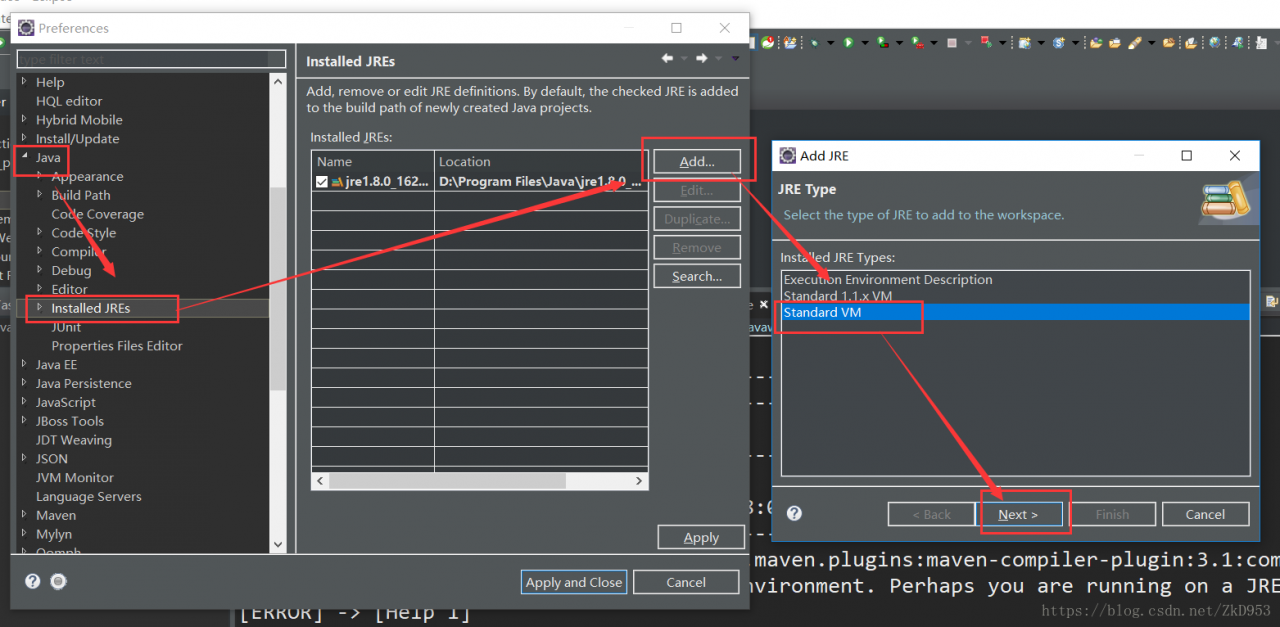
The import Maven project appears http://cwiki.apache.org/confluence/display/MAVEN/MojoFailureException Solutions

error occurs when importing maven project, conducting maven clean, and maven install:

[ERROR] Failed to execute goal. Org. Apache maven. Plugins: maven — the compiler plugin: 3.1: the compile (default – the compile) on project mvc2: Compilation failure
[ERROR] No compiler is provided in this environment. Perhaps you are running on a JRE rather than a JDK?
[ERROR] -> [Help 1]
[ERROR]
[ERROR] To see the full stack trace of the errors, re-run Maven with the -e switch.
[ERROR] Re-run Maven using the -X switch to enable full debug logging.
[ERROR]
[ERROR] For more information about the errors and possible solutions, please read the following articles:
[ERROR] [Help 1] http://cwiki.apache.org/confluence/display/MAVEN/MojoFailureException

is running on a JRE rather than a JDK version.

is running on a JRE rather than a JDK version

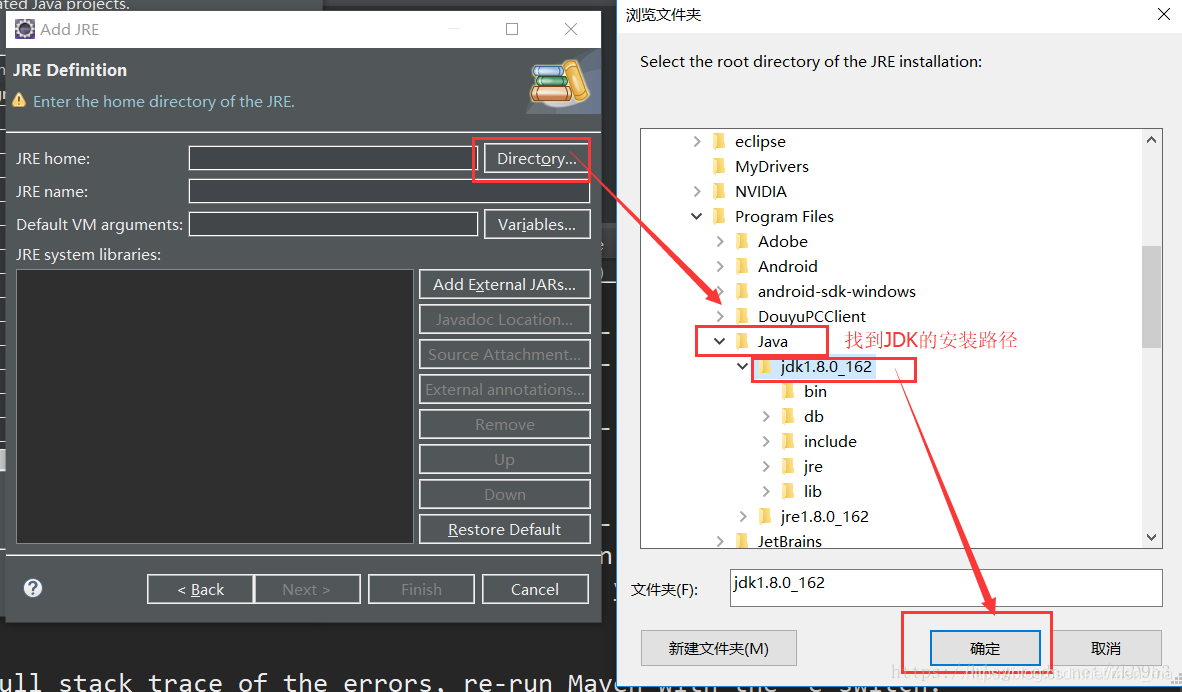
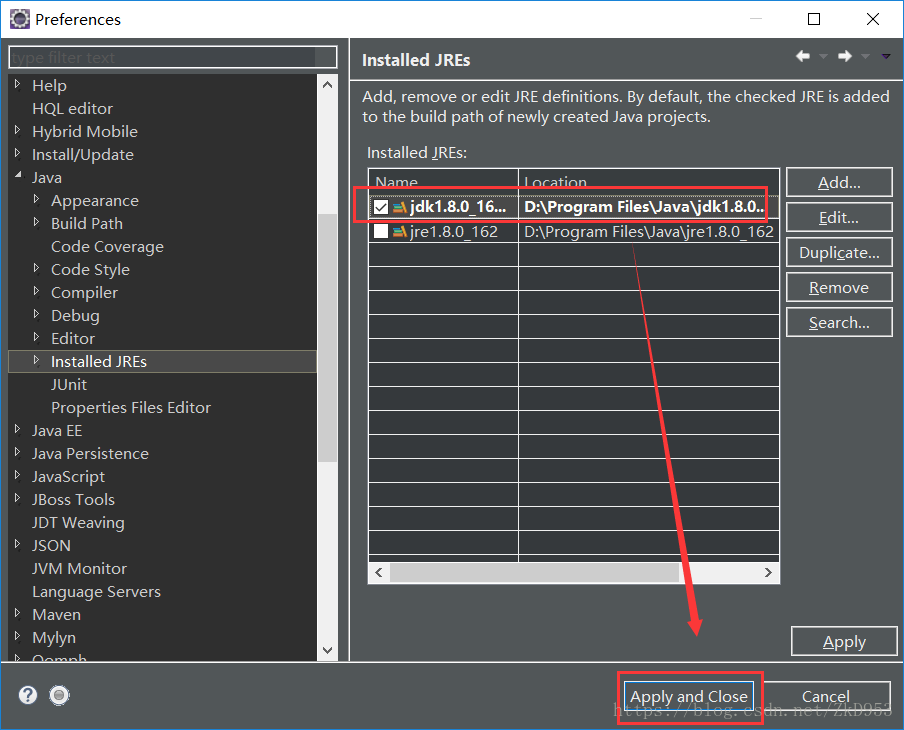
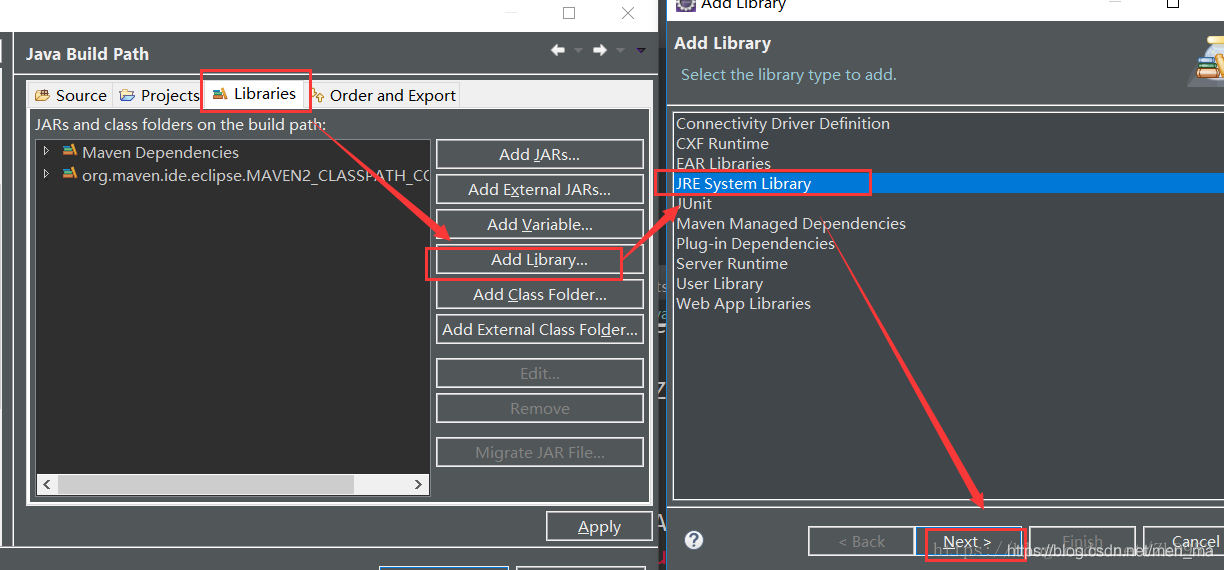
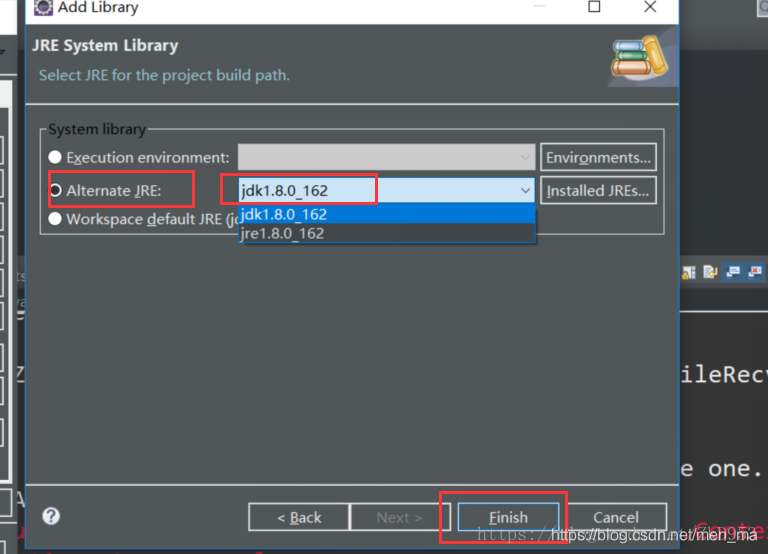
  1. window – & gt; The preferences – & gt; Java – & gt; Installed JREs
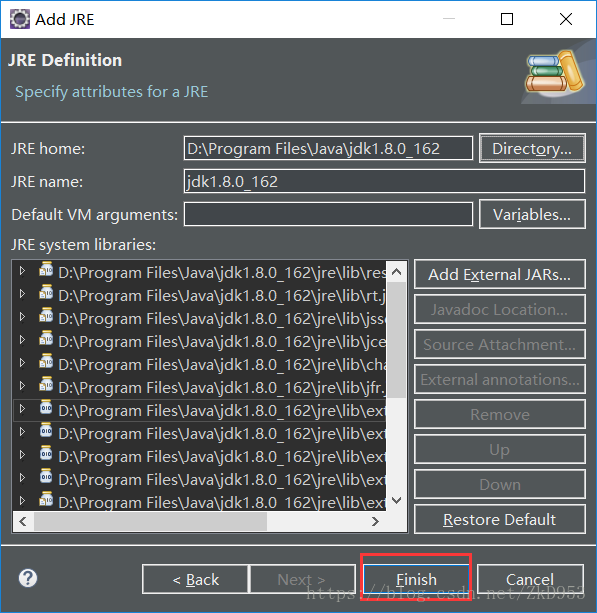
  2. find JDK installation path

  3. select the JDK – & gt; apply
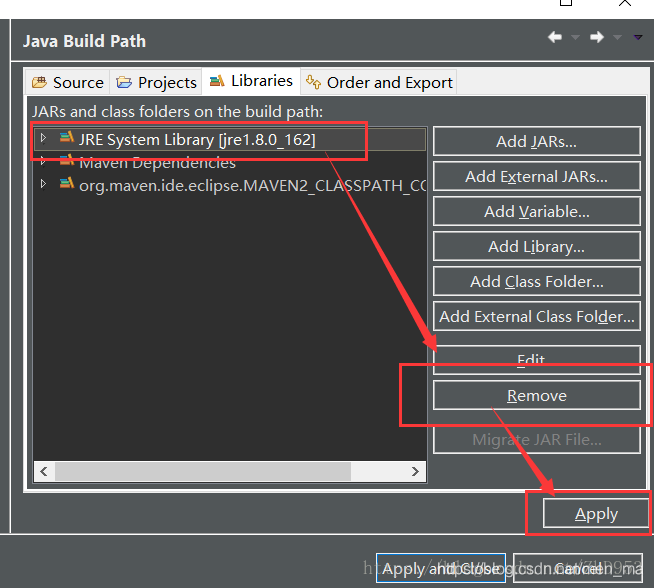
  4. maven clean again, maven install, if the problem remains, For the operation:


  5. open pom. The XML file, The following configuration under the plugins will source target to correspond to the JDK version (I was) 1.8:
<plugin>
 <groupId>org.apache.maven.plugins</groupId>
 <artifactId>maven-surefire-plugin</artifactId>
 <version>2.4.2</version>
 <configuration> 
 <source>1.8</source>
 <target>1.8</target>
 </configuration>
 </plugin>

set the JDK version 1.8
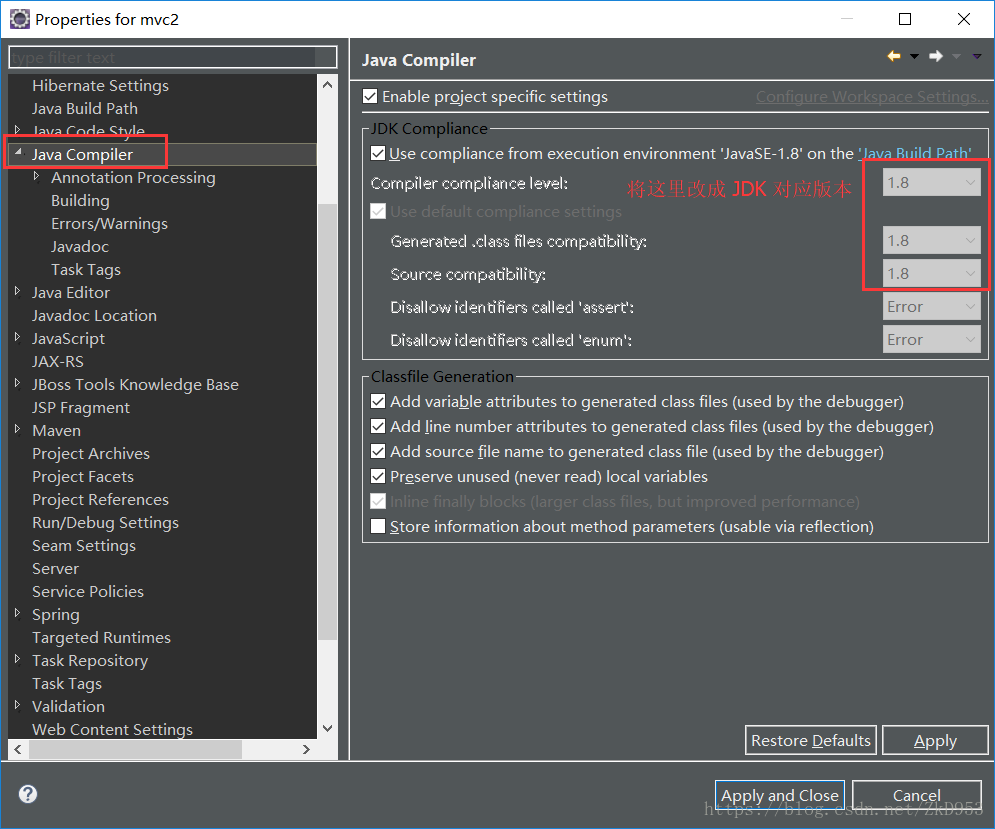
maven clean again, maven install, no error, can be loaded, But the project may still be small Red Cross on the top left corner, specific error is as follows:
Dynamic Web Module 3.0 requires Java 1.6 or newer.


specific solution is as follows:
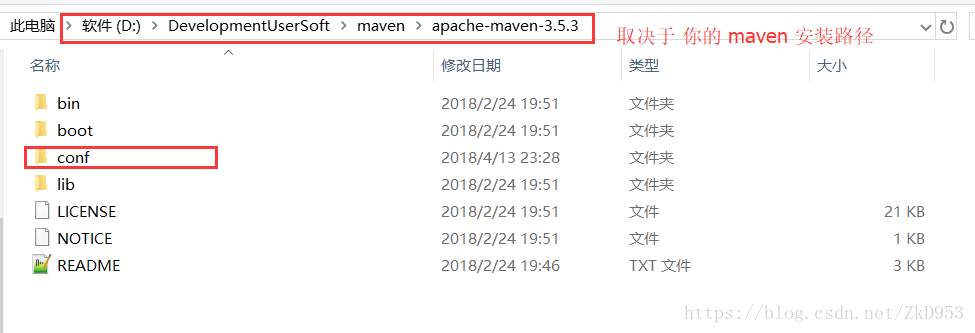
find apache – maven installation path;

in Apache-maven-3.5.3 /conf/settings.xml file with the following configuration (depending on JDK version, mine is 1.8) :

<profiles>     
       <profile>       
            <id>jdk-1.8</id>       
            <activation>       
                <activeByDefault>true</activeByDefault>       
                <jdk>1.8</jdk>       
            </activation>       
            <properties>       
                <maven.compiler.source>1.8</maven.compiler.source>       
                <maven.compiler.target>1.8</maven.compiler.target>       
                <maven.compiler.compilerVersion>1.8</maven.compiler.compilerVersion>       
            </properties>       
    </profile>      
</profiles>   

re Maven > Update project can solve this problem.

this article reprinted in: https://blog.csdn.net/ZkD953/article/details/79935520

Spring boot can’t scan XML (invalid bound statement (not found))

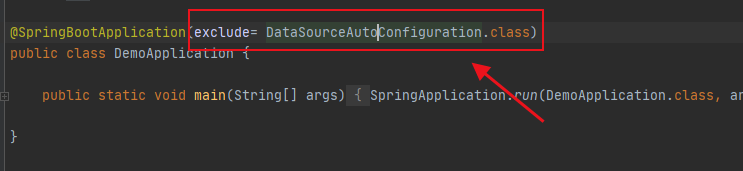
in a recent work on a project, a headache problem, the background and foreground, after a successful start in obtaining some mapper, always show can not find the mapper, but if use Ctrl or can enter this method, on the Internet to find a lot of solutions, did not solve my problem, the following are some of the common rule out way:

1, check whether namespace in your XML file is correct

2. Check whether the mapper method written by yourself is consistent or missing with the method in XML, and whether the return type or name is consistent

3. If it is not possible yet, take a look to see if the XML configuration path of mapper is correct

4. Delete some Spaces in XML

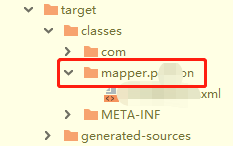
5, I encountered myself, to see if the target file exists and is a level 1 directory:

, if you’re like me, you can delete the new mapper, and when you create a new mapper, you can create a new mapper, and you can create a new directory on the mapper.

and finally the target should look like this:

is just like that.

if not solved, you can leave a message to communicate with oh ~

Error inflating class in WebView in Android 5. X android.webkit.WebView Solutions

using WebView in Android version 5.x May report the following error

android.view.InflateException: Binary XML file line #24: Error inflating class android.webkit.WebView

solution 1:

use createConfigurationContext () method to get the Context

public class LollipopFixedWebView extends WebView {

    public LollipopFixedWebView(Context context) {
        super(getFixedContext(context));
    }

    public LollipopFixedWebView(Context context, AttributeSet attrs) {
        super(getFixedContext(context), attrs);
    }

    public LollipopFixedWebView(Context context, AttributeSet attrs, int defStyleAttr) {
        super(getFixedContext(context), attrs, defStyleAttr);
    }

    @TargetApi(Build.VERSION_CODES.LOLLIPOP)
    public LollipopFixedWebView(Context context, AttributeSet attrs, int defStyleAttr, int defStyleRes) {
        super(getFixedContext(context), attrs, defStyleAttr, defStyleRes);
    }

    public LollipopFixedWebView(Context context, AttributeSet attrs, int defStyleAttr, boolean privateBrowsing) {
        super(getFixedContext(context), attrs, defStyleAttr, privateBrowsing);
    }

    public static Context getFixedContext(Context context) {
        // Android Lollipop 5.0 & 5.1
        if (Build.VERSION.SDK_INT >= 21 && Build.VERSION.SDK_INT <= 22) 
            return context.createConfigurationContext(new Configuration());
        return context;
    }
}

solution 2:

in the build.gradle of the project, appcompat version 1.1.0 May be buggy, use the following version to solve the problem

implementation 'androidx.appcompat:appcompat:1.2.0'


How to solve the problem that the project module turns grey in Maven

wrong project, built to remove reconstruction, suddenly have been project identification, always prompt project can’t find, then see the maven inside of bar on the right, according to project is gray, the diagram below:

for this reason, find relevant solution and steps are as follows:
1 file – setting

2 maven – ignored files, the following figure

save after 3 o ‘clock, gray disappears inside maven:

Java and Android commons codec usage and nosuch method error

introduction

Commons codec, a utility class package provided by the Apache open source organization for handling common encoding methods, such as DES, SHA1, MD5, Base64, URL, Soundx, and so on. Not only encoding, but also decoding.

common classes and functions

1, Base64 encoding and decoding 2, Hex encoding and decoding 3, MD5 encryption (MD5 is an irreversible algorithm, encryption only) 4, SHA encryption 5, Metaphone and Soundex 6, URLCodec

source

the address https://commons.apache.org/proper/commons-codec/download_codec.cgi
or
https://github.com/apache/commons-codec </ p>

Java project using

<dependency>
  <groupId>commons-codec</groupId>
  <artifactId>commons-codec</artifactId>
  <version>1.15</version>
</dependency>

Android USES

it’s a pity that did not provide gradle dependence, only from the source code or download bin file copies jars to the Android projects in use, can appear but in Android USES Java. Lang. NoSuchMethodError: No static method decodeHex (Ljava/lang/String;)
[B in class Lorg/apache/commons/codec/binary/Hex; or its super classes (declaration of ‘org.apache.commons.codec.binary.Hex’ appears in /system/framework/org.apache.http.legacy.boot.jar)

why

Android also has a copy of the package name and class name of the API we use, but the point is there is no such method in the system! This results in a package name conflict, and the system finds the same class with the same name in its SDK, and then calls the method we use below the system’s own class.
however the system does not have that method at all, it is not called at all. And then there’s no and then there’s less than /p>

solution

obtained the source code by itself, modified the package name, and then recompiled into a jar package, and then imported into the Android project for use; Recompile and run your Own Android project, and you’ll see that the previous problems are gone;

Problems and causes of Java’s main function format (public static void main (string args()))

I believe that many people when learning Java always find the main function is used like this:

public static void main (String args[])

so why is that?
main () “method type” is void, indicating that the method does not return a value. It has a parameter, “GRAS,” which is an array of objects of type String. The method declaration for main() is fixed and cannot be changed. The access modifier for the
main () method is public, so you can run the program (call the method) from anywhere.

Explicit and implicit conversion of Java data type

implicit conversion:
two byte data type operation, the result is an int data type.


(byte, short) < int< long< float< Double;
an operation involving only a byte, short, the result will be converted to an int;
if other operations are involved, convert to a large data type according to the relational result above.
below are some code examples

public class TypeWay {
    public static void main(String[] args) {
        byte b1 = 1, b2 = 2;
        System.out.println(getType(b1+b2));
    }
    public static String getType(Object a){
        return a.getClass().toString();
    }
}

运行结果:class java.lang.Integer

a byte data type and a short data type operation result in an int data type.

public class TypeWay {
    public static void main(String[] args) {
        byte b1 = 1;
        short b2 = 2;
        System.out.println(getType(b1+b2));
    }
    public static String getType(Object a){
        return a.getClass().toString();
    }
}

结果为:class java.lang.Integer

the following code means: an int and long data type operation, the result of the long data type.

public class TypeWay {
    public static void main(String[] args) {
        int b1 = 1;
        long b2 = 2;
        System.out.println(getType(b1*b2));
        System.out.println("go and try");
    }
    public static String getType(Object a){
        return a.getClass().toString();
    }
}

结果为:class java.lang.Long

an int data type and a double data type operation result doule data type.

public class TypeWay {
    public static void main(String[] args) {
        int b1 = 1;
        double b2 = 2.0;
        System.out.println(getType(b1*b2));
        System.out.println("go and try");
    }
    public static String getType(Object a){
        return a.getClass().toString();
    }
}

结果为:class java.lang.Double

: a float and a double operation results in a double operation.

public class TypeWay {
    public static void main(String[] args) {
        float b1 = 1.0f;
        double b2 = 2.0;
        System.out.println(getType(b1*b2));
        System.out.println("go and try");
    }
    public static String getType(Object a){
        return a.getClass().toString();
    }
}

结果为:class java.lang.Double

conversion
directly precedes the data with the corresponding function of your conversion data type. However, there is no support for converting high-level data types to low-level data types.

here are some examples:
high data types cannot be converted to high data types.

public class TypeWay {
    public static void main(String[] args) {
        int b1 = 1;
        int b2 = 2;
        System.out.println(getType((byte)b1*b2));

    }
    public static String getType(Object a){
        return a.getClass().toString();
    }
}

结果是:class java.lang.Integer

low data type converted to high data type:

public class TypeWay {
    public static void main(String[] args) {
        int b1 = 1;
        int b2 = 2;
        System.out.println(getType((long)b1*b2));

    }
    public static String getType(Object a){
        return a.getClass().toString();
    }
}

结果是:class java.lang.Long

The number of control threads and concurrency number of concurrent executor of Java starting gun

introduction

the first time when studying the singleton pattern, useful to the multithreading concurrency test thread-safe singleton pattern. However, I was pressed for time at that time and did not record it, so I made a special record today.

1, look at the code

import java.util.concurrent.CountDownLatch;
import java.util.concurrent.ExecutorService;
import java.util.concurrent.Executors;
import java.util.concurrent.Semaphore;


/**
* @author :Jarvisy
* @date :Created in 2020/9/16 1:20
* @description :
*/
public class ConcurrentExecutor {
    /**
     * @param runHandler
     * @param executeCount    发起请求总数
     * @param concurrentCount 同时并发执行的线程数
     * @throws Exception
     */
    public static void execute(final RunHandler runHandler, int executeCount, int concurrentCount) throws Exception {
        ExecutorService executorService = Executors.newCachedThreadPool();
        //控制信号量,此处用于控制并发的线程数
        final Semaphore semaphore = new Semaphore(concurrentCount);
        //闭锁,可实现计数量递减
        final CountDownLatch countDownLatch = new CountDownLatch(executeCount);
        for (int i = 0; i < executeCount; i++) {
            executorService.execute(new Runnable() {
                public void run() {
                    try {
                        //执行此方法用于获取执行许可,当总计未释放的许可数不超过executeCount时,
                        //则允许同性,否则线程阻塞等待,知道获取到许可
                        semaphore.acquire();
                        runHandler.handler();//回调函数
                        //释放许可
                        semaphore.release();
                    } catch (Exception e) {
                        e.printStackTrace();
                    }
                    countDownLatch.countDown();
                }
            });
        }
        countDownLatch.await();//线程阻塞,知道闭锁值为0时,阻塞才释放,继续往下执行
        executorService.shutdown();
    }


    public interface RunHandler {
        void handler();
    }
}

2, Executors

Java four thread pool can be created by Executors:

  1. newCachedThreadPool creates a cacheable thread pool. If the length of the thread pool exceeds the processing requirement, the free thread can be reclaimed flexibly. If no thread can be retrieved, a new thread can be created.
  2. newFixedThreadPool creates a fixed-length thread pool that controls the maximum number of concurrent threads. The newScheduledThreadPool creates a fixed-length thread pool that supports timed and periodic task execution while waiting in the queue for
  3. .
  4. newSingleThreadExecutor creates a single-threaded thread pool that executes tasks with only a unique worker thread, ensuring that all tasks are executed in the specified order (FIFO, LIFO, priority).

The first type: newCachedThreadPool
thread pool is infinite. When the second task is executed and the first task has been completed, the thread executing the first task is reused instead of creating a new thread each time.

ExecutorService cachedThreadPool = Executors.newCachedThreadPool();
        for (int i = 0; i < 10; i++) {
            final int index = i;
            try {
                Thread.sleep(index * 1000);
            } catch (InterruptedException e) {
                e.printStackTrace();
            }
            cachedThreadPool.execute(new Runnable() {
                public void run() {
                    System.out.println(index);
                }
            });
        }

second: newFixedThreadPool
because the thread pool size is 3, each task output index after sleep 2 seconds, so every two seconds to print 3 Numbers.
the size of the fixed-length thread pool is best set based on system resources. Such as the Runtime. GetRuntime (). AvailableProcessors ()

ExecutorService fixedThreadPool = Executors.newFixedThreadPool(3);  
  for (int i = 0; i < 10; i++) {  
   final int index = i;  
   fixedThreadPool.execute(new Runnable() {  
    public void run() {  
     try {  
      System.out.println(index);  
      Thread.sleep(2000);  
     } catch (InterruptedException e) {  
      e.printStackTrace();  
     }  
    }  
   });

NewScheduledThreadPool

ScheduledExecutorService scheduledThreadPool = Executors.newScheduledThreadPool(5);  
  scheduledThreadPool.scheduleAtFixedRate(new Runnable() {  
   public void run() {  
    System.out.println("delay 1 seconds, and excute every 3 seconds");  
   }  
  }, 1, 3, TimeUnit.SECONDS);

Fourth: newSingleThreadExecutor

ExecutorService singleThreadExecutor = Executors.newSingleThreadExecutor();  
  for (int i = 0; i < 10; i++) {  
   final int index = i;  
   singleThreadExecutor.execute(new Runnable() {  
    public void run() {  
     try {  
      System.out.println(index);  
      Thread.sleep(2000);  
     } catch (InterruptedException e) {  
      e.printStackTrace();  
     }  
    }  
   });

3, the ExecutorService

ExecutorService methods:

1, execute(Runnable) this method accepts an instance of Runnable and executes asynchronously. The problem with this approach is that there is no way to know the execution results of Task. If we want to get the execution result of task, we can pass in an instance of Callable.

2, submit(Runnable) submit(Runnable) and execute(Runnable) are different in that the former can return a Future object. By returning the Future object, we can check whether the submitted task has been completed. If the task completes, the future.get() method returns null. Note that the future.get() method causes a block.

3, submit(Callable) submit(Callable), similar to submit(Runnable), also returns a Future object, but otherwise submit(Callable) receives an implementation of a Callable. The call() method in the Callable interface has a return value that can return the execution result of the task, while the run() method in the Runnable interface is void. No return value. If the task completes, the future.get() method returns the execution result of the Callable task. Note that the future.get() method causes a block.

4, invokeAny (…). this method receives a collection of Callable. Execution of this method does not return the Future, but does return the result of one of the Callable tasks. This method does not guarantee that the result of which task is returned, but one of them anyway.

5 and invokeAll (…). invokeAll (…). With invokeAny (…). Similarly, a collection of Callable objects is received, but the former will return a List of Future objects corresponding to each Callable task after execution.

Shutdown of>ExecutorService:
1, shutdown() : stops receiving new tasks, and the original tasks continue

  1. stop receiving the new submit task;
  2. committed tasks (including those running and waiting in the queue), will continue to complete;
  3. wait until the second step is completed, then really stop;

2, shutdownNow() : stop receiving new tasks, the original task stops executing

  1. stops receiving the new submit task as shutdown();
  2. ignores tasks waiting in the queue;
  3. attempts to interrupt the task being performed;
  4. returns a list of unexecuted tasks;

3, awaitTermination(long timeOut, TimeUnit) : timeOut and TimeUnit are timeOut and unit
the current thread is blocking until:

  1. and other submitted tasks (including running and waiting in the queue) executed;
  2. or timeout (timeout and TimeUnit);
  3. or if the thread is interrupted, throw InterruptedException;

then monitors whether the ExecutorService has closed, returning either true (after the shutdown request all tasks have been completed) or false (timeout)

The difference between

4, shutdown() and shutdownNow()
shutdown() just closed the submission channel, using submit() was invalid; And the inside runs just the way it is supposed to, and then stops.
shutdownNow() instantly stops the thread pool, stopping both running and waiting tasks.

5, shutdown(), awaitTermination(),
shutdown(), no new task can be submitted. But after awaitTermination(), the submission can continue.
awaitTermination() is blocked and returns whether the thread pool has stopped (true/false); Shutdown () does not block.

1. Elegant shutdown, using shutdown()
; 2. Want to shutdown immediately, and get the list of unperformed tasks; 3. shutdown() > awaitTermination()

4, Semaphore

Semaphore is a helper class for thread synchronization that maintains the number of threads currently accessing itself and provides a synchronization mechanism. Semaphore allows you to control the number of threads accessing a resource at the same time, for example, to implement the number of concurrent accesses allowed for a file.

Semaphore initialization must provide the number of concurrent threads because Semaphore does not provide a function to update the number of concurrent threads.

1. The constructors of the class Semaphore are permits, representing the maximum number of permits for threads to execute code between acquire() and release() at the same time. Acquire () acquire() function is to consume 1 license every time this method is called. The function of acquire(n) is to consume n licenses every time this method is called. The function of release() is to dynamically add a license to the method every time it is called.
5, method release(n)‘s function is to dynamically add n licenses to the method every time it is called.
method acquirenterruptibly () means that threads waiting to enter acquire() method are not allowed to be interrupted.
7, the method available() returns the number of permits currently available in the Semaphore object.
8, method exhaustive () retrieves and returns the maximum number of permits, And will be available for permission to reset to 0
9, methods, getQueueLength () is the function of licensing the waiting thread number 10,
method hasQueueThreads () is used to determine any threads are waiting for the permission
11, fair and not fair semaphore:
sometimes to get permission to order associated with the sequence of thread starts, this signal will be divided into fair and not fair. The so-called fair semaphore is the order in which the lock is acquired depending on the order in which the thread is started, but it does not mean that 100% of the semaphore is acquired, only in probability, and the non-fair semaphore is independent.
e.g.

Semaphore semaphore = new Semaphore(1false);

False: means non-fair semaphore, i.e., the order in which threads start is independent of the order in which semaphore. Acquire () is called, i.e., the program started first does not mean that permission is obtained first.
True: fair semaphore, i.e., the order in which threads start is related to the order in which semaphore. Acquire () is called, i.e., the first started thread gets permission first.

12, tryAcquire() is used to try to obtain 1 license. Returns false if it cannot be retrieved, usually in conjunction with an if statement, which is non-blocking. The non-blocking feature prevents the synchronization from being in a state of continuous waiting.
13, method tryAcquire(n) is to try to obtain n licenses, if not, return false
14, method tryAcquire(long timeout, TimeUnit unit) is to try to obtain 1 license within a specified time. The function of tryAcquire(int acquisition, long timeout, TimeUnit unit) is to attempt to obtain n permits within a specified time. Otherwise, false

can be returned

5, CountDownLatch

CountDownLatch is a class that causes one thread to wait until each of the other threads has completed its own execution.
is implemented by a counter whose initial value is the number of threads. After each thread has finished executing, the value of the counter is -1. When the value of the counter is 0, it means that all threads have finished executing, and then the thread waiting on the lock can resume its work.

CountDownLatch has only one constructor, and you need to pass in an int, which is typically your number of threads

The three methods in the

CountDownLatch class are the most important:

//调用await()方法的线程会被挂起,它会等待直到count值为0才继续执行
public void await() throws InterruptedException { };   
//和await()类似,只不过等待一定的时间后count值还没变为0的话就会继续执行
public boolean await(long timeout, TimeUnit unit) throws InterruptedException { };  
//将count值减1
public void countDown() { };  

Conversion of two data types in Java

how data types in Java are converted

data type casting is the process of changing a value from one type to another. For example, String data 456 can be converted to a numeric type, and any type of data can be converted to String.

if you convert from a low-precision data type to a high-precision data type, you will never overflow and will always succeed. However, the conversion of high-precision data type to low-precision data type will inevitably result in information loss and possibly failure.

data type conversion can be done in two ways, implicit and explicit.

implicit cast:

the first type is implicit conversion, which is the conversion from a low-level type to a high-level type without any operation, the system will perform automatically. This type conversion is called implicit conversion. The following basic data types involve data conversions, which do not include logical types or character types. These types are classified in order of accuracy from low to high:
byte< short< int< long< float< Double
example:
int x = 100;
float y = x; The output y value is 100.0

implicit casting requires certain rules to resolve when to convert one type of data to another.
the general rule of implicit type conversion below:

shows type conversion:

the second type is display type conversion, also known as display type conversion to cast. Display type conversion must be used when assigning the value of a high-precision variable to a low-precision variable.
syntax :

may cause accuracy to disappear when performing display type conversions

( type name) value to be converted

example:
int a = (int)45.23;

int a = (int)45.23;
long b = (long)45.6f;
int c = (int) ‘d’;
output result a=45;
b = 45;
c = 100; Note: when assigning integers to a byte short int long type of variable, the values of these types must not be exceeded, or you must enter a cast. For example:
byte a = (byte)129;

reference: what are the two types of data conversion in Java?