Tag Archives: java

Maven download and configuration

maven download and configure

  1. website https://maven.apache.org/

  2. click on the download

  3. in the Previous Choose archives of the Releases

  4. choose to download the version of the

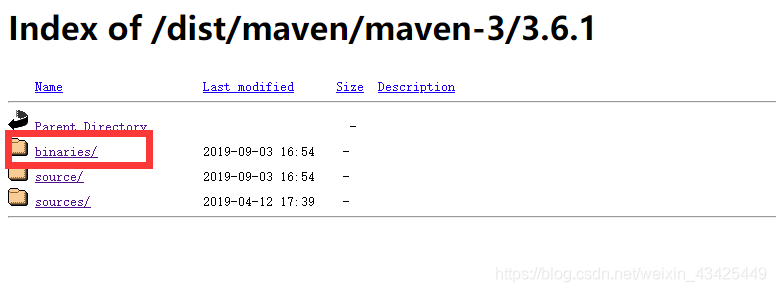
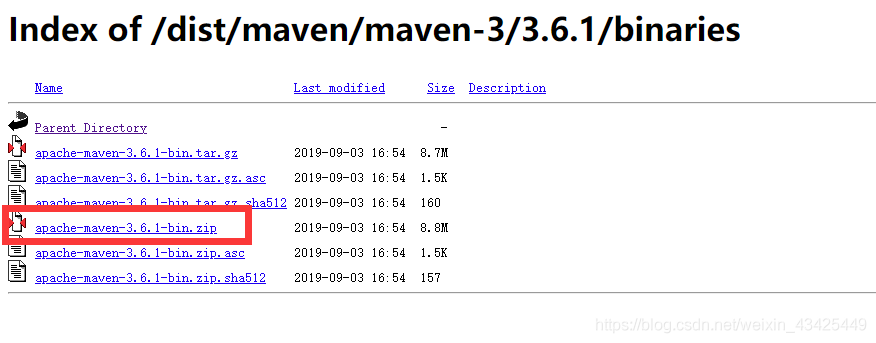
    into to the directory selected binaries, click the apache maven – 3.6.1 track – bin. To download and unzip the zip


    1. environment variable configuration of

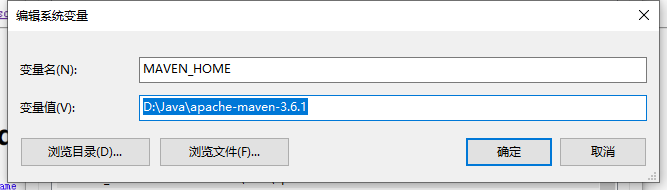
      add a new variable

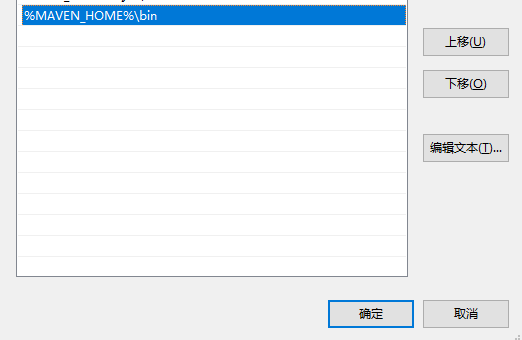
      in the path configuration MAVEN_HOME % % \ bin

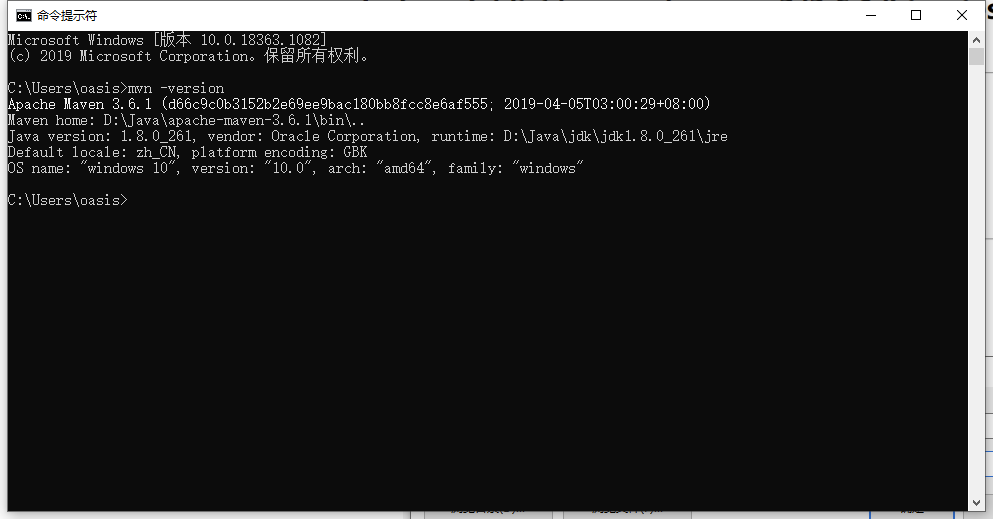
      maven – input in the CMD version to see success

    2. modify the configuration file

      modify the apache maven – 3.6.1 \ conf \ Settings XML

      • specifies your warehouse location

        <localRepository>D:\Java\apache-maven-3.6.1\repository</localRepository>
        
      • configuration mirror

        <mirrors>
            <!-- 阿里云仓库 -->
            <mirror>
                <id>alimaven</id>
                <name>aliyun maven</name>
                <url>http://maven.aliyun.com/nexus/content/repositories/central/</url>
                <mirrorOf>central</mirrorOf>
            </mirror>
        </mirrors>
        

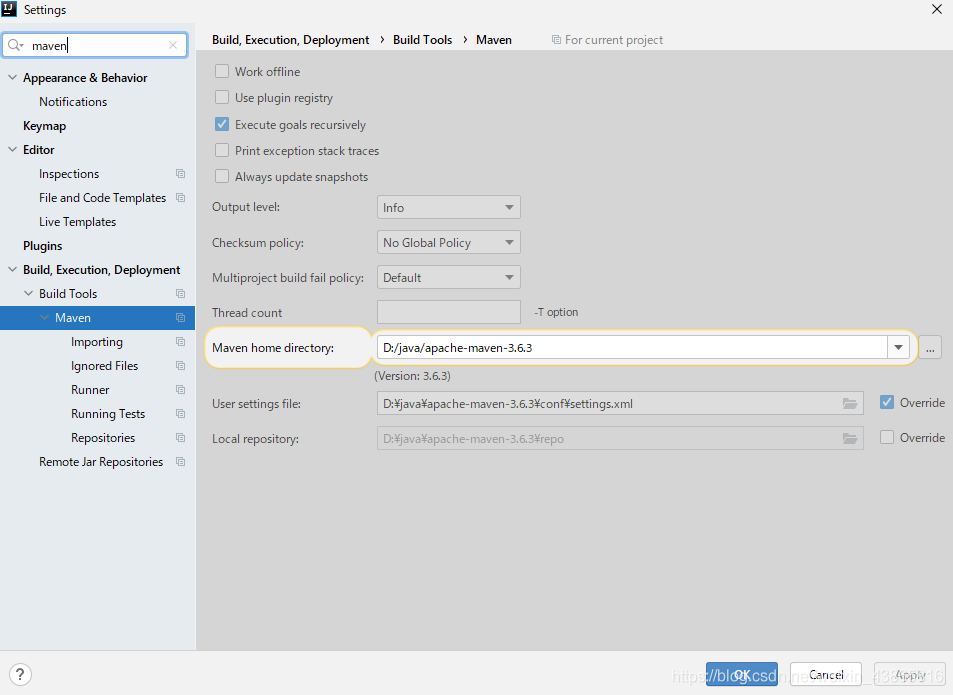
      • the idea of maven associated Settings

        choose from the menu file – Settings

JSON and map convert to each other (using fastjson)

article directory

JSON String

    • to Map, get leaf node
    • Map to String String
  • JSON string to Map, get the leaf node

    fastjson has two ways:

    • json. parseObject (String, Class< T>)

    //JSON subclass

    • JSONObject.parseObject
    String str ={
     "sign": "sign",
     "data": {
      "type": "第二层",
      "order": {
       "test": "第三层"
      }
     }
    }
    
    Map<String,String> parseObject = JSON.parseObject(str,Map.class);
    	//获取sign节点
    String sign=parseObject.get("sign");
    	//获取data节点
    String data=String.valueOf(parseObject.get("data"));
    	//获取data集合
    Map dataMap  = JSON.parseObject(data,Map.class);
    	//获取order集合
    Map orderMap = (Map)dataMap.get("order"); 
    	//获取叶子节点
    orderMap.get("test");
    

    Map String String

    String str = JSONObject.toJSONString(testMap);
    

    – tools

    Common errors and modification methods of findbug

    1. findbugs:EI_EXPOSE_REP
      problem description: Getters and setters of the may expose internal representation by returning reference type
      eclipse automatically generates reference type (Object, array, Date, etc.) will get or expose the inner implementation of the code by referring to the mutable Object. There are many solutions provided that the returned or assigned Object is not the original reference Object.
    # Date
    public Date getHappenTime() {
    if(happenTime != null){
    return (Date) happenTime.clone();
    }
        return null;
    }
    # 数组
    public String[] getStringArrary() {
    if(stringArray != null){
    return Arrays.copyOf(stringArray, stringArray.length);
    }
        return null;
    }
    # hashTable
    table = new HashTable(hashTable);
    
    1. findbugs: EI_EXPOSE_REP2
      description: May expose internal representation by storing the an externally mutable object into a setter method returns a reference type
      eclipse to automatically generate a reference type (object, array, the Date, etc.) or through the getter and setter methods get the variable object reference operation and internal implementation code, open the solution a lot, As long as the returned or assigned object is not the original reference object.
      solution:
    # Date类型为例:
    public void setHappenTime(Date happenTime) {
    if(happenTime != null){
    this.happenTime = (Date) happenTime.clone();
    }else{
    this.happenTime = null;
    }
    }
    # 数组
    public String[] setStringArrary(String[] arr) {
    if(arr != null){
    this.stringArrays = Arrays.copyOf(stringArray, stringArray.length);
    } else {
     this.stringArrays =null;
    }
    }
    

    3.CN_IDIOM_NO_SUPER_CALL

    clone method does not call super.clone()
    a non-final class defined the clone() method without calling the super.clone() method. For example: B extends from A and if the clone method in B calls spuer.clone() and the clone in A does not call spuer.clone(), that results in an inaccurate result type. Spuer. clone() is called from A’s clone method.

    1. findbugs:DC_DOUBLECHECK

    multi-threading – Possible double check of field
    multi-threading double check of field
    , solution, add volatile keyword decoration to the field.

    1. [NP_NULL_PARAM_DEREF]
      description: Null passed for nonnull parameter passed to nonnull parameter
      solution: add nonnull judgment

    Spring boot thymeleaf crud implements simple functions of adding, deleting, modifying and querying

    introduction

    this article introduces a simple CRUD application using spring boot and Thymeleaf.

    create Maven project

    here to create a maven-based project using intellij community edition
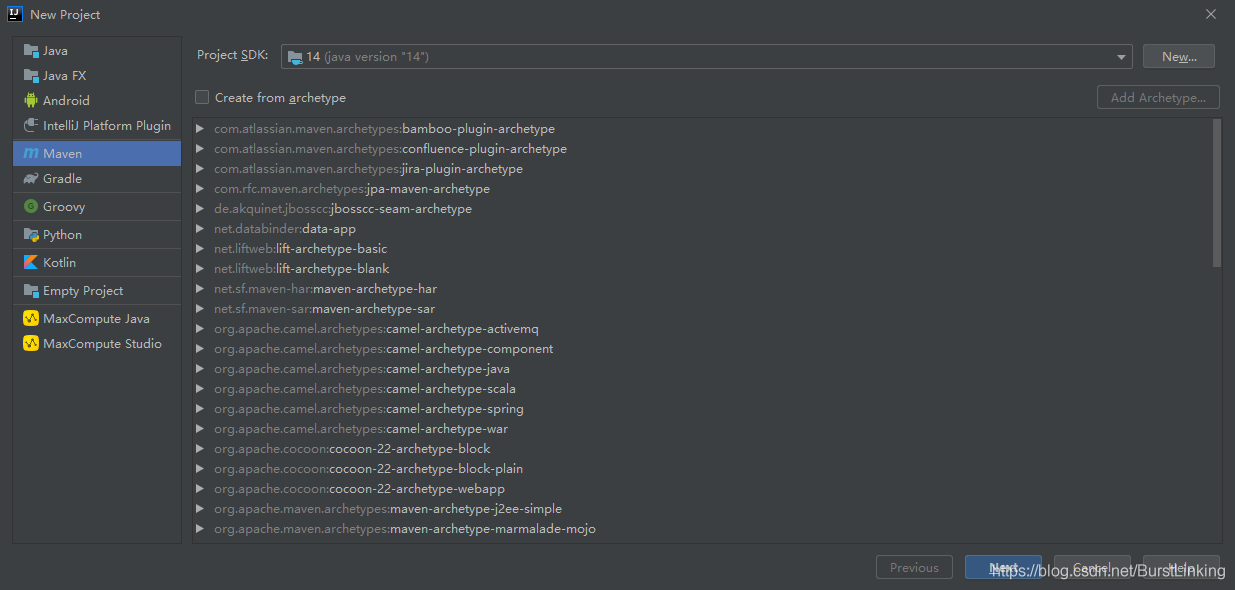
    overall architecture
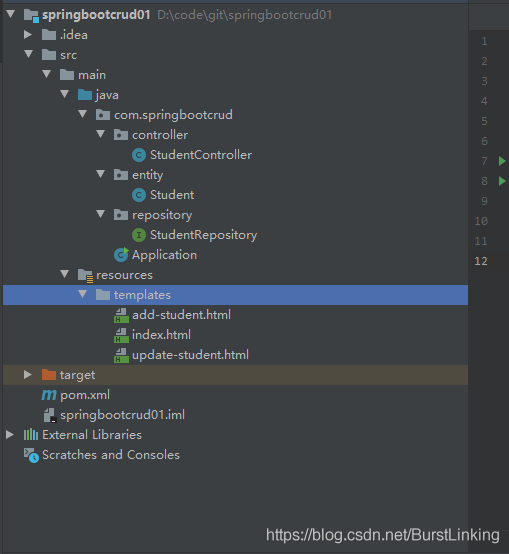
    Add Maven dependencies

    database selected H2 lightweight database, convenient configuration, default configuration data written into memory, restart service lost, configuration data can be written to the file.

      <parent>
          <groupId>org.springframework.boot</groupId>
          <artifactId>spring-boot-starter-parent</artifactId>
          <version>2.2.6.RELEASE</version>
      </parent>
      <dependencies>
          <dependency>
              <groupId>org.springframework.boot</groupId>
              <artifactId>spring-boot-starter-data-jpa</artifactId>
          </dependency>
          <dependency>
              <groupId>org.springframework.boot</groupId>
              <artifactId>spring-boot-starter-thymeleaf</artifactId>
          </dependency>
          <dependency>
              <groupId>org.springframework.boot</groupId>
              <artifactId>spring-boot-starter-web</artifactId>
          </dependency>
          <dependency>
              <groupId>org.springframework.boot</groupId>
              <artifactId>spring-boot-devtools</artifactId>
              <scope>runtime</scope>
          </dependency>
          <dependency>
              <groupId>com.h2database</groupId>
              <artifactId>h2</artifactId>
              <scope>runtime</scope>
          </dependency>
          <dependency>
              <groupId>org.springframework.boot</groupId>
              <artifactId>spring-boot-starter-test</artifactId>
              <scope>test</scope>
          </dependency>
      </dependencies>

    Domain layer
    The

    layer defines the entity class for data interaction. Here we define the Student class.

    package com.springbootcrud.entity;
    
    import javax.persistence.*;
    import javax.validation.constraints.NotBlank;
    
    @Entity
    public class Student {
    
        @Id
        @GeneratedValue(strategy = GenerationType.AUTO)
        private long id;
    
        @NotBlank(message = "Name is mandatory")
        @Column(name = "name")
        private String name;
    
        @NotBlank(message = "Email is mandatory")
        @Column(name = "email")
        private String email;
    
        @Column(name = "phoneNo")
        private long phoneNo;
    
        public Student() {
        }
    
        public Student(String name, String email) {
            this.name = name;
            this.email = email;
        }
    
        public long getId() {
            return id;
        }
    
        public void setId(long id) {
            this.id = id;
        }
    
        public String getName() {
            return name;
        }
    
        public void setName(String name) {
            this.name = name;
        }
    
        public String getEmail() {
            return email;
        }
    
        public void setEmail(String email) {
            this.email = email;
        }
    
        public long getPhoneNo() {
            return phoneNo;
        }
    
        public void setPhoneNo(long phoneNo) {
            this.phoneNo = phoneNo;
        }
    
        @Override
        public String toString() {
            return "Student{" +
                    "id=" + id +
                    ", name='" + name + '\'' +
                    ", email='" + email + '\'' +
                    ", phoneNo=" + phoneNo +
                    '}';
        }
    }
    

    repository layer

    is the persistence layer that interacts with the database. Here, the implementation of adding, deleting, modifying and checking entity classes in the database is specifically implemented. Here, we inherit the corresponding classes of the spring data framework instead of implementing the Dao layer implementation method by ourselves.

    package com.springbootcrud.repository;
    
    import com.springbootcrud.entity.Student;
    import org.springframework.data.repository.CrudRepository;
    import org.springframework.stereotype.Repository;
    
    import java.util.List;
    
    @Repository
    public interface StudentRepository extends CrudRepository<Student, Long> {
        List<Student> findByName(String Name);
    }
    

    controller layer

    this layer is responsible for processing the user’s input and returning the correct response back to the user.

    package com.springbootcrud.controller;
    
    import com.springbootcrud.entity.Student;
    import com.springbootcrud.repository.StudentRepository;
    import org.springframework.beans.factory.annotation.Autowired;
    import org.springframework.stereotype.Controller;
    import org.springframework.ui.Model;
    import org.springframework.validation.BindingResult;
    import org.springframework.web.bind.annotation.GetMapping;
    import org.springframework.web.bind.annotation.PathVariable;
    import org.springframework.web.bind.annotation.PostMapping;
    import org.springframework.web.bind.annotation.RequestMapping;
    
    import javax.validation.Valid;
    
    @Controller
    @RequestMapping("/students/")
    public class StudentController {
    
        private final StudentRepository studentRepository;
    
        @Autowired
        public StudentController(StudentRepository studentRepository) {
            this.studentRepository = studentRepository;
        }
    
        @GetMapping("signup")
        public String showSignUpForm(Student student) {
            return "add-student";
        }
    
        @GetMapping("list")
        public String showUpdateForm(Model model) {
            System.out.println(studentRepository.findAll());
            model.addAttribute("students", studentRepository.findAll());
            return "index";
        }
    
        @PostMapping("add")
        public String addStudent(@Valid Student student, BindingResult result, Model model) {
            if (result.hasErrors()) {
                return "add-student";
            }
    
            studentRepository.save(student);
            return "redirect:list";
        }
    
        @GetMapping("edit/{id}")
        public String showUpdateForm(@PathVariable("id") final long id, Model model) {
            Student student = studentRepository.findById(id)
                    .orElseThrow(() -> new IllegalArgumentException("Invalid student Id:" + id));
            model.addAttribute("student", student);
            return "update-student";
        }
    
        @PostMapping("update/{id}")
        public String updateStudent(@PathVariable("id") long id, @Valid Student student, BindingResult result, Model model) {
            if (result.hasErrors()) {
                student.setId(id);
                return "update-student";
            }
    
            studentRepository.save(student);
            model.addAttribute("students", studentRepository.findAll());
            return "index";
        }
    
        @GetMapping("delete/{id}")
        public String deleteStudent(@PathVariable("id") long id, Model model) {
            Student student = studentRepository.findById(id).orElseThrow(() -> new IllegalArgumentException("Invalid student id:" + id));
            studentRepository.delete(student);
            model.addAttribute("students", studentRepository.findAll());
            return "index";
        }
    
    }
    

    View layer

    user sees the specific web page view, combined with Thymeleaf populated data, shown to the user

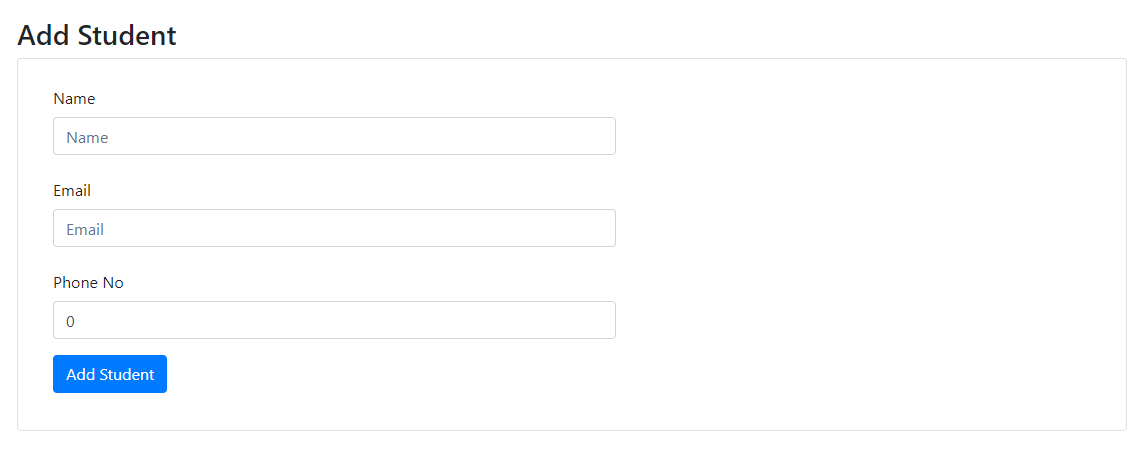
    add-student.html

    <!DOCTYPE html>
    <html xmlns:th="http://www.thymeleaf.org">
    <head>
        <meta charset="utf-8">
        <meta http-equiv="x-ua-compatible" content="ie=edge">
        <title>Add User</title>
        <meta name="viewport" content="width=device-width, initial-scale=1">
        <link rel="stylesheet" href="https://stackpath.bootstrapcdn.com/bootstrap/4.1.3/css/bootstrap.min.css" integrity="sha384-MCw98/SFnGE8fJT3GXwEOngsV7Zt27NXFoaoApmYm81iuXoPkFOJwJ8ERdknLPMO" crossorigin="anonymous">
        <link rel="stylesheet" href="https://use.fontawesome.com/releases/v5.4.1/css/all.css" integrity="sha384-5sAR7xN1Nv6T6+dT2mhtzEpVJvfS3NScPQTrOxhwjIuvcA67KV2R5Jz6kr4abQsz" crossorigin="anonymous">
        <!-- <link rel="stylesheet" href="../css/shards.min.css"> -->
    </head>
    
    <body>
        <div class="container my-5">
            <h3>Add Student</h3>
            <div class="card">
                <div class="card-body">
                    <div class="col-md-10">
                        <form action="#" th:action="@{/students/add}" th:object="${student}" method="post">
                            <div class="row">
                                <div class="form-group col-md-8">
                                    <label for="name" class="col-form-label">Name</label> <input type="text" th:field="*{name}" class="form-control" id="name" placeholder="Name"> <span th:if="${#fields.hasErrors('name')}" th:errors="*{name}" class="text-danger"></span>
                                </div>
                                <div class="form-group col-md-8">
                                    <label for="email" class="col-form-label">Email</label> <input type="text" th:field="*{email}" class="form-control" id="email" placeholder="Email"> <span th:if="${#fields.hasErrors('email')}" th:errors="*{email}" class="text-danger"></span>
                                </div>
                                <div class="form-group col-md-8">
                                    <label for="phoneNo" class="col-form-label">Phone No</label> <input type="text" th:field="*{phoneNo}" class="form-control" id="phoneNo" placeholder="PhoneNo"> <span th:if="${#fields.hasErrors('phoneNo')}" th:errors="*{phoneNo}" class="text-danger"></span>
                                </div>
                                <div class="col-md-6">
                                    <input type="submit" class="btn btn-primary" value="Add Student">
                                </div>
                                <div class="form-group col-md-8"></div>
                            </div>
                        </form>
                    </div>
                </div>
            </div>
        </div>
    </body>
    
    </html>

    index.html

    <!DOCTYPE html>
    <html xmlns:th="http://www.thymeleaf.org">
    <head>
        <meta charset="utf-8">
        <meta http-equiv="x-ua-compatible" content="ie=edge">
        <title>Users</title>
        <meta name="viewport" content="width=device-width, initial-scale=1">
        <link rel="stylesheet" href="https://stackpath.bootstrapcdn.com/bootstrap/4.1.3/css/bootstrap.min.css" integrity="sha384-MCw98/SFnGE8fJT3GXwEOngsV7Zt27NXFoaoApmYm81iuXoPkFOJwJ8ERdknLPMO" crossorigin="anonymous">
        <link rel="stylesheet" href="https://use.fontawesome.com/releases/v5.4.1/css/all.css" integrity="sha384-5sAR7xN1Nv6T6+dT2mhtzEpVJvfS3NScPQTrOxhwjIuvcA67KV2R5Jz6kr4abQsz" crossorigin="anonymous">
        <!-- <link rel="stylesheet" href="../css/shards.min.css"> -->
    </head>
    
    <body>
        <div class="container my-2">
            <div class="card">
                <div class="card-body">
                    <div th:switch="${students}" class="container my-5">
                        <p class="my-5">
                            <a href="/students/signup" class="btn btn-primary"><i class="fas fa-user-plus ml-2"> Add Student</i></a>
                        </p>
                        <div class="col-md-10">
                            <h2 th:case="null">No Students yet!</h2>
                            <div th:case="*">
                                <table class="table table-striped table-responsive-md">
                                    <thead>
                                        <tr>
                                            <th>Name</th>
                                            <th>Email</th>
                                            <th>Phone No</th>
                                            <th>Edit</th>
                                            <th>Delete</th>
                                        </tr>
                                    </thead>
                                    <tbody>
                                        <tr th:each="student : ${students}">
                                            <td th:text="${student.name}"></td>
                                            <td th:text="${student.email}"></td>
                                            <td th:text="${student.phoneNo}"></td>
                                            <td><a th:href="@{/students/edit/{id}(id=${student.id})}" class="btn btn-primary"><i class="fas fa-user-edit ml-2"></i></a></td>
                                            <td><a th:href="@{/students/delete/{id}(id=${student.id})}" class="btn btn-primary"><i class="fas fa-user-times ml-2"></i></a></td>
                                        </tr>
                                    </tbody>
                                </table>
                            </div>
                        </div>
                    </div>
                </div>
            </div>
        </div>
    
    </body>
    </html>

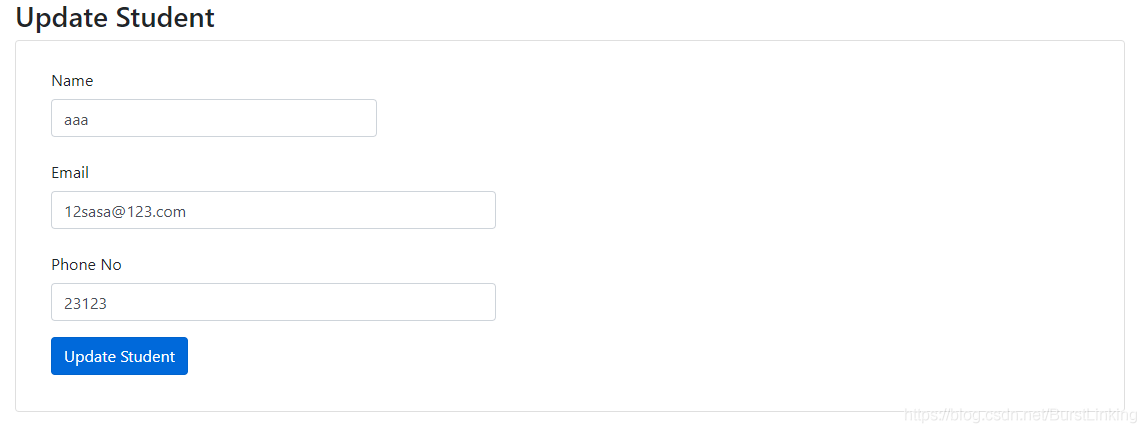
    update-student.html

    <!DOCTYPE html>
    <html xmlns:th="http://www.thymeleaf.org">
    <head>
        <meta charset="utf-8">
        <meta http-equiv="x-ua-compatible" content="ie=edge">
        <title>Update User</title>
        <meta name="viewport" content="width=device-width, initial-scale=1">
        <link rel="stylesheet" href="https://stackpath.bootstrapcdn.com/bootstrap/4.1.3/css/bootstrap.min.css" integrity="sha384-MCw98/SFnGE8fJT3GXwEOngsV7Zt27NXFoaoApmYm81iuXoPkFOJwJ8ERdknLPMO" crossorigin="anonymous">
        <link rel="stylesheet" href="https://use.fontawesome.com/releases/v5.4.1/css/all.css" integrity="sha384-5sAR7xN1Nv6T6+dT2mhtzEpVJvfS3NScPQTrOxhwjIuvcA67KV2R5Jz6kr4abQsz" crossorigin="anonymous">
        <!-- <link rel="stylesheet" href="../css/shards.min.css"> -->
    </head>
    <body>
        <div class="container my-5">
            <h3>Update Student</h3>
            <div class="card">
                <div class="card-body">
                    <div class="col-md-8">
                        <form action="#" th:action="@{/students/update/{id}(id=${student.id})}" th:object="${student}" method="post">
                            <div class="row">
                                <div class="form-group col-md-6">
                                    <label for="name" class="col-form-label">Name</label> <input type="text" th:field="*{name}" class="form-control" id="name" placeholder="Name"> <span th:if="${#fields.hasErrors('name')}" th:errors="*{name}" class="text-danger"></span>
                                </div>
                                <div class="form-group col-md-8">
                                    <label for="email" class="col-form-label">Email</label> <input type="text" th:field="*{email}" class="form-control" id="email" placeholder="Email"> <span th:if="${#fields.hasErrors('email')}" th:errors="*{email}" class="text-danger"></span>
                                </div>
                                <div class="form-group col-md-8">
                                    <label for="phoneNo" class="col-form-label">Phone No</label> <input type="text" th:field="*{phoneNo}" class="form-control" id="phoneNo" placeholder="PhoneNo"> <span th:if="${#fields.hasErrors('phoneNo')}" th:errors="*{phoneNo}" class="text-danger"></span>
                                </div>
                                <div class="form-group col-md-8">
                                    <input type="submit" class="btn btn-primary" value="Update Student">
                                </div>
                            </div>
                        </form>
                    </div>
                </div>
            </div>
        </div>
    </body>
    </html>

    run springboot application

    program run entry.

    package com.springbootcrud;
    
    import org.springframework.boot.SpringApplication;
    import org.springframework.boot.autoconfigure.SpringBootApplication;
    
    @SpringBootApplication
    public class Application {
        public static void main(String[] args) {
            SpringApplication.run(Application.class, args);
        }
    }
    

    execution effect
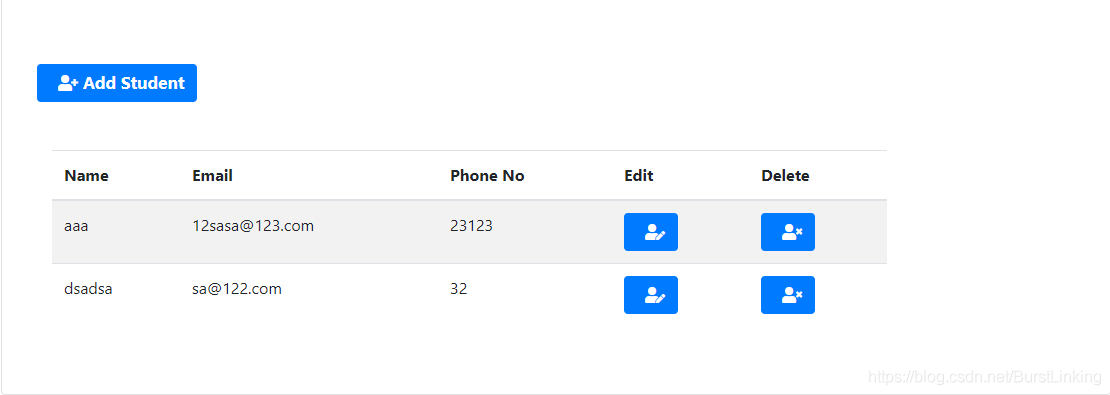
    Java — one of Apollo configuration centers — Introduction to Apollo

    Apollo configuration center

    Apollo (Apollo) is a distributed configuration center developed by ctrip framework department. It can centrally manage the configuration of different environments and clusters. After configuration modification, it can be pushed to the application end in real time. Details please refer to the official introduction: https://github.com/ctripcorp/apollo/wiki/Apollo%E9%85%8D%E7%BD%AE%E4%B8%AD%E5%BF%83%E4%BB%8B%E7%BB%8D

    Apollo supports four dimensions to manage the key-value format configuration:

    1. application (application)
    2. environment (environment)
    3. cluster (cluster)
    4. namespace (namespace)

      feature

      based on the particularity of configuration, so the Apollo, from the beginning of the design was determined to become a governance configuration publishing platform, currently offers the following features:

      • unified management of different environments, different cluster configuration

        • Apollo provides a unified interface centralized management environment (environment), different cluster (cluster), the configuration of different namespaces (namespace)
        • the same code deployed in different clusters, can have different configurations, such as a zookeeper address such as
        • (namespace) can be easily through the namespace support multiple different applications to share the same configuration, It also allows applications to override Shared configurations
      • configuration changes in real time (hot publish)

        • user after Apollo modified the configuration and released, the client can receive the latest configuration in real time (1 second), and notify the application
      • version release management

        • all configuration releases have a version concept, which makes it easy to support configuration rollback
      • grayscale release

        • supports the grayscale publication of configuration. For example, after clicking the publication, it only takes effect on some application instances. After the observation is ok for a period of time, it will be pushed to all application instances
      • authority management, release audit, operation audit

        • application and configuration management has a sound authority management mechanism, the management of configuration is also divided into two links, editing and publishing, so as to reduce human error
        • all operations have audit logs, can easily track the problem
      • client configuration information monitoring

        • can easily see the configuration used by which instances
        • provide. Java and.net native client

        • provides a native Java and.net client to facilitate application integration
        • supports Spring Placeholder, Annotation, and ConfigurationProperties of Spring Boot to facilitate application use (Spring 3.1.1+ is required)
        • also provides Http interface, Non-java and.net applications can also easily use
      • to provide open platform API

        • Apollo itself provides more perfect unified configuration management interface, support environment and data center configuration management, permissions, process governance features such as
        • though Apollo, for the sake of generality to configuration modifications do not too many restrictions, as long as you comply with the basic format can save
        • in our research, found that for some users, there may be more complex their configuration format, such as XML, json, need to make check in the format
        • if there are some use DAL, Not only have a specific format, but also to input the value of the need to calibrate the rear can save, such as check the database, the user name and password match
        • for such applications, Apollo application support party through an open interface configuration changes in the Apollo and release, and has perfect authorization and access control
        • simple deployment

          • configuration center as a basic service, availability requirements is very high, which requires the Apollo external dependence as far as possible little
          • the only external dependence is MySQL, so deployment is very simple, as long as the installed Java and MySQL can make Apollo run
          • Apollo also provides packaging script, a key can generate all the necessary installation package, and supports custom runtime parameters

            development guide

            once we have a basic understanding of Apollo, we will start its development. Apollo consists of two parts, the client side and the server side. Let’s first describe the server side of Apollo.

            • Apollo server
            • Apollo server is mainly composed of three parts, namely, configservice, adminservice, portal
            • configservice: provides the configuration reading, pushing and other functions, and the service object is Apollo client
            • adminservice: The Service object is Apollo Portal (management interface)
            • Portal: Portal management interface, intuitively view and publish project configuration messages
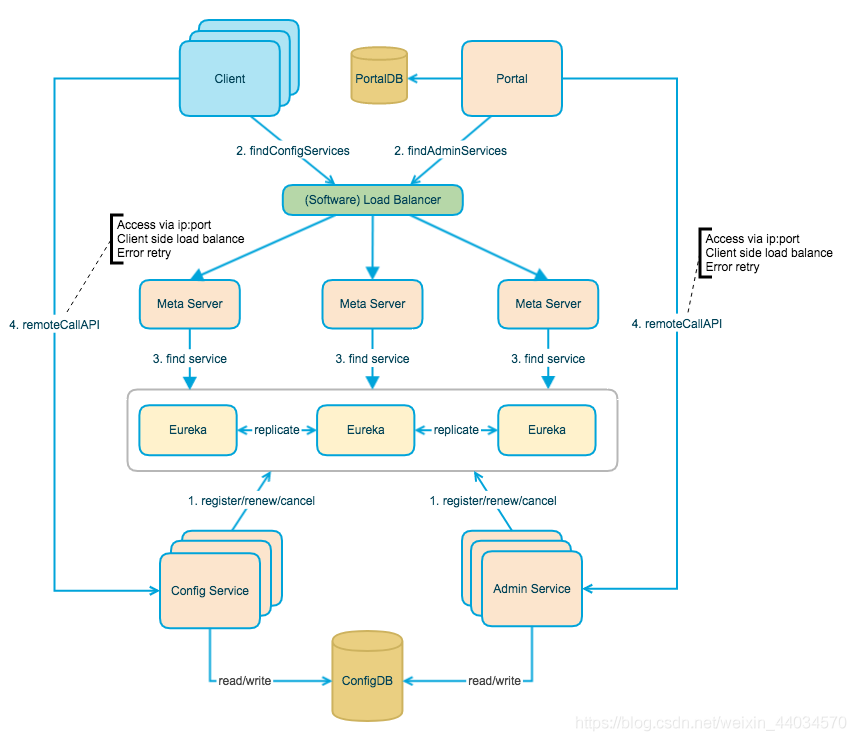
            • Config Service and Admin Service are multi-instance, stateless deployment. Therefore, we need to register ourselves in Eureka and keep the heartbeat
            • . On top of Eureka, we built a layer of Meta Server to encapsulate Eureka’s Service discovery interface.
            • Client accesses the Meta Server through the domain name to get the Config Service Service list (IP+Port), and then directly accesses the Service through IP+Port. At the same time, load balance will be performed on the Client side, and error retry
            • Portal accesses the Meta Server through the domain name to obtain the list of Admin Service services (IP+Port), and then access the Service directly through IP+Port. Meanwhile, load balance will be performed on the Portal side, and error retry
            • to simplify deployment. We will actually deploy the Config Service, Eureka, and Meta Server logical roles in the same JVM process

            • Eureka Registry

            • it provides a complete Service Registry and Service Discovery implementation, and has also withstood the test of Netflix’s own production environment. It is relatively easy to use

            • 0. At the same time, Spring Cloud also has a set of perfect open source code to integrate Eureka, so it is very convenient to use.

            • . In addition, Eureka also supports startup in the container of our application, that is to say, after our application is launched, it ACTS as Eureka and also serves as a service provider. In this way, the service availability is greatly improved

            • last point is open source, because the code is open source, so it is very easy for us to understand its implementation principle and troubleshooting problems

              Apollo client

            • 0

              1 rely on import convenience, just need to integrate apolloClient

              2
            • 3

              4

              5 client and server maintained a long connection, In this way, the push

              client will pull the latest configuration of the application regularly from the server of Apollo configuration center. The default timing frequency is to pull the latest configuration of the application every 5 minutes. After the client gets the latest configuration of the application from the server of Apollo configuration center, The client caches the configuration obtained from the server in the local file system a

            • application gets the latest configuration and subscription configuration update notification from the Apollo client

            0

    The Tomcat connector configured to listen on port 7014 failed to start

    which is the port of this project has been occupied by other projects, you cannot use it. There are two methods:

    1, in the application. Yml file in a new port

    2, force to close the occupied port

    forces you to close the occupied port

    1, open the computer process of CMP according to port to check the program number netstat ano | findstr searches take up port

    2. According to the progress of the program, see the specific program name tasklist | findstr searches process number

    3, Mandatory, recursive delete the program and its child process taskkill – f – t – im process name (Java. Exe)

    After

    execution is complete, you can use this port

    Maven global configuration

    IDE no other Settings method to configure Maven globally (one time Maven)

    recently when I was writing code with idea, I found that every time I opened a new project, I had to reconfigure Maven, which was particularly troublesome. Baidu online many idea one-time configuration Maven method.
    found File--> Other Settings
    but I didn't find in my idea other Settings

    so I began to baidu have no other idea Solution for Settings option. Some people say File--> Settings--> Other Settings other Settings in Settings

    the end result is, of course, I didn't find it.
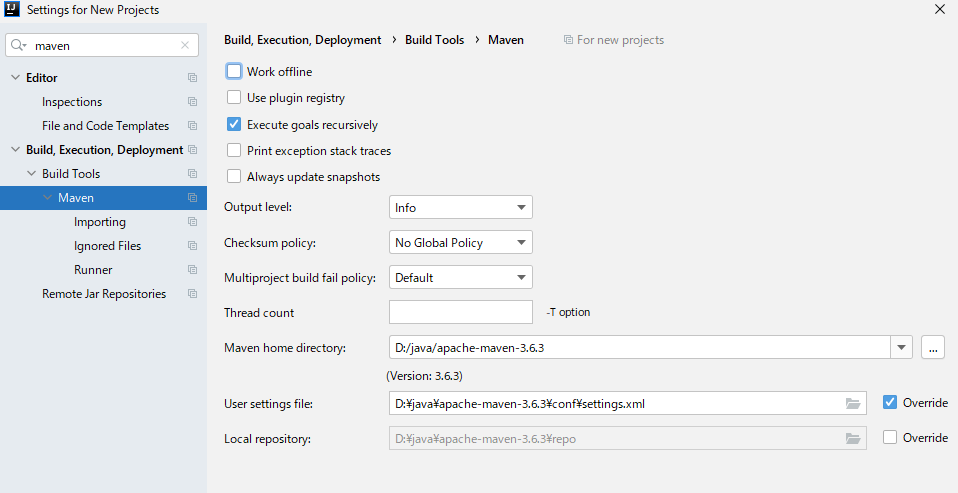
    I finally found the Default Settings changed his name Settings For New Projects

    then go to configuration with respect to OK

    once again into the idea of Settings, found that the Maven has been configured.

    generally speaking, I'm not careful enough. I wish I could help others.
    is recorded for query purpose.

    How to Split numbers and strings in a strings

    article directory

      • BB </ li>
      • implementation </ li> </ ul>

      BB

      has a string sent from the front, in the form of letter + English, to get the letter to change color for it, so split. It USES the built-in method of String. When I look back, I see there are 60 or 70 methods in 1.8, so I have to write the String carefully when I have time.

      implementation </ h2>
      </ p>

      code

      //比如字符串为:Fn9527
      String asid = "Fn9527";
      String str = asid.replaceAll("[0-9]","");
      String num = asid.replaceAll("[a-zA-Z","");
      
      //syso
      //syso
      

      </ p>

      result

      Fn
      9527
      

      </ div>

    Dubbo failed to register and consumer null pointer exception

    Dubbo unable to register problem

    error starting server:

    Failed to register consumer:// 192.168.60.1/com. Duck. Service. The UserService?application=user-web& category=consumers& check=false& default.check=false& default.reference.filter=regerConsumerFilter& default.timeout=600000& Dubbo = server & amp; interface=com.atguigu.gmall.service.UserService& methods=getReceiveAddressByMemberId,getAllUser& pid=12648& side=consumer& Timestamp = 1583642177210 to zookeeper zookeeper:// 47.112.171.153:2181/com. Alibaba. Dubbo. Registry. RegistryService?application=user-web& client=zkclient& Dubbo = server & amp; interface=com.alibaba.dubbo.registry.RegistryService& pid=12648& timestamp=1583642177225, cause: Zookeeper is not connected yet!

    problem, this is due to Linux firewall enabled, causing registration failure.

    resolved: turn off the Linux (CentOS7 based) firewall

    Service
    systemctl stop firewaldeld. service
    1
    insert picture description

    here

    consumption null pointer exception problem

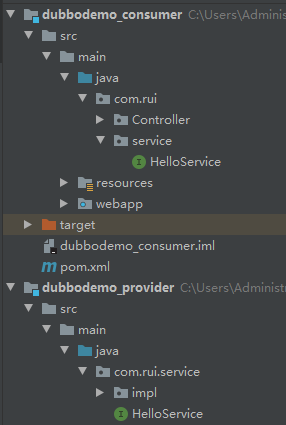
    the reason is that the package name not consistent, do not agree the package name can lead to the provider and consumer is not a node, that consumers will never gain value!!!!!

    dubbo could not register problem
    consumer null pointer exception

    Android 10 open file exception open failed: eacces (permission denied) android:requestLegacyExternalStorage= “true“

    in Android development, we generally use the following code to get the storage path, and the results are generally /storage/emulated/0

    in AndroidManifest. Application node in the XML file with the android: requestLegacyExternalStorage = “true” attribute, as follows: </ p>

    <application
        android:requestLegacyExternalStorage="true"
    

    may be easy for developers, but for those who are new to android, it doesn’t use

    now most mobile phones are Android version 10.0, when reading and writing files to the memory card, the problem of: open failed: EACCES (Permission denied) will occur. After adding the above one sentence of code to baidu, it has not been solved. The possible reason is that there is no dynamic access Permission added in the code snippet

    dynamic read and write permission code:

    final int REQUEST_EXTERNAL_STORAGE = 1;
    if (ContextCompat.checkSelfPermission(MainActivity.this,
                            Manifest.permission.WRITE_EXTERNAL_STORAGE) != PackageManager.PERMISSION_GRANTED) {
                        ActivityCompat.requestPermissions(MainActivity.this, new String[]{Manifest.permission.WRITE_EXTERNAL_STORAGE}, 101);
                    } else {
                        //downloadFile();
                        /**
                         * Write the code you want to execute here
                         */
                    }
    

    Where is

    used?

    for example, we now have a button, we get its click event in the Activity, click we want to add a photo in: /storage/emulated/0/DCIM, we want to perform the operation in else can

    example:

    no dynamic permissions added:

     utils_get.setOnClickListener(new View.OnClickListener() {
                @Override
                public void onClick(View view) {
                    getDataFromokHttpUtils();
                }
            });
    

    add dynamic permissions:

    utils_down.setOnClickListener(new View.OnClickListener() {
                @Override
                public void onClick(View view) {
                    final int REQUEST_EXTERNAL_STORAGE = 1;
                    String[] PERMISSIONS_STORAGE = {
                            Manifest.permission.READ_EXTERNAL_STORAGE,
                            Manifest.permission.WRITE_EXTERNAL_STORAGE };
                    if (ContextCompat.checkSelfPermission(MainActivity.this,
                            Manifest.permission.WRITE_EXTERNAL_STORAGE) != PackageManager.PERMISSION_GRANTED) {
                        ActivityCompat.requestPermissions(MainActivity.this, new String[]{Manifest.permission.WRITE_EXTERNAL_STORAGE}, 101);
                    } else {
                        downloadFile();
                    }
    
                }
            });
    

    </ div>

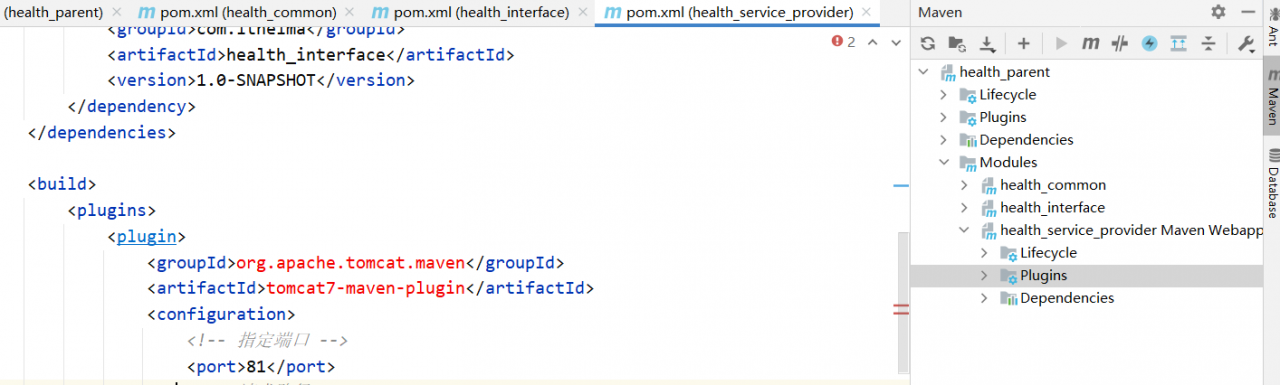
    Idea2020.2 encountered pom.xml The problem of file error report in Maven plug-in tomcat7

    before baidu to find the answer, is dependent on specified in the servlets API – add provided

    find their dependence has been added, did not find a solution.
    red error, ali cloud warehouse can’t download the file. An error is as follows:

    find file location, delete maven local repository file

    solution: Specify the version information 2.2