Tag Archives: java

Springbatch failed to execute commandlinerunner

Springbatch Failed to execute CommandLineRunner error resolution

java.lang.IllegalStateException: Failed to execute CommandLineRunner
	at org.springframework.boot.SpringApplication.callRunner(SpringApplication.java:816) [spring-boot-2.1.4.RELEASE.jar:2.1.4.RELEASE]
	at org.springframework.boot.SpringApplication.callRunners(SpringApplication.java:797) [spring-boot-2.1.4.RELEASE.jar:2.1.4.RELEASE]
	at org.springframework.boot.SpringApplication.run(SpringApplication.java:324) [spring-boot-2.1.4.RELEASE.jar:2.1.4.RELEASE]
	at org.springframework.boot.SpringApplication.run(SpringApplication.java:1260) [spring-boot-2.1.4.RELEASE.jar:2.1.4.RELEASE]
	at org.springframework.boot.SpringApplication.run(SpringApplication.java:1248) [spring-boot-2.1.4.RELEASE.jar:2.1.4.RELEASE]
	at hoperun.pagoda.batchprocessingdata.BatchprocessingdataApplication.main(BatchprocessingdataApplication.java:31) [classes/:na]
Caused by: org.springframework.batch.core.repository.JobInstanceAlreadyCompleteException: A job instance already exists and is complete for parameters={-spring.output.ansi.enabled=always}.  If you want to run this job again, change the parameters.
	at org.springframework.batch.core.repository.support.SimpleJobRepository.createJobExecution(SimpleJobRepository.java:132) ~[spring-batch-core-4.1.2.RELEASE.jar:4.1.2.RELEASE]
	at sun.reflect.NativeMethodAccessorImpl.invoke0(Native Method) ~[na:1.8.0_201]
	at sun.reflect.NativeMethodAccessorImpl.invoke(Unknown Source) ~[na:1.8.0_201]
	at sun.reflect.DelegatingMethodAccessorImpl.invoke(Unknown Source) ~[na:1.8.0_201]
	at java.lang.reflect.Method.invoke(Unknown Source) ~[na:1.8.0_201]
	at org.springframework.aop.support.AopUtils.invokeJoinpointUsingReflection(AopUtils.java:343) ~[spring-aop-5.1.6.RELEASE.jar:5.1.6.RELEASE]
	at org.springframework.aop.framework.ReflectiveMethodInvocation.invokeJoinpoint(ReflectiveMethodInvocation.java:198) ~[spring-aop-5.1.6.RELEASE.jar:5.1.6.RELEASE]
	at org.springframework.aop.framework.ReflectiveMethodInvocation.proceed(ReflectiveMethodInvocation.java:163) ~[spring-aop-5.1.6.RELEASE.jar:5.1.6.RELEASE]
	at org.springframework.transaction.interceptor.TransactionAspectSupport.invokeWithinTransaction(TransactionAspectSupport.java:294) ~[spring-tx-5.1.6.RELEASE.jar:5.1.6.RELEASE]
	at org.springframework.transaction.interceptor.TransactionInterceptor.invoke(TransactionInterceptor.java:98) ~[spring-tx-5.1.6.RELEASE.jar:5.1.6.RELEASE]
	at org.springframework.aop.framework.ReflectiveMethodInvocation.proceed(ReflectiveMethodInvocation.java:186) ~[spring-aop-5.1.6.RELEASE.jar:5.1.6.RELEASE]
	at org.springframework.batch.core.repository.support.AbstractJobRepositoryFactoryBean$1.invoke(AbstractJobRepositoryFactoryBean.java:181) ~[spring-batch-core-4.1.2.RELEASE.jar:4.1.2.RELEASE]
	at org.springframework.aop.framework.ReflectiveMethodInvocation.proceed(ReflectiveMethodInvocation.java:186) ~[spring-aop-5.1.6.RELEASE.jar:5.1.6.RELEASE]
	at org.springframework.aop.framework.JdkDynamicAopProxy.invoke(JdkDynamicAopProxy.java:212) ~[spring-aop-5.1.6.RELEASE.jar:5.1.6.RELEASE]
	at com.sun.proxy.$Proxy64.createJobExecution(Unknown Source) ~[na:na]
	at org.springframework.batch.core.launch.support.SimpleJobLauncher.run(SimpleJobLauncher.java:134) ~[spring-batch-core-4.1.2.RELEASE.jar:4.1.2.RELEASE]
	at org.springframework.boot.autoconfigure.batch.JobLauncherCommandLineRunner.execute(JobLauncherCommandLineRunner.java:214) ~[spring-boot-autoconfigure-2.1.4.RELEASE.jar:2.1.4.RELEASE]
	at org.springframework.boot.autoconfigure.batch.JobLauncherCommandLineRunner.executeLocalJobs(JobLauncherCommandLineRunner.java:186) ~[spring-boot-autoconfigure-2.1.4.RELEASE.jar:2.1.4.RELEASE]
	at org.springframework.boot.autoconfigure.batch.JobLauncherCommandLineRunner.launchJobFromProperties(JobLauncherCommandLineRunner.java:172) ~[spring-boot-autoconfigure-2.1.4.RELEASE.jar:2.1.4.RELEASE]
	at org.springframework.boot.autoconfigure.batch.JobLauncherCommandLineRunner.run(JobLauncherCommandLineRunner.java:166) ~[spring-boot-autoconfigure-2.1.4.RELEASE.jar:2.1.4.RELEASE]
	at org.springframework.boot.SpringApplication.callRunner(SpringApplication.java:813) [spring-boot-2.1.4.RELEASE.jar:2.1.4.RELEASE]
	... 5 common frames omitted

springbatch second start

Failed to execute CommandLineRunner — fail to execute CommandLineRunner

A job instance already exists and is complete for the parameters = {- spring. The output. The ANSI. Enabled = always}. If you want to run this job again, change the parameters.

– job instance already exists, and completed the parameter = {- spring. The output. The ANSI. Enabled = always}. If you want to run this job again, change the parameter

look at the code:

package hoperun.pagoda.batchprocessingdata;

import java.util.Date;

import org.springframework.batch.core.ExitStatus;
import org.springframework.batch.core.Job;
import org.springframework.batch.core.JobExecution;
import org.springframework.batch.core.JobParameters;
import org.springframework.batch.core.JobParametersBuilder;
import org.springframework.batch.core.configuration.JobRegistry;
import org.springframework.batch.core.launch.JobLauncher;
import org.springframework.boot.SpringApplication;
import org.springframework.boot.autoconfigure.EnableAutoConfiguration;
import org.springframework.boot.autoconfigure.SpringBootApplication;
import org.springframework.context.ConfigurableApplicationContext;
import org.springframework.context.annotation.ComponentScan;

@SpringBootApplication
@ComponentScan
@EnableAutoConfiguration
public class BatchprocessingdataApplication {
    public static void main(String[] args) {
        //        String jobName = args[0];
        String jobName = "userMigrationJob0";
        try {
            //System.out.println("节点1");
            ConfigurableApplicationContext context = SpringApplication.run(BatchprocessingdataApplication.class, args);
            JobRegistry jobRegistry = context.getBean(JobRegistry.class);
            Job job = jobRegistry.getJob(jobName);
            JobLauncher jobLauncher = context.getBean(JobLauncher.class);
            //System.out.println("节点2:");
            JobExecution jobExecution = jobLauncher.run(job, createJobParams());
            if (!jobExecution.getExitStatus().equals(ExitStatus.COMPLETED)) {
                throw new RuntimeException(jobName +" Job execution failed.");
            }
        } catch (Exception e) {
            throw new RuntimeException(jobName +" Job execution failed.");
        }
    }

    private static JobParameters createJobParams() {
        //System.out.println("节点3");
        return new JobParametersBuilder().addDate("date", new Date()).toJobParameters();
    }
}

I clearly set return new JobParametersBuilder(). AddDate (“date”, new date ()). ToJobParameters ();

. AddDate (“date”, new date ()) is different every time!! But why still report parameter same!!

solution:

adds the configuration in application.properties:

spring.batch.job.enabled=false

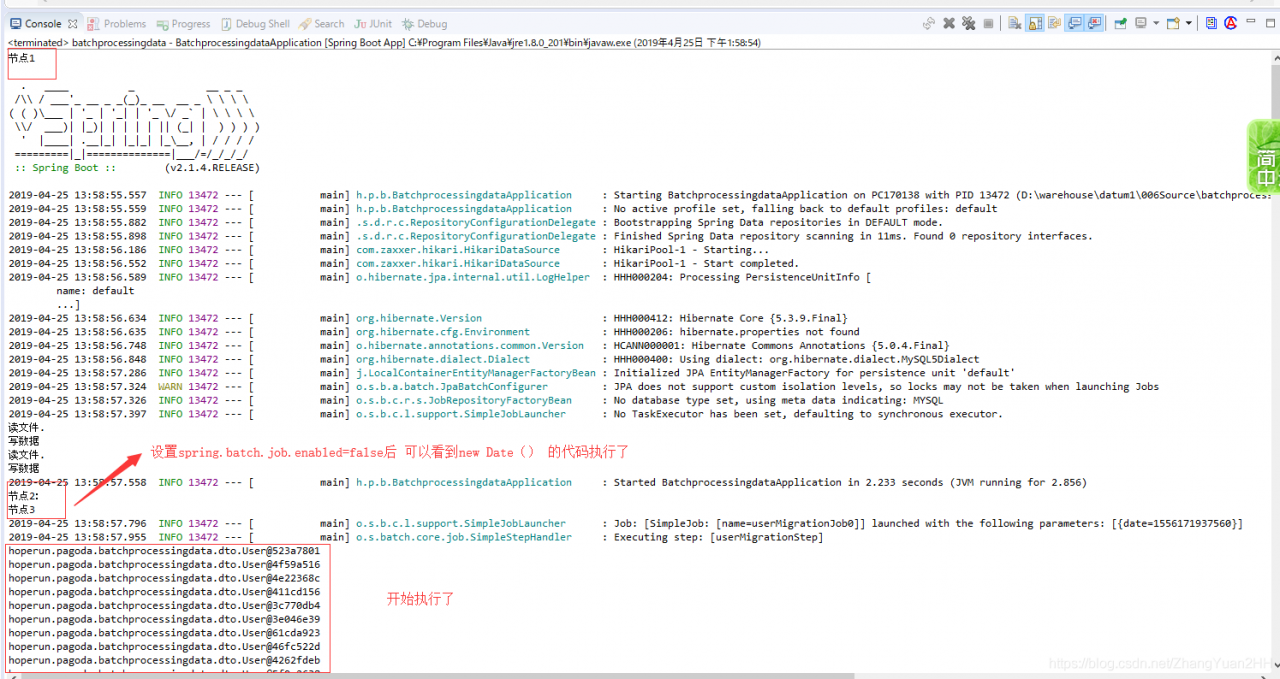
make both jobs unavailable and the program executes the job according to joblaunch.run.

error cause:

because each job is executed by default when spring batch is loaded, the default is to execute the job database first, and if the job is executed, an error is reported,

— this is printing

without spring.batch. Job.enabled =false
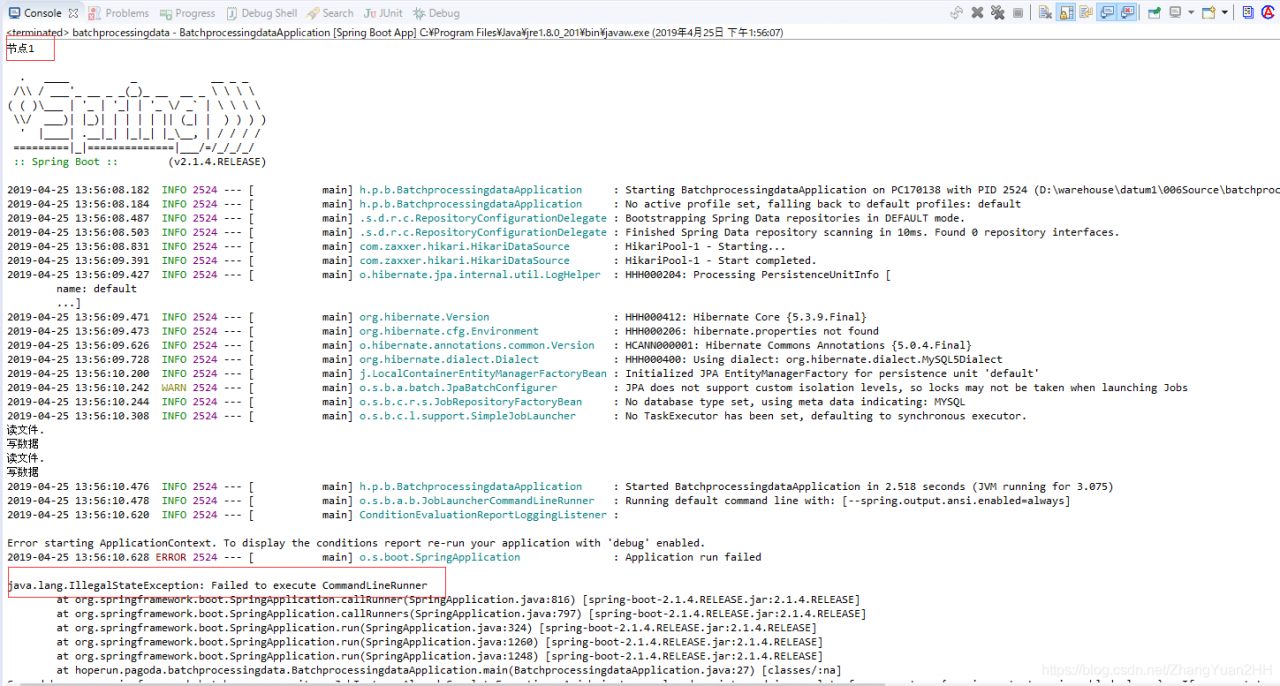
— this is printing

with spring.batch. Job.enabled =false
Kafka connection abnormal org.apache.kafka . common.errors.TimeoutException : Failed to update metadata after 60000 ms.

Introduction: there are many problems about hosts on the Internet. After testing, I found out that it is not. After testing by myself, I introduced three solutions to most problems:

1. Firewall port not opened or closed

firewall generally local test will be closed, the line is generally open, it is recommended to add port

add port:

# --permanent 为永久添加,不指定此参数重启后失效
firewall-cmd --zone=public --add-port=9092/tcp --permanent

delete port:

firewall-cmd --zone=public --remove-port=80/tcp --permanent

view all ports:

 firewall-cmd --zone=public --list-ports

view specified port:

firewall-cmd --zone= public --query-port=9092/tcp

view port status:

netstat -tunlp

overload:

firewall-cmd --reload

firewall command:

#开启防火墙 
service firewalld start
#启用防火墙 
service firewalld enable (永久生效)
#关闭防火墙 
service firewalld stop (重启后失效)
#禁用防火墙 
service firewalld disable (永久生效)
#重启防火墙 
service firewalld restart
#查看状态 
service firewalld status

2. Kafka service entry address not specified

edit the server.properties in the config directory of kafka, and add the address of the service entry to the external service:

注意:此ip为kafka所在主机的ip地址
listeners=PLAINTEXT://192.168.5.228:9092

3. The kafka version in the project is inconsistent with the kafka version installed on the server

modify maven pom. XML file, specify the corresponding kafka coordinates,
I installed kafka_2.12-2.1.0, the corresponding coordinates are:

<dependency>
      <groupId>org.apache.kafka</groupId>
      <artifactId>kafka_2.11</artifactId>
      <version>0.10.0.0</version>
</dependency>

解决Failed to execute goal org.apache.maven.plugins:maven-compiler-plugin:3.7.0:compile

mvn clean package -Dmaven.test.skip=true

error thrown today when the project was packaged with the maven command :

Failed to execute goal org.apache.maven.plugins:maven-compiler-plugin:3.7.0:compile (default-compile) on project springbootdemo: Fatal error compiling: 无效的标记: -parameters -> [Help 1]

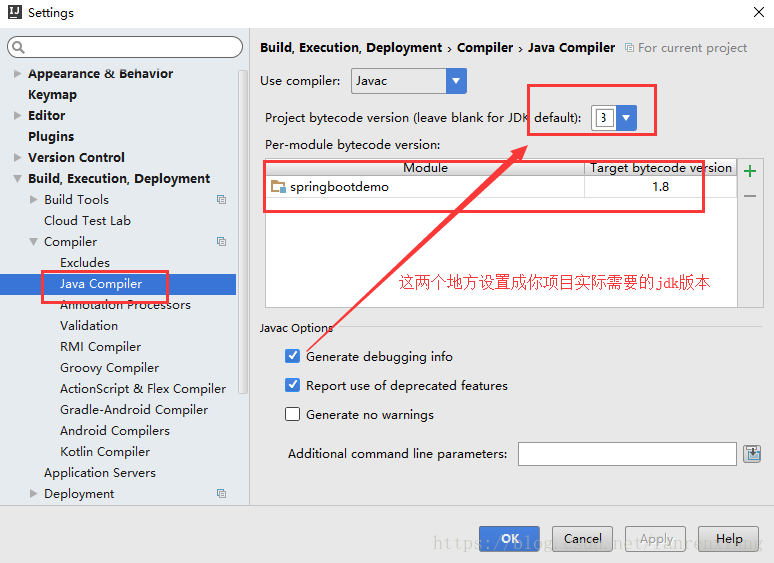
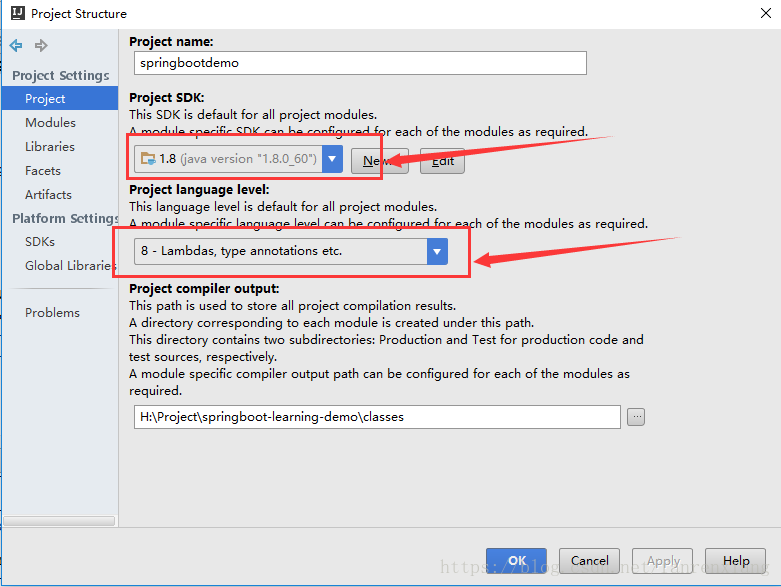
is easier to fix because the JDK version you need for your project is inconsistent with the JDK version you are currently using, because Java version is defined as 1.8 in my project’s pom. XML, but my actual idea for run project is 1.7

    <java.version>1.8</java.version>

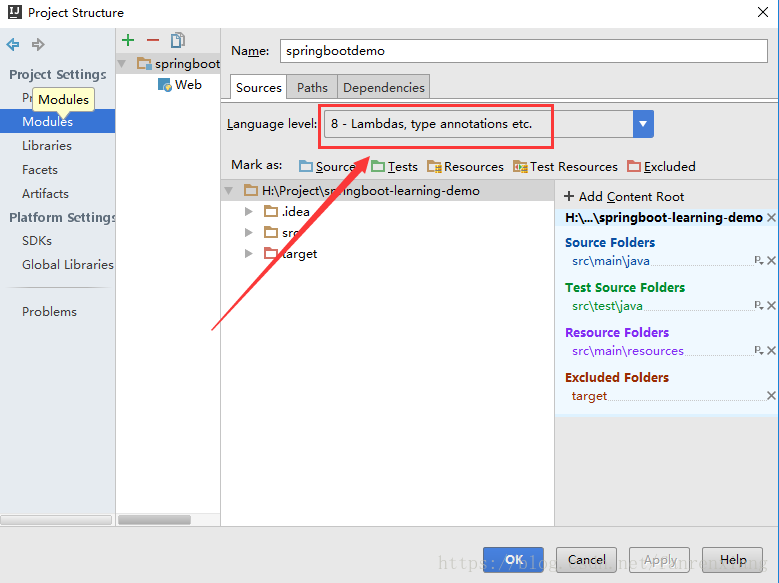
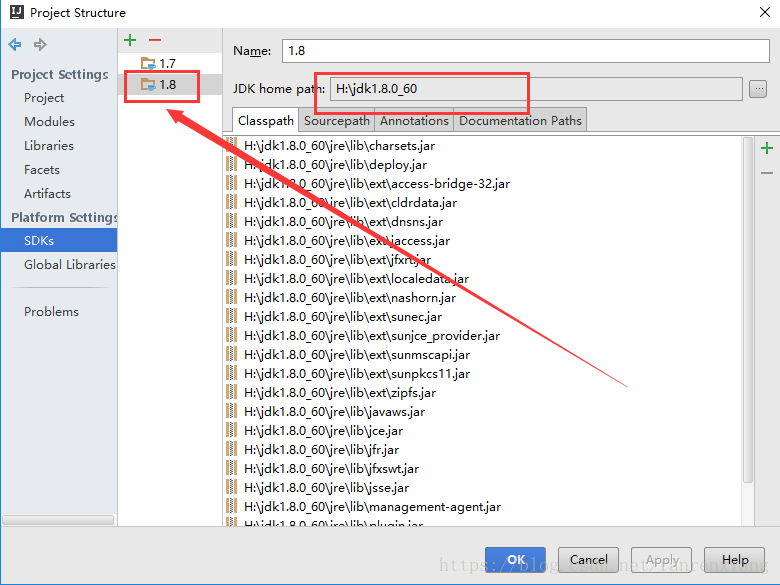
solution: simply replace the current JDK version with the JDK required for your project

if you click on the package compiler in the maven window of intellij idea, enter the intellij idea JDK version by Ctrl+Alt+s into the Settings screen

select the item, right click the F4 key, and set the item properties to enter

if you’re packing directly in Windows CMD with maven, you’ll need to switch your JDK environment. After the above setup, repackage and compile OK!

other conditions can also cause this error:

1. When you run a project with a command like java-jar ~.jar, you can also package the project with an error.

2. The configured dependency in your pom. XML file is not correct (it may be version, name, etc.), jar package does not come down, please carefully check whether there is an error in pom. XML, for example, if the dependency is not correct in idea, it can be directly seen in the maven project window.


extended reading: advanced customized timing tasks (including an administrative interface) using quartz
recommended reading: elastic search search engine actual combat demo:https://github.com/simonsfan/springboot-quartz-demo, branches: feature_es

Message: failed to decode response from marionette

is thrown because of an error in the title:

Message: Tried to run command without establishing a connection

interprets:

to start with my crawler architecture, I use firefox+selenium. The error above is caused by the fact that after the browser exits, the crawler needs the browser to execute some commands, so the error appears. The second problem comes:

Why does the

browser crash automatically?Generally speaking, it is because it is running out of resources. What resources?Memory resources, the browser is very occupied memory, and some crawlers in order to speed up the crawler will let the browser do cache,

this results in the browser taking up more memory

solution:

1. According to the resource occupied by the crawler, increase the memory

appropriately

2. Slow down the crawler speed and make the browser a little idle, especially in the crawler that starts multiple browsers

— — — — — — — — — — — — — — — — — — — — — — — — — — — — — — — — — the 2019-04-24 update — — — — — — — — — — — — — — — — — — — — — — — — — — — — — — — —

the above statement is not wrong, but some is not taken into account, the browser will actually the main reason for the collapse because the browser memory leaks, that is to say, because the default browser is open caching function,

as the crawler runs, the cache of the browser will become larger and larger, which will eventually lead to the memory leak of the browser ( premise is that the browser does not restart the crawler, if the browser restarts after a period of time, there will be no problem ),

as for how to disable browser cache in crawlers, this is mentioned in my other blog, but not

reproduced in: https://www.cnblogs.com/gunduzi/p/10600152.html

Spring boot JPA Repository exception Validation failed for query for method

is

when making a jpa

code as follows

Repository

 @Query("select HomepageSection from HomepageSection where parent_id = :parentid and del_flag = '0'")
    List<HomepageSection> findChildrenSectionsByParent(@Param("parentid") String parentid);

DB

创建表HOMEPageSection(
id varchar(64) not null主键,
parent_id varchar(64)
)

实体

@Entity
@Table(name = "Homepage_section")
@Data
public class HomepageSection {
    @Id
    String id;
    String parent_id;
    String section_type;
    String section_title;
    String section_description;
    String section_image;
    String create_by;
    String update_by;
    Date create_date;
    Date update_date;
    String del_flag;


}

then exception

org.springframework.beans.factory.BeanCreationException: Error creating bean with name 'companyDescriptionServiceImpl': Injection of resource dependencies failed; nested exception is org.springframework.beans.factory.BeanCreationException: Error creating bean with name 'HOMEpageSectionRepository': Invocation of init method failed; nested exception is java.lang.IllegalArgumentException: Validation failed for query for method public abstract java.util.List xxx.repository.xxxweb.HOMEpageSectionRepository.findChildrenSectionsByParent(java.lang.String)!
	at org.springframework.context.annotation.CommonAnnotationBeanPostProcessor.postProcessPropertyValues(CommonAnnotationBeanPostProcessor.java:321)
	at org.springframework.beans.factory.support.AbstractAutowireCapableBeanFactory.populateBean(AbstractAutowireCapableBeanFactory.java:1264)
	at org.springframework.beans.factory.support.AbstractAutowireCapableBeanFactory.doCreateBean(AbstractAutowireCapableBeanFactory.java:553)
	at org.springframework.beans.factory.support.AbstractAutowireCapableBeanFactory.createBean(AbstractAutowireCapableBeanFactory.java:483)
	at org.springframework.beans.factory.support.AbstractBeanFactory$1.getObject(AbstractBeanFactory.java:306)
	at org.springframework.beans.factory.support.DefaultSingletonBeanRegistry.getSingleton(DefaultSingletonBeanRegistry.java:230)
	at org.springframework.beans.factory.support.AbstractBeanFactory.doGetBean(AbstractBeanFactory.java:302)
	at org.springframework.beans.factory.support.AbstractBeanFactory.getBean(AbstractBeanFactory.java:197)
	at org.springframework.beans.factory.support.DefaultListableBeanFactory.preInstantiateSingletons(DefaultListableBeanFactory.java:761)
	at org.springframework.context.support.AbstractApplicationContext.finishBeanFactoryInitialization(AbstractApplicationContext.java:867)
	at org.springframework.context.support.AbstractApplicationContext.refresh(AbstractApplicationContext.java:543)
	at org.springframework.boot.context.embedded.EmbeddedWebApplicationContext.refresh(EmbeddedWebApplicationContext.java:122)
	at org.springframework.boot.SpringApplication.refresh(SpringApplication.java:693)
	at org.springframework.boot.SpringApplication.refreshContext(SpringApplication.java:360)
	at org.springframework.boot.SpringApplication.run(SpringApplication.java:303)
	at org.springframework.boot.SpringApplication.run(SpringApplication.java:1118)
	at org.springframework.boot.SpringApplication.run(SpringApplication.java:1107)
	at xxx.Application.main(Application.java:23)
	at sun.reflect.NativeMethodAccessorImpl.invoke0(Native Method)
	at sun.reflect.NativeMethodAccessorImpl.invoke(NativeMethodAccessorImpl.java:62)
	at sun.reflect.DelegatingMethodAccessorImpl.invoke(DelegatingMethodAccessorImpl.java:43)
	at java.lang.reflect.Method.invoke(Method.java:498)
	at org.springframework.boot.devtools.restart.RestartLauncher.run(RestartLauncher.java:49)
Caused by: org.springframework.beans.factory.BeanCreationException: Error creating bean with name 'HOMEpageSectionRepository': Invocation of init method failed; nested exception is java.lang.IllegalArgumentException: Validation failed for query for method public abstract java.util.List xxx.repository.xxxweb.HOMEpageSectionRepository.findChildrenSectionsByParent(java.lang.String)!
	at org.springframework.beans.factory.support.AbstractAutowireCapableBeanFactory.initializeBean(AbstractAutowireCapableBeanFactory.java:1628)
	at org.springframework.beans.factory.support.AbstractAutowireCapableBeanFactory.doCreateBean(AbstractAutowireCapableBeanFactory.java:555)
	at org.springframework.beans.factory.support.AbstractAutowireCapableBeanFactory.createBean(AbstractAutowireCapableBeanFactory.java:483)
	at org.springframework.beans.factory.support.AbstractBeanFactory$1.getObject(AbstractBeanFactory.java:306)
	at org.springframework.beans.factory.support.DefaultSingletonBeanRegistry.getSingleton(DefaultSingletonBeanRegistry.java:230)
	at org.springframework.beans.factory.support.AbstractBeanFactory.doGetBean(AbstractBeanFactory.java:302)
	at org.springframework.beans.factory.support.AbstractBeanFactory.getBean(AbstractBeanFactory.java:202)
	at org.springframework.beans.factory.config.DependencyDescriptor.resolveCandidate(DependencyDescriptor.java:208)
	at org.springframework.beans.factory.support.DefaultListableBeanFactory.doResolveDependency(DefaultListableBeanFactory.java:1138)
	at org.springframework.beans.factory.support.DefaultListableBeanFactory.resolveDependency(DefaultListableBeanFactory.java:1066)
	at org.springframework.context.annotation.CommonAnnotationBeanPostProcessor.autowireResource(CommonAnnotationBeanPostProcessor.java:518)
	at org.springframework.context.annotation.CommonAnnotationBeanPostProcessor.getResource(CommonAnnotationBeanPostProcessor.java:496)
	at org.springframework.context.annotation.CommonAnnotationBeanPostProcessor$ResourceElement.getResourceToInject(CommonAnnotationBeanPostProcessor.java:627)
	at org.springframework.beans.factory.annotation.InjectionMetadata$InjectedElement.inject(InjectionMetadata.java:169)
	at org.springframework.beans.factory.annotation.InjectionMetadata.inject(InjectionMetadata.java:88)
	at org.springframework.context.annotation.CommonAnnotationBeanPostProcessor.postProcessPropertyValues(CommonAnnotationBeanPostProcessor.java:318)
	... 22 common frames omitted
Caused by: java.lang.IllegalArgumentException: Validation failed for query for method public abstract java.util.List xxx.repository.xxxweb.HOMEpageSectionRepository.findChildrenSectionsByParent(java.lang.String)!
	at org.springframework.data.jpa.repository.query.SimpleJpaQuery.validateQuery(SimpleJpaQuery.java:92)
	at org.springframework.data.jpa.repository.query.SimpleJpaQuery.<init>(SimpleJpaQuery.java:62)
	at org.springframework.data.jpa.repository.query.JpaQueryFactory.fromMethodWithQueryString(JpaQueryFactory.java:72)
	at org.springframework.data.jpa.repository.query.JpaQueryFactory.fromQueryAnnotation(JpaQueryFactory.java:53)
	at org.springframework.data.jpa.repository.query.JpaQueryLookupStrategy$DeclaredQueryLookupStrategy.resolveQuery(JpaQueryLookupStrategy.java:144)
	at org.springframework.data.jpa.repository.query.JpaQueryLookupStrategy$CreateIfNotFoundQueryLookupStrategy.resolveQuery(JpaQueryLookupStrategy.java:212)
	at org.springframework.data.jpa.repository.query.JpaQueryLookupStrategy$AbstractQueryLookupStrategy.resolveQuery(JpaQueryLookupStrategy.java:77)
	at org.springframework.data.repository.core.support.RepositoryFactorySupport$QueryExecutorMethodInterceptor.<init>(RepositoryFactorySupport.java:436)
	at org.springframework.data.repository.core.support.RepositoryFactorySupport.getRepository(RepositoryFactorySupport.java:221)
	at org.springframework.data.repository.core.support.RepositoryFactoryBeanSupport.initAndReturn(RepositoryFactoryBeanSupport.java:277)
	at org.springframework.data.repository.core.support.RepositoryFactoryBeanSupport.afterPropertiesSet(RepositoryFactoryBeanSupport.java:263)
	at org.springframework.data.jpa.repository.support.JpaRepositoryFactoryBean.afterPropertiesSet(JpaRepositoryFactoryBean.java:101)
	at org.springframework.beans.factory.support.AbstractAutowireCapableBeanFactory.invokeInitMethods(AbstractAutowireCapableBeanFactory.java:1687)
	at org.springframework.beans.factory.support.AbstractAutowireCapableBeanFactory.initializeBean(AbstractAutowireCapableBeanFactory.java:1624)
	... 37 common frames omitted
Caused by: java.lang.IllegalStateException: No data type for node: org.hibernate.hql.internal.ast.tree.IdentNode 
 \-[IDENT] IdentNode: 'h' {originalText=h}

	at org.hibernate.hql.internal.ast.tree.SelectClause.initializeExplicitSelectClause(SelectClause.java:160)
	at org.hibernate.hql.internal.ast.HqlSqlWalker.useSelectClause(HqlSqlWalker.java:920)
	at org.hibernate.hql.internal.ast.HqlSqlWalker.processQuery(HqlSqlWalker.java:688)
	at org.hibernate.hql.internal.antlr.HqlSqlBaseWalker.query(HqlSqlBaseWalker.java:673)
	at org.hibernate.hql.internal.antlr.HqlSqlBaseWalker.selectStatement(HqlSqlBaseWalker.java:309)
	at org.hibernate.hql.internal.antlr.HqlSqlBaseWalker.statement(HqlSqlBaseWalker.java:257)
	at org.hibernate.hql.internal.ast.QueryTranslatorImpl.analyze(QueryTranslatorImpl.java:262)
	at org.hibernate.hql.internal.ast.QueryTranslatorImpl.doCompile(QueryTranslatorImpl.java:190)
	at org.hibernate.hql.internal.ast.QueryTranslatorImpl.compile(QueryTranslatorImpl.java:142)
	at org.hibernate.engine.query.spi.HQLQueryPlan.<init>(HQLQueryPlan.java:115)
	at org.hibernate.engine.query.spi.HQLQueryPlan.<init>(HQLQueryPlan.java:76)
	at org.hibernate.engine.query.spi.QueryPlanCache.getHQLQueryPlan(QueryPlanCache.java:150)
	at org.hibernate.internal.AbstractSessionImpl.getHQLQueryPlan(AbstractSessionImpl.java:302)
	at org.hibernate.internal.AbstractSessionImpl.createQuery(AbstractSessionImpl.java:240)
	at org.hibernate.internal.SessionImpl.createQuery(SessionImpl.java:1894)
	at org.hibernate.jpa.spi.AbstractEntityManagerImpl.createQuery(AbstractEntityManagerImpl.java:291)
	at sun.reflect.NativeMethodAccessorImpl.invoke0(Native Method)
	at sun.reflect.NativeMethodAccessorImpl.invoke(NativeMethodAccessorImpl.java:62)
	at sun.reflect.DelegatingMethodAccessorImpl.invoke(DelegatingMethodAccessorImpl.java:43)
	at java.lang.reflect.Method.invoke(Method.java:498)
	at org.springframework.orm.jpa.ExtendedEntityManagerCreator$ExtendedEntityManagerInvocationHandler.invoke(ExtendedEntityManagerCreator.java:347)
	at com.sun.proxy.$Proxy100.createQuery(Unknown Source)
	at org.springframework.data.jpa.repository.query.SimpleJpaQuery.validateQuery(SimpleJpaQuery.java:86)
	... 50 common frames omitted

tried many times and finally found the problem

because the table name HOMEpage_section cannot automatically become Entity’s table name. So I use @table (name=”HOMEpage_section”), but I feel in repository that the jpa resolution does not indicate that entity class name should be placed after the select

alias will solve the problem

 @Query("select h from HomepageSection as h where parent_id = :parentid and del_flag = '0'")
    List<HomepageSection> findChildrenSectionsByParent(@Param("parentid") String parentid);


Vscode debug Java console input: evaluation failed because the thread is not suspended

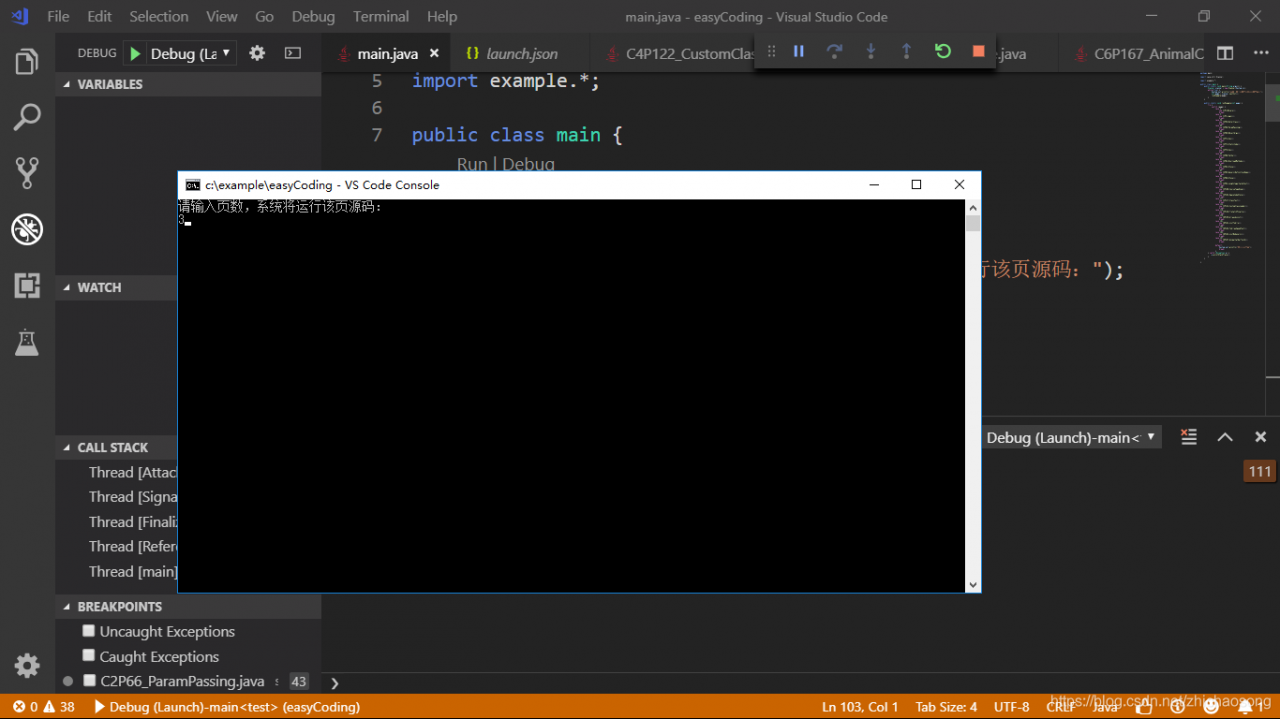
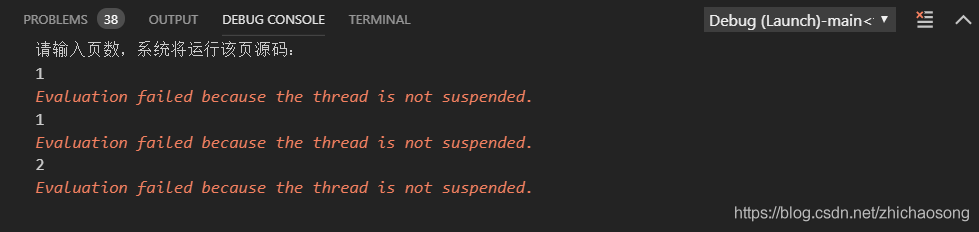
use VS Code to debug Java program, need to use the console input, the results have been error, find a solution

error:

add a line "console": "externalTerminal" for

{
    // Use IntelliSense to learn about possible attributes.
    // Hover to view descriptions of existing attributes.
    // For more information, visit: https://go.microsoft.com/fwlink/?linkid=830387
    "version": "0.2.0",
    "configurations": [
        {
            "type": "java",
            "name": "Debug (Launch)-main<test>",
            "request": "launch",
            "mainClass": "main.main",
            "projectName": "test",
            "console": "externalTerminal"
        }
    ]
}

works as follows:

this error occurs because the built-in debugging console of VSCode does not support Java input. So you need to modify the debug console in the Debug configuration file, just change the console property to externalTerminal. External terminal.

E / Art: failed sending reply to debugger: a solution to broken pipe

E/art: Failed remote reply to debugger: Broken pipe solution

explanation error:

E/ART:向调试器发送回复失败:管道损坏。

what is E/ART?

ART is </ strong> A ndroid – [R not Ť IME. This is the Android phones bytecode interpreter. E just means the ERROR record level. </ strong> </ strong> </ strong> </ p>

what is the send reply debugger?

debugging on Android phones is using adb (Android debugging bridge). Adb processes run on your development computer (your laptop or PC), and daemons run on Android devices (that is, emulators or phones).

what is a broken pipe?

Your development machine and Android device communicate like a client server. corrupt pipe indicates that the communication has become invalid. For example, the client (Android device) is trying to send a reply to the server (adb process running on the development machine), but the server has closed the socket.

how to repair </ strong> </ strong> </ strong> </ h3>
First make sure your application builds

by performing cleanup/rebuild
Then, if you are running an application using USB debugging on a real phone, you can usually solve the problem by unplugging the USB cable and re-inserting it to re-establish the client/server connection.

If this doesn’t work, you can disconnect the USB cable (stop the emulator if necessary) and close Android Studio. This is usually enough to block the ADB process. Then, when you open Android Studio again, it will restart and re-establish the connection.

if this does not work, you can try to use the instructions to manually stop the adb server in this problem. For example, you could try to open a command prompt or terminal, then go to the SDK/platform-tools directory and type:

adb kill-server
adb start-server

*The daemon is not running; tcp:5037 is now started.
*Successful start of the daemon

When this appears.

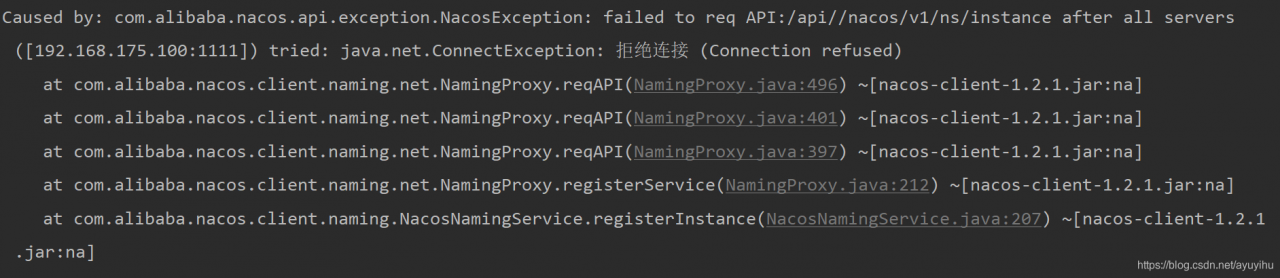
NACOS error com.alibaba.nacos.api.exception.NacosException: failed to req API:/api//nacos/v1/ns/instance

service registry to nacos error: com. Alibaba. Nacos. API. Exception. NacosException: failed to the req API:/API// nacos/v1/ns/instance after all the servers ([192.168.175.100:1111]) tried: java.net.ConnectException: Refuse a Connection (Connection union)

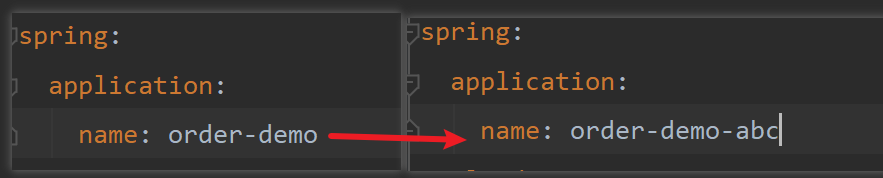
after looking for a long time without finding the reason, it turns out that as long as you modify spring.application.name, it can be restored to normal:

so that it can start normally, which is very strange.

sometimes stops the service, restarts it and can’t be registered, and then changes the service name again.

Springboot project startup exception – required a single bean, but 2 were found

springboot project startup exception – required a single bean, but 2 were found

    • description
    • detailed error message
    • error analysis
    • why
    • solution

    problem description

    springboot+mybatis, write interface and implementation classes, and use @autowired injection controller, start exception: required a single bean, but 2 were found

    controller interface:

    @RestController
    @RequestMapping("/api/sys/statistic")
    public class StatisticController {
    
        @Autowired
        private ISysAccessLogService iSysAccessLogService;
        
    }
    

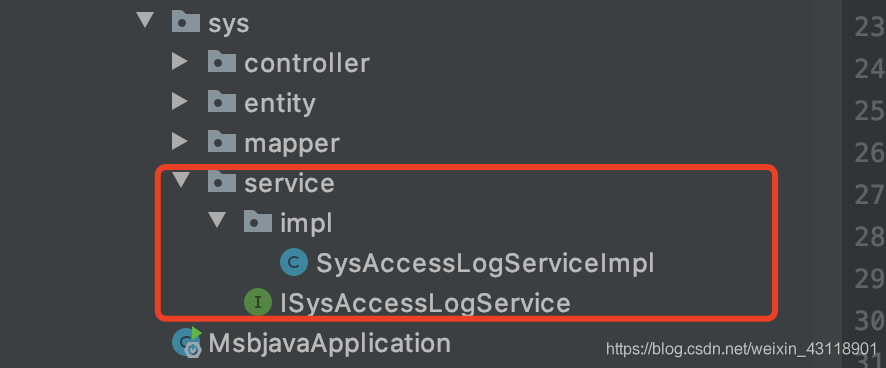
    interface and implementation class

    detail error

    APPLICATION FAILED TO START
    Description:

    Field iSysAccessLogService in com.msb.sys.controller.StatisticController required a single bean, but 2 were found:
    – sysAccessLogServiceImpl: defined in file [/Users/ronghuilin/java/msbjava/target/classes/com/msb/sys/service/impl/SysAccessLogServiceImpl.class]
    – ISysAccessLogService: defined in file [/Users/ronghuilin/java/msbjava/target/classes/com/msb/sys/service/ISysAccessLogService.class]

    Action:

    Consider marking one of the beans as @Primary, updating the consumer to accept multiple beans, or using @Qualifier to identify the bean that should be consumed

    Disconnected from the target VM, address: ‘127.0.0.1:61739’, transport: ‘socket’

    error analysis

    if you’re prompted, there’s no way to automatically inject iSysAccessLogService at StatisticController.

    @autowired is injected by type by default, and as prompted, my project has two beans of this type, so it cannot be injected automatically.

    The

    error message also suggests a solution:
    1. Use one of the beans with the @primary annotation as the default,
    2. Add @qualifier to the injected property to specify beanName to specify which bean

    to use

    but I’ve only written one implementation class for the interface, and as expected there’s only one bean, which should be fine.

    Reason

    after a roundabout search, I found that I had annotated springboot’s boot class with @mapperscan (” “com”).

    @mapperscan this is the annotation is the Mapper scan annotation for mybatis, and the scope of the scan I specified is the com package.
    mybatis scans the interface under com, generates the implementation class of the interface, and infuses it into spring.
    then spring scans the interface implementation class I wrote, injects spring, and you have two beans.

    solution

    in the springboot project it is recommended to add @mapper directly to the Mapper interface and not to use @mapperscan.

    if you want to use @mapperscan annotations, be careful to configure the scope of the scan to avoid the above problems caused by repeat scan injection of spring beans.

Solve Android studio connection dl.google.com Timeout problem

error as follows

Connect to dl.google.com:443 [dl.google.com/120.253.255.33] failed

problem:
is an IP whose DNS is not resolved to the domain name dl.google.com or an error occurs during the resolution.

solution:
1. Baidu an IP query url, enter the domain name dl.google.com, find the corresponding IP

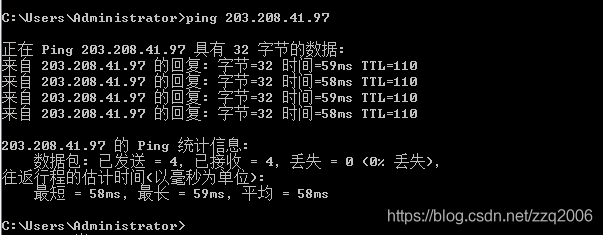
2. Let’s look at the first few pings to see if they work, so let’s pick the first one

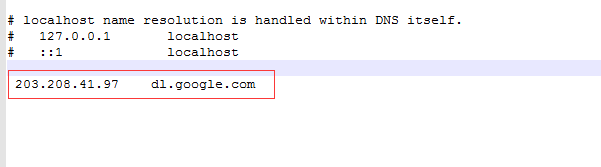
3. Find the file hosts of your computer, C:\Windows\System32\drivers\etc\hosts
write the domain name and the corresponding IP into the file.

Failed to configure a DataSource: ‘ url’ attribute

Description:. Failed to configure a DataSource: ‘ url’ attribute is not specif:Reason: Failed to determine a suitable driver class

  • error cause: database not configured
  • solution:

error cause: database

is not configured

solution:

1.配置数据库

2. Set do not configure database

  • 1
  • 2
  • 3
@SpringBootApplication(exclude = DataSourceAutoConfiguration.class)


  • 1

The first installation of zookeeper on Linux failed to start

error is as follows:
[root @ hecs 2 – Linux – 20200625134441 – x – medium – bin] #./zkServer sh start
ZooKeeper JMX enabled by default
Using the config:/home/they/they/bin /…/conf/zoo. CFG
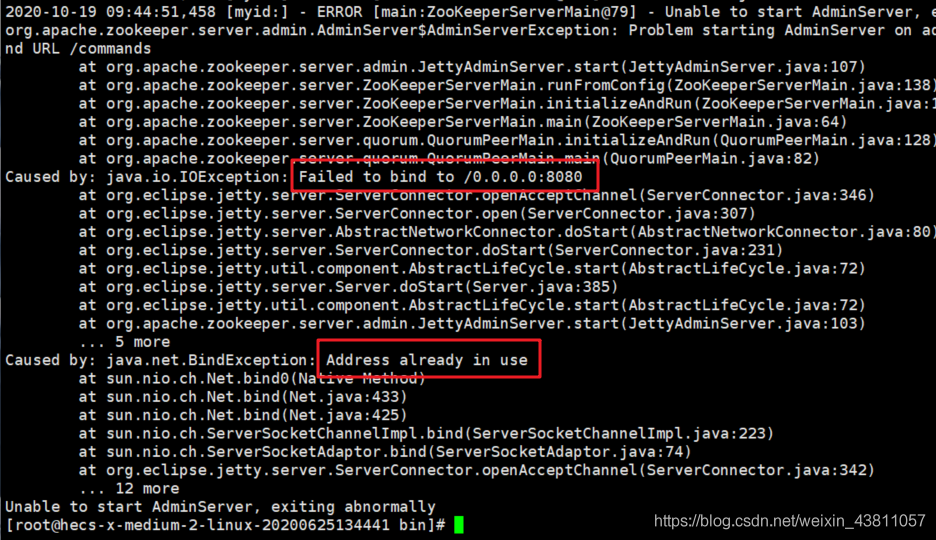
Starting zookeeper… Zookeep’s default START port is also 8080
. Therefore, we need TO modify the zookeeper’s port
solution:
. ./ zkserver.sh start-foreground

, so my port 8080 was taken up, causing zookeeper to fail to launch
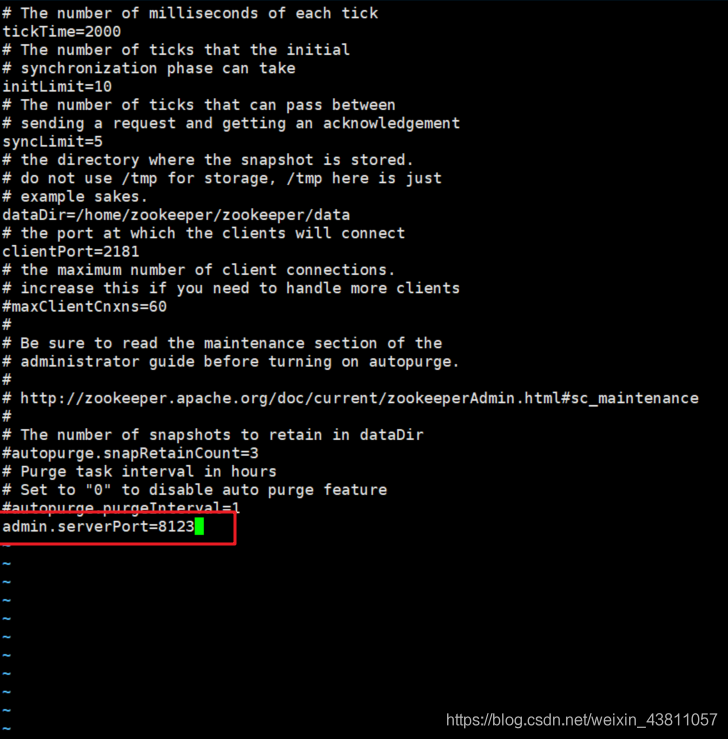
. Add
admin.serverport =8123

3, restart
./ zkserver.sh start
perfectly fixed.