Tag Archives: java

Launchanywhere windows error loading Java VM: 2 and 216

background
I haven’t come across such a problem for a long time. It’s all about JavaVM. Learn as you go.

LaunchAnywhere Error:
Windows error 2 occured while loading the Java VM

or

LaunchAnywhere Error:
Windows error 216 occured while loading the Java VM

English version of the error message is important, mainly when searching, the likelihood of finding the answer is greatly increased.
To solve
The first case:

LaunchAnywhere Error:
Windows error 2 occured while loading the Java VM

The reason is that after installing the Java JDK or the compact version of RE runtime environment (which is included in the former), you need to manually set the environment variables based on the version. Can’t Oracle check for environment variables at install time and set them if necessary?
Set the method
The second case:

LaunchAnywhere Error:
Windows error 216 occured while loading the Java VM

This error occurred while trying to install a 64-bit program on a 32-bit machine.

Severe: error filterStart error resolution

My question is: same JDK version, same tomcat version, project written using jfinal under Windows, and then packaged under the webapps directory of tomcat6 for ubuntu12.04 server:
The following error occurs:

SEVERE: Error filterStart 
Aug 27, 2013 9:37:44 AM org.apache.catalina.core.StandardContext start 
SEVERE: Context [/test] startup failed due to previous errors 

Based on my own experience and solutions, here is my approach:
First remove &lt from web.xml; filter> Tag, and then restart Tomcat. The error will be reported in the background of Tomcat to see what is the cause of the error.
If a package is missing, the necessary package is imported, and any other errors resolve themselves. Mine is not short of bags

SEVERE: End event threw exception 
java.lang.reflect.InvocationTargetException 
        at sun.reflect.NativeMethodAccessorImpl.invoke0(Native Method) 
        at sun.reflect.NativeMethodAccessorImpl.invoke(NativeMethodAccessorImpl.java:57) 
        at sun.reflect.DelegatingMethodAccessorImpl.invoke(DelegatingMethodAccessorImpl.java:43) 
        at java.lang.reflect.Method.invoke(Method.java:616) 
        at org.apache.tomcat.util.IntrospectionUtils.callMethod1(IntrospectionUtils.java:928) 
        at org.apache.tomcat.util.digester.SetNextRule.end(SetNextRule.java:193) 
        at org.apache.tomcat.util.digester.Rule.end(Rule.java:229) 
        at org.apache.tomcat.util.digester.Digester.endElement(Digester.java:1138) 
        at com.sun.org.apache.xerces.internal.parsers.AbstractSAXParser.endElement(AbstractSAXParse 
r.java:604) 

According to the information I collected on the Internet, it is probably due to the inconsistency or lower version of the JDK version; Select a unified version of the development and running environments
If the version is not unified, the unified version, if the version is low, then change to a high version.
(However, I also have a problem here, if the server can not connect to the external network, then the program started under Tomcat is still an error)
Here is the download link for the JDK:
http://www.oracle.com/technetwork/java/javase/archive-139210.html

Error: could not find or load main class

The Internet said a lot of methods, only said I used
CMD runs Java Chinese garbled code
Set environment variable — system environment variable

Add entry: JAVA_TOOL_OPTIONS
value: -dfile.encoding = utf-8-duser. language=en

The main class could not be loaded
Method 1. Remove the package *
method 2. Suppose the class test is in the SRC directory. Once compiled, run in the SRC sibling directory

java src.test

Reproduced in: https://www.cnblogs.com/so-easy/p/11369745.html

Could not find or load main class

It’s a shame that after all this time, Javac hello. Java is normal today when Java is running in CMD, Java hello, Could not find or load main class

public class TestHuman {

public static void main(String[] args) {

system.out.println (” hello Word!!”) );

}

}

can execute javac hello. Java instruction code is ok, when executing Java hello, there is a problem, it should be the environment variable configuration, what is the problem…

After a long search, I found the CLASSPATH {%JAVA_HOME%\lib; %JAVA_HOME%\lib\tools.jar}, preceded by “.;” .
Why is it missing?Does not affect Eclipse but will affect the operation of CMD…
Eclipse will automatically configure packages, projects, and paths for us, so that’s fine,
CMD has to manually configure these paths by itself, adding “. “means the current path, so there is no need to write the path step by step.

And I at the beginning of the configuration, should not understand what the point here is, there is no configuration, almost make a joke, mutual encouragement ~ mutual encouragement ~

ERROR StatusLogger No log4j2 configuration file found.

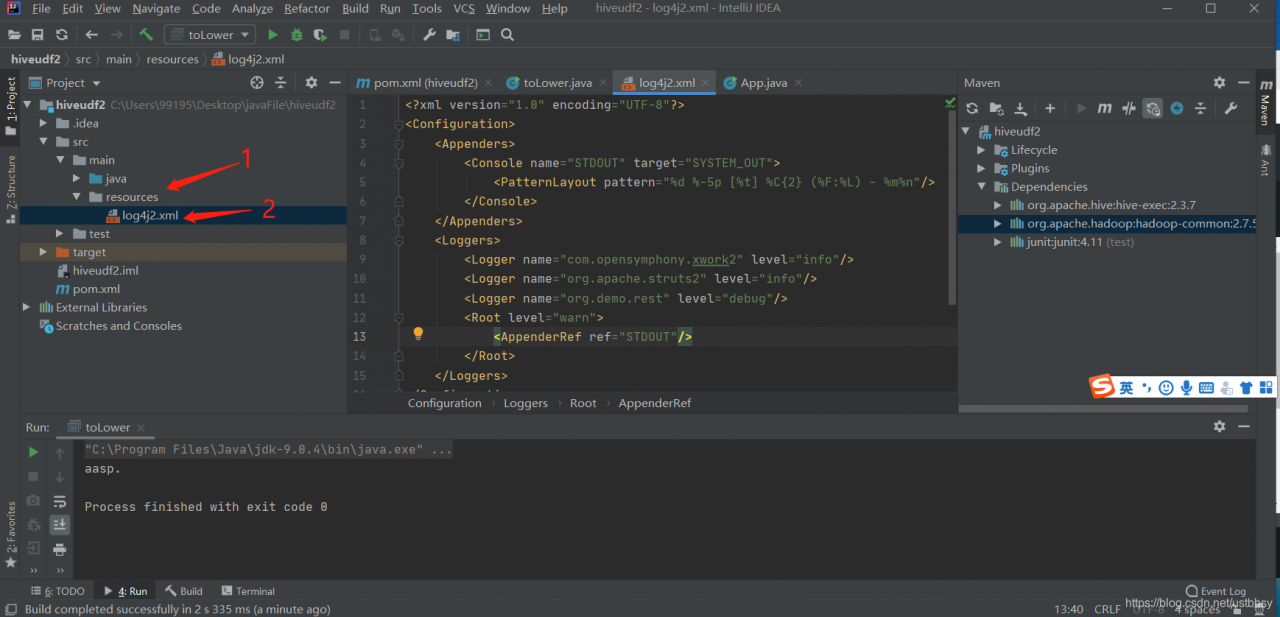
The tool is Intellij Idea
The

    in SRC – & gt; So I’m going to go under main and I’m going to go under resources and I’m going to go under resources and I’m going to go under log4j2.xml

The file contents of log4j2.xml are as follows

<?xml version="1.0" encoding="UTF-8"?>
<Configuration>
    <Appenders>
        <Console name="STDOUT" target="SYSTEM_OUT">
            <PatternLayout pattern="%d %-5p [%t] %C{2} (%F:%L) - %m%n"/>
        </Console>
    </Appenders>
    <Loggers>
        <Logger name="com.opensymphony.xwork2" level="info"/>
        <Logger name="org.apache.struts2" level="info"/>
        <Logger name="org.demo.rest" level="debug"/>
        <Root level="warn">
            <AppenderRef ref="STDOUT"/>
        </Root>
    </Loggers>
</Configuration>


And then it’s ok

An error occurred while collecting items to be installed

When installing p3C plug-ins in eclipse, I will not elaborate here. This is a plug-in developed by Ali’s internal code standards that can help developers better regulate the code. If necessary, it can be installed. In addition ali Java development manual you can also read, the specification of the purple code style. Okay, theme, the following error will be reported when installing the plug-in:

An error occurred while collecting items to be installed
session context was:(profile=epp.package.jee, phase=org.eclipse.equinox.internal.p2.engine.phases.Collect, operand=, action=).
No repository found containing: osgi.bundle,org.aspectj.runtime.source,1.7.0.20120507134200
No repository found containing: osgi.bundle,org.eclipse.contribution.weaving.jdt.source,2.2.0.e36x-20120507-1400
No repository found containing: org.eclipse.update.feature,org.eclipse.contribution.weaving.source,2.2.0.e36x-20120507-1400
No repository found containing: osgi.bundle,org.eclipse.contribution.xref.core.source,2.2.0.e36x-20120507-1400
No repository found containing: org.eclipse.update.feature,org.eclipse.contribution.xref.source,2.2.0.e36x-20120507-1400
No repository found containing: osgi.bundle,org.eclipse.contribution.xref.ui.source,2.2.0.e36x-20120507-1400
No repository found containing: osgi.bundle,org.eclipse.net4j.jms.api,3.0.0.v20110215-1551
No repository found containing: osgi.bundle,org.springframework.roo.wrapping.protobuf-java-lite,2.3.0.0001

This is because some libraries can not connect, resulting in online installation failed, just add the url address of the library where the installation is.
The specific steps are as follows:

    click on the Windows of the Eclipse window — > Perference go to Install\update and click Available Software Sites
    3. Click Add and, after calling the name, copy the missing path in the error message.

The above errors, for example, add the following path:
name: eclipse
location:https://www.eclipse.org/ajdt/downloads/
Therefore, if you encounter similar errors later, you can first look at what library is missing, and then add the corresponding library address.
LDAP: error code 21 – objectclass: value ා 0 invalid per syntax

The root cause is that the ObjectClass for manipulating data in LDAP is the same as in the original LDAP when adding, deleting, or altering it.
First, inconsistent ObjectClass type causes the reason for the addition failure
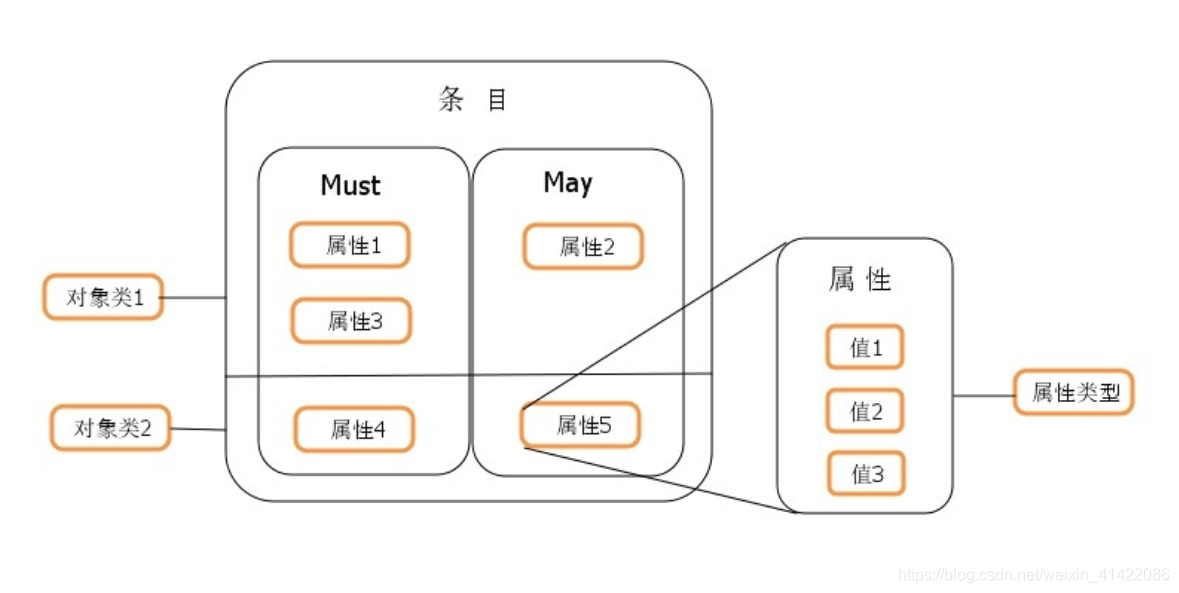
Entry, which is a directory managed object, is the most basic particle in LDAP. Generally, the addition, deletion, change, and retrieval of LDAP are based on entries. Each entry can have many attributes. An ObjectClass (ObjectClass) is a collection of properties.
Object classes make it easy to define entry types. Each entry can inherit directly from multiple object classes, thus inheriting various properties. If two object classes have the same property, only one property will be retained after the entry is inherited. The object class also specifies which attributes are essential information and Must or Required: which attributes are extensibility information and May or Optional.
Each Entry in the LDAP directory tree must belong to its own conditional objectClass, objectClass, then define its Entry attributes and corresponding values, and objectClass corresponds to Java as class. In Java, Class can be roughly divided into Abstract and Concrete, and only concrete Class can generate instance. In LDAP, objectClass is divided into three classes: Abstract, Structural, and Auxiliary. The specific definition is as follows:
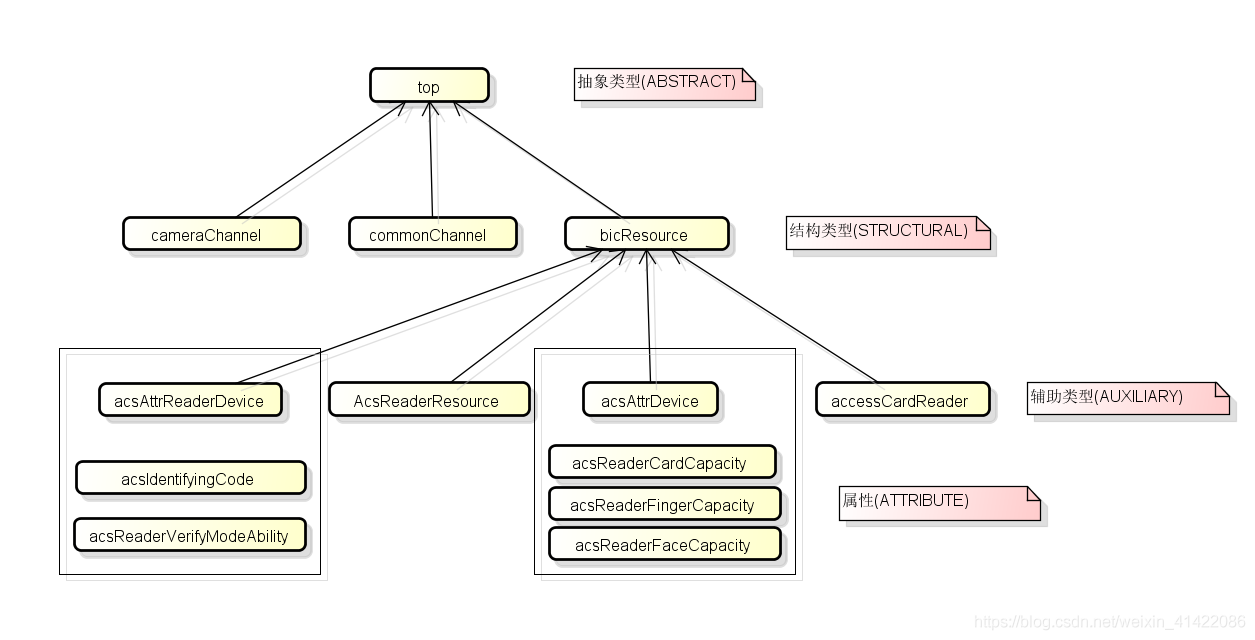
Abstract object classes are only intended to be extended by other object classes. An entry must not contain any abstract classes unless it also contains a structure or helper class from which Dervies derive an abstract class (that is, including non-abstract object classes, an inheritance chain of abstract classes). All entries must contain at least a “top” abstract object class and their structural classes in the inheritance chain. They may or may not contain other abstract classes in the inheritance chain in the structural class or in any of their helper classes. **Structural: ** Structured object classes are designed to define the key that an item represents. Each entry must contain a structured object class chain, and the root of the chain must ultimately be a “Top” abstract object class. Changes to the entry’s structural object class are not allowed. **Auxiliary: **Auxiliary object classes are intended to define the additional qualities of items. An entry may contain zero or more helper classes, and the set of helper classes associated with an entry may change over time.
The object classes themselves can inherit from each other, so the root of the object class is the top abstract object class. Take access control devices as an example, their inheritance relationship is shown in the figure below:

DAP entry attributes can be added depending on whether the objectClass inherited by the entry contains this attribute. ObjectClass has an inheritance relationship, that is, the attributes added to the entry ultimately depend on the collection of all objectclasses that it inherits.
The objectClass and attributes are specified by the schema file, which is stored in the /etc/openldap/schema directory. The schema file specifies the composition of the objectClass and the corresponding relationships between attributes and values in the directory tree. You can generate the objectClass by defining a schema file to generate the required attributes. The relationships determined before the ObjectClass, AttributeType and Syntax are shown in the figure below:

so if the added property is not in the scope of objectClass, the directory server is not allowed to add the property. To do so, you must add the schema file to produce the properties corresponding to the objectClass.

Caused by: java.net.SocketException : connection reset or caused by: java.sql.SQLRecoverableException solve

Aug 12, 2019 10:42:42 AM org.apache.catalina.startup.TldConfig execute
INFO: At least one JAR was scanned for TLDs yet contained no TLDs. Enable debug logging for this logger for a complete list of JARs that were scanned but no TLDs were found in
 them. Skipping unneeded JARs during scanning can improve startup time and JSP compilation time.- Root WebApplicationContext: initialization started
- Refreshing Root WebApplicationContext: startup date [Mon Aug 12 10:42:43 CST 2019]; root of context hierarchy
- Loading XML bean definitions from file [/opt/apache-tomcat-7.0.91/webapps/statusPublish/WEB-INF/classes/applicationContext.xml]
- Loading XML bean definitions from file [/opt/apache-tomcat-7.0.91/webapps/statusPublish/WEB-INF/classes/baseDataSource.xml]
- Loading XML bean definitions from file [/opt/apache-tomcat-7.0.91/webapps/statusPublish/WEB-INF/classes/redis.xml]
- Loading XML bean definitions from file [/opt/apache-tomcat-7.0.91/webapps/statusPublish/WEB-INF/classes/activemq.xml]
- init datasource error, url: jdbc:oracle:thin:@172.20.16.244:1521:orcl
java.sql.SQLRecoverableException: IO Error: Connection reset
	at oracle.jdbc.driver.T4CConnection.logon(T4CConnection.java:421)
	at oracle.jdbc.driver.PhysicalConnection.<init>(PhysicalConnection.java:531)
	at oracle.jdbc.driver.T4CConnection.<init>(T4CConnection.java:221)
	at oracle.jdbc.driver.T4CDriverExtension.getConnection(T4CDriverExtension.java:32)
	at oracle.jdbc.driver.OracleDriver.connect(OracleDriver.java:503)
	at com.alibaba.druid.filter.FilterChainImpl.connection_connect(FilterChainImpl.java:148)
	at com.alibaba.druid.filter.stat.StatFilter.connection_connect(StatFilter.java:211)
	at com.alibaba.druid.filter.FilterChainImpl.connection_connect(FilterChainImpl.java:142)
	at com.alibaba.druid.pool.DruidAbstractDataSource.createPhysicalConnection(DruidAbstractDataSource.java:1423)
	at com.alibaba.druid.pool.DruidAbstractDataSource.createPhysicalConnection(DruidAbstractDataSource.java:1477)
	at com.alibaba.druid.pool.DruidDataSource.init(DruidDataSource.java:677)
	at sun.reflect.NativeMethodAccessorImpl.invoke0(Native Method)
	at sun.reflect.NativeMethodAccessorImpl.invoke(NativeMethodAccessorImpl.java:57)
	at sun.reflect.DelegatingMethodAccessorImpl.invoke(DelegatingMethodAccessorImpl.java:43)
	at java.lang.reflect.Method.invoke(Method.java:606)
	at org.springframework.beans.factory.support.AbstractAutowireCapableBeanFactory.invokeCustomInitMethod(AbstractAutowireCapableBeanFactory.java:1706)
	at org.springframework.beans.factory.support.AbstractAutowireCapableBeanFactory.invokeInitMethods(AbstractAutowireCapableBeanFactory.java:1645)
	at org.springframework.beans.factory.support.AbstractAutowireCapableBeanFactory.initializeBean(AbstractAutowireCapableBeanFactory.java:1574)
	at org.springframework.beans.factory.support.AbstractAutowireCapableBeanFactory.doCreateBean(AbstractAutowireCapableBeanFactory.java:545)
	at org.springframework.beans.factory.support.AbstractAutowireCapableBeanFactory.createBean(AbstractAutowireCapableBeanFactory.java:482)
	at org.springframework.beans.factory.support.AbstractBeanFactory$1.getObject(AbstractBeanFactory.java:306)
	at org.springframework.beans.factory.support.DefaultSingletonBeanRegistry.getSingleton(DefaultSingletonBeanRegistry.java:230)
	at org.springframework.beans.factory.support.AbstractBeanFactory.doGetBean(AbstractBeanFactory.java:302)
	at org.springframework.beans.factory.support.AbstractBeanFactory.getBean(AbstractBeanFactory.java:197)
	at org.springframework.beans.factory.support.BeanDefinitionValueResolver.resolveReference(BeanDefinitionValueResolver.java:351)
	at org.springframework.beans.factory.support.BeanDefinitionValueResolver.resolveValueIfNecessary(BeanDefinitionValueResolver.java:108)
	at org.springframework.beans.factory.support.AbstractAutowireCapableBeanFactory.applyPropertyValues(AbstractAutowireCapableBeanFactory.java:1481)
	at org.springframework.beans.factory.support.AbstractAutowireCapableBeanFactory.populateBean(AbstractAutowireCapableBeanFactory.java:1226)
	at org.springframework.beans.factory.support.AbstractAutowireCapableBeanFactory.doCreateBean(AbstractAutowireCapableBeanFactory.java:543)
	at org.springframework.beans.factory.support.AbstractAutowireCapableBeanFactory.createBean(AbstractAutowireCapableBeanFactory.java:482)
	at org.springframework.beans.factory.support.AbstractBeanFactory$1.getObject(AbstractBeanFactory.java:306)
	at org.springframework.beans.factory.support.DefaultSingletonBeanRegistry.getSingleton(DefaultSingletonBeanRegistry.java:230)
	at org.springframework.beans.factory.support.AbstractBeanFactory.doGetBean(AbstractBeanFactory.java:302)
	at org.springframework.beans.factory.support.AbstractBeanFactory.getBean(AbstractBeanFactory.java:197)
	at org.springframework.beans.factory.support.BeanDefinitionValueResolver.resolveReference(BeanDefinitionValueResolver.java:351)
	at org.springframework.beans.factory.support.BeanDefinitionValueResolver.resolveValueIfNecessary(BeanDefinitionValueResolver.java:108)
	at org.springframework.beans.factory.support.AbstractAutowireCapableBeanFactory.applyPropertyValues(AbstractAutowireCapableBeanFactory.java:1481)
	at org.springframework.beans.factory.support.AbstractAutowireCapableBeanFactory.populateBean(AbstractAutowireCapableBeanFactory.java:1226)
	at org.springframework.beans.factory.support.AbstractAutowireCapableBeanFactory.doCreateBean(AbstractAutowireCapableBeanFactory.java:543)
	at org.springframework.beans.factory.support.AbstractAutowireCapableBeanFactory.createBean(AbstractAutowireCapableBeanFactory.java:482)
	at org.springframework.beans.factory.support.AbstractBeanFactory$1.getObject(AbstractBeanFactory.java:306)
	at org.springframework.beans.factory.support.DefaultSingletonBeanRegistry.getSingleton(DefaultSingletonBeanRegistry.java:230)
	at org.springframework.beans.factory.support.AbstractBeanFactory.doGetBean(AbstractBeanFactory.java:302)
	at org.springframework.beans.factory.support.AbstractBeanFactory.getBean(AbstractBeanFactory.java:202)
	at org.springframework.context.support.PostProcessorRegistrationDelegate.invokeBeanFactoryPostProcessors(PostProcessorRegistrationDelegate.java:120)
	at org.springframework.context.support.AbstractApplicationContext.invokeBeanFactoryPostProcessors(AbstractApplicationContext.java:681)
	at org.springframework.context.support.AbstractApplicationContext.refresh(AbstractApplicationContext.java:523)
	at org.springframework.web.context.ContextLoader.configureAndRefreshWebApplicationContext(ContextLoader.java:444)
	at org.springframework.web.context.ContextLoader.initWebApplicationContext(ContextLoader.java:326)
	at org.springframework.web.context.ContextLoaderListener.contextInitialized(ContextLoaderListener.java:107)
	at com.xaca.listener.SystemInitListener.contextInitialized(SystemInitListener.java:67)
	at org.apache.catalina.core.StandardContext.listenerStart(StandardContext.java:5157)
	at org.apache.catalina.core.StandardContext.startInternal(StandardContext.java:5680)
	at org.apache.catalina.util.LifecycleBase.start(LifecycleBase.java:145)
	at org.apache.catalina.core.ContainerBase.addChildInternal(ContainerBase.java:1018)
	at org.apache.catalina.core.ContainerBase.addChild(ContainerBase.java:994)
	at org.apache.catalina.core.StandardHost.addChild(StandardHost.java:652)
	at org.apache.catalina.startup.HostConfig.deployDirectory(HostConfig.java:1296)
	at org.apache.catalina.startup.HostConfig$DeployDirectory.run(HostConfig.java:2039)
	at java.util.concurrent.Executors$RunnableAdapter.call(Executors.java:471)
	at java.util.concurrent.FutureTask.run(FutureTask.java:262)
	at java.util.concurrent.ThreadPoolExecutor.runWorker(ThreadPoolExecutor.java:1145)
	at java.util.concurrent.ThreadPoolExecutor$Worker.run(ThreadPoolExecutor.java:615)
	at java.lang.Thread.run(Thread.java:745)
Caused by: java.net.SocketException: Connection reset
	at java.net.SocketOutputStream.socketWrite(SocketOutputStream.java:118)
	at java.net.SocketOutputStream.write(SocketOutputStream.java:159)
	at oracle.net.ns.DataPacket.send(DataPacket.java:199)
	at oracle.net.ns.NetOutputStream.flush(NetOutputStream.java:211)
	at oracle.net.ns.NetInputStream.getNextPacket(NetInputStream.java:227)
	at oracle.net.ns.NetInputStream.read(NetInputStream.java:175)
	at oracle.net.ns.NetInputStream.read(NetInputStream.java:100)
	at oracle.net.ns.NetInputStream.read(NetInputStream.java:85)
	at oracle.jdbc.driver.T4CSocketInputStreamWrapper.readNextPacket(T4CSocketInputStreamWrapper.java:122)
	at oracle.jdbc.driver.T4CSocketInputStreamWrapper.read(T4CSocketInputStreamWrapper.java:78)
	at oracle.jdbc.driver.T4CMAREngine.unmarshalUB1(T4CMAREngine.java:1179)
	at oracle.jdbc.driver.T4CMAREngine.unmarshalSB1(T4CMAREngine.java:1155)
	at oracle.jdbc.driver.T4CTTIfun.receive(T4CTTIfun.java:279)
	at oracle.jdbc.driver.T4CTTIfun.doRPC(T4CTTIfun.java:186)
	at oracle.jdbc.driver.T4CTTIoauthenticate.doOAUTH(T4CTTIoauthenticate.java:366)
	at oracle.jdbc.driver.T4CTTIoauthenticate.doOAUTH(T4CTTIoauthenticate.java:752)
	at oracle.jdbc.driver.T4CConnection.logon(T4CConnection.java:359)
	... 63 more
- {dataSource-1} init error
java.sql.SQLRecoverableException: IO Error: Connection reset
	at oracle.jdbc.driver.T4CConnection.logon(T4CConnection.java:421)
	at oracle.jdbc.driver.PhysicalConnection.<init>(PhysicalConnection.java:531)
	at oracle.jdbc.driver.T4CConnection.<init>(T4CConnection.java:221)
	at oracle.jdbc.driver.T4CDriverExtension.getConnection(T4CDriverExtension.java:32)
	at oracle.jdbc.driver.OracleDriver.connect(OracleDriver.java:503)
	at com.alibaba.druid.filter.FilterChainImpl.connection_connect(FilterChainImpl.java:148)
	at com.alibaba.druid.filter.stat.StatFilter.connection_connect(StatFilter.java:211)
	at com.alibaba.druid.filter.FilterChainImpl.connection_connect(FilterChainImpl.java:142)
	at com.alibaba.druid.pool.DruidAbstractDataSource.createPhysicalConnection(DruidAbstractDataSource.java:1423)
	at com.alibaba.druid.pool.DruidAbstractDataSource.createPhysicalConnection(DruidAbstractDataSource.java:1477)
	at com.alibaba.druid.pool.DruidDataSource.init(DruidDataSource.java:677)
	at sun.reflect.NativeMethodAccessorImpl.invoke0(Native Method)
	at sun.reflect.NativeMethodAccessorImpl.invoke(NativeMethodAccessorImpl.java:57)
	at sun.reflect.DelegatingMethodAccessorImpl.invoke(DelegatingMethodAccessorImpl.java:43)
	at java.lang.reflect.Method.invoke(Method.java:606)
	at org.springframework.beans.factory.support.AbstractAutowireCapableBeanFactory.invokeCustomInitMethod(AbstractAutowireCapableBeanFactory.java:1706)
	at org.springframework.beans.factory.support.AbstractAutowireCapableBeanFactory.invokeInitMethods(AbstractAutowireCapableBeanFactory.java:1645)
	at org.springframework.beans.factory.support.AbstractAutowireCapableBeanFactory.initializeBean(AbstractAutowireCapableBeanFactory.java:1574)
	at org.springframework.beans.factory.support.AbstractAutowireCapableBeanFactory.doCreateBean(AbstractAutowireCapableBeanFactory.java:545)
	at org.springframework.beans.factory.support.AbstractAutowireCapableBeanFactory.createBean(AbstractAutowireCapableBeanFactory.java:482)
	at org.springframework.beans.factory.support.AbstractBeanFactory$1.getObject(AbstractBeanFactory.java:306)
	at org.springframework.beans.factory.support.DefaultSingletonBeanRegistry.getSingleton(DefaultSingletonBeanRegistry.java:230)
	at org.springframework.beans.factory.support.AbstractBeanFactory.doGetBean(AbstractBeanFactory.java:302)
	at org.springframework.beans.factory.support.AbstractBeanFactory.getBean(AbstractBeanFactory.java:197)
	at org.springframework.beans.factory.support.BeanDefinitionValueResolver.resolveReference(BeanDefinitionValueResolver.java:351)
	at org.springframework.beans.factory.support.BeanDefinitionValueResolver.resolveValueIfNecessary(BeanDefinitionValueResolver.java:108)
	at org.springframework.beans.factory.support.AbstractAutowireCapableBeanFactory.applyPropertyValues(AbstractAutowireCapableBeanFactory.java:1481)
	at org.springframework.beans.factory.support.AbstractAutowireCapableBeanFactory.populateBean(AbstractAutowireCapableBeanFactory.java:1226)
	at org.springframework.beans.factory.support.AbstractAutowireCapableBeanFactory.doCreateBean(AbstractAutowireCapableBeanFactory.java:543)
	at org.springframework.beans.factory.support.AbstractAutowireCapableBeanFactory.createBean(AbstractAutowireCapableBeanFactory.java:482)
	at org.springframework.beans.factory.support.AbstractBeanFactory$1.getObject(AbstractBeanFactory.java:306)
	at org.springframework.beans.factory.support.DefaultSingletonBeanRegistry.getSingleton(DefaultSingletonBeanRegistry.java:230)
	at org.springframework.beans.factory.support.AbstractBeanFactory.doGetBean(AbstractBeanFactory.java:302)
	at org.springframework.beans.factory.support.AbstractBeanFactory.getBean(AbstractBeanFactory.java:197)
	at org.springframework.beans.factory.support.BeanDefinitionValueResolver.resolveReference(BeanDefinitionValueResolver.java:351)
	at org.springframework.beans.factory.support.BeanDefinitionValueResolver.resolveValueIfNecessary(BeanDefinitionValueResolver.java:108)
	at org.springframework.beans.factory.support.AbstractAutowireCapableBeanFactory.applyPropertyValues(AbstractAutowireCapableBeanFactory.java:1481)
	at org.springframework.beans.factory.support.AbstractAutowireCapableBeanFactory.populateBean(AbstractAutowireCapableBeanFactory.java:1226)
	at org.springframework.beans.factory.support.AbstractAutowireCapableBeanFactory.doCreateBean(AbstractAutowireCapableBeanFactory.java:543)
	at org.springframework.beans.factory.support.AbstractAutowireCapableBeanFactory.createBean(AbstractAutowireCapableBeanFactory.java:482)
	at org.springframework.beans.factory.support.AbstractBeanFactory$1.getObject(AbstractBeanFactory.java:306)
	at org.springframework.beans.factory.support.DefaultSingletonBeanRegistry.getSingleton(DefaultSingletonBeanRegistry.java:230)
	at org.springframework.beans.factory.support.AbstractBeanFactory.doGetBean(AbstractBeanFactory.java:302)
	at org.springframework.beans.factory.support.AbstractBeanFactory.getBean(AbstractBeanFactory.java:202)
	at org.springframework.context.support.PostProcessorRegistrationDelegate.invokeBeanFactoryPostProcessors(PostProcessorRegistrationDelegate.java:120)
	at org.springframework.context.support.AbstractApplicationContext.invokeBeanFactoryPostProcessors(AbstractApplicationContext.java:681)
	at org.springframework.context.support.AbstractApplicationContext.refresh(AbstractApplicationContext.java:523)
	at org.springframework.web.context.ContextLoader.configureAndRefreshWebApplicationContext(ContextLoader.java:444)
	at org.springframework.web.context.ContextLoader.initWebApplicationContext(ContextLoader.java:326)
	at org.springframework.web.context.ContextLoaderListener.contextInitialized(ContextLoaderListener.java:107)
	at com.xaca.listener.SystemInitListener.contextInitialized(SystemInitListener.java:67)
	at org.apache.catalina.core.StandardContext.listenerStart(StandardContext.java:5157)
	at org.apache.catalina.core.StandardContext.startInternal(StandardContext.java:5680)
	at org.apache.catalina.util.LifecycleBase.start(LifecycleBase.java:145)
	at org.apache.catalina.core.ContainerBase.addChildInternal(ContainerBase.java:1018)
	at org.apache.catalina.core.ContainerBase.addChild(ContainerBase.java:994)
	at org.apache.catalina.core.StandardHost.addChild(StandardHost.java:652)
	at org.apache.catalina.startup.HostConfig.deployDirectory(HostConfig.java:1296)
	at org.apache.catalina.startup.HostConfig$DeployDirectory.run(HostConfig.java:2039)
	at java.util.concurrent.Executors$RunnableAdapter.call(Executors.java:471)
	at java.util.concurrent.FutureTask.run(FutureTask.java:262)
	at java.util.concurrent.ThreadPoolExecutor.runWorker(ThreadPoolExecutor.java:1145)
	at java.util.concurrent.ThreadPoolExecutor$Worker.run(ThreadPoolExecutor.java:615)
	at java.lang.Thread.run(Thread.java:745)
Caused by: java.net.SocketException: Connection reset
	at java.net.SocketOutputStream.socketWrite(SocketOutputStream.java:118)
	at java.net.SocketOutputStream.write(SocketOutputStream.java:159)
	at oracle.net.ns.DataPacket.send(DataPacket.java:199)
	at oracle.net.ns.NetOutputStream.flush(NetOutputStream.java:211)
	at oracle.net.ns.NetInputStream.getNextPacket(NetInputStream.java:227)
	at oracle.net.ns.NetInputStream.read(NetInputStream.java:175)
	at oracle.net.ns.NetInputStream.read(NetInputStream.java:100)
	at oracle.net.ns.NetInputStream.read(NetInputStream.java:85)
	at oracle.jdbc.driver.T4CSocketInputStreamWrapper.readNextPacket(T4CSocketInputStreamWrapper.java:122)
	at oracle.jdbc.driver.T4CSocketInputStreamWrapper.read(T4CSocketInputStreamWrapper.java:78)
	at oracle.jdbc.driver.T4CMAREngine.unmarshalUB1(T4CMAREngine.java:1179)
	at oracle.jdbc.driver.T4CMAREngine.unmarshalSB1(T4CMAREngine.java:1155)
	at oracle.jdbc.driver.T4CTTIfun.receive(T4CTTIfun.java:279)
	at oracle.jdbc.driver.T4CTTIfun.doRPC(T4CTTIfun.java:186)
	at oracle.jdbc.driver.T4CTTIoauthenticate.doOAUTH(T4CTTIoauthenticate.java:366)
	at oracle.jdbc.driver.T4CTTIoauthenticate.doOAUTH(T4CTTIoauthenticate.java:752)
	at oracle.jdbc.driver.T4CConnection.logon(T4CConnection.java:359)
	... 63 more
- {dataSource-1} inited
- Exception encountered during context initialization - cancelling refresh attempt: org.springframework.beans.factory.BeanCreationException: Error creating bean with name 'org
.mybatis.spring.mapper.MapperScannerConfigurer#0' defined in file [/opt/apache-tomcat-7.0.91/webapps/statusPublish/WEB-INF/classes/applicationContext.xml]: Cannot resolve reference to bean 'sqlSessionFactory' while setting bean property 'sqlSessionFactory'; nested exception is org.springframework.beans.factory.BeanCreationException: Error creating bean with name 'sqlSessionFactory' defined in file [/opt/apache-tomcat-7.0.91/webapps/statusPublish/WEB-INF/classes/applicationContext.xml]: Cannot resolve reference to bean 'baseDataSource' while setting bean property 'dataSource'; nested exception is org.springframework.beans.factory.BeanCreationException: Error creating bean with name 'baseDataSource' defined in file [/opt/apache-tomcat-7.0.91/webapps/statusPublish/WEB-INF/classes/baseDataSource.xml]: Invocation of init method failed; nested exception is java.sql.SQLRecoverableException: IO Error: Connection reset- Context initialization failed
org.springframework.beans.factory.BeanCreationException: Error creating bean with name 'org.mybatis.spring.mapper.MapperScannerConfigurer#0' defined in file [/opt/apache-tomca
t-7.0.91/webapps/statusPublish/WEB-INF/classes/applicationContext.xml]: Cannot resolve reference to bean 'sqlSessionFactory' while setting bean property 'sqlSessionFactory'; nested exception is org.springframework.beans.factory.BeanCreationException: Error creating bean with name 'sqlSessionFactory' defined in file [/opt/apache-tomcat-7.0.91/webapps/statusPublish/WEB-INF/classes/applicationContext.xml]: Cannot resolve reference to bean 'baseDataSource' while setting bean property 'dataSource'; nested exception is org.springframework.beans.factory.BeanCreationException: Error creating bean with name 'baseDataSource' defined in file [/opt/apache-tomcat-7.0.91/webapps/statusPublish/WEB-INF/classes/baseDataSource.xml]: Invocation of init method failed; nested exception is java.sql.SQLRecoverableException: IO Error: Connection reset	at org.springframework.beans.factory.support.BeanDefinitionValueResolver.resolveReference(BeanDefinitionValueResolver.java:359)
	at org.springframework.beans.factory.support.BeanDefinitionValueResolver.resolveValueIfNecessary(BeanDefinitionValueResolver.java:108)
	at org.springframework.beans.factory.support.AbstractAutowireCapableBeanFactory.applyPropertyValues(AbstractAutowireCapableBeanFactory.java:1481)
	at org.springframework.beans.factory.support.AbstractAutowireCapableBeanFactory.populateBean(AbstractAutowireCapableBeanFactory.java:1226)
	at org.springframework.beans.factory.support.AbstractAutowireCapableBeanFactory.doCreateBean(AbstractAutowireCapableBeanFactory.java:543)
	at org.springframework.beans.factory.support.AbstractAutowireCapableBeanFactory.createBean(AbstractAutowireCapableBeanFactory.java:482)
	at org.springframework.beans.factory.support.AbstractBeanFactory$1.getObject(AbstractBeanFactory.java:306)
	at org.springframework.beans.factory.support.DefaultSingletonBeanRegistry.getSingleton(DefaultSingletonBeanRegistry.java:230)
	at org.springframework.beans.factory.support.AbstractBeanFactory.doGetBean(AbstractBeanFactory.java:302)
	at org.springframework.beans.factory.support.AbstractBeanFactory.getBean(AbstractBeanFactory.java:202)
	at org.springframework.context.support.PostProcessorRegistrationDelegate.invokeBeanFactoryPostProcessors(PostProcessorRegistrationDelegate.java:120)
	at org.springframework.context.support.AbstractApplicationContext.invokeBeanFactoryPostProcessors(AbstractApplicationContext.java:681)
	at org.springframework.context.support.AbstractApplicationContext.refresh(AbstractApplicationContext.java:523)
	at org.springframework.web.context.ContextLoader.configureAndRefreshWebApplicationContext(ContextLoader.java:444)
	at org.springframework.web.context.ContextLoader.initWebApplicationContext(ContextLoader.java:326)
	at org.springframework.web.context.ContextLoaderListener.contextInitialized(ContextLoaderListener.java:107)
	at com.xaca.listener.SystemInitListener.contextInitialized(SystemInitListener.java:67)
	at org.apache.catalina.core.StandardContext.listenerStart(StandardContext.java:5157)
	at org.apache.catalina.core.StandardContext.startInternal(StandardContext.java:5680)
	at org.apache.catalina.util.LifecycleBase.start(LifecycleBase.java:145)
	at org.apache.catalina.core.ContainerBase.addChildInternal(ContainerBase.java:1018)
	at org.apache.catalina.core.ContainerBase.addChild(ContainerBase.java:994)
	at org.apache.catalina.core.StandardHost.addChild(StandardHost.java:652)
	at org.apache.catalina.startup.HostConfig.deployDirectory(HostConfig.java:1296)
	at org.apache.catalina.startup.HostConfig$DeployDirectory.run(HostConfig.java:2039)
	at java.util.concurrent.Executors$RunnableAdapter.call(Executors.java:471)
	at java.util.concurrent.FutureTask.run(FutureTask.java:262)
	at java.util.concurrent.ThreadPoolExecutor.runWorker(ThreadPoolExecutor.java:1145)
	at java.util.concurrent.ThreadPoolExecutor$Worker.run(ThreadPoolExecutor.java:615)
	at java.lang.Thread.run(Thread.java:745)
Caused by: org.springframework.beans.factory.BeanCreationException: Error creating bean with name 'sqlSessionFactory' defined in file [/opt/apache-tomcat-7.0.91/webapps/status
Publish/WEB-INF/classes/applicationContext.xml]: Cannot resolve reference to bean 'baseDataSource' while setting bean property 'dataSource'; nested exception is org.springframework.beans.factory.BeanCreationException: Error creating bean with name 'baseDataSource' defined in file [/opt/apache-tomcat-7.0.91/webapps/statusPublish/WEB-INF/classes/baseDataSource.xml]: Invocation of init method failed; nested exception is java.sql.SQLRecoverableException: IO Error: Connection reset	at org.springframework.beans.factory.support.BeanDefinitionValueResolver.resolveReference(BeanDefinitionValueResolver.java:359)
	at org.springframework.beans.factory.support.BeanDefinitionValueResolver.resolveValueIfNecessary(BeanDefinitionValueResolver.java:108)
	at org.springframework.beans.factory.support.AbstractAutowireCapableBeanFactory.applyPropertyValues(AbstractAutowireCapableBeanFactory.java:1481)
	at org.springframework.beans.factory.support.AbstractAutowireCapableBeanFactory.populateBean(AbstractAutowireCapableBeanFactory.java:1226)
	at org.springframework.beans.factory.support.AbstractAutowireCapableBeanFactory.doCreateBean(AbstractAutowireCapableBeanFactory.java:543)
	at org.springframework.beans.factory.support.AbstractAutowireCapableBeanFactory.createBean(AbstractAutowireCapableBeanFactory.java:482)
	at org.springframework.beans.factory.support.AbstractBeanFactory$1.getObject(AbstractBeanFactory.java:306)
	at org.springframework.beans.factory.support.DefaultSingletonBeanRegistry.getSingleton(DefaultSingletonBeanRegistry.java:230)
	at org.springframework.beans.factory.support.AbstractBeanFactory.doGetBean(AbstractBeanFactory.java:302)
	at org.springframework.beans.factory.support.AbstractBeanFactory.getBean(AbstractBeanFactory.java:197)
	at org.springframework.beans.factory.support.BeanDefinitionValueResolver.resolveReference(BeanDefinitionValueResolver.java:351)
	... 29 more
Caused by: org.springframework.beans.factory.BeanCreationException: Error creating bean with name 'baseDataSource' defined in file [/opt/apache-tomcat-7.0.91/webapps/statusPub
lish/WEB-INF/classes/baseDataSource.xml]: Invocation of init method failed; nested exception is java.sql.SQLRecoverableException: IO Error: Connection reset	at org.springframework.beans.factory.support.AbstractAutowireCapableBeanFactory.initializeBean(AbstractAutowireCapableBeanFactory.java:1578)
	at org.springframework.beans.factory.support.AbstractAutowireCapableBeanFactory.doCreateBean(AbstractAutowireCapableBeanFactory.java:545)
	at org.springframework.beans.factory.support.AbstractAutowireCapableBeanFactory.createBean(AbstractAutowireCapableBeanFactory.java:482)
	at org.springframework.beans.factory.support.AbstractBeanFactory$1.getObject(AbstractBeanFactory.java:306)
	at org.springframework.beans.factory.support.DefaultSingletonBeanRegistry.getSingleton(DefaultSingletonBeanRegistry.java:230)
	at org.springframework.beans.factory.support.AbstractBeanFactory.doGetBean(AbstractBeanFactory.java:302)
	at org.springframework.beans.factory.support.AbstractBeanFactory.getBean(AbstractBeanFactory.java:197)
	at org.springframework.beans.factory.support.BeanDefinitionValueResolver.resolveReference(BeanDefinitionValueResolver.java:351)
	... 39 more
Caused by: java.sql.SQLRecoverableException: IO Error: Connection reset
	at oracle.jdbc.driver.T4CConnection.logon(T4CConnection.java:421)
	at oracle.jdbc.driver.PhysicalConnection.<init>(PhysicalConnection.java:531)
	at oracle.jdbc.driver.T4CConnection.<init>(T4CConnection.java:221)
	at oracle.jdbc.driver.T4CDriverExtension.getConnection(T4CDriverExtension.java:32)
	at oracle.jdbc.driver.OracleDriver.connect(OracleDriver.java:503)
	at com.alibaba.druid.filter.FilterChainImpl.connection_connect(FilterChainImpl.java:148)
	at com.alibaba.druid.filter.stat.StatFilter.connection_connect(StatFilter.java:211)
	at com.alibaba.druid.filter.FilterChainImpl.connection_connect(FilterChainImpl.java:142)
	at com.alibaba.druid.pool.DruidAbstractDataSource.createPhysicalConnection(DruidAbstractDataSource.java:1423)
	at com.alibaba.druid.pool.DruidAbstractDataSource.createPhysicalConnection(DruidAbstractDataSource.java:1477)
	at com.alibaba.druid.pool.DruidDataSource.init(DruidDataSource.java:677)
	at sun.reflect.NativeMethodAccessorImpl.invoke0(Native Method)
	at sun.reflect.NativeMethodAccessorImpl.invoke(NativeMethodAccessorImpl.java:57)
	at sun.reflect.DelegatingMethodAccessorImpl.invoke(DelegatingMethodAccessorImpl.java:43)
	at java.lang.reflect.Method.invoke(Method.java:606)
	at org.springframework.beans.factory.support.AbstractAutowireCapableBeanFactory.invokeCustomInitMethod(AbstractAutowireCapableBeanFactory.java:1706)
	at org.springframework.beans.factory.support.AbstractAutowireCapableBeanFactory.invokeInitMethods(AbstractAutowireCapableBeanFactory.java:1645)
	at org.springframework.beans.factory.support.AbstractAutowireCapableBeanFactory.initializeBean(AbstractAutowireCapableBeanFactory.java:1574)
	... 46 more
Caused by: java.net.SocketException: Connection reset
	at java.net.SocketOutputStream.socketWrite(SocketOutputStream.java:118)
	at java.net.SocketOutputStream.write(SocketOutputStream.java:159)
	at oracle.net.ns.DataPacket.send(DataPacket.java:199)
	at oracle.net.ns.NetOutputStream.flush(NetOutputStream.java:211)
	at oracle.net.ns.NetInputStream.getNextPacket(NetInputStream.java:227)
	at oracle.net.ns.NetInputStream.read(NetInputStream.java:175)
	at oracle.net.ns.NetInputStream.read(NetInputStream.java:100)
	at oracle.net.ns.NetInputStream.read(NetInputStream.java:85)
	at oracle.jdbc.driver.T4CSocketInputStreamWrapper.readNextPacket(T4CSocketInputStreamWrapper.java:122)
	at oracle.jdbc.driver.T4CSocketInputStreamWrapper.read(T4CSocketInputStreamWrapper.java:78)
	at oracle.jdbc.driver.T4CMAREngine.unmarshalUB1(T4CMAREngine.java:1179)
	at oracle.jdbc.driver.T4CMAREngine.unmarshalSB1(T4CMAREngine.java:1155)
	at oracle.jdbc.driver.T4CTTIfun.receive(T4CTTIfun.java:279)
	at oracle.jdbc.driver.T4CTTIfun.doRPC(T4CTTIfun.java:186)
	at oracle.jdbc.driver.T4CTTIoauthenticate.doOAUTH(T4CTTIoauthenticate.java:366)
	at oracle.jdbc.driver.T4CTTIoauthenticate.doOAUTH(T4CTTIoauthenticate.java:752)
	at oracle.jdbc.driver.T4CConnection.logon(T4CConnection.java:359)
	... 63 more
Aug 12, 2019 10:47:23 AM org.apache.catalina.core.StandardContext startInternal
SEVERE: One or more listeners failed to start. Full details will be found in the appropriate container log file
Aug 12, 2019 10:47:23 AM org.apache.catalina.core.StandardContext startInternal
SEVERE: Context [/statusPublish] startup failed due to previous errors
Aug 12, 2019 10:47:23 AM org.apache.catalina.loader.WebappClassLoaderBase clearReferencesJdbc
SEVERE: The web application [/statusPublish] registered the JDBC driver [com.alibaba.druid.proxy.DruidDriver] but failed to unregister it when the web application was stopped.
 To prevent a memory leak, the JDBC Driver has been forcibly unregistered.Aug 12, 2019 10:47:23 AM org.apache.catalina.loader.WebappClassLoaderBase clearReferencesJdbc
SEVERE: The web application [/statusPublish] registered the JDBC driver [oracle.jdbc.OracleDriver] but failed to unregister it when the web application was stopped. To prevent
 a memory leak, the JDBC Driver has been forcibly unregistered.Aug 12, 2019 10:47:23 AM org.apache.catalina.loader.WebappClassLoaderBase clearReferencesThreads
SEVERE: The web application [/statusPublish] appears to have started a thread named [logback-1] but has failed to stop it. This is very likely to create a memory leak.
Aug 12, 2019 10:47:23 AM org.apache.catalina.loader.WebappClassLoaderBase clearReferencesThreads
SEVERE: The web application [/statusPublish] appears to have started a thread named [logback-2] but has failed to stop it. This is very likely to create a memory leak.
Aug 12, 2019 10:47:23 AM org.apache.catalina.loader.WebappClassLoaderBase clearReferencesThreads
SEVERE: The web application [/statusPublish] appears to have started a thread named [Druid-ConnectionPool-Create-1240664017] but has failed to stop it. This is very likely to 
create a memory leak.Aug 12, 2019 10:47:23 AM org.apache.catalina.loader.WebappClassLoaderBase clearReferencesThreads
SEVERE: The web application [/statusPublish] appears to have started a thread named [Druid-ConnectionPool-Destroy-1240664017] but has failed to stop it. This is very likely to
 create a memory leak.Aug 12, 2019 10:47:23 AM org.apache.catalina.loader.WebappClassLoaderBase checkThreadLocalMapForLeaks
SEVERE: The web application [/statusPublish] created a ThreadLocal with key of type [java.lang.ThreadLocal] (value [java.lang.ThreadLocal@8a95bff]) and a value of type [java.l
ang.Class] (value [class oracle.sql.AnyDataFactory]) but failed to remove it when the web application was stopped. Threads are going to be renewed over time to try and avoid a probable memory leak.Aug 12, 2019 10:47:23 AM org.apache.catalina.loader.WebappClassLoaderBase checkThreadLocalMapForLeaks
SEVERE: The web application [/statusPublish] created a ThreadLocal with key of type [java.lang.ThreadLocal] (value [java.lang.ThreadLocal@2debc9f1]) and a value of type [java.
lang.Class] (value [class oracle.sql.TypeDescriptorFactory]) but failed to remove it when the web application was stopped. Threads are going to be renewed over time to try and avoid a probable memory leak.Aug 12, 2019 10:47:23 AM org.apache.catalina.loader.WebappClassLoaderBase loadClass
INFO: Illegal access: this web application instance has been stopped already.  Could not load com.alibaba.druid.stat.JdbcConnectionStat$Entry.  The eventual following stack tr
ace is caused by an error thrown for debugging purposes as well as to attempt to terminate the thread which caused the illegal access, and has no functional impact.java.lang.IllegalStateException
	at org.apache.catalina.loader.WebappClassLoaderBase.loadClass(WebappClassLoaderBase.java:1813)
	at org.apache.catalina.loader.WebappClassLoaderBase.loadClass(WebappClassLoaderBase.java:1771)
	at com.alibaba.druid.filter.stat.StatFilter.getConnectionInfo(StatFilter.java:607)
	at com.alibaba.druid.filter.stat.StatFilter.connection_connect(StatFilter.java:220)
	at com.alibaba.druid.filter.FilterChainImpl.connection_connect(FilterChainImpl.java:142)
	at com.alibaba.druid.pool.DruidAbstractDataSource.createPhysicalConnection(DruidAbstractDataSource.java:1423)
	at com.alibaba.druid.pool.DruidAbstractDataSource.createPhysicalConnection(DruidAbstractDataSource.java:1477)
	at com.alibaba.druid.pool.DruidDataSource$CreateConnectionThread.run(DruidDataSource.java:1998)

- create connection error
java.lang.NoClassDefFoundError: com/alibaba/druid/stat/JdbcConnectionStat$Entry
	at com.alibaba.druid.filter.stat.StatFilter.getConnectionInfo(StatFilter.java:607)
	at com.alibaba.druid.filter.stat.StatFilter.connection_connect(StatFilter.java:220)
	at com.alibaba.druid.filter.FilterChainImpl.connection_connect(FilterChainImpl.java:142)
	at com.alibaba.druid.pool.DruidAbstractDataSource.createPhysicalConnection(DruidAbstractDataSource.java:1423)
	at com.alibaba.druid.pool.DruidAbstractDataSource.createPhysicalConnection(DruidAbstractDataSource.java:1477)
	at com.alibaba.druid.pool.DruidDataSource$CreateConnectionThread.run(DruidDataSource.java:1998)
Caused by: java.lang.ClassNotFoundException: com.alibaba.druid.stat.JdbcConnectionStat$Entry
	at org.apache.catalina.loader.WebappClassLoaderBase.loadClass(WebappClassLoaderBase.java:1928)
	at org.apache.catalina.loader.WebappClassLoaderBase.loadClass(WebappClassLoaderBase.java:1771)
	... 6 more
Aug 12, 2019 10:47:23 AM org.apache.catalina.startup.HostConfig deployDirectory
INFO: Deployment of web application directory /opt/apache-tomcat-7.0.91/webapps/statusPublish has finished in 284,225 ms
Aug 12, 2019 10:47:23 AM org.apache.coyote.AbstractProtocol start
INFO: Starting ProtocolHandler ["http-bio-8081"]
Aug 12, 2019 10:47:23 AM org.apache.coyote.AbstractProtocol start
INFO: Starting ProtocolHandler ["ajp-bio-8009"]
Aug 12, 2019 10:47:23 AM org.apache.catalina.startup.Catalina start
INFO: Server startup in 284265 ms

** Performance: ** projects that run in Tomcat and load XML have to wait a long time, and the result of waiting is the same error, the same result is tried many times, only occasionally successful startup, but also a few minutes to start successfully.
** reason: ** connects ORACLE server, the client wants to generate random key for client authentication, JDK default USES /dev/random, random USES blocking to generate random number, the generation speed is very slow, ORACLE server will actively reset, and in the alert. Log error.
solution:
edit $JAVA_HOME/jre/lib/security/Java security.
will securerandom source = file:/dev/random into three ways (try)
1, the file:/dev/urandom (urandom adopted the Yin plug type generated random Numbers, performance is very good, No timeout generated)
2, file:/dev/./urandom
3, file:/dev/… My virtual machine was originally the first one. The startup project didn’t work, but now I’ve switched to the second one and it works!!

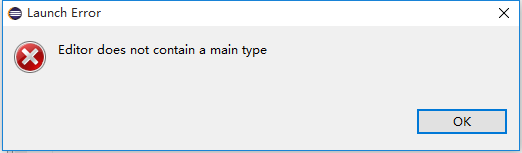
Eclipse software Java solution: editor does not contain a main type error box

The editor does not contain a main type error box
When you run the Java file is, if the following error box pops up:

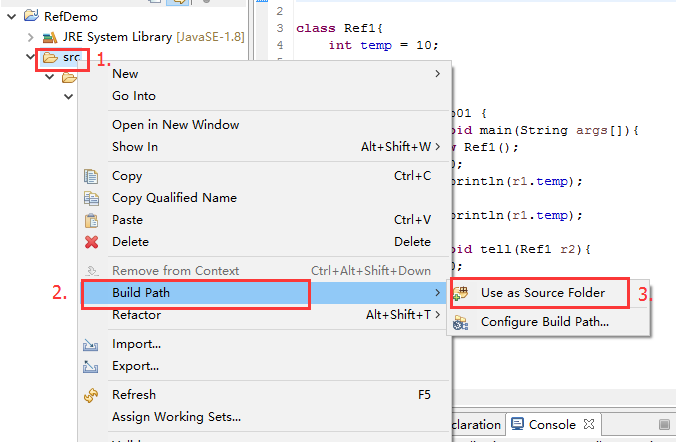
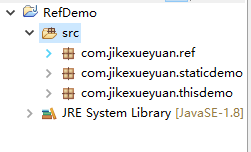
Reason for error: The current source code (all packages) is not added to build path (SRC path with the file directory inside)

Solution: Right click on: SRC path -> Build Path -> Use as Source Folder

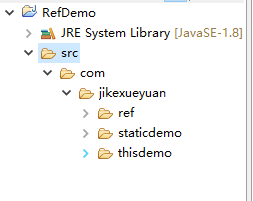
Now, the SRC path should look like this :(instead of a file directory, it looks like a Java package)

Eneditor does not contain a main type. eneditor does not contain a main type.


Reference site:
use the eclipse to run with the main function of the Java file, the editor does not contain a main type of mistakes box
http://blog.csdn.net/zt689/article/details/22161909

Eclipse can’t open an error: Error:could not find java SE Runtime Environment/Error: could not find java.dll

Eclipse could not find Java SE Runtime Environment/Error: could not find Java DLL
It’s not uncommon for a friend to fail to open an error message when using Eclipse
Error:could not find Java SE Runtime Environment/Error: could not find Java
This is mostly due to multiple installations and uninstalls; you may have two versions of the JDK installed on your computer
To solve this problem, there are the following solutions:
Methods a
After uninstalling, reconfigure your environment variables to prevent your environment variables from still being uninstalled.
Method 2
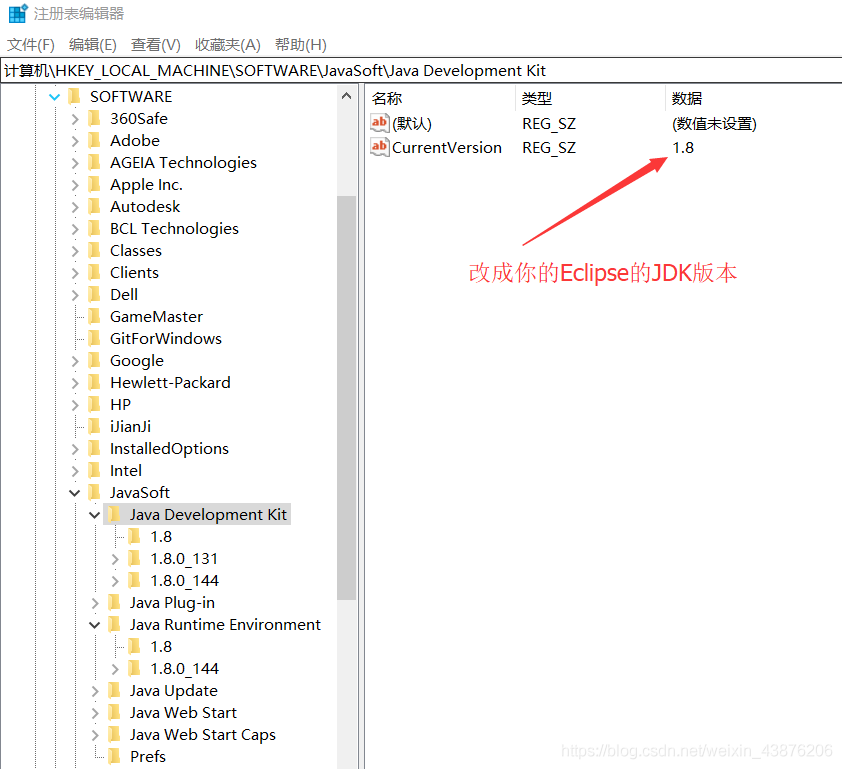
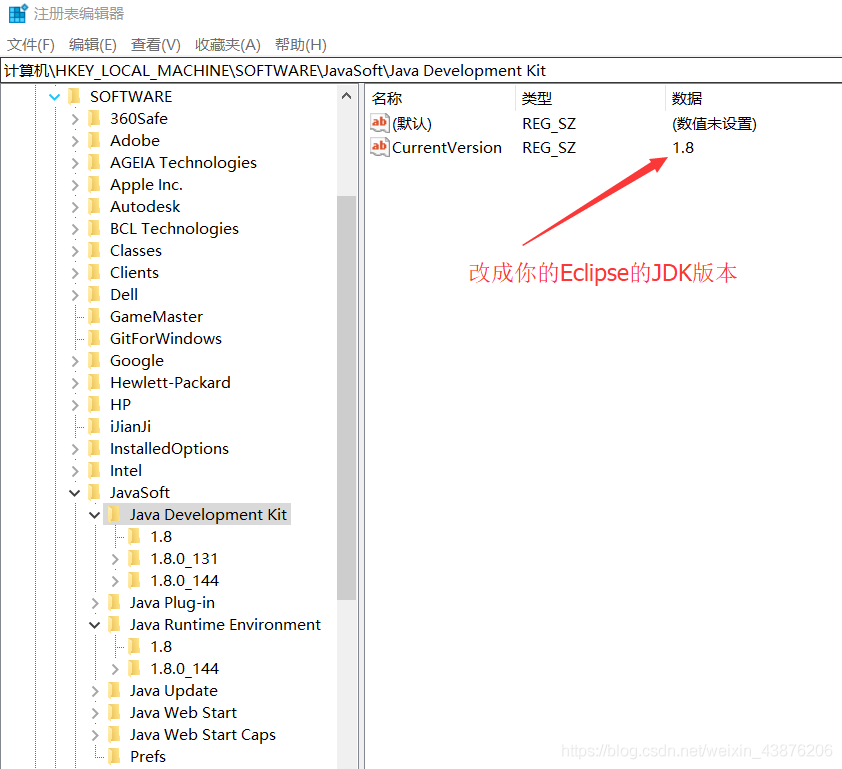
For example, when you open the 1.7 version of Eclipse, but when you install the 1.8 version, the CurrentVersion field of the registry is updated to 1.8, so you cannot open it. Could not find Java.dll change both CurrentVersion as shown by the arrow in the figure below to 1.7.
Note: Just change the version of the Eclipse JDK that you installed.

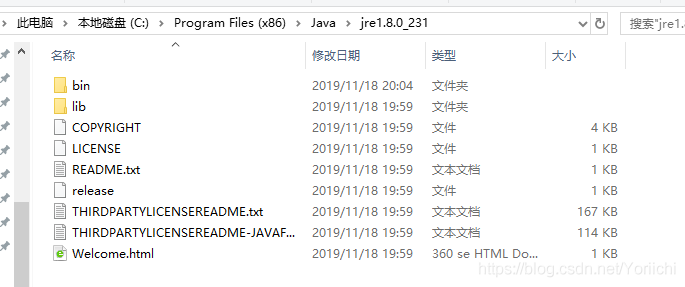
Error: missing `server’ JVM at `C:\Program Files (x86)\Java\jre1.8.0_231\bin\server\jvm.dll’.

** problem: ** when using “neo4j.bat confole” to start up neo4j, Error Error: missing server' JVM atC:\Program Files (x86)\Java\jre1.8.0_231\bin\server\ jvvm.dll ‘popped up.
Solution:
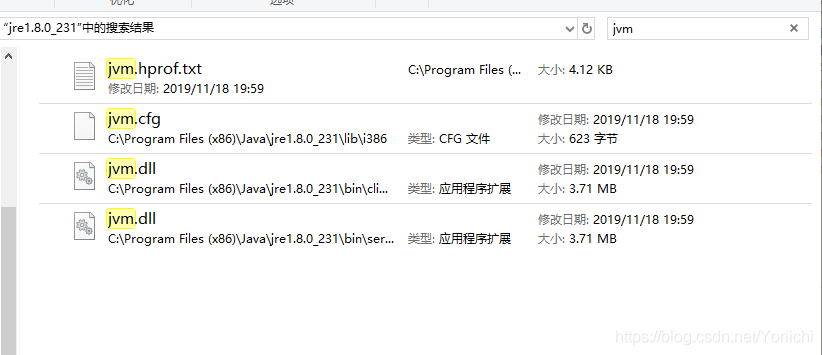
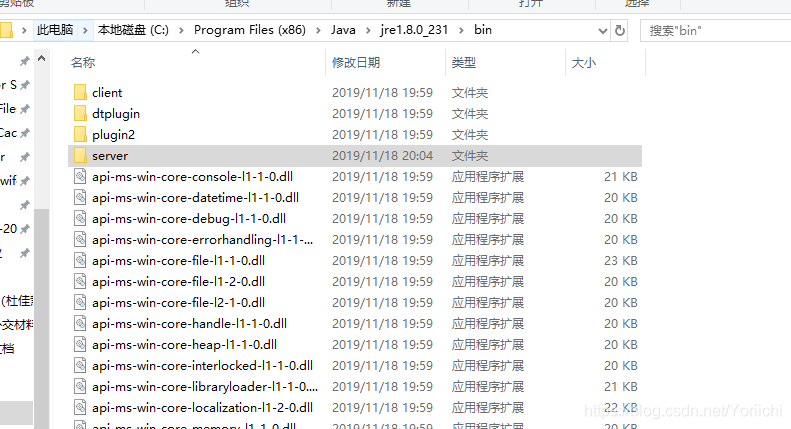
1. Find Java error path

2. Search jvm. DLL

3. Create server in bin folder, copy jvm. DLL paste

4. Return CMD, run neo4j.bat Console, success

Error: could not find java.dll Error: could not find Java se runtime environment solution

DLL Error: could not find Java SE Runtime Environment
As title.
my situation is more complicated, and this is just a problem I had when reconfiguring Java environment variables.
My computer was originally configured with the latest JDK13, and the environment variables were set according to JDK13. Later JDK10 and JDK1.8 were downloaded for course reasons
Writing Java using Intellij Idea all the time has not been a problem. But a few days ago on a whim, I wrote a small program to run on the command line, and something went wrong
1. Javac conflicts with Java commands
It’s an error saying that the.class file I compiled with Javac is different from the version of the Java command that followed me. I checked the following with the -version command. My Javac is JDK13, and Java is a mix of JDK10 and 13.
because currently JDK10 is useless, it is removed, resulting in javac and Java command all die.
considering recent course requirements, we decided to simply reconfigure the JDK1.8 environment variable
2. Javac-version is not working properly
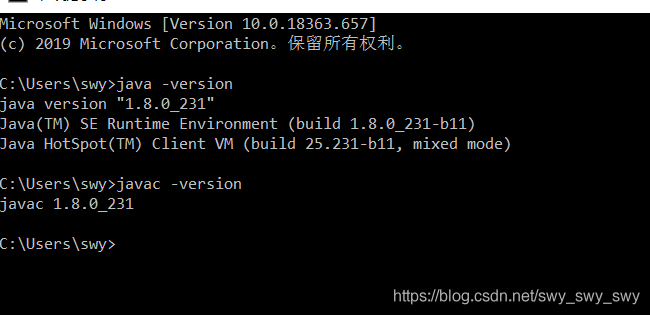
After resetting path and so on in accordance with the same configuration method, Java command reported the error as shown in the question, and JavAC was also not good. I searched for a circle on the Internet and finally had no choice but to restart the computer. The result javAC was actually normal, but Java was still abnormal
3. Java Error: could not find Java Runtime Environment
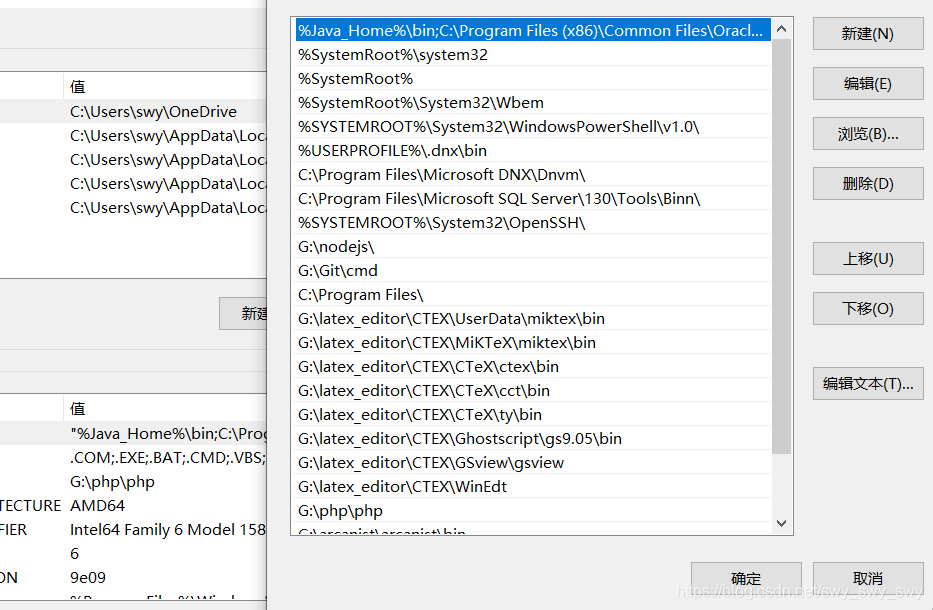
First we open the environment variable (just search “edit environment variable” by Corna on Win10)

We noticed that the path variable has an extra C:\Program Files(x86)\Common Files\Oracle… When executing Java commands on the command line, the default is to execute this Java first instead of adding our own %Java_Home%\bin, etc., so we need to put this added variable in front of the Oracle variable.
The problem is that I always end up with double quotes in front of the variable path, and the command line test still doesn’t work.
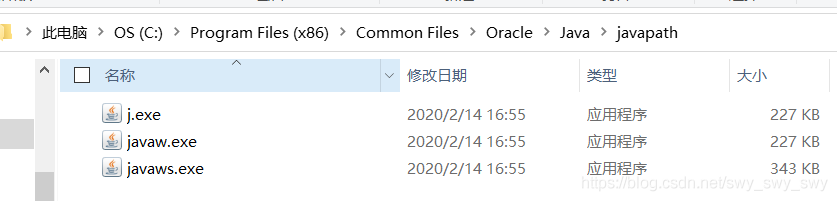
Continue searching and find someone said to change the java.exe in the System32 path, just rename it, but there is no Java.exe in my System32 path
Exe

as shown in the figure, j.xe
command line test successful!

After the