1. Problem description
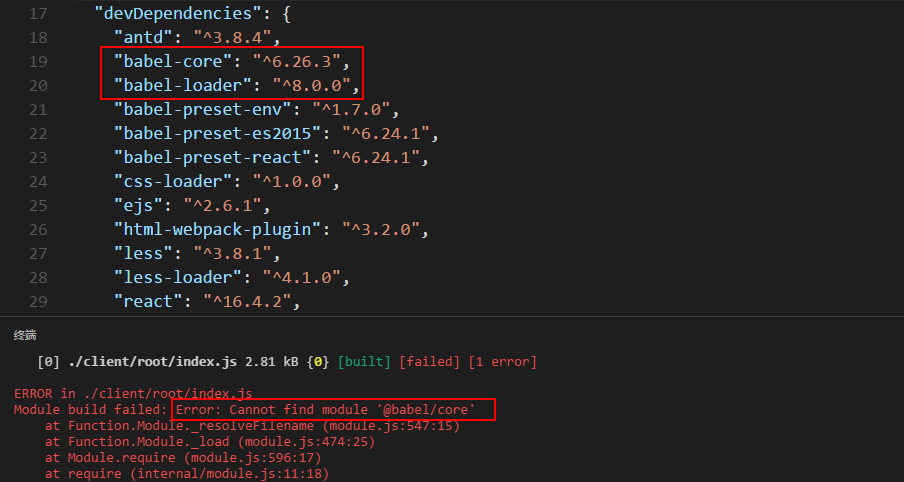
When configuring webpack.config.js to automatically package, an Error: Cannot find module’@babel/core’ error occurred. I
initially thought that babel-core was not installed. After reinstalling babel-core several times, it still doesn’t work. Compared with the previous project, it is found that the version of babel-loader is different. The previous one was @7.1.5 version, but now it is @8.0.0 version.
Second, the solution
Install back to the @7.1.5 version with a dubious mood
npm uninstall babel-loader
npm install babel-loader@7.1.5
And then npm run buildfound success!
I’m a little puzzled, it’s only a few days since the last installation, so I updated it to [email protected]. And it doesn’t support the original configuration anymore. No solution was found on the Internet, and the principle is still unclear. Mark it first, and after solving the problem of @8.0.0, I will come back to add.
Attach webpack.config.js code:
var webpack = require('webpack');
var path = require('path');
var HtmlWebpackPlugin = require('html-webpack-plugin');

module.exports = {
    entry: __dirname + '/client/root/index',
    output: {
        path: path.join(__dirname + '/dist'),
        filename: 'bundle.js',
    },

    module: {
        loaders : [{
            test :/(\.jsx|\.js)$/,
            exclude : /node_modules/,
            loader :'babel-loader',
            options:{
                presets:[
                    "env", "react",
                ]
            }
        },
        {
            test: /\.css$/,
            loader: 'style-loader!css-loader'
        },
        {
            test: /\.less$/,
            loader: 'style-loader!css-loader!less-loader'
        },
        {
            test: /\.(jpg|.png)$/,
            loader: 'url-loader'
        }
        ]
    },

    plugins: [
        new HtmlWebpackPlugin({
            template: __dirname + '/client/views/template.html'
        }),
    ]
}
Regarding the [email protected]cause of the error has been found, thank you @Sky__zt for your answer.
(Forgot to read the official document)
The official default babel-loader | babel corresponding version needs to be the same: that is, the babel-loaderlatest version is requiredbabel
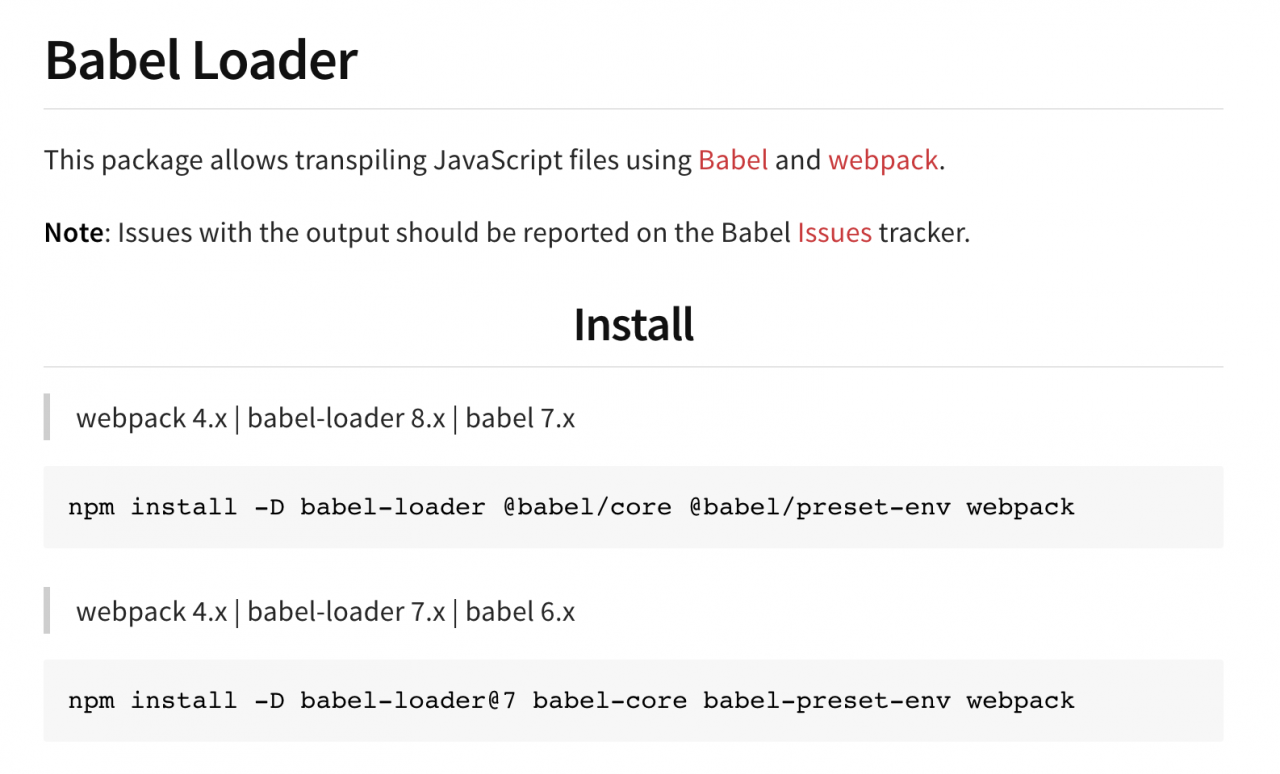
For details, please refer to: “npm_babel-loader”
to sum up:
Two solutions: 1. Roll back the lower version
npm install -D babel-loader@7 babel-core babel-preset-env
- Update to the highest version:
npm install -D babel-loader @babel/core @babel/preset-env webpack
Read More:
- [Solved] Webpack compilation Error: Cannot find module’webpack-cli/bin/config-yargs’
- Error: cannot find module ‘webpack cli/bin/config yargs’‘
- [Solved] Using `babel-preset-react-app` requires that you specify `NODE_ENV` or `BABEL_ENV` environment variables. Valid values are “development”, “test”, and “production”. Instead, received: undefined.
- NPM start project error: cannot find module ‘webpack’ problem solution
- Vue require Error: node_modules/babel-loader/lib
- [Solved] Error: Cannot find module ‘webpack-cli/package.json‘
- When starting Vue project: cannot find module ‘webpack cli / bin / config yargs’ error resolution
- How to Solve Error: Cannot find module ‘webpack/lib/RequestShortener’
- [Solved] npm Error: Error: Cannot find module ‘postcss-loader‘
- NPM install error: Cannot find module ‘D:\zip\node_modules\npm\bin\npm-cli.js‘
- [Solved] Could not find a package configuration file provided by “moveit_core“
- [Solved] internal/modules/cjs/loader.js:892 ^Error: Cannot find module ‘C:\Users\LX\Desktop\Node_DEMO\a
- NPM run dev Error Module build failed: Error: Cannot find module ‘node-sass’
- Webpack Error: Module build failed: TypeError: this.getOptions is not a function
- Error: uncaughtexception: cannot find module ‘internal / util / types’
- Error: Cannot find module ‘png-js‘ [How to Solve]
- [Solved] swiper Error: The requested module ‘react’ is expected to be of type CommonJS, which does not support named exports. CommonJS modules can be imported by importing the default export
- Module not found: Error: Can‘t resolve ‘sass-loader‘ in…
- [Solved] Vue.js error: Module build failed: Error: No parser and no file path given, couldn’t infer a parser.
- [Solved] TS Error: Could not find a declaration file for module