Traversing the background data to generate tree structure
var getTree=function(treeData,parentId){
var treeArr=[];
for(var i=0; i< treeData.length; i++){
var node=treeData[i];
if(node.sjchannelcode==parentId ){
var newNode={order:node.order,code:node.channelcode,url:node.url,name:node.name,sjchannelcode:node.sjchannelcode,channelcode:getTree(treeData,node.channelcode)};
treeArr.push(newNode);
}
}
return treeArr;
}
// call tree method
var treeArr=getTree(data,sj);
data is the data returned from the background, sj root directory returned by the node parent id
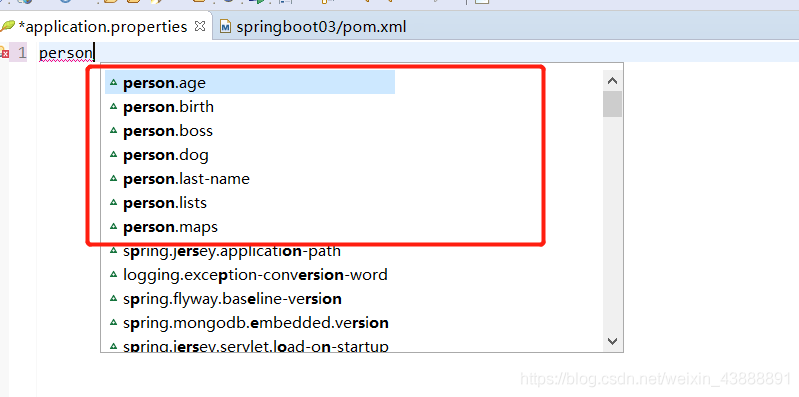
Eclipse relies on spring boot configuration processor, and there is no prompt for writing properties and YML
Problem description:
In eclipse, the Spring-boot-Configuration-Processor dependency has been added to the SpringBoot project through the @configurationProperties (Prefix = “person”) annotation and the YML file for data binding but still does not raise the issue.
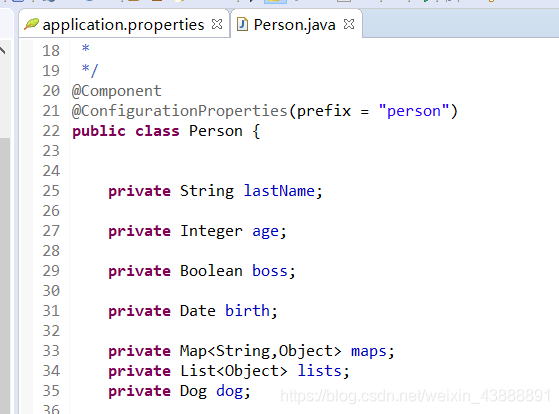
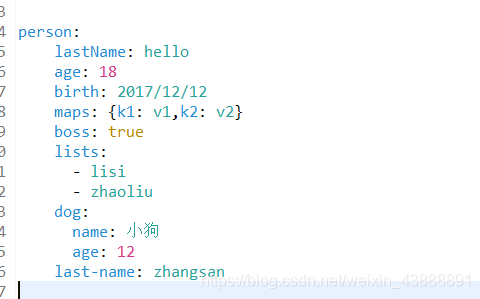
<!--Import the configuration file processor, and the configuration file will be prompted for binding.-->
<dependency>
	<groupId>org.springframework.boot</groupId>
	<artifactId>spring-boot-configuration-processor</artifactId>
	<optional>true</optional>
</dependency>
Solution process:
Add the following dependencies
<properties>
	<project.build.sourceEncoding>UTF-8</project.build.sourceEncoding>
	<project.reporting.outputEncoding>UTF-8</project.reporting.outputEncoding>
	<java.version>1.8</java.version>
</properties>
Then update project
right click – “maven-” update project
Maven install
right click – “run as -” maven install
Jtextfield cannot be displayed normally when added to JPanel
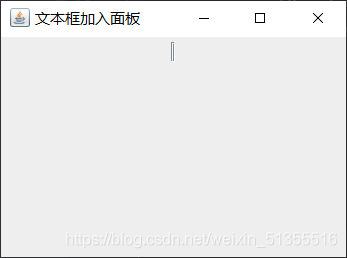
JTextField added to JPanel does not display properly.
(There is a problem analysis in the back, after reading will definitely help you solve the problem oh!!)
Code examples:
package CSDN;

import javax.swing.*;

public class JtextjoinJpanel {
    public static void main(String[] args) {
        JFrame f=new JFrame("Text Box Add Panel");
        JPanel jp = new JPanel();
        JTextField jt = new JTextField(). f.setBounds(400,400,500,500); // Set the window position size;

        f.setBounds(400,400,500,500); // set window position size
        jp.setSize(200,200); //set panel size
        jt.setSize(100,100); //set textbox size

        jp.add(jt); //add the text box to the panel
        f.add(jp);

        f.setDefaultCloseOperation(JFrame.EXIT_ON_CLOSE);
        f.setVisible(true);
    }
}
Results:
solution:
- sets textbox parameters.
JTextField jt = new JTextField();
Change to:JTextField jt = new JTextField(10);
- set the panel layout to null.
Add jp.setLayout(null);
Results:
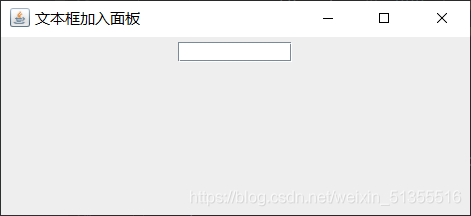
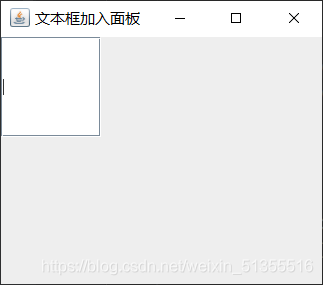
Note :10 means the number of characters that can be entered in a text box.
Reasons for the problem (personal opinion):
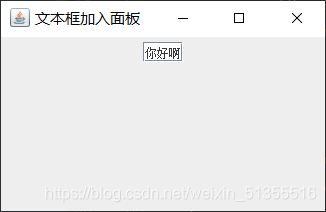
Due to the panel USES is flow layout, create a text box, if no input default arguments (string), then the text box default is empty, will cover its flow way, leaving only border (so see like a vertical bar, click can still input characters), if 10 to its input parameters, is equivalent to 10 characters have been input, so will not cover; Not setting it to flow layout also solves the problem.
Therefore, if
TextField jt = new JTextField();
to TextField jt = new JTextField("Hello");
The result is
Vue uses localstorage and sessionstorage to store data
What is localStorage
For browsers, using Web Storage to store key values is more intuitive than storing cookies, and has a larger capacity, which includes two types: localStorage and sessionStorage
- sessionStorage (temporary storage) : maintains a storage area for each data source that exists during browser opening, including page reloading of localStorage (long-term storage) : the same as sessionStorage, but the data will still exist
after the browser is closed
Ii. Usage
Note: The usage of sessionStorage and localStorage is basically the same. The value of the reference type needs to be converted to JSON, so only localStorage is listed here
1 save
//object
const info = { name: 'hou', age: 24, id: '001' };
//String
 const str="haha";
localStorage.setItem('hou', JSON.stringify(info));
localStorage.setItem('zheng', str);
 const str="haha";
localStorage.setItem('hou', JSON.stringify(info));
localStorage.setItem('zheng', str);
2 for
var data1 = JSON.parse(localStorage.getItem('hou'));

var data2 = localStorage.getItem('zheng');
3 remove
//detel one

localStorage.removeItem('hou');
//Detel all
localStorage.clear();
4 listening
Storage Triggered when a change (add, update, delete) occurs, changes on the same page will not be triggered, but will only listen for changes on other pages in the same domain. Storage
window.addEventListener('storage', function (e) {
  console.log('key', e.key); console.log('oldValue', e.oldValue);
  console.log('newValue', e.newValue); console.log('url', e.url);
})
5. Practice in VUE
A default based on what I want to do, remember what I did last time, very simple
when I add data, remember what I did last time
when I add or commit,
localStorage.setItem('projectId',me.workhourData.projectId+","+me.workhourData.projectManager);
Just grab it when you open the new page, and just make sure it’s not empty
//Remember the last selected auditor
            if(localStorage.length>0){
                var mydata = localStorage.getItem('projectId');
                if(mydata!=null){
                    var arr3=mydata.split(",");
                    if(arr3[0]==me.workhourData.projectId){
                        me.workhourData.projectManager=arr3[1];
                    }
                }
            }
Note 6 points
The localStorage expiration date is permanent. The average browser can store around 5MB. The sessionStorage API is the same as localStorage.
sessionStorage defaults to the session time of the browser (that is, after the TAB closes, it disappears).
localStorage scope is the protocol, hostname, port.
sessionStorage scope is window, protocol, hostname, port.
once you know these points, your problem will be solved easily.
localStorage is on the window. So you don’t need to write this.localstorage, in vue if you write this, it means the vUE instance. complains
Oracle prompt text does not match format string
Reason:
if you enter the date directly without specifying the date format, it will cause the inserted time format to be inconsistent with the existing time format in the database, resulting in an error. 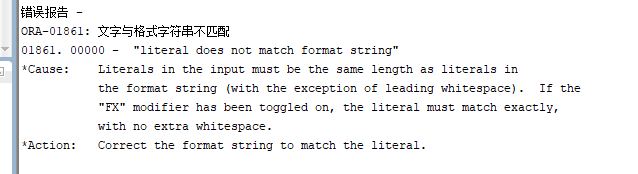
:
CREATE TABLE STU_CON
(
No. CHAR(4),
Name CHAR(9),
Sex CHAR(3),
DATE,
Home address VARCHAR2(50),
CONSTRAINT PK_SID PRIMARY KEY (student number),
CONSTRAINT UK_NAME UNIQUE,
CONSTRAINT CK_BDAY CHECK(Date of Birth>'1988-01-01')
)
So you have to specify the date format, and if you can use TO_DATE, you have to declare the date format as well.
for example:
to_date(‘ 1988-01-01 ‘) this would dig its own grave, so it should be written:
to_date(‘ 1988-01-01 ‘, ‘yyyy-mm-dd’)
to_date(‘ 1988-01-01 ‘, ‘yyyy-mm-dd’)
JavaScript determines whether it’s morning or afternoon or evening
let self=this;
let date=new Date();

  if(date.getHours()>=0&&date.getHours()<12){

    self.hoursTip="Good morning"

  }else if(date.getHours()>=12&&date.getHours()<18){

    self.hoursTip="Good afternoon"

  }else{

    self.hoursTip="Good night"

  }
}
JAVA: Random access file is always garbled
This article is based on the possibility that when you use randomAccessFile to read and write a file, you can be sure that the transcoding form is not wrong, but the random code still appears.
package ABC;

import java.io.*;

public class markdown {
	public static void main(String[] argv) {
		try {
			RandomAccessFile br = new RandomAccessFile("D:\\officePC\\onedirve\\OneDrive\\桌面\\1.txt","rw");

			String str;
			long position = 0;
			long next_position = 0;
			while((str = br.readLine())!=null) {
				position = br.getFilePointer();
				String str1 = new String(str.getBytes("ISO-8859-1"));
				String str2 = new String("##".getBytes("ISO-8859-1")) + str1;
				br.seek(next_position);
				System.out.println(str2);
				br.write(str2.getBytes());
				br.write(new String("\n").getBytes());
				next_position = position;
			}
			br.close();
		}catch(IOException e) {
			e.printStackTrace();
		}
	}
}
After the above code has executed two loops, this situation occurs:

As you can see, I first read a position, position, and then change each line (add). The length of each line changes, but the memory length of each line does not change, so the system sends its extra characters to the next line, and the next line is overwritten.
solution: you must read the rest in and modify it.
JavaScript determines whether parentheses are paired.
Example:
		"()" | "()[]{}" | "{[]}"	true	{{{{}}}([])}
		"(]" | "([)]"	false				{{{{}}}([[])]}	{([)]}
		*/
		var str = "{{{{}}}([[])]}";
		var isValid = function(s){
			let items = []
			let sLength = s.length
			if(sLength % 2 !== 0){
				return false
			}
			for(let i=0; i < sLength; i++){
				switch(s[i]){
					case "(":
						items.push(s[i])
						break
					case "[":
						items.push(s[i])
						break
					case "{":
						items.push(s[i])
						break
					case ")":
						if(items[items.length - 1] === "("){
							items.pop()
						}
						break
					case "]":
						if(items[items.length - 1] === "["){
							items.pop()
						}
						break
					case "}":
						if(items[items.length - 1] === "{"){
							items.pop()
						}
						break
				}
			}
			return items.length === 0
		}
console.log(isValid(str))Leetcode 357: How to calculate the number of digits with different digits
Such a simple thing, mentality exploded, the first glance will know very simple, originally intended to do half an hour, the results tamper tamper and nearly 50 minutes, but also in the middle of debugging several times, the algorithm is not really can’t.
AC after the state of mind and exploded, this know this is a digit dp, but I use greed (turns out not greedy), thought for a long time also did not think of how to do with dp, in the burst of time, the original dp is to store the value of one place, ten place just
int countNumbersWithUniqueDigits(int n) {
	if(0==n)
		return 1;
	if(n<0 || n>10)
		return 0;
	int ret = 0;
	for(int i=n;i>=1;--i)
	{
		int ret1 = 1;
		int num = 9;
		for(int j=0;j<i;++j)
		{
			ret1 *= num;
			num = 0==j ?num : num-1;
		}
		ret += ret1;
	}
	return ret+1;
}
Command not found: ADB appears on Mac
Method one:
- open the MAC terminal, enter CD ~ enter
touch.bash_profile [if you don’t have .bash_profile , create this file] enter open.bash_profile [open the file we created, a text edit box should pop up, if this is the first time to configure the environment, Write the following code in the open text editor: • export ANDROID_HOME=/usr/local/opt/android-sdk
• export PATH=${PATH}:${ANDROID_HOME}/tools
• export PATH=${PATH}:${ANDROID_HOME}/platform-tools
- note that
in [4] ANDROID_HOME should be filled in according to its own SDK path, the rest can be copied directly. As for the SDK path, you can open Android Studio and view in the Preference [Android SDK] and enter source.bash_profile in the terminal and enter adb [verify that the configuration is complete and if not show adb: command not found that the configuration is complete] Method 2:
- make sure whether to install the adb,
/Library/Android/SDK/platform - the tools/adb  if there is, if there is a skip the following steps, directly to the last step 5; Open [Android Studio]; Open the SDK Manager check 】 【 SDK Platform - the Tools), run the following command on the Mac
  echo export "PATH = ~/Library/Android/SDK/Platform - the Tools: $PATH" & gt; > ~/. Bash_profile
 6. Restart the terminal
after completing the above steps
Note: if ZSH is used, replace .bash_profile with .zshenv
Quote from: https://stackoverflow.com/questions/10303639/adb-command-not-found/45063101#45063101?newreg=f632609fe6154f9580a49153cb0387e5