This is because the data in the page has not yet been loaded when substrings are used.

Error code:

you can use the v – if
is amended as:

Vue error resolution: typeerror: cannot read property ‘_ t’ of undefined”
[Vue warn]: Error in render: “TypeError: Cannot read property ‘_t’ of undefined”
The compatibility issue between Vue and i18n is the multi-language configuration used in the project. The solution is as follows:
Vue.use(iView)
replace
Vue.use(iView, {
  i18n: function(path, options) {
    let value = i18n.t(path, options)
    if (value !== null && value !== undefined) {
      return value
    }
    return ''
  }
})
Internationalization other items are configured unchanged and are recorded only.
Reference articles:
https://github.com/iview/iview/issues/1090
Vue: cannot read property ‘substring’ of undefined“
TypeError: Cannot read property ‘substring’ of undefined ‘TypeError: Cannot read property’ substring ‘of undefined’
Reason: The string used to intercept is empty.
Resolution: Null the string before,
How does lightningchart, a high performance chart control, draw maps in 3D?
LightningChart is primarily a charting component (charts are graphical representations of data) rather than a virtual environment creation tool. However, LightningChart provides multiple ways to use geographic maps, not only in 2D, but also in 3D.
If you are primarily interested in 3D maps, Artion can provide three examples of possible ideas. First, you can import a map/image into a “chart” and create a surface whose geometry and color are based on map elements (such as shading). Example of this type in ExampleArgesurface:
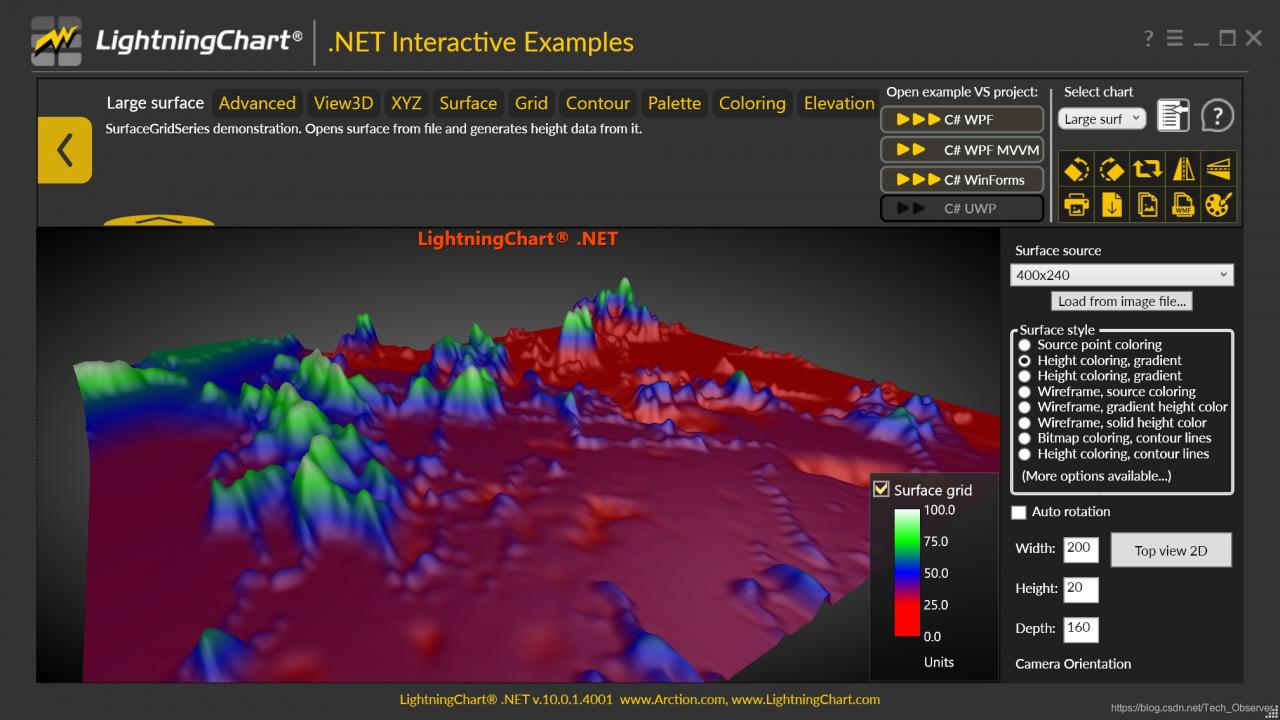
Example large surface
As shown in ExampleGlobal Surface3D, such a surface can be wrapped in any shape
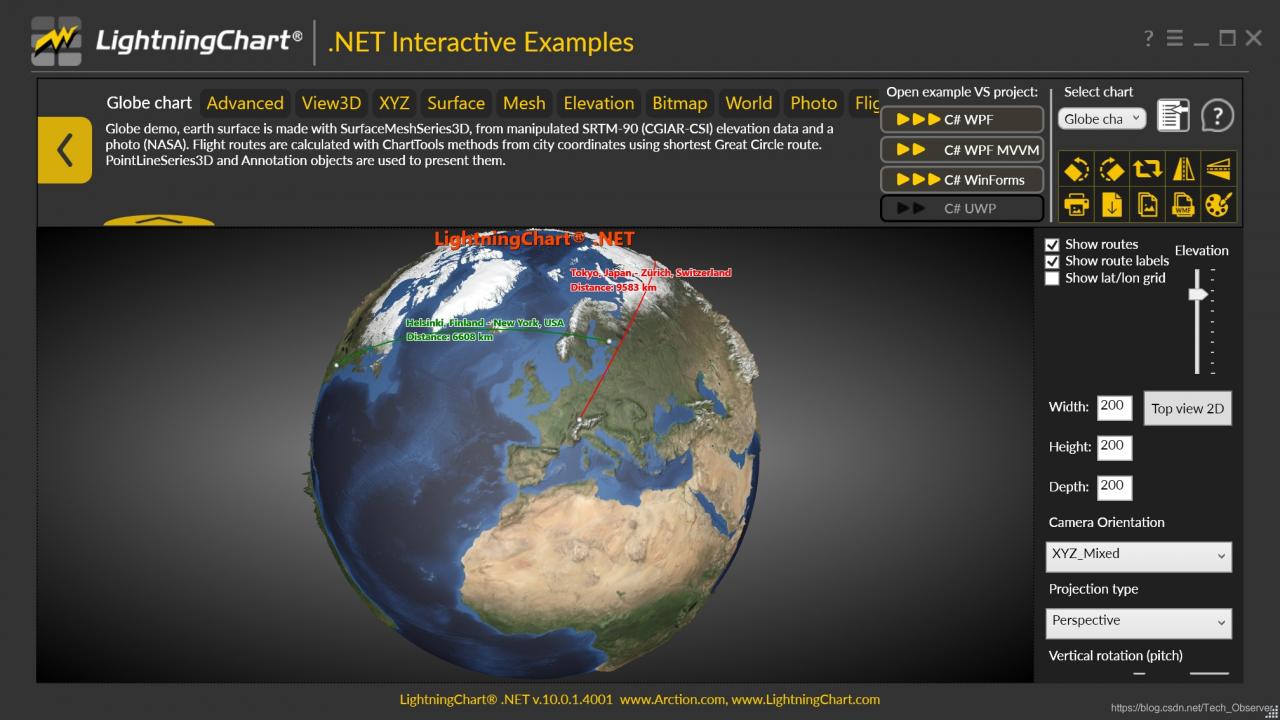
Example Globesurface3D
You can also use the information/data from the map (for example, boundary residents, population size, etc.) to create Chart 3D objects (which can be pointlineseries3D, meshModel, polygon3D, etc.). In ExamplePopulationPolygons3D demonstrates a kind of such a method.

Example population polygon 3D
LightningChart.net is fully GPU-accelerated and optimized for displaying massive amounts of data in real time — over 1 billion data points. LightningChart includes a wide range of 2D, Advanced 3D, Polar, Smith, 3D Pake/Doughnut, Geographic Maps and GIS charts as well as volume mapping capabilities for science, engineering, medicine, aviation, trade, energy and other fields.
The Vue project does not install node sass and an error is reported


pull down after the project, only do the NPM install after NPM run dev, then an error, found the package. The json and node – sass, install
NPM install node – no longer an error after sass
Solution to the problem of selecting node sass when creating vue-cli3
Because :
vue-cli3.0 defaults to using the yarn package management tool instead of the original NPM
In yarn, node-sass, the default download will most likely fail if you don’t over the wall
The solution
yarn config set sass_binary_site http://cdn.npm.taobao.org/dist/node-sass -g
So when use the yarn to download the node – sass don’t stuck an error failed to install
this method not only solve the vue cli3 installation node – sass error
is used to solve the yarn package management tools installation node – sass error problem
Problem solving
The shell runs the class file and imports the jar package that the class depends on
The shell script runs the class file to import the class dependent JARs
Leetcode 832. Flip image
Answer key
They’re very clear, so do what they say, flip it horizontally first, and then flip it backwards.
Horizontal reverse can use its own reverse, reverse directly and 1 XOR can be.
code
class Solution {
public:
    vector<vector<int>> flipAndInvertImage(vector<vector<int>>& A) {
        int n = A.size();
        for(int i = 0; i < n; i++){
            reverse(A[i].begin(),A[i].end());
        }
        for(int i = 0; i < n; i++){
            for(int j = 0; j < A[0].size(); j++){
                A[i][j] = A[i][j]^1;
            }
        }
        return A;
    }
};
Fatal: reusing to merge unrelated histories
Git: fatal: refusing to merge unrelated nothing is solved
Today to create a local warehouse (README), the local warehouse and making the association, found that the git pull, git feach remind fatal: refusing to merge unrelated nothing

access to the Internet to check the reason was that the two branches are two different versions, and have different submission history
add
$git pull origin master --allow-unrelated-histories
Can allow irrelevant history to mention, forced merger, really solved this problem, thank you
Resolving fatal: reusing to merge unrelated histories in Git
An error of Git
Sometimes there are some problems in the process of using Git, so when you solve each problem, you need to summarize and record it, so that you won’t do it again.
A, fatal: refusing to merge unrelated nothing
Today, while creating a project with Git, the following error occurred when two branches were merged.
~/SpringSpace/newframe on master ⌚ 11:35:56
$ git merge origin/druid
fatal: refusing to merge unrelated historiesThe key to the problem here is: fatal: refusing to merge unrelated nothing
you might be in the git pull or git push are likely to encounter, this is because the two branches without relationship. So what's the solution?
Second, solutions
Behind the commands you add - allow - unrelated - nothing
for example:
git merge master - allow - unrelated - nothing
~/SpringSpace/newframe on druid ⌚ 11:36:49
$ git merge master --allow-unrelated-histories
Auto-merging .gitignore
CONFLICT (add/add): Merge conflict in .gitignore
Automatic merge failed; fix conflicts and then commit the result.If you are a git pull or git push to fatal: refusing to merge unrelated nothing
in the same way:
git pull origin master - allow - unrelated - nothing
and so on, this is the perfect solution to cough up!
fatal: refusing to merge unrelated histories
Git: fatal: refusing to merge unrelated nothing to solve the
today creates a local warehouse (README), the local warehouse, and making the association, found that the Git pull, Git feach remind fatal: refusing to merge unrelated nothing
the reason was that the two branches are two different versions, with a different history
git pull origin master --allow-unrelated-histories
window.open () several ways to open windows
- opens Baidu in the current window and makes the URL appear in the search bar.
window.open("http://www.baidu.com/", "_self");
- Open Baidu
window.open("http://www.baidu.com/", "_blank");
- Open a new window and name it “hello”
window.open("", "hello");
- > In addition, there are several options for the second argument of the open function :
- If you want to add something else to the new window, you need a third parameter :
window.open("http://www.baidu.com/", "_self","height=400,width=400,top=10,left=10,resizable=yes");
There is one last argument to the open function, which is about history, whether the window being opened has the same history URL as the window being opened, or whether it is a separate memory.